


SaaS SEO can look successful on the surface and still fail the business. A page gets traffic. The chart moves up. Everyone feels good for a week. Then the signups stay flat, demo requests barely move, and the product team asks the uncomfortable question: “Are these visitors even our buyers?”
That is the real problem with SaaS SEO. Traffic alone is not enough. A SaaS website needs the right visitors: people who understand the pain, compare options, check integrations, trust the product, and take a serious next step. Search behavior has also changed. Buyers still use Google, but they also ask AI tools, read review sites, watch demos, scan Reddit threads, and compare pricing pages before talking to sales.
The strongest SEO tactics SaaS teams can use now are practical, product-aware, and tied to buyer intent. They explain the problem clearly, show how the workflow works, and help qualified visitors move closer to a trial, demo, or purchase. A wider bootstrapped growth roadmap can later to Growth Tactics for Bootstrapped SaaS.
Why SaaS SEO Needs a Different Playbook in 2026?
B2B SaaS buyers rarely move in a straight line. Someone may first ask an AI chatbot for software options, then search Google for comparisons, read reviews on a third-party platform, check a few pricing pages, watch a short demo, and ask a peer in a private Slack group before signing up.
That makes SaaS SEO more complex than old-school blog publishing. Ranking for broad educational terms is still useful in some cases, but it is not enough. A SaaS team needs search assets for different moments in the buying journey: problem pages, use-case pages, alternative pages, comparison pages, integration pages, templates, documentation, customer stories, and pricing-support pages.
G2’s 2026 AI Search Insight Report found that many B2B software buyers now start research with AI chatbots more often than Google, while Google still appears somewhere in the journey for most buyers. That does not mean Google is dead. It means SaaS discovery is now split across more surfaces.
HubSpot’s 2026 marketing research also shows how common AI-assisted content creation has become. That matters because generic explainers are easier to produce than ever. Shallow content now blends into the background. SaaS pages need sharper judgment, clearer product context, and proof that the team understands the customer’s workflow.
| 2026 SaaS SEO Reality | What It Means | Better Response |
| Buyers use AI tools during software research | First impressions may happen before a website visit | Make product, category, and proof pages clear |
| Google still supports discovery and validation | Search visibility remains important | Keep technical SEO and intent targeting strong |
| AI-generated content is everywhere | Generic posts feel less useful | Add product context, examples, screenshots, and proof |
| B2B buyers compare deeply | They want confidence before signup | Build comparison, alternative, and use-case pages |
| Search demand is fragmented | Buyers search by problem, role, tool, stack, and workflow | Build a focused SaaS keyword strategy |
| Product-led content converts better | Buyers want to see how the workflow works | Use demos, templates, examples, and practical steps |
| Rankings alone can mislead | Traffic may not turn into revenue | Track trials, demos, activation, and pipeline |
The strongest SaaS SEO programs are not built around publishing volume. They are built around buyer progress. A comparison page with 300 visits and 12 qualified demos may be far more useful than a broad blog post with 10,000 visits and no product interest.
1. Build Your SaaS Keyword Strategy Around Buyer Intent
A useful SaaS keyword strategy starts with intent, not search volume. High-volume keywords often look impressive in a spreadsheet, but many of them bring weak commercial value. A broad term may attract students, beginners, researchers, or readers who are not looking for software at all.
SaaS buyers search differently based on how close they are to action. Some are trying to understand the problem. Some already know the software category. Some compare vendors. Some look for templates. Some search for integrations because their tech stack is already decided. Each search type deserves a different page.
| Keyword Intent | Searcher Mindset | Example |
| Problem-aware | “I know the pain, but not the tool type.” | how to reduce customer onboarding drop-off |
| Solution-aware | “I know the software category.” | customer onboarding software |
| Use-case intent | “I need this for my workflow.” | client onboarding software for agencies |
| Comparison intent | “I am choosing between options.” | tool A vs tool B |
| Alternative intent | “I may replace my current tool.” | best tool A alternative |
| Integration intent | “It must work with my stack.” | CRM with Slack integration |
| Template intent | “I need a practical asset now.” | SaaS onboarding checklist template |
| Pricing intent | “I am checking cost and fit.” | customer success software pricing |
A small SaaS team should not begin with a giant keyword list. Start with the 30 to 50 searches most likely to bring qualified users. Then label each keyword by intent, product fit, page type, and business value.
| Keyword | Intent | Page Type | Product Angle | CTA |
| client approval software | Solution-aware | Use-case page | Show approval workflow | Start free trial |
| best client approval tools | Comparison | List page | Compare category options honestly | View product demo |
| tool X alternative | Alternative | Competitor alternative page | Explain switching fit | Compare options |
| approval email template | Template | Free asset page | Lead into automated approvals | Download template |
| client feedback lost in email | Problem-aware | Problem-solution post | Explain workflow pain | See workflow |
Do not rely only on SEO tools. Some of the best SaaS keywords come from sales calls, support tickets, demo questions, review complaints, competitor pages, Reddit discussions, and customer interviews. The words buyers use in frustration often make better page titles than polished marketing language.
2. Prioritize Bottom-of-Funnel Pages Before Broad Blog Topics
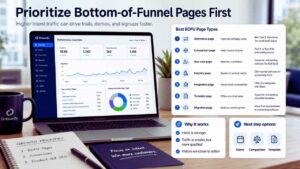
Bottom-of-funnel SEO is usually one of the fastest ways for SaaS teams to attract qualified organic traffic. These pages target people who are already evaluating software, comparing vendors, switching tools, or trying to solve a specific workflow problem. The traffic may be smaller, but the intent is stronger.
A person searching “best onboarding software for SaaS teams” is usually closer to action than someone searching “what is onboarding.” The broad keyword may still have value, but it should not dominate the early roadmap if the team needs signups, trials, or demos.
| Page Type | Why It Matters | Example Topic |
| Alternative page | Captures people unhappy with a current tool | Best Tool X alternative for small SaaS teams |
| Comparison page | Helps buyers choose between options | Tool A vs Tool B for onboarding teams |
| Use-case page | Matches a specific workflow | Customer onboarding software for B2B SaaS |
| Industry page | Speaks to a vertical need | Client portal software for accounting firms |
| Integration page | Solves stack compatibility | CRM that integrates with Slack |
| Template page | Gives practical value before signup | Customer onboarding checklist template |
| Migration page | Reduces switching fear | How to move from spreadsheets to onboarding software |
A bottom-of-funnel page should not hide the product until the final paragraph. If someone is evaluating software, they expect product detail. Show what the tool does. Explain who it fits. Mention where it may not fit. Add screenshots or workflow visuals if available. Include pricing guidance only when it can be kept accurate.
The best pages do not pressure every reader into the same CTA. A high-intent visitor may want a demo. A cautious visitor may want a comparison. A hands-on visitor may want a template. Give them a next step that matches their stage.
A strong bottom-of-funnel page usually needs:
- A clear opening that matches the buyer’s problem
- A short “best for” explanation
- Product or workflow screenshots where possible
- A focused feature or use-case comparison
- Honest limitations
- Proof from customers, reviews, or real usage
- FAQs that answer buying doubts
- A visible CTA that does not feel buried
The biggest warning: Do not fake neutrality. If you are writing a “best tools” page and your product is included, be clear about where it fits. Buyers trust balanced judgment more than obvious self-promotion.
3. Create Product-Led SEO Pages That Show the Workflow
SaaS products are hard to understand through abstract writing. A page can explain “automation,” “visibility,” or “collaboration” all day and still leave the reader wondering what actually happens inside the product. Product-led SEO fixes that by showing the workflow.
That does not mean every page should become a sales pitch. It means the page should connect the searcher’s problem to a practical process. If the page is about churn reduction, show what churn-risk signals look like. If it is about knowledge base software, show how articles are created, reviewed, and updated. If it is about client approvals, show how a request moves from draft to final approval.
| Generic Topic | Product-Led Version | Why It Works Better |
| How to improve onboarding | How to build a SaaS onboarding checklist inside your product workflow | Shows action |
| What is customer feedback? | How to collect customer feedback and route it to product teams | Shows process |
| How to reduce churn | How to spot churn risk from product usage signals | Shows measurable behavior |
| How to manage approvals | How to send client approvals without email back-and-forth | Shows workflow pain |
| How to create reports | How to build a weekly client report from live dashboard data | Shows the outcome |
A strong product-led SEO page often includes screenshots, short videos, templates, tables, examples, and practical warnings. These details make the page more useful and harder to copy.
| Question | Why It Matters |
| What problem is the reader trying to solve? | Keeps the page focused |
| What does the old workflow look like? | Makes the pain visible |
| What does the better workflow look like? | Shows product relevance |
| What result should the reader expect? | Connects the workflow to value |
| What should the reader do next? | Supports conversion |
Product-led pages are underrated because they may not always target huge keywords. Their strength is quality. They attract people who want to see how the job gets done, not just read another definition.
4. Build Comparison and Alternative Pages With Real Honesty
Comparison and alternative pages are valuable because they catch buyers at a serious decision point. Someone searching “Tool A vs Tool B” or “Tool X alternative” is usually not browsing casually. They are checking fit.
These pages need careful editorial judgment. Weak comparison pages attack competitors, exaggerate small differences, and pretend the author has no bias. That style does not help buyers. It also makes the brand look insecure. A better page explains tradeoffs clearly.
| Comparison Section | What to Include | Why It Helps |
| Quick verdict | Best fit by buyer type | Saves time |
| Feature comparison | Only the differences that matter | Reduces confusion |
| Setup effort | How hard it is to start | Handles migration fear |
| Pricing fit | Which team size gets value | Helps budget planning |
| Use-case fit | Where each tool works best | Improves decision quality |
| Limitations | Where your product may not fit | Builds trust |
| Migration notes | How switching works | Reduces friction |
| FAQs | Objections and edge cases | Supports the final decision |
Alternative pages should focus on why someone might switch, not why a competitor is terrible. A user may be moving because their current tool is too expensive, too complex, too limited, too enterprise-heavy, or simply built for a different type of team. Use wording that respects the buyer’s situation.
| Weak Angle | Stronger Angle |
| Why Tool X is bad | When teams look for a Tool X alternative |
| We are better than Tool X | How to choose between Tool X and a simpler approval workflow |
| Tool X lacks everything | Tool X may fit larger teams, while smaller teams may prefer faster setup |
| Switch now | What to check before moving from Tool X |
A good comparison page can say, “Choose the other tool if you need deep enterprise controls. Choose this option if your small team needs faster setup and fewer admin layers.” That kind of honesty may lose a poor-fit buyer, but it improves trust with the right one.
5. Build Integration Pages That Capture High-Intent Searches
Integration searches are often closer to buying intent than teams realize. If someone searches “CRM with Slack integration” or “support software with Salesforce integration,” they already have part of their workflow in place. They are not just learning. They are checking whether a new tool can fit into an existing stack.
The mistake is publishing thin integration pages that show a logo, a short paragraph, and a CTA. That is not enough. A useful integration page should explain what connects, how the workflow improves, what data moves, what setup requires, and what limitations exist.
Useful integration pages include:
- What the integration does
- Who should use it
- Common workflows it supports
- Setup steps or setup expectations
- Screenshots or simple diagrams
- Permission or data notes
- Known limitations
- Related integrations
- CTA for trial, setup, or documentation
For example, a stronger page does not just say, “Connect Slack and your CRM.” It explains that sales teams can receive deal alerts, route follow-up tasks, share customer updates, or notify account owners when a lead changes status.
| Integration Keyword Type | Example |
| Tool plus integration | Slack CRM integration |
| Category plus integration | customer support software with Salesforce integration |
| Workflow plus integration | send onboarding alerts to Slack |
| Competitor plus integration | Tool X Google Sheets integration alternative |
| API plus use case | API for customer onboarding data |
| Automation connector | Zapier integration for client approvals |
Start with integrations that buyers already ask about. Five detailed integration pages are more valuable than 50 weak pages created only to capture keyword variations.
6. Use Template, Checklist, and Calculator Pages for Search and Lead Capture
Templates, checklists, calculators, and swipe files work well because they solve a real task. They give the reader something useful before asking for a signup.
Someone searching “SaaS onboarding checklist template” may not be ready to buy today, but they clearly care about onboarding. If your product helps with onboarding, that search is still valuable. The template becomes a bridge between education and product interest.
| Free Asset Type | Best For | SaaS Example |
| Checklist | Step-by-step process | Customer onboarding checklist |
| Template | Repeatable document | Client approval email template |
| Calculator | ROI or planning | Churn cost calculator |
| Scorecard | Evaluation | SaaS retention health scorecard |
| Swipe file | Ready examples | Win-back email swipe file |
| Spreadsheet | Tracking workflow | Content calendar spreadsheet |
| Planner | Strategy work | Product launch planning sheet |
| Audit sheet | Self-assessment | SEO audit checklist for SaaS pages |
The landing page matters as much as the asset. A weak landing page says, “Download our template.” A stronger one explains the problem, shows a preview, tells users what is included, and shows how the asset connects to the workflow.
A good asset page should include:
- A clear problem statement
- A preview of the template or tool
- Who it is for
- What is included
- How to use it
- A short product connection
- A simple email follow-up path
Do not turn every asset into a hard-gated form. If the page offers no value before the form, users may bounce. Give enough practical detail on the page itself, then offer the download for readers who want the complete version. Templates can also become referral assets. A useful checklist is easier for users to share than a generic product page.
7. Create Topic Hubs Around Core SaaS Problems
One isolated post rarely builds enough depth around a competitive SaaS topic. A topic hub organizes related pages around a core problem, role, category, or workflow.
For example, a customer onboarding SaaS could build a hub around onboarding strategy, onboarding checklists, onboarding tools, onboarding metrics, onboarding email examples, onboarding mistakes, automation, and templates. A good hub helps readers move from learning to evaluation. It does not exist only for search engines.
| Hub Type | Best For | Example |
| Problem hub | Educating early-stage buyers | Customer onboarding drop-off |
| Use-case hub | Showing workflow depth | Client approval workflows |
| Role hub | Targeting specific buyers | SEO for SaaS founders |
| Industry hub | Vertical SaaS positioning | Reporting tools for agencies |
| Integration hub | Tech stack searches | CRM integrations |
| Template hub | Lead capture | SaaS marketing templates |
| Comparison hub | Buying-stage SEO | Best onboarding software alternatives |
A strong hub usually has one overview page and several supporting pages. The overview page explains the topic and gives readers paths into deeper resources. Supporting pages answer specific questions.
| Hub Element | Purpose |
| Overview page | Establish the topic foundation |
| Supporting pages | Cover subtopics in depth |
| Use-case pages | Connect the topic to product workflows |
| Templates | Capture practical demand |
| FAQs | Answer repeated buyer questions |
| Comparison pages | Support evaluation |
| Internal links | Help readers and crawlers move through the topic |
| Product CTA | Move qualified visitors forward |
The common mistake is publishing many disconnected posts and calling it authority. Topical depth needs structure. A reader should know where to go next. Search engines should understand how the pages relate. Your team should know which pages support acquisition, education, conversion, or retention.
8. Optimize for AI Search Without Chasing Fake Hacks

AI search has changed how software buyers discover products. People now ask AI tools for vendor shortlists, alternatives, feature comparisons, implementation advice, and pricing questions.
That does not make traditional SEO irrelevant. Google’s own guidance still treats visibility in generative AI search features as part of broader Search optimization, not a separate replacement for SEO. The practical takeaway is simple: make the product easy to understand, verify, and compare across the places buyers research.
| AI Search Need | Practical SaaS SEO Response |
| Clear brand understanding | Explain what the product does in plain language |
| Category relevance | Use consistent category, product, and use-case language |
| Product comparison | Publish honest comparison and alternative pages |
| Trust signals | Collect reviews, testimonials, case studies, and mentions |
| Structured answers | Use clear headings, summaries, tables, and FAQs |
| Freshness | Update pages when product, pricing, or category changes |
| External validation | Earn mentions on review, partner, and industry sites |
| Crawlability | Keep important content accessible and indexable |
Avoid the fake shortcuts. Do not create dozens of thin “AI answer” pages. Do not stuff pages with prompt-like headings. Do not publish invented comparisons. Those tactics may create noise, but they do not create trust. AI systems often draw from multiple sources. That means your broader presence matters.
| Visibility Surface | Why It Matters |
| Website pages | Main source of product truth |
| Review platforms | Buyer trust and third-party validation |
| YouTube demos | Visual proof of product workflows |
| LinkedIn founder posts | Point of view and expertise |
| Partner pages | External entity connections |
| Community discussions | Real-world sentiment |
| Case studies | Proof of outcomes |
| Help docs | Product depth and clarity |
The safest approach is to make your product clear everywhere buyers might check: product pages, pricing pages, help docs, review profiles, partner pages, demos, and comparison pages. If those sources disagree or feel thin, AI visibility will not be the only problem. Buyer trust will suffer too.
9. Strengthen Technical SEO for SaaS-Specific Problems
Technical SEO is not glamorous, but it can quietly limit a SaaS site. SaaS websites often grow fast and unevenly. Product pages change. Feature pages get duplicated. Help docs move. App subdomains appear. JavaScript-heavy pages hide important content. Old pages stay live after the product has changed.
A small team does not need a huge technical audit every month. Start with the problems that affect crawling, indexing, speed, duplication, and conversion-critical pages.
| SaaS Technical Issue | Why It Hurts | Practical Fix |
| JavaScript-rendered content | Search engines may process important content less reliably | Make core content accessible in HTML where possible |
| Duplicate feature pages | Wastes crawl attention | Consolidate or canonicalize similar pages |
| Thin integration pages | Weak user value | Add real workflows and setup details |
| Login-gated docs | Useful content cannot rank | Keep public docs for common product questions |
| Old product pages | Creates wrong expectations | Update, redirect, or archive |
| Slow pages | Hurts user experience | Compress media and reduce scripts |
| Weak internal linking | Important pages stay isolated | Add contextual links from hubs and product pages |
| Misused structured data | Can create rich-result eligibility problems | Use valid structured data that matches visible content |
Technical work should protect the pages that matter most to the business:
| Priority Page | Technical Check |
| Homepage | Clear title, crawlable content, fast load |
| Pricing page | Indexable, clear metadata, no blocked content |
| Product pages | Unique copy, strong internal links |
| Use-case pages | Clean headings, structured sections |
| Comparison pages | Updated and canonicalized properly |
| Integration pages | Unique content and no thin templates |
| Help docs | Public where useful and well organized |
| Blog pages | Good internal links and no duplication |
Search Console should be part of the routine. Check indexing issues, search queries, impressions, clicks, and pages losing visibility. Technical SEO is not a one-time cleanup. SaaS sites change every time the product, docs, pricing, or positioning changes.
10. Build Review, Proof, and Case Study Pages for Search Trust
SaaS buyers want proof before they commit. They want to know whether real teams use the product, what changed after adoption, and whether the tool fits their situation.
Proof can also support SEO. A case study about a small agency reducing client approval delays may not bring huge traffic, but the visitors it attracts can be highly relevant. Proof pages also support conversion across the site. A use-case page becomes stronger when it links to a real customer story. A comparison page becomes stronger when it shows evidence, not only claims.
| Proof Asset | SEO Value | Conversion Value |
| Case study | Captures use-case and industry searches | Shows real outcome |
| Testimonial page | Supports brand trust | Reduces buyer doubt |
| Review page | Targets review-related searches | Helps evaluation |
| Industry story | Matches vertical intent | Shows fit for specific teams |
| Before-and-after workflow | Explains product impact | Makes value concrete |
| Customer quote block | Adds credibility to product pages | Supports CTA confidence |
| Mini case note | Easy to publish often | Adds proof across pages |
| Results page | Shows measurable value | Helps sales and demos |
A useful SaaS case study does not need to be long. It needs to be specific. Avoid vague claims like “improved productivity.” Explain the customer type, problem, old workflow, product workflow, result, and lesson.
| Case Study Section | What to Include |
| Customer context | Team size, role, industry, use case |
| Problem | What was painful before |
| Old workflow | How they handled it manually |
| Product workflow | How the tool changed the process |
| Result | Time saved, errors reduced, adoption improved, or process simplified |
| Quote | Human proof |
| Next step | Relevant CTA |
For early SaaS teams, a “mini case note” can be enough. One customer quote plus a clear workflow can be more useful than a polished story with no substance.
11. Measure SEO by Revenue Signals, Not Only Rankings
Rankings, impressions, and clicks matter. They show whether pages are visible and whether searchers respond to titles and snippets. But they do not prove business value.
SaaS SEO needs to connect search performance with product and revenue signals. Which pages bring signups? Which signups activate? Which topics influence demos? Which pages support sales conversations? Which pages attract users who churn quickly?
| SEO Metric | What It Shows | SaaS Meaning |
| Impressions | Search visibility | Early demand signal |
| Clicks | Traffic from search | Page attraction |
| CTR | Title and snippet quality | Packaging strength |
| Rankings | Search position | Competitive visibility |
| Signups | Conversion | Product interest |
| Demo requests | High-intent action | Sales opportunity |
| Trial activation | User quality | Whether SEO brings the right users |
| Paid conversion | Revenue quality | Business impact |
| Pipeline influenced | Sales support | SEO contribution beyond last click |
| Assisted conversions | Multi-touch value | Pages that help buyers decide |
Not every page should be judged the same way. A broad educational post may build awareness. A comparison page should drive trials or demos. A template page should capture leads. A help doc may reduce support friction. A case study may help sales close deals.
| Page Type | Primary Metric | Secondary Metric |
| Comparison page | Demo or trial conversion | Assisted pipeline |
| Alternative page | Trial starts | Paid conversion |
| Use-case page | CTA clicks | Qualified signups |
| Template page | Downloads | Email activation |
| Integration page | Trial starts | Setup completion |
| Help doc | Support deflection | Product activation |
| Educational blog | Search growth | Assisted conversions |
| Case study | Sales influence | CTA clicks |
Review SEO monthly with product and sales context. A page that looks average in traffic may be valuable if prospects mention it during demos. A page with strong traffic may need rewriting if it attracts poor-fit visitors.
The practical question is not “Did traffic grow?” It is “Did the right people move closer to value?”
A Practical 30-Day SaaS SEO Plan
A 30-day sprint should improve the search foundation, not create publishing chaos. The focus should be high-intent opportunities, conversion pages, technical issues, and assets that help buyers make progress.
| Week | Main Focus | Actions | Output |
| Week 1 | Audit search and conversion | Review Search Console, current pages, rankings, signups, and demo paths | SEO baseline |
| Week 2 | Build intent map | Group keywords by problem, use case, comparison, alternative, integration, and template | SaaS keyword map |
| Week 3 | Publish focused assets | Create 2 bottom-of-funnel pages, 1 template page, and 1 product-led post | First high-intent pages |
| Week 4 | Improve and measure | Add internal links, update CTAs, fix indexing issues, review early signals | Cleaner search system |
In week one, look for leaks. Which pages get impressions but low clicks? Which pages get traffic but no conversions? Which product pages are missing from search? Which important pages have no internal links?
In week two, group keywords by buyer stage and business value. Do not organize only by topic.
In week three, publish fewer pages with more purpose. A strong comparison page, use-case page, template page, and product-led post can beat 10 generic articles.
In week four, clean the system. Add internal links. Fix weak CTAs. Check indexing. Update titles where click-through rates are poor. SEO takes time, but early signals often show whether a page matches demand.
Best SaaS SEO Page Types to Build First
Not every SaaS team should start with the same page types. A known category needs different pages from a new category. A developer tool needs different pages from an HR platform. A product-led tool needs different pages from a sales-led enterprise product.
| SaaS Situation | Best Page Types to Build First |
| Known category | Comparison, alternative, use-case pages |
| New category | Problem, workflow, education pages |
| Product-led SaaS | Templates, tutorials, integration pages |
| Sales-led SaaS | Case studies, comparison pages, security pages |
| Developer SaaS | Docs, API pages, integration pages |
| Agency-focused SaaS | Industry pages, templates, client workflow pages |
| AI SaaS | Use cases, pricing clarity, examples, comparison pages |
| Competitive market | Alternative pages, proof pages, category pages |
A strong starting set for many SaaS teams:
| Page | Purpose |
| Main category page | Own the product category |
| 3 use-case pages | Match specific workflows |
| 3 comparison or alternative pages | Capture buying intent |
| 3 integration pages | Match stack-based demand |
| 2 template pages | Capture practical searches |
| 2 product-led tutorials | Show workflow value |
| 1 case study page | Add proof |
That is enough to create a focused base. After that, expand using search data, sales questions, support issues, and product adoption signals.
Common SaaS SEO Mistakes to Avoid
Most SaaS SEO mistakes come from chasing traffic instead of buyer progress. Teams publish broad articles, ignore product pages, hide the product inside educational posts, and never check whether search visitors become users.
Another mistake is copying competitor topics without understanding why those pages work. A competitor may rank because of authority, backlinks, brand demand, or product-market fit. Copying the title does not copy the advantage.
| Mistake | Why It Hurts | Better Approach |
| Chasing high-volume keywords first | Attracts low-intent visitors | Prioritize buyer intent |
| Publishing generic AI content | Adds no unique value | Add examples, screenshots, proof, and product context |
| Ignoring bottom-of-funnel pages | Misses buyers close to action | Build comparison, alternative, and use-case pages |
| Thin integration pages | Weak user value | Add workflows and setup details |
| No internal linking plan | Pages stay isolated | Build hubs and contextual links |
| Hiding the product | Readers do not connect the page to value | Use product-led explanations |
| Measuring only traffic | Misses business impact | Track trials, demos, activation, and revenue |
| Letting pages go stale | Product information becomes inaccurate | Review and refresh regularly |
The biggest warning is simple: Do not publish pages that sound correct but feel empty. SaaS buyers want details. They want to know how setup works, what integrations exist, what pricing limits matter, what workflows look like, and what proof supports the claim.
If the page does not answer those questions, it may rank but still fail the business.
Best Low-Cost Tools for SaaS SEO
A bootstrapped SaaS team does not need an expensive SEO stack at the beginning. Start with tools that reveal search demand, indexing problems, page behavior, and conversion quality.
| Need | Tool Type | What to Use It For |
| Search performance | Search Console | Queries, clicks, impressions, indexing |
| Analytics | Website analytics | Signups, demo requests, conversion paths |
| Behavior insights | Heatmaps and recordings | Page friction and CTA issues |
| Crawling | Site crawler | Broken links, duplicate titles, missing metadata |
| Keyword research | SEO research tool | Intent mapping and competitor gaps |
| Content planning | Spreadsheet or workspace | Page roadmap and internal links |
| Rank tracking | Rank tracker | Important commercial keywords |
| Product data | Internal analytics | Activation and paid conversion by SEO page |
A practical starter setup can be simple: Search Console, website analytics, a spreadsheet, a crawler, a heatmap tool, and a customer-language document. The customer-language document is easy to overlook, but it is often the most useful. Store phrases from sales calls, support tickets, reviews, and churn reasons. Those words should shape SEO pages.
Tools should not create the strategy. They should help confirm what buyers already reveal through search, sales, support, and product behavior.
How SEO Supports SaaS Growth
SEO supports SaaS growth when it helps the right people discover, understand, trust, and try the product. It is not only a traffic channel. It supports acquisition, activation, sales, support, retention, and referrals.
A help doc can reduce repeated support questions. A template can bring leads. A comparison page can help sales. A case study can reassure hesitant buyers. A product-led tutorial can improve activation.
| Growth Area | SEO Contribution |
| Acquisition | Brings qualified search visitors |
| Product education | Explains workflows and use cases |
| Sales | Supports comparison and evaluation |
| Activation | Helps users complete key tasks |
| Retention | Educates customers on deeper workflows |
| Support | Answers repeated questions publicly |
| Referrals | Gives users useful pages to share |
| Brand trust | Builds proof through reviews and case studies |
| AI visibility | Helps systems understand category, product, and proof |
| Expansion | Shows advanced use cases and upgrade value |
A wider bootstrapped growth roadmap can later point to Growth Tactics for Bootstrapped SaaS, because organic search works best when it connects with product, pricing, content, referrals, and retention.
Final Thoughts
The best SEO tactics SaaS teams use are not built around publishing more for the sake of it. They are built around helping buyers make better decisions.
Start with the searches that show real intent. Build bottom-of-funnel pages before chasing broad traffic. Show product workflows instead of hiding behind generic advice. Write honest comparison pages. Make integration pages useful. Offer templates that solve real tasks. Build topic hubs with structure. Keep technical SEO clean. Use proof pages to build trust. Measure what happens after the click.
SaaS SEO works when it brings the right people closer to value. That is the standard worth using.
Frequently Asked Questions (FAQs) About SEO Tactics SaaS
What are the best SEO tactics SaaS teams should start with?
Start with intent-based keyword mapping, bottom-of-funnel pages, product-led tutorials, comparison pages, alternative pages, integration pages, and templates. These usually create more business value early than broad educational posts alone.
What makes SaaS SEO different from normal SEO?
SaaS SEO has to support product understanding and buying decisions. It is not enough to attract readers. The pages need to help visitors compare options, understand workflows, trust the product, and take a step such as starting a trial or booking a demo.
Is B2B SaaS SEO still worth doing in 2026?
Yes, but the strategy needs to match how buyers research now. Google still matters, but buyers also use AI tools, review platforms, demos, communities, and comparison pages. SaaS SEO should cover the full evaluation journey, not just informational blog posts.
How does AI search affect SaaS SEO?
AI search makes clarity and proof more important. SaaS teams need clean product pages, honest comparisons, useful documentation, customer proof, review visibility, and consistent category language across the web. Fake AI-search shortcuts are not a reliable strategy.
What should SaaS SEO measure?
Measure impressions, clicks, rankings, signups, demo requests, trial activation, paid conversion, pipeline influence, assisted conversions, and revenue by page type. Traffic is useful, but qualified movement matters more.






















