


Your small team is juggling multiple projects, drowning in emails, and struggling to meet deadlines. Sound familiar? You’re not alone. In fact, studies show that teams waste up to 20% of their time searching for information and managing tasks without the right tools.
But here’s the good news: The right SaaS (Software as a Service) tools can change everything. In this guide, we’ll explore 15 game-changing tools that can boost your team’s productivity by up to 40%. Whether you’re a startup founder, small business owner, or team leader, you’ll discover practical solutions that won’t break the bank.
The Rise of SaaS Tools: Why They Matter Now More Than Ever
The workplace has changed dramatically. With 58% of Americans working remotely at least part of the time (Gallup, 2023), the need for cloud-based tools has skyrocketed. Small teams particularly benefit because:
- 💰 Pay-as-you-go pricing saves up to 72% compared to traditional software
- 🚀 Teams see results fast – most tools take less than a week to implement
- 🔄 93% of companies report better collaboration with SaaS tools
- 📈 Small businesses using SaaS grow 30% faster on average
Choosing the Right Tools: A Strategic Approach
Before diving into specific tools, let’s understand what matters:
- Core Needs First: Focus on tools that solve your biggest pain points
- Budget Reality: Look for free plans or affordable starting tiers
- Integration Power: Choose tools that work well together
- Growth Potential: Select solutions that scale with your team
Top 15 SaaS Productivity Tools for Small Teams
Project Management Tools
1. Asana
- Price: Free for up to 15 users; Business plan at $13.49/user/month
- Key Features:
- Task management
- Timeline views
- Custom workflows
- Team collaboration
- Best for: Teams needing visual project tracking
2. ClickUp
- Price: Free forever plan; Business plan at $12/user/month
- Key Features:
- All-in-one workspace
- Custom views
- Time tracking
- Document collaboration
- Best for: Teams wanting to replace multiple tools with one solution
3. Monday.com
- Price: Basic plan starts at $8/user/month
- Key Features:
- Visual workflow management
- Automation recipes
- Integration capabilities
- Custom dashboards
- Best for: Teams requiring visual workflow management
Communication Tools
4. Slack
- Price: Free plan available; Pro plan at $7.25/user/month
- Key Features:
- Channel-based messaging
- File sharing
- Video calls
- 2,400+ app integrations
- Best for: Teams needing instant communication
5. Zoom
- Price: Free plan; Pro plan at $149.90/year/license
- Key Features:
- HD video conferencing
- Meeting recordings
- Screen sharing
- Virtual backgrounds
- Best for: Remote teams requiring reliable video calls
Document Collaboration
6. Google Workspace
- Price: Business Starter at $6/user/month
- Key Features:
- Real-time document editing
- Cloud storage
- Email hosting
- Calendar management
- Best for: Teams needing comprehensive collaboration tools
7. Notion
- Price: Free personal plan; Team plan at $8/user/month
- Key Features:
- Wiki creation
- Project management
- Document collaboration
- Custom databases
- Best for: Teams wanting flexible documentation
Time Management
8. RescueTime
- Price: Lite (free); Premium at $12/month
- Key Features:
- Automatic time tracking
- Productivity scoring
- Website blocking
- Detailed reports
- Best for: Teams focusing on time optimization
9. Toggl Track
- Price: Free plan; Premium at $10/user/month
- Key Features:
- One-click time tracking
- Project planning
- Billing integration
- Team scheduling
- Best for: Teams needing accurate time tracking
File Storage and Sharing
10. Dropbox
- Price: Plus plan at $11.99/month
- Key Features:
- 2TB storage
- File sync
- Smart backup
- Remote device wipe
- Best for: Teams handling large files
11. Box
- Price: Starter plan at $7/user/month
- Key Features:
- Enterprise-grade security
- Custom branding
- Version control
- Integration capabilities
- Best for: Teams prioritizing security
Task Automation
12. Zapier
- Price: Free plan; Team plan at $29.99/month
- Key Features:
- 5,000+ app integrations
- Multi-step zaps
- Custom workflows
- Error handling
- Best for: Teams wanting to automate repetitive tasks
13. Make (formerly Integromat)
- Price: Free plan; Team plan at $16/user/month
- Key Features:
- Visual automation builder
- Complex scenarios
- Real-time execution
- Error handling
- Best for: Teams needing advanced automation
Customer Support
14. Intercom
- Price: Starting at $74/month
- Key Features:
- Live chat
- Chatbots
- Help center
- Customer data platform
- Best for: Teams managing customer communication
15. Freshdesk
- Price: Free plan; Growth plan at $15/agent/month
- Key Features:
- Ticket management
- Knowledge base
- Team collaboration
- Automation rules
- Best for: Teams handling customer support
Comparison Table
| Tool Category | Entry Price | Cloud Storage | Mobile App | API Access |
|---|---|---|---|---|
| Project Management | $0-$13 | 100MB-∞ | Yes | Yes |
| Communication | $0-$7 | 5GB-∞ | Yes | Yes |
| Document Collab | $0-$8 | 15GB-∞ | Yes | Yes |
| Time Management | $0-$12 | N/A | Yes | Limited |
| File Storage | $8-$12 | 2TB-∞ | Yes | Yes |
| Task Automation | $0-$30 | N/A | Limited | Yes |
| Customer Support | $0-$74 | Varies | Yes | Yes |
How to Choose the Right Tools
Consider these factors when selecting SaaS tools:
- Team Size and Growth Plans
- Budget Constraints
- Integration Requirements
- Security Needs
- Ease of Use
- Customer Support Quality
Implementation Guide: Make These Tools Work for You
Step 1: Assessment (Week 1)
- Audit current workflows
- List pain points
- Set clear goals
- Survey team needs
Step 2: Selection (Week 2)
- Compare tools against needs
- Test free trials
- Get team feedback
- Calculate ROI potential
Step 3: Rollout (Weeks 3-4)
- Start with core tools
- Train team members
- Document processes
- Set usage guidelines
Step 4: Optimization (Ongoing)
- Monitor adoption rates
- Gather feedback
- Adjust workflows
- Measure impact
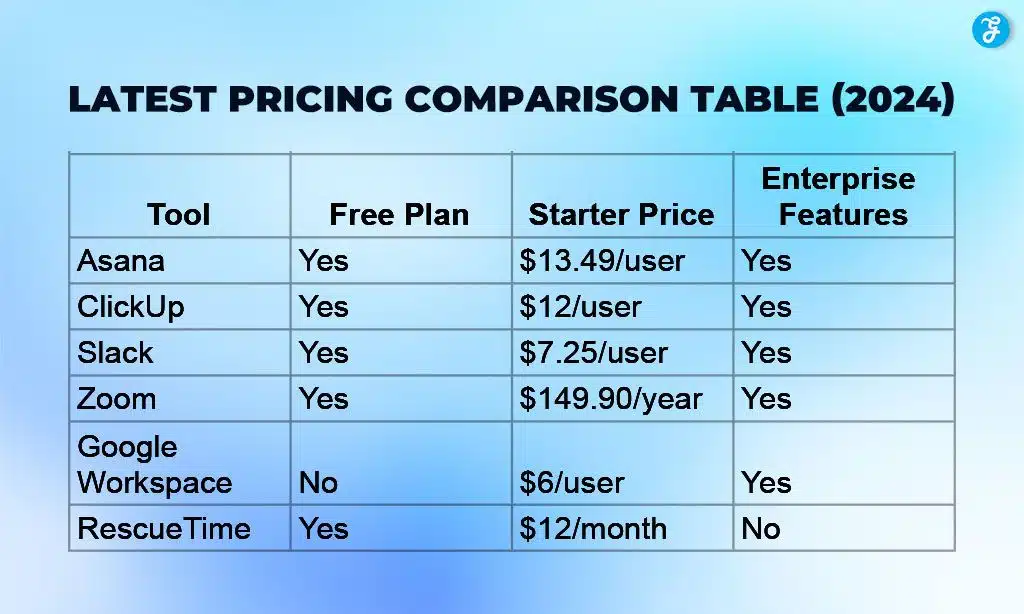
Latest Pricing Comparison Table (2024)
Takeaway
The right SaaS tools aren’t just about fancy features – they’re about transforming how your team works. Start small, focus on what matters most to your team, and build from there. Remember: The goal isn’t to use every tool available, but to find the perfect combination that makes your team unstoppable.
Ready to boost your team’s productivity? Start with one or two tools that address your biggest challenges. Test them thoroughly during free trials, and scale up as you see results. The future of work is here – and with these tools, your small team can achieve big things.F





















