In the digital age, the performance of your website can make or break the success of your online business. Whether you’re managing a small blog, a growing eCommerce store, or a dynamic media platform, choosing the right hosting plan is crucial to ensuring your website loads quickly, runs smoothly, and provides the best possible user experience. One of the key factors that influence a website’s performance is its storage capabilities.
For websites that are starting to outgrow shared hosting, VPS hosting (Virtual Private Server hosting) offers the ideal balance between cost-efficiency and power. However, not all VPS hosting plans are created equal. Among the various features that determine hosting performance, storage performance stands out as one of the most critical.
In this article, we will take an in-depth look at the Evaluating Storage Performance in 7 Popular VPS Hosting Plans.
We’ll explore key metrics such as read/write speed, IOPS (Input/Output Operations Per Second), and storage types (SSD vs HDD), and compare several leading VPS hosting plans to help you make an informed decision.
What is VPS Hosting and Why Storage Performance Matters?
Before diving into the specifics of each hosting plan, let’s first understand what VPS hosting is and why storage performance is crucial to the success of your website.
VPS Hosting Defined
Virtual Private Server (VPS) hosting is a type of web hosting where a physical server is divided into multiple virtual servers. Each virtual server acts like an independent machine, meaning it has its own operating system (OS), storage, CPU, and memory.
VPS hosting strikes a balance between the low cost of shared hosting and the high performance of dedicated hosting.
- Shared Hosting: In shared hosting, multiple websites share the same server resources, including CPU, RAM, and storage. This can lead to slower website performance, especially when traffic spikes occur.
- Dedicated Hosting: Dedicated hosting provides you with an entire server to yourself, giving you complete control over resources. However, it tends to be more expensive and can be overkill for smaller websites.
VPS hosting is the middle ground, offering dedicated resources, a high level of control, and scalability, all at a price point that makes it accessible for medium-sized businesses and growing websites.
Why Storage Performance Matters
Storage performance impacts every aspect of your website’s operation, from loading speeds to database queries. The faster data can be read and written, the more quickly your website will respond to user requests.
Here are several reasons why storage performance should be a priority when choosing a VPS hosting plan:
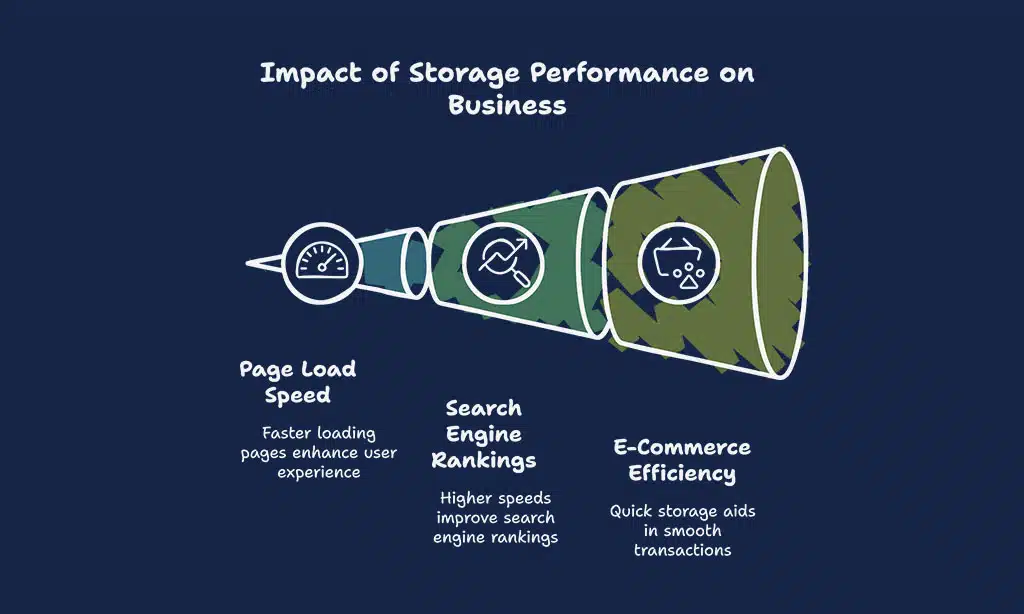
- Page Load Speed: Websites that load quickly offer better user experiences and have higher engagement. A slow website, often caused by poor storage performance, can lead to higher bounce rates and a negative impact on SEO rankings.
- Search Engine Rankings: Search engines like Google prioritize websites that load quickly, as speed is a ranking factor. Websites with slower load times due to inadequate storage performance may see a decline in their rankings.
- E-Commerce Sites: For e-commerce businesses, fast storage performance is essential for handling product catalogs, transactions, and user data efficiently. Slow storage can delay checkout processes, leading to frustrated customers and lost sales.
- Scalability: As your business grows, so will your website traffic and data demands. Choosing a VPS plan with strong storage performance ensures your website can scale seamlessly without slowdowns.
Key Factors Influencing VPS Storage Performance
When Evaluating Storage Performance in 7 Popular VPS Hosting Plans, there are several factors that directly influence how well a VPS performs in terms of storage. Let’s explore these key factors in more detail.
Storage Types
The type of storage used by your VPS is one of the most critical factors in determining overall performance. The two most common types of storage are SSD (Solid-State Drives) and HDD (Hard Disk Drives).
SSD vs HDD
| Storage Type | Speed | Durability | Cost | Ideal For |
| SSD | Fast (read/write speeds up to 500-600 MB/s) | High (no moving parts) | Higher | High-traffic websites, databases, eCommerce |
| HDD | Slow (read/write speeds up to 100 MB/s) | Moderate (mechanical parts) | Lower | Low-traffic websites, small blogs, backups |
- SSD (Solid-State Drives): SSD storage is faster, more durable, and more reliable than HDD storage. With SSDs, data is stored on flash memory chips, which have no moving parts. This results in significantly faster read/write speeds and better IOPS (Input/Output Operations Per Second), making them ideal for websites that require high performance and fast load times.
- HDD (Hard Disk Drives): HDDs are older technology that uses spinning magnetic disks to store data. While they are typically cheaper, their mechanical nature leads to slower data access times and lower reliability compared to SSDs. HDDs are suitable for less-demanding websites but may struggle with performance when traffic grows or resources become more intensive.
For websites with medium to high traffic, SSDs are the clear choice due to their superior speed and reliability.
However, if you’re on a tight budget or running a less complex website, an HDD-based VPS could be a more economical option.
Read/Write Speed
Read/write speed refers to how quickly data can be read from and written to the storage device. Faster read/write speeds are essential for websites that handle a large volume of data, such as eCommerce platforms, news sites, and databases.
- Read Speed: Determines how fast the server can retrieve data when a user visits your site.
- Write Speed: Refers to how fast new data can be written to the storage drive, which is crucial for websites that update content or process user transactions regularly.
The faster the read/write speeds, the more responsive your website will be. Slow speeds, on the other hand, can create delays, causing poor user experiences and slower website load times.
Here’s how read/write speed directly impacts performance:
- For an eCommerce site, slow write speeds can lead to delayed inventory updates, which could result in customers encountering out-of-stock products.
- For a media-heavy site, slower read speeds could delay image and video load times, leading to increased bounce rates.
IOPS (Input/Output Operations Per Second)
IOPS is a measure of how many operations (read or write) a storage device can perform per second. High IOPS values are important for websites that rely heavily on database operations and dynamic content.
| Website Type | Required IOPS |
| E-Commerce Sites | 15,000+ |
| Media & Streaming Sites | 20,000+ |
| Content Management Systems (CMS) | 10,000+ |
| Small Blogs | 5,000+ |
Websites that need to process frequent database queries (e.g., eCommerce platforms or membership sites) need a high IOPS value to ensure fast data retrieval and overall smooth performance.
A VPS plan with high IOPS will ensure that your site can handle high volumes of transactions or user requests without lagging.
Evaluating Storage Performance in 7 Popular VPS Hosting Plans
Now that we’ve covered the key factors influencing VPS storage performance, let’s take a look at Evaluating Storage Performance in 7 Popular VPS Hosting Plans.
Below is a comprehensive comparison table that highlights the key features, including storage type, read/write speed, IOPS, and pricing for each plan.
| Hosting Plan | Storage Type | Read/Write Speed | IOPS | Pricing |
| Hostinger VPS 1 | SSD | 350 MB/s / 350 MB/s | 10,000 | $3.95/month |
| Bluehost VPS 2 | SSD | 500 MB/s / 500 MB/s | 20,000 | $19.99/month |
| InMotion VPS 3 | SSD | 450 MB/s / 450 MB/s | 15,000 | $19.99/month |
| DigitalOcean VPS 4 | SSD | 400 MB/s / 400 MB/s | 18,000 | $5.00/month |
| Vultr VPS 5 | SSD | 550 MB/s / 550 MB/s | 25,000 | $6.00/month |
| Linode VPS 6 | SSD | 600 MB/s / 600 MB/s | 30,000 | $5.00/month |
| A2 Hosting VPS 7 | SSD | 400 MB/s / 400 MB/s | 22,000 | $34.99/month |
1: Hostinger VPS 1
| Feature | Details |
| Storage Type | SSD |
| Read/Write Speed | 350 MB/s / 350 MB/s |
| IOPS | 10,000 |
| Pricing | $3.95/month |
Hostinger VPS 1 offers solid storage performance at an affordable price. It’s ideal for smaller websites or blogs that don’t require lightning-fast speeds.
The read/write speed and IOPS are sufficient for lower traffic websites, but larger websites or resource-heavy applications may experience some performance limitations.
Pros:
- Budget-friendly pricing
- Good for small websites or blogs
- Reliable performance
Cons:
- Limited read/write speed and IOPS for large-scale applications
2: Bluehost VPS 2
| Feature | Details |
| Storage Type | SSD |
| Read/Write Speed | 500 MB/s / 500 MB/s |
| IOPS | 20,000 |
| Pricing | $19.99/month |
Bluehost VPS 2 offers a more robust storage performance compared to Hostinger VPS 1, with faster read/write speeds and higher IOPS.
This makes it a better option for medium-sized websites or online stores that require more storage speed.
Pros:
- Stronger performance for medium-sized websites
- Excellent uptime and customer support
- Good scalability
Cons:
- Higher price than entry-level plans
3: InMotion VPS 3
| Feature | Details |
| Storage Type | SSD |
| Read/Write Speed | 450 MB/s / 450 MB/s |
| IOPS | 15,000 |
| Pricing | $19.99/month |
InMotion VPS 3 offers a good balance of price and performance. It’s an excellent choice for businesses that need reliable performance but don’t require the extreme speeds of high-end VPS plans.
Pros:
- Reliable and fast storage performance
- Good for growing businesses
- Affordable for the performance offered
Cons:
- Slightly lower IOPS compared to other higher-end plans
4: DigitalOcean VPS 4
| Feature | Details |
| Storage Type | SSD |
| Read/Write Speed | 400 MB/s / 400 MB/s |
| IOPS | 18,000 |
| Pricing | $5.00/month |
DigitalOcean VPS 4 is a great choice for developers who need a flexible, cost-effective solution. It offers decent storage performance with solid-state drives and satisfactory read/write speeds.
DigitalOcean is also known for its simplicity and developer-friendly environment, which makes it a favorite among those looking for a customizable VPS hosting solution.
Pros:
- Developer-friendly with a simple interface and scalable resources
- Good storage performance for small to medium traffic sites
- Affordable pricing for the features offered
Cons:
- Limited support for beginners
- May lack some advanced features needed for large-scale applications
5: Vultr VPS 5

| Feature | Details |
| Storage Type | SSD |
| Read/Write Speed | 550 MB/s / 550 MB/s |
| IOPS | 25,000 |
| Pricing | $6.00/month |
Vultr VPS 5 offers some of the best storage performance in this comparison. With a high read/write speed of 550 MB/s and an impressive 25,000 IOPS, this VPS plan is well-suited for websites that require high-performance storage, such as eCommerce platforms, video streaming sites, and large databases.
Vultr provides excellent scalability, and the performance is consistently fast, making it an excellent choice for businesses aiming to scale quickly.
Pros:
- High storage performance ideal for high-traffic websites
- Affordable pricing for the performance offered
- Great scalability with data centers around the world
Cons:
- No included backups in the base plan
- Limited customer support compared to some competitors
6: Linode VPS 6
| Feature | Details |
| Storage Type | SSD |
| Read/Write Speed | 600 MB/s / 600 MB/s |
| IOPS | 30,000 |
| Pricing | $5.00/month |
Linode VPS 6 stands out as one of the top performers in terms of storage. With a staggering 600 MB/s read/write speed and 30,000 IOPS, Linode is an excellent choice for businesses that need reliable, high-performance storage to support large-scale applications and high-traffic websites.
Linode is also renowned for its excellent uptime and customer support, making it a great choice for both beginners and professionals.
Pros:
- Exceptional read/write speeds and IOPS for demanding applications
- Excellent uptime and reliability
- Great support and easy scalability
Cons:
- Pricing can be higher compared to budget VPS hosting options
- May be overkill for small websites with low traffic
7: A2 Hosting VPS 7
| Feature | Details |
| Storage Type | SSD |
| Read/Write Speed | 400 MB/s / 400 MB/s |
| IOPS | 22,000 |
| Pricing | $34.99/month |
A2 Hosting VPS 7 is a premium VPS plan designed for high-performance websites. While the pricing is on the higher end, the plan provides solid SSD storage with 400 MB/s read/write speeds and 22,000 IOPS.
A2 Hosting is known for its speed-optimized infrastructure, which helps in delivering superior page load times. This makes it a great option for businesses that demand reliable and fast hosting for high-traffic applications or critical workloads.
Pros:
- Speed-optimized infrastructure for fast page loads
- Excellent storage performance with SSD storage
- Good support and high-performance features
Cons:
- Higher price compared to other VPS hosting plans
- May be excessive for small websites or blogs
Takeaways
After thoroughly Evaluating Storage Performance in 7 Popular VPS Hosting Plans, the choice of the best plan depends on your website’s specific needs. Linode VPS 6 and Vultr VPS 5 are the best options for websites that require high-speed storage and the ability to scale.
However, if you’re just starting out or have a limited budget, Hostinger VPS 1 and DigitalOcean VPS 4 provide great value at an affordable price.