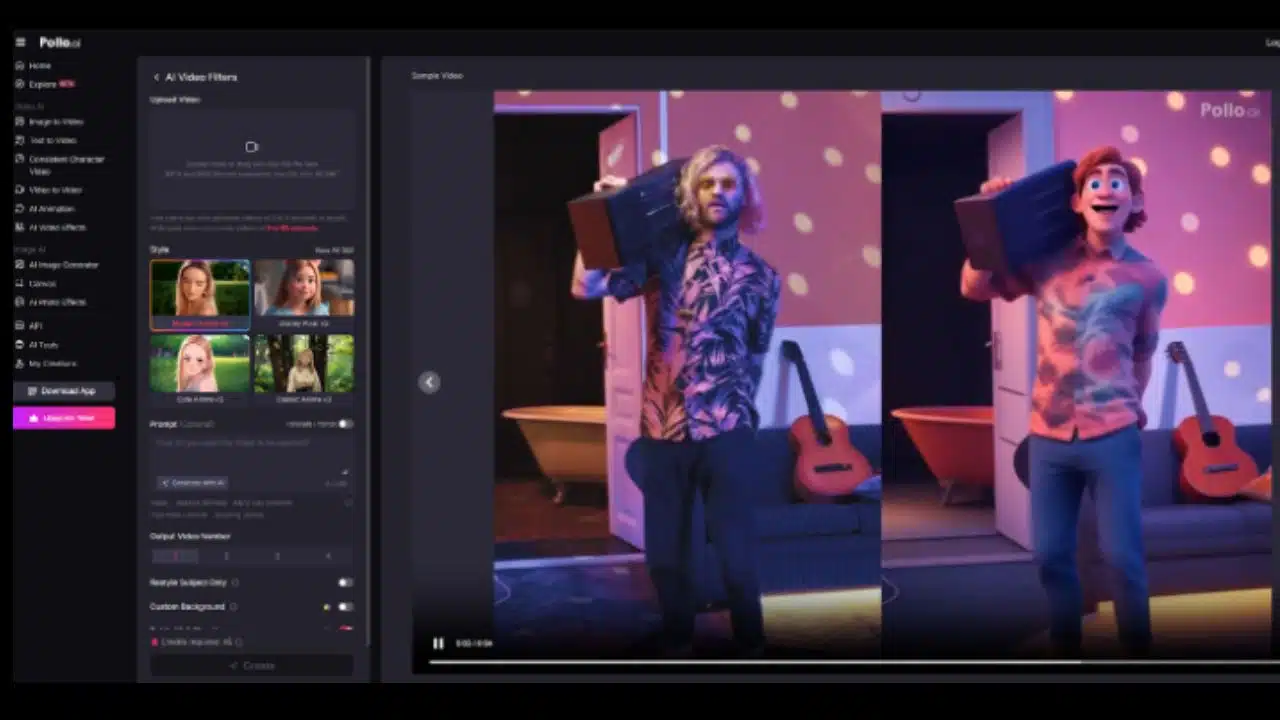
Pollo.ai positions itself as an all-in-one AI video platform, but its strongest suit lies in the video filters and animated effects that can radically transform ordinary footage into captivating visual experiences. This review takes a deep dive into those creative features, particularly animated filters, and assesses their strengths, limitations, workflows, and real-world potential—all in a neutral, SEO-optimized tone.
The Creative Powerhouse: Overview of Filters and Effects
Pollo.ai provides over 40 distinct video effects, encompassing everything from stylized filters to physics-driven animations. These tools fall into two primary categories:
- Style Transfer Filters
Applies aesthetic transformations such as anime, Pixar, claymation, pixel art, pop art, noir, cyberpunk, and pencil sketch.
- Animated & Physics Effects
Includes motion-based transformations like squish, inflate, melt, explode effects, along with themed effects (e.g., superhero makeovers, seasonal overlays).
How the Tools Work: Workflow and Usability
Uploading & Selecting Effects
Users upload short video clips—typically MP4 or MOV under 50 MB for the free tier—and select effects from a visual grid. A preview generally helps decide the effect before generation.
Customization Options
Pollo.ai allows granular control:
- Subject-only filtering to isolate the main character
- Custom backgrounds to complement stickers and overlays
- Batch generation, choosing between 1 to 4 outputs per prompt
- Visibility and copy protection options
Generation and Download
Processing time ranges from 15 to 60 seconds depending on the effect. Free users receive short clips with watermarks; high-res or watermark-free versions require upgrade.
Stylized Filters: From Anime to Noir
Anime & “Studio” Effects
Filters like Studio Ghibli-style, Modern Anime v3, and Classic Anime v3 effectively convert real video into animation reminiscent of Japanese artistry. These maintain original movement intact while overlaying vivid colors and clean, detailed textures.
Claymation & Pixar
The claymation filter generates tactile stop-motion aesthetics; Pixar filters create smooth 3D caricatures with rounder lines. These effects preserve the movement of the original clip without breaking hand-eye sync.
Pixel, Pop Art, Noir, Cyberpunk
Filters offering 8-bit pixel-art, pop-art, and noir aesthetics produce stylized overlays that mimic CRT glitches, bold halftones, or dramatic film noir contrasts. Cyberpunk filters add neon hues and holographic overlays, enriching the footage with futurist elements.
Physics-Based Animation: Creativity Beyond Filters
Squish, Inflate, Melt, Explode
These dynamic, physics-informed effects transform video elements:
- Squish compresses figures or objects into clay-like structures
- Inflate makes subjects balloon-like
- Melt liquefies pixels into drips
- Explode fragments overlays or subjects into animated shards
All simulate weight, deformation, and fluid effect with a cartoonish charm that maintains believable motion flow.
Character Overlays
Superhero, villain, or fantasy filters apply costumes and props—like Batman masks, Venom skin, or magical auras—on face/body greyed, tracking natural expressions. Filters even include seasonal overlays like Santa hats, festive backgrounds, and Halloween themes.
Use Cases That Shine
Content Creators and Influencers
Short-form creators can benefit from effects like AI Christmas transforms, Twerk videos, and flying effects, particularly on platforms like TikTok or Reels. These engage viewers quickly due to novelty and vibrancy.
Marketers & Brands
Brands can deploy quick product reveals with explode/melt effects or transform demo footage into pixel art for nostalgia-driven campaigns. Consistent filters like “Consistent Character Video” help maintain brand aesthetics over serialized content.
Educators & Archivists
Educators can recreate vintage footage with animated elements; archivists can apply noir, sketch, or anime to bring old footage to life in new digital formats.

Technical Quality & Outputs
Preservation of Motion and Detail
Pollo.ai’s frame-wise GAN models track limbs and hands accurately, minimizing flicker. Reviewers report HD output, though free-tier watermarks remain.
Resolution & Speed Considerations
Free clips are capped at ~720p. Paid tiers support HD and 4K. Export speeds vary: 15–60 seconds per effect depending on GPU and pipeline load.
Consistency & Artifacts
Occasional blending issues appear around fast-moving edges, especially in filters like explode or melt. Users can manually crop or post-process to assist fidelity.
User Feedback & Community Opinion
Flowster App Testing
Flowster praised Pollo.ai’s “unparalleled creative flexibility” of 40+ effects, noting access without subscription as a strong advantage.
Reddit Commentary
User FreakingOblin007 shared:
“Even with the obvious blurs due to flaws, it still looks kinda clean.”
Another commented on inflatable and squish effects’ humor, though background quality needs refinement.
Trustpilot Reports
Reviews emphasize “fast and easy” usage for video-to-video and video filters, though note free-tier credit constraints.
Limitations and Downside Considerations
Duration and File Size
Free uploads capped at 50 MB and 3–5 second clips. Longer, watermark-free exports require paid up to 60 seconds with subscription.
Background Interference
Complex backgrounds sometimes distort during physics effects. Users may need to separate creations or add post filters in editors.
Not Suitable for Film-Grade VFX
While excellent for short-form and stylized content, Pollo.ai is not a replacement for high-end VFX tools used in longer-form or feature production.
Workflow Tips for Best Results
Optimal Input Video
Use clear, well-lit footage that isolates the main subject for best animated effect application.
Batch Generation Strategy
Generate multiple versions simultaneously (up to 4 per prompt) to test effect variations quickly.
Leverage Restyle-Subject Feature
Split foreground from background to keep animated effect focused and create sharp contrast.
Post-Production Touches
Use editors like Premiere or Resolve to add audio, overlay effects, or upscaled visuals.
Final Analysis
Pollo.ai’s video filter and animated effect suite provides a remarkable blend of creativity, accessibility, and visual novelty. Its extensive library breathes life into short videos, and its physics-based tools offer playful yet technically impressive transformations. While it won’t replace professional vfx pipelines, it democratizes short-form video stylization for creators, educators, and marketers.
Ideal For:
- Short-form content creators on TikTok, Reels
- Marketers experimenting with playful product visuals
- Educators bringing archival footage onboard
- Hobbyists seeking visual flair without steep learning curves
Pollo.ai stands out as a creative playground for short-form video transformation, offering a robust, diverse effect library with minimal barriers. Its combination of style filters, physics-based animations, and image-to-video tools forms a disciplined yet imaginative ecosystem. While professionals may look elsewhere for full VFX suites, Pollo.ai is an optimal choice for creators who prioritize speed, variety, and creative freedom.
For any user seeking animated filters, visual experimentation, or fast-turnaround video content, Pollo.ai is a distinctly capable—and surprisingly fun—tool in the modern AI toolkit.