Have you ever scrolled through endless web pages and wondered if there is a better way to find what you need? Many users feel lost between clicking “Next” repeatedly or waiting for new content to load as they scroll. Both methods have their advantages, but they can also create frustration.
At times, it can feel like searching for a needle in a haystack.
When comparing pagination vs. infinite scroll, the SEO implications are important. Pagination provides search engines with a clear structure and organized pathways to content, while infinite scroll focuses on user engagement by continuously delivering fresh updates.
Choosing the right approach depends on the goals of the website. The following guide explains how to evaluate both options effectively.
So, grab a cup of coffee and explore the details step by step.
What Is Pagination?
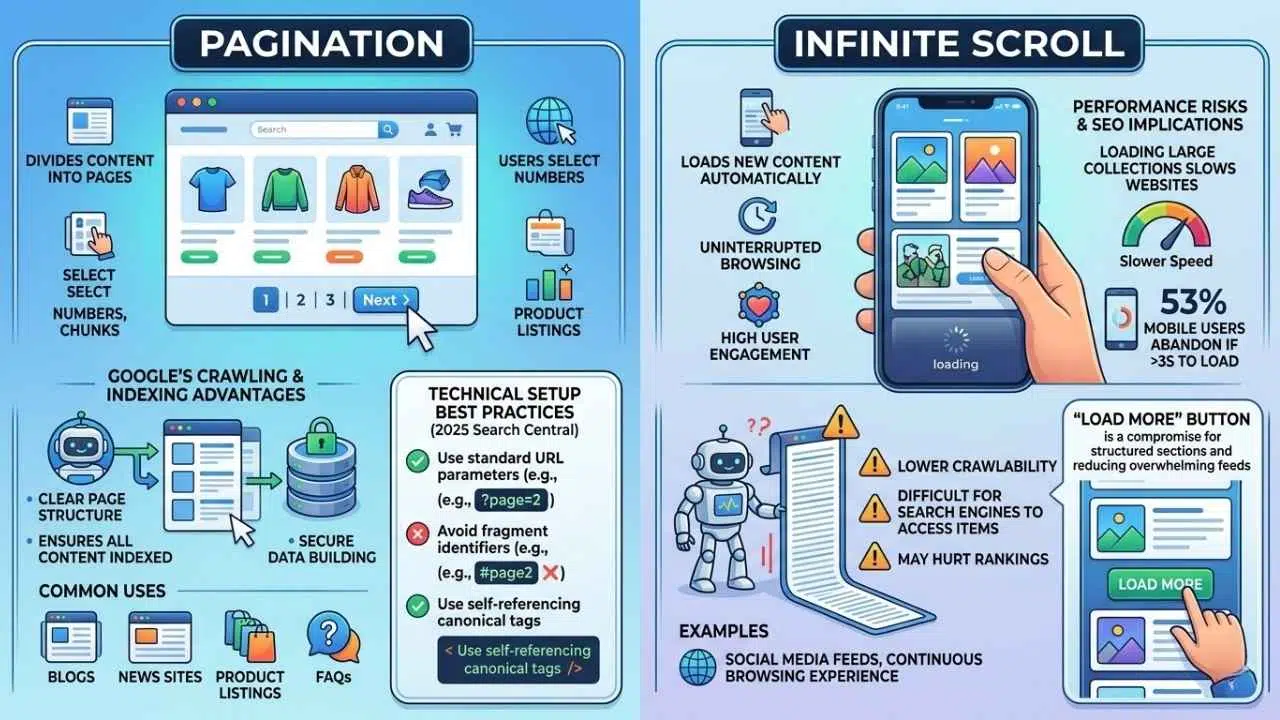
Pagination divides content into smaller, numbered pages. Users pick a number or click “Next” to move through items in chunks. Google likes pagination since it brings clear page structure and helps search engines index every piece of content without missing anything.
Sites like blogs and news platforms in the US use this layout to keep things tidy and easy to follow. A strong page structure guides traffic while giving users control over what they view first. Pagination works well for large collections such as product listings, reviews, or FAQs.
If you are setting this up, Google’s 2025 Search Central documentation offers very specific guidelines. You want to follow these rules to get the best results:
- Use standard URL parameters: Format your pages using a simple query like `?page=2`.
- Avoid fragment identifiers: Do not use a hashtag like `#page2` because Googlebot completely ignores the text after a hash.
- Use self-referencing canonical tags: Point each paginated page to itself so search engines know it is unique.
The approach keeps load times steady instead of overwhelming browsers with endless scrolling. Most visitors expect these familiar controls because they organize big information sets without confusion or clutter.
What Is Infinite Scroll?
Infinite scroll loads new content as you move down a page. You do not need to click any buttons or links to see more information. It feels like the content never ends.
This method fits well with content-heavy sites, such as social media feeds and news pages. Users stay longer, scrolling for videos, photos, or stories that keep appearing.
Some web designers prefer infinite scroll because it boosts user engagement metrics and creates a continuous browsing experience. But loading too much at once can slow websites down and create SEO problems if search engines cannot access all items on the page.
Recent 2025 performance data shows that 53% of mobile users will abandon a page if it takes longer than three seconds to load.
Slow load times lower crawlability and may even hurt ranking in search results. Many top US sites use a “Load More” button to mix structure with easy browsing. This helps users find what they want without feeling lost in an endless feed.
Pros and Cons of Pagination
Pagination brings its own set of strengths and hurdles. We can look at the specific benefits and drawbacks to help you choose the right path.
Better Content Organization
Clear page breaks keep large sets of information neat and tidy. Users see specific chunks, sorted by topic or date, rather than a long river of endless content.
For example, major US news sites like CNN use numbered pages to group articles by day or theme. This helps people find what they need fast.
Search engines also prefer well-structured content. Crawlers spot each section without missing items buried deep down a page.
Here is a quick look at how pagination organizes different types of sites:
| Site Type | Typical Pagination Strategy | Primary Benefit |
|---|---|---|
| E-commerce (e.g., Target) | 24 to 48 items per page | Prevents browser lag and keeps product images loading fast. |
| News Platforms (e.g., CNN) | Grouped by date or category | Allows readers to find older, archived stories easily. |
| Forums (e.g., Reddit) | Numbered comment threads | Keeps discussions organized and prevents endless scrolling fatigue. |
Stronger crawl coverage means nothing gets lost in the shuffle. This is gold for SEO optimization and web design.
Pagination hands users a road map. Numbered pages or simple “Next” and “Previous” buttons make it easy to spot where you are and what is left.
Visitors move back and forth with one click, jumping straight to page 3 or skipping ahead without breaking a sweat. This clear path gives control over content browsing.
It works exceptionally well in information-led sites like forums or product catalogs. Familiar layouts help people find old posts fast, avoid endless scrolling, and reduce frustration.
Search engines also love this order. Websites send clearer signals for crawling efficiency and Search Engine Optimization SEO, leading to lower bounce rates. A 2025 digital marketing benchmark report shows that e-commerce sites using structured navigation average between 20% and 40% bounce rates in the US.
Improved SEO Performance
Clear page numbers give search engines tidy roads to follow, like well-marked highway exits. This helps bots cover more ground and index even the largest content sets with ease.
Google handles numbered pages better than endless scrolling feeds. This leads to improved crawl coverage and stronger SEO optimization.
Sites using this structure often see faster load times since only one chunk of content appears at once. To get the most SEO value out of your paginated pages, keep these technical tips in mind:
- De-optimize paginated URLs: Do not stuff keywords into page 2 or page 3. Keep the focus on your main category page.
- Never use a noindex tag: Blocking paginated pages prevents search engines from finding the internal links pointing to your older posts.
- Monitor Search Console: Use Google Search Console to check if your numbered pages show up with crawl errors.
With simple navigation and clear page structure, user experience gets a big boost. A small business blog or a news site gains sharper focus on each topic, making it easier for people and bots to find what they need fast.
Limited Content Exposure
Scrolling can feel endless, but sometimes it hides a lot. Users might not scroll far enough to see all the valuable posts or products.
This hurts sites that want every article or item seen, like news platforms or big online shops. Search engines may also miss deeper content if bots cannot crawl past what loads first.
Infinite scroll works well for image galleries or social feeds with short attention spans. Still, important details often slip through the cracks, leaving excellent posts undiscovered.
Pagination avoids this pitfall by giving each page its own structured spot in site navigation and web design. People find information faster when they know where to look next, boosting both user engagement and SEO optimization while giving each post a fighting chance at visibility in Search Engine Results Pages (SERPs).
Pros and Cons of Infinite Scroll
Scrolling down feels fun, like a never-ending bag of chips. It is hard to stop and easy to binge. Still, some folks get lost in the flow, while search engines can hit speed bumps trying to keep up.
Enhanced User Engagement
Endless scrolling pulls people in, keeping them glued to the screen far longer than classic pagination. Users glide through a river of new posts and photos, never needing to click away or wait for another page to load.
TikTok, Instagram, and Pinterest have mastered this style. They boost their engagement metrics sky-high as users scroll without noticing time slipping by.
Sites with infinite scroll fuel curiosity and encourage more content exploration on mobile phones too.
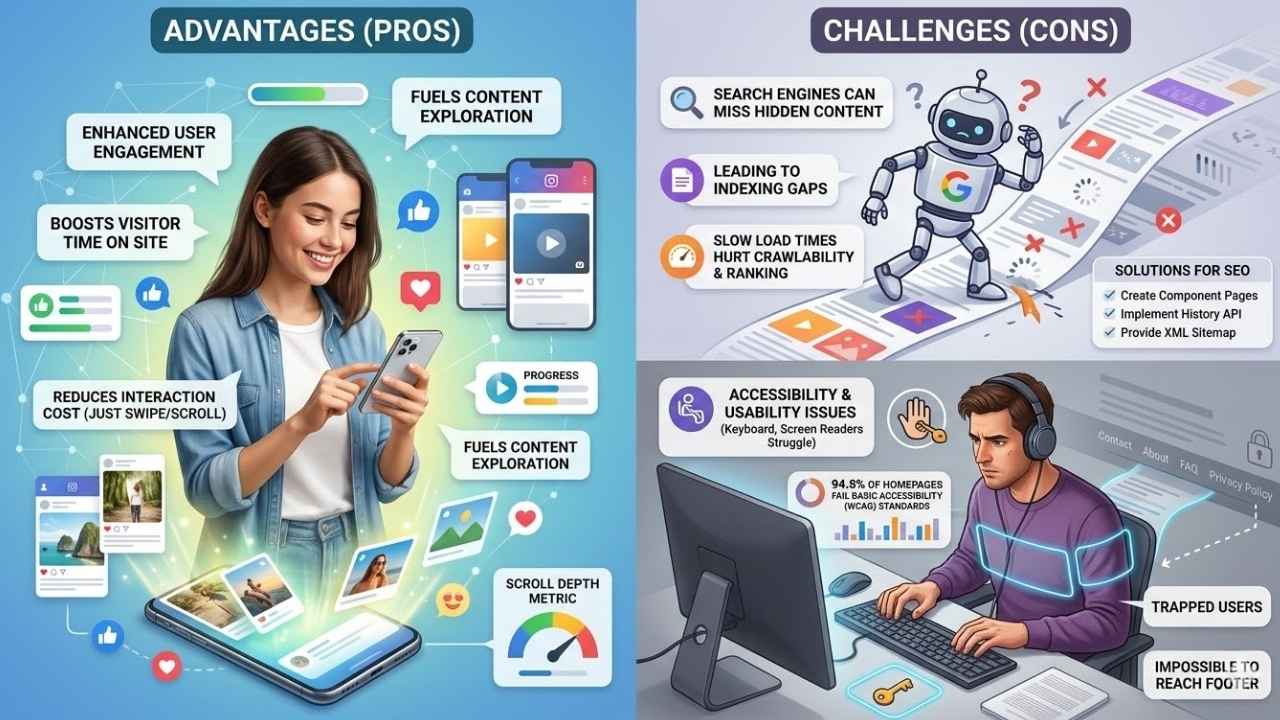
The beauty of infinite scroll is that it reduces the interaction cost to zero. The user just swipes, and the content appears like magic.
While folks interact with more items and spend extra minutes onsite, hidden gems may still get lost. They often get buried beneath fast-moving feeds if not paired with smart web design choices.
Continuous Browsing Experience
Scrolling feels smooth and keeps people glued to the page, especially on content-heavy sites. Facebook, Instagram, and X use this model for good reason.
Users see new posts pop up as they scroll with no pause for extra clicks. User engagement can shoot up thanks to this setup.
This kind of web design skips traditional pages, letting fresh content load as you move down. If you want to measure how well this is working, you can track the “scroll depth” metric in Google Analytics 4.
Fast browsing wins points only if the site manages speed well for both desktop and mobile users. Load times may stack up if too much data pours in at once, which could slow things down, hurt SEO optimization, and make it difficult for search engines to crawl moving content.
Challenges with SEO Indexing
Search engines often struggle to read content that loads as users scroll. Googlebot can miss hidden articles or images, leading to gaps in what gets indexed.
Sites with infinite scroll may see only part of their content appear in search results. This happens especially if key information hides behind long load times or dynamic pages.
Content-heavy websites face even bigger hurdles, as slow loading hurts both user experience and SEO Optimization. Pages can lose crawlability and page rank if important sections fail to load quickly for the crawler.
To fix these indexing challenges, you need to provide a fallback:
- Create component pages: Build standard paginated pages in your backend that Google can crawl.
- Implement history API: Change the URL in the browser address bar as the user scrolls, so each section has a unique link.
- Provide a site map: Make sure every single product or article is listed in your XML sitemap.
On mobile devices, these problems grow because servers try sending more data at once. This hurts both Visibility and Content Accessibility on Search Engine Results Pages.
Accessibility and Usability Issues
Infinite scroll can trip up users, especially those who use screen readers or keyboard navigation. Some content sits hidden off-screen and loads only as you scroll.
This makes it tough for people using assistive tech to reach everything. The 2025 WebAIM Million report found that 94.8% of US homepages fail basic Web Content Accessibility Guidelines (WCAG) standards.
Infinite scroll is a major offender here. Keyboard-only users often get trapped in the feed, completely unable to reach the footer links at the bottom of the page.
Long scrolling makes it hard to find specific info fast, causing people to lose their spot or spend extra time searching. Pagination hands back control so folks always know where they are and can jump right to what matters most.
SEO Implications of Pagination
Search engines love clear paths, and pagination lays out each step like breadcrumbs in a forest. Search bots can march along these pages with ease, finding more to index every time.
Improved Crawlability for Search Engines
Google’s bots act like hungry ants, following each crumb or page one by one. Pagination lines your content up in neat rows, making their work much easier.
So, no blog post or product gets skipped because it sits too far down an endless list. Big sites with lots of items love this clear path since every link stands out and gets a fair shot at ranking.
By forcing clear paths, pagination ensures you maximize your website’s crawl budget, allowing bots to discover your newest pages instantly.
Sites using pagination benefit because crawlers can spot the next page easily through numbered links or “Next” buttons. This helps cover more ground fast.
Nothing hides below the fold or waits for someone to scroll all day. As a result, search engines index more pages and show them higher on search results.
Clear Content Structure for Indexing
Pagination brings a crystal-clear path for both users and search engines. Each page holds its own spot in the site structure.
This helps with crawling efficiency and strong coverage, especially on large content sets like news archives or big e-commerce shops. Clear sections mean that SEO optimization tools can map out every part of your site architecture.
This links each piece back to its rightful category and prevents old articles from becoming orphaned pages. Search engine bots love order, not chaos.
They latch onto clean URLs and defined page breaks like a magnet finds metal. Structured pagination stops important posts from getting buried deep down an endless scroll abyss.
The results are very clear for your website:
- Better visibility in SERPs for individual products.
- More accurate user engagement metrics tracked per page.
- Improved information architecture across your entire domain.
Sites thrive when they keep navigation simple while serving up bite-sized pieces of content for indexing. It is just like stacking building blocks instead of dumping them all in one pile.
SEO Implications of Infinite Scroll
Search engines can miss some posts because infinite scroll loads content as you keep scrolling, not all at once. If the setup is not just right, your hidden gems may never show up in search results.
Dynamic Content Loading Challenges
Dynamic content loading, like infinite scroll, can tie search engines in knots. Search bots struggle to reach all items because new posts or products appear only as people scroll.
This setup often leaves some pages hidden from indexing, creating gaps and hurting visibility on the SERP. Long page load times are another headache.
Sites that keep adding more images or articles while scrolling may frustrate users with slow speeds. Slow websites push visitors away and lower engagement metrics.
Adding elements dynamically to the page often causes Cumulative Layout Shift (CLS), a Core Web Vital metric that directly impacts your Google rankings.
For SEO optimization, this can mean dropping down in rankings. Google heavily favors fast sites with good mobile usability and strong content accessibility for all users.
Potential Indexing Gaps
Search engines love order, but infinite scroll can make a mess of things. Sites that load content as you scroll often hide valuable information from bots.
Google’s crawler sometimes misses later posts or product listings because they appear only after lots of scrolling. This leaves parts of your site hidden in plain sight.
If you want to see exactly what Googlebot sees, you can use the URL Inspection Tool in Google Search Console to view the rendered HTML. If your products are not in that code, they will not rank.
Load times also suffer with endless scrolling, especially on mobile devices. Slow-loading pages do not just frustrate people; they lead to poor crawl coverage and weaker SEO performance too.
Best Practices for Balancing SEO with User Experience
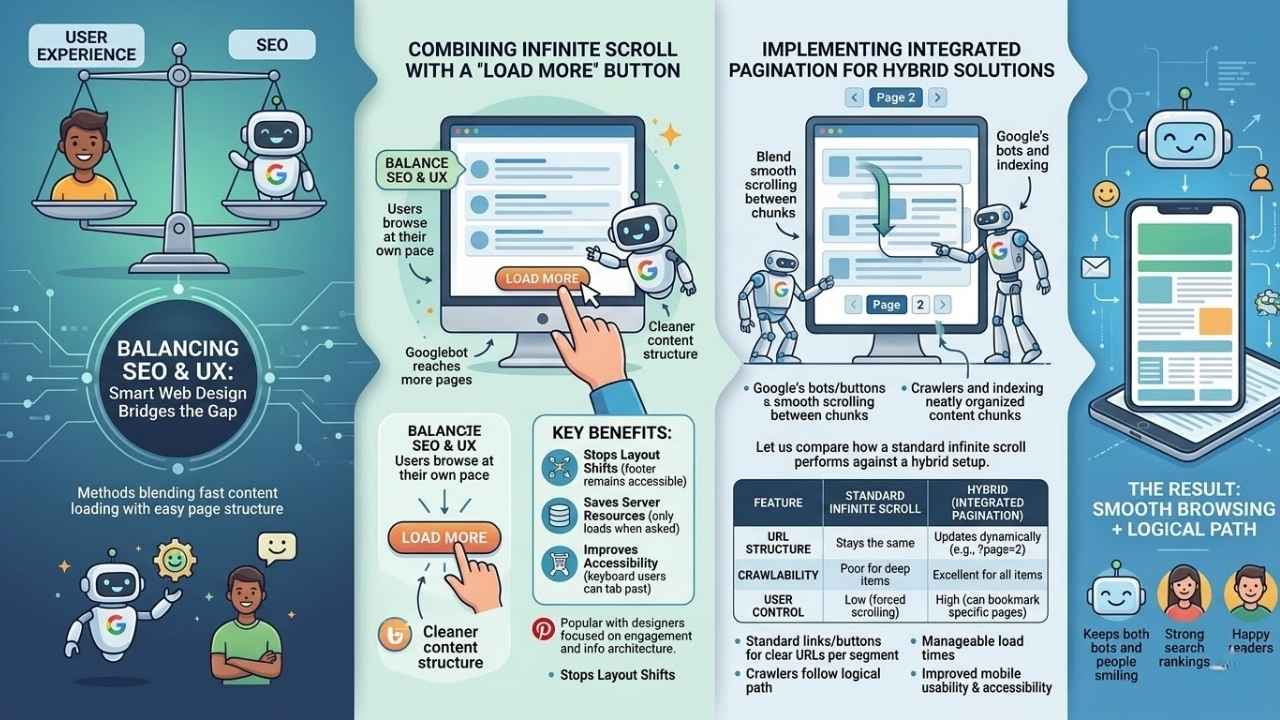
Smart web design can bridge the gap between strong search rankings and happy readers. Explore methods that blend fast content loading with easy page structure, keeping both bots and people smiling.
Combining Infinite Scroll with a “Load More” Button
Pairing infinite scroll with a “Load More” button strikes a balance between SEO optimization and user experience. Users get to browse content at their own pace, instead of being swept away in an endless flood.
Googlebot can reach more of your pages since new sections only load after a click. This gives better crawlability and cleaner content structure for indexing.
This method keeps page speed steady and helps prevent crawling gaps that often trouble full infinite scroll. Here are a few reasons why the “Load More” button works so well:
- Stops layout shifts: The footer remains accessible, preventing frustrating jumps on the screen.
- Saves server resources: You only load database items when the user specifically asks for them.
- Improves accessibility: Keyboard users can easily tab past the button to reach the end of the page.
Sites like Pinterest have made this approach popular among web designers who focus on engagement metrics and information architecture. You put visitors back in the driver’s seat without leaving search engines behind in the dust.
Implementing Integrated Pagination for Hybrid Solutions
Some websites blend infinite scroll and pagination to get the best of both. For example, using a “Load More” button lets users keep scrolling while also keeping search engines happy with page structure.
This setup keeps content organized by splitting it into smaller chunks. Google’s bots can crawl and index each section without missing important information.
Let us compare how a standard infinite scroll performs against a hybrid setup:
| Feature | Standard Infinite Scroll | Hybrid (Integrated Pagination) |
|---|---|---|
| URL Structure | Stays the same | Updates dynamically (e.g., `?page=2`) |
| Crawlability | Poor for deep items | Excellent for all items |
| User Control | Low (forced scrolling) | High (can bookmark specific pages) |
Standard links or buttons at the bottom help create clear URLs for every segment of content. Users get smooth browsing, but crawlers still follow a logical path through your web design.
With this hybrid approach, load times stay manageable, and both mobile usability and accessibility improve too.
Final Thoughts
Choosing between Pagination Vs. Infinite Scroll: SEO Implications can make or break your site’s performance and user experience. Pagination keeps content neat, easy for search engines to crawl, and gives readers steady footing while exploring page by page.
Infinite scroll brings seamless engagement but may trip up both crawlers and folks who like clear boundaries. Pick carefully. Sometimes a “Load More” button or hybrid approach works wonders in balancing organization with smooth browsing.
How does your site handle large chunks of information? Try tweaking your setup. See what sparks more clicks, longer visits, and clearer paths for Google’s bots. Even small changes can help pages rank higher or improve how fast your site loads on mobile devices.
Check trusted SEO blogs or seek expert advice to stay ahead of trends that shape visibility online. The right structure helps users find what they want, and it keeps them coming back for more!