
Prompt versioning tools help teams record what changed in an AI instruction, review the change and return to a known version when an update causes problems. The useful question is not simply whether a product keeps history: it is whether your application can identify, test and reliably restore the exact instruction it used.
This documentation-based comparison covers purpose-built prompt systems and Git services that can manage prompts stored as files. It is not a hands-on ranking. Review and rollback may require configuration or an application deployment; no tool automatically decides whether an AI answer is safe or correct.
Prompt versioning tools compared
| Tool | Review and history | Rollback approach |
|---|---|---|
| Langfuse | Prompt versions and labels | Move a production label to a prior version |
| LangSmith | Versioned assistant configuration | Select an earlier assistant version |
| Braintrust | Prompt history and evaluation workflows | Use an earlier identified version |
| Arize Phoenix | Prompt versions and playground | Select and deploy a known version |
| Arize AX | Prompt hub and version identifiers | Restore a prior configured version |
| GitHub | File history and pull-request review | Revert a merged change |
| GitLab | Merge-request review and repository history | Revert a merge request or commit |
1. Langfuse: promote a known prompt with labels
Langfuse keeps prompt versions and uses labels such as production to select one. A reviewer can compare revisions and a team can move the production label back to a prior version if a release underperforms. This separates a prompt change from a full application deployment when the application is configured to fetch that label.
Check caching and fallback behavior before relying on an immediate rollback: changing a label is useful only when the running application receives the intended version. Protected labels add control, but confirm role permissions for the chosen plan and installation.
2. LangSmith: version an assistant configuration
LangSmith documents versions of deployed assistant configurations and a method for making a previous assistant version active again. For a team using its agent deployment workflow, that provides a concrete way to connect an instruction change to an assistant configuration.
This is an assistant-version workflow rather than evidence that every prompt change is automatically approved. Decide who can make a version active, test the configuration on representative cases and record which assistant version handled each release.
3. Braintrust: connect prompt revisions to evaluation
Braintrust describes versioned prompts, version history and comparisons alongside evaluation. A team can compare a candidate instruction with a stable baseline before choosing which version to use in an application. A previous version can be selected again when the integration is set up to reference it.
Scores need meaningful test data. An evaluation that checks only style can miss an incorrect tool call or an unsupported answer; include examples of the failures your application actually needs to prevent. Verify the deployment and permissions model before assuming a formal approval gate is built in.
4. Arize Phoenix: manage prompts near experiments
Phoenix provides prompt management and a playground for working with prompt versions. Teams already using its datasets and tracing can examine a proposed revision in the same broader investigation workflow, then reference the intended version in their integration.
Review and rollback depend on how versions are selected and deployed in that integration. A self-managed installation also needs backups, upgrades and access controls. Confirm how your installed version handles labels and previous prompt versions before promising a one-click reversal.
5. Arize AX: organize prompt versions in a wider platform
Arize AX documents a prompt hub and version identifiers for prompt-related work. It is a candidate for organizations that want to examine instructions alongside application traces and evaluations, especially where multiple teams already use the platform.
Ask how the specific plan controls editing, review and deployment. A tag or saved version is not itself an approval process; record the reviewer and the version deployed, and rehearse restoring an earlier configuration using the actual integration.
6. GitHub: review prompt files through pull requests
If prompts live in text or configuration files, GitHub’s commit history and pull-request reviews provide a familiar change record. Reviewers can inspect the diff, comment and request changes. GitHub also documents reverting a merged pull request through a new pull request that reverses its merge commit.
GitHub does not automatically connect the reviewed file to a running model request. Your build and deployment process must carry the approved commit into production; rolling back the repository alone does not prove the application has switched.
7. GitLab: use merge requests for prompt changes
GitLab can hold prompt files alongside application code. Its merge-request reviews, approval settings and revert workflows give a team a way to discuss and reverse changes with the same controls used for other code. This can fit teams that already maintain their release process there.
Availability of particular approval controls depends on the product tier and configuration. Store model settings, templates and evaluation fixtures with the relevant prompt where practical; a reverted instruction paired with a different model configuration may not reproduce earlier behavior.
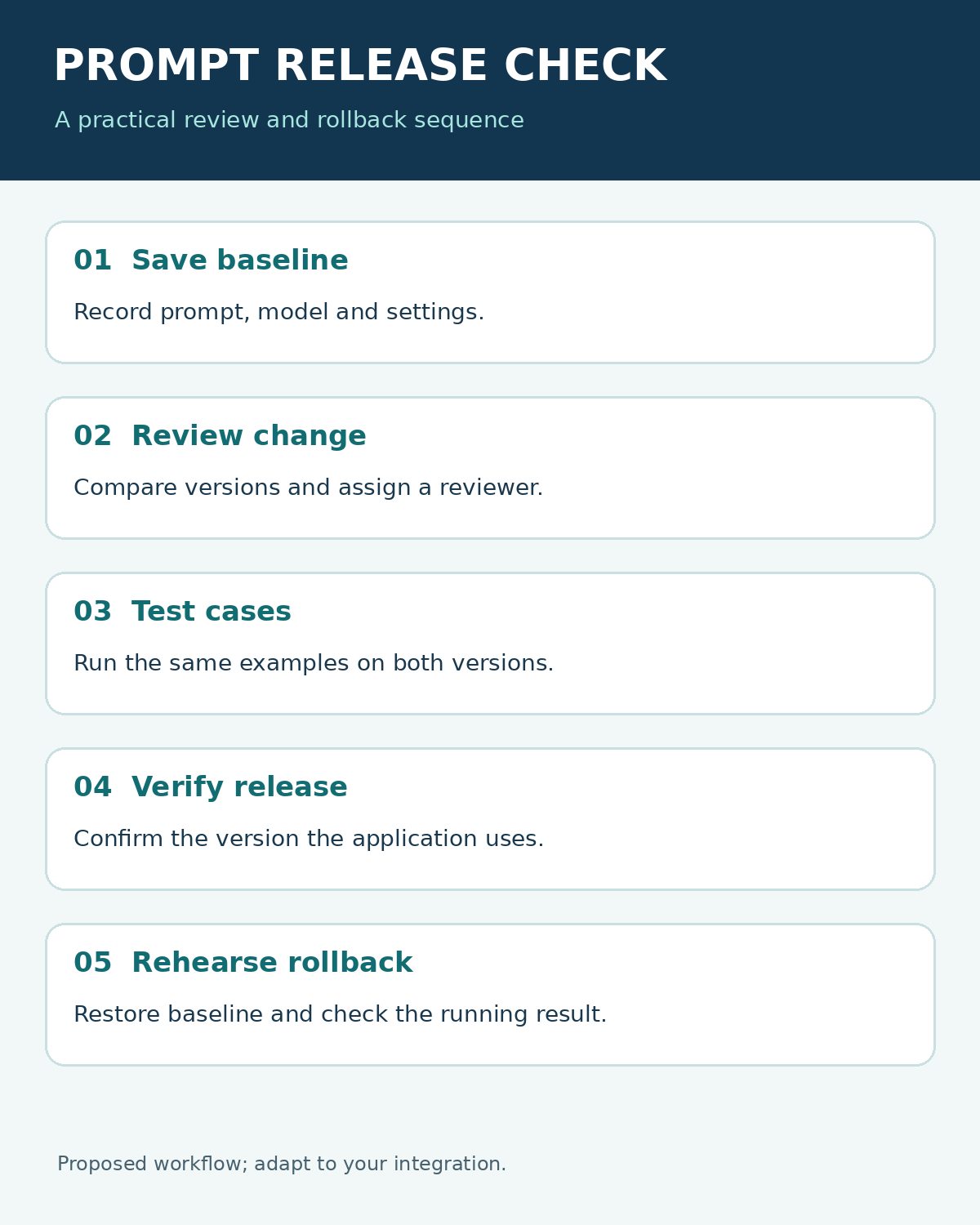
A review and rollback test for prompt versioning tools
Use a harmless example and a fixed set of test inputs. Save the current prompt, model and settings as a baseline, then change one instruction and have a reviewer inspect the difference. Run the same cases against both versions, including an input outside the system’s authority.
- Record the version identifier and the reviewer’s decision.
- Promote the candidate through the actual application path.
- Confirm from logs or a controlled response which version is running.
- Restore the baseline and repeat the check, including cache and fallback behavior.
- Record what happened and restrict access to sensitive test data.
For an example of a formal operating standard, Texas Health and Human Services’ prompt engineering standards call for version-controlled prompts and validation in the target environment, including documented rollback steps. Treat that as an example of one organization’s requirements and adapt the controls to your own setting.
A prompt is one part of an agent’s behavior. Retrieval data, model versions, tool definitions and application code can change independently, so keep their identifiers with the release. Editorialge’s guide to versioned FAQ datasets for AI agents explains the related challenge of controlling the answers supplied to an agent.
Choosing prompt versioning tools
Choose prompt versioning tools around the team’s real release path. A registry with labels can simplify an instruction-only change; a Git workflow can fit existing code review. In either case, make the human review explicit, test the running configuration and verify the rollback rather than assuming a saved version guarantees it.