Law firm automation helps legal teams handle repetitive work such as collecting intake details, tracking deadlines, preparing standard documents, and sending routine client updates. Used carefully, it gives lawyers and staff more time for tasks that require legal judgment.
The key is to automate the process, not the responsibility: people should review critical dates, verify legal work, and protect client information. For U.S. firms, ABA Formal Opinion 512 explains how existing professional duties apply to generative AI, while state ethics rules and court requirements may vary. Start with a predictable task, set clear review steps, and use only tools approved for the information involved.
1. Automate intake and conflict checks—with a lawyer reviewing the result
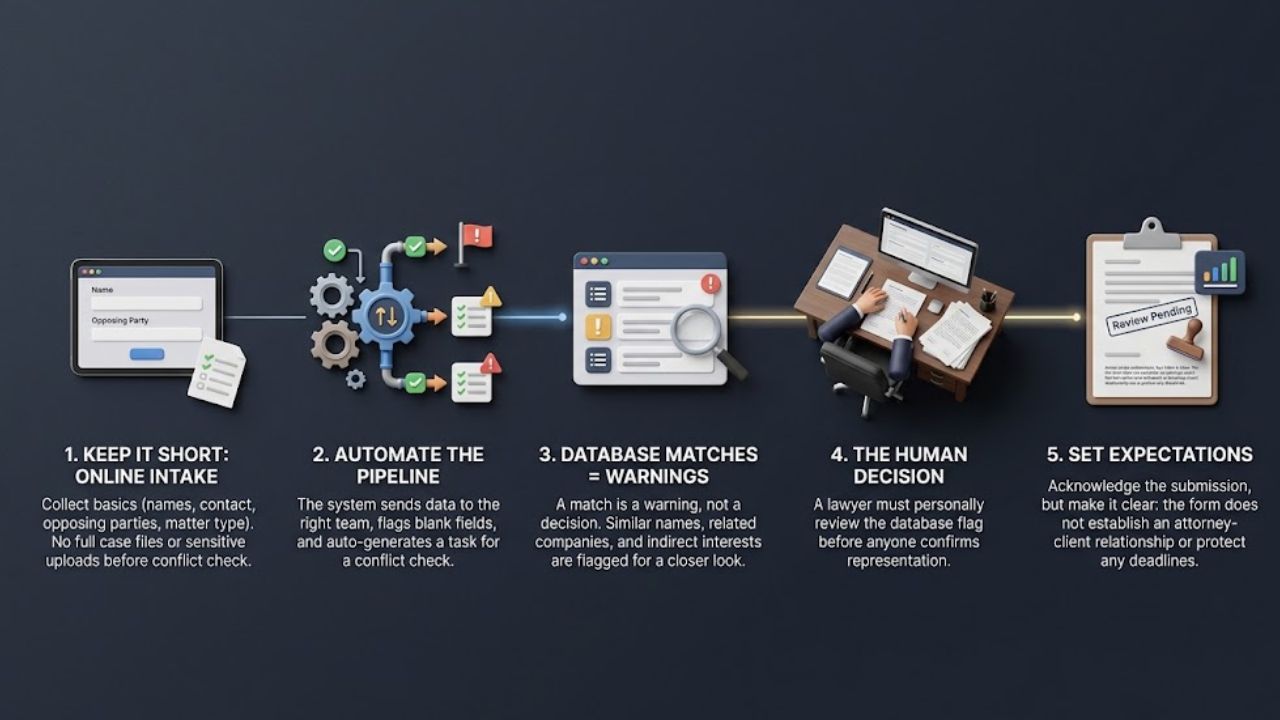
An online form can collect the basics before a consultation: names, contact details, opposing parties, matter type, and a short description. A workflow can send the submission to the right team, flag blank fields, and create a task for a conflict check. That is a sensible use of law firm automation because it speeds up routing without deciding whether to take the case.
Keep the first form short. Prospective clients do not need to upload a full case file or enter a detailed account of sensitive events before the firm has checked for conflicts. Collect only what is needed at this stage, explain how the firm will handle it, and limit who can view it.
A database match is a warning, not a conflict decision. Similar names, related companies, former clients, and indirect interests may require a closer look. Have an authorized person review the result before anyone confirms representation. The acknowledgment should also say that submitting the form does not establish an attorney-client relationship or protect a deadline.
2. Use calendaring tools to flag deadlines, not to own them
A shared calendar can keep hearings, filing dates, and follow-up tasks visible to the people who need them. Reminders also reduce the chance that a deadline lives only in one person’s inbox.
But a calendar is only as reliable as the date entered. The calculation may depend on the jurisdiction, how a document was served, a court order, a holiday schedule, or a later change in the case. A wrongly entered date can be repeated across a whole team without anyone noticing.
Record the source for each proposed deadline and have a second qualified person check it against the relevant order or rule. Give the lawyer responsible enough lead time to act. When the court changes a schedule, assign someone to update the calendar and confirm that reminders reflect the new date. Automation can make the process visible; it cannot make an unchecked calculation safe.
3. Build document templates for routine drafting
Templates and document-assembly systems are well suited to first drafts of routine notices, engagement letters, common forms, and internal checklists. They save repeated typing and help keep standard language consistent.
The less visible risk is reuse: an outdated clause or mistaken assumption can appear in dozens of documents. Give each template an owner, make matter-specific fields easy to spot, and review the language when laws, court rules, or firm policies change. A reviewer should check names, dates, defined terms, attachments, and any clause selected by the system.
Start with a familiar, low-risk document. Keep track of the edits people make. If reviewers keep correcting the same field, improve the template or the information it draws from. A template that produces a polished-looking draft can still be the wrong template for the matter.
4. Use AI to organize documents and research, then verify its work
AI tools can help sort a large record, extract dates or defined terms, compare drafts, or suggest search terms. For a lawyer or paralegal, that first pass may make it easier to find documents worth examining. It should not be mistaken for the examination itself.
A generated summary can omit a qualification or turn an inference into a factual statement. A research tool can invent a citation or misstate a real decision. Check important statements against the underlying document and authoritative legal sources. Before citing a case in a filing, open it and verify that it says what the draft claims.
Client information needs a separate check before it goes into any AI service. Review the service’s terms and settings for retention, access, and reuse, as well as client instructions, protective orders, court rules, and firm policy. Use only a tool approved for the information involved. Removing names may reduce exposure, but it does not automatically make a document safe to upload.
ABA Formal Opinion 512 addresses lawyers’ professional duties when they use generative AI. NIST’s Generative AI Profile offers voluntary guidance for identifying and managing AI risks; it is not a substitute for legal or ethics requirements.
5. Automate routine client updates without making them misleading
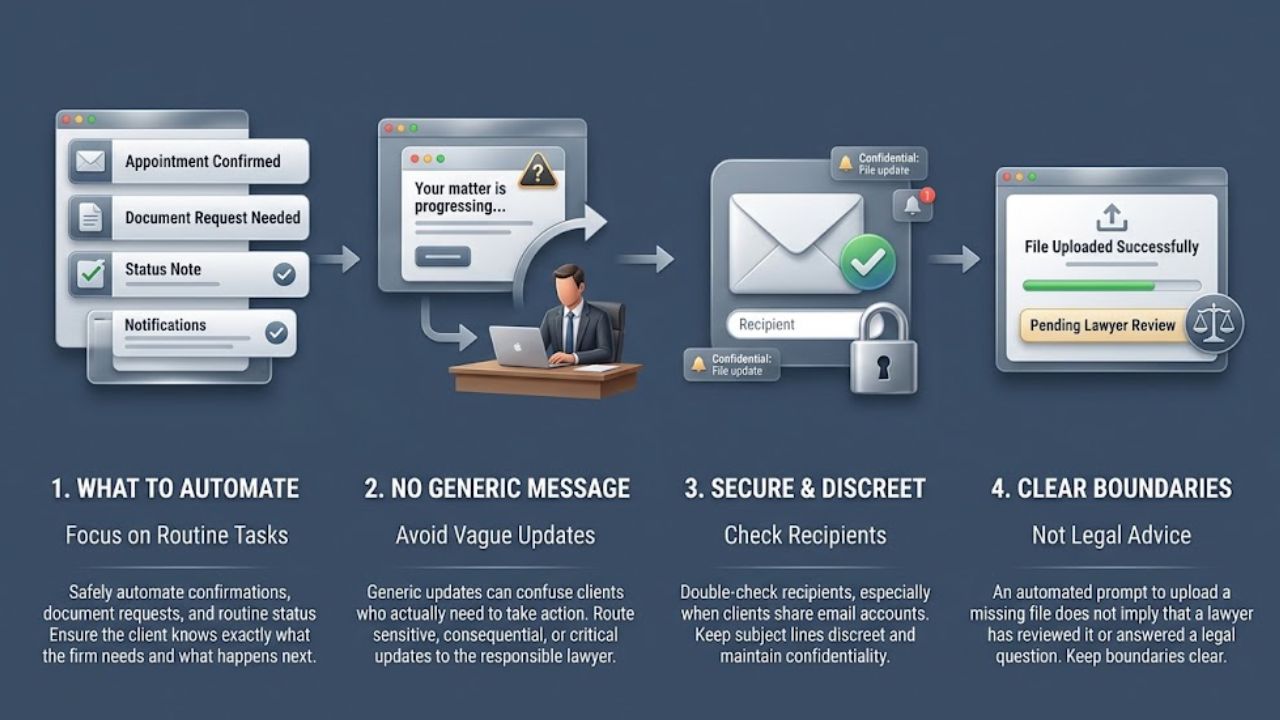
Appointment confirmations, document requests, and routine status notes are often good candidates for a carefully managed workflow. The client should still be able to tell what the firm needs and what happens next.
A generic “your matter is progressing” message can create confusion if the client actually needs to send a record or make a decision. Use templates for routine communications, but route sensitive or consequential updates to the responsible lawyer. Check recipients before sending, especially when a client uses a shared email account, and keep subject lines discreet.
One useful boundary: automation may prompt a client to upload a missing document, but it should not imply that a lawyer has reviewed the document or answered a legal question when that has not happened.
6. Make billing automation more transparent
Timekeeping software can capture activity and assemble a draft invoice. It can help with recordkeeping, but it cannot decide what a client should fairly be charged.
Review entries for accuracy, duplication, and consistency with the engagement terms and applicable rules. If an AI tool shortens a task, do not describe the work as though the longer process took place. ABA Formal Opinion 512 discusses reasonable fees in connection with generative AI; firms should check the rules in their jurisdiction and explain billing practices to clients when required.
Have a lawyer review invoices before they go out. Keep descriptions clear enough to explain the work, while avoiding confidential details the client does not need on a bill. The point of law firm automation here is cleaner administration—not automatic approval of every time entry.
7. Set firm-wide rules and review how automation performs
If each employee chooses tools independently, the firm may not know where client data is going or how generated work is being used. A short written policy can identify approved services, limit what information users may enter, name who can authorize new tools, and specify which work needs lawyer review.
Training should include what to do when an output looks wrong or a workflow sends information to the wrong place. ABA Model Rules 5.1 and 5.3 address supervision of lawyers and nonlawyer assistance, though jurisdictional versions can vary.
After launch, look for missed tasks, inaccurate documents, privacy problems, or client confusion. If a process takes more time to review than it saves, revise it or stop using it. A firm should also be able to correct records and pause a workflow quickly. The policy matters most when something goes wrong, not when everything is working as expected.
Final Thoughts
Start with a task that is repetitive, easy to check, and unlikely to make a legal decision on its own. Appointment reminders or routing an intake form are often easier places to begin than deadline calculation or AI-assisted legal research. Assign an owner, define the review step, and see whether the process actually reduces work without creating new errors.
That is the practical test for law firm automation: it should make routine work easier while leaving lawyers accountable for client information, legal judgment, and the quality of the work.
Frequently Asked Questions (FAQs) About Law Firm Automation
Does a law firm have to tell every client when it uses automation?
Not in every situation. The answer can depend on the tool, the information involved, how the output affects the representation, client instructions, and applicable rules. Check local requirements and the engagement terms; seek ethics guidance when the circumstances are unclear.
Can a firm upload client documents to a public AI chatbot?
Do not assume that it is appropriate. First check the service’s data practices and settings, firm policy, client instructions, and any court order or restriction. If the firm cannot establish that the information will be handled appropriately, do not upload it.
What is a sensible first automation project for a small firm?
Try a low-risk administrative task, such as routing intake submissions or sending appointment confirmations. Avoid starting with a workflow that makes legal decisions, sends sensitive information without review, or calculates critical deadlines on its own.