Visitors rarely trust a business website because of one badge, testimonial, or polished image. They look for answers instead: Is the business real? Is the offer clear? Can its claims be verified? What happens if a purchase goes wrong?
The best website trust elements answer those questions before uncertainty becomes a reason to leave. Stanford web credibility research, based on studies involving more than 4,500 people, identified business identity, contact information, professional design, useful content, accuracy, and updates as credibility cues. It is not a current conversion benchmark, but its central lesson remains useful: people trust websites that make verification easy.
Trust signals must also be genuine. A real address, a specific customer story, or a clear refund policy can reduce doubt. An invented testimonial, fake award, or meaningless security badge can do the opposite.
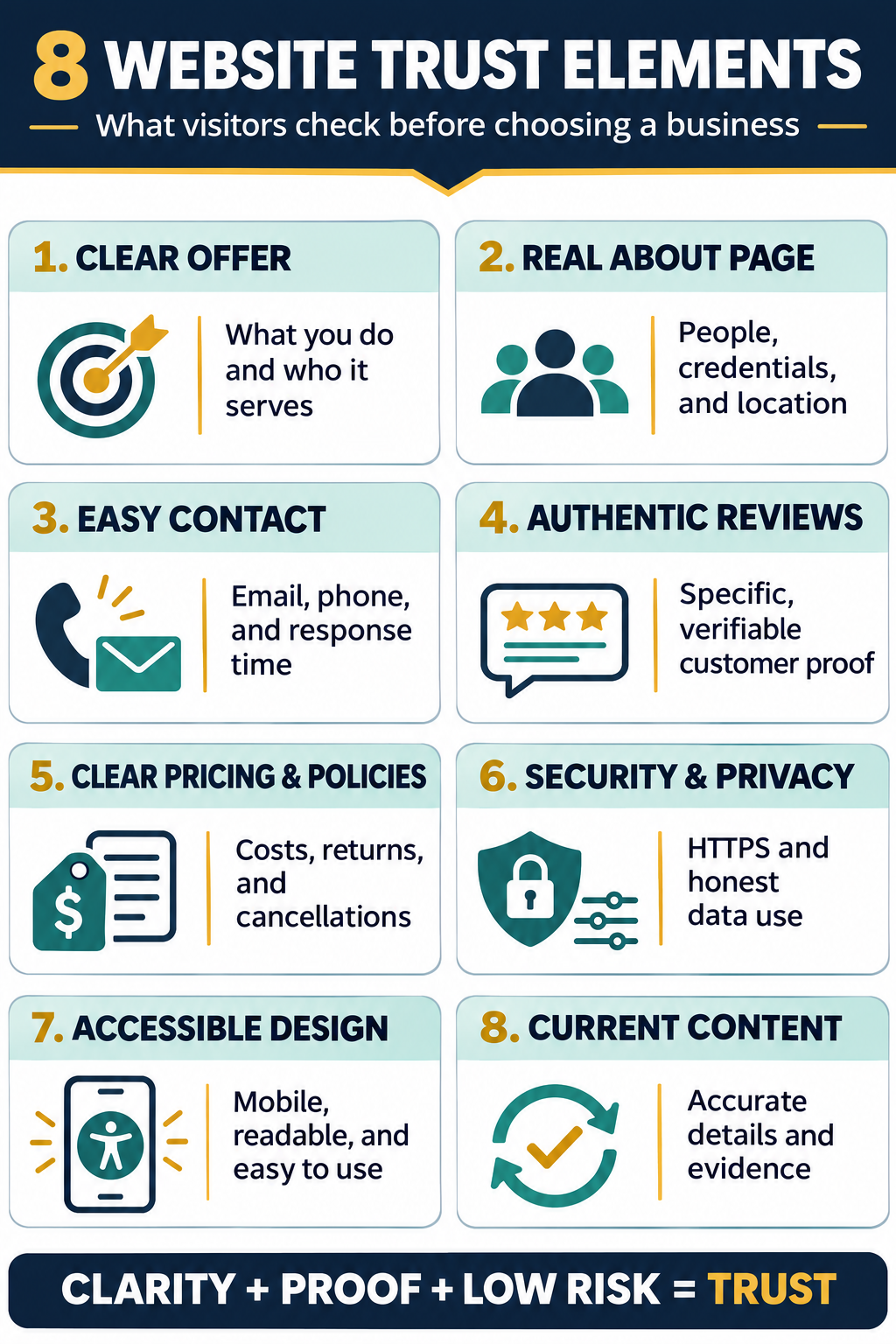
8 Website Trust Elements at a Glance
| Website element | The visitor’s question |
|---|---|
| Clear value proposition | “Am I in the right place?” |
| Verifiable About page | “Who is behind this business?” |
| Accessible contact information | “Can I reach someone if I need help?” |
| Authentic customer proof | “Has this worked for people like me?” |
| Transparent prices and policies | “What am I agreeing to?” |
| Security and privacy information | “What happens to my data or payment?” |
| Professional, accessible design | “Can I use this site without friction?” |
| Current, verifiable content | “Is this information still reliable?” |
1. A Clear Statement of What the Business Does
The first screen should tell visitors what the business offers, who it serves, and what they can do next. A slogan such as “Building Better Futures” sounds polished but does not explain the offer.
A stronger opening is specific: “Bookkeeping and tax support for independent retailers in Toronto,” followed by a relevant action such as “Request a consultation.” The statement does not need to describe every service. It only needs to help the intended customer recognize that the page is relevant.
Test the homepage with someone unfamiliar with the business. After five seconds, ask what it does, who it serves, and what comes next. If the answers are unclear, more logos will not repair the first impression.
2. A Verifiable About Page With Real People
An About page should make the organization easier to verify. It can identify the founder or leadership team, trading or legal name, location, history, credentials, and purpose.
Use real photographs when they add evidence. A genuine team, workplace, product, or project image says more than unrelated stock photography. The page must reflect reality: a solo consultant need not imply a “global team,” and a remote company need not stage an office.
Credentials should be precise enough to check. Name the issuing organization, professional membership, qualification, or license. Link to a public register where one exists. Avoid labels such as “certified expert” without explaining what the certification covers.
3. Contact Information and Clear Support Expectations
Visitors should not have to submit a form before learning whether the business is reachable. Provide suitable contact channels: a monitored email, phone number, location or service area, business hours, and support or sales contact.
Chat should not hide the absence of every other route. Place a clearly labeled Contact link in the navigation or footer. If replies are not immediate, state a realistic response window instead of promising unavailable “24/7 support.”
The information should match the company’s important external profiles. Editorialge’s guide to keeping business information accurate across third-party platforms explains why contradictory phone numbers, addresses, and opening hours create a practical problem for customers.
4. Authentic Reviews, Case Studies, and Work Samples
Social proof is strongest when it is specific and verifiable. A useful testimonial identifies the service, customer’s situation, and result in the customer’s own words. A case study can add the scope, process, time frame, and measured outcome.
Do not publish invented customer names, stock portraits presented as clients, or edited testimonials that change the customer’s meaning. If possible, let visitors check a wider pattern through an independent review profile instead of displaying only a handpicked wall of praise.
Editorialge’s guide to local SEO tactics for small businesses recommends a simple approach: ask real customers at an appropriate time, make the process easy, and never manipulate the outcome.
In the United States, the FTC’s Consumer Reviews and Testimonials Rule addresses fake reviews, incentives tied to a particular sentiment, undisclosed insider reviews, and review suppression. Other countries and review platforms have their own requirements.
A new business with no reviews can still show proof honestly. Use genuine work samples, explain the process, identify relevant experience, or offer references with permission. “No evidence yet” is safer than manufactured evidence.
5. Transparent Pricing, Terms, and Customer Policies
Uncertainty grows when visitors cannot tell what a service includes, when payment is due, or whether a purchase can be returned. Publish the information that affects the decision before asking for payment or a sales call.
For a product business, this may include the price, shipping charge, delivery estimate, return period, refund conditions, warranty limits, and cancellation process. A service business can explain typical ranges, minimum engagements, quote factors, and what happens after an inquiry.
Put important conditions near the relevant action. A return policy hidden behind several footer links will not answer a shopper’s concern at checkout. Likewise, a low headline price followed by compulsory fees late in the process can make an otherwise professional website feel deceptive.
Important destinations should also be easy to find. Editorialge’s explanation of different search intent types notes that pricing, support, contact, returns, and documentation pages need clear titles, sensible URLs, and direct internal links.
6. Sensible Security and Plain-Language Privacy Information
Every business website should use HTTPS, maintain valid certificates, update its software, and protect forms and accounts. Payment pages should use reputable processors and collect only necessary information.
HTTPS protects the connection. It does not prove that the company itself is honest. Treat it as a security baseline rather than a promotional guarantee. Avoid badges that suggest independent security testing unless that testing genuinely occurred and remains valid.
A privacy notice should match what the site actually does. Explain what data is collected, why it is needed, which providers receive it, how long it is kept, and how people can exercise relevant choices. Do not copy a generic policy that describes tools or practices the business does not use.
The exact legal duties depend on the visitor, business, and jurisdiction. Editorialge’s GDPR compliance guide for website owners offers a useful starting point for websites serving or monitoring people in the European Union.
7. Professional, Accessible, and Predictable Design
Professional design is about care and consistency. Visitors should be able to read the text, understand the navigation, use the site on a phone, complete forms, and recognize buttons.
Broken links, overlapping mobile layouts, aggressive pop-ups, and unreadable color combinations suggest poor attention to the customer experience. Editorialge’s guide to mobile SEO best practices covers responsive layouts, readable content, crawlable links, manageable advertising, and mobile navigation without unnecessary friction.
Accessibility strengthens the experience further. Use descriptive headings, keyboard-friendly controls, sufficient color contrast, form labels, captions where needed, and useful alternative text for meaningful images. The guide to writing effective image alt text explains how concise descriptions help people using screen readers understand important visual content.
Real images can also provide evidence. Show the actual team, location, product, or completed project when appropriate. Stock photography is not automatically harmful, but it should never impersonate customers, employees, or facilities.
8. Current Content and Evidence Visitors Can Check
Outdated details create doubt even when the rest of the website looks polished. Review prices, opening hours, staff profiles, product availability, service areas, policy dates, and support instructions according to how often they change.
Claims need a path to verification. Link research to original sources, name the organization behind an award, show a license’s validity period, and give expert content a real author. Distinguish measured results from estimates or customer statements.
Useful service pages should answer the questions customers ask before contacting the business. Editorialge’s guide to making a local business easier to understand and verify shows how clear services, pricing factors, locations, processes, reviews, and real examples create a stronger proof layer than generic promises.
If information changes, update it visibly. If a factual error could affect a customer’s decision, correct it rather than leaving conflicting versions across the website and external profiles.
Trust Badges Cannot Replace the Basics
Security seals, association logos, ratings, and awards can support trust when they are genuine, current, relevant, and linked to verification. They become decoration when visitors cannot tell who issued them or what they mean.
The same caution applies to countdown timers, “only one left” messages, inflated customer numbers, and rows of famous client logos. If the business cannot substantiate the claim, remove it. Clear facts and low-risk decisions build trust more reliably than manufactured urgency.
Common Questions About Website Trust Elements
What should a new business show if it has no customer reviews?
Show evidence the business already has: relevant founder experience, credentials, sample work, a transparent process, clear policies, or a pilot project documented with permission. Do not invent testimonials to make the business appear older or busier.
Does every service business need to publish exact prices?
No. Custom work may require a quote. The website can still explain the minimum engagement, typical range, what affects the price, what is included, and how the estimate is prepared.
Where should website trust elements appear?
Place each element near the uncertainty it resolves. Put delivery and return information near product decisions, privacy information beside data collection, credentials beside expert claims, and customer proof near the relevant service. A single “Trust” page cannot compensate for missing information throughout the customer journey.
Make Website Trust Elements Verifiable
Run a short audit with someone unfamiliar with the company. Ask them to identify what the business does, who operates it, how to contact it, what evidence supports its claims, what a purchase includes, and what happens to their data. Record where they hesitate.
Before publishing major changes, use a practical website launch checklist to test navigation, forms, links, mobile layouts, keyboard access, browser compatibility, and important calls to action.
The best website trust elements are not the most decorative ones. They are the details that help visitors verify the business, understand the offer, and take the next step without accepting an avoidable risk.