
Autonomous AI agents can investigate a request, select tools, and carry work across applications. Choosing one for workflow automation starts with a more practical question: how much freedom should the system have before a person needs to intervene? These 12 options cover everyday business assistants, configurable enterprise agents, and developer frameworks, with different requirements for setup, supervision, and maintenance.
For a small operations team, connecting an assistant to approved information may be enough. An enterprise handling customer records needs stronger controls over identities, actions, and exceptions. A development team building a custom application may need direct control over state and execution. The right choice depends on which of those problems you actually have.
New to the category? Our guide to how AI productivity agents work explains the difference between an assistant, a fixed workflow, and an agent that chooses its next step.
Which Autonomous AI Agents Should You Shortlist?
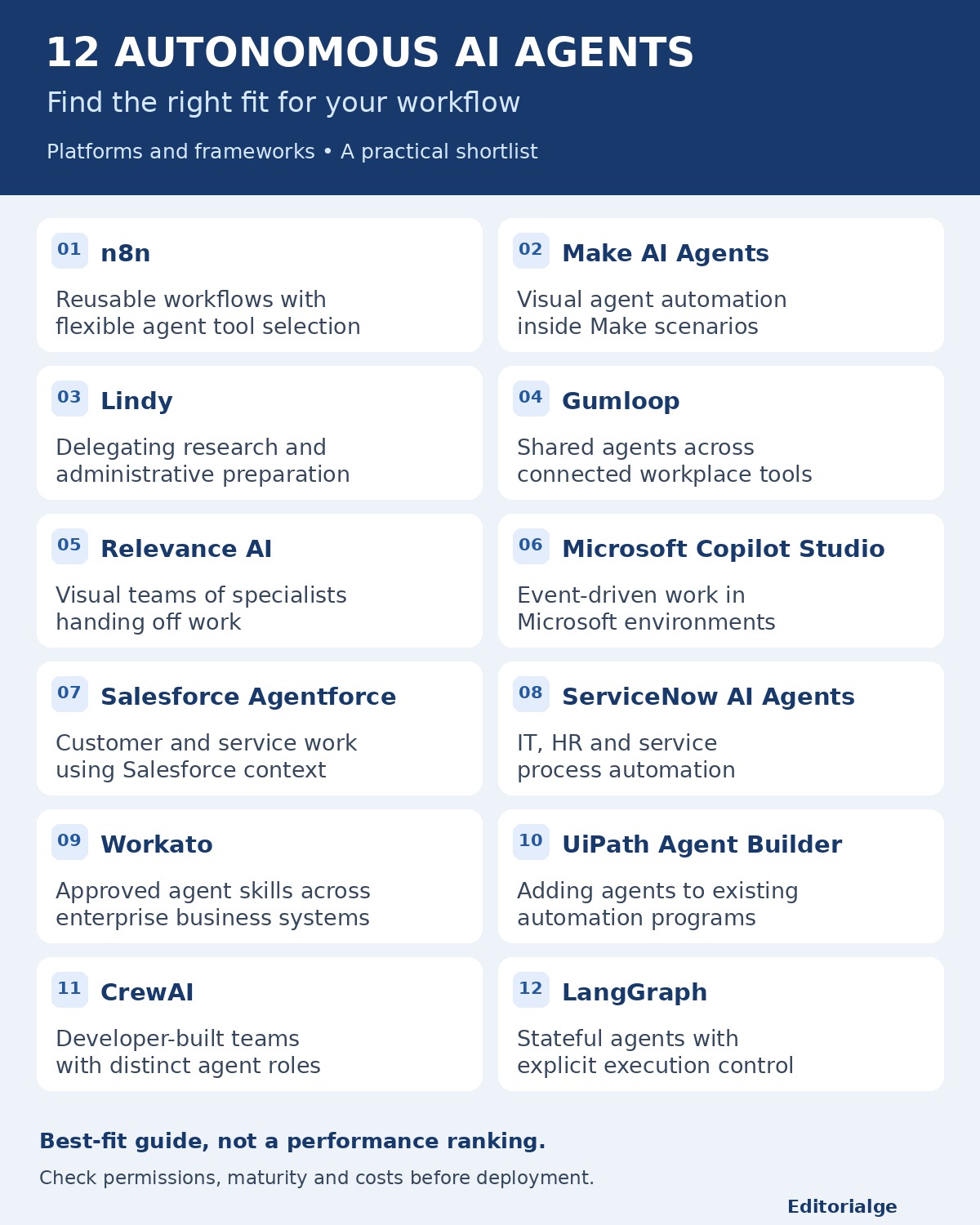
- For agents working alongside existing automation, start with n8n or Make.
- For business users delegating research and administrative work, examine Lindy and Gumloop.
- For visual teams of specialist agents, consider Relevance AI.
- For an established enterprise stack, evaluate Microsoft Copilot Studio, Salesforce Agentforce, ServiceNow AI Agents, Workato, or UiPath in the context of your existing systems.
- For a custom application your engineers will operate, compare CrewAI with LangGraph.
The entries are grouped by implementation approach, not ranked from strongest to weakest. “Best” means a strong fit for the stated use case; it does not mean every product has been tested against every alternative.
How This List Was Selected
This research-based comparison draws on official product documentation, release notes, and product pages reviewed on November 12, 2026. Selection focused on tool execution, workflow integration, visibility into what happened, and the practical work required to operate an agent. No hands-on benchmark was performed. All workflow examples below describe possible designs, not tested results or customer case studies.
Strictly speaking, these are products for deploying or building autonomous agents. Some provide ready-to-configure assistants; others require you to construct the system. Autonomy also varies by action: an agent may research independently while waiting for approval before sending an email or changing a record.
A fixed sequence does not become agentic simply because one step calls a language model. If every action and branch can be specified in advance, conventional business process automation software may be the simpler starting point.
The 12 Options at a Glance
| Option | Type | Best-fit use | Decision-changing consideration |
|---|---|---|---|
| n8n | Workflow platform with agents | Combining reusable workflows with flexible tool selection | New Agents remain in preview; cloud and self-hosted setup differ |
| Make AI Agents | Visual agent builder | Agentic steps inside Make scenarios | New app is open beta; custom AI connections require a paid plan |
| Lindy | Business AI assistant | Delegating research and administrative preparation | Documented external-impact actions wait for approval |
| Gumloop | Business agent platform | Shared agents across connected workplace tools | Track credit consumption and trigger ownership |
| Relevance AI | Visual multi-agent builder | Specialists handing work to one another | Choose explicit routing where a handoff must always occur |
| Microsoft Copilot Studio | Enterprise agent builder | Event-driven work in a Microsoft environment | Authentication behavior depends on the agent experience |
| Salesforce Agentforce | Enterprise agent platform | Customer and service workflows using Salesforce context | Useful actions depend on configured data and business rules |
| ServiceNow AI Agents | Platform-native enterprise agents | IT, HR, and service processes | Requires process ownership and maintained platform records |
| Workato | Enterprise agent and integration platform | Agents executing approved skills across business systems | Integration design remains a substantial part of implementation |
| UiPath Agent Builder | Low-code enterprise agent builder | Adding agents to an established automation program | Agent logic and the surrounding automation need separate evaluation |
| CrewAI | Developer framework | Role-based agent teams within controlled workflows | Your team must build, test, and operate the application |
| LangGraph | Developer orchestration framework | Stateful workflows with explicit execution control | It supplies orchestration, not a ready-made business assistant |
1. n8n — Best for Combining Agents With Existing Workflows
n8n is worth shortlisting when your team already knows how information should move between systems but wants an agent to decide which approved operation to use. Its newer Agents capability can call workflows as tools, while a workflow can call an agent through the Message an Agent node. The established AI Agent node also remains available.
This separation lets you keep a record-update procedure tightly defined while allowing flexible investigation before that update. A support assistant could gather account context and prepare a response, then pass an approved change to a workflow with explicit inputs. Teams can reuse the same agent across supported channels and scheduled work.
The September 2026 announcement labels the new Agents experience as preview. It describes availability on current n8n Cloud versions and Community self-hosted installations with extra setup. One agent turn counts as one execution under the stated model. Separate model usage and operating costs still matter. Choose a more packaged assistant if nobody will own workflow maintenance.
2. Make AI Agents — Best for Visual Scenario Builders
Make suits teams that want to place agent reasoning inside a visual automation scenario. Its new AI Agents app gives agents instructions, knowledge, and tools; those tools can include modules, scenarios, MCP tools, and other agents. MCP is a protocol through which an agent can access tools exposed by another service.
Existing Make users can keep predictable processing in their scenarios and reserve agent decisions for variable inputs. In an intake workflow, a scenario could validate the incoming form, let an agent classify an ambiguous request, and route the result through defined handling paths. That gives the reasoning step a clear job.
The documentation identifies the new app as open beta, with functionality and pricing subject to change. Make’s AI Provider is available across plans; custom provider connections require paid plans. Familiarity with scenarios remains useful. If the task is a fixed transformation with stable rules, a normal scenario may offer a more straightforward way to debug it.
3. Lindy — Best for Supervised Business Delegation
Lindy is aimed at people who want to delegate work through a business assistant rather than assemble an orchestration framework. Its advertised roles include inbox and calendar work, customer support, research, and operational coordination. The relevant question is whether the assistant can access the approved information required for your particular job.
It offers a practical entry point for preparing work that a person will review. A useful first assignment could gather background for a meeting and prepare a follow-up draft. That is a useful degree of independence even when the final communication remains supervised.
Lindy’s current billing documentation says actions with outside impact, including sending email and updating tickets, wait for approval; approved read-only lookups do not. It should therefore not be described as an unrestricted unattended operator. Billing combines users with shared credits, and credit-consuming work pauses when the pool runs out. Its public plan labels differ across pages, so confirm the actual checkout terms before committing. For explicitly designed branching processes, examine a workflow builder.
Gumloop provides an agent workspace for business teams, with connected tools and examples such as account research and support triage. Its current positioning emphasizes agents and shared work, so describing it only as a visual flowchart builder misses an important part of the product.
Operational visibility is particularly useful when several people rely on the same agent. Gumloop’s release notes document agent analytics, visibility into tool calls, and per-chat credit thresholds that pause for approval. A revenue workflow could assemble account context and prepare a briefing for a salesperson without requiring the salesperson to maintain a custom agent application.
Shared agents need clear ownership of triggers, connected accounts, and spending. The November changelog includes fixes involving connector failures and re-enabled triggers, a reminder to test the exact integrations you depend on. Release notes are evidence of documented changes, not a reliability benchmark. If your priority is explicit application-level state management, a developer framework may be a better match.
5. Relevance AI — Best for Visual Teams of Specialist Agents
Relevance AI’s Workforce feature organizes multiple agents on a visual canvas. Its documentation distinguishes AI-directed handoffs from mandatory next steps and conditional routing. That distinction matters when one part of a process needs judgment but another must happen every time.
A team can give separate agents narrower responsibilities instead of asking one broad agent to do everything. In a research workflow, one agent could gather approved evidence, another extract structured findings, and a final stage check the output against a required format. The canvas helps make responsibilities and handoffs visible.
More agents introduce more places to lose context or repeat work. Use a mandatory transition when a validation stage must never be skipped, and reserve discretionary handoffs for cases where the next specialist genuinely depends on the input. An AI reviewer does not establish that a human has approved the result. Start with one agent unless splitting the responsibility makes failures easier to detect and correct.
6. Microsoft Copilot Studio — Best for Microsoft-Centered Operations
Copilot Studio supports agents that react to events in connected services. Instead of waiting for a chat message, an agent can respond when an appropriate trigger fires and call configured tools or topics. This makes it relevant to organizations already managing business processes in Microsoft’s ecosystem.
For example, a process could react to an incoming request, collect related information, and prepare an internal action for review. The operational advantage is connecting the agent to an existing environment of accounts, data, and administrative policies.
Authentication needs careful, experience-specific review. Microsoft’s standard event-trigger documentation describes maker credentials, which can give an agent access beyond the requesting user’s own permissions. Separate preview documentation for agents using the GitHub Copilot harness describes shared-agent scenarios with user authentication. Do not assume those behaviors are interchangeable. Confirm the experience being deployed and test under the actual intended identity. A familiar Microsoft interface alone does not establish appropriate data access.

7. Salesforce Agentforce — Best for Salesforce Customer Workflows
Agentforce is designed around agents taking action with business context. Salesforce presents service examples including investigating open cases, drafting follow-ups, escalating to specialists, retrieving customer history, and updating work orders. These are more specific buying criteria than a general promise of an AI employee.
Organizations that already maintain useful customer records in Salesforce can evaluate agents close to those records. A service workflow could identify the relevant case, gather its history, propose a next action, and hand an exception to a specialist. The value comes from combining contextual information with a permitted business action.
Those capabilities still require configured actions, usable records, and clear rules for exceptions. A missing account relationship or outdated policy can undermine a well-written response. Evaluate your actual service process and commercial package together rather than treating Agentforce as a standalone chatbot purchase. If the workflow spans many unrelated systems, compare an integration-centered option before deciding where the agent should run.
8. ServiceNow AI Agents — Best for Established Service Workflows
ServiceNow AI Agents are intended to operate within service processes across areas such as IT, HR, and customer service. AI Agent Studio supports customization, while AI Agent Orchestrator coordinates agents working toward a business objective. Documented tools include flow actions, subflows, scripts, and skills.
It is a logical candidate when the organization already maintains service records and process ownership in ServiceNow. An incident workflow could collect context, categorize a request, and prepare the next step for the responsible team. Building near existing service data may reduce the need to reconstruct that context in another application.
The business process must still be defined. Decide which cases an agent may handle, which actions require escalation, and who owns a stalled request. Agent orchestration cannot make incomplete records trustworthy. This option is harder to justify for a small team seeking only an occasional research assistant; its strongest fit is a service operation with an established platform and administrative capacity.
9. Workato — Best for Agents That Need Enterprise Integrations
Workato combines an integration platform with agents called Genies and a low-code Agent Studio. Its documented approach lets teams add approved skills, workflows, and integrations to an agent and ground its work in business information and policies.
This is useful when the difficult part is making an action work across several systems. An employee request could involve retrieving a record, checking the applicable policy, and preparing a change through an established integration. A reusable skill can give the agent a defined operation instead of broad, unspecific access.
Workato describes runtime authentication, role-based access, and action logs. These are documented platform capabilities rather than proof that a particular implementation is configured correctly. Mapping records, handling partial failures, and assigning integration ownership remain necessary work. Favor it when cross-system execution is central to the project; a lighter assistant may be sufficient when the task ends with a draft document and no complex system updates.
10. UiPath Agent Builder — Best for Existing Automation Programs
UiPath Agent Builder provides a visual canvas inside Studio for configuring agent instructions, tools, inputs, and outputs. Its starter patterns include ticket classification, document extraction, knowledge retrieval, and content generation. UiPath also describes platform support for evaluation, retries, and observability.
An organization already operating automations can assess agents as another component of that program. In a document process, an agent might interpret an ambiguous request before a defined automation performs a record update. That division gives the reasoning stage and the execution stage different responsibilities.
Evaluating the agent alone is insufficient. Test the entire path, including what happens when a tool cannot complete its action or a retry follows a partial update. A retry feature does not automatically prevent duplicate business changes. UiPath merits attention where an automation team can own that lifecycle. For a simple knowledge assistant, the surrounding platform may be more than the project needs.
11. CrewAI — Best for Developers Building Role-Based Agent Teams
CrewAI is a developer framework for coordinating agents rather than an employee-ready business application. Its documentation separates Crews, which are collaborating agents with roles and tools, from Flows, which manage state and execution around their work.
That model suits developers who want specialist agents to handle part of a larger controlled process. A workflow could place evidence extraction and drafting inside a Crew, while a Flow checks required fields and determines whether the output can advance. The framework’s guidance recommends starting production applications with a Flow.
Your team remains responsible for tool permissions, deployment, evaluation, and maintenance. Multiple agent roles also do not guarantee independent verification: agents can repeat the same unsupported assumption. Treat the framework and any managed enterprise offering as different procurement choices. If the desired outcome is a usable assistant next week and nobody will maintain an application, a packaged platform is a more realistic starting point.
12. LangGraph — Best for Explicit State and Execution Control
LangGraph is a low-level orchestration framework and runtime for stateful agents. Developers define shared state, processing nodes, and the connections between them. Its documentation emphasizes durable execution, persistence, streaming, and human-in-the-loop interaction, with deterministic and model-driven steps in the same graph.
It fits applications where the system must keep track of what has happened and resume a controlled process. An illustrative workflow might collect evidence, pause for a person’s decision, and continue from stored state. The implementation can make that transition explicit rather than burying the entire job in one long instruction.
LangGraph does not prescribe an agent’s prompts or architecture and is not a ready-made business assistant. Engineers must design the behavior and operate the surrounding application. LangChain is not required to use LangGraph, while related services such as LangSmith serve separate roles. Choose it for control you actually need, with development and operational capacity to support that choice.
How to Compare Costs Without Misleading Starting Prices
A seat, execution, credit, tool call, and model token are different billing units. Comparing headline subscription prices across these products would hide those differences. The table therefore compares implementation fit rather than pretending to provide an equivalent monthly cost.
Build a workload estimate with the same number of incoming jobs, average steps, review requirements, and failure assumptions for each candidate. Include subscription or platform charges, model usage, connected-service costs, infrastructure, and the time spent reviewing and repairing output. Developer frameworks also require engineering and operational work even when their software can be obtained without a license fee.
For a pilot, calculate cost per accepted result: total attributable pilot cost divided by the number of results that meet your acceptance criteria. Do not divide only by attempted runs. A cheap run that creates a duplicate ticket or an unusable report has not delivered the intended value.
If model usage dominates the bill, our guide to AI token optimization tools provides related context. Token reductions should still be evaluated alongside answer quality and the cost of retries.
A Practical Pilot for Autonomous AI Agents
Use a bounded support-intake workflow as an illustrative pilot: read a synthetic request, identify the account, retrieve an approved policy, draft a response, and prepare an internal ticket. Require human approval before sending the response. This is a proposed evaluation method, not a test conducted for this article.
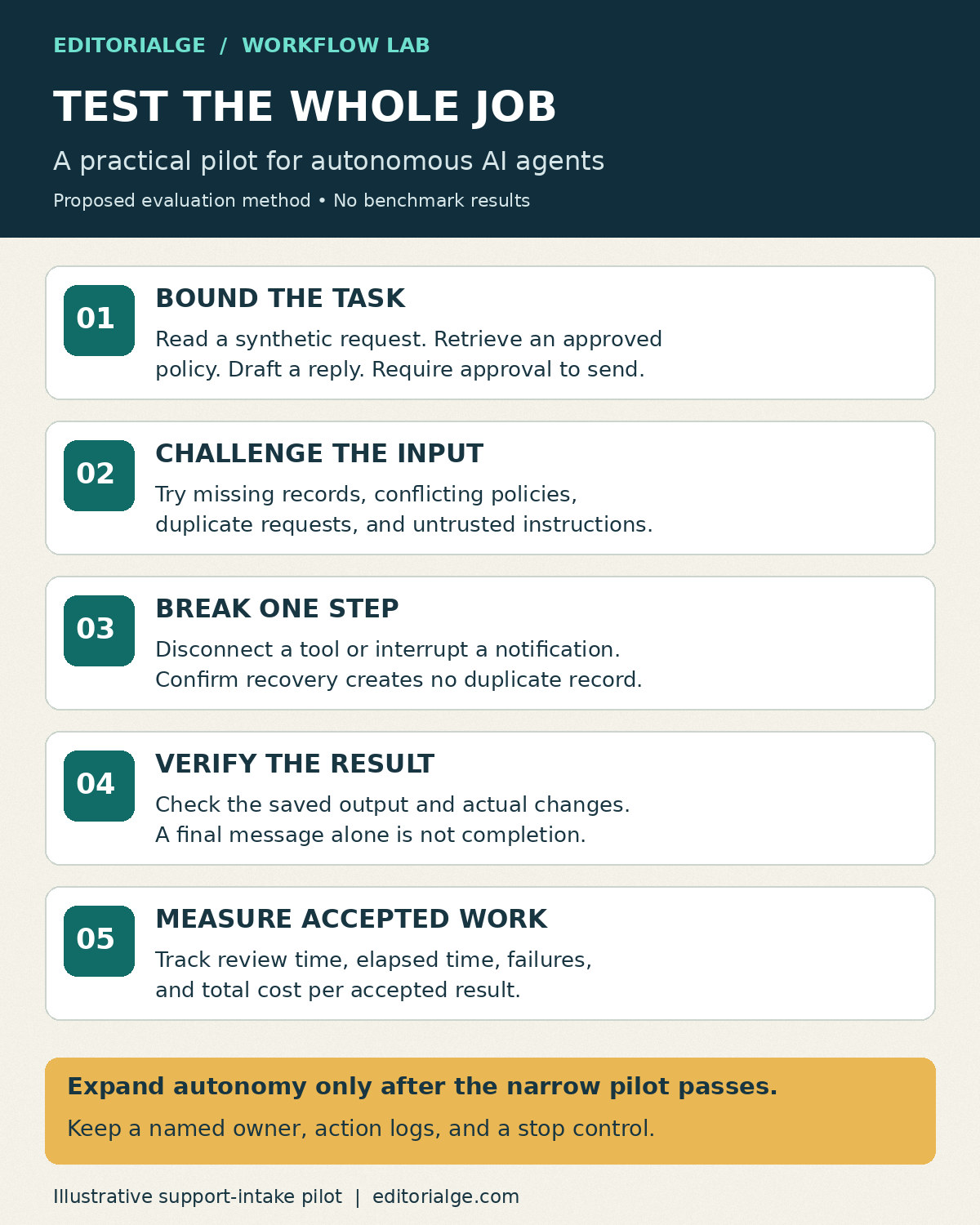
- Define success before selecting a product. Specify the required fields, acceptable sources, permitted changes, and conditions that require escalation.
- Prepare ordinary and difficult cases. Include a missing account, conflicting policy text, duplicate input, disconnected integration, and content containing instructions the agent should not follow.
- Run the same cases through each shortlisted implementation. Record tool calls, intermediate outputs, final changes, and reviewer corrections.
- Force a partial failure. If ticket creation succeeds but the final notification fails, confirm that recovery does not create a second ticket.
- Measure accepted results, review time, elapsed time, and total cost. Record late or stalled jobs separately from successful completions.
- Expand permissions only after the narrow workflow behaves acceptably. Keep an owner and a way to stop the automation.
Make the operating states visible: queued, running, awaiting approval, failed, and completed. “Completed” should mean the expected output was saved and checked, not simply that the model produced a final message. For recurring work, use a stable job identifier and a persistent record of the actual output location.
The NIST AI Risk Management Framework offers a broader structure for managing AI risks. It is background guidance, not a certification of any product in this list. In a pilot, translate that risk-management perspective into concrete ownership, access limits, evaluation, and monitoring.
For practical implementation guidance, the NIST AI RMF Playbook provides suggested actions around governing, mapping, measuring, and managing risk. Adapt those actions to the workflow and its owner rather than treating the playbook as a mandatory checklist.
Choose the Smallest System That Can Finish the Job
The most useful autonomous AI agents are the ones your team can operate reliably within a defined scope. Begin with a platform that fits your existing systems and the people who will maintain it. Use n8n or Make for workflow-centered building, packaged assistants for supervised delegation, enterprise platforms for established business processes, and developer frameworks when custom execution control is essential.
Shortlist two options, run the same bounded pilot, and compare accepted outcomes after review. Expand only when the agent can finish the job, show what it changed, and recover predictably when a step fails.