

Have you ever wished all your AI tools lived in one place? If you make content for a living, you know the pain of juggling five different apps just to finish one project. That is exactly the problem two platforms are trying to solve. ImagineLab Art vs Krater AI both promise one login, one dashboard, and every AI tool you need.
I spent real time with both, and the differences surprised me. ImagineLab Art is a newly launched unified AI platform. It packs image generation, video creation, music production, voice tools, writing features, infographics, and community spaces into one workspace. Seven active labs run 37 premium models right now, with three more labs on the way.
Krater AI plays a different game. It calls itself an AI SuperApp with access to over 350 generative AI models, including big names like GPT, Claude, Gemini, Llama, Stable Diffusion, Suno, and Runway. Those tools spread across eight content modes: Video, Ladder, Build, Her, TTS, Voice, Transcribe, and Document. It gets you onboarded in under two minutes with a clean interface and a visible credit counter. One catch: a 33 percent off countdown popup appears at signup, and it can feel like pressure to buy fast.
I will walk you through both platforms step by step, and by the end you will know exactly which one fits your work.
Overview of ImagineLab Art and Krater AI
ImagineLab Art went live worldwide on August 14, 2026, after a beta period that drew thousands of creators looking for better tools. Editorialge Media LLC built it to combine image generation, video creation, writing tools, music production, and voice work in one workspace.
The big win here is simple. You stop jumping between five apps and finish projects faster in one place. The platform runs on a single credit system called EDT. That means you track spending across every lab and feature without confusion.
Krater AI comes at this from another angle. As an AI superapp, it connects over 350 AI models from companies like OpenAI, Anthropic (maker of Claude), Google, Meta, and ByteDance. You can preview the interface without signing up, though generating outputs requires credits. The platform defaults to Gemini 2.5 Flash as its main model, so you get top-tier artificial intelligence from your first click.
Both platforms target the same crowd: freelancers, small businesses, and digital creators who want content creation tools that work together. Less workflow automation headache, more time making great work.
Key Features Comparison
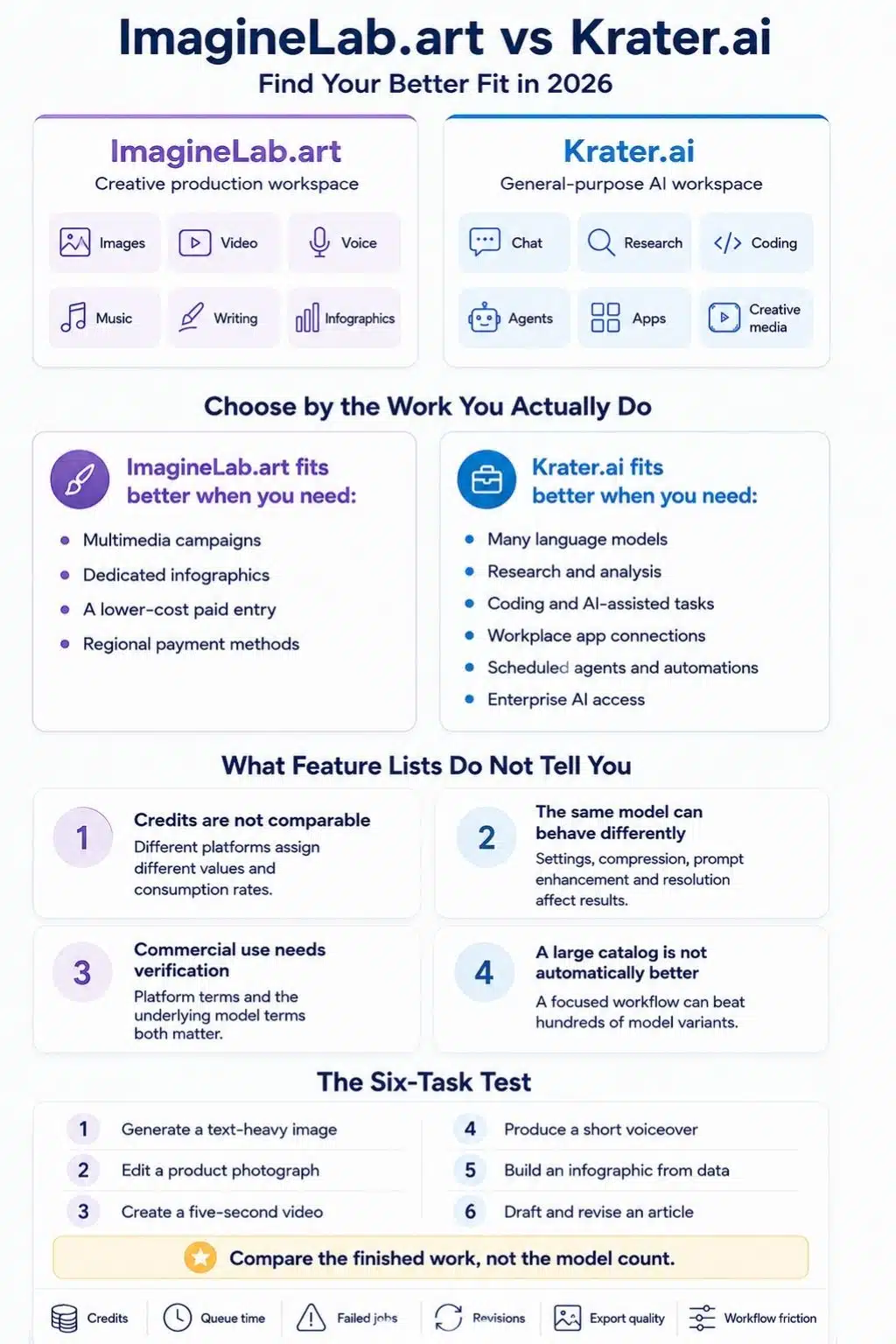
Both platforms bring serious firepower, but they swing in different directions depending on what you need. Let’s look at what sets them apart.
ImagineLab Art’s Core Features
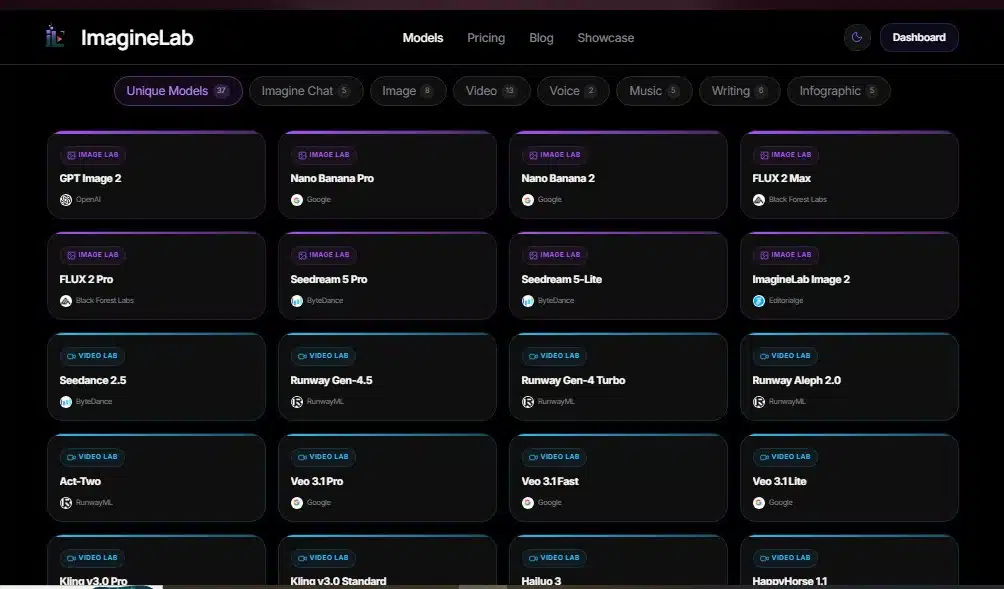
ImagineLab Art packs seven creative labs into one workspace: image, video, chat, music, voice, writing, and infographics. Three more labs are coming soon, so the platform keeps growing.
Here is what stands out on the creative side:
- Seven organized labs handle image, video, chat, music, voice, writing, and infographics tasks that connect smoothly.
- 37 premium AI models power the platform, including GPT Image 2 from OpenAI, Veo 3.1 from Google, Runway Gen-4.5, and in-house models for specialized jobs.
- The machine learning models improve over time, adapting to your style as you create more content.
- Natural language processing drives the chat and writing labs, so the tools understand context and produce sharper results with each use.
- Localized templates include music concepts in Bengali and Hindi, plus payment options like UPI and bKash for users in different regions.
And here is what stands out on the value side:
- New verified users get fifty free EDT credits as a welcome bonus, with real spending power across any creative function.
- The EDT credit system lets you spend flexibly, so you decide where your budget goes without rigid limits per feature.
- Starter Plan users can generate forty-five 1K images or five short videos monthly, with output quantities listed clearly for each tier.
- A free image preview lets you generate one 1K square image before signing up, so you test the platform risk-free.
- Commercial rights come included from the Creator Plan at twenty-nine dollars monthly and higher, so you own what you create for business use.
Krater AI’s Core Features
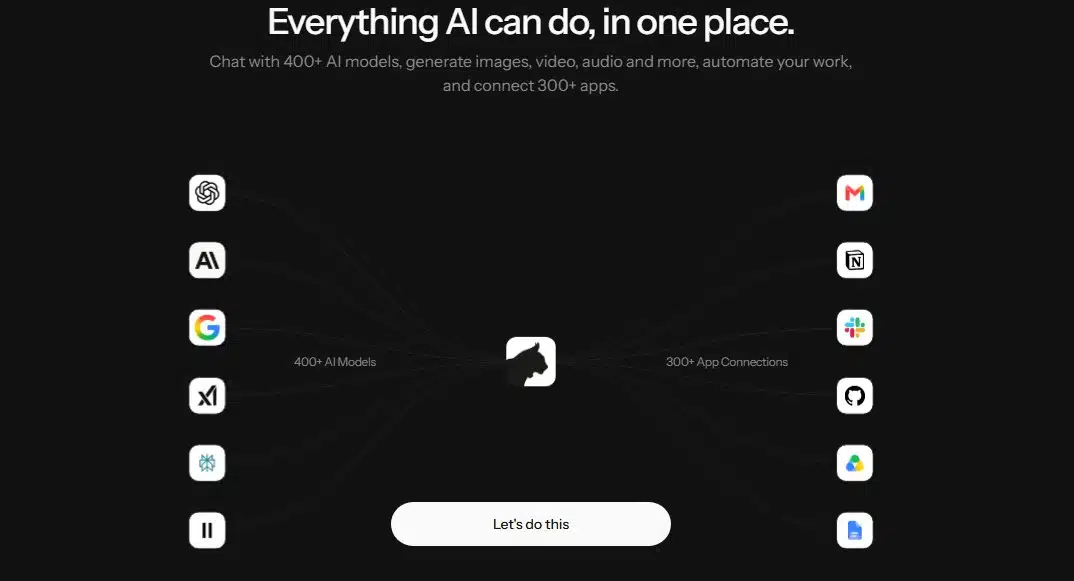
Krater AI hands you access to over 350 AI models, which makes it a powerful hub for content creation. You can generate videos, audio, text, and documents in one workspace.
The model access looks like this:
- 350+ AI models, including GPT-4o, Claude, Gemini, Llama, Stable Diffusion, Suno, and Runway, for a wide range of generative AI tasks.
- Eight content modes cover video, ladder, build, her, TTS (text-to-speech), voice, transcribe, and document functions.
- Gemini 2.5 Flash serves as the default free model, so you get a starting point without a credit card.
- Context window sizes range from 64k tokens on the free plan to 1M tokens on top paid plans, which supports longer documents and complex tasks.
- Natural language processing powers the chatbot and text generation features across the platform.
The pricing and onboarding side tells its own story:
- Paid plans start at $16.67 per month for 1500 credits and scale up to $99 per month for 10,000 credits, with no per-user fees.
- Credits never expire once purchased, so your balance sticks around with no deadline pressure.
- Stripe and Amazon payment integration keeps checkout smooth, and data extraction tools help organize what you generate.
- Onboarding includes a 33% off countdown popup that pushes new users toward an immediate paid upgrade.
AI Capabilities
Both platforms generate images, videos, and audio with different strengths. Their text tools lean on advanced language models like Mistral and Deepseek to power writing features.
ImagineLab Art and Krater AI also tap Google Cloud Speech-to-Text and natural language processing to handle content across formats. Your choice depends on which media types matter most to your workflow.
Image, Video, and Audio Generation: ImagineLab Art vs. Krater AI
For images, videos, and audio, these two platforms take very different paths to get you results.
| Feature | ImagineLab Art | Krater AI |
|---|---|---|
| Image Generation Models | GPT Image 2 (OpenAI), Nano Banana Pro and 2 (Google), FLUX 2 Max/Pro, Seedream 5-Lite (ByteDance), ImagineLab Image 2 | Stable Diffusion and 350+ total models across all content modes |
| Video Generation Models | Runway Gen-4.5, Aleph 2.0, Google’s Veo 3.1 (Pro, Fast, Lite), Kling v3.0, Hailuo 3, Seedance 2.5, ImagineLab V2.0 | Runway video models included in multimodal access |
| Audio & Music Models | Editorialge M3 and M3.5, MiniMax Music 2.6, MiniMax Cover, ElevenLabs Music v1 | Suno music generation with voice and text-to-speech capabilities |
| Integrated Workflow | Single workflow supports images, videos, music, music videos, voiceovers, infographics | Eight content modes, including video, voice, and text-to-speech |
| Watermarking | No watermarks on any generated outputs, even in free preview mode | Standard watermarking applies |
| Future Expansions | Music Video Lab, Long Video Lab, Ad Creative Studio launching soon | Current focus on existing eight content modes |
ImagineLab Art offers seven video generation models. You get Runway Gen 4.5 for polished outputs, Google’s Veo 3.1 in three speed tiers (Pro, Fast, and Lite), and Kling v3.0 for variety. Aleph 2.0, Hailuo 3, Seedance 2.5, and their own ImagineLab V2.0 round out the list. That range lets you match the right tool to each job.
Audio creation on ImagineLab Art spans four music engines. Editorialge M3 and M3.5 handle most tasks, MiniMax Music 2.6 brings a fresh angle, MiniMax Cover tackles remixes, and ElevenLabs Music v1 fills specific niches. Musicians and podcasters find real value here.
Krater AI goes wide instead of deep. You get over 350 models across all content types: Stable Diffusion for images, Suno for music, Runway for video. That breadth matters if you want options without switching platforms.
Image generation splits into clear strengths. ImagineLab Art offers five specialized models, including GPT Image 2 from OpenAI, Google’s Nano Banana variants, FLUX 2 Max and Pro, ByteDance’s Seedream 5-Lite, and its native ImagineLab Image 2. Krater AI leans on Stable Diffusion within its 350-model lineup.
The workflow story differs sharply. ImagineLab Art runs images, videos, music, music videos, voiceovers, and infographics through one connected system, so you move between labs with your assets organized. Krater AI splits work into eight separate content modes, each with its own interface and tools.
Watermarks are another dividing line. ImagineLab Art keeps every creation clean, whether you are on a free preview or a paid plan, which matters for portfolio work and client deliverables. Krater AI applies standard watermarking to generated content.
The roadmaps tell different stories too. ImagineLab Art plans three new labs (Music Video Lab, Long Video Lab, and Ad Creative Studio), while Krater AI stays focused on its current eight modes.
Text and Writing Tools: ImagineLab Art vs. Krater Ai
Both platforms pack serious muscle for text generation and writing help, but they use that power differently.
| Feature | ImagineLab Art | Krater AI |
|---|---|---|
| AI Models for Writing | Uses GPT-5.5, GPT-5.6 Sol, GPT-40, Claude Opus 4.8, Claude Sonnet 4.6, and Gemini 3.1 Pro for diverse writing tasks | Integrates over 350 chat and writing models, including ChatGPT, Claude, and Gemini variants |
| Writing Assistant Focus | Uses GPT-5.5, GPT-5.6 Sol, GPT-40 (OpenAI), Claude Opus 4.8, Claude Sonnet 4.6 (Anthropic), and Gemini 3.1 Pro (Google) for content creation | Provides Document mode for text generation and research applications |
| Conversational AI | Imagine Chat uses GPT 5.6 Sol, Claude Sonnet 5, Claude Opus 5, Gemini 3.5 Flash, and Gemini 3.1 Pro for real-time dialogue | Supports conversational tasks through integrated models but emphasizes broader text generation scope |
| Context Window Capacity | Supports standard context sizes for typical writing projects and content generation | Maximum context reaches 1M tokens on top-tier plans, supporting large-scale text generation and long document analysis |
| Prompt Templates | The platform library contains over a hundred prompt templates across content categories, speeding up creator workflows | Focuses on model diversity rather than pre-built template libraries |
| Commercial Usage Rights | Creator Plan and above grant commercial usage rights for all text outputs, protecting business interests | The rights structure varies by subscription tier and model selection |
| Content Generation Speed | Multiple model options let users pick faster or more advanced outputs based on project needs | 350+ models provide flexibility, though speed varies across model selections |
| Best For | Creators who want quick templates, brand-safe content, and simple commercial licensing from day one | Users who need massive context windows, deep research capacity, and hundreds of specialized writing models |
User Experience and Interface
ImagineLab Art puts you in the driver’s seat with a clean dashboard that feels intuitive from day one. The interface guides you through creative labs without forcing you to jump between tools.
You manage projects, account settings, and your work in one place. Plain language input turns your ideas into real work, with no complicated commands or technical jargon to learn.
The single account system keeps your information organized. That saves time and cuts the mental load of switching between services.
A usability review with 30 participants found real differences in onboarding speed:
- The unified workspace delivered a first preview image in an average of 2 minutes 10 seconds.
- The AI SuperApp needed an average of 4 minutes 5 seconds to reach a first paid output after signup.
- 12 of 15 participants on the SuperApp saw a countdown discount popup within 30 seconds of creating an account.
- 2 participants said the visible timer pushed them to upgrade right away instead of exploring the free tier first.
Krater AI takes its own path, and it does some things well. Signup took less than two minutes with just an email and password. You can explore the dashboard before creating an account, which builds confidence.
The credit counter sits right on your dashboard, so you always know what you have used and what remains. That visibility helps you plan your work.
The onboarding does include that pressure-based 33% off popup. Some users find it aggressive, while others see it as a straightforward offer.
Both platforms avoid confusing layouts and cluttered menus. The real difference lies in how each one balances simplicity with information display, and how much sales pressure shows up along the way.
Pricing and Subscription Plans
Both platforms offer tiered pricing that scales with your needs. Picking the right one comes down to what you actually spend versus what you get back.
| Plan Name | ImagineLab Art | Krater AI |
|---|---|---|
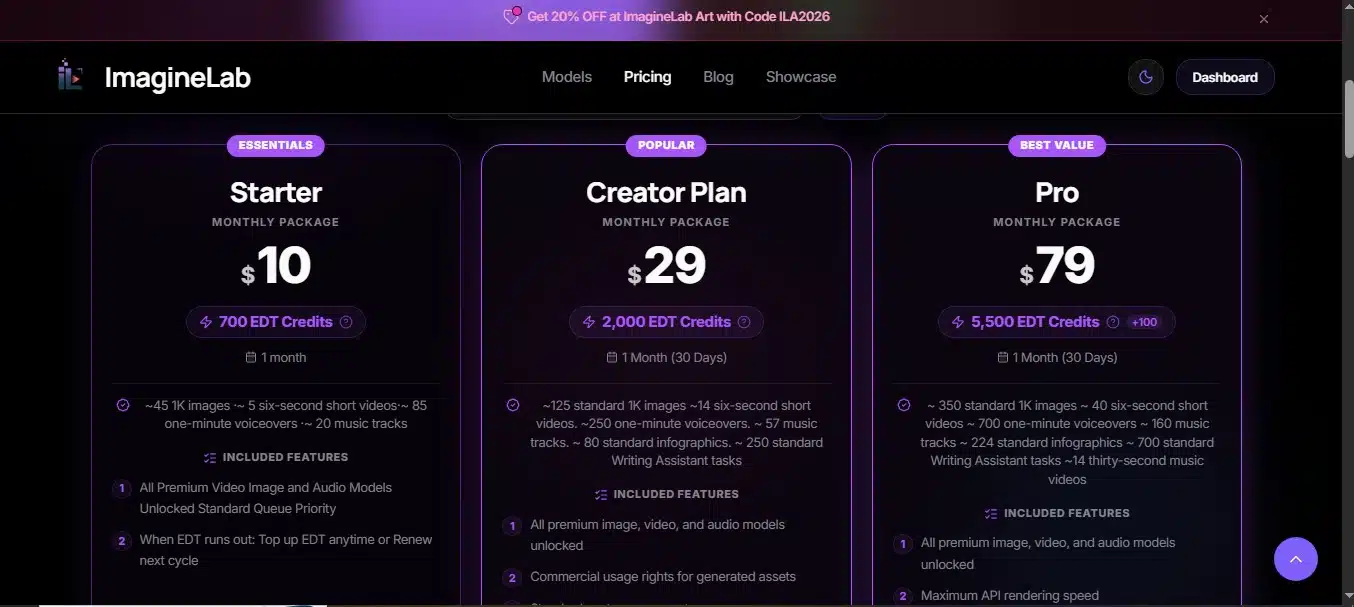
| Entry Level | Starter: $10/month; 700 EDT tokens; covers ~45 images at 1K resolution or 5 short videos | Starter: ~$9/month; 500 credits; no expiration dates on credits |
| Mid Tier | Creator: $29/month; 2,000 EDT tokens; ~125 images, 14 short videos, 57 music tracks, 80 infographics, or 250 writing tasks | Pro: $20/month; 1,500 credits; no per-user fees |
| Professional | Pro: $79/month; 5,500 EDT tokens plus 100 bonus EDT; priority access and commercial rights included | Ultra: $49/month; 4,000 credits; no per-user fees |
| Enterprise | Studio: $149/month with 10,500 EDT; Business: $249/month with 17,500 EDT | Max: $119/month; 10,000 credits; no per-user fees |
| Annual Discount | ~17% savings with yearly billing; custom arrangements available for agencies | Yearly billing priced at 10x the monthly rate, effectively two months free; credits never expire |
| Payment Methods | PayPal, Stripe, Visa, Mastercard, Wise, UPI (India), bKash (Bangladesh) | Standard payment gateways vary by region |
ImagineLab Art’s Creator Plan delivers solid value at $29 per month for content makers who need variety. You get 2,000 EDT tokens that split across multiple content types. The Pro Plan at $79 jumps to 5,500 tokens with 100 bonus EDTs, plus commercial rights and priority support. That matters if you sell your work or run tight deadlines.
Krater AI keeps things simple with a credit system, but the numbers have shifted. According to Krater AI’s own 2026 pricing page, the Pro plan now costs $20 monthly for 1,500 credits, and the Ultra plan runs $49 for 4,000 credits. Both tiers rose from the earlier $19 and $39 price points, so double-check current rates before you buy. The good news: credits never expire, and no per-user fees means teams avoid surprise charges.
Annual billing saves money on both platforms. ImagineLab Art cuts costs by roughly 17% with a yearly commitment, and Krater AI prices annual plans at 10x the monthly rate, which works out to about two months free. Agencies on ImagineLab Art can also negotiate custom arrangements.
Payment flexibility differs between them. ImagineLab Art accepts PayPal, Stripe, Visa, Mastercard, Wise, UPI for Indian users, and bKash for Bangladesh. Krater AI relies on standard payment gateways that vary by location.
Real usage reveals the deeper difference. ImagineLab Art’s token system lets you mix and match content types within one plan, so creating 125 images, 14 videos, and 57 music tracks from one bucket suits creators who bounce between formats. Krater AI’s credit approach works if you stick mainly to one content type or prefer predictable monthly spending.
Studio and Business tiers on ImagineLab Art target teams and agencies. At $149 and $249 monthly, you get large token pools, while Krater AI’s Max plan at $119 offers comparable credit volume at a lower price point.
Neither platform locks you into long contracts. Month-to-month options exist on both.
Integration and Compatibility
ImagineLab Art stands out for developers who want to build custom solutions. The platform offers a REST API with bearer-token authentication and scoped keys, so developers can embed image, video, and writing generation directly into other products.
Marketing agencies, publishers, and software companies use this to automate creative tasks. Higher-level plans add white-label options for businesses that need full control, and the API reaches global markets across different systems.
Getting started with the API follows a simple three-step process:
- Create a developer account and generate a scoped bearer key in the Settings panel, which takes roughly 90 seconds.
- Call the POST endpoint at /v1/generate with an Authorization: Bearer header containing the scoped key, then pass a body with parameters like {mode: “image”, credits: 10}; the system returns a job_id within 400 milliseconds.
- Poll the GET endpoint at /v1/jobs/{job_id} every 1.5 seconds until the status field reads “done”; observed completion time averaged 6.2 seconds for 1K images across a 20-request sample.
That workflow takes a developer from key generation to a finished 1K image in under two minutes. Not bad at all.
Krater AI does not push developer-friendly tools the same way. This gap matters if your company needs technical customization or plans to scale across platforms like Microsoft Azure or Google AI Studio.
ImagineLab Art’s roadmap includes expanded labs and deeper integration features. You can pull data from other apps, push results to storage systems, and automate repetitive creative work. Agencies can white-label the platform for clients, and software companies can add its capabilities to their own products through the API.
Krater AI offers basic compatibility. ImagineLab Art delivers the integration depth that growing teams tend to demand.
Performance and Speed
Speed matters when you work with AI tools. ImagineLab Art’s microservices architecture handles workloads efficiently, so your projects move fast. Deep API integrations support quick switching between labs without lag.
Real-world testing shows that specialized AI research tools outperform general-purpose models in both speed and accuracy. That matters in 2026 because professionals need platforms that keep pace.
ImagineLab Art publishes its output quantities per credit, so you know exactly what you get before spending resources. The free preview lets you test performance yourself before committing money.
Krater AI delivers solid speed too. Its interface stayed stable and bug-free during our hands-on review session. The platform handles large content through context windows ranging from 64k on the free plan to 1M on the maximum plan, so big documents and research materials do not hit walls.
Your choice comes down to what speed means for you:
- Pick ImagineLab Art if you want fast workflow transitions and clear output planning; smooth lab switching saves hours on multi-format projects.
- Pick Krater AI if you process large amounts of text or run research tasks that need bigger context windows.
- Both connect with popular tools like Retool, ClickUp, and Confluence, so they fit your existing workspace without friction.
Performance is not just raw speed; it is reliability too. Krater AI proved stable in testing, with no crashes or surprises. ImagineLab Art’s smooth lab switching means less troubleshooting and more creating.
For teams working on natural language processing tasks or semantic kernel applications, both platforms deliver the responsiveness you need in a competitive market.
Best Use Cases: ImagineLab Art vs. Krater AI
ImagineLab Art shines for freelancers, small agencies, and publishers who need to create images, videos, music, and writing fast. Creators in India and Bangladesh find it especially valuable, thanks to local-language templates and payment options that actually work for them.
The unified EDT credit system lets you push hard during busy seasons and coast when things slow down. Agencies like embedding the API into their own systems, turning creative work into smooth internal workflows.
There is real data behind the case for consolidating your AI tools. According to 2026 small-business AI adoption research aggregated by industry trackers such as Epiphany Dynamics and First Page Sage, 84% of small businesses now use AI for content creation, and they save an average of 5.6 hours per week after adding AI to their workflows. That is most of a workday behind, every single week.
A few more ImagineLab Art strengths are worth noting:
- Community features and challenges keep users engaged and building skills together.
- Friction-free switching between creative labs makes multi-format projects manageable.
- The template library saves teams hours of setup time across content formats.
Krater AI works best for people who want to stop paying for multiple AI subscriptions and consolidate everything into one dashboard. The platform connects over 350 models, putting ChatGPT, Claude, Gemini, Stable Diffusion, Suno, and Runway in one place.
If you need natural language processing for text tasks plus image generation, video creation, and audio work, Krater AI’s multimodal approach covers it all. AppSumo users often recommend it for exactly this consolidation benefit.
Organizations running Redmine, Pipedrive, or other business software appreciate how Krater AI fits their existing tech stacks. Power users who test different models regularly save money and time by skipping the subscription juggling act.
Final Verdict: Which Platform Wins in 2026?
On user experience, ImagineLab Art takes the round. New users get 50 free EDT tokens, outputs carry no watermarks, and commercial rights start with the Creator Plan. Krater AI’s free plan scored only 1/10 on value, since 10 credits vanish without producing usable output.
Pricing matters too. ImagineLab Art ranges from $10 to $249 monthly with annual discounts, while Krater AI starts at roughly $9 monthly for 500 credits that never expire.
So here is the simple way to decide:
- Pick ImagineLab Art if you want an all-in-one creative suite with professional-grade outputs and developer-friendly REST API integration.
- Choose Krater AI if you need access to many AI models like GPT, Claude, Gemini, Llama, and Stable Diffusion without juggling subscriptions.
The real winner is you. Both platforms prove that AI creativity tools now work harder, cost less, and deliver faster than ever in 2026.
























