In competitive gaming, speed isn’t everything, but it sets the definitive baseline for every single engagement. You can have the best tactical map strategies in the world, but if your physical execution lags behind your quick decision-making, you are dead before you can input a counter-play. Finding ways to systematically improve gaming reflexes isn’t about chasing empty shortcuts; it’s about rewiring your cognitive processing pathways to transform conscious effort into pure, unthinking muscle memory.
To truly scale the competitive ladder, players need a deliberate training framework that separates raw reaction speed from contextual game mechanics, measures performance objectively, and isolates structural errors.
Why You Must Train Processing Speed to Dominate High-Stakes Matches
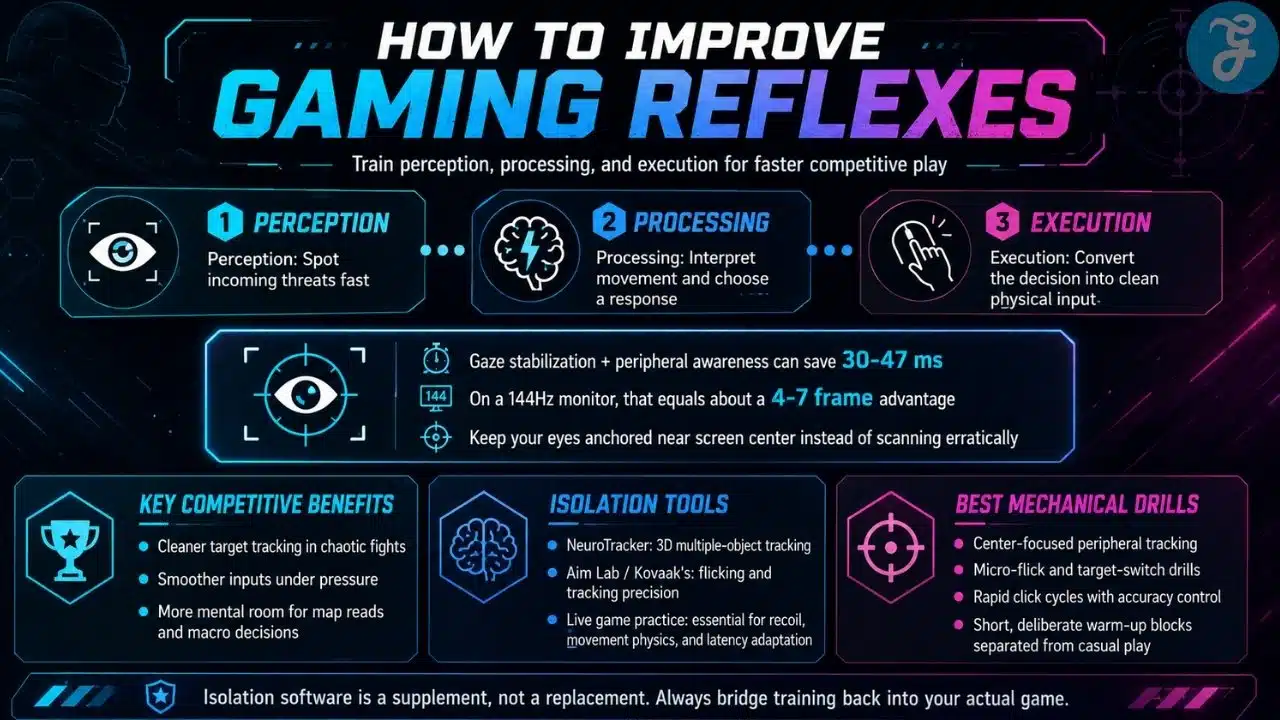
Your reaction time is essentially your ultimate buffer against the unexpected. When an opponent swings a tight corner or fires a surprise ultimate ability from the fog of war, your nervous system initiates a multi-stage race against the clock involving perception, processing, and muscle execution.
To truly improve gaming reflexes, you have to train your brain to optimize that internal processing window. High-tier esports athletes rely heavily on gaze stabilization rather than scanning erratically across the screen with their eyes. By training your eyes to remain anchored near the center of your monitor while using your peripheral vision to flag incoming movement, you can cut your mechanical execution lag by up to 30 to 47 milliseconds. On a standard 144Hz competitive monitor, that simple cognitive shift translates into a massive 4-to-7-frame advantage over your opponent.
Key Competitive Benefits
-
Decisive micro-choices: Executing clean, accurate target tracking even when the screen is flooded with chaotic particle effects.
-
Adrenaline management: Keeping your physical inputs smooth and steady when your heart rate spikes during late-round clutch scenarios.
-
Strategic headroom: Reducing the mental energy required for physical mechanics, freeing up your brain to analyze macro map rotations.
Core Mechanical Drills and Isolation Strategies
Achieving elite processing speeds requires separating your mechanical warm-ups from your normal casual play. Running deliberate, isolated exercises allows you to hyper-focus on specific neurological pathways without the distraction of overall match stress.
How Virtual Simulation and Software Tools Improve Gaming Reflexes
Modern software packages make it easy to isolate the visual and physical components of your reactivity. Specialized cognitive-motor platforms allow players to push their perceptual boundaries in controlled environments before stepping into a live competitive lobby.
A Note on Simulation Environments: Applications like NeuroTracker specialize in 3D multiple-object tracking to expand your peripheral awareness, while trainers like Aim Lab or Kovaak’s isolate micro-flicking and tracking precision. However, remember that isolation software is a supplement, not a replacement. You must regularly bridge the gap by practicing directly inside your live game engine to account for specific movement physics, internal weapon recoil, and network latency.
Benefits of Targeted Isolation Drills
-
Locking in automatic, subconscious spatial tracking without active cognitive drag.
-
Conditioning your wrist and fingers to maintain micro-accuracy during rapid direction changes.
-
Strengthening neural pathways through hyper-repetitive, high-intensity click cycles.
Genre-Specific Applications of Mechanical Pacing
A rapid click means nothing if it isn’t grounded in the context of your specific game. Every major esports genre demands a completely different physical output and cognitive processing loop.
Technical Demands by Genre
-
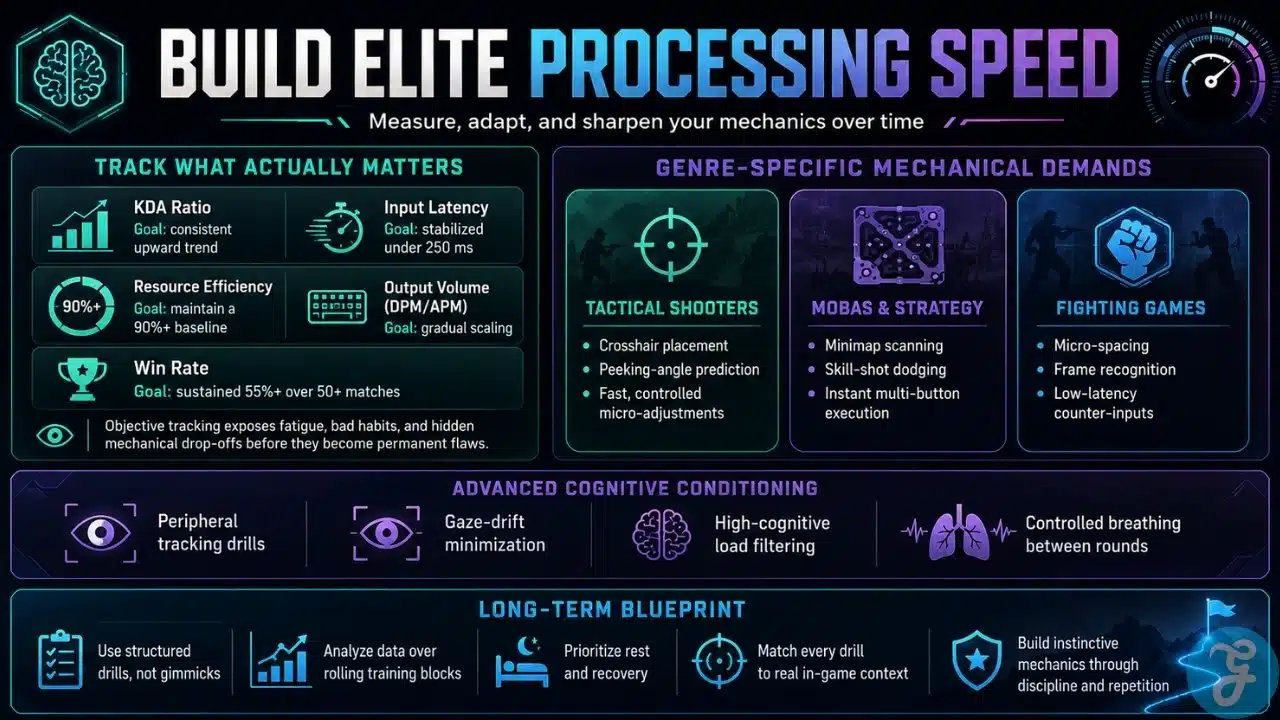
Tactical Shooters: Maintaining perfect, height-adjusted crosshair placement while predicting common enemy peeking angles based on map geometry.
-
MOBAs & Strategy: Continuous minimap scanning, frame-perfect skill-shot dodging, and instant execution of complex multi-button ability combinations.
-
Fighting Games: Micro-spacing inside tight neutral zones, recognizing exact animation startup frames, and executing precise, low-latency counter-inputs.
Tracking Progress and Performance Trends
You cannot systematically optimize what you fail to mathematically measure. Relying on gut feeling or simple win/loss streaks will keep you trapped on a performance plateau. Serious development requires leveraging integrated telemetry logs and third-party analytical suites to track your micro-metrics over a large, rolling sample size.
The performance matrix below outlines the fundamental data categories and target baselines that competitive players use to track structural mechanical growth over long-term training blocks.
| Metric | Tooling | Tracking Methodology | Target Goal |
| KDA Ratio | In-game dashboard | Monitoring kill, death, and assist distributions per match block | Consistent upward trajectory |
| Input Latency | Telemetry logs / External apps | Measuring time between visual stimulus presentation and physical switch activation | Stabilized under 250ms |
| Resource Efficiency | Post-match telemetry | Evaluating accuracy metrics like last-hit percentage or shot precision | Maintaining a 90%+ baseline |
| Output Volume (DPM/APM) | Post-game combat logs | Assessing total damage or actions per minute during high-intensity team fights | Gradual, incremental scaling |
| Win Rate | Analytical tracking networks | Comparing global win percentages over a rolling 50+ match sample size | Sustained 55%+ baseline |
Analyzing these data sets prevents you from practicing blindly, exposing hidden mechanical drop-offs caused by hidden fatigue or bad alignment habits before they turn into permanent muscle memory flaws.
Advanced Cognitive Conditioning and Gaze Controls
Once your fundamental input mechanics are solid, you can layer on advanced physiological and cognitive conditioning techniques to keep yourself ahead of the evolving competitive meta:
-
Peripheral tracking drills: Purposely focusing your eyes on a dead-center point while using software to identify and react to secondary targets creeping in from the margins of your vision.
-
Gaze-drift minimization: Using software overlays or conscious monitoring to ensure your eyes aren’t jumping tracking lines, saving precious milliseconds spent on eye transit time.
-
High-cognitive load filtering: Training your mind to process vocal team callouts and map changes without allowing the verbal noise to interrupt your physical micro-mechanics.
-
Controlled breathing patterns: Utilizing box-breathing methods between rounds to actively lower your heart rate, preventing muscle tremors during high-stakes endgames.
The Long-Term Blueprint for Elite Processing
Ultimately, the choice to improve gaming reflexes shouldn’t rely on chasing trendy gimmicks or overhyped gaming peripherals. Lasting improvement is the product of a slow, structured, and highly disciplined training methodology. By blending deliberate, isolated reflex drills with rigorous data analysis, proper physical rest, and tight game-specific context, you build a resilient mechanical foundation. This slow mastery of the core fundamentals is what gives serious competitors the sharp, instinctive edge needed to dominate the ladder.