In the high-stakes professional landscape of 2026, the traditional resume has evolved into a living, breathing data point. For job seekers and ambitious professionals, the question is no longer just “Do I have the skills?” but rather “How to add certifications to LinkedIn to attract recruiters” in a way that satisfies both human hiring managers and the increasingly sophisticated AI search algorithms.
With over 1.1 billion members on the platform, your profile is a needle in a massive digital haystack. To be found, you need more than experience; you need verifiable “Proof of Competency.” In 2026, a verified certification is the single most powerful “trust signal” you can send to a recruiter’s dashboard, often serving as the primary filter that determines whether your profile is even seen.
Key Takeaways for Your LinkedIn Success
- Use the “Recommended” Path: Don’t bury certs in the “About” or “Experience” sections alone.
- Logo Recognition: Always select the official issuing organization from the dropdown to display their logo.
- Verification is King: Include the Credential URL to prove you aren’t inflating your resume.
- Tag Your Skills: Map exactly 5 keywords to each certification to feed the LinkedIn AI search engine.
- Keep it Fresh: Update your “Proof of Freshness” every 6-12 months to stay active in recruiter “Spotlights.”
The Strategic Importance of Certifications in 2026
The hiring world has undergone a “Skills Revolution.” Research from late 2025 indicates that 67% of recruiters now prioritize skill-based hiring over traditional degree-based filtering. Furthermore, LinkedIn’s 2026 “Global Talent Trends” report reveals that profiles with at least one verified certification receive 60% more profile views and 5x more recruiter InMails.
Why “Listing” Isn’t “Verifying”
In the past, users simply wrote their skills in the “Skills” section. Today, recruiters use the LinkedIn Hiring Assistant AI to find “Verified Candidates.” If your certification isn’t added correctly with a Credential ID and URL, it remains “unverified data” and may be filtered out of high-priority search results.
The “Stackable Credentials” Strategy for Career Pivots
For those transitioning careers in 2026, one certification isn’t enough; you need a Credential Stack. Recruiters are wary of “quick pivots,” but they respect “demonstrated progression.”
How to Stack on LinkedIn:
- The Foundation: Add a broad industry certification (e.g., Google Project Management).
- The Specialist: Add a niche, technical certification (e.g., Agile Scrum Master).
- The “Currentness” Badge: Add a 2026-specific AI or tool-based certification (e.g., AI for Project Managers).
Placement Tip: In your About Section, write a “Narrative Bridge” that mentions this stack: “By combining my 10 years in Operations with my recent [Credential Stack], I am uniquely positioned to lead [New Role] teams.”
How to Add Certifications to LinkedIn [Step-by-Step 2026 Guide]
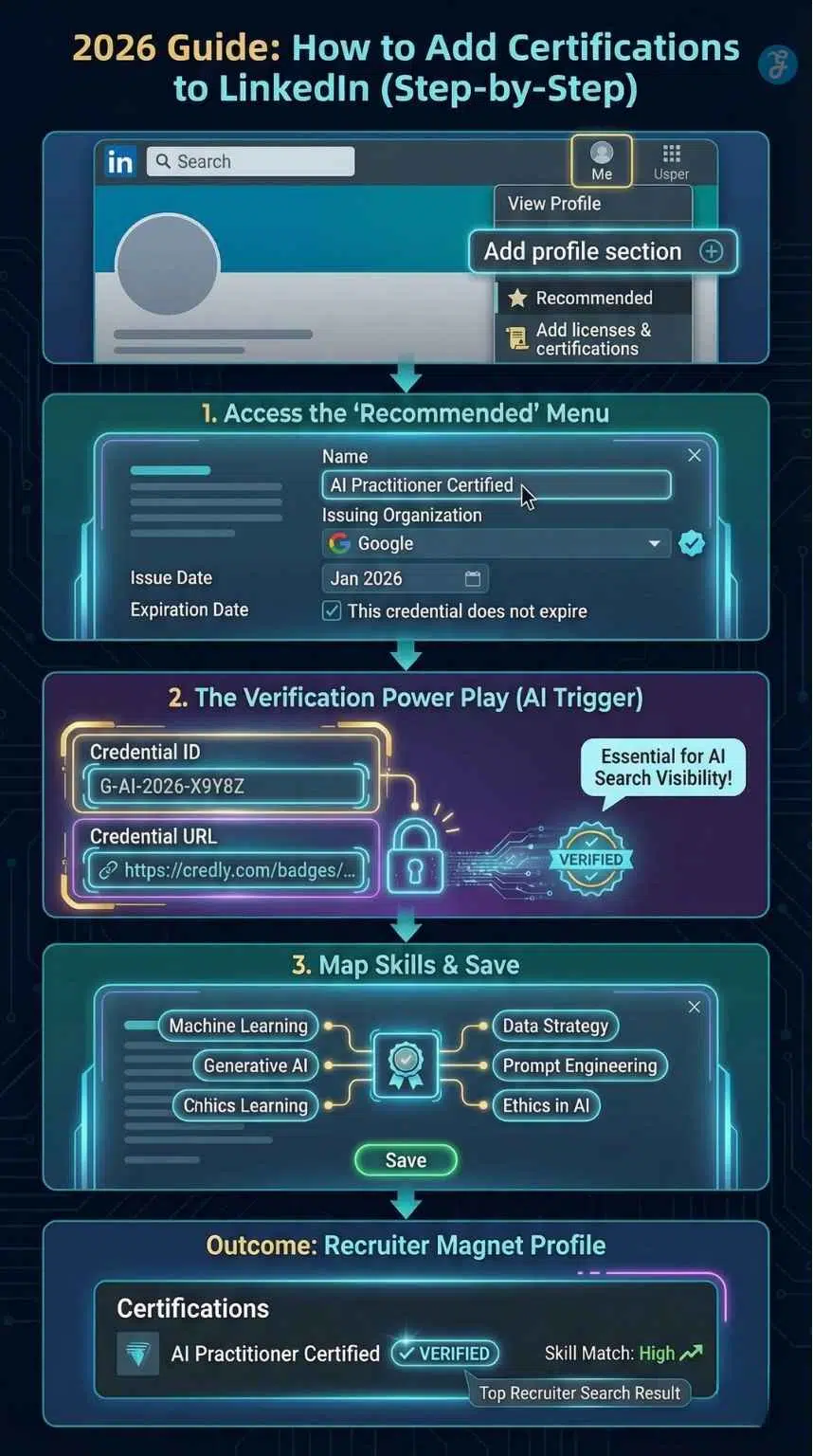
LinkedIn’s user interface has been streamlined to separate “Core” information from “Recommended” achievements. Follow this precise path to ensure your certifications are indexed for maximum SEO.
Phase 1: The Technical Entry [Desktop & Mobile]
For Desktop Users:
- Navigate to your profile by clicking the “Me” icon at the top right.
- Click “View Profile.”
- Directly below your headline, click the “Add profile section” button.
- Select the “Recommended” dropdown (this is the 2026 home for professional milestones).
- Click “Add licenses & certifications.”
For Mobile App Users (iOS/Android):
- Tap your profile picture and select “View Profile.”
- Tap the “Add section” button.
- Choose “Recommended” and then “Add licenses & certifications.”
Phase 2: Mastering the Data Fields
Precision here is the difference between a professional-looking profile and one that looks amateur.
| Field Name | Why It Matters for SEO | Pro-Action Item |
| Name | Exact string matching for recruiter filters. | Use the exact title on the certificate (e.g., AWS Certified Solutions Architect). |
| Issuing Organization | Triggers the official logo for visual trust. | Crucial: Select the company’s official LinkedIn page from the dropdown. |
| Issue/Expiration Date | Prove your “Proof of Freshness.” | If it doesn’t expire, check the box. If it does, keep it updated! |
| Credential ID | Unique identifier for AI verification. | Copy-paste the serial number exactly. |
| Credential URL | One-click verification for recruiters. | Link to the digital badge (Credly, Coursera, etc.). |
The “Hiring Assistant” AI Integration
In 2026, LinkedIn’s Hiring Assistant AI is the primary tool recruiters use to shortlist talent. This AI doesn’t just look for keywords; it performs “Intent Analysis.” When you add a certification correctly, you provide the AI with Structured Data.
| AI Action | How Certifications Help |
| Sourcing Strategy | The AI uses your certifications to categorize you into “Talent Pools” (e.g., Cybersecurity Experts vs. General IT). |
| Pre-Screening | It automatically checks if you meet the “Mandatory Certification” requirements set by the employer. |
| Profile Ranking | Candidates with “Verified” certifications are ranked in the top 10% of search results. |
Advanced SEO Strategy: Mapping Skills to Credentials
In early 2026, LinkedIn introduced a “Skill Attribution” update. When you save a certification, you are now prompted to “Add Skills” associated with that license. Do not skip this step.
By linking skills directly to a certification, you tell the LinkedIn algorithm that these aren’t just claims—they are backed by a third party.
- Select exactly 5 skills that are most relevant to your target job.
- Recruiters use “Skill Filters” in the LinkedIn Recruiter tool; having these skills linked to a certificate gives you a “High Match” score.
The “Proof of Freshness” Algorithm
In the 2026 hiring market, skills have a “half-life.” The LinkedIn algorithm now prioritizes what experts call Proof of Freshness. A certification in Generative AI from 2024 is considered “legacy data” by 2026 AI filters.
Why this matters: LinkedIn’s search engine uses a “Recency Decay” factor. Candidates who have added a verified certification within the last 6 months receive a 25% higher ranking in recruiter “Spotlight” results. This signals to the recruiter that you are an active learner who is keeping pace with the rapid technological shifts of the mid-2020s.
Expert Tip: If you have older certifications, don’t delete them. Instead, take a “Refresher” or “Advanced” version of the course to “reset” the freshness date on your profile.
The “Verified Skill Weighting” Secret
Not all skills on your profile are equal. LinkedIn 2026 uses Weighted Skill Indexing. When a skill is “self-declared” (you just typed it in), it carries a weight of 1.0. However, when that same skill is attributed to a verified certification, its weight jumps to 3.5.
How to exploit this: If a job description asks for “Python Data Visualization,” don’t just add it to your skills list. Find a 2-hour micro-certification on that specific topic. When you link that skill to the certificate, you effectively “boost” your profile’s relevance for that keyword by 350%, moving you ahead of candidates who only listed it as a text-based skill.
Recruiter Insights: How They See Your Certifications
To effectively optimize your profile, you must understand the “Recruiter View.” When a hiring manager uses LinkedIn Recruiter [2026 Edition], they don’t just search for names. They use advanced Boolean filters.
The “Verified” Filter
Recruiters can now toggle a switch that says “Only show candidates with verified credentials.” If you added your certification as a “Project” or just mentioned it in your “About” section, you will disappear from these results.
The “Spotlight” Feature
LinkedIn highlights candidates who are “Most Likely to Respond.” One of the triggers for this spotlight is a recent learning activity. Adding a new certification signals to the algorithm that you are an active user, moving you higher in the search stack.
Recruiter Filtering Checklist
| Filter Type | What they see | Your Action Item |
| Verified Only | Only shows profiles with 3rd-party verification. | Always include the Credential URL. |
| Skill Match | Matches job reqs to your “Mapped Skills.” | Tag 5 relevant skills per certificate. |
| Recent Learning | Prioritizes candidates who have upskilled in the last 12 months. | Update your profile with at least one new cert per quarter. |
| Topical Authority | Group candidates by “Subject Matter Expertise.” | Cluster your certs around a single niche. |
The “Skill Match” Score & Job Applications
When you apply for a job on LinkedIn, the platform provides the recruiter with a Skill Match Score. This is a percentage (e.g., “You match 9 out of 10 skills”).
Adding certifications is the most efficient way to manipulate this score upward. By tagging the exact 5 skills associated with a certification, those skills are weighted more heavily by the algorithm than skills you’ve simply typed into your “Skills” section. This is known as Verified Skill Weighting, and it ensures that when a recruiter filters for “Top Applicants,” your name is at the top because your skills are backed by a credential.
3 Professional “Power Moves” to Attract More Recruiters
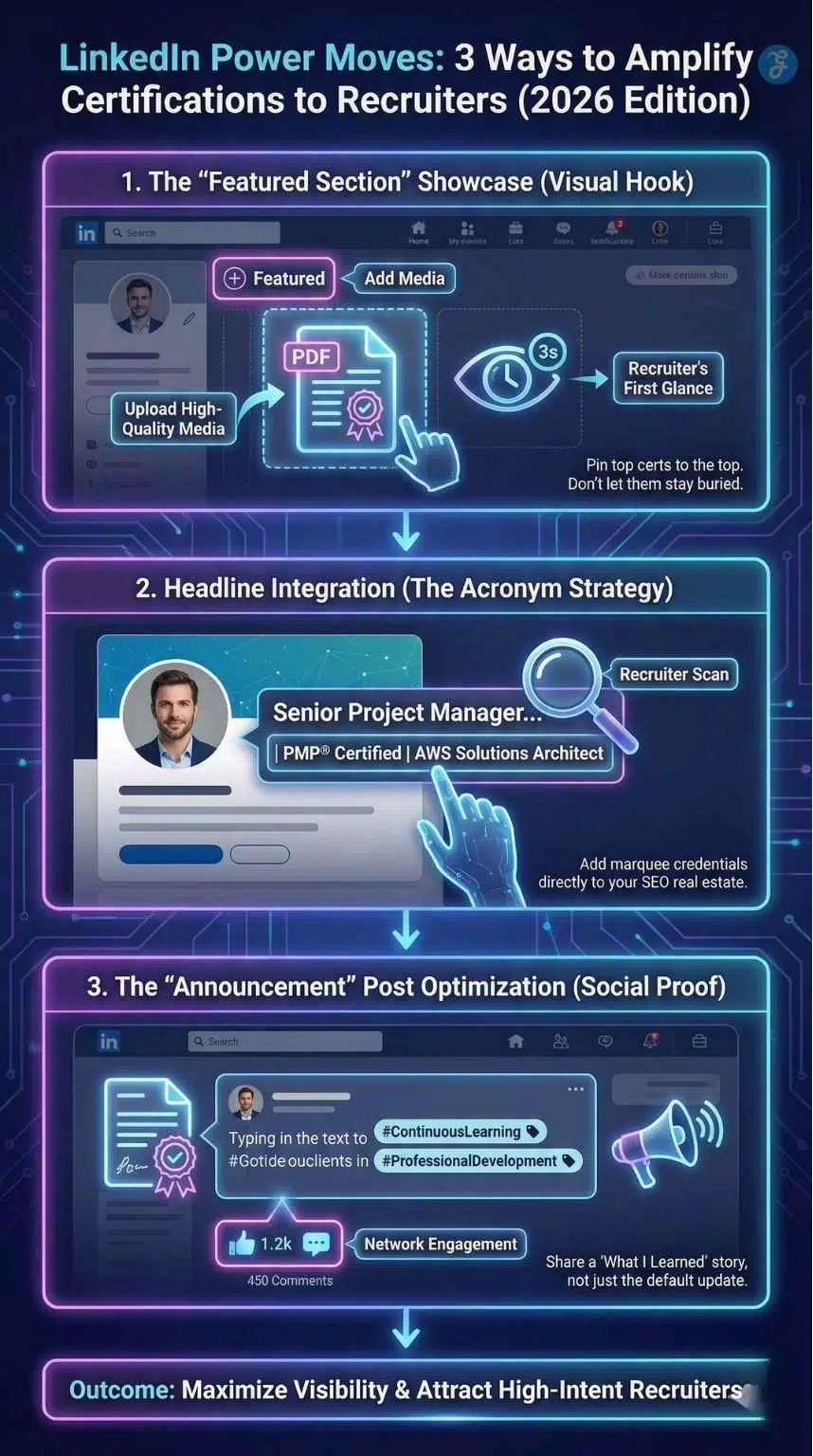
Beyond just listing your credentials, you must strategically position them to dominate the recruiter’s field of vision. By leveraging high-impact profile real estate and behavioral triggers, you can transform a static list of achievements into a dynamic portfolio that demands immediate professional attention.
1. The “Featured Section” Showcase
Don’t let your best work sit at the bottom. The Featured Section is your digital portfolio.
- How: Add a “Link” or “Media” item to your Featured section.
- What: Upload the PDF of your most prestigious certificate or a screenshot of your digital badge.
- SEO Benefit: This creates a visual “hook” in the first 3 seconds a recruiter views your page.
2. Headline Integration [The Acronym Strategy]
Recruiters scan headlines before anything else. If you have a marquee certification (PMP, CPA, AWS, SHRM), put it in your headline.
- Weak Headline: Project Manager at ABC Corp.
- Strong Headline: Senior Project Manager | PMP Certified | Agile & Scrum Expert | Transforming Operations at ABC Corp.
3. The “Announcement” Post Optimization
When you finish a course, LinkedIn asks if you want to share it. Use this as a marketing opportunity.
- Don’t use the default text: “I’m happy to share that I’ve obtained a new certification…”
- Do write a “What I Learned” post. Tag the issuing organization and use keywords like #ContinuousLearning and #ProfessionalDevelopment. This puts your achievement in the feeds of your network and potential recruiters.
Comparison of Certification Types for 2026
| Certification Tier | Examples | Best For | Impact Score |
| Gold Standard | PMP, CPA, CFA, AWS Solutions Architect | Career pivoters & Senior roles | High (9/10) |
| Skill-Specific | Google Data Analytics, HubSpot Inbound | Mid-level technical roles | Medium (7/10) |
| Micro-Credentials | LinkedIn Learning, Coursera Specializations | Proving “Currentness” in AI/Tech | Moderate (6/10) |
Micro-Credentials vs. Macro-Degrees
2026 has seen the total de-indexing of “unverified degrees” in favor of Micro-Credentials. Data shows that 90% of employers are now willing to offer a 10–15% higher starting salary to candidates who hold specific, stackable micro-credentials from industry leaders like AWS, Google, or NVIDIA.
| Credential Type | Recruiter Value (2026) | Time to Complete |
| Traditional Degree | Foundation/Historical Data | 4+ Years |
| Industry Micro-Cert | Immediate Technical Utility | 2–4 Weeks |
| AI Specialist Badge | High-Value/Low Supply | 10–20 Hours |
Strategic Takeaway: Recruiters in 2026 use micro-credentials to “de-risk” a hire. They know that a candidate with a specific Microsoft Azure AI badge can perform on day one, whereas a general “Computer Science” degree requires months of training.
The “Endorsement Loop” for Certifications
A certification proves you have the knowledge; an Endorsement Loop proves you have applied it. In 2026, LinkedIn’s AI looks for “Co-occurrence” data.
The Strategy: After adding a new certification, reach out to three colleagues or mentors. Ask them to endorse the specific skills you just linked to that certification.
The Logic: When a verified certification is paired with 5+ endorsements on the same skills, it triggers a “High Competency” badge in the recruiter’s search view. This is the “Golden Triangle” of LinkedIn SEO: Certification + Skill Mapping + Social Proof.
Avoiding the “Verification Ghost” [Common Mistakes]
Even high-level professionals fail at LinkedIn SEO because of minor technical errors. Avoid these “Verification Ghosts” that make your hard work invisible to the AI:
- The “Haphazard” Name Mistake: Using abbreviations like “AWS SAA” instead of the full “AWS Certified Solutions Architect – Associate.” The AI filters for the full name.
- The Missing Logo: If you don’t select the official organization from the LinkedIn dropdown, the logo won’t appear. Profiles without a logo are viewed as “Low Trust” by 42% of hiring managers.
- The Dead Link: Always check your Credential URL once a month. If the link breaks (common with platform migrations), the AI marks the credential as “Unverified.”
- The Over-Cram: Adding 50+ minor certificates (like 1-hour webinars) dilutes your “Subject Matter Authority.” Stick to the Rule of 5: Only feature 5 high-impact certifications at a time.
Final Thoughts: Building Your Digital Credibility
Your LinkedIn profile is no longer a static resume; it is a dynamic proof of value. Knowing how to add certifications to LinkedIn to attract recruiters is the foundation of a modern job search strategy. By following this verified, step-by-step process, you aren’t just adding a line of text; you are optimizing your professional brand for the AI-driven hiring market of 2026.
Treat your certifications as your digital currency; the more verified and strategically placed they are, the higher your market value becomes.