


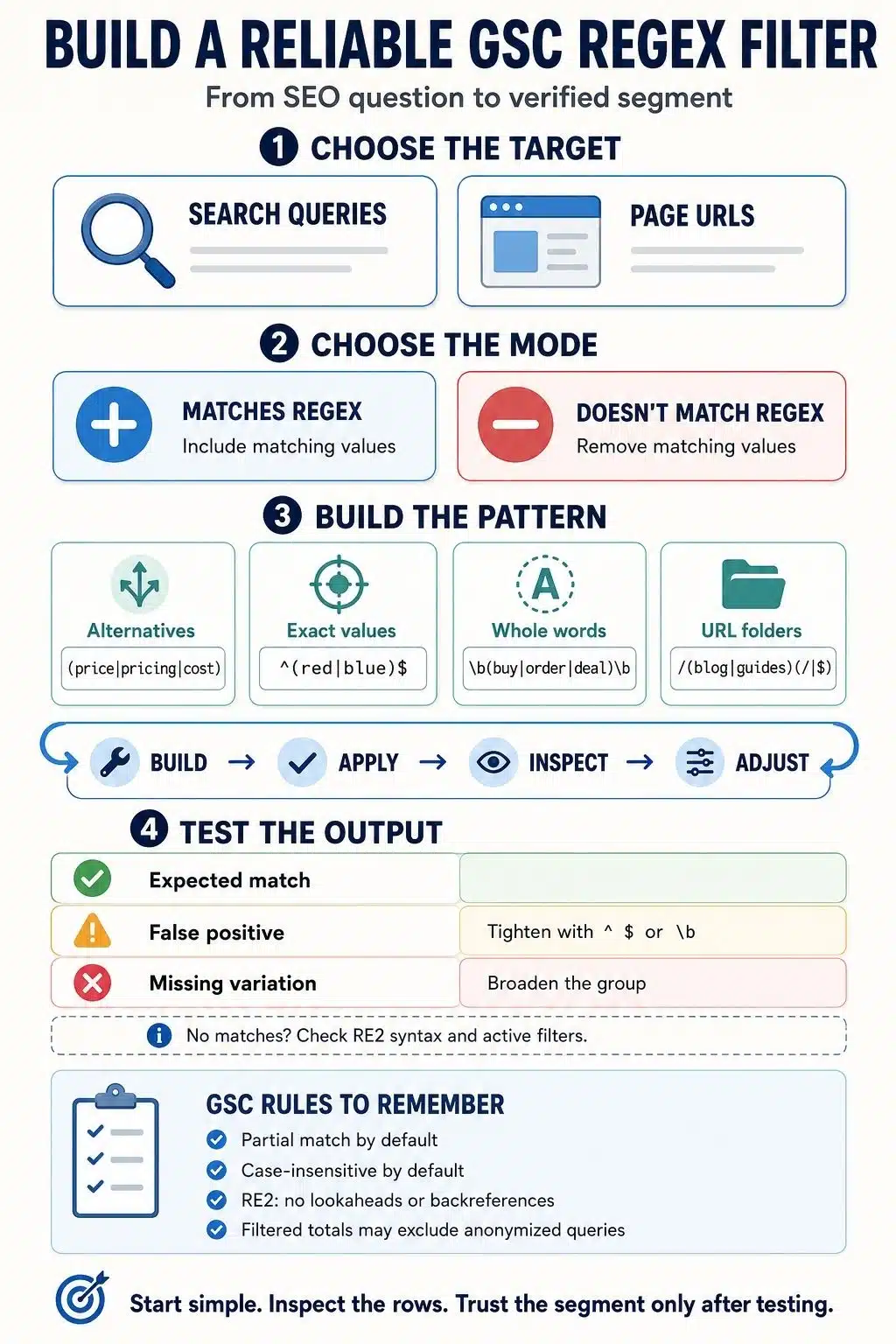
Regex filters in GSC let you group search queries or page URLs by a shared text pattern. Instead of filtering for one word at a time, you can capture brand variations, question-based searches, commercial terms, content directories, file types, and other meaningful segments with one expression.
I find it most useful to think of regex as a way to ask Google Search Console a more precise question. A normal filter can show queries containing “price.” A regex filter can group “price,” “pricing,” “cost,” and “discount” into one view.
The expressions are often short. The harder part is making sure the segment represents what you actually want to measure.
What Are Regex Filters in GSC?
A regular expression, commonly shortened to regex, is a text pattern. In Google Search Console’s Performance reports, it can be used to match search queries or page URLs.
Regex filters are useful when the standard “contains,” “doesn’t contain,” or exact-match options are too limited. They can help you:
- Combine brand names, abbreviations, and misspellings
- Find searches beginning with question words
- Group commercial or transactional modifiers
- Isolate several website directories
- Identify URLs with parameters or file extensions
- Include or exclude multiple values at once
A regex filter only changes the data displayed in the report. It does not affect crawling, indexing, rankings, or the data Google has already collected.
When Should You Use Regex Instead of a Normal Filter?
Regex is not automatically better because it is more advanced. If I only want to see queries containing “mortgage,” the normal Queries containing filter is simpler and easier to verify. Regex becomes worthwhile when I need to describe several alternatives or a repeatable structure.
For example, regex is the better choice when I want to find:
- “Acme,” “Acme Co,” “Acmeco,” and common misspellings
- Queries starting with “how,” “why,” “can,” or “does”
- URLs inside either /blog/ or /guides/
- Searches containing “buy,” “order,” “coupon,” or “discount”
- Queries containing four or more words
- URLs ending in PDF, DOCX, or XLSX
The practical rule is simple: use a standard filter for one literal value and regex for a pattern.
How Regex Matching Works in Google Search Console
Google Search Console uses the RE2 regex engine. You do not need to learn the entire language, but four rules prevent most mistakes.
Matching is partial by default
An expression can match any part of a query or URL.
For example: shoe
This may match:
- shoe
- running shoes
- shoe size guide
- best shoes for walking
That broad matching is often useful. It can also include unintended results.
To match one complete query, place ^ at the beginning and $ at the end:
^best running shoes$
The ^ marks the beginning of the value, while $ marks the end.
Matching is case-insensitive
GSC normally treats uppercase and lowercase letters as the same. A filter for seo can also match SEO and Seo.
If case genuinely matters, place (?-i) at the beginning:
(?-i)PDF
Case-sensitive matching is rarely necessary for search queries, but it may occasionally help with unusual URL structures.
A filter can include or exclude matches
GSC gives you two choices:
- Matches regex shows queries or URLs that match the pattern.
- Doesn’t match regex removes matching values and shows the remainder.
This is useful for dividing data into segments such as branded and non-branded queries.
Some advanced regex features are unsupported
RE2 supports the operators most GSC users need, including groups, alternatives, anchors, character classes, and repetition.
It does not support lookaheads, lookbehinds, or backreferences. An expression copied from a PCRE or JavaScript tutorial may therefore fail in Search Console even if it works elsewhere.
How to Add a Regex Filter in GSC
To apply a regex filter:
- Open the relevant property in Google Search Console.
- Go to Performance and select Search results.
- Click + Add filter.
- Choose Queries or Pages.
- Select Custom (regex).
- Choose Matches regex or Doesn’t match regex.
- Enter the expression and click Apply.
- Inspect the table to confirm that the results fit the intended segment.
Other filters can remain active. You might combine a query regex with a particular country, device, search type, and date range.
Do not skip the final check. A regex can be technically valid and still match the wrong queries.
The Regex Symbols You Actually Need
Most GSC analysis can be handled with a small group of operators:
- | means OR.
buy|order|purchase matches any of the three terms. - () groups alternatives or repeated patterns.
^(how|what|why) matches values beginning with one of those words. - ^ marks the beginning of a value.
- $ marks the end of a value.
- . matches any single character.
- .* matches any sequence of characters.
- ? makes the preceding item optional.
colou?r matches “color” and “colour.” - + matches the preceding item one or more times.
- * matches the preceding item zero or more times.
- [] matches one character from a set or range.
[0-9] matches one digit. - \d represents a digit.
- \s represents whitespace.
- \S represents a non-whitespace character.
- \b creates an ASCII word boundary. It works well for English words but should be tested carefully with non-Latin scripts.
- \. matches a literal period, which is important when writing domains such as example\.com.
A short expression that you understand is safer than an elaborate one copied without knowing what each part does.
Useful Regex Filters for Search Queries
These examples are templates. Replace the sample terms with ones that reflect the actual brand, audience, and analysis.
Match one exact query
^best running shoes$
This matches only that complete query. It will not include “best running shoes for women.”
To match several exact queries:
^(best running shoes|running shoe reviews|shoes for running)$
Group brand variations
(acme|acme co|acmeco|akme)
A real brand filter might include:
- The complete company name
- Abbreviations
- Spaced and unspaced versions
- The domain name
- Important branded products
- Common misspellings
Because GSC uses partial matching, this expression can also capture longer searches such as “acme login” or “acme product reviews.”
GSC now has a built-in Branded and Non-branded query filter for eligible properties. It is convenient, but it may not appear for every property, and automated brand classification can make mistakes. Regex remains useful when you want a transparent definition based on terms you selected yourself.
Find question-based searches
A broad expression such as what|how|when|why may overmatch because GSC can find those letter combinations inside longer words.
A more controlled version is:
^(who|what|where|when|why|how|can|does|is|are)\b
This finds queries beginning with one of those words. The results can reveal questions an existing page should answer more clearly or subjects that deserve separate coverage.
Identify commercial language
\b(best|review|reviews|vs|versus|price|pricing|cost)\b
This can surface searches from people comparing options or investigating a purchase.
The filter is only a proxy for intent. A query containing “best” is not automatically commercial, and a query mentioning “cost” may still be purely informational. I would always inspect the returned searches before labeling the whole segment.
For stronger transactional language, try:
\b(buy|order|coupon|discount|deal|near me)\b
Find longer queries
To match searches containing four or more words:
^\S+(\s+\S+){3,}$
Longer searches often reveal specific problems, preferred wording, and missing details that broad keywords conceal. They are not automatically easier to rank for, but they can be more informative.
Find searches containing a year
\b20\d{2}\b
This matches four-digit years from 2000 to 2099.
It can reveal queries where freshness matters. That should lead to an honest content review, not a cosmetic date change. Facts, examples, recommendations, and instructions should be updated before a page is presented as current.
Useful Regex Filters for Page URLs
Page filters should reflect the URLs GSC actually reports. I would copy a real URL from the Pages table before building the expression.
Isolate several content sections
^https://(www\.)?example\.com/(blog|guides)(/|$)
This matches URLs in the /blog/ or /guides/ directory, with or without www.
A directory filter can help measure a publishing project, investigate a traffic decline, or compare different sections of a large website.
Group language directories
^https://example\.com/(en|es|fr)(/|$)
This works when language versions use a consistent folder structure.
Language and country should not be treated as the same dimension. Spanish pages can receive traffic from several countries, so country filters should be added only when they support the question being investigated.
Find URLs containing parameters
\?.+
This matches URLs containing a question mark followed by at least one character.
It can uncover parameterized URLs receiving impressions or clicks. However, Search Console usually credits performance to the canonical URL. A duplicate or parameterized version may not appear if Google assigns its data to another canonical page.
Find common document types
\.(pdf|docx?|xlsx?)(\?.*)?$
This finds PDF, DOC, DOCX, XLS, and XLSX URLs, including versions followed by parameters.
The results may show that downloadable files are performing exactly as intended. They may also reveal information that would be more accessible or useful as an HTML page.
Common Regex Mistakes in GSC
Regex mistakes in GSC often come down to one misplaced symbol, an unescaped period, or a pattern that matches more than intended. The filter may still return data, making these errors easy to miss, so always inspect the actual queries or URLs before trusting the segment.
Treating * as a general wildcard
The asterisk repeats the item immediately before it.
shoe*
This can match sho, shoe, and shoee. It does not mean “shoe followed by anything.”
For that, use:
shoe.*
Forgetting to escape a period
In regex, a period represents any single character.
This is broader than it looks:
example.com
A literal domain should be written as:
example\.com
Anchoring alternatives incorrectly
This expression:
^red|blue$
means “starts with red OR ends with blue.”
To match only the complete values “red” or “blue,” group the alternatives:
^(red|blue)$
Adding spaces around the OR operator
Spaces are treated as actual characters. This expression may not behave as expected:
red | blue
Use:
(red|blue)
Assuming zero results mean zero demand
A filter may return nothing because:
- The segment has no recorded data
- The expression is too restrictive
- A special character was not escaped
- The pattern contains unsupported syntax
- Another active filter is hiding the results
- The assumed URL differs from the canonical URL GSC reports
Start with one literal term. Confirm that it matches, then add groups, anchors, and other operators one step at a time.
Why Filtered GSC Totals May Not Add Up
This is the most important data limitation to understand. Google hides some rare searches to protect user privacy. These anonymized queries may contribute to the unfiltered chart total, but they are removed when a query filter is applied.
Search Console also truncates some query data rather than storing and displaying every possible row.
As a result, the total for queries matching a regex plus the total for queries not matching it may not equal the original unfiltered total. That does not automatically mean the expression is wrong.
The limitation is particularly relevant when calculating branded and non-branded traffic. The split can reveal direction and change, but it should not be presented as a perfect accounting of every search.
The standard Performance report table is also limited to 1,000 rows. Larger websites may need the Search Analytics API or bulk data exports for more complete analysis.
What the Filter Cannot Tell You
Regex matches text. It cannot directly filter for:
- CTR below a particular percentage
- Position within a chosen range
- More than a set number of impressions
- A specific percentage decline in clicks
- Whether a query genuinely resulted in a conversion
After defining the text segment, you still need to examine, sort, compare, or export its metrics.
I would also avoid treating regex categories as facts about search intent. A word pattern can suggest what the searcher wanted, but the returned queries, ranking pages, and surrounding results provide the context.
A Reliable Way to Build a GSC Regex
The safest workflow is incremental:
- Decide exactly what the segment should include.
- Begin with one literal word or URL fragment.
- Confirm that GSC returns the expected rows.
- Add alternatives with |.
- Add groups or anchors only when necessary.
- Check for unexpected matches.
- Remove unrelated country, device, page, or date filters while troubleshooting.
- Compare the finished segment across an appropriate period.
If an expression becomes difficult to explain in plain language, it is probably too complicated for routine reporting. A smaller, transparent filter is easier to maintain and less likely to mislead someone later.
Build the Segment Before Interpreting It
Regex filters in GSC are valuable because they make scattered search data easier to examine as a meaningful group. They can bring brand variations together, isolate content sections, and surface patterns that ordinary filters miss. But a regex does not create the insight for you. It defines the segment.
The best approach is to begin with a clear question, build the smallest expression that represents it, and inspect what GSC actually returns. Once the segment is accurate, the performance data becomes far more useful.
Frequently Asked Questions on Regex Filters in GSC
1. Are regex filters in GSC case-sensitive?
No. GSC regex matching is case-insensitive by default. Add (?-i) to the beginning only when uppercase and lowercase versions must be treated differently.
2. Why does my regex work in a tester but not in the Search Console?
The tester may use PCRE, JavaScript, or another regex engine. GSC uses RE2, which does not support lookaheads, lookbehinds, backreferences, and some other advanced features. Test the pattern in an RE2-compatible environment and confirm it again inside GSC.
3. Can I use negative lookahead in GSC regex?
No. RE2 does not support negative lookahead expressions such as (?!…). If the goal is to exclude a group of values, place those alternatives in one expression and select Doesn’t match regex.
4. Why did my total change after I added a query regex?
Applying a query filter removes anonymized searches from the calculation. Data truncation can create further differences, so filtered totals may not match the unfiltered chart or add up perfectly.
5. Can regex find low-CTR or declining pages?
Not directly. Regex can isolate a group of queries or URLs, after which you can examine CTR, clicks, impressions, and position. Numerical performance conditions must be analyzed separately.























