Parents looking for a screen-time limit run into a counting problem. A device report may combine homework, video calls, games, and short videos, although they are different experiences. Healthy screen time for kids needs boundaries, but a number cannot show whether use is useful or crowding out something important.
The clearest limits apply during the early years. Older children need boundaries plus judgment: what they are doing, when they are doing it, whether they can stop, and what remains in their day.
There Is No Universal Number
The American Academy of Pediatrics updated its media policy in 2026 without setting one universal limit. Families are advised to choose boundaries that fit the child, household routine, and differences between school days and weekends. Its range runs from under one hour of daily entertainment for toddlers and preschoolers to one or two hours—or sometimes more—for older children.
The phrase “or more” does not endorse unlimited use. These are family-set boundaries, not a medical line between safe and harmful. A video call with a grandparent is different from autoplaying short videos. Current guidance on healthy screen time for kids asks families to examine the pattern and its effects.
The World Health Organization sets firmer limits for children under five within its guidance on sleep, activity, and sedentary behavior. National authorities may use different age bands, so local advice is worth checking.
Healthy Screen Time for Kids by Age
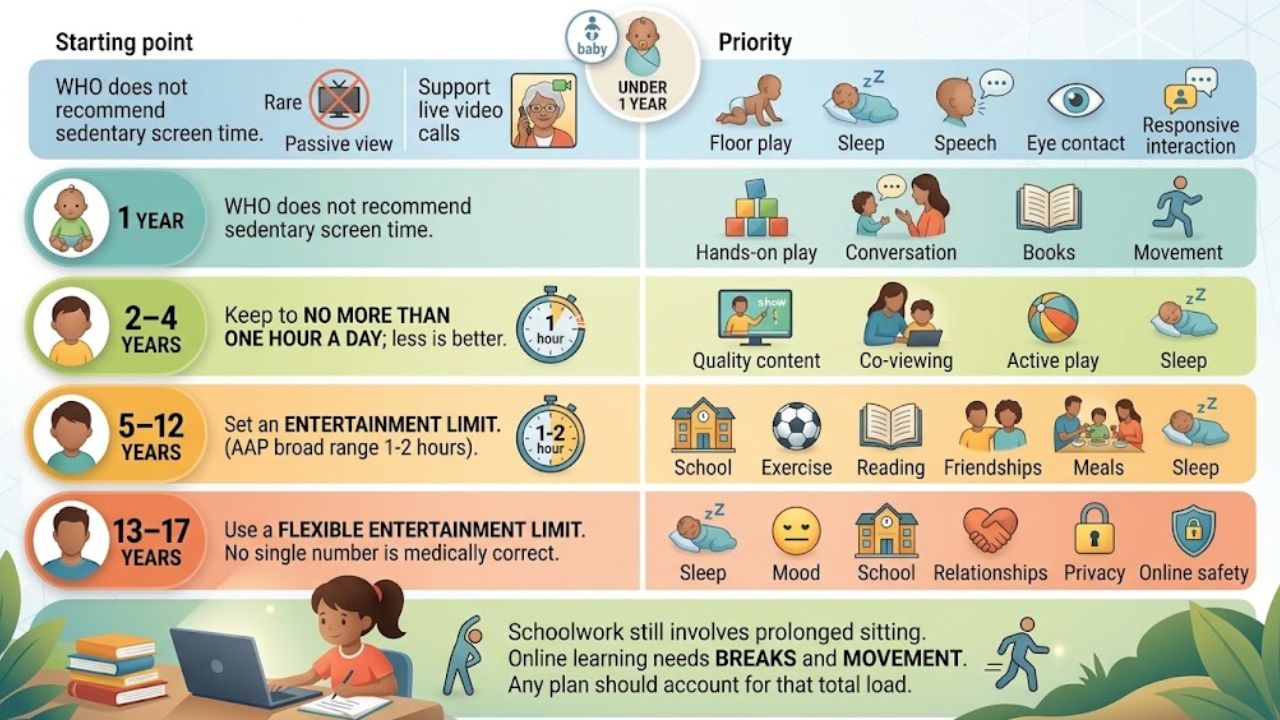
These ranges are useful starting points, not a diagnosis of whether an individual child’s habits are healthy.
| Age | Practical Starting Point | What Deserves Priority |
| Under 1 | WHO does not recommend sedentary screen time. Keep passive viewing rare; support live video calls. | Floor play, sleep, speech, eye contact, and responsive interaction |
| 1 year | WHO does not recommend sedentary screen time for one-year-olds. | Hands-on play, conversation, books, and movement |
| 2–4 years | Keep sedentary screen time to no more than one hour a day; less is better. | Quality content, co-viewing, active play, and sleep |
| 5–12 years | Set an entertainment limit. The AAP’s broad range is one to two hours or more, adjusted to the child and routine. | School, exercise, reading, friendships, meals, and sleep |
| 13–17 years | Use a flexible entertainment limit rather than treating one number as medically correct. | Sleep, mood, school, relationships, privacy, and online safety |
Schoolwork still involves prolonged sitting, even when excluded from an entertainment limit. Online learning needs breaks and movement. Any healthy screen time for kids plan should account for that total load.
Content Matters as Much as Time
An “educational” label is not enough. Useful media for younger children has an age-appropriate purpose, a manageable pace, few distractions, and ideas a caregiver can revisit away from the device. The AAP names PBS KIDS and Sesame Workshop as examples of child-centered media, although access varies by country.
Treat ads, constant rewards, in-app purchases, autoplay, and endless feeds cautiously. An “educational” description does not cancel those design problems. They can make stopping harder and extend use.
The AAP’s “5 Cs” provides a practical review:
- Child: Does this fit the child’s age, temperament, and current needs?
- Content: Is it useful, safe, and developmentally appropriate?
- Calm: Is a device becoming the response to every difficult emotion?
- Crowding out: What activity disappears when screen use expands?
- Communication: Can the child discuss what they watch, play, or encounter?
For healthy screen time for kids, “crowding out” is often the most revealing check. Even a modest amount is poorly timed if it replaces bedtime reading, outdoor play, or a family meal.
Protect Sleep and Movement
Screens in bedrooms leave games, messages, and notifications within reach overnight. The AAP advises keeping bedrooms screen-free and avoiding screens during the hour before bed. A charging station outside sleeping areas is often more effective than another nightly reminder.
Keep meals and homework free from entertainment media, and turn off unwatched background television. After a laptop-heavy school day, a child may need a snack and outdoor movement before gaming—not another seated session as soon as class ends.
Weekend flexibility is reasonable. A film night or long family call is not a failure. Watch the weekly pattern and whether the child returns to the usual routine. A routine for healthy screen time for kids can bend occasionally without losing its basic shape.
Build a Practical Family Media Plan
Check device reports for several ordinary days. Separate schoolwork, creative projects, video calls, and entertainment; one total hides too much. A phone report may also miss television, a game console, or a school laptop, so treat it as a clue rather than a verdict. Then protect sleep, meals, homework, physical activity, and face-to-face time.
Set an endpoint children understand, such as one episode or a fixed gaming session, and give a warning before it ends. Turn off autoplay. Restrict downloads and purchases, keep young children’s profiles private, and disable open chat unless supervised. A shared tablet can make boundaries easier to monitor than one kept in a bedroom.
Adults should follow visible rules too. “No phones at dinner” is easier to accept when it applies to everyone. Review what healthy screen time for kids means at home when school demands, sleep, or behavior changes.
Signs a Timer Is Not Enough
Healthy screen time for kids should fit around daily life. A timer cannot diagnose a problem, but several persistent changes deserve attention:
- Sleep is shortened because the child stays online or checks a device overnight.
- Schoolwork, exercise, friendships, or previously enjoyed activities steadily fall away.
- The child hides use, bypasses controls, or cannot disengage without severe conflict.
- A screen becomes the only reliable way to manage boredom, anger, or distress.
- Online activity involves bullying, strangers, sexual content, dangerous challenges, self-harm material, or unauthorized spending.
A pediatrician can help when daily functioning suffers or anxiety, depression, attention difficulties, sleep problems, or developmental needs may be involved. Self-harm, exploitation, or an immediate threat requires prompt local medical, safeguarding, or emergency help.
Final Thoughts
Healthy screen time for kids is a working family boundary, not a magic number. Begin with a three-day check of actual use, then make one change that solves a visible problem: charge devices outside bedrooms, turn off autoplay, or protect an outdoor hour after school. Use firmer limits in the early years and more discussion as children mature. A modest rule the household can follow consistently is more useful than a strict target that collapses after two days.
Frequently Asked Questions (FAQs)
Does homework count as screen time?
It counts as screen exposure, but track it separately from entertainment. Add movement breaks and keep recreation from extending a screen-heavy school day late into the evening.
Are educational apps exempt from limits?
No. Even a good app can displace conversation, play, sleep, and hands-on learning. For young children, short sessions with a caregiver are preferable to unsupervised use.
Is video chatting acceptable for babies?
Live calls are more interactive than passive viewing. A caregiver can respond with the baby and connect the person on-screen to real life. Stop when the baby loses interest.
Can parental controls replace family rules?
No. Parental controls can support healthy screen time for kids by limiting time, purchases, downloads, or contacts. They cannot judge content quality, capture every device, or replace conversations about online experiences.
When should parents ask a pediatrician for help?
Seek advice for persistent extreme conflict, lost sleep, declining daily functioning, or use linked to anxiety, low mood, attention problems, or unsafe online behavior.