

GPU selection for gaming is where many PC builds either become smart or stupidly expensive. The graphics card is usually the part everyone talks about first, and honestly, I get it. It is the part that decides how well your games look, how smooth they feel, and how long your setup can stay useful before the upgrade itch starts screaming again.
But I do not choose GPUs by hype. I do not care if a card has a giant cooler, a ridiculous name, or marketing that makes it sound like it’s more of a spaceship than an actual GPU. I care about what it does for the actual gaming experience.
When I choose or recommend a GPU, I look at resolution, FPS target, VRAM, price-to-performance, ray tracing, power efficiency, cooling, and upgrade life. But if I had to pick the biggest factor, I would say future-proofing. I would rather spend a bit more on a graphics card that stays useful for several years than buy something that feels outdated too quickly.
Why GPU Selection Matters So Much
The GPU is the heart of gaming performance. The CPU matters. RAM matters. Storage matters. Cooling and power supply matter too. But when it comes to resolution, graphics settings, ray tracing, FPS, and visual quality, the GPU usually carries the biggest load.
That is why bad GPU selection can ruin a build. A weak GPU can limit the entire PC. An overpowered GPU can waste money if the monitor cannot show the performance. A power-hungry GPU can create heat, noise, and PSU problems if the rest of the build is not ready.
This is why I do not look at GPUs alone. I look at the full setup. The monitor, CPU, PSU, case airflow, games, and future upgrade plan all matter.
A proper PC gaming guide should never treat the GPU as a random part. It should be chosen around the experience you want.
GPU Selection For Gaming Starts With Resolution
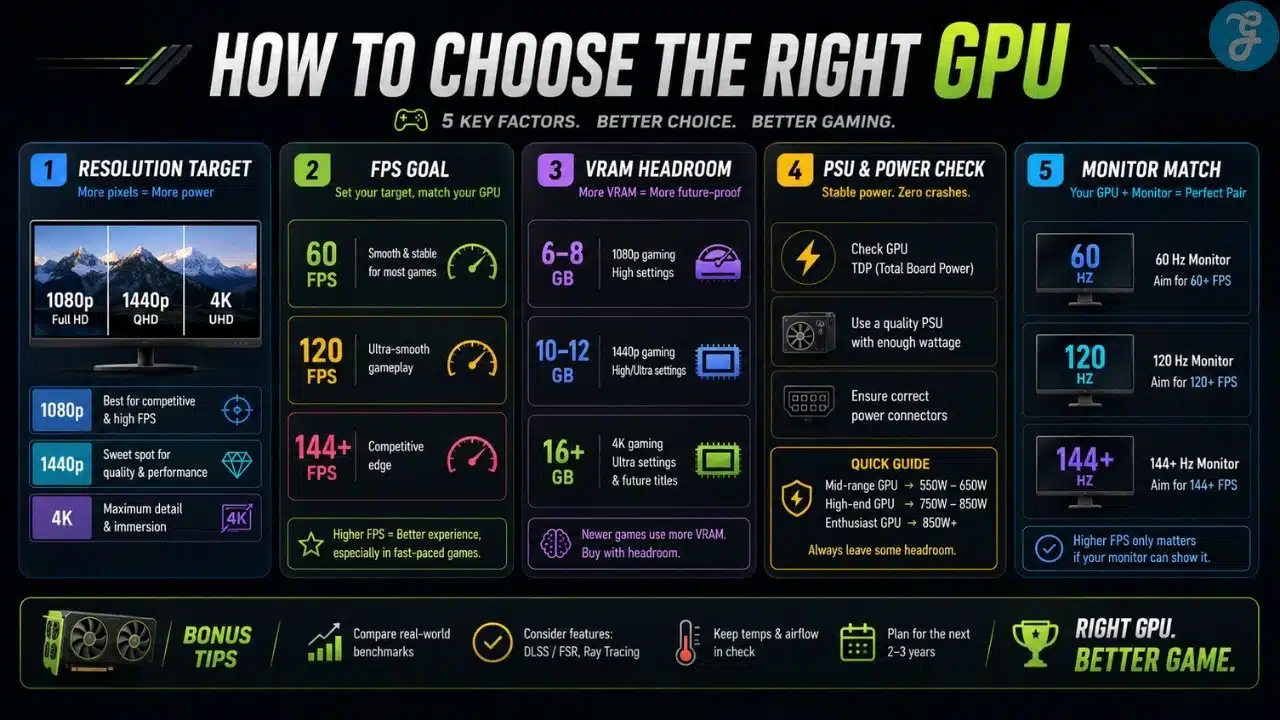
The first thing I look at is resolution. Not brand. Not RGB. Not the size of the box. Resolution.
A GPU that makes sense for 1080p may not make sense for 1440p. A GPU that handles 1440p well may struggle at 4K if you push heavy games. This is why I always ask what monitor someone is using before recommending a graphics card.
1080p is easier to run and still good for budget or competitive gaming. 1440p is the sweet spot for many modern gamers because it gives better clarity without becoming as demanding as 4K. 4K looks amazing, but it needs serious GPU power if you want smooth performance.
Here is the simple way I think about it.
| Resolution Target | What It Needs | My Take |
|---|---|---|
| 1080p | Budget or mid-range GPU | Great for esports and value builds |
| 1440p / QHD | Strong mid-range or upper mid-range GPU | Best balance for many gamers |
| 4K | High-end GPU | Beautiful but expensive and demanding |
| Ultrawide 1440p | Strong GPU with good VRAM | Immersive but heavier than standard 1440p |
If someone tells me they want 4K gaming but has a tight GPU budget, I usually slow them down. You can run 4K on weaker cards by lowering settings, but that is not the same as having a smooth 4K experience.
FPS Target: Smoothness Has A Price
FPS is the next big question. A person targeting 60 FPS does not need the same GPU as someone targeting 144 FPS or 165 FPS.
For story games, 60 FPS can still feel good. For competitive games, higher FPS feels much better. If you have a high-refresh monitor, your GPU needs to push enough frames to make that screen worth it.
This is where people often get confused. Buying a 165Hz monitor does not mean every game will magically run at 165 FPS. The GPU has to do the work. The CPU has to support it. The game has to be optimized enough. Settings also matter.
Here is how I usually break it down.
| FPS Target | Best For | GPU Demand |
|---|---|---|
| 60 FPS | Story games, casual gaming | Moderate |
| 90–120 FPS | Smooth modern gaming | Stronger GPU needed |
| 144–165 FPS | High-refresh gaming | Strong GPU and good CPU balance |
| 240 FPS+ | Competitive esports | Very strong system and lower settings |
| 4K High FPS | Premium gaming | High-end GPU territory |
For me, stable FPS matters more than peak FPS. I would rather have a smooth 100 FPS than a game jumping between 160 and 55 because someone wanted every setting maxed out for no reason.
VRAM: The Spec People Used To Ignore
VRAM matters more now than it used to. It affects how well the GPU handles textures, higher resolutions, ray tracing, large open-world games, and future titles.
I do not think people should panic-buy VRAM blindly. More VRAM does not automatically make a weak GPU powerful. But too little VRAM can absolutely hurt a card’s long-term usefulness.
For 1080p gaming, lower VRAM can still work depending on the game. For 1440p, I prefer having more breathing room. For 4K, VRAM becomes much more important.
This is especially important for future-proofing. If I am spending serious money on a GPU, I do not want it to feel limited too quickly because the memory was already tight at launch.
Here is a practical view.
| VRAM Range | Best Fit | My Take |
|---|---|---|
| 6GB | Entry-level or older/lighter gaming | Getting tight for modern games |
| 8GB | 1080p gaming | Usable, but not ideal for long-term comfort |
| 12GB | Strong 1080p and 1440p | Better breathing room |
| 16GB | 1440p, ultrawide, some 4K | Stronger future-proofing |
| 20GB+ | High-end 4K and heavy workloads | Premium territory |
VRAM is not everything, but I never ignore it anymore.
Price-To-Performance: Do Not Buy With Ego
Price-to-performance is where smart GPU buying happens. A graphics card can be powerful and still be a bad deal. Another card can be less exciting but much smarter for the money.
I always look at what the card gives for the price. How much performance does it offer at the target resolution? How much VRAM does it include? How well does it handle the games the person actually plays? How much power does it use? How long is it likely to stay useful?
This is why I do not like buying GPUs only because they are new. New does not always mean smart. Expensive does not always mean worth it. Cheap does not always mean value either.
A good GPU should make sense for the budget and the setup.
Future-Proofing: The Main Thing I Care About
Future-proofing is the biggest factor for me. I do not mean buying the most expensive GPU possible. That is not future-proofing. That is financial violence with extra fans.
Future-proofing means buying a card with enough performance, VRAM, feature support, and efficiency to stay useful for several years.
If the budget allows, I prefer spending a bit more for a GPU that has breathing room instead of buying something that is barely enough today. “Just enough” sounds good until games get heavier, software updates arrive, new features become common, and suddenly the card feels tired.
A future-proof GPU should not only run today’s games. It should handle tomorrow’s games with sensible settings too.
That is why I look at the card’s long-term comfort, not just today’s benchmark chart.
NVIDIA Vs AMD: I Respect Both Sides
I do not like turning GPU buying into a brand war. NVIDIA and AMD both have strengths, and pretending one side is always correct is lazy.
NVIDIA is strong in features like DLSS, ray tracing performance, creator support, driver ecosystem, and power efficiency in many cards. For people who care about ray tracing, upscaling, streaming, AI-assisted features, or productivity support, NVIDIA can make a lot of sense.
AMD often offers strong value, good raster performance, and attractive VRAM options for the price. For gamers who care about traditional gaming performance, higher VRAM at certain price points, and good price-to-performance, AMD can be a very smart choice.
I respect both. The right choice depends on the card, price, games, resolution, and features you actually use.
Here is the balanced view.
| Brand Strength | NVIDIA | AMD |
|---|---|---|
| Ray Tracing | Usually stronger | Improving, but varies by tier |
| Upscaling | DLSS is a major strength | FSR is flexible and widely supported |
| VRAM Value | Depends on model | Often strong at certain price points |
| Raster Performance | Strong | Often very competitive |
| Creator Features | Strong ecosystem | Good, but depends on workload |
| Price-To-Performance | Depends on generation and model | Often attractive in many tiers |
I would never tell someone to buy only by brand. Buy the better card for your actual needs.
Ray Tracing: Nice Feature, Not Always The Priority
Ray tracing can make games look beautiful when done well. Better lighting, reflections, shadows, and realism can improve visually heavy games.
But ray tracing is demanding. It can drop FPS hard, especially at higher resolutions. This is why I do not treat ray tracing as mandatory for every gamer.
If someone mostly plays competitive games, ray tracing barely matters. If someone loves cinematic single-player games and wants better visuals, it matters more.
For me, ray tracing is a nice bonus, not the only reason to buy a GPU. I care more about the full experience: FPS, resolution, VRAM, future-proofing, and value.
A GPU should be good even when ray tracing is not being used.
Upscaling: DLSS, FSR, And Real-World Performance
Upscaling is now part of modern GPU buying. NVIDIA has DLSS. AMD has FSR. These technologies can help improve performance by rendering at a lower internal resolution and reconstructing the image.
This can be very useful, especially at 1440p and 4K. It helps GPUs stay playable in demanding games. It also makes ray tracing more practical in some cases.
I do not see upscaling as cheating. I see it as another tool. If the image looks good and the game feels smooth, I am fine with it.
But I still do not want to rely on upscaling as an excuse to buy too weak of a GPU. Upscaling helps, but raw performance still matters.
Power Efficiency And Heat
Power efficiency matters more than people think. A GPU that consumes less power for similar performance can run cooler, quieter, and easier on the power supply.
This affects the whole build. A hot, power-hungry GPU may need a stronger PSU, better case airflow, and more cooling. It may also make the room warmer and the PC louder during long sessions.
I do not mind a powerful GPU using power if the performance justifies it. But I do not like inefficient cards that create heat and noise without giving enough back.
Power efficiency is especially important for smaller cases, warmer rooms, quieter builds, and people who game for long hours.
Cooling, Size, And Case Compatibility
Not every GPU fits every case. This sounds obvious, but people still forget it.
Modern graphics cards can be long, thick, and heavy. Some take up three slots or more. Some need multiple power connectors. Some need strong airflow to avoid heat issues.
Before buying, I always check GPU length, thickness, power connector type, PSU wattage, and case airflow. A powerful card inside a cramped case can become loud and hot.
Cooling design also matters. A good cooler can keep temperatures lower and noise under control. But do not buy the biggest card blindly. Make sure it fits the actual build.
Entry-Level GPU Tier
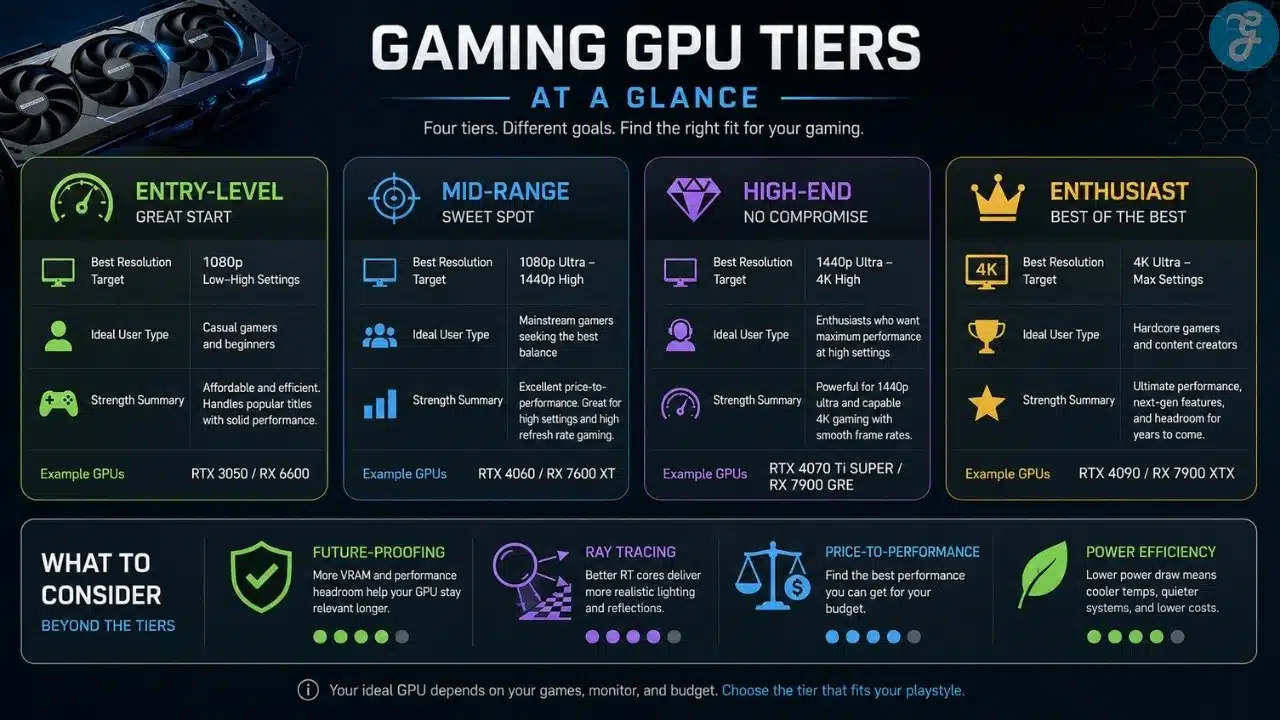
Entry-level GPUs are for budget gaming, esports, lighter games, and 1080p setups. This tier is not about max settings or future-proof dominance. It is about getting playable performance without overspending.
I think entry-level cards make sense when the budget is tight or the games are light. If someone mainly plays esports titles, older games, indie games, or less demanding multiplayer games, this tier can work.
Best for: budget gamers, students, casual players, and 1080p esports setups.
Why We Chose It: entry-level GPUs keep the cost low while still making PC gaming possible.
Things to consider: limited VRAM and weaker long-term future-proofing.
Mid-Range GPU Tier
Mid-range GPUs are where most gamers should probably look first. This tier usually gives the best balance between performance, price, power use, and long-term value.
A good mid-range GPU can handle 1080p very well and often provides strong 1440p performance depending on the game and settings. This is the tier I usually like for practical gaming builds.
It is not the flashiest tier, but it often makes the most sense.
Best for: 1080p high FPS, 1440p gaming, and balanced PC builds.
Why We Chose It: mid-range GPUs usually offer the strongest mix of value and performance.
Things to consider: not always ideal for heavy 4K gaming or maxed ray tracing.
High-End GPU Tier
High-end GPUs are for people who want stronger 1440p performance, ultrawide gaming, high refresh rates, ray tracing, and entry-level 4K comfort.
This is also where future-proofing starts to feel better. A good high-end card gives more breathing room for upcoming games, higher settings, and demanding monitors.
But this tier needs a strong supporting build. The CPU, PSU, cooling, and monitor should all make sense. Otherwise, you are paying for performance you may not fully use.
Best for: 1440p high refresh, ultrawide gaming, ray tracing, and strong future-proofing.
Why We Chose It: high-end GPUs offer more performance headroom for demanding games and future titles.
Things to consider: higher cost, stronger PSU needs, and better airflow requirements.
Enthusiast GPU Tier
Enthusiast GPUs are for people who want the best performance available and are willing to pay for it. This tier is for 4K gaming, heavy ray tracing, high refresh premium monitors, creative workloads, and users who simply want top-tier hardware.
I respect enthusiast builds, but I do not pretend they are necessary for everyone. Most gamers do not need this tier.
This is where price-to-performance often gets worse. You pay a lot more for the top end. That can be worth it if you use the performance, but it can be wasteful if you only play lighter games.
Best for: 4K gaming, premium setups, heavy ray tracing, and high-end creative use.
Why We Chose It: enthusiast GPUs deliver maximum performance and the strongest headroom.
Things to consider: expensive, power-hungry, and often unnecessary for average players.
GPU Tier Comparison
Before choosing a card, I like comparing tiers based on real gaming goals. This keeps the decision grounded.
Here is the practical breakdown.
| GPU Tier | Best Resolution Target | Best For | Future-Proofing |
|---|---|---|---|
| Entry-Level | 1080p | Budget gaming and esports | Limited |
| Mid-Range | 1080p high FPS / 1440p | Most balanced gamers | Good |
| High-End | 1440p high refresh / ultrawide / some 4K | Demanding gamers | Strong |
| Enthusiast | 4K and premium setups | Maximum performance users | Very strong |
The better tier is not always the most expensive one. The better tier is the one that fits your monitor, games, and budget.
Matching GPU To Monitor
A GPU and monitor should be chosen together. This is one of the most important rules in GPU selection for gaming.
If you buy a high-end GPU but use a basic 1080p 60Hz monitor, you are wasting potential. If you buy a 4K high-refresh monitor but use a weak GPU, you are creating frustration.
Your GPU should match your resolution and refresh rate. That is how you get a balanced setup.
Here is the simple view.
| Monitor Type | GPU Need |
|---|---|
| 1080p 60Hz–100Hz | Entry-level or mid-range GPU |
| 1080p 144Hz–240Hz | Mid-range or stronger GPU |
| 1440p 144Hz–165Hz | Strong mid-range or high-end GPU |
| 1440p Ultrawide | High-end GPU preferred |
| 4K 60Hz | High-end GPU |
| 4K High Refresh | Enthusiast GPU |
A monitor upgrade can make a GPU feel better. A GPU upgrade can make a monitor more useful. The two should not be planned separately.
Common GPU Buying Mistakes
The first mistake is buying only by brand. NVIDIA and AMD both have good cards. The right answer depends on the model, price, games, and features.
The second mistake is ignoring VRAM. A card can have good performance today but feel limited later if VRAM is too tight.
The third mistake is buying more GPU than the monitor can use. That is wasted money.
The fourth mistake is buying too weak of a GPU for the resolution. That leads to lower settings, unstable FPS, and frustration.
The fifth mistake is ignoring power and cooling. A GPU does not live alone. It needs a PSU, airflow, and a case that can handle it.
GPU Selection Checklist
Before buying a graphics card, I like going through a checklist. It prevents expensive mistakes.
Use this before choosing your GPU.
| Buying Area | What To Check |
|---|---|
| Resolution | 1080p, 1440p, ultrawide, or 4K |
| FPS Target | 60, 120, 144, 165, or higher |
| VRAM | Enough for current and future games |
| Price-To-Performance | Performance should justify the price |
| Future-Proofing | Enough headroom for several years |
| Ray Tracing | Important for visual-heavy games |
| Upscaling | DLSS, FSR, and real-world image quality |
| Power Use | PSU and heat requirements |
| Cooling | Cooler quality and case airflow |
| Size | Card length and thickness compatibility |
| Brand Features | NVIDIA and AMD strengths based on needs |
| Monitor Match | GPU should fit your display |
Buy The GPU That Makes Sense Three Years From Now
The smartest GPU selection for gaming is not about buying the loudest, newest, or most expensive card. It is about buying the card that fits your monitor, games, FPS target, budget, and upgrade plan.
I care about future-proofing because I do not like replacing expensive parts too quickly. If I spend serious money on a GPU, I want it to stay useful for several years. That means enough performance, enough VRAM, good feature support, reasonable power use, and a strong match with the rest of the PC.
NVIDIA and AMD both have good options. Entry-level, mid-range, high-end, and enthusiast GPUs all have a place. The right card is the one that gives you the gaming experience you want without wasting money on performance you will never use.
Frequently Asked Questions (FAQs) About GPU Selection For Gaming
These answers cover the common GPU questions I usually hear from gamers.
What Matters Most When Choosing A Gaming GPU?
Resolution, FPS target, VRAM, price-to-performance, future-proofing, ray tracing, upscaling, power use, and monitor match all matter. For me, future-proofing is one of the biggest factors.
Is NVIDIA Better Than AMD For Gaming?
NVIDIA and AMD both have strong gaming GPUs. NVIDIA often has strong ray tracing and DLSS features, while AMD often offers attractive value and VRAM in many segments. The better choice depends on the card and your needs.
How Much VRAM Do I Need For Gaming?
For 1080p, 8GB can still work, but more is better for long-term comfort. For 1440p, 12GB or more is a stronger target. For 4K, more VRAM becomes much more important.
Should I Buy A GPU For Today Or Future-Proofing?
I prefer spending more for a GPU that can stay useful for several years. Buying something barely enough for today can lead to an earlier upgrade.
Do I Need Ray Tracing?
Not everyone needs ray tracing. It matters more for cinematic single-player games and visually heavy titles. Competitive players may care more about FPS and clarity.
Can A Strong GPU Make A Bad PC Good?
Not by itself. A strong GPU helps gaming performance, but the CPU, RAM, PSU, cooling, storage, and monitor still matter. A badly balanced PC can still feel disappointing.

























