A fitness app can record every walk and workout, yet still leave a person wondering why they should open it tomorrow. Progress may feel slow, the same route can get dull, and a missed day can make a routine seem broken. Thoughtful gamified fitness features give users a reason to come back, provided they make activity feel more achievable rather than more demanding.
Gamification adds game-like elements to a non-game activity. In fitness apps, that can mean a progress ring, a challenge with friends, a badge for a milestone, or an audio story that unfolds during a run. A 2024 review of randomized trials found slight average improvements in some physical activity and body-measure outcomes from gamified health apps compared with non-gamified apps. That is useful evidence, but it does not mean every badge or leaderboard will motivate every person.
The strongest features help users notice progress, choose a manageable next step, or enjoy the activity more. Here are seven examples, with a few limits worth considering.
1. Goals that fit the user
A goal gives a workout direction. But a target that feels unrealistic can quickly become a daily reminder of falling short. Useful gamified fitness features let people choose goals that reflect their current routine and adjust them as their circumstances change.
Apple Watch’s Activity rings are one familiar example. They track movement, exercise, and standing activity against daily goals, with progress displayed visually. Wheelchair users can use a Roll ring, and Apple lets users pause their rings for a break without losing an award streak.
The useful part is not the ring itself; it is the visible, personal target. A beginner might aim to take a walk on several days each week. Someone training for a race might focus on weekly distance. Neither needs to match another person’s goal.
Before committing to a target, consider whether it leaves room for rest and ordinary schedule changes. An app should make it easy to adjust a goal, not turn a missed target into a reason to give up.
2. Progress you can see
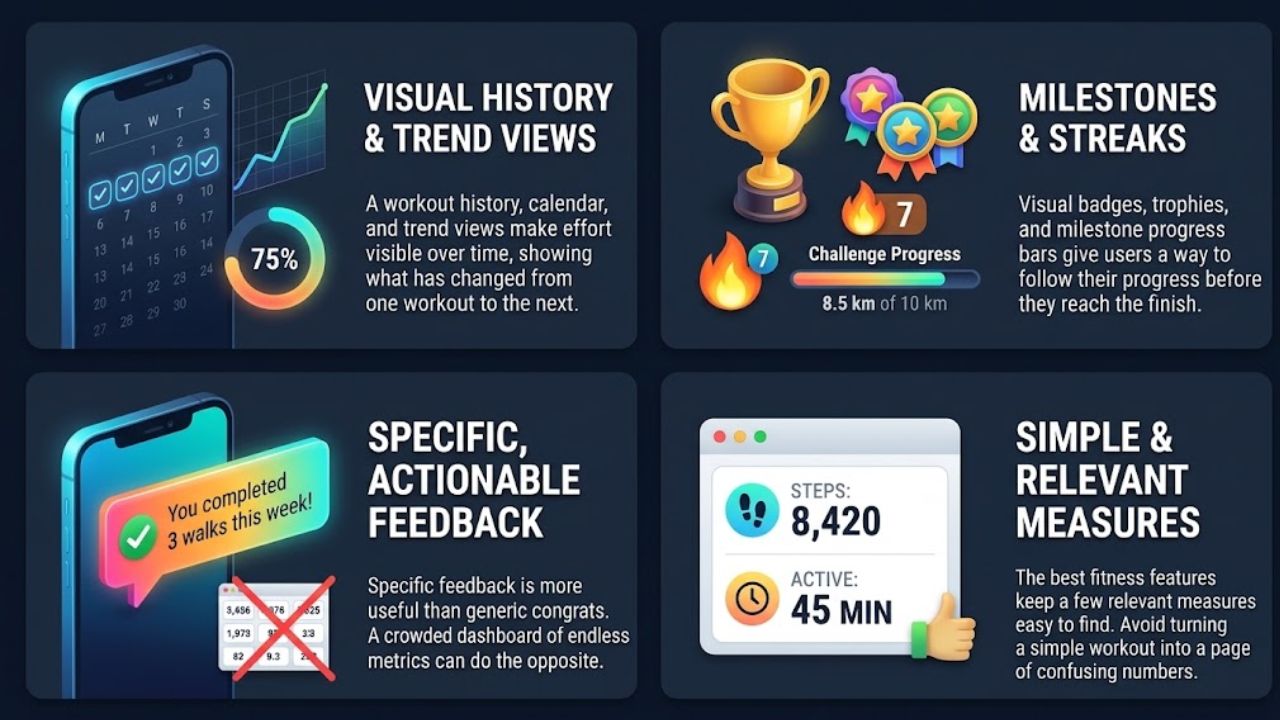
Improvement is hard to judge from one workout to the next. A workout history, calendar, progress bar, or trend view can show what has changed over time and make effort feel less invisible.
Nike Run Club tracks runs and offers badges and trophies for milestones such as personal bests and streaks. Strava uses progress bars on challenge pages to show how close users are to goals such as distance, elevation, or activity days. Each gives users a way to follow progress before they reach the finish.
Specific feedback is more useful than a string of generic congratulations. “You completed three walks this week” gives someone a detail they can act on. A crowded dashboard with every available metric may do the opposite, especially for someone who only wants to track walks.
The best gamified fitness features make a few relevant measures easy to find. If an app turns a simple workout into a page of numbers to interpret, the extra tracking may not be worth the effort.
3. Streaks that allow for rest
Streaks reward repetition. They can encourage a person to keep a new routine going by recognizing consecutive active days or regular participation over a week.
The problem starts when a streak demands daily activity. If one missed day wipes away months of progress, a user may feel punished for being ill, busy, or simply taking a rest day. That pressure can turn a helpful prompt into a reason to avoid the app.
A more forgiving streak counts a realistic weekly pattern, allows planned rest, or offers a pause. Apple’s option to pause Activity rings without breaking an award streak is one example. Users should check how an app handles breaks before becoming invested in a long streak.
A streak can be satisfying, but it should not dictate when someone exercises. If protecting the number on the screen matters more than the person’s energy or recovery, it is reasonable to turn the feature off.
4. Badges for milestones that matter
A badge makes an achievement visible. Completing a beginner plan, returning to exercise after a break, or reaching a personal distance record may all feel worth marking. The reward does not need value outside the app; the recognition can still make progress easier to notice.
Nike Run Club offers badges and trophies for milestones, including personal bests. Apple Fitness awards users for records, streaks, and other achievements. These examples recognize more than one type of progress, which is preferable to rewarding only speed or workout volume.
Badges become less meaningful when every small action earns one. A person who sees a prize for every tap may soon stop noticing them. A better system explains why an achievement matters and gives users milestones that match different abilities and goals.
Badges are a modest motivator, not a substitute for a useful plan. They are most rewarding when they reflect something the user actually set out to do.
5. Challenges with a clear finish
A challenge turns a broad intention into a time-bound target. Someone might aim to cover a set distance during a month or complete a chosen number of active days. A clear finish can make a large goal easier to plan.
Strava offers challenges based on distance, elevation, time, or activity days. Some are individual; others include a group goal or leaderboard. The rules vary, so check what activities count and whether the challenge requires particular tracking or visibility settings.
Competition suits some users and puts others off. A leaderboard can be motivating for a person who enjoys comparing results, but a beginner may find it discouraging to rank against experienced athletes. Personal progress or group totals can be a better fit.
Join a challenge because its target suits your routine, not because the deadline pressures you to do too much. Gamified fitness features should make participation inviting across different activity levels.
6. Encouragement from friends
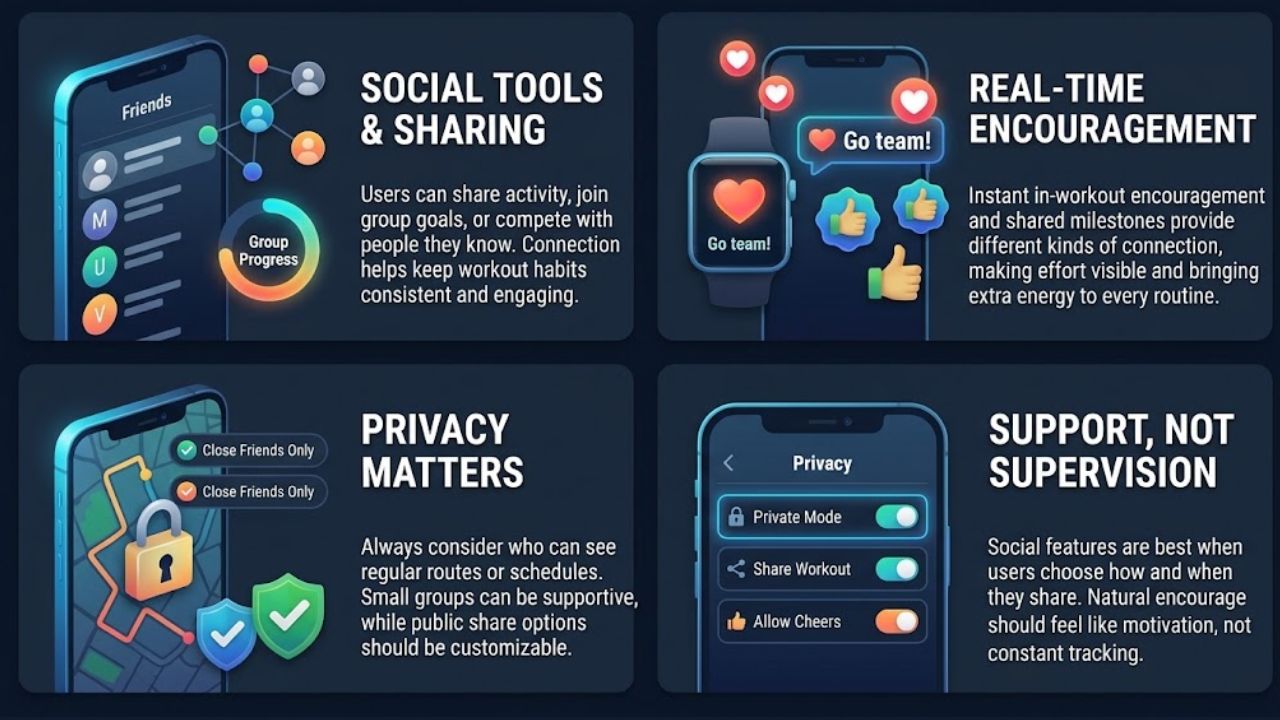
Some people are more likely to follow through when a friend is involved. Social tools can let users share activity, send encouragement, join a group goal, or compete with people they know.
Apple Fitness supports sharing Activity progress and offers seven-day competitions. Nike Run Club includes challenges and in-run cheers from friends. These features provide different kinds of connection: one makes progress visible, while the other can bring encouragement into a workout.
Privacy deserves attention. Check who can see activity before sharing it, particularly if a fitness profile reveals regular routes or schedules. A small group of friends may feel supportive; a public leaderboard may feel like an audience. Some people will prefer to keep their records private, and that is a reasonable choice.
Social features are most useful when users control how much they share and whether they compete. Encouragement should feel like support, not supervision.
7. Story missions for less predictable workouts
A story can give a walk or run a purpose beyond pace and distance. Instead of following a workout in silence, users hear characters, complete a mission, or collect virtual items as they move. This is a more distinctive option for people who find repetitive cardio dull.
Zombies, Run! builds workouts around audio missions. Users walk, jog, or run while a story plays through their headphones, collect supplies, and use them in the app’s base-building feature. The workout becomes part of a continuing narrative.
This format will not suit every runner. Someone who prefers quiet or follows a structured training plan may find the story distracting. But for a person who struggles with boredom, having a mission to follow can make a familiar route feel different.
Choose an audio feature that does not require watching the screen while moving. The story should add interest without making safety or pace feel like part of a contest. These gamified fitness features are a niche option, but they can help when routine itself is the main obstacle.
Final Thoughts
Start with the feature that addresses the reason exercise is hard to repeat. If progress feels invisible, try a simple tracker. If workouts feel dull, a story mission may be a better fit than a leaderboard. Set a goal that allows for rest, then change or disable any prompt that makes activity feel like an obligation.
The most useful gamified fitness features are the ones that support a routine beyond the app. Rewards can mark progress, but the right routine is one a person can keep returning to.
FAQs Gamified Fitness Features
Do gamified fitness features improve motivation?
They can help some users engage with physical activity. A 2024 review found slight average improvements in certain outcomes, but the results do not guarantee that a particular feature will work for everyone.
Are fitness app leaderboards good for beginners?
They may motivate people who enjoy competition. Beginners who find rankings discouraging can look for personal goals, private tracking, or group challenges that measure collective progress instead.
Should I keep a fitness streak going every day?
Not if doing so means ignoring rest or exercising when unwell. Choose a streak that accommodates breaks, or disable it if it creates pressure.