


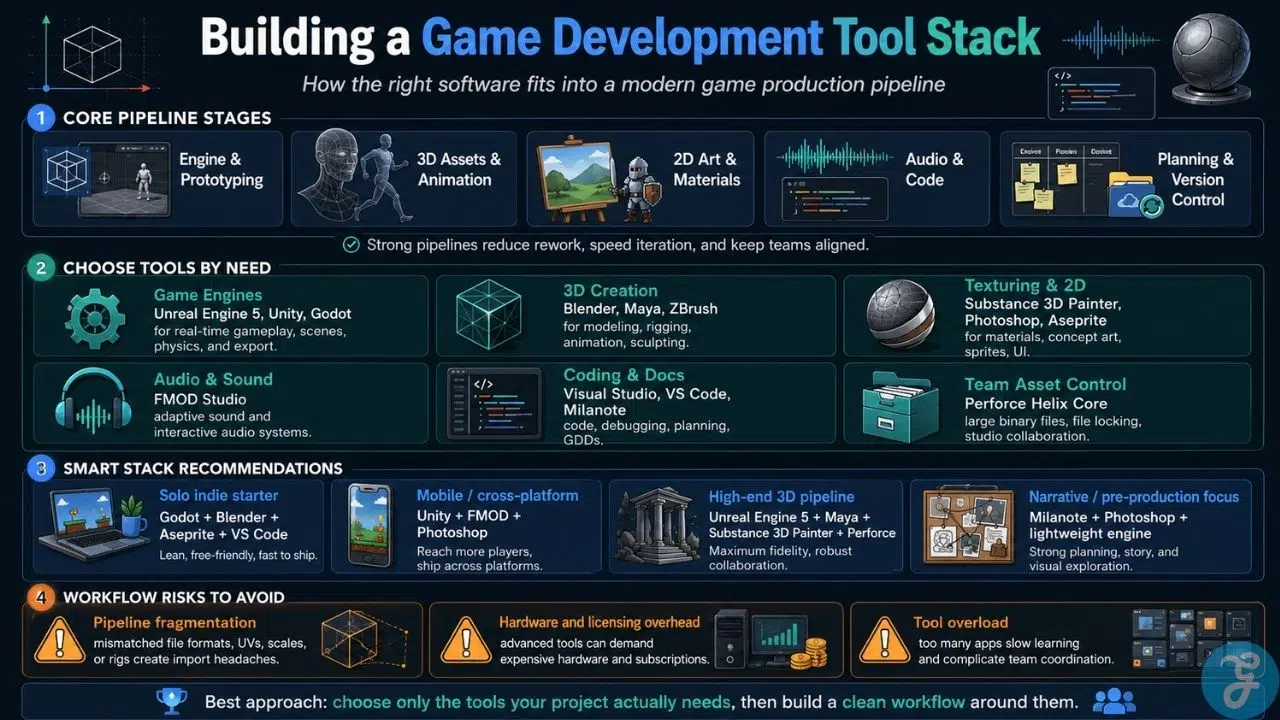
Building modern video games requires an interconnected ecosystem of software applications. A game development pipeline depends on tools handling every phase of production, from initial concept art and game design documents (GDD) to 3D sculpting, sound design, code compilation, and version control.
Choosing the right game design and development tools directly impacts asset workflows, team collaboration, and final runtime performance. Whether you are an indie developer building a 2D narrative title or part of a studio assembling high-fidelity 3D environments, this guide details the essential software across every stage of game creation.
Core Game Engines: Essential Game Design and Development Tools
Game engines serve as the central hub of development, handling real-time rendering, physics simulation, collision detection, user input, and scene management.
1. Unreal Engine 5: Photorealistic Visuals and Visual Scripting
Unreal Engine 5 (UE5) stands as the benchmark for high-fidelity 3D game creation, virtual production, and real-time visual effects. Powered by geometry rendering technologies like Nanite and dynamic lighting systems like Lumen, UE5 allows developers to import cinematic-grade 3D assets directly into real-time environments.
-
Primary Function: 3D Game Engine and Real-Time Renderer.
-
Core Languages: C++ and Blueprints (visual node-based scripting).
-
Best For: AAA titles, photorealistic 3D action games, and cinematic open worlds.
-
Key Strength: Blueprints allow designers to program complex game logic without writing raw code, making high-end development accessible.
2. Unity: Multi-Platform Versatility and Ecosystem
Unity is one of the most widely deployed game engines globally, powering thousands of mobile, desktop, console, and virtual reality (VR) titles. Its component-based architecture and extensive Asset Store enable rapid prototyping and flexible production workflows.
-
Primary Function: Cross-Platform 2D, 3D, and XR Game Engine.
-
Core Language: C#.
-
Best For: Mobile blockbusters, 2D indie titles, AR/VR applications, and multi-platform launches.
-
Key Strength: Robust cross-platform export capabilities and a massive community asset library.
3. Godot Engine: Open-Source Flexibility for 2D and 3D
Godot is a lightweight, community-driven open-source engine that has gained massive traction among indie creators. Operating on a modular scene-and-node architecture, Godot provides dedicated 2D rendering pipelines alongside capable 3D capabilities.
-
Primary Function: Lightweight 2D and 3D Game Engine.
-
Core Languages: GDScript (Python-like syntax), C#, and C++.
-
Best For: 2D platformers, indie RPGs, lightweight 3D titles, and royalty-free commercial releases.
-
Key Strength: Fully open-source under the MIT license, meaning zero licensing fees, zero subscriptions, and complete ownership of your code.
3D Asset Creation and Sculpting Game Design Tools
Before assets can be placed into an engine, 3D models must be modeled, UV-unwrapped, rigged, and animated.
4. Blender: Open-Source 3D Modeling and Animation
Blender is a comprehensive, open-source 3D creation suite that covers modeling, rigging, animation, simulation, rendering, compositing, and motion tracking. Its zero-cost entry point and continuous feature additions have made it an indispensable tool for indie studios and solo developers.
-
Primary Function: 3D Asset Creation, Rigging, and Animation.
-
Best For: Environment modeling, low-poly assets, character animation, and indie asset pipelines.
-
Key Strength: Comprehensive feature set with no software acquisition cost.
5. Autodesk Maya: Industry-Standard Character Rigging
Autodesk Maya remains a primary standard across major game development studios and animation houses. Known for its deep toolsets in skeleton rigging, keyframe animation, and custom pipeline scripting, Maya integrates cleanly into large-scale studio workflows.
-
Primary Function: Professional 3D Animation and Character Rigging.
-
Best For: AAA character rigging, complex technical animation, and studio pipelines.
-
Key Strength: Advanced animation control systems and industry-wide file format compatibility.
6. ZBrush: High-Detail Organic Sculpting
ZBrush specializes in high-polygon digital sculpting, allowing artists to create intricate surface details on organic characters, creatures, and hard-surface models. Using dynamic mesh technology, artists sculpt virtual clay before decimating meshes for engine optimization.
-
Primary Function: High-Poly Digital Sculpting and Texture Painting.
-
Best For: High-detail character art, monster design, and high-to-low poly baking workflows.
-
Key Strength: Handles tens of millions of polygons smoothly during dense sculpting sessions.
2D Art, Texturing, and Graphics Game Development Software
Visual assets require surface texturing, material definitions, UI components, and concept art to establish the game’s aesthetic.
7. Adobe Photoshop and Aseprite: Concept Art and Pixel Graphics
Creating 2D assets generally splits into concept design and specialized sprite creation. Adobe Photoshop serves as the broad studio standard for concept illustration, texture preparation, and UI layout. For pixel-art titles, Aseprite offers specialized timeline tools, color indexing, and tilemap generation.
-
Primary Function: Concept Painting, Texture Editing, and 2D Animation.
-
Best For: Environmental concept art, 2D sprite sheets, texture maps, and user interface design.
-
Key Strength: Unmatched layering control in Photoshop and precise frame-by-frame pixel editing in Aseprite.
8. Adobe Substance 3D Painter: PBR Material Creation
Substance 3D Painter is the industry standard for Physically Based Rendering (PBR) texturing. Artists paint materials directly onto 3D models using smart masks, particle effects, and parametric layers that automatically adapt to an asset’s geometry curvature and ambient occlusion maps.
-
Primary Function: 3D Texture Painting and Material Generation.
-
Best For: PBR texturing for game characters, vehicles, weapons, and prop sets.
-
Key Strength: Real-time PBR viewport feedback that mirrors exact lighting conditions across game engines.
Audio Design, IDEs, and Production Tools
Beyond visuals and engines, game development relies on specialized tools for interactive sound, code editing, game design document organization, and file version control.
9. FMOD Studio: Interactive Audio Middleware
FMOD Studio operates as an adaptive audio authoring tool that bridges the gap between sound designers and game programmers. Instead of triggering static audio files, sound designers build dynamic soundscapes that shift parameters based on real-time gameplay events (such as low health states or dynamic weather changes).
-
Primary Function: Interactive and Adaptive Audio Engine Integration.
-
Best For: Dynamic sound design, dynamic music mixing, and spatial 3D audio environments.
-
Key Strength: Intuitive Digital Audio Workstation (DAW) interface that connects directly to Unity and Unreal Engine.
10. Visual Studio and VS Code: High-Performance Code IDEs
Integrated Development Environments (IDEs) provide the text editing, refactoring, and debugging infrastructure necessary for writing clean game code. Microsoft Visual Studio provides deep integration for C++ and C# debugging in large projects, while Visual Studio Code (VS Code) offers a lightweight, extensible alternative with plugin support.
-
Primary Function: Code Authoring, Compilation, and Memory Debugging.
-
Best For: Writing core game mechanics, custom engine tools, and performance profiling.
-
Key Strength: Advanced breakpoint debugging and real-time code inspection tools.
11. Milanote: Visual Game Design Document (GDD) Planning
A Game Design Document (GDD) outlines the mechanics, world lore, system logic, and artistic vision of a game before production begins. Milanote functions as a flexible visual canvas where design teams organize moodboards, level flowcharts, narrative trees, and core mechanics onto interactive boards.
-
Primary Function: Visual Game Design Documentation and System Planning.
-
Best For: Storyboarding, level layout planning, mechanics mapping, and pre-production brainstorming.
-
Key Strength: Blends freeform visual boards with structured text, links, and media cards.
12. Perforce Helix Core: Version Control for Large Binary Assets
Unlike standard web software development that relies primarily on text code, game development involves massive binary files (3D meshes, uncompressed textures, audio files, and compiled builds). Perforce Helix Core is the studio benchmark version control system built to manage multi-terabyte repositories without performance degradation.
-
Primary Function: Enterprise Version Control and Digital Asset Management.
-
Best For: Studio asset tracking, file locking, and managing large binary game repositories.
-
Key Strength: Strict file locking mechanisms that prevent artists from accidentally overwriting massive binary files.
Comparing Top Game Design and Development Tools
| Tool / Software | Category | Primary Skill Required | Pricing Model | Best Use Case |
| Unreal Engine 5 | Game Engine | C++ / Visual Nodes | Royalty-based (after $1M) | Photorealistic 3D / AAA titles |
| Unity | Game Engine | C# Scripting | Free tier / Subscription | Cross-platform 2D/3D & Mobile |
| Godot Engine | Game Engine | GDScript / C# | 100% Free (MIT License) | Indie 2D & lightweight 3D games |
| Blender | 3D Modeling | 3D Spatial Design | 100% Free (Open Source) | 3D modeling, rigging & animation |
| Autodesk Maya | 3D Modeling | Technical Animation | Paid Subscription | Professional character rigging |
| ZBrush | Digital Sculpting | Sculpting & Anatomy | Paid Subscription | High-poly organic detailing |
| Substance 3D Painter | 3D Texturing | Material Mapping | Paid Subscription | PBR surface texturing |
| Adobe Photoshop | 2D Art & UI | Graphic Design | Paid Subscription | Concept art & UI layout |
| FMOD Studio | Audio Middleware | Sound Design | Free tier / Licensed | Dynamic, adaptive soundscapes |
| Visual Studio | Code IDE | C++ / C# Programming | Free Community / Enterprise | Code compilation & debugging |
| Milanote | GDD & Planning | Game Design | Free tier / Subscription | Visual game documentation |
| Perforce Helix Core | Version Control | System Admin | Free for small teams / Paid | Multi-gigabyte binary storage |
Limitations and Trade-Offs of Modern Game Development Tools
Building an efficient production stack requires evaluating operational constraints before adopting complex software packages.
The Pipeline Fragmentation Challenge
Using too many disparate tools can introduce software friction. Exporting 3D assets from modeling software into texturing suites, rigging packages, and finally into game engines requires strict file format standards (such as FBX, OBJ, or USD). If scale units, bone hierarchies, or UV channels are misaligned across tools, technical artists waste valuable production hours fixing import errors.
Hardware and Licensing Overhead
High-end software stacks carry demanding hardware requirements and subscription costs. Running suites like Unreal Engine 5, ZBrush, and Substance Painter simultaneously requires powerful GPU hardware, large RAM capacities, and high-speed NVMe storage. Independent developers should balance software costs with hardware constraints, utilizing open-source alternatives like Godot and Blender to minimize early overhead.
Final Thoughts: Selecting the Best Game Design and Development Tools
Selecting the right game design and development tools depends on your team size, project scope, target platforms, and artistic direction. Solo developers and small indie studios often thrive by pairing lightweight, cost-effective engines like Godot or Unity with versatile open-source tools like Blender. Larger studios, by contrast, rely on specialized pipelines built around Unreal Engine 5, Maya, Substance Painter, and Perforce to handle complex collaborative workflows.
Focus on mastering the primary tools that address your project’s immediate bottlenecks, establish clean asset export workflows, and build a manageable pipeline that supports your creative vision.
Frequently Asked Questions(FAQs) About Game Design and Development Tools
What tools do professional game developers use for GDD planning?
Professional studios use visual collaboration platforms like Milanote, Storyflow, or Miro alongside database documentation tools like Notion, Confluence, and Jira to map out mechanics, sprint tasks, and world design.
Can I build a commercial game using only free game design tools?
Yes. A fully functional, commercial-grade pipeline can be assembled at zero cost using Godot (game engine), Blender (3D modeling/animation), GIMP or Aseprite (2D graphics), Audacity (sound editing), VS Code (programming), and GitHub (version control).
Which software should I learn first as a beginner game designer?
If your focus is general game development, starting with a user-friendly engine like Unity or Godot allows you to learn basic scripting and level design quickly. If your focus is visual asset creation, learning Blender provides the broadest foundation for 3D game art.

























