

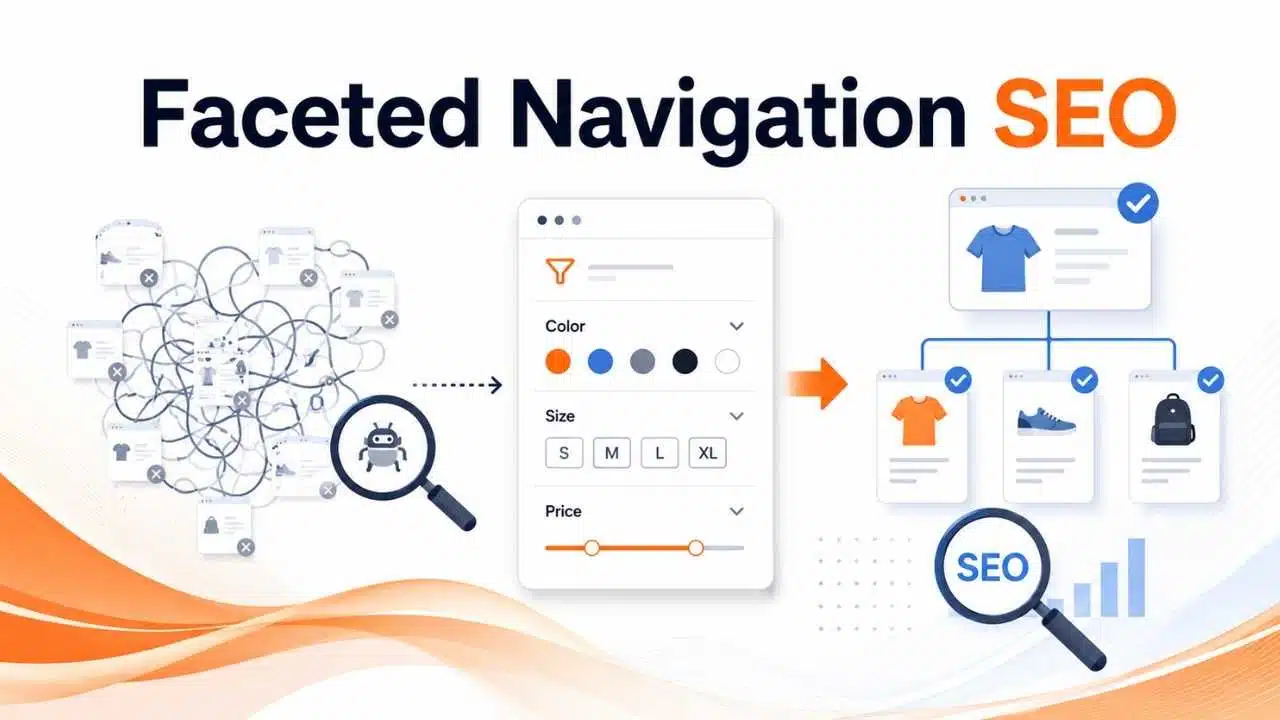
Faceted navigation SEO is the practice of optimizing a site’s multi-filter system so shoppers can easily narrow down products without creating massive crawl, indexation, or duplicate content issues for search engines.
While multi-select filters—like size, color, brand, and price—improve user experience on large e-commerce stores, they also generate millions of unique, parameter-heavy URLs. When Google crawls every combination, it drains your crawl budget, dilutes link equity, and triggers duplicate content penalties.
A sound faceted navigation SEO strategy resolves this gap. By strategically controlling which filter states search engines can discover, crawl, and index, you ensure shoppers enjoy seamless navigation while Google focuses strictly on your high-value, high-intent landing pages.
Faceted navigation lets users refine a collection using attributes attached to the items inside it.
A laptop category might offer filters for:
- brand;
- processor;
- RAM;
- storage;
- screen size;
- price;
- operating system;
- availability.
Each filter changes the result set.
From the shopper’s point of view, this is normal browsing. From the site’s URL architecture, it can become a multiplication problem.
Ten facets do not necessarily create ten extra pages. They can be combined in different orders, paired with pagination, mixed with sorting, or repeated with tracking parameters. The number of possible URLs can grow far beyond the number of meaningful categories.
That is why faceted navigation deserves an architectural plan rather than a few SEO tags added after launch.
The First Decision: Search Landing Page or Browsing State?
Before choosing a canonical or writing a robots.txt rule, decide whether a filtered state deserves to appear in search at all.
This is the most useful distinction in faceted navigation SEO.
Consider a furniture store.
These could represent legitimate search destinations:
- leather sofas;
- black office chairs;
- wooden king-size beds;
- outdoor dining tables.
A page for leather sofas may have stable inventory, clear demand, useful internal links, and a purpose beyond helping one shopper narrow a list.
Now compare it with:
black + under $173 + four-star rating + in stock + free delivery
That combination may be useful during a shopping session. It does not automatically deserve a permanent search result.
Most faceted states belong in the second group.
When a filtered combination is intentionally promoted into search, treat it like a real landing page. Give it a stable URL, a clear title and heading, consistent products, sensible internal links, and a canonical strategy that reflects its intended status.
Do not generate these pages merely because keyword combinations exist. Thin inventory and unstable product sets can turn a theoretically attractive landing page into a weak search result.
Why Filters Can Waste Crawling Resources
Google has specifically identified faceted navigation as a common cause of overcrawling.
The mechanism is straightforward.
Googlebot follows links. If one filtered page exposes another full set of filter links, the crawler can continue moving deeper:
brand
then:
brand + color
then:
brand + color + size
then another order of the same parameters.
Large marketplaces, travel sites, property portals, jobs platforms, and ecommerce stores can create very large URL spaces this way.
The main risks are not mysterious ranking penalties. They are practical crawl and indexing inefficiencies.
Google may spend resources requesting low-value, duplicate, or empty combinations while useful new URLs compete for crawler attention.
This is primarily a scale problem. A store with a few hundred products should not panic because its filters use query parameters. A marketplace capable of creating millions of combinations needs much tighter control.
Duplicate Filter URLs Add Unnecessary Noise
Poor implementations sometimes give the same result set several URLs.
For example:
?brand=nike&color=black
and:
?color=black&brand=nike
may produce identical pages.
The same thing can happen through:
- repeated parameters;
- different capitalization;
- tracking values;
- default parameters;
- session IDs;
- alternate filter paths;
- sorting combined with facets;
- inconsistent parameter order.
This makes crawling harder to control and canonicalization less clean.
Where a filtered state is exposed, create one predictable URL representation for it. Keep parameter handling consistent and avoid generating multiple paths to the same selection.
It is much easier to prevent this at the application layer than to clean up thousands of duplicate URLs later.
Indexable Facets Should Earn Their Place
A filtered page should not become indexable simply because it exists.
A useful search landing page normally has several things going for it:
- clear search intent;
- enough products to satisfy that intent;
- reasonable inventory stability;
- a permanent URL;
- useful internal linking;
- a distinct title and heading;
- a reason to exist independently from the parent category.
For example, /sofas/leather/ may deserve its own search visibility if the retailer carries a substantial and stable leather-sofa range.
A highly specific combination that routinely drops to one product probably does not.
This is where SEO judgment matters more than automation. Programmatically creating every possible brand-plus-color page can produce a large amount of thin inventory even when the URL structure is technically tidy.
Robots.txt Is for Crawl Control
When a set of faceted URLs does not need to be crawled, robots.txt can be useful.
A site may decide that sorting or rating filters should never create crawlable search destinations:
User-agent: Googlebot
Disallow: /*?*sort=
Disallow: /*?*rating=
The exact rules depend on the site’s parameter structure and should be tested carefully.
robots.txt prevents crawling of matching URLs. It does not tell Google which page is canonical, and it does not guarantee that a blocked address can never appear in Search if Google discovers that URL elsewhere.
That distinction matters.
Use crawl blocking when the problem is a large URL space that Google does not need to request.
Do not use robots.txt as a substitute for canonicalization.
Noindex Is Different
A noindex directive says that an accessible page should not remain in Google’s index.
Google must be able to crawl the page to read that directive.
This creates a common contradiction:
- the URL is blocked in robots.txt;
- the page contains noindex;
- the site expects Google to process both.
If Google cannot crawl the page, it may never see the noindex.
There is also a scale problem. Leaving millions of low-value filter URLs crawlable so that Google can repeatedly discover noindex does not solve the underlying crawl-space issue.
Use noindex when a page needs to remain accessible but should not appear in Search.
For a vast faceted URL space that should not be crawled in the first place, it is usually the wrong primary control.
Canonicals Help With Duplication, Not Infinite Crawling
Canonical tags are often used on filter URLs.
For example:
/mens-shoes/?sort=price
may point to:
/mens-shoes/
as its preferred canonical.
That can make sense when both pages contain substantially the same collection and the sorted version should not compete independently.
Canonicalization is useful for consolidation. It is not a crawl firewall.
Google normally needs to request the alternative URL before it can discover and evaluate the canonical signal. A site that exposes millions of faceted combinations therefore cannot expect canonical tags alone to prevent those URLs from consuming crawler attention.
The stronger setup is consistent across signals:
- internal links point toward preferred URLs;
- canonical tags reinforce those URLs;
- XML sitemaps contain preferred canonical pages;
- unwanted crawl spaces are controlled separately.
Conflicting signals make the architecture harder to understand.
Do Not Rely on Nofollow Alone
Putting rel=”nofollow” on filter links can reduce discovery through those links, but it is fragile as the main control.
The same filtered URL may also be linked from another navigation element, discovered through an external link, or exposed elsewhere on the site.
For nofollow to work consistently as a discovery control, links to those unwanted states would need consistent treatment.
That becomes difficult on a large site with multiple templates and components.
Fix URL generation and crawlability at the architecture level first. Treat nofollow as a supporting choice rather than the foundation of the strategy.
Sorting Pages Are Usually Low-Hanging Fruit
Sorting is often one of the easiest areas to clean up.
URLs such as:
?sort=price-low
?sort=price-high
?sort=rating
usually contain the same products arranged differently.
Shoppers need those controls.
Search engines rarely need a separate landing page for every order in which the same items can appear.
If a technical team is trying to reduce an oversized faceted URL space, sorting parameters are a sensible place to investigate early.
Empty Filters Need Proper HTTP Handling
Faceted navigation can also create combinations with no valid results.
A URL may request a brand, size, and color combination that cannot exist and return a page saying “No products found.”
If the combination is genuinely invalid or empty, Google’s current guidance recommends returning an HTTP 404 rather than treating it as an ordinary 200 OK page.
The same principle applies to nonsensical duplicate filters and nonexistent pagination states.
There is an important ecommerce exception.
A permanent category that temporarily has zero stock is not the same thing as an impossible combination. If products are expected to return, removing the category whenever inventory reaches zero may be the wrong business and SEO decision.
The application should understand the difference between a valid page with temporary inventory issues and a filter state that has no meaningful content.
JavaScript Does Not Make Faceted URLs Invisible
Moving filters into JavaScript does not automatically prevent crawling.
If the interface exposes ordinary crawlable links, Google can discover them.
Fragment-based states behave differently. Google generally does not use the content after # to create separate indexed URLs, which can be useful when filters are purely an interface feature.
That same behavior becomes a limitation if the business wants some filtered states to rank.
So the decision should happen in this order:
- decide which filtered states belong in Search;
- design URLs for those states;
- decide how purely interactive states should behave;
- implement the JavaScript around that architecture.
Starting with a front-end implementation and hoping it accidentally controls SEO is a poor substitute for an indexation plan.
Be Careful With Product Variants
Color and size create a particularly easy mistake because they can describe both a category facet and a product variant.
These are different:
/t-shirts/?color=green
and:
/t-shirt?color=green
The first may represent a collection of green T-shirts.
The second may represent the green version of one product.
Google’s ecommerce guidance supports using distinct URLs for product variants when Google needs to understand those variants.
That means a broad rule such as:
Disallow: /*?*color=
could unintentionally block useful product URLs if the same parameter is used across several templates.
Before creating parameter-based rules, map where each parameter appears.
A regular expression can match URLs perfectly and still be strategically wrong.
Internal Linking Often Determines How Bad the Problem Becomes
Faceted navigation becomes a crawl problem because URLs are exposed.
If every filtered page presents another complete set of crawlable links, the site creates a huge graph that crawlers can continue exploring.
For valuable facet landing pages, that is fine. Those pages should be discoverable.
For temporary browsing states, ask whether search crawlers need a normal link to them at all.
XML sitemaps should follow the same principle. Include the canonical URLs the site genuinely wants discovered and indexed, not every URL the backend can generate.
The cleaner the internal linking, sitemap, and canonical signals are, the less work the site has to do later to explain which URLs matter.
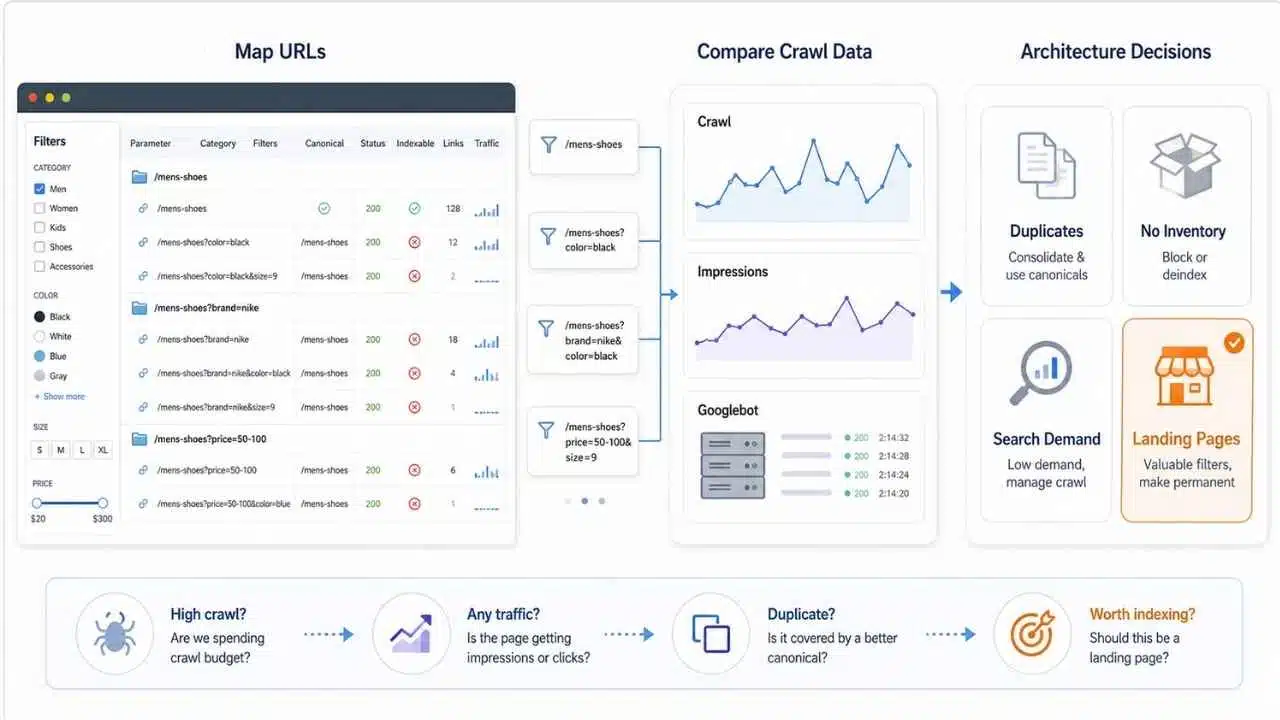
Do not begin an audit by blocking every URL that contains ?.
First map what the site is actually producing.
Group faceted URLs by:
- parameter;
- category;
- number of active filters;
- canonical target;
- status code;
- indexability;
- internal links;
- organic impressions;
- search traffic.
Then compare that with crawler behavior.
Google Search Console’s Crawl Stats report can show broader crawling patterns. URL Inspection is useful for individual examples. On larger sites, server log analysis gives a much clearer picture of which parameter combinations Googlebot is requesting.
The useful questions are not “How many parameters do we have?” but:
- Which combinations consume the most crawling?
- Which filter URLs actually receive impressions or traffic?
- Which are duplicates?
- Which return no inventory?
- Which correspond to stable search demand?
- Which parameters are reused on product pages?
- Which filtered states should become permanent landing pages?
That turns the audit into an architecture decision rather than a cleanup exercise.
Most large sites will need several controls working together.
A sensible policy often looks something like this:
- keep core category pages indexable;
- deliberately promote a limited number of useful facet combinations;
- restrict crawling of low-value sorting and filtering spaces;
- canonicalize genuine duplicate variants appropriately;
- use noindex only where accessible pages need to stay out of Search;
- return 404 for impossible or truly empty combinations;
- normalize parameter order;
- keep session and tracking values out of navigation links;
- include preferred canonical URLs in sitemaps;
- manage product variants separately from category facets.
Write this policy down.
Without a shared rule set, technical contradictions appear quickly. Development exposes a new filter. SEO blocks the parameter. Merchandising links heavily to it. A sitemap generator includes the URL anyway.
No individual tag can cleanly repair a site where the architecture itself sends conflicting instructions.
Final Thoughts
Good faceted navigation SEO is not about removing filters. It is about separating useful shopping functionality from the much smaller set of pages that deserve search visibility. Customers may need thousands of ways to refine a catalogue. Google does not need thousands of crawlable URLs for those choices.
Start by identifying the filtered states that have durable search value. Build those as genuine landing pages. Keep sorting, temporary combinations, duplicate states, and impossible filters from expanding the crawl space unnecessarily.
Then verify the result with crawl data.
The strongest implementation is the one where shoppers can filter aggressively while search engines see a clear, controlled architecture rather than every combination the database is capable of generating.


























