

Managing remote teams feels like herding cats, especially when you can’t see what your employees are doing all day. Research shows that companies using employee monitoring software see a 30% boost in workforce productivity.
This guide breaks down 10 top-rated employee monitoring tools that help track time, manage projects, and keep your team accountable without crossing privacy lines. Ready to find the perfect fit for your business?
Key Takeaways
- Companies using employee monitoring software see a 30% boost in workforce productivity according to research.
- Hubstaff offers GPS tracking and geolocation features perfect for remote teams across different time zones.
- Teramind provides over 200 built-in DLP rules for insider threat detection and data security compliance.
- WebWork costs only $4.99 per user monthly with no minimum user requirements for small businesses.
- Controlio scales from 5 users to 100,000 users with 6-month data retention on base plans.
Hubstaff
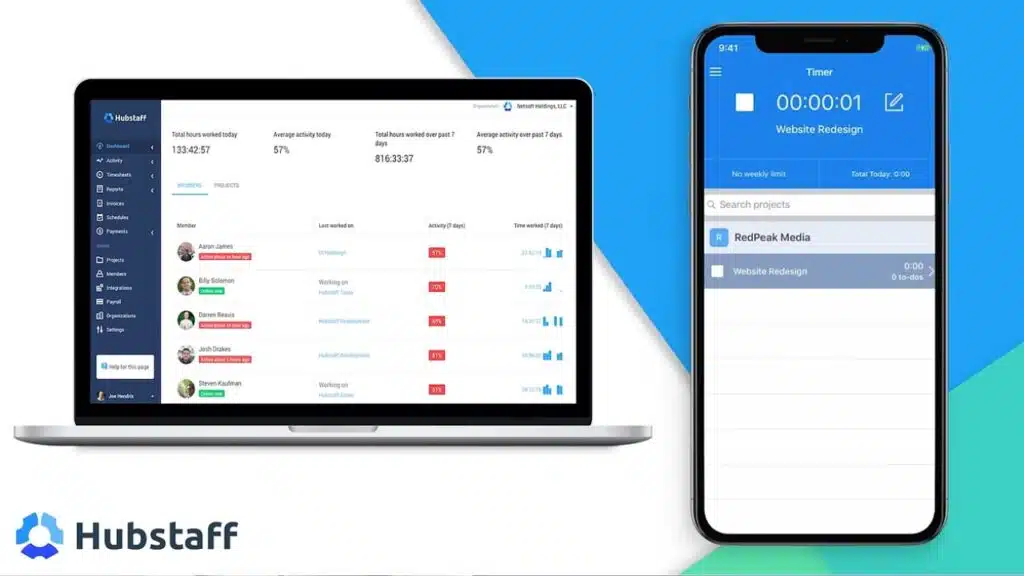
Hubstaff stands out as a powerhouse for businesses that need rock-solid time tracking and GPS location features. This employee monitoring software makes workforce management feel like a breeze, especially for remote teams who work across different locations and time zones.
How does Hubstaff track geolocation and manage time?
GPS tracking capabilities make location monitoring simple for remote teams. Real-time maps show employee locations during work hours, giving managers clear visibility into field operations.
Geolocation tracking works through GPS time clock features that record where employees start and end their shifts. Time tracking within geofenced locations helps employers verify that workers arrive at designated job sites.
This workforce management tool captures precise location data, making it perfect for businesses with mobile workers or multiple office locations.
Time tracking features monitor keyboard and mouse activity to measure actual work time. Screenshots capture at intervals for visual work verification, creating a digital record of employee productivity.
Project budget integration helps manage labor costs while payroll management automates payments based on tracked hours. The Enterprise plan provides access to advanced geolocation and compliance features that smaller plans lack.
Add-ons expand functionality for detailed activity insights and task management, though the platform lacks live screen view capabilities that some competitors offer.
Teramind
Teramind stands out as a powerhouse for companies worried about insider threats and data security breaches, offering behavioral analytics that can spot suspicious employee activity before it becomes a real problem.
Why is Teramind ideal for security and insider threat detection?
Teramind stands out as a powerhouse for companies worried about data breaches and internal security risks. This employee monitoring software comes packed with over 200 built-in DLP rules that work around the clock to catch potential threats before they become major problems.
Companies can create custom policies that fit their specific needs, making it a smart choice for businesses handling sensitive information. The system uses tamperproof logs that create rock-solid evidence for investigations, which comes in handy if legal issues arise.
Security-focused organizations love how this platform handles compliance requirements for GDPR, HIPAA, and PCI DSS standards. The Optical Character Recognition feature scans screenshots to spot sensitive data that might slip through other security measures.
Behavioral analytics help managers identify unusual patterns that could signal insider threats or security breaches. The Enterprise plan unlocks the most powerful threat detection features, though smaller teams might find the 5-user minimum subscription a bit steep for their budgets.
Time Doctor
Time Doctor acts like a digital watchdog for your remote teams, tracking every minute while employees work on projects. This employee monitoring software combines automatic time tracking with detailed productivity analytics, making it easy to spot who’s crushing their goals and who might need extra support.
How can Time Doctor improve employee performance and productivity?
Time Doctor transforms employee performance through its comprehensive tracking system that monitors work patterns with precision. This employee monitoring software captures detailed data about how workers spend their time, creating a clear picture of productivity levels across teams.
The platform generates daily, weekly, and monthly reports that reveal exactly where time goes during work hours. Managers can spot productivity gaps and address them quickly using these insights.
The real-time tracking feature shows activity as it happens, making it easy to identify when employees need support or guidance.
Break analysis and inactivity alerts serve as gentle nudges that keep workers focused throughout the day. The system sends notifications when employees remain idle for too long, encouraging them to return to their tasks.
This automatic time tracking eliminates guesswork about billable hours and project allocation. Teams can see which activities boost their performance and which ones drain their energy.
The software integrates with over 60 external tools, streamlining workflows and reducing the time spent switching between applications. Performance evaluations become more accurate because managers have concrete data instead of assumptions.
Employee accountability increases naturally when workers can see their own productivity patterns and make improvements on their own.
ActivTrak
ActivTrak stands out as a smart employee monitoring software that watches user activity without making workers feel like they’re under a microscope. This platform gives managers clear productivity insights while helping remote teams stay connected and focused on their goals.
How does ActivTrak optimize workflow and provide productivity insights?
ActivTrak transforms workplace surveillance into actionable intelligence. This employee monitoring software captures user activity data across different operating systems, including Windows, macOS, and mobile apps.
Real-time activity monitoring enables managers to identify workflow bottlenecks before they slow down entire teams. The platform tracks employee productivity through automatic time tracking and behavioral analytics.
Web blocking helps maintain focus by restricting access to non-work sites during business hours.
Productivity insights are generated from user activity data that flows through the system continuously. Transparent, non-intrusive design informs employees about monitoring activities, building trust instead of fear.
The software provides detailed analytics on task allocation, billable hours, and employee performance metrics. Screenshots, available as an add-on, provide visual verification of activity without crossing privacy boundaries.
No keylogger included, supporting transparency and privacy policies that respect worker rights while delivering the data analytics managers need for strategic workforce planning.
Insightful
Insightful transforms raw employee data into actionable insights that help managers make smarter decisions about workforce management and productivity analytics.
What advanced analytics does Insightful offer for productivity and attendance?
Insightful packs a punch with its advanced analytics for productivity tracking. The software delivers real-time app monitoring that shows exactly what employees do during work hours.
Managers get detailed logs through time and attendance tracking features. These logs help track when workers arrive, take breaks, and finish their day. The platform offers more than 50 integrations with third-party tools for data enrichment.
This means your existing business processes connect smoothly with Insightful’s monitoring system. Meeting time measurement analyzes how much time teams spend in collaborative tasks.
This feature helps identify if too many meetings slow down productivity.
Detailed productivity reports support performance management across remote teams and office workers. The system creates tailored productivity recommendations based on employee behavior patterns.
These suggestions help boost employee performance without micromanaging. Productivity analytics show which apps and websites help or hurt work output. Stealth and visible monitoring modes cater to different transparency needs in your workplace.
The stealth mode tracks user activity monitoring without employees knowing. Visible mode keeps everything open and builds trust. Automatic time tracking captures billable hours for project management and payroll management tasks.
DeskTime
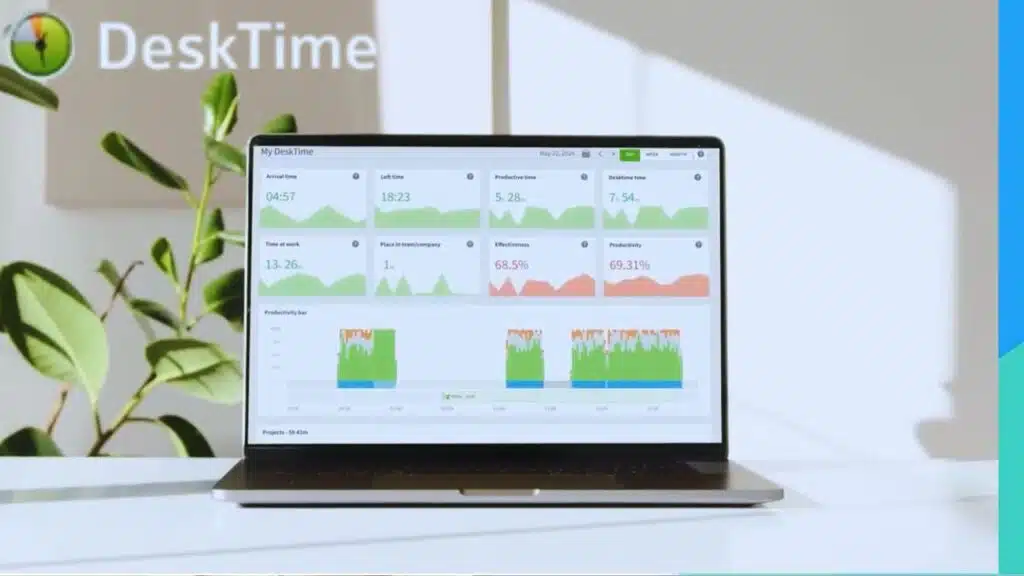
DeskTime tracks how much time your team spends on different tasks and websites. This employee monitoring software takes automatic screenshots and shows which apps boost productivity, making workforce management simple for remote teams.
How does DeskTime track productivity and automate screenshots?
DeskTime tracks employee productivity through automated time tracking and attendance recording. The software monitors websites and application usage to analyze productive and non-productive time.
This employee monitoring software provides clear insights into how workers spend their hours. Automated screenshots capture employee activity at set intervals for verification purposes.
These images help managers see what happens on employee screens throughout the day.
Task and workflow analysis gives performance insights to supervisors. The system integrates with project management tools for task-based productivity tracking. Cloud storage makes activity logs and records easy to access from anywhere.
Free and tiered paid plans work for various team sizes and budgets. Automated reporting saves managers time by creating summaries for review. This workforce management approach helps remote teams stay accountable and productive.
Veriato
Veriato stands out with its powerful behavior analytics that spot unusual patterns before they become problems. This software catches insider threats by watching how employees interact with sensitive data, making it perfect for companies that handle confidential information.
What behavior analytics and threat detection features does Veriato have?
Veriato stands out with its advanced behavioral analytics that dig deep into employee patterns. This employee monitoring software uses artificial intelligence to spot unusual activities before they become real problems.
Machine learning algorithms work behind the scenes, analyzing keystroke logging patterns and application usage data. The system flags risky behaviors automatically, sending alerts to managers when something looks off.
User behavior analytics help companies catch potential insider threats early. The software tracks everything from file transfers to email communications, building a complete picture of how employees interact with company data.
Advanced data loss prevention features protect sensitive information from leaving your organization. The platform integrates smoothly with SIEM systems, making it perfect for enterprise security teams.
Automated alerts pop up whenever suspicious activities occur, giving security teams real-time tracking capabilities. Compliance support helps businesses meet industry standards without breaking a sweat.
Security reports provide detailed insights into workforce management patterns and potential risks. The system monitors internet usage and application access, creating a safety net around your most important data.
This comprehensive approach to employee productivity tracking makes Veriato a powerful tool for companies serious about data privacy and security.
WebWork
WebWork delivers powerful employee monitoring features at a fraction of the cost, making it perfect for small businesses and startups that need comprehensive workforce management without breaking the bank.
Why is WebWork a budget-friendly option with comprehensive monitoring?
WebWork stands out with its low-cost pricing at $4.99 per user each month. Small businesses love this price point because there’s no minimum user requirement. You get unlimited projects, tasks, and teams included at no extra charge.
This means your growing company won’t face surprise costs as you add more work.
Cost-effective solutions don’t always mean fewer features, and WebWork proves this point. The platform offers comprehensive monitoring features within its base price. Screenshot monitoring tracks visual activity without additional fees.
No required add-ons make it perfect for tight budgets. The Consumer Sentiment Index of 5.0 based on 1,136 insights shows users appreciate the value. Some technical issues like glitches and syncing delays exist, but the affordable pricing makes up for these minor bumps in the road.
Apploye
Apploye stands out with its smart project management features and automatic time tracking capabilities. This employee monitoring software helps remote teams track billable hours while offering GPS tracking for field workers, making workforce management simple for businesses of all sizes.
How does Apploye help with productivity management and project tracking?
Apploye transforms workforce management through its comprehensive employee monitoring software. This platform offers automatic time tracking that captures every minute your team spends on tasks.
The system provides real-time tracking capabilities that give managers instant visibility into employee performance. Teams can access detailed productivity analytics that show exactly where time goes during work hours.
The software integrates seamlessly with existing project management tools, making task allocation simple and effective. Managers receive live updates about project progress without constantly checking in with team members.
The platform supports both remote teams and office workers with equal efficiency.
Project tracking becomes effortless with Apploye’s advanced features. The software captures automated screenshots that provide visual proof of work completion. Task management tools help organize projects from start to finish.
Employee accountability increases because workers know their activities are monitored transparently. The system tracks billable hours accurately for client invoicing and payroll management.
Behavioral analytics reveal patterns that help improve operational efficiency across departments. Teams can monitor key performance indicators through detailed reports that highlight both strengths and areas for improvement.
The platform works on desktop computers, Chrome browsers, and mobile devices for maximum accessibility.
Controlio
Controlio offers scalable data monitoring tools that grow with your business needs. This platform tracks employee activity across multiple devices, giving managers complete visibility into workforce productivity and security threats.
What scalable data monitoring tools does Controlio provide?
Controlio scales from 5 users to 100,000 users for enterprise monitoring needs. Companies can track keystrokes, application usage, website visits, and USB activity across their entire workforce.
The platform monitors active time and idle periods while capturing email communications and print jobs. Keystroke logging and automatic screenshots create detailed activity records for managers.
Data retention spans 6 months on the base plan, with unlimited storage on advanced tiers. Custom rules and alerts help managers spot issues before they become problems. The system collects data offline, so employee monitoring continues even without internet connections.
Controlio meets GDPR and HIPAA compliance standards, protecting sensitive business information while tracking employee productivity and performance across remote teams.
Takeaways
Employee monitoring software has become a game-changer for businesses managing remote teams and tracking productivity. These ten tools offer powerful features that help companies stay on top of their workforce management needs.
From time tracking to behavioral analytics, each platform brings something special to the table.
Choosing the right tool depends on your specific business needs, budget, and team size. Some excel at project management, while others shine with their user experience and automation features.
The key is finding software that balances employee accountability with respect for privacy laws and worker satisfaction.
FAQs
1. What makes employee monitoring software worth the investment for workforce management?
The best employee monitoring software combines time tracking, gps tracking, and payroll management in one package. These tools boost employee productivity tracking while keeping your remote teams accountable. Time Doctor and similar platforms offer real-time tracking that turns guesswork into hard data.
2. How do automatic time tracking features improve employee engagement and task management?
Automatic time tracking removes the headache of manual timesheets, letting workers focus on actual work instead of paperwork. Most tools sync with project management systems and track billable hours without constant input. This hands-off approach actually increases employee engagement because nobody likes being micromanaged every minute.
3. Can keystroke logging and behavioral analytics really boost employee performance without hurting morale?
Smart keystroke logging focuses on productivity patterns, not spying on personal messages. The key is transparency, you tell your team what you’re tracking and why. When employees see how behavioral analytics help with task allocation and workload balance, they often welcome the insights.
4. What privacy laws should companies consider when implementing employee accountability tools?
Privacy laws vary by state, but most require clear disclosure about monitoring activities. You need written consent for things like gps tracking on personal android devices or ios phones. Consumer privacy rules also apply when your team handles customer data, so check both employee and client protection requirements.
5. How do attendance management and productivity analytics integrate with human resource management systems?
Modern attendance management tools plug right into existing human resource management systems without a steep learning curve. The integration streamlines payroll management and gives HR teams better data for performance reviews. Most platforms offer APIs that connect with popular HRMS solutions, making onboarding smooth as butter.
6. Do these monitoring tools actually support remote work and employee empowerment strategies?
Good monitoring tools act like a collaboration tool rather than a digital watchdog. They help remote teams stay connected through real-time tracking and task management features. The best platforms focus on employee empowerment by giving workers insights into their own productivity patterns, turning monitoring into a tool for personal growth rather than just oversight.





















