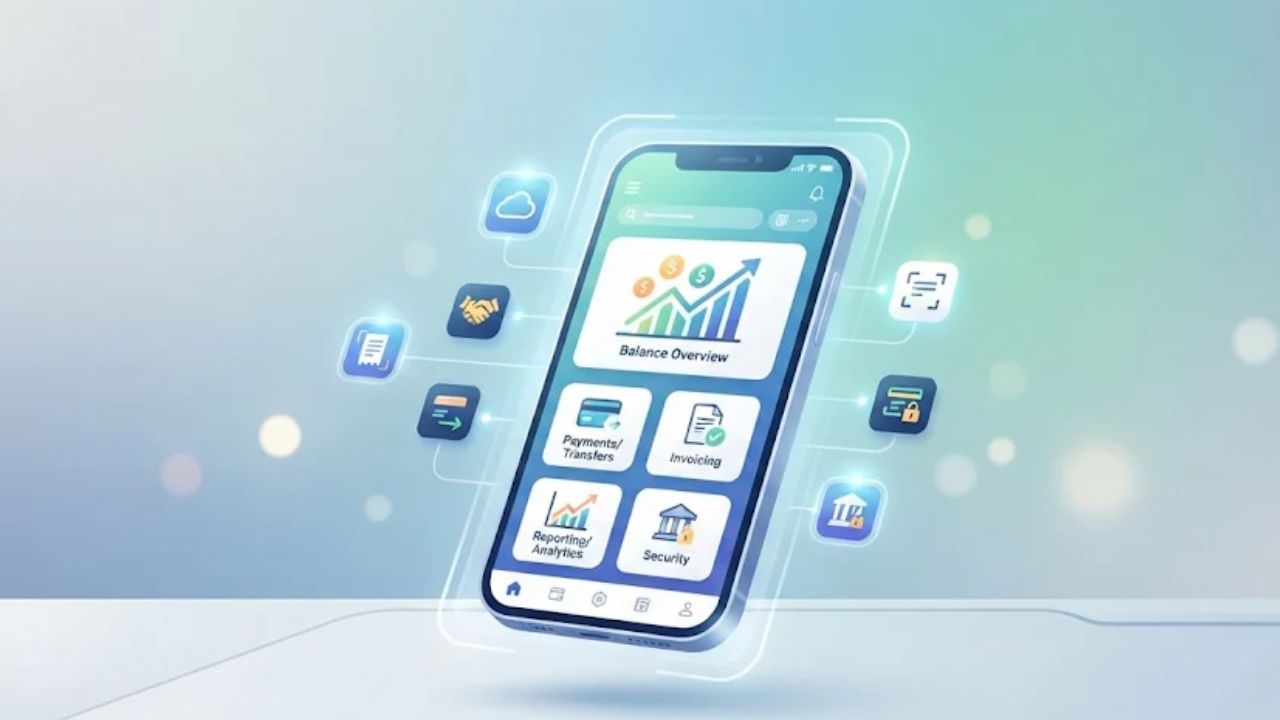
You bank on your phone all the time. A business account holds your company’s cash, so a bad app costs you more. Compare these 8 business banking app features: a safe login, ease of use, payments, a link to your books, check deposits, alerts, team access, and help.
Then look past the “free app” label. The app may cost nothing, but each wire or transfer can. This guide gives you a quick test for each feature, a table of real fees, and a 15-minute screen to run before you sign up. Use it on two or three apps, then pick one.
Why Your Business Banking App Choice Matters
Your business banking app is a work tool you will use every day. It moves money in and out, tracks what you spend, and shows where your cash stands.
A business account also keeps your company money apart from your personal money. That keeps your records clean. It also shows vendors and clients that you run a real business.
The wrong app costs you in three ways. It wastes your time, it charges fees you did not plan for, and it can leave gaps in security. The eight features below help you avoid all three.
8 Business Banking App Features To Compare
Start with this table. It lists each feature, what good looks like, and one test you can run. Most tests work before you sign up. You can use app store reviews, the bank’s website, a demo, or a call to the bank. A few tests need an open account, and you will find those in the “after you open” list at the end.
| Feature | What good looks like | Your quick test |
| 1. Security and two-factor login | Multifactor login, fraud alerts, card freeze, extra checks on large payments | Ask if every user must use two-factor login, and what happens on a new phone. |
| 2. Ease of use | Main tasks take a few taps | In a demo or in screenshots, see how fast you can find a balance, a transfer, and past payments. |
| 3. Payments and invoicing | ACH, wires, bill pay, invoices, and digital wallets | Find the fee for each payment type on the fee schedule. |
| 4. Accounting software sync | Direct link to the tools you already use | Ask which accounting tools the bank links to directly. |
| 5. Mobile check deposit | Fast deposits, clear daily and monthly limits | Find the deposit limits and the hold time. |
| 6. Real-time alerts | Custom alerts for balances, payments, and logins | Ask if you can set low-balance and large-payment alerts. |
| 7. Multi-user permissions | User roles, payment approvals, audit trails | Ask if a payment can need a second approval and who shows up in the activity log. |
| 8. Support | Human help plus digital tools, problems actually fixed | Send a question by chat or phone. Time the reply. |
1. Security and Two-Factor Login
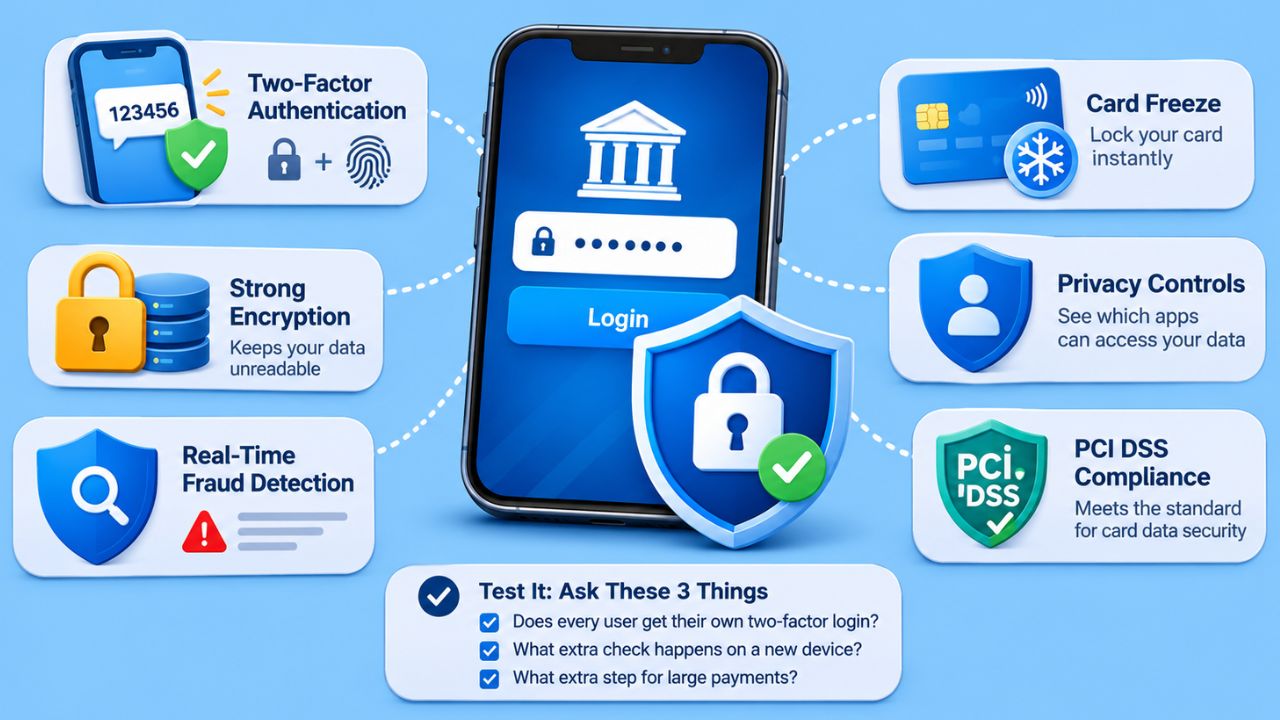
Start with security, since this app guards your company’s money. “Security is non-negotiable. A trustworthy mobile banking app should include secure login, strong encryption and two-factor authentication.”
Bank regulators point the same way. The FFIEC, a group of US bank regulators, has issued guidance that says banks should offer multifactor authentication for business customers.
The same guidance calls for risk checks. It also calls for multifactor login or extra layers of security on high-risk transactions, like large payments. This is guidance for banks, not a law that every app must follow, so ask what your bank actually does.
Multifactor authentication means you prove who you are with two or more different kinds of proof. That could be something you know, like a password, plus something you have, like your phone. A face or fingerprint check can be one of those kinds, but on its own it does not prove the bank uses multifactor login.
Look for more than login, too. Good apps offer real-time fraud detection, card freeze, and privacy controls that show which outside apps can see your data.
Encryption keeps your data unreadable while it moves, so thieves can’t use it. If the app handles card payments, ask whether it meets PCI DSS, the standard for protecting card data.
Test it: Ask three things. Does every user get their own two-factor login? What extra check happens when someone logs in on a new device, or sends a large payment?
2. Ease of Use
A confusing app slows you down every single day. You want to check your balance, send a transfer, and review past activity without digging through menus.
Good apps use simple layouts, like a bottom menu bar or clear tabs. The app should also work the same on Apple and Android devices, so your whole team gets the same experience.
Test it: Look at the app store screenshots or ask for a demo. Find three tasks: your balance, a new transfer, and a past payment. If any task looks buried, note it.
3. Payments and Invoicing
Getting paid and paying others is the core of the job. Check that the app handles ACH payments, wire transfers, bill pay, and invoices.
Look for digital wallets as well. Many apps work with Apple Pay, Google Pay, Zelle, and PayPal.
That matters, since 77% of Americans use at least one major digital wallet like PayPal, Cash App, or Apple Pay. Your customers may want to pay you that way.
Some apps go further. Found includes expense tracking and tax set-aside tools. Relay lets you split money across more than one checking account, so you can sort funds by project or client.
Test it: Before you send any payment, find the fee for an ACH transfer, a same-day wire, and an incoming wire. If you can’t find a fee in the app or on the fee schedule, ask. The next section shows why this matters.
4. Accounting Software Sync
Your app should feed your books without extra typing. When the bank links to your accounting software, you skip duplicate data entry and cut errors.
Common tools include QuickBooks Online, Xero, and Zoho Books. If you sell on online marketplaces, a tool like A2X can match your marketplace payouts to your bank deposits.
Test it: Ask the bank which accounting tools it links to directly. A direct link is better than a file you must download and upload by hand.
5. Mobile Check Deposit
Mobile check deposit lets you take a photo of a check and deposit it. Most big banks offer it, including Chase, Bank of America, Wells Fargo, PNC, and TD Bank.
The details are what differ. Some accounts cap how many deposits you can make each month, or how many dollars you can deposit each day.
Test it: Find the daily and monthly deposit limits before you sign up. Ask how long deposited funds are held. If your team deposits checks, ask whether more than one user can do it.
6. Real-Time Alerts
Alerts help you catch fraud and mistakes fast. You want a ping the moment a payment goes out, a wire fails, or your balance drops too low.
The best apps let you build your own alerts. For example, you can set an alert for any payment over a certain size, for each new login, or for when a bill is due.
Newer apps add AI money tools. These include spending insights, budgeting tools, and bill management. They are worth a look, but they should not replace basic alerts that work.
Test it: Before you sign up, ask which alerts you can set and how they arrive. After you open the account, set a large-payment alert, make a small transfer, and see how fast the alert shows up.
7. Multi-User Permissions, Approvals, and Audit Trails
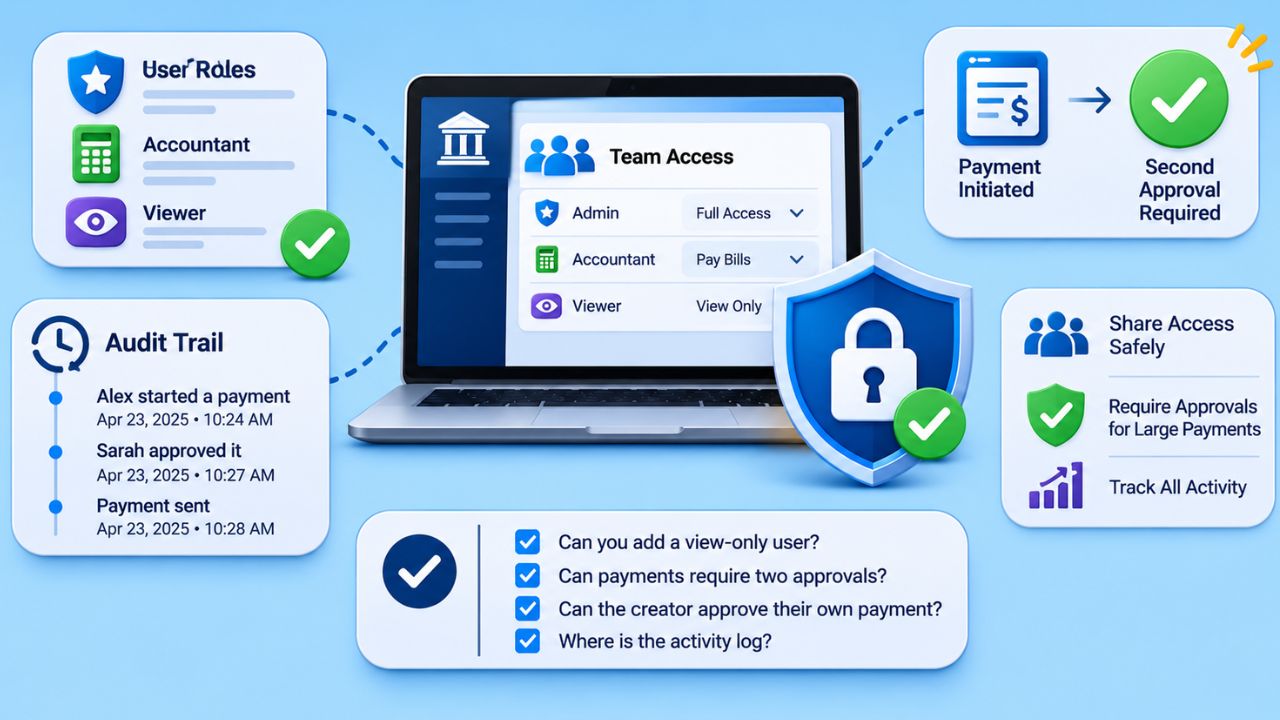
Once you hire help, you need to share access without giving away full control. This matters a lot for teams. Look for three things. First, user roles, so each person sees only what they need. Second, approvals, so a payment needs a second person to sign off before it goes out.
Third, audit trails, so you can see exactly who did what and when. A good log shows who started a payment, who approved it, and the time of each step.
Big banks offer some of this. Chase lets you assign user roles for transaction approvals. Capital One lets you add multiple users to an account.
Wells Fargo business accounts support multiple users with custom permissions. Some apps also offer audit trails for multi-user activity.
Say your bookkeeper needs to pay bills, but you want to approve anything large. The right setup lets them start the payment while you give the final OK. The person who starts a payment should not be able to approve it too.
Test it: In a demo, ask the bank to show you how to add a view-only user. Then ask if payments can require two approvals. Ask whether the creator can approve their own payment, and where you can see the activity log.
8. Support
When money is stuck, you need help fast. The good news is that business banking support is getting better. J.D. Power’s 2026 study found that small business banking satisfaction rose for the fifth year in a row. It improved across nearly every part of the banking experience.
The study also shows what good support looks like. In 2026, 61% of small business customers had a relationship manager, up from 58% the year before.
Satisfaction with problem resolution rose 13 points. Nine out of 10 small businesses said their most recent problem was resolved. So good support means two things. You get a real person when you need one, and your problem actually gets fixed. Use that as your bar.
Test it: Before you open an account, send support a real question by chat or phone. Time the reply. Ask if you would get a relationship manager.
What Does a ‘Free’ Business Banking App Really Cost?
Many banks say their app is free. That is often true, but it is only part of the story. “While app access is usually free, transaction-level fees can add up.” The real cost sits in what you do inside the app. Wires, transfers, and monthly plan fees can quietly eat into your cash.
Here are real examples to compare against. They were reported in June 2026, so check each bank’s current fee schedule before you decide.
| Cost to check | Real example | What to ask |
| App access | Usually free | Is there a monthly account fee, even if the app is free? |
| Same-day wire transfer | $20 at Santander | What do outgoing and incoming wires cost? |
| ACH transfer | $7 at Santander | Are some ACH transfers free each month? |
| Yield on idle cash, basic plan | 1.3% APY on Bluevine Standard checking | What rate do you earn with no monthly fee? |
| Yield on idle cash, paid plan | 3.0% APY on Bluevine Premier, with a $95 monthly fee | Does the extra interest beat the monthly fee at your balance? Can the fee be waived? |
| Deposit limits | Varies by account | How many mobile deposits are included each month? |
Worked Example: Transaction Fees
Now do the math. At Santander, a same-day wire costs $20, and an ACH transfer costs $7. Say you send two same-day wires and ten ACH payments in a month. The wires cost $40, and the ACH payments cost $70. That is $110 a month before any account fee.
So the same “free” app can cost a busy business more than a plan with a monthly fee and free transfers. It all depends on how many payments you send.
Worked Example: Interest vs. a Monthly Fee
Yield works the same way. Bluevine’s Standard plan pays 1.3% APY, while its Premier plan pays 3.0% APY with a $95 monthly fee.
Here is a simple yearly estimate. The fee is $95 times 12, or $1,140 a year. The extra rate is 3.0% minus 1.3%, or 1.7%.
Divide $1,140 by 1.7%, and you get about $67,100. If your average balance stays below that, the free plan likely leaves you with more money.
This estimate assumes both rates apply to your full balance and the fee is not waived. Check the plan’s balance caps, rules, and waivers.
Quick check: List how many wires, ACH payments, and deposits you make in a normal month. Multiply each by its fee.
Add any monthly fee, and subtract any interest you would earn. That number is what the app really costs you.
How To Test and Pick Your Business Banking App
You don’t need to open an account to learn most of what matters. Use this 15-minute screen on two or three apps. Keep a notes page open for each one.
If the bank can’t answer a question right away, write it down. Follow-up calls or a demo may take longer than 15 minutes, and that is fine.
Before You Sign Up: The 15-Minute Screen
- Minutes 1 to 3: Reviews and layout. Read recent App Store reviews and skip the star rating. Look for features people say break. “If an app’s customers overwhelmingly say a certain feature doesn’t work correctly, it probably doesn’t.” Then scan the screenshots or demo for your balance, transfers, and past payments.
- Minutes 4 to 7: Security and team controls. Confirm two-factor login for every user, fraud alerts, card freeze, and extra checks on large payments. Check that you can add view-only users and require two approvals. Confirm the audit log shows who started a payment, who approved it, and when.
- Minutes 8 to 11: Fees and features. Pull the fee schedule. Write down the cost of a same-day wire, an incoming wire, an ACH transfer, and any monthly fee. Note the mobile deposit limits and hold time, the accounting tools it links to, and the alerts you can set.
- Minutes 12 to 15: Support. Find the support channels. Send one real question by chat or phone and note how fast you hear back. Ask if you would get a relationship manager.
How To Decide
First, cut any app that misses a must-have. That means weak login security, no extra checks on large payments, or no approvals and audit logs if you have a team.
Then compare the apps that are left. Pick the one with the lowest real cost from your fee math and the easiest daily tasks.
After You Open: First-Week Checks
- Turn on two-factor login. Freeze your debit card and unfreeze it.
- Connect your accounting software. Check that a few transactions show up with the right dates and amounts.
- Set a low-balance alert and a large-payment alert. Make a small transfer and time the alert.
- Add a team member with limited access. Send a test payment that needs a second approval, then check the activity log.
If any check fails, call support right away. It is easier to switch in week one than in year one. Keep the goal in mind. These eight business banking app features should make money tasks safer and simpler. If an app makes simple tasks hard or hides its fees, move on to the next one on your list.
Frequently Asked Questions About Business Banking App Features
1. What should you look for first in a business banking app?
Look for strong security features like two-factor authentication, biometric login, and 256-bit bank-grade encryption. Your money and client data must stay protected.
2. Why do fees matter so much when you compare apps?
Small fees add up fast, especially when domestic wire transfers can cost $15 to $30 each. Check all costs for transfers, ATM use, and overdrafts before you commit.
3. Can a business banking app help with cash flow and payments?
Yes, the best apps make cash management easy. You can send invoices, accept card payments, and pay your staff from one screen. Real-time alerts track every transaction instantly, so you always know where your money goes.
4. Does the app need to work with my accounting software?
Yes, it should sync with tools like QuickBooks or Xero to save you hours each month on bookkeeping and eliminate manual entry errors.