You start a stream with a smile, but chat stays empty. Many new streamers feel that gap. They search for Mistakes New Streamers Make and hope for a guide.
One fact: new streamers often skip prep. They pick budget mics and use a weak internet connection. They miss tips on lighting, camera, and streaming platforms. This post shows you how to test your setup.
It helps you boost audio quality, engage chat, and grow viewer interaction. Keep reading.
Key Takeaways
- Test your setup before you go live. Use tools like Wowza Media Systems to check your camera, mic, encoder, and internet. One broadcaster fixed jitter with adaptive bitrates and saw a 30% boost in viewer interaction.
- Get clean audio. Grab a USB mic, pop filter, noise gate, and treat the room. In OBS Studio, keep peaks below 0 dB. Poor sound drives viewers away in under five seconds.
- Stream on a set schedule. Random hours caused a 30% drop in viewers for one host. Consistent slots help fans plan and boost your audience engagement.
- Engage and protect your chat. Greet viewers by name with a chatbot, reply to comments, and use trusted moderators or bots to block spam and hate speech.
- Track your metrics twice a week with tools like StreamElements. Review viewer retention, peak times, and chat spikes. Networking—like a Discord raid—can add 40 new fans in one night.
Neglecting Proper Preparation
Skipping prep on a new stream feels like cooking without a recipe, messy and risky. Many live streamers jump into twitch streams or youtube live without testing gear. That misstep triggers frozen frames, lag spikes, and viewer drop‑off.
Internet hiccups, isp throttling, or wrong bitrates can kill audience engagement fast. Testing HLS or peer protocol, WebRTC, ahead of time smooths video‑on‑demand (vod) archives.
One broadcaster fixed jitter with adaptive bitrates, and saw a 30% boost in viewer interaction and audience engagement. Wowza Media Systems helps orgs tame live streaming woes, with tools for transcode and stream setup.
Gear checks cut frustration. Camera, mic, and encoder have to pass a quick run‑through. Missing a sound test means audio quality might drop, and viewers will complain. Smartphone backups, on a social media app, serve as a safety net.
Obs software on PC, or a small hardware encoder, both need config tweaks. That tune‑up lifts the viewer experience on any platform. Solid prep frees the host to focus on play and chat, boosting viewer retention.
Ignoring Audio Quality
Bad audio sinks live streaming faster than a leaky ship. Viewers quit when they hear echo, hiss, or muffled words. Give them crisp sound instead. Grab a USB microphone. Add a pop filter and a noise gate.
Set up an audio interface. Treat the room with blankets or foam panels. Talk at six inches from the capsule. This simple stream setup keeps voices clear. Clean sound fuels audience engagement and viewer retention on any streaming platform.
Find a quiet, dedicated spot for every session. Close windows, turn off fans, mute phone buzz. Check decibel levels in OBS Studio before going live. Adjust gain, keep peaks below zero dB, watch for clipping.
Good audio quality means more viewer interaction and longer watch times on live streams and video-on-demand (VOD). Poor sound drives people away in under five seconds.
Overlooking Visual Quality
Low-res live streams drive viewers away. Pixelation feels like static soup on a clear day. You need good lighting and a solid cam. A Pro Stream cam, a mirrorless shooter, a prosumer cam or a PTZ camera can fix that mess.
Clear images boost viewer interaction and audience engagement on streaming platforms.
Test your stream before you go live. That dress rehearsal helps you spot glitches or pixelation. Tweak lights or adjust cams to banish foggy frames. Sharp video keeps viewers glued to your show.
It can boost your viewer retention fast.
Streaming Irregularly or Inconsistently
Live streaming at random hours hurts growth. Viewer counts slip when audiences can’t set aside time. A popular streaming platform host saw a 30% drop in viewers after shifting to erratic sessions.
Consistent slots build audience engagement, just like a TV show that airs each week. Fans plan around your schedule, and viewer interaction jumps up.
Use schedule planning and note peak hours on streaming platforms. Mark two or three slots and stick to them. A clear layout in streaming software and a reliable capture device cuts glitches out of your stream setup.
Solid expectations boost viewer engagement every time you go live.
Failing to Engage with the Audience
Skipping chat replies kills viewer interaction. Hosts who ignore comments lose community engagement fast. Fans will ping you in chat to snag a shoutout. A quick name call makes them feel valued.
Broadcast software on most PCs lets you tag viewers in live streaming sessions. A chatbot plugin can auto-greet names in chat on streaming platforms. Share a short story or joke to spark audience engagement.
Use polls or mini‑games between rounds to add interactive segments.
Ignoring Chat Moderation
Unchecked chat grows toxic, like weeds that choke a garden. Trolls flood the feed with hate speech and spam, and new viewers run away. I once watched a streamer lose half their audience in minutes.
Live streaming on streaming platforms can feel like the wild west, if you skip guardrails, viewer interaction dies.
Set clear chat rules, post them where everyone sees. Name a trusted helper or a bot to delete spam, block hate speech. Active mods spark positive audience engagement, they keep chat fun.
A calm chat boosts viewer interaction and growth.
Using Copyrighted Content Without Permission
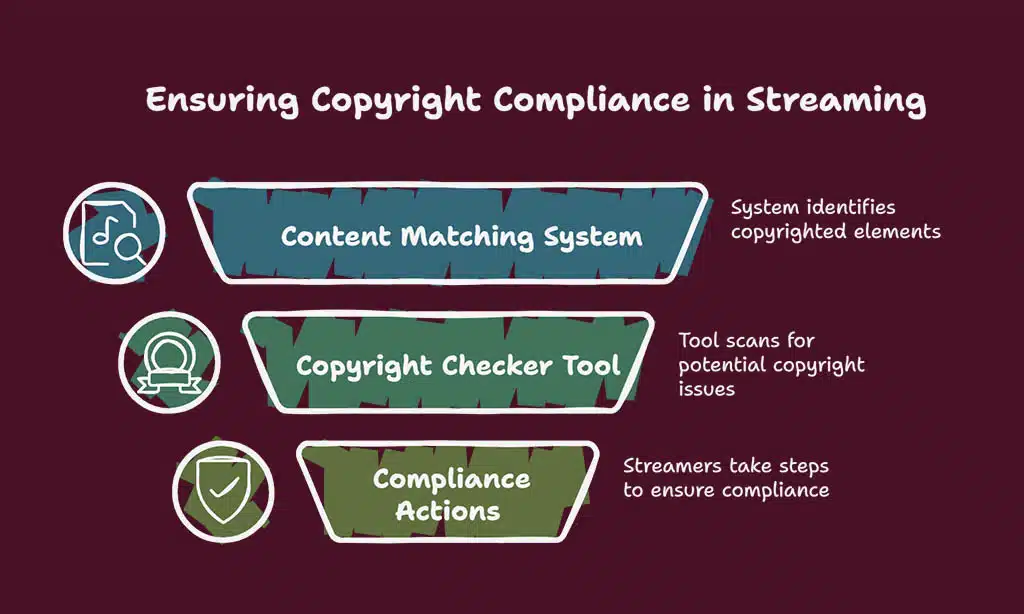
Streamers risk legal action or channel removal if they play unlicensed music or video clips during live streaming on social apps. Trademark owners send takedown notices fast under DMCA rules.
Use royalty-free tracks under Creative Commons license or buy a paid license. A content matching system flags copyrighted parts before viewers see them.
A copyright checker tool scans clips and warns you of trouble spots. Proper checks keep your streaming platforms safe from strikes or shutdowns. Better compliance boosts audience engagement and viewer interaction.
Focusing Solely on Gameplay
Pure gameplay feels like watching paint dry. Live streaming thrives on chatter, not silence. Toss in a quick story about your breakfast spill. Ask fans for snack tips or debate the best pizza topping.
A broadcasting tool can flash alerts on screen, so every shout out feels special, and viewer interaction spikes.
Talking through a difficult boss battle hooks viewers. A communication platform lets fans vote in polls, toss ideas, and cheer on your wins. Authentic energy attracts crowds more than a stiff act.
Fans bond with a real you, not a robot. Streaming platforms reward those who spark genuine connections.
Neglecting Analytics and Performance Metrics
Skipping performance metrics stunts your growth. It feels like flying blind, in a storm. Monitor viewer trends, peak times, and engagement rate in your dashboard feature. Streamers who skip this step miss new chat spikes.
Review metrics twice a week to spot your best streaming hours.
Set up your stats view or a channel metrics tool, like StreamElements. Track viewer retention. The data shows where games get dull and fans drift off. Use that insight to tweak your live streaming schedule or content style.
This small move can fire up more viewer interaction, and spark steady channel gains.
Underestimating the Importance of Networking
New streamers skip networking and stay hidden behind the screen. Twitch chats work like busy town squares, full of faces to meet and talk with. I joined a Discord crew and messaged three hosts by midnight.
That raid plucked forty fans to my live streaming show, fueled by OBS alerts and Streamlabs cues. Collabs with peers bring shared audiences and fresh chatter. Community events boost profiles and spark real growth.
Takeaways
We covered the key traps. Testing audio with the right bitrate in OBS saves headaches. Smoothing frame rate and chatting with fans keeps viewers hooked. Setting up chat mods in Streamlabs cuts spam fast.
Tracking stats on your dashboard guides your next move. Sticking to a plan and a steady schedule pays off. Your channel will bloom when you stay true to the craft.
FAQs on Common Mistakes New Streamers Should Avoid
1. What is the biggest mistake new streamers make?
Ignoring chat kills your vibe fast, if you ghost your viewers, they ghost you. Talk, ask, react.
2. How can new streamers fix bad audio?
Poor sound drives crowds away. Pick a good microphone, cut noise, test your levels.
3. Why does a streaming schedule matter?
Random streams are like chasing smoke. A fixed plan pulls viewers back like a magnet.
4. How do I grow my audience fast?
Mix chat and clips on social sites, team up with fellow broadcasters, brand your channel, stick to a theme.