


Hey there, are you struggling to make your app talk to other systems using APIs, only to hit frustrating roadblocks? Maybe your API integration keeps crashing, or worse, it’s a mess to fix when something goes wrong.
Don’t worry, you’re not alone in this pickle, and I’ve got your back with some handy tips.
APIs are super important for modern apps, but boy, can they cause big headaches if not done right. Let’s face it, one wrong move with api integration, and your whole project might feel like a house of cards.
Here’s the good news, though, I’m breaking down five common slip-ups, from hardcoding api endpoints to sloppy error handling, and I’ll show you simple ways to dodge these traps.
Stick around, let’s fix this together!
Key Takeaways
- Avoid hardcoding API endpoints and credentials to prevent messes when changes happen; use environment variables instead.
- Don’t skip error handling; use retry logic and tools like Martini to catch issues before crashes.
- Keep API integrations simple; avoid extra custom code and use visual editors like Martini for clean logic.
- Fix messy data by using consistent formats like snake_case and tools like JSON schema for smooth performance.
- Don’t tightly couple APIs with app logic; use modular tools like Negroni to stay flexible for updates.
Mistake 1: Hardcoding Endpoints and Credentials
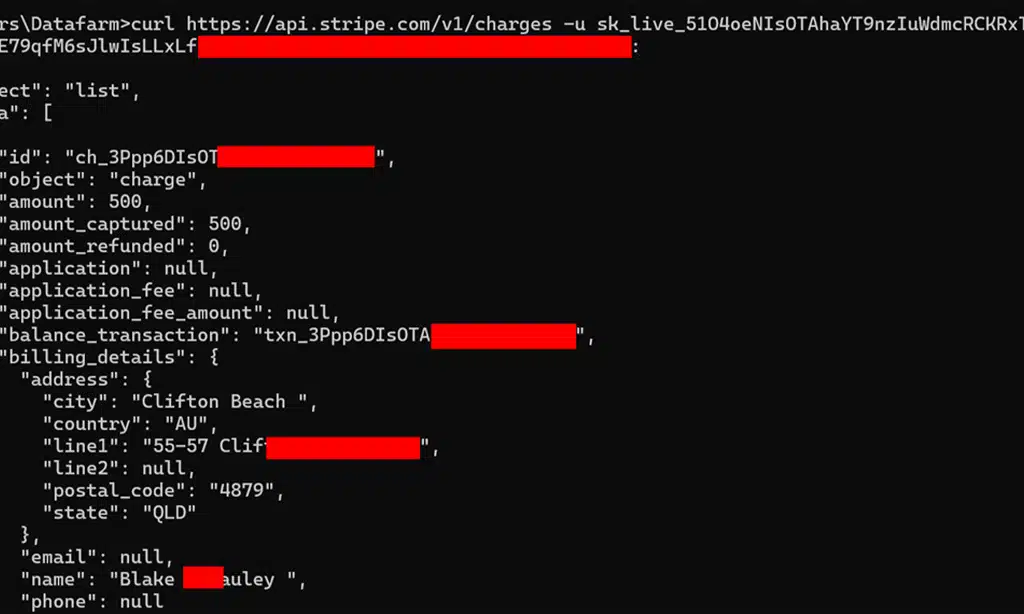
Hey, did you know hardcoding API endpoints and credentials can be a real pain in the neck? Stick around, and let’s chat about why this habit can land you in hot water fast!
Why it’s problematic
Hardcoding API endpoints and credentials is a risky move, folks. It creates a mess when things change, and trust me, they often do. If an endpoint shifts or a password gets updated, you’re stuck rewriting code.
This leads to integration failures that can halt your app in its tracks. Plus, it’s a pain to manage secrets this way, leaving your data exposed to prying eyes.
Think of it like building a house on sand, shaky and prone to collapse. Hardcoding makes your API integration brittle, especially in production environments. Every tweak means digging into the source code, wasting time and effort.
It’s a shortcut that bites back, causing difficulties in managing secrets and sneaky vulnerabilities. Stick around to see how to dodge this trap with smarter practices.
Best practices to avoid it
Hey there, let’s chat about dodging a big mess with API integrations. I’m talking about those pesky hardcoded endpoints and credentials that can trip you up.
- Grab some environment variables or configuration files to store your sensitive stuff, like API endpoints and credentials. This keeps your data safe, far from prying eyes in your code. It’s like hiding your house key under a rock instead of taping it to the front door. Plus, using environment variables makes swapping settings for different setups, like testing or production, super easy.
- Try tools like Martini for centralized API management to keep things tidy. This handy helper lets you manage endpoints without hardcoding them into your app. Think of it as a trusty organizer, keeping all your API bits in one spot, so you’re not scrambling through code when changes hit.
- Always keep your api documentation close for quick updates on endpoints. This isn’t just a boring manual, it’s your roadmap to avoid slipping up with outdated hardcoded info. Check it often, especially when you’re making a get request or setting up new integrations.
- Set up a habit of using secure methods for storing data over hardcoding. Whether it’s a post request or a put request, rely on external configs to hold sensitive details. It’s like locking your diary instead of leaving it open on the kitchen table for everyone to read.
- Test your setup with api testing to catch hardcoded mistakes early. Run some quick checks using automated tests to see if your credentials are exposed. It’s a bit like double-checking your backpack before a trip, making sure nothing important is sticking out for others to snatch.
Mistake 2: Skipping Proper Error Handling
Hey there, skipping error handling in API integration is like driving without a seatbelt, risky and bound to hurt! Let’s chat about why ignoring those pesky error messages can mess up your app, and how to fix it with smart moves like retry logic.
Common issues caused by neglecting error handling
Ignoring error handling in API integration is like driving blindfolded, folks. You’re bound to crash! When APIs fail due to network glitches or hit rate limits, a “200 OK” response isn’t a sure thing.
Without proper checks, your app might freeze or lose data, and that’s a mess no one wants to clean up.
Think of it as skipping the safety net under a tightrope. Poor error handling can lead to application crashes or even data loss, especially in critical systems. So, let’s not gamble with reliability, alright? Using retry logic and fallback mechanisms can save the day when things go south with API endpoints.
Solutions to implement effective error management
Hey there, let’s chat about fixing API errors before they mess up your day. I’ve got some handy tips to keep your integrations smooth and stress-free.
- First up, use Martini’s error handling blocks to catch issues fast. This tool helps you spot problems in your API calls right away. It’s like having a safety net that grabs errors before they crash your system. Set these blocks up in your code, especially for tricky spots like a POST request or GET request, to keep things running.
- Next, add retry logic to your setup with Martini. This means if an API call fails, your system tries again instead of just giving up. Think of it as a stubborn friend who keeps knocking until the door opens. It’s a game-changer for handling random hiccups in API consumption or development.
- Also, set up monitoring mechanisms to track API failures as they happen. You can use tools to watch for errors in real-time, so you’re not left guessing what went wrong. It’s like having a security camera for your REST API, alerting you to trouble before it grows. Make sure to check logs often for weird patterns.
- Don’t skip testing your error handling with tools like automated testing. Simulate API flops to see how your system reacts under pressure. It’s a bit like practicing a fire drill, so you’re ready for the real deal. Test every GET request or PUT request to catch weak spots early.
- Finally, build fallback mechanisms to save the day when APIs fail. If a call doesn’t work, have a backup plan, like default data or a secondary endpoint. Picture it as a spare tire in your car, ready to roll when you hit a flat. This keeps your web development or app running, no matter the glitch.
Mistake 3: Overcomplicating API Integrations with Excessive Custom Code
Hey there, ever feel like you’re building a rocket to fetch a glass of water with your API setups? Let’s chat about why piling on too much custom code, especially with tools like JavaScript and Node, can turn a simple task into a real head-scratcher.
Challenges of overengineering integrations
Overdoing API integrations with too much custom code can trip you up, folks. It’s like building a fancy mansion when a cozy cabin would do just fine. Piling on extra, unnecessary scripts in JavaScript or Node eats up time and resources, as we’ve seen with many projects.
This habit makes your system messy and tough to fix down the road.
Think of it as adding too many gadgets to a simple bike. Sure, it might look cool, but you’re stuck with maintenance headaches later. Overengineering API development often leads to wasted effort, draining your budget and patience.
Stick to clean, basic solutions for integration logic, and save yourself the hassle of untangling a giant knot.
Simplification strategies for clean integration
Hey there, let’s chat about making API integration a breeze. Keeping things simple can save you tons of headaches, trust me!
- Start with visual flow editors like Martini for your core logic. These tools let you map out API integration visually, cutting down on messy code. You drag, drop, and connect elements, making the process clear and fast. It’s like drawing a roadmap instead of writing a novel.
- Reserve custom code for edge cases only. Don’t write tons of scripts when a tool can handle most tasks. Use code just for those odd, tricky bits that need a special touch. This keeps your project neat and easy to manage.
- Stick to standard protocols for API development. Following common rules, like REST-ful designs, makes your setup predictable. Others can jump in and understand your work without a puzzle to solve. It’s like speaking a shared language.
- Use libraries to speed up integration logic. Grab pre-built tools for tasks like data transformation or handling GET requests. These cut your workload and reduce errors. Think of them as shortcuts on a busy highway.
- Keep API documentation handy at all times. Clear guides help you avoid overcooking your setup with extra steps. They show you the right endpoints and formats, like a recipe for a perfect dish.
- Test often with automation tools. Run checks on your POST request or PUT request flows to spot issues early. Tools like these act like a safety net, catching slips before they turn into crashes.
- Normalize data before passing it between systems. Use data normalization to keep formats like snake_case consistent. This stops messy data from gumming up your works. It’s like tidying up before guests arrive.
Mistake 4: Passing Inconsistent or Messy Data Between APIs
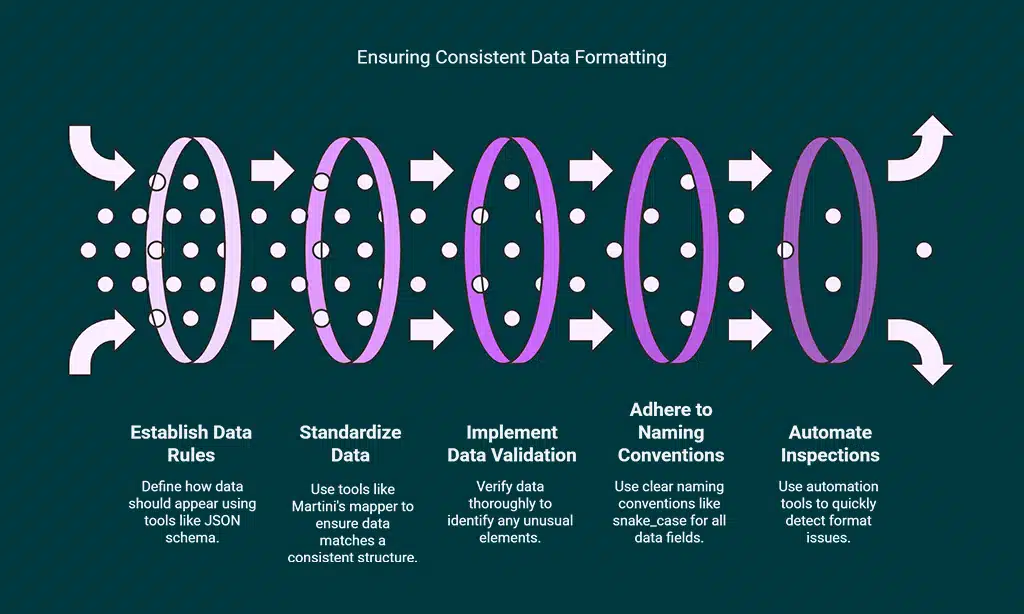
Hey there, ever wonder why your API integrations sometimes act like a cranky toddler? Messy data, like mismatched formats or sloppy naming, can mess up system performance big time, so let’s fix that!
Impact on system performance and reliability
Messy data in API integration can slow down your system, folks. It’s like trying to run a race with a heavy backpack. Inconsistent formats, such as mixing CamelCase and snake_case, create hiccups.
These naming convention clashes mess up how data flows between APIs. Your app might lag or even crash due to this chaos. Think of it as a traffic jam on the web, halting everything.
Poor data handling also shakes up reliability, my friends. Imagine complex data structures acting like a puzzle with missing pieces. They can lead to integration failures, breaking the connection.
This impacts how well your website or app performs with API endpoints. Stick to data normalization to keep things steady and smooth. Let’s dodge these pitfalls and keep your system humming!
Steps to ensure consistent data formatting
Hey there, Readers, let’s address a major concern in API integration. Inconsistent data can disrupt your systems, but we’ve got you covered with straightforward steps.
- First, establish strict data rules using tools like JSON schema. This involves defining how data should appear before it reaches your system. Think of it as a gatekeeper at a club, only allowing the correct format. It prevents faulty data from slipping into your API endpoints and creating disorder.
- Next, standardize data with solutions like Martini’s mapper or Negroni for schema-first modeling. These tools function as an interpreter, ensuring data matches a consistent structure, regardless of its origin. This maintains smooth API consumption and reduces errors during a POST request or GET request.
- Then, implement strong data validation mechanisms to verify everything thoroughly. Imagine this as a last check before deployment, identifying any unusual elements in the data stream. It’s essential for maintaining high system performance and preventing crashes when handling application/json content.
- Also, adhere to clear naming conventions like snake_case for all data fields. This is akin to labeling boxes in a warehouse, so everyone can instantly see what’s inside. It assists testers and developers during API testing, saving time and reducing frustration.
- Finally, automate inspections with modern automation tools to quickly detect format issues. Envision a robot monitoring your data around the clock, highlighting anything amiss before it reaches the server. This integrates with continuous integration (CI) practices, ensuring your API development remains precise and dependable.
Mistake 5: Tightly Coupling APIs with Integration Logic
Hey, have you ever tied your API setup so close to your app’s core that a tiny change feels like pulling a thread on a sweater? Let’s chat about why this tight grip on integration logic can trip you up, and spark your interest to read on!
Risks of tight coupling
Tight coupling in API integration is like gluing two puzzle pieces together, folks. It means your APIs and integration logic are so attached to each other that separating them turns into a real struggle.
This creates significant obstacles with updates and reusability. If you need to modify or replace an API, it’s a challenge to do so without disrupting the entire system. Imagine trying to change a tire while the car is still racing down the highway, incredibly dangerous and prone to disaster.
Now, consider this scenario in your API development work. Tightly coupled systems make it hard to adapt or resolve issues quickly. Every small adjustment can cascade through, triggering errors or downtime.
It’s a problem just waiting to emerge with API consumption. The lack of adaptability also means reusing your code for other projects is nearly out of reach. So, you’re forced to start over from the beginning each time, losing valuable time and energy.
Approaches to decouple APIs effectively
Hey there, let’s chat about making your API integrations smoother. Decoupling APIs can save you from a real headache, and I’ve got some handy tips to share.
- Start by using modular components, like Negroni for API and data models, to keep things separate and tidy. This approach stops your code from turning into a tangled mess, making it easier to update or swap parts without breaking everything. Think of it as organizing your desk, so you can find stuff fast.
- Opt for orchestration tools like Martini to manage how your APIs talk to each other. This acts like a traffic cop, directing data flow without letting systems get too cozy or dependent. It keeps your integration logic clean and flexible for future changes.
- Focus on frontend separation with tools like Bellini to avoid mixing API logic with user interface code. By doing this, you create a clear boundary, almost like a fence between neighbors, ensuring that changes on one side don’t mess up the other.
- Design with loose ties by avoiding hard links between API endpoints and your app’s core. This means your app won’t crash if an API version shifts, kinda like having a backup plan when your GPS fails mid-trip. It’s all about staying adaptable.
- Implement environment variables for settings like API credentials or URLs, such as those starting with https://. This trick keeps sensitive info out of your code, much like hiding your house key under a mat instead of leaving it in the lock. It boosts security and ease of updates.
- Add retry logic and fallback mechanisms to handle API hiccups gracefully. If a GET request or POST request fails, your system can try again or switch to a backup, sorta like having a spare tire in your trunk. This prevents total breakdowns during unexpected issues.
- Standardize data with normalization techniques to keep info consistent across APIs. Messy data, like mismatched snake_case or formats, gets ironed out, acting like a translator between chatty friends who speak different slang. It smooths out communication big time.
- Test often with unit tests to catch tight coupling early in API development or consumption. Running these checks is like doing a quick car inspection before a long drive, spotting weak spots before they cause a wreck. It saves time and frustration down the road.
Takeaways
Wrapping up, let’s keep those API integrations smooth, folks! Dodging these five common slip ups can save you a real headache down the road. Got a tricky API puzzle messing with your day? Drop your story in the comments, and let’s swap some fixes with tools like automation aids and solid API testing tricks.
Stick with smart practices, and watch your systems run like a well oiled machine!
FAQs
1. What’s a big slip-up with API integration regarding error handling, and how do I dodge it?
Hey, messing up error handling is like walking blindfolded near a cliff. Don’t just assume every GET request or POST request will work flawlessly; build solid retry logic and fallback mechanisms to catch hiccups. This keeps your app from crashing when an API endpoint throws a tantrum.
2. Why do rate limits trip up so many during API consumption, and what’s the fix?
Rate limits are the bouncers of API development, kicking you out if you’re too pushy. Plan ahead by checking API documentation for limits, and use automation tools to pace your requests so you don’t get blocked or redirected.
3. How does ignoring API versioning mess up integration logic, and what should I do?
Listen, skipping API versioning is like using an old map for a new city; you’ll get lost fast. Always track version control to maintain backward compatibility, and test updates with tools like pytest to avoid breaking your PUT request or other calls.
4. What’s the deal with poor data normalization in API testing, and how can I sidestep this trap?
Poor data normalization is a sneaky beast, turning your data into a jumbled mess across different API endpoints. Use consistent formats, like snake_case for naming, and double-check application/json responses to keep client and server chatting smoothly. It’s a small step that saves big headaches down the road.
5. Why is overlooking transport layer security a huge blunder in API integration, and how do I stay safe?
Hey, ignoring transport layer security (TLS) or Secure Sockets Layer (SSL) is like leaving your front door wide open for data breaches or SQL injection. Lock it down with role-based access control, OAuth 2.0, and strong access controls to shield user privacy and stop unauthorized access cold.
6. How does neglecting API documentation bite me during software development, and what’s my escape plan?
Man, skipping API documentation is like cooking without a recipe; you’re bound to botch it. Dive into those docs to grasp syntax, content negotiation, and Cross-Origin Resource Sharing rules, so your web browser or app doesn’t stumble over HTTP:// errors or Cross-Site Scripting risks. It’s your roadmap to dodge pitfalls in the cloud or with tools like Google Analytics.
























