Category Page Tweaks That Lift Rankings target the structural flaws that cause high-value collection pages to underperform. Standard category pages often struggle due to vague headings, broken pagination, bloated filter URLs, and heavy top-of-page text that pushes products below the fold.
Implementing targeted category page tweaks fixes these crawlability, indexing, and user experience issues. By refining page structure, dynamic H1s, internal linking, and faceted navigation, you make inventory immediately accessible to both shoppers and search engines. While overall site authority and inventory quality still dictate ultimate SERP positions, eliminating these technical friction points builds the structural foundation necessary to earn higher search visibility and drive conversions.
Detail Category Page Audits Often Miss
A category-page edit is usually a template edit. Change a title formula, canonical rule, filter setting, or product-grid component, and the effect may spread across hundreds of URLs.
Before touching the template, establish a baseline for a representative group of categories. Record their organic impressions, clicks, ranking queries, Google-selected canonicals, indexing status, mobile performance, and organic conversions where available.
Test major changes on a limited group first. A carefully written heading will not rescue a category if the new template accidentally canonicalizes it to another URL. Likewise, a faster product grid is not an improvement if Googlebot can no longer reach the products inside it.
8 Category Page Tweaks That Lift Rankings
Category pages often rank below their potential because structural problems weaken relevance, crawling, and usability. The following eight adjustments address the issues that matter most, from search intent and internal linking to filter control, pagination, mobile performance, and empty inventory, without turning every collection into an overloaded SEO landing page.
1. Align the Page With One Clear Category Intent
This is the first adjustment to make when a category is crawlable and indexed but ranks for the wrong searches or performs inconsistently.
The title, main heading, opening copy, and inventory should describe the same collection. “Performance Footwear” may sound polished, but it is a weak heading for a page containing women’s running shoes. “Women’s Running Shoes” tells shoppers what they have reached without making them decode a marketing phrase.
Start with a concise title and one visually prominent main heading. Google does not require a page to contain only one H1, but several headline-sized elements competing for attention can blur the page’s main subject.
The opening copy should confirm what distinguishes the collection. Two or three useful sentences are often enough above the products. A category page does not need a 700-word essay before the first item appears. If shoppers need help comparing materials, sizing, compatibility, or use cases, place that information below the initial grid.
Most importantly, the inventory must support the wording. A page targeting “waterproof hiking boots” should not consist mainly of water-resistant footwear. Search-focused copy cannot repair a misleading assortment.
Write distinct titles for important categories rather than changing one noun in a repeated template. Google may generate a different title link when the supplied title is vague, repetitive, outdated, or inconsistent with the visible page.
A well-written meta description can make the search result more informative, but it should not be treated as a direct ranking factor. Google may also choose another passage when it better matches the query.
2. Strengthen Internal Links to Important Categories
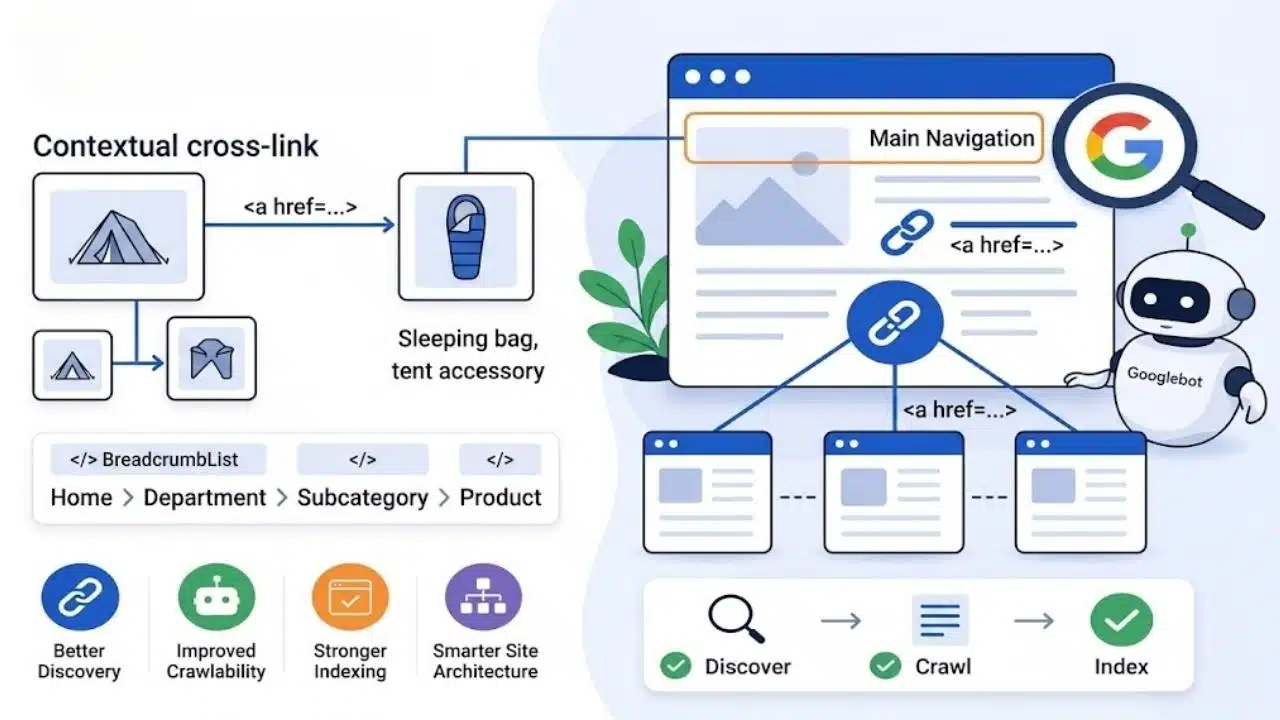
Google uses links to discover pages and understand relationships within a site. A commercially important category that can only be reached through an internal search box or a complicated filter interaction has a discovery problem.
Build a normal path from broader to narrower pages: main navigation to department, department to subcategory, and subcategory to product. These should be ordinary links with destinations in their href attributes, not JavaScript events attached to buttons or images.
Putting every category in the main menu is not the answer. An overloaded navigation system makes the store harder to use. Reserve prominent links for categories with substantial inventory, clear search demand, seasonal relevance, or genuine business importance.
Visible breadcrumbs are worthwhile because they help shoppers move back through the hierarchy. BreadcrumbList structured data can reinforce that structure and may affect how the path appears in search, but it does not guarantee a rich result or a ranking improvement.
Use contextual cross-links selectively. A camping-tent category can reasonably point to sleeping bags and tent accessories. A large block of loosely related keyword links looks more like an SEO mechanism than useful navigation.
3. Decide Which Filter Pages Deserve Indexation
Faceted navigation is the most complicated item on this list and the easiest to mishandle. Filters for colour, brand, size, material, price, availability, and sorting can multiply one category into thousands of URLs.
Some filtered combinations deserve dedicated landing pages. Most do not. A page such as “men’s black leather boots” may be useful when there is identifiable search demand, a stable product selection, enough inventory, and room for distinct metadata. A URL combining size 10, a temporary discount, price order, stock status, and several colours is unlikely to offer lasting search value.
An indexable filtered page needs a stable URL, a self-referencing canonical, crawlable internal links, accurate metadata, and products that satisfy the filtered intent. Do not create indexable combinations merely because the platform can generate them.
Sorting parameters, session IDs, tracking values, and thin combinations should generally remain outside the index. Google recommends preventing the crawling of faceted URLs when they are not needed in Search. Depending on the platform, that may involve robots.txt rules or filter states represented with URL fragments. Canonical tags may reduce crawling of noncanonical variations over time, but they are not the strongest long-term crawl-control method.
The distinction between crawling and indexing matters. Blocking a URL in robots.txt does not guarantee that it will disappear from search results. If a URL is already indexed and needs to be removed, Google must be allowed to crawl it and detect a noindex directive. Blocking it first can prevent that instruction from being seen.
Filter combinations that return no products or contain impossible values should return a genuine 404 response. Redirecting every empty combination to the base category hides the error and sends shoppers somewhere they did not request.
After restricting filter URLs, confirm that all important products remain reachable through base categories, subcategories, XML sitemaps, or Merchant Center feeds. A cleaner crawl path is not useful if part of the catalogue becomes orphaned.
4. Put Crawlable Pagination Behind Infinite Scroll
Infinite scroll and “Load more” controls can make browsing feel smoother, but Googlebot generally does not click buttons or trigger user actions to reveal additional products.
The interface therefore needs a crawlable foundation. Each result set should have a unique URL, such as ?page=2, with an ordinary link leading to the next page. Every paginated page should use its own canonical instead of pointing back to page one. The later pages contain different products, so they are not duplicates of the opening page.
Google also suggests linking pages in the sequence back to the first page. This helps identify the beginning of the collection and gives shoppers a simple route back.
Do not use fragments such as #page=2 for pagination because Google generally ignores URL fragments during indexing. The older rel=”next” and rel=”prev” annotations are no longer used by Google either.
There is no need to write a fresh description for every paginated URL. Google allows pages in a recognised sequence to share titles and descriptions. Spend the development time on unique URLs, correct canonicals, and working links instead.
A basic test catches many failures: inspect the rendered HTML and try to reach later products without clicking a JavaScript-only control. If no crawlable path exists, the implementation remains incomplete.
5. Consolidate Conflicting URL and Canonical Signals
One category can quietly exist through uppercase and lowercase paths, trailing-slash variations, tracking parameters, old URLs, and alternate navigation routes. These variations create unnecessary crawling and make the preferred page less clear.
Choose one indexable URL and use it consistently in internal links, breadcrumbs, XML sitemaps, canonical elements, and international annotations where relevant. Indexable categories should normally use self-referencing canonicals. Obsolete duplicates with no independent purpose can be permanently redirected to the preferred version.
Canonical elements are signals, not commands. Google may select a different canonical when links, redirects, sitemap entries, or content contradict the tag. Fix the template producing the conflicting URLs instead of expecting one line of canonical markup to contain the problem.
This is one of the quieter category page tweaks that lift rankings because visitors may notice nothing. Its value comes from reducing ambiguity and concentrating signals around the URL the store actually wants indexed.
Avoid changing established URLs solely to make them shorter or prettier. A migration creates redirect work, tracking complications, temporary volatility, and opportunities for broken links. It should solve a meaningful structural problem, not satisfy a preference for tidier slugs.
6. Improve the Product Grid Before Adding More Copy
The product grid is usually the main content of a category page. If it is confusing, another block of keyword-focused text will not fix the shopping experience.
Each card should show enough information for an initial comparison. Depending on the products, that may mean a specific name, clear image, current price, availability, meaningful variant details, and an accurately represented rating or review count.
Filters should reflect attributes shoppers genuinely use. A laptop category may need memory, screen size, processor family, and operating system. A generic “features” filter filled with inconsistent marketing labels creates more friction than help.
Do not let unavailable items dominate the first screen unless there is a deliberate merchandising reason. Quick-view and quick-add controls should also sit alongside, rather than replace, a crawlable product-page link.
Use descriptive alt text that explains what appears in each image. Repeating the category keyword across every card is not useful for accessibility and can become keyword stuffing.
These improvements are not direct ranking switches. They matter because the page becomes more useful, its products remain accessible, and shoppers can compare the selection without unnecessary guesswork.
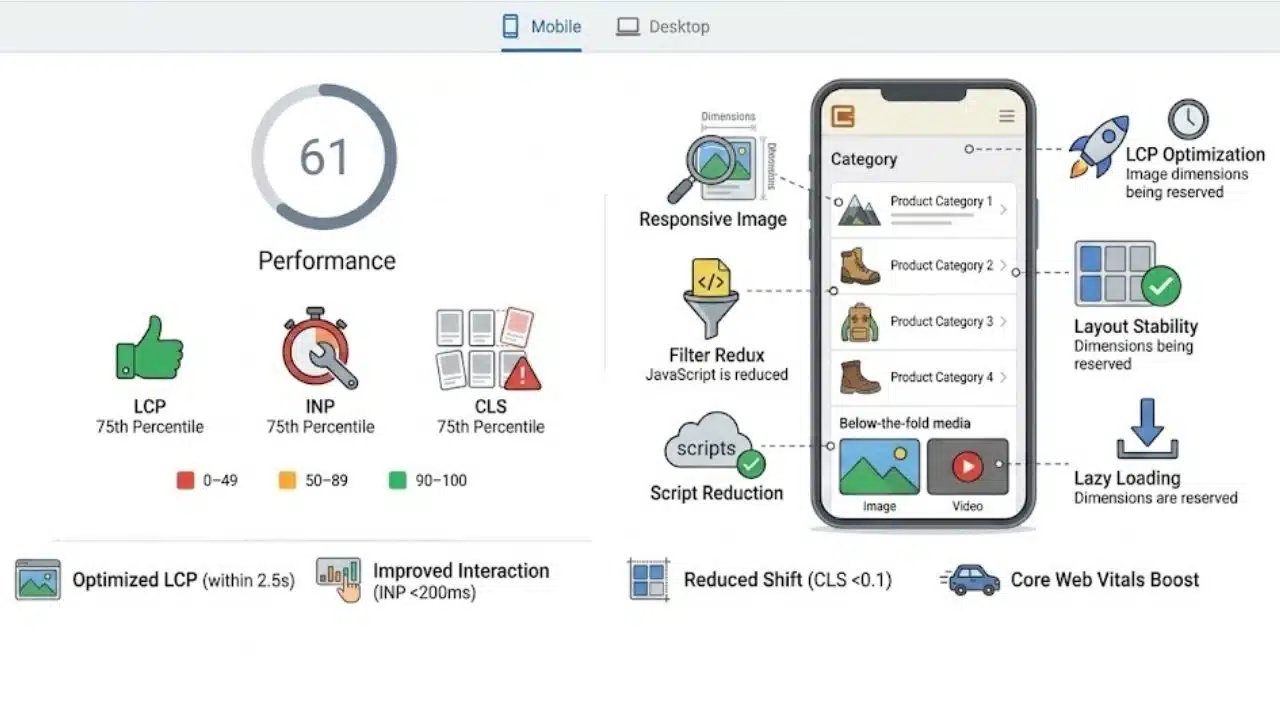
Category templates often carry large images, filter drawers, review integrations, recommendations, promotional banners, personalisation, and analytics scripts. The combined weight can make them noticeably slower than simpler pages.
Current Core Web Vitals guidance defines good performance as:
- Largest Contentful Paint within 2.5 seconds
- Interaction to Next Paint below 200 milliseconds
- Cumulative Layout Shift below 0.1
Assess those thresholds at the 75th percentile of real visits, separately for mobile and desktop. A strong Lighthouse result on a fast laptop does not represent every customer using a mid-range phone and an ordinary mobile connection.
Common problems include an oversized banner becoming the LCP element, filters delayed by excessive JavaScript, product cards shifting when images load, and promotional bars being inserted after the grid appears.
Serve responsive images at appropriate sizes, reserve their dimensions, reduce unnecessary scripts, and lazy-load below-the-fold media where suitable. Do not lazy-load an image likely to become the LCP element because delaying its request can worsen loading performance.
Core Web Vitals contribute to page experience, but perfect scores are overrated when the category itself is irrelevant, thin, or poorly merchandised. Fix delays and instability that shoppers can feel before chasing a flawless laboratory score.
8. Handle Empty and Seasonal Categories Deliberately
An empty category returning a successful 200 response with only “No products found” offers little value and may be treated as a soft 404.
Use noindex when an empty category must remain accessible but should not appear in search. If the page has been permanently removed and has no replacement, return a genuine 404 or 410. Redirect it only when a closely equivalent category exists.
Avoid sending every retired category to the homepage. That does not answer the original request and may be treated as a soft 404.
Temporary stock shortages need more judgment. Keep the page live when products are expected to return and the category can still help shoppers through restock information or suitable alternatives.
Recurring seasonal pages may also be worth preserving. An established Christmas decoration or summer garden furniture category can often be updated when the season returns instead of being deleted and rebuilt under a new URL. That is a strategic choice, not a universal Google requirement.
The Practical Takeaway
Start with categories that already receive useful search impressions or appear for queries closely aligned with their products. First confirm the search intent and internal-link path. Then inspect filters, pagination, canonicals, mobile rendering, and empty-category handling.
Deploy one meaningful group of changes at a time and give Google time to recrawl and reprocess the affected URLs. Compare the results with the original baseline rather than assuming every movement came from the latest edit.
The strongest category page tweaks that lift rankings also make the store easier to shop. They clarify what each collection contains, remove unnecessary crawl paths, and help visitors reach relevant products with less friction. That is a more reliable approach than treating category-page SEO as a contest to publish the most copy.