Ever found yourself wondering if your trusty PS4 controller can tag along to the next-gen party on a PS5 console? Good news: compatibility isn’t just a dream for your favorite DualShock 4.
This guide describes the simplicity behind connecting and gaming with your PS4 controller on Sony’s latest marvel, offering solutions that keep you in play without skipping a beat. With practical steps and insightful details ahead, get ready to bridge the generational gap.
Dive in—gaming nostalgia awaits!
Understanding PS4 and PS5 Controllers
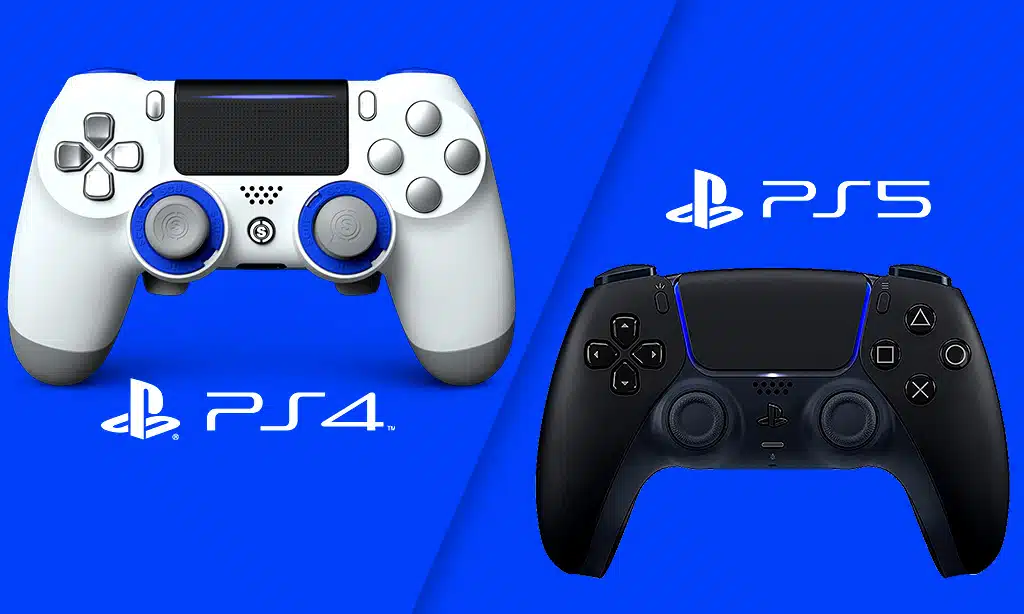
PS4 controllers, known as DualShock 4, were made for the original PlayStation 4. They have a share button and a touchpad. They can connect to consoles with Bluetooth or a micro-USB cable.
PS5 controllers are called DualSense, and they offer more features than PS4 controllers. These include haptic feedback and adaptive triggers that change how you feel in games.
The DualSense also has a built-in microphone and a Create button instead of the Share button from the DualShock 4. It charges using USB-C instead of micro-USB. This means it can send power faster and fit in either way, making it more convenient to plug in.
Both types of controllers work wirelessly and let you add headsets for game chat or streaming sounds directly to your ears while playing.
Can You Use PS4 Controller on PS5?
You can indeed use your PS4 controller on the new PlayStation 5. But there’s a catch! It only works when you’re playing games that were originally made for the PS4. If you try to play a game designed for the PS5, your old DualShock controller won’t work. Did you know about PS Now? Learn how to install PS Now on your PC.
Sony designed it this way so that players get the most out of new features and technologies in PlayStation 5 games with their DualSense controllers.
Using your PS4 gamepad on your new console is great for saving some money or when having friends over without enough PS5 controllers to go around. Just remember, while most wireless controllers connect easily to different devices, connecting a DualShock to a PlayStation 5 might not give you every feature available like it would on its home system, especially with newer games made specifically for the latest technology in Sony’s arsenal.
How to use a PS4 Controller on PS5
Curious about connecting your trusted DualShock 4 with the latest Sony console? Read on—we’ve got you covered with a step-by-step guide to bridge generations with ease in gaming.
Using a PS4 DualShock 4 Controller on PS5
Playing PS4 games on your PS5 console doesn’t mean you need to buy new controllers. You can use your trusty PS4 DualShock 4 gamepad for that nostalgic feel.
- Turn on your PS5 and go to the home screen.
- Navigate to the ‘Settings’ gear icon at the top right corner.
- Scroll down and select ‘Accessories.’
- Choose ‘Bluetooth Accessories.’
- Grab your PS4 controller and hold down the ‘Share’ button and the ‘PS’ button simultaneously.
- Wait until the light bar on the controller starts flashing; this means it’s in pairing mode.
- Look at your TV or monitor and see your controller pop up on the list of Bluetooth devices.
- Select it using your PS5 controller; you might need to press ‘X’ a couple of times.
- The light bar should glow steadily once it’s successfully connected.
- You can only play games made for the PS4 with this setup. Newer games won’t work because they need DualSense features.
- Some options are unavailable, like haptic feedback and adaptive triggers, because they’re DualSense-specific.
- Remember, when you want to use PlayStation VR, you’ll still need motion controllers compatible with it.
- For remote play or streaming services like Apple TV, a DualShock 4 will work just fine.
Limitations of Using a PS4 Controller on PS5
A PS4 controller won’t work with PS5 games. This means you miss out on new features like haptic feedback and adaptive triggers when playing the latest titles. Sony designed these innovations to create a more immersive gaming experience exclusive to the PS5.
You can play your old favorites from the PS4 on the new console using a DualShock 4 controller, but it’s not forward-compatible. If you try to use it for newer games, it simply won’t respond.
Gamers need to switch to a DualSense controller for anything that’s made for the next-gen system.
Takeaway
You’ve learned a lot about using your trusty PS4 controller on the new PS5. It’s clear that it works, but only with PS4 games. Remember, if you’re aiming to dive into the latest PS5 titles, you’ll need to grab a DualSense controller.
Keep gaming and enjoy making the most of all your controllers!