
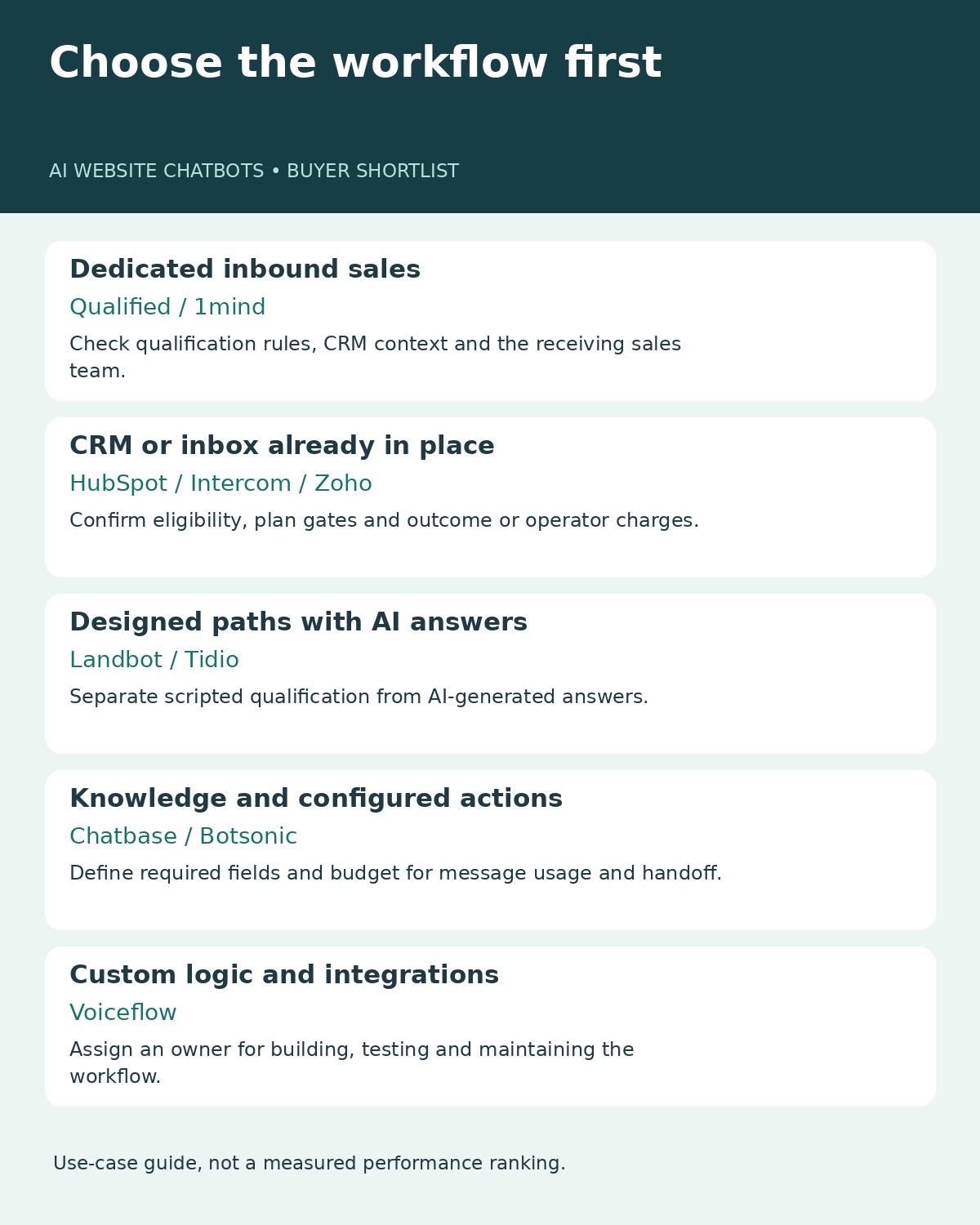
The best AI website chatbots for lead qualification help visitors explain what they need, assess whether your business can serve them, and pass useful context to the right person. A collected email address is only the beginning. This guide compares ten options for B2B marketers, from dedicated inbound sales agents to configurable builders, with current pricing checks and a small public-site evaluation.
What We Checked
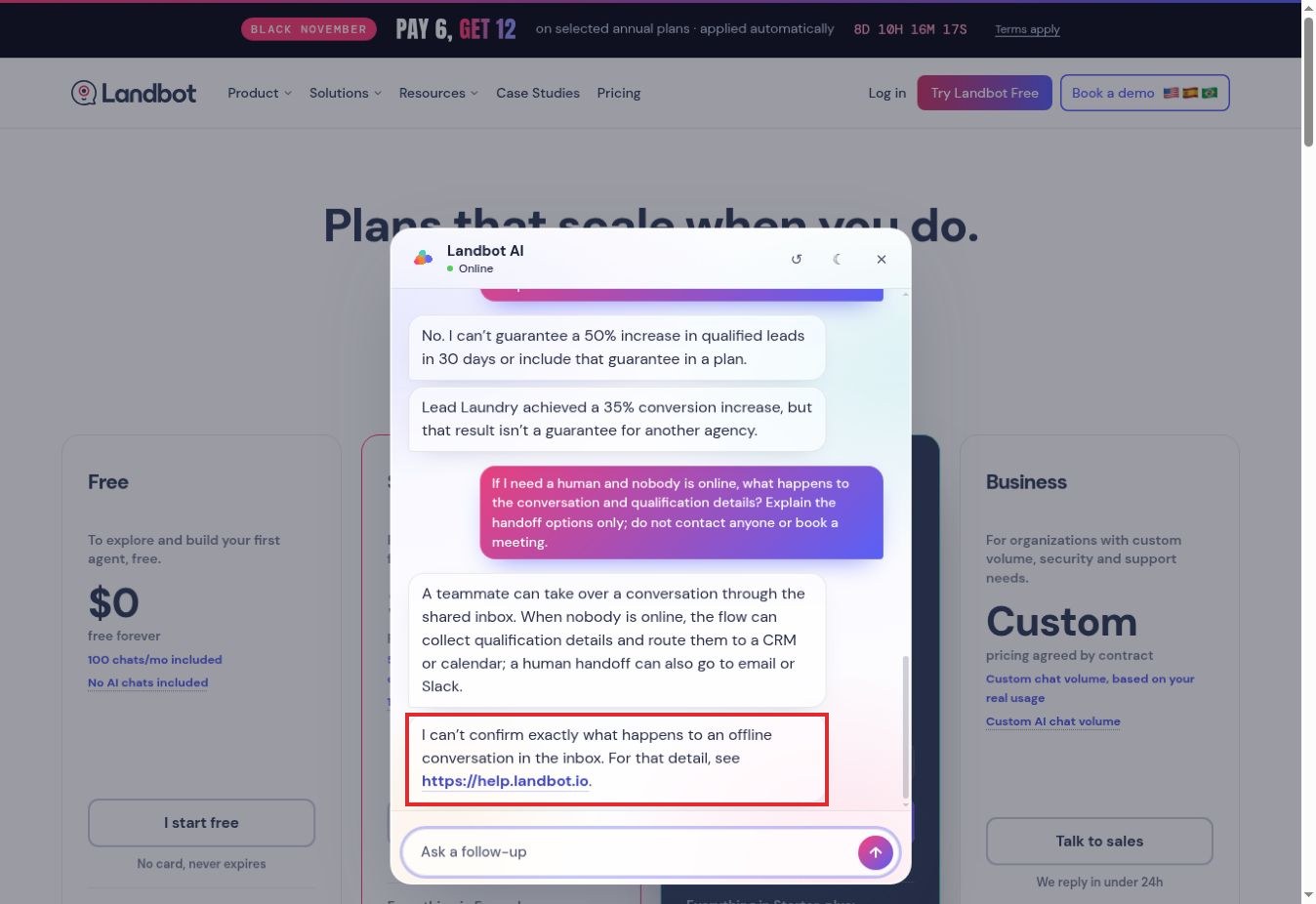
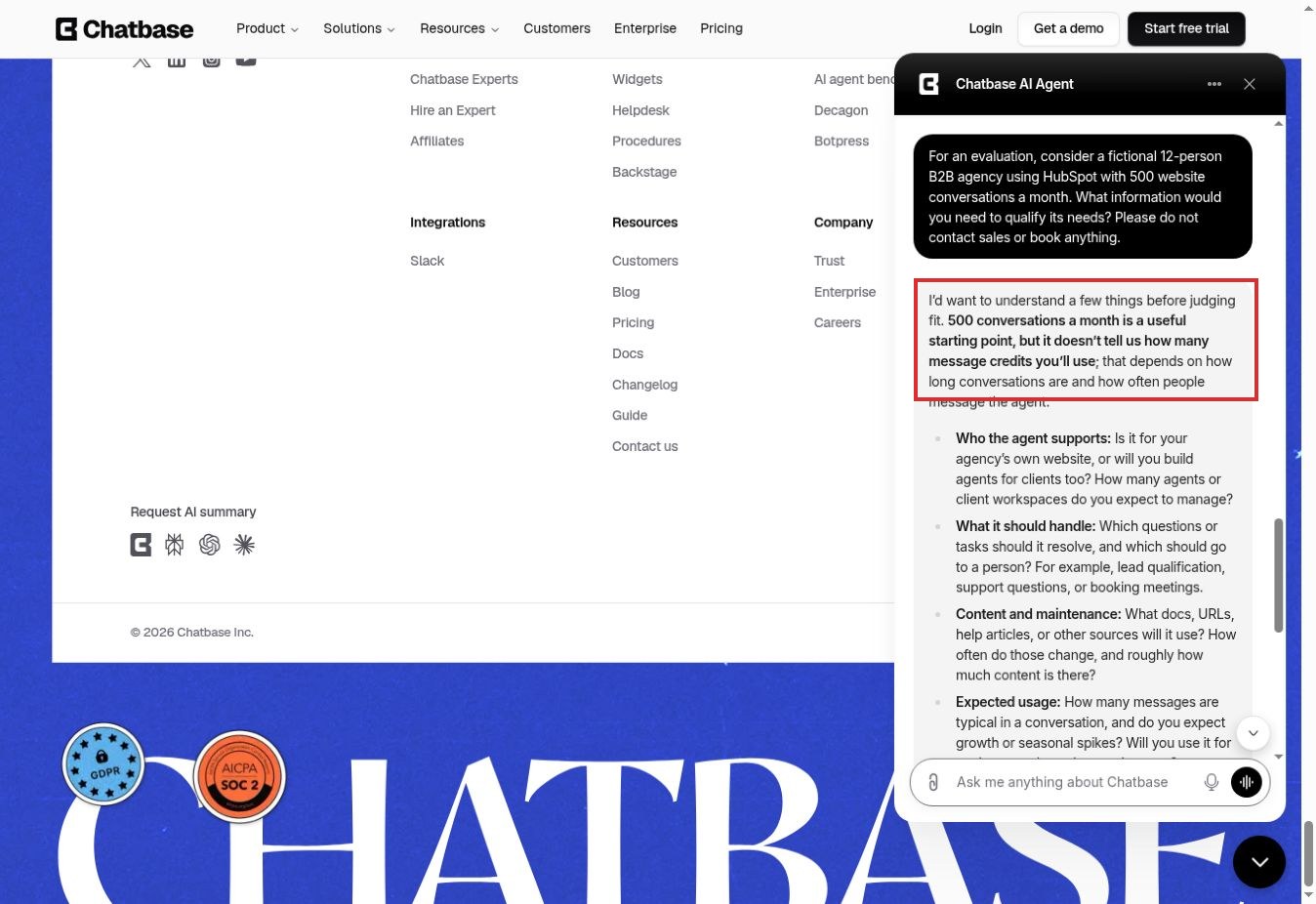
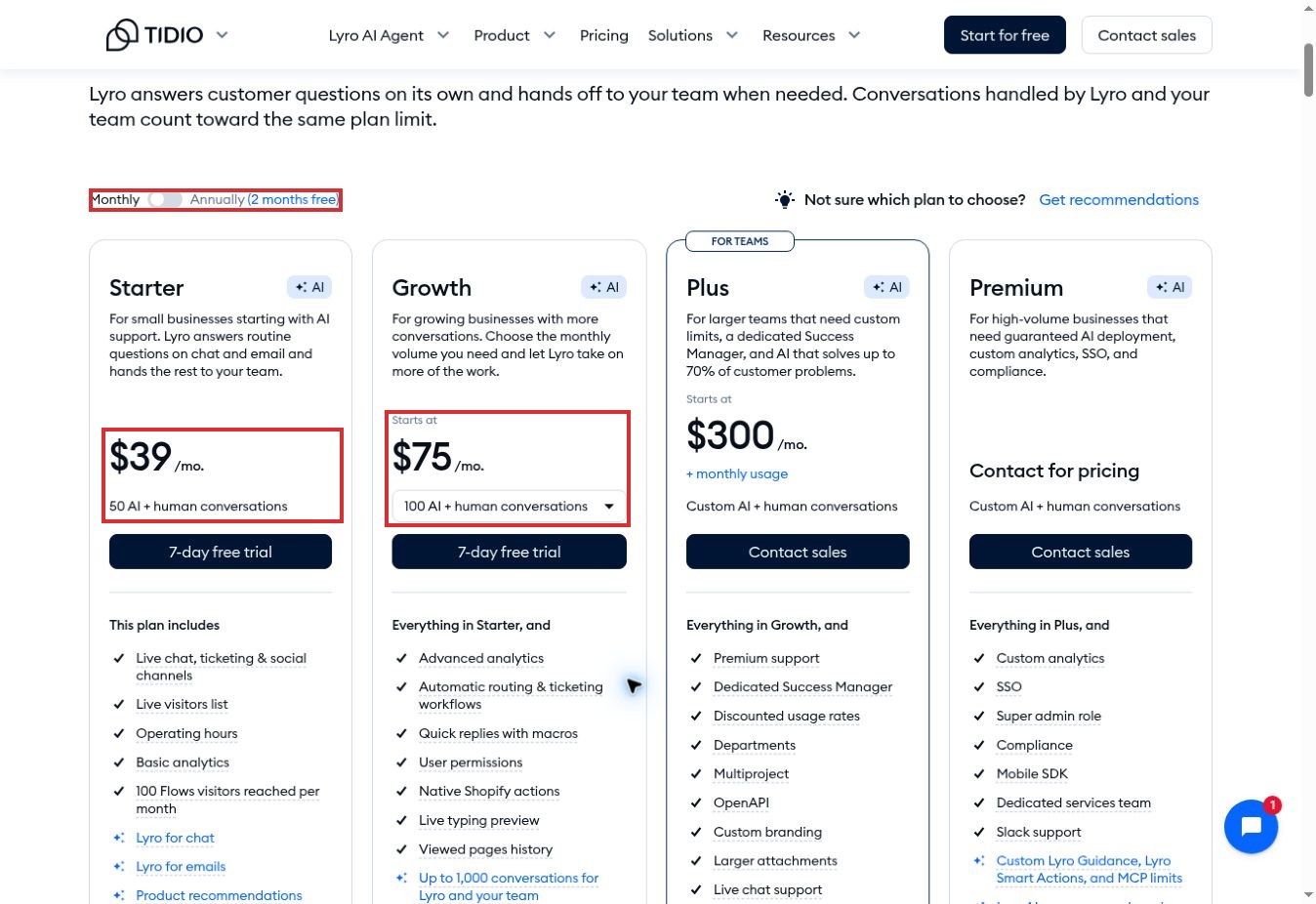
Research and public-site observations for this draft were completed on November 22, 2026. We reviewed official product documentation, plan limits, qualification workflows and handoff guidance. We also submitted five controlled questions to Landbot’s public pricing assistant, one discovery question to Chatbase’s public agent, and switched Tidio’s pricing display from annual to monthly billing. Three annotated screenshots document those interactions.
These were public-interface checks, not authenticated implementations or conversion-rate benchmarks. We did not connect a CRM, transfer a conversation to a real sales representative, book a meeting or test every product. Vendor capabilities below come from documentation unless an observation is explicitly identified. The numbering organizes different buying needs; it does not claim a measured performance ranking.
One significant exclusion is Drift. Salesloft’s October 26, 2026 sunset notice says Drift will retire on January 31, 2027, with access ending earlier if a contract expires first. That makes it unsuitable for a new-purchase shortlist. We include 1mind as a current option and explain the migration relevance below.
AI Website Chatbots for Lead Qualification: Quick Comparison
Start with your CRM and the decision you need the chatbot to make. Prices below are US-dollar public list prices checked on November 22, 2026, where available. Taxes, implementation, add-ons and other subscriptions can increase the total. A starting price does not mean every qualification or handoff feature is included.
| Tool | Most relevant use case | Pricing checkpoint | Key buying question |
|---|---|---|---|
| 1. Qualified Piper | Dedicated B2B inbound sales automation | Custom quote | Which CRM context and routing rules are included? |
| 2. 1mind | Conversational qualification with product demos | No public dollar rate verified; request a quote | What migrates from your current chat system? |
| 3. HubSpot Breeze Customer Agent | Qualification within HubSpot | Eligible subscription plus credit usage | Is the lead-qualification beta enabled? |
| 4. Intercom Fin for Sales | Inbound sales alongside Intercom workflows | $9.99 per Qualification; other outcomes differ | How will your playbook classify billable outcomes? |
| 5. Landbot | Structured conversational flows with AI | Starter $45/month; Professional $110/month | Which integration and AI-chat quota do you need? |
| 6. Chatbase | Knowledge-based answers plus configured qualification | Basic $150/month; $120/month billed annually | How many message credits will conversations consume? |
| 7. Zoho SalesIQ | Zoho-centered visitor engagement and CRM workflows | Operator-based plans; verify local pricing and AI scope | Which bot capabilities does your tier include? |
| 8. Tidio | AI answers combined with scripted lead flows | With Lyro AI: Starter $39/month; Growth from $75/month | How do chat quotas and Flows visitors differ? |
| 9. Botsonic | Smaller deployments using knowledge and actions | Starter $19/month; Professional $49/month | Does the required human handoff cost extra? |
| 10. Voiceflow | Custom qualification logic and integrations | Usage-based; confirm the current package | Who will build, test and maintain the workflow? |
1. Qualified Piper: For Dedicated B2B Inbound Sales
Qualified is worth evaluating when website conversations are part of an established revenue operation. Piper is positioned as an AI sales agent, with website engagement, qualification and meeting booking rather than a general FAQ widget alone. Its platform materials describe using CRM and account context to make conversations more relevant.
The practical attraction is continuity: a visitor’s company, needs and buying signals can inform what happens next. However, that only helps when your team has defined a useful ideal customer profile and ownership rules. An existing customer, a student and a potential enterprise buyer should not all enter the same sales queue.
Pricing is quote-based. The public plan comparison includes different allowances and capabilities, so request an itemized proposal for website traffic, email activity, integration work and the handoff features you expect. Do not treat a third-party annual estimate as your likely contract.
For a pilot, supply several clearly qualified and clearly unsuitable fictional accounts. Ask the vendor to demonstrate the reason for each routing decision and the record your representative receives. Qualified is a stronger shortlist candidate for teams ready to manage those rules than for a business seeking only a lightweight contact form.
2. 1mind: For Qualification Alongside Product Demonstrations
1mind’s Website Inbound offering combines conversational discovery with product explanations and interactive demos. Its official materials describe qualifying intent, writing structured qualification information to a CRM, booking meetings and transferring suitable buyers to representatives. This makes it relevant when visitors need to understand a complex product before they can explain their requirements.
It also matters for existing Drift customers: Salesloft identifies 1mind as its recommended replacement for Drift chatbot functionality. That recommendation does not establish that every existing playbook, integration or historical conversation migrates automatically. Treat migration as a separate acceptance checklist.
No public dollar rate was verified in the official pages reviewed. Ask for the price of the specific website deployment, its usage allowance, onboarding work and supported CRM configuration. A broad platform demonstration can include capabilities outside the package you intend to buy.
The key test is whether the agent can explain your product accurately while collecting the minimum information a salesperson needs. Also test a visitor who wants a person immediately. A polished demonstration is useful, but a reliable fallback, correct CRM fields and clear ownership after transfer are what make the experience operationally valuable.
3. HubSpot Breeze Customer Agent: For Teams Already Using HubSpot
HubSpot’s customer agent can be configured with lead-qualification actions, making it a logical candidate when your customer records and sales processes already live in HubSpot. The current setup documentation labels this capability as beta and specifies eligible Professional or Enterprise subscriptions, permissions and beta enrollment. Free live chat should not be confused with this AI qualification workflow.
The documented configuration lets teams define qualification criteria and distinguish qualified, partially qualified and unqualified leads. That middle state is valuable: a visitor who has not supplied a budget is not necessarily a bad prospect. Your routing rules should preserve uncertainty instead of turning missing information into a positive qualification.
Deployment uses HubSpot Credits in addition to the eligible subscription. HubSpot advertises customer-agent pricing of $0.50 per resolved conversation; confirm how the current billing rules apply to your qualification workflow and included credits. Do not substitute the separate prospecting agent’s price.
HubSpot also documents immediate, later and continued-agent handoff behavior. Before launch, check who receives the conversation, what happens outside working hours and whether the chosen outcome updates the intended record. This is a good ecosystem fit, provided your account has the required access and your team can maintain the criteria.
4. Intercom Fin for Sales: For Explicit Qualification Outcomes
Fin for Sales deserves a separate evaluation from Fin for Service. Intercom documents it as a distinct configuration for inbound selling, including qualification and routing, and makes it available on its latest pricing plans. A support deployment does not automatically prove that the sales playbook is ready.
The cost distinction is substantial. Intercom lists $9.99 for a Qualification, where a prospect matches defined criteria and is routed to sales, such as through a meeting booking. Self-serve routing, disqualification and product-discovery resolution use the lower $0.99 outcome rate. These usage charges are additional to the underlying subscription; the documentation says only one outcome is charged per conversation.
That structure makes playbook design part of budgeting. Decide which visitors should reach a salesperson and which should receive a trial or self-service path. Review a sample of outcomes with your sales team rather than accepting every booked meeting as evidence of a valuable lead.
Fin for Sales is particularly relevant when Intercom is already central to your customer conversations. During a pilot, check the transcript and assigned outcome together. The question is whether the handoff contains the buyer’s actual need and qualification evidence, not simply whether a conversation ended successfully.
5. Landbot: For Controlled Flows With Conversational AI
Landbot is useful when marketers want structured questions, explicit branches and AI assistance within the same visitor journey. Its documentation describes combining AI responses with qualification paths, integrations and human takeover. This can suit teams that want a predictable eligibility decision without forcing every answer into a rigid form.
In our public-site check, a fictional agency needed three operators, native HubSpot integration, 500 total chats and 300 AI chats monthly. The pricing assistant recommended Professional at $110 per month before tax, consistent with the displayed plan. That plan listed three seats, 2,500 chats and 300 AI chats. Starter was $45 monthly, but its lower price did not meet the supplied requirements.
The assistant rejected a $30 budget for the same requirements and refused to guarantee a 50% increase in qualified leads. Its offline-handoff explanation was less complete: it described possible routes but explicitly could not confirm exactly what would happen to an offline inbox conversation.
Those observations make the next evaluation step clear. Build the unavailable-agent branch and check the destination yourself. A helpful plan recommendation does not verify CRM delivery or a working human takeover. Budget separately for any additional chat or AI-chat usage.
6. Chatbase: For Answers Plus Configurable Qualification Procedures
Chatbase combines knowledge-based responses with Actions and Procedures. Its Procedures materials describe qualification tasks involving information such as role, budget and intent. That makes it relevant to businesses that want an agent to answer product questions before collecting enough detail for the next step.
Its public agent made a useful distinction during our check. Given a fictional 12-person agency with 500 monthly conversations, it asked about deployment scope, message volume, content, CRM behavior and escalation needs. It did not assume that 500 conversations equaled 500 message credits. It also asked whether the agency was serving its own website or building agents for clients.
The pricing page listed Basic at $150 monthly, or $120 per month billed annually, with 4,000 monthly message credits. Branding removal and additional agents have separate listed charges. Estimate usage with realistic multi-turn conversations, not your visitor count alone.
Chatbase is a practical candidate when your knowledge sources are organized and you can specify the qualification procedure. In a trial, inspect the final structured fields and the human inbox route. A detailed discovery answer from the vendor’s public bot is evidence of that interaction, not proof that your own configured agent will qualify or route correctly.
7. Zoho SalesIQ: For Zoho-Centered Sales Operations
Zoho SalesIQ belongs on the shortlist when visitor engagement needs to connect closely with Zoho CRM. Its Zobot platform supports configurable bots, while Zoho’s CRM integration materials describe capturing visitor information and keeping conversation context with customer records. Its bot setup guidance also provides an operator-handoff option.
The attraction is a connected workflow: gather the visitor’s requirements, distinguish an existing contact from a new lead, and deliver useful information to the responsible team. However, SalesIQ includes multiple bot and AI capabilities. The presence of live chat or a codeless builder does not establish that a particular tier includes the AI behavior you want.
Paid plans are organized around operator licenses, with separate feature and usage limits. The official pricing table is localized, and no stable dollar amount was verified for this comparison. Confirm your currency, billing term, operator count, bot entitlement and AI usage rather than importing a price from another region.
For a pilot, include a returning contact and a new visitor with similar names. Check record association and the qualification fields before assessing convenience. Zoho is a sensible ecosystem choice when that integration reduces manual work, but the CRM destination and handoff still need an end-to-end test.
8. Tidio: For AI Answers Combined With Scripted Lead Flows
Tidio is a useful option when a smaller team wants conversational AI answers alongside predictable lead capture and routing. Its documentation clearly distinguishes Lyro AI from Flows: Lyro generates contextual answers, while Flows follow scripted paths for activities such as collecting details and qualifying a request. This distinction matters if your buying brief asks for autonomous sales qualification.
We switched its pricing page to monthly billing with Lyro AI selected. Starter displayed $39 per month for 50 AI-plus-human conversations; Growth started at $75 for 100. Flows has its own visitor allowance and separate higher-volume pricing. These are different billing units, so one traffic estimate cannot replace both calculations.
Tidio updated its plan guidance on November 16, 2026. It says the free Lyro allowance is 50 conversations once, not 50 renewing every month. Existing accounts can also remain on earlier plans, making older screenshots an unreliable guide to a new account.
Choose Tidio when the combination of AI answers and designed qualification steps matches your process. Test what happens when a visitor leaves the script, asks for a person or returns after an earlier conversation. Do not present a completed contact form as proof of AI lead scoring.
9. Botsonic: For a Smaller Knowledge-and-Actions Deployment
Botsonic offers an accessible starting point for a website agent built around your content, lead forms and actions. Its public pricing lists Starter at $19 monthly with 1,000 messages and one team member, and Professional at $49 monthly with 3,000 messages and two team members. Annual billing has lower monthly equivalents.
The crucial distinction is between collecting contact details and deciding whether a prospect meets your criteria. For a meaningful qualification workflow, define the required answers, disqualifying conditions and next action. If the process depends on more elaborate workflows or API access, examine the higher-tier feature requirements before comparing only the starting prices.
Human assistance also needs a closer look. Botsonic’s documentation lists Zendesk live-agent handoff as an add-on and says add-on availability varies by plan. An emailed transcript, a callback request and an immediate live conversation are different outcomes. Ask which one your proposed setup actually supports and what it costs.
Botsonic fits a focused pilot where the knowledge base and required actions are modest. Run multi-turn examples to estimate message consumption, then verify the destination of captured details. The low entry price is useful only if the plan includes the behavior your sales process requires.
10. Voiceflow: For Teams Building Their Own Qualification Logic
Voiceflow is the builder option in this comparison. Its website lead-generation guide demonstrates collecting contact information and using a HubSpot action after consent. That is a useful foundation, but creating a contact is not a complete qualification system. Your team still needs to design the criteria, missing-information states and appropriate routing.
This flexibility suits agencies and teams with someone responsible for workflow design. You can make the conversation reflect a specialized buying process instead of adapting every visitor to a generic questionnaire. The trade-off is ownership: someone must maintain knowledge, integrations, test cases and changes to the decision logic.
Voiceflow’s handoff documentation also distinguishes live transfer from ticket creation. A ticket may support later follow-up without connecting the visitor to a person in the current session. Test both the website experience and what appears in the receiving support platform.
Pricing is usage-based, and the exact package should be confirmed for your deployment. Include implementation and maintenance in the comparison. Use isolated test connections: Voiceflow’s guide warns that draft testing can use a connected production integration unless you separate it. Start with synthetic contacts and verify consent before enabling real CRM writes.
What the Five-Question Check Revealed
We used one fictional agency scenario across five prompts in Landbot’s public pricing assistant. This was a qualitative check of one configured bot on one date, not a standardized contest between vendors. Chatbase received only the opening discovery scenario; Tidio’s interaction was limited to its pricing controls.
| Question tested | Observed Landbot response | What remains unverified |
|---|---|---|
| What information is needed for a 12-person agency using HubSpot? | Asked about operators, AI-chat volume and client-account needs. | Whether a deployed customer bot would collect and store the same fields. |
| Which monthly plan fits three operators, native HubSpot and 300 AI chats? | Recommended Professional at $110 before tax. | Checkout, actual billing and integration behavior. |
| Can the same requirements fit a $30 monthly budget? | Said no plan met all requirements. | Consistency across repeated or differently phrased requests. |
| Can it guarantee 50% more qualified leads in 30 days? | Refused to promise that result. | Any actual conversion or pipeline improvement. |
| What happens when a visitor needs a human and nobody is online? | Described options but acknowledged uncertainty about the offline inbox behavior. | Real transfer, notification delivery and CRM context retention. |
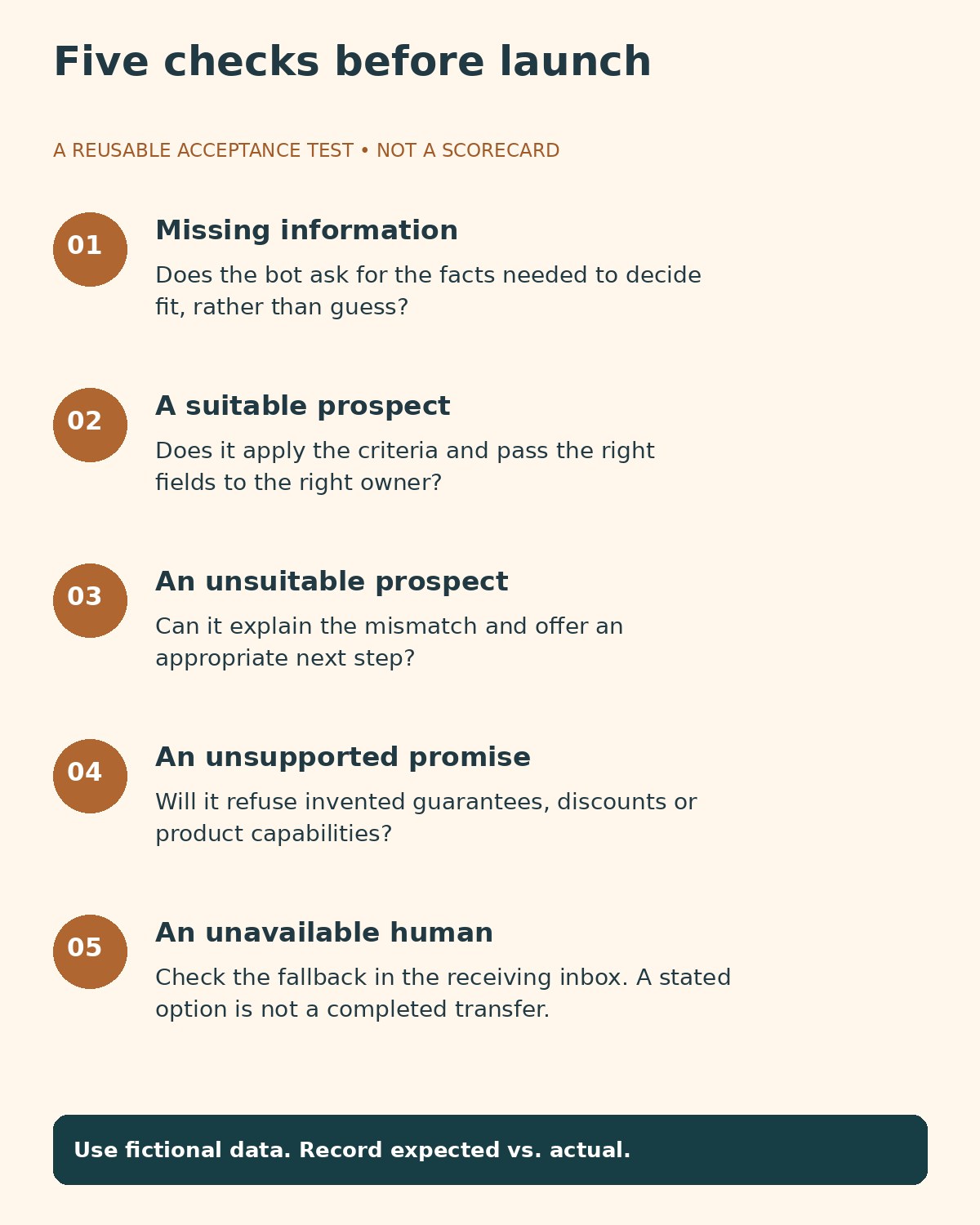
The most useful lesson is the gap between explaining a workflow and completing it. A chatbot can describe a sensible handoff while the receiving queue, business hours or integration is misconfigured. Acceptance testing must include the destination, not just the visitor’s chat window.
How to Choose and Pilot the Right Tool
Write down a small set of business-relevant qualification criteria before opening a trial. For example, a software company might need the visitor’s use case, team size, required integration and deployment timeframe. Decide which answers are mandatory, which are optional and which should trigger a person’s review.
Next, define three outcomes: ready for sales, needs more information and not currently a fit. Give each a helpful next step. A visitor outside your target market might still benefit from documentation or a self-service plan. Do not make the agent invent urgency or claim that a product supports something absent from your approved content.
Test a realistic conversation through the entire process. Inspect the qualification fields, transcript, consent record, assigned owner and fallback when no representative is available. Our guide to business process automation software provides context for evaluating the surrounding workflow rather than the chat widget alone.
Budget with the vendor’s actual billing unit. Intercom sales outcomes, Chatbase message credits, Landbot AI chats and Tidio conversation quotas are not interchangeable. Estimate a normal month and a busy month, including human seats, integrations, branding, implementation and additional usage.
Finally, review accepted leads with sales. Track unsuitable meetings, missing fields, requests for a person and conversations that never reached an owner. Use branching customer support training scenarios to prepare staff for the unusual cases that automation hands over. A small pilot with clear acceptance criteria is more informative than an impressive demo alone.
Frequently Asked Questions
Is an AI website chatbot the same as a lead-qualification tool?
No. A bot may answer questions or collect an email without applying qualification criteria. Look for defined decision rules, structured fields, uncertainty handling and a verifiable next action.
Which option should an existing HubSpot team evaluate first?
Start by checking access to HubSpot’s customer-agent qualification capability. Its ecosystem fit may simplify the workflow, but beta eligibility, subscription requirements and usage costs still need confirmation.
Can a free plan support ongoing AI qualification?
Sometimes a free allowance is enough for exploration, but check whether it renews and includes AI, integrations and routing. Tidio’s one-time 50-conversation Lyro allowance, for example, is different from a recurring monthly entitlement.
No. Verify the receiving inbox, assigned owner, transcript and notification. Also test outside working hours. A ticket or email can be a valid fallback, but it is not an immediate live transfer.
Choose for the Decision Your Sales Team Needs
The right AI website chatbots for lead qualification should improve the quality and usefulness of the next conversation. Shortlist dedicated sales agents for complex inbound selling, ecosystem tools when your CRM is central, and builders when your process needs custom logic. Then test missing information, unsuitable prospects, unsupported promises and unavailable humans. Reliable routing and honest answers matter more than a longer list of captured contacts.