The best Interactive Product Demo Software for B2B SaaS Teams depends on what your buyer needs to do: follow a short product story, explore an editable interface, or navigate a realistic sales environment. Storylane, Navattic and Supademo make a useful opening shortlist, but enterprise demo operations and content-heavy marketing teams have different requirements. This guide compares ten options by workflow, pricing structure and the checks that matter before you commit.
Pricing and public product information reviewed: November 16, 2026. Prices below are in US dollars, before taxes. Annual-billing figures are monthly equivalents, not promises of monthly cancellation. “Best for” labels are editorial fit judgments, not benchmark winners.
Which Demo Software Should You Shortlist?
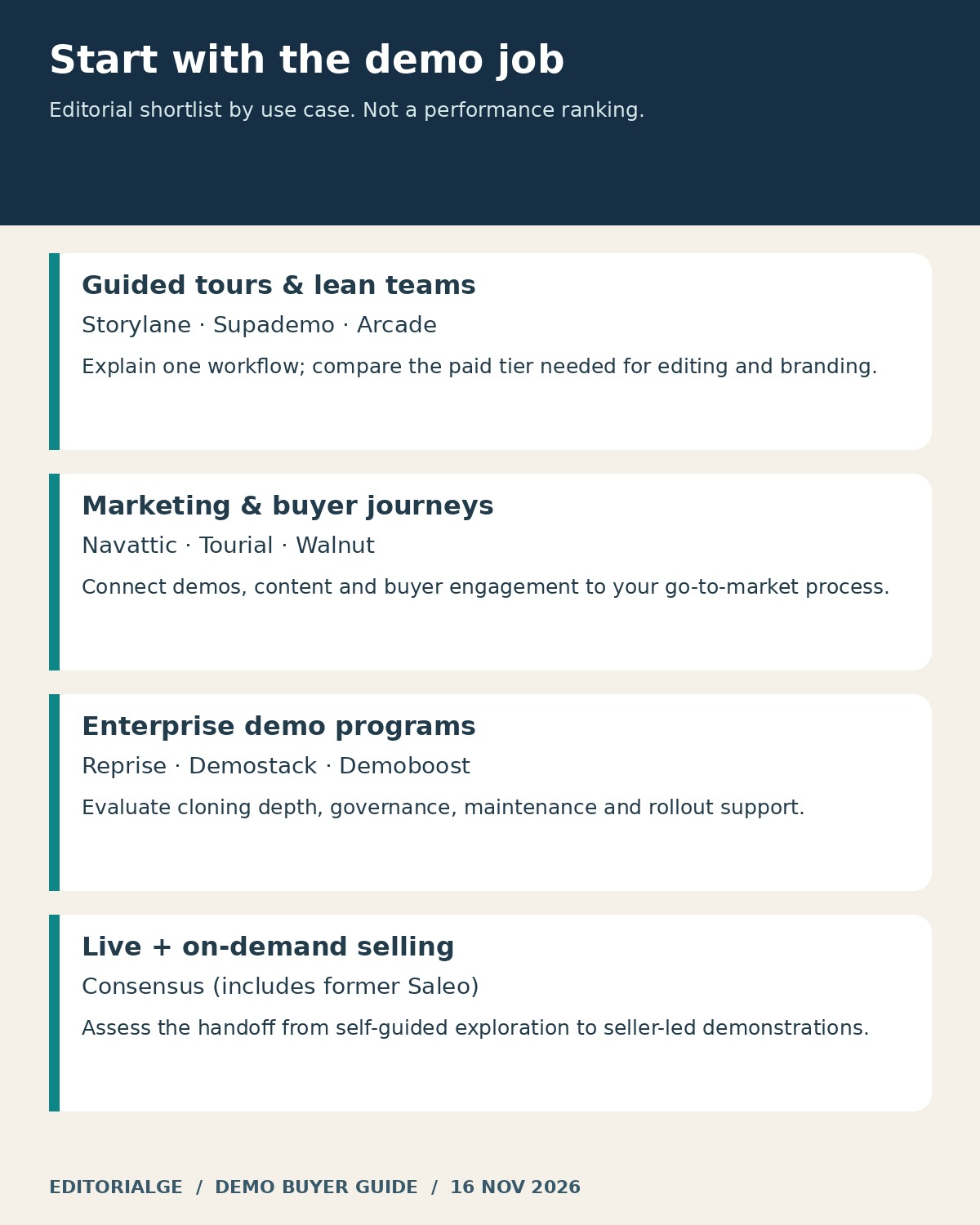
Start with Storylane for a marketing-to-sales demo program, Navattic for HTML tours connected to go-to-market workflows, and Supademo for a smaller team combining demos with customer education. Consider Arcade for visual storytelling, Walnut for coordinated buyer journeys, and Reprise or Demostack when the depth of the demo environment matters more than a simple capture price. Tourial, Demoboost and Consensus cover additional content, presales and live-demo requirements.
Choose the format first. A low-cost screenshot tour can be the right answer for a landing page, while a complex technical sale may need a controlled sandbox. Buying the largest platform before defining that distinction makes both the budget and the implementation harder to manage.
First-Hand Review: What Stood Out in the Three Public Walkthroughs
For this review, I followed the public Storylane, Navattic and Supademo walkthroughs and recorded the interface states shown in the annotated screenshots below. Three practical decisions stood out: choosing the capture format, reviewing the context behind the demo narrative, and checking the recording controls before capture. These observations give buyers concrete questions to bring to a trial.
In Storylane, I reached the capture explanation showing Screenshot and HTML options beside the recording control. My takeaway: decide how much interface editing your demo needs before choosing a plan. In Navattic, I followed the Copilot example to the context-review screen, where brand voice, product context and go-to-market information were organized separately. That makes narrative review an important pilot step. In Supademo, I advanced through the recording guidance and inspected the displayed recording and sensitive-data controls. That highlights a useful preparation check: decide what belongs in a shareable capture before recording your product.
My buying recommendation from these observations is to shortlist by the workflow you need to maintain, then compare the plan that actually includes it. A polished public walkthrough helps explain the vendor’s approach; a pilot with your own product establishes whether that approach fits your team.
Review Method and Evidence
Review date: November 16, 2026. This comparison combines an AI-assisted browser review of three vendor-authored public walkthroughs with official product and pricing research across all ten platforms. The original screenshots, annotations and first-person notes document the observed public-tour steps. Pricing records distinguish billing intervals, creator or seat allowances and feature gates. Account-level creation, publishing and export workflows remain subjects for the eight-step buyer pilot below.
The recommendations are editorial judgments about fit, supported by the documented features and observed tour states. They are not measured build-speed or conversion rankings. This approach reflects Google’s guidance on useful reviews: show the evidence, explain decision factors and make meaningful trade-offs clear.
Interactive Product Demo Software for B2B SaaS Teams: Comparison Table
| Software | Best-fit buying situation | Pricing signal checked Nov. 16, 2026 | Main question before purchase |
|---|---|---|---|
| Storylane | Guided marketing demos with room to expand | Starter $50 monthly or $40/month annually; Growth $625 or $500/month annually | Do you need HTML editing rather than screenshot/video tours? |
| Navattic | HTML tours and coordinated GTM activity | Free Starter; no numeric Base/Growth price displayed in the reviewed page | What is the current quote for the required seats and workflow? |
| Supademo | Lean demo and education teams | Scale $50 monthly or $38/month annually per creator | Will screenshot demos suffice, or do you need a higher HTML tier? |
| Arcade | Visual, shareable product stories | Dedicated interactive-demo page lists Growth at $50 monthly or $42.50/month annually per seat | Are you buying interactive demos or the separate video offering? |
| Walnut | Buyer journeys shared across a sales team | Ignite $575/month, billed annually | How do editor, presenter and AI-credit allocations match usage? |
| Reprise | Tours, data injection and deeper demo infrastructure | Free; Teams $125/seat monthly or $100/seat/month annually | Which tier includes the cloning and governance you need? |
| Demostack | Complex product simulations | No numeric public price verified; request a quote | Can the simulated environment reproduce your essential workflows? |
| Tourial | Micro tours and content playlists | Engage/Scale plans; no numeric public price displayed | How are tour centers, support and identity controls packaged? |
| Demoboost | Presales teams growing a demo program | Start Up $375/month, billed annually | Which integrations and demo formats require an upgrade? |
| Consensus | Combined on-demand and seller-led demos | Request pricing; no numeric price verified | Which products and usage allowances are included in the quote? |
These prices are entry points or relevant named tiers, not equivalent baskets. Several vendors have changed product packaging. In particular, Arcade has separate demo and video pricing surfaces, and Reprise’s newer plans page differs from its older platform-fee presentation. Confirm the exact product, billing cadence and included features in writing.
1. Storylane — Best for a Marketing-to-Sales Demo Program
Best for: A product marketer who wants a guided tour now and a path toward more editable demos as the program grows.
Storylane’s free tier includes one published screenshot/video demo and one seat. Starter expands the published-demo allowance; Growth adds HTML editing and includes five seats. That format distinction matters more than the headline entry price if your demo needs frequent changes to interface text or visual elements.
Why people choose it: The tier structure gives teams a way to begin with a focused guided asset and evaluate more advanced demo needs later. Our recommendation is to identify the first feature that forces your upgrade before comparing costs.
Trade-off: Starter and Growth solve different editing problems. Do not budget for the lower tier while assuming it includes the higher tier’s HTML controls. Check additional seats and AI allowances separately.

First-hand observation: I opened “Take a tour,” selected “Demo Suite,” and advanced to the capture explanation. The public walkthrough showed Screenshot and HTML choices beside the recording control. That made the capture-format decision visible early. I was navigating Storylane’s prepared example, not recording a new product or validating its promised creation speed.
Your pilot question: Can one marketer update a changed label and publish the revised tour without rebuilding the whole sequence? Use a real release change as the test case.
Best for: Marketing teams that want interactive product exploration connected to broader lead and sales activity.
Navattic’s Starter tier offers one seat and one HTML or media demo. Base lists five seats, unlimited HTML demos, integrations and campaign-oriented capabilities; Growth lists ten seats and additional sales and governance features. The current pricing page reviewed did not display a numeric Base or Growth amount, so this comparison does not recycle older advertised prices.
Why people choose it: The product’s HTML emphasis and tiered GTM capabilities make it a relevant candidate when a tour must fit into a repeatable campaign process.
Trade-off: A free single-demo experiment does not establish the cost of a team rollout. Ask for a quote that names the required seats, integrations, custom domains and access controls.

First-hand observation: I started Navattic’s public Copilot tour and followed the context-upload example through “Generate” to the review screen. Brand voice, product context and go-to-market context appeared as separate areas. I then advanced to the capture and drafting explanations. This showed how the vendor presents context review; I did not upload a document or verify AI-generated accuracy in a real workspace.
Your pilot question: Can the marketer review and correct the product narrative before publishing, and can the sales team see the resulting buyer activity in the system it actually uses?
3. Supademo — Best for Lean Teams Sharing Demos and Guides
Best for: Founders and smaller teams building reusable product explanations for buyers and customers.
Supademo’s free plan lists five guided interactive demos for one creator. Scale is priced per creator and adds capabilities including branching and tracking. The annual-billing Business tier is $199/month with one creator; Growth is $350/month with five creators. HTML editing begins above Scale, and sandbox demos appear in Growth.
Why people choose it: It is a useful shortlist candidate when product demonstrations and practical education overlap. Separate creator seats from people who only need to review or view the content.
Trade-off: The affordable Scale entry point should not be treated as the price of the complete HTML or sandbox offering. Confirm the plan against the experience you want to publish.

First-hand observation: I selected the homepage’s “Interactive Demo” tab, started the tour and advanced from the recording explanation to the workflow step. The prepared capture panel showed “Hide Sensitive Data” above “Record Interactive Demo.” I found that placement useful as a reminder to sanitize content before recording. The image contains the vendor’s sample application; I did not inspect a real customer account or test the redaction feature itself.
Your pilot question: Can a second team member update the guide, and does the shared result still make sense without the creator explaining it live?
4. Arcade — Best for Visual Product Storytelling
Best for: A marketer packaging a concise product story for a website, launch or follow-up message.
Arcade’s dedicated interactive-demo pricing page lists a free plan with one published demo. Growth adds branching, calls to action, forms, branding and export options. Its Enterprise feature list includes HTML capture and additional organizational controls.
Why people choose it: The storytelling-oriented package is relevant when the main deliverable is a polished, shareable explanation of one product outcome.
Trade-off: Arcade’s main pricing page now emphasizes AI video plans, while its dedicated interactive-demo page presents a different structure. Confirm which subscription your workspace will use. Do not substitute a video-generation credit allowance for an interactive-demo entitlement.
Your pilot question: Does the viewer understand the product outcome without narration, and do exported versions preserve enough context when interactivity disappears?
5. Walnut — Best for Coordinated Buyer Journeys
Best for: Sales and marketing teams that need shared demo content and a structured buyer experience.
Walnut Ignite includes three editor seats, three presenter seats and an annual pool of 50,000 AI credits. Its published feature set includes unlimited demos, playlists, engagement tracking and deal rooms. Accelerate is $1,550/month billed annually and adds capabilities including sandbox demos and personalization.
Why people choose it: Separating editing from presentation can suit a team where a few specialists build approved assets and more colleagues use them in deals.
Trade-off: Seat counts alone do not describe the full cost. Model who creates content, who presents it and how AI activity consumes the shared allowance.
Your pilot question: Can a representative select the approved asset for a buyer without accidentally editing the master version or sharing an outdated variation?
6. Reprise — Best for Teams Needing Multiple Demo Formats
Best for: Teams evaluating guided tours, live data presentation and a route to more extensive demo environments.
Reprise’s current plans page offers a free tier with data injection and product tours. Teams adds capabilities such as multi-asset Demo Flows and digital sales rooms. Full application clones sit in the Enterprise offering on that page.
Why people choose it: It belongs on the shortlist when one buying process may require several forms of product demonstration, rather than a single website tour.
Trade-off: Older Reprise pricing material describes an annual platform fee plus licenses. Use the current plans and a written proposal to establish what applies to your purchase, especially for enterprise cloning and access requirements.
Your pilot question: Which interactions must behave like the real application, and which can be explained through a controlled sequence? Prove the difficult interaction before expanding the scope.
7. Demostack — Best for Complex Product Simulations
Best for: Enterprise teams whose sales story requires an environment with meaningful depth.
Demostack describes a cloner that reproduces the product frontend and simulates backend responses. Its positioning combines product simulations, personalization, presentation and analytics. The public pricing material reviewed explains the enterprise offering without a numeric price.
Why people choose it: A controlled simulation is worth evaluating when an ordinary guided tour cannot support the questions buyers ask during a technical conversation.
Trade-off: More realistic behavior creates more to validate. Vendor claims about reduced maintenance or engineering effort should become pilot questions, not assumed savings.
Your pilot question: Can the environment handle a buyer taking an unexpected route? Include a filter, a drill-down and a reset in the acceptance test, then assign ownership of updates after each product release.
8. Tourial — Best for Micro Tours and Content Playlists
Best for: Product marketers organizing several short explanations around personas or use cases.
Tourial combines interactive tours with Tour Centers, which function as content playlists. Engage lists five seats and three Tour Centers; Scale lists uncapped seats and unlimited Tour Centers. The pricing page displays no numeric amount. Its homepage also states that Tourial is now part of Navless.ai.
Why people choose it: A collection of short, focused journeys can be useful when different buyers need different starting points.
Trade-off: Confirm the current commercial arrangement and product roadmap, along with the support and identity-management options included in the offer. Premium SSO is listed as an add-on on the pricing page.
Your pilot question: Can a first-time visitor find the relevant tour without reading a long menu? Test the organization of the content as carefully as the tour itself.
9. Demoboost — Best for Growing Presales Demo Programs
Best for: Teams that want to compare demo formats alongside onboarding and service support.
Demoboost Start Up lists two seats and unlimited HTML, screenshot and video demos at $375/month billed annually. Essentials is $600/month with five seats; Growth is $1,200/month with ten. The published ladder adds mobile experiences, sandbox demos, CRM integrations and services at different levels.
Why people choose it: The plan structure makes it possible to discuss both software capability and the help needed to establish a repeatable demo operation.
Trade-off: The entry tier does not include every integration or advanced format. Map your requirements to the specific plan rather than treating the whole feature list as standard.
Your pilot question: What will the included service hours actually deliver: implementation, content improvement, training or troubleshooting? Put the expected output into the proposal.
10. Consensus — Best for Connecting On-Demand and Live Demos
Best for: Revenue teams combining buyer-led exploration with seller-led demonstrations.
Consensus brings together interactive tours, video demos, AI agents and live demonstrations. Saleo is now part of Consensus, with its live data-injection capability presented as Consensus Live. We therefore count Consensus once, rather than presenting Saleo as a separate competing vendor.
Why people choose it: It is relevant when the buying journey moves between self-service discovery and a live sales conversation, and the team wants those interactions considered together.
Trade-off: No numeric public price was verified. Ask which products, user roles, usage allowances and implementation services the proposal includes.
Your pilot question: Can the salesperson see what the buyer explored before the call, and can the live demonstration respond to that interest without exposing real customer information?
How to Compare the Real Annual Cost
Start with a requirement list and a realistic headcount. Three creators, six presenters and twenty reviewers are not necessarily twenty-nine paid seats. Conversely, a product priced per creator can become expensive if every customer-success colleague needs editing access. Ask vendors to classify those roles before issuing a quote.
Use this planning equation: annual subscription plus required add-ons plus implementation plus internal maintenance time. Include the cost of replacing captured screens after product changes. A tool that is quick to record but slow to update can be the more expensive option over a year.

The illustration compares different purchasing scenarios, not equivalent feature bundles. Three Supademo Scale creators at the annual rate equal $1,368 a year. Storylane Growth’s five-seat package at its annual rate equals $6,000. Walnut Ignite equals $6,900 annually for its specified seat mix. None of those calculations includes taxes, negotiated terms, extra consumption or internal labor.
Ask what happens when you downgrade or cancel. Will existing embeds keep working? Can you download something useful? Is an export a video, a PDF, static images or a genuinely interactive offline experience? Those outputs solve different continuity problems. Keep the answer with the commercial proposal.
For a quote-based platform, send the same brief to every vendor: number of creators and presenters, number of products, required environments, expected demo volume, analytics destinations, identity controls and support needs. Comparable inputs make the proposals easier to evaluate.
Run This Eight-Step Pilot Before Signing
Use the same small workflow in every shortlisted tool. For example, demonstrate how a fictional account creates a project, adds a task, assigns it, changes its status and views a report. Keep the underlying story consistent so visual polish does not conceal a missing capability. The following is a proposed evaluation protocol.
1. Prepare One Outcome and Safe Sample Data
Write the buyer’s question at the top of the test brief. Replace real names, emails, account details and commercial information before capturing. Decide what the viewer should understand at the end. A tour that explains one useful outcome is easier to evaluate than an unfocused product overview.
2. Capture the Same Eight Steps
Record setup time separately from recording time. Note extension installation, permissions, loading behavior and any screen that fails to capture correctly. Save the original capture and a short log. Do not use a vendor’s “build in minutes” statement as your measured result.
3. Check What the Capture Contains
Review screenshots, tooltips, menus and any captured HTML content for information that should not leave the test environment. A visual blur should not be assumed to remove underlying data. Ask how the platform stores captures and whether content can be deleted from both the editor and published assets.
4. Make a Realistic Edit
Change a product label, replace one image, rewrite a tooltip and add a branch. Give the task to the person who will maintain the demo. Record whether the work requires recapturing, specialist help or a higher subscription tier. This is a more useful comparison than counting editing features.
5. Publish Where Buyers Will Actually See It
Test a shared link and an embed on a non-public test page. Check the opening state, ending call to action and behavior after a page refresh. Confirm that the demo still looks sensible beside your real page navigation and cookie-consent interface.
6. Test Access and Small-Screen Readability
Try keyboard navigation, visible focus, browser zoom and a narrow viewport. Check whether narration has useful captions or a text alternative. The W3C’s preliminary accessibility checks provide a starting point, but passing a few checks does not establish full accessibility conformance.
7. Verify the Reporting Path
Define “started,” “completed” and “clicked the CTA” before reviewing analytics. Use a clearly labeled test session and verify the event in the destination system. Avoid treating every visitor who later becomes an opportunity as revenue caused by the demo. Attribution and causation answer different questions.
8. Simulate a Product Release
Replace one screen after publishing, check the old link, and inspect the exported version. Record who approves changes and who owns broken embeds. A maintainable demo library needs a review date and an accountable owner, just like other product content.
A Decision Matrix Your Team Can Reuse
Use pass/fail requirements before a weighted score. If the tool cannot safely represent your core workflow or meet a mandatory access requirement, a beautiful editor should not compensate. For the remaining candidates, the following weights are a suggested starting point, not scores assigned to these vendors.
| Criterion | Suggested weight | Evidence to collect |
|---|---|---|
| Workflow fidelity | 25% | Recording of the same buyer task |
| Editing and maintenance | 25% | Time and steps to update one released screen |
| Distribution and reporting | 20% | Working embed and verified analytics event |
| Access and governance | 15% | Role review and accessibility checks |
| Total annual cost | 15% | Written quote plus internal effort estimate |
Score each category from one to five using your own evidence, then multiply by its weight. Agree on the meaning of each score before the demonstrations. If maintenance matters most to your team, increase that weight rather than pretending every organization has the same priorities.
A demo also needs a distribution plan. Connect each asset to a buyer question in your SaaS content marketing strategy. After signup, a focused walkthrough may support the next action in a SaaS welcome email sequence. Measure whether it helps that particular step instead of expecting one tour to serve the whole customer journey.
Frequently Asked Questions
What Is Interactive Product Demo Software?
It lets you create a product experience that a viewer can navigate, usually through guided screens, editable captures or a simulated environment. Unlike a linear video, a demo can ask the viewer to click, choose a path or explore a workflow. The degree of freedom depends on the format and product.
Which Option Is Best for a Small SaaS Team?
Start by comparing the free or entry-level offerings from Storylane, Supademo, Arcade and Navattic against one defined workflow. The right choice is the lowest-cost plan that supports your editing and sharing needs. A free plan is useful for evaluation, but its publishing or collaboration limits may not fit a team rollout.
Do You Need HTML Capture?
HTML capture deserves attention when you need to change interface text, preserve certain interactions or personalize a captured screen. A screenshot-based tour may be sufficient for a stable, short explanation. Test your hardest screen rather than assuming either format will reproduce every behavior.
Can a Product Demo Replace a Free Trial?
A demo can help a buyer understand value before creating an account. It does not necessarily prove that the product handles the buyer’s data, integrations or operating constraints. Use it to prepare for a trial or technical evaluation when those questions remain important.
Were All Ten Platforms Tested Hands-On?
No. We directly navigated public walkthroughs from Storylane, Navattic and Supademo and captured the displayed states. All ten were researched from public product and pricing sources. We did not complete independent capture-to-export tests, purchase subscriptions or measure sales outcomes.
What Should You Ask About AI Features?
Ask which actions consume credits, whether failed or repeated generations are charged, how a shared pool is controlled and what happens when it runs out. Review generated claims, narration and sample data before publishing. More automation does not remove the need for product accuracy.
Choose a Demo Your Team Can Keep Accurate
The strongest Interactive Product Demo Software for B2B SaaS Teams is the one that explains the right workflow, fits your buying process and remains manageable after the product changes. Shortlist by format, verify the current plan and run the same pilot in each finalist. Keep the screenshots, quote and maintenance notes together so the decision rests on evidence your team can revisit.