
Client portal software for service businesses gives clients one place to find their files, messages, invoices and next steps. The right choice depends on what your firm actually delivers: recurring creative requests, document-heavy engagements, consulting projects or structured onboarding. A polished login page helps, but reliable access rules and a clear client journey matter more.
For an agency or consultancy, the useful question is whether a client can open the correct project, supply a missing document and understand what happens next without another email. This guide compares ten relevant options, with dated pricing checks, practical limitations and a repeatable evaluation plan.
Which client portal should you shortlist?
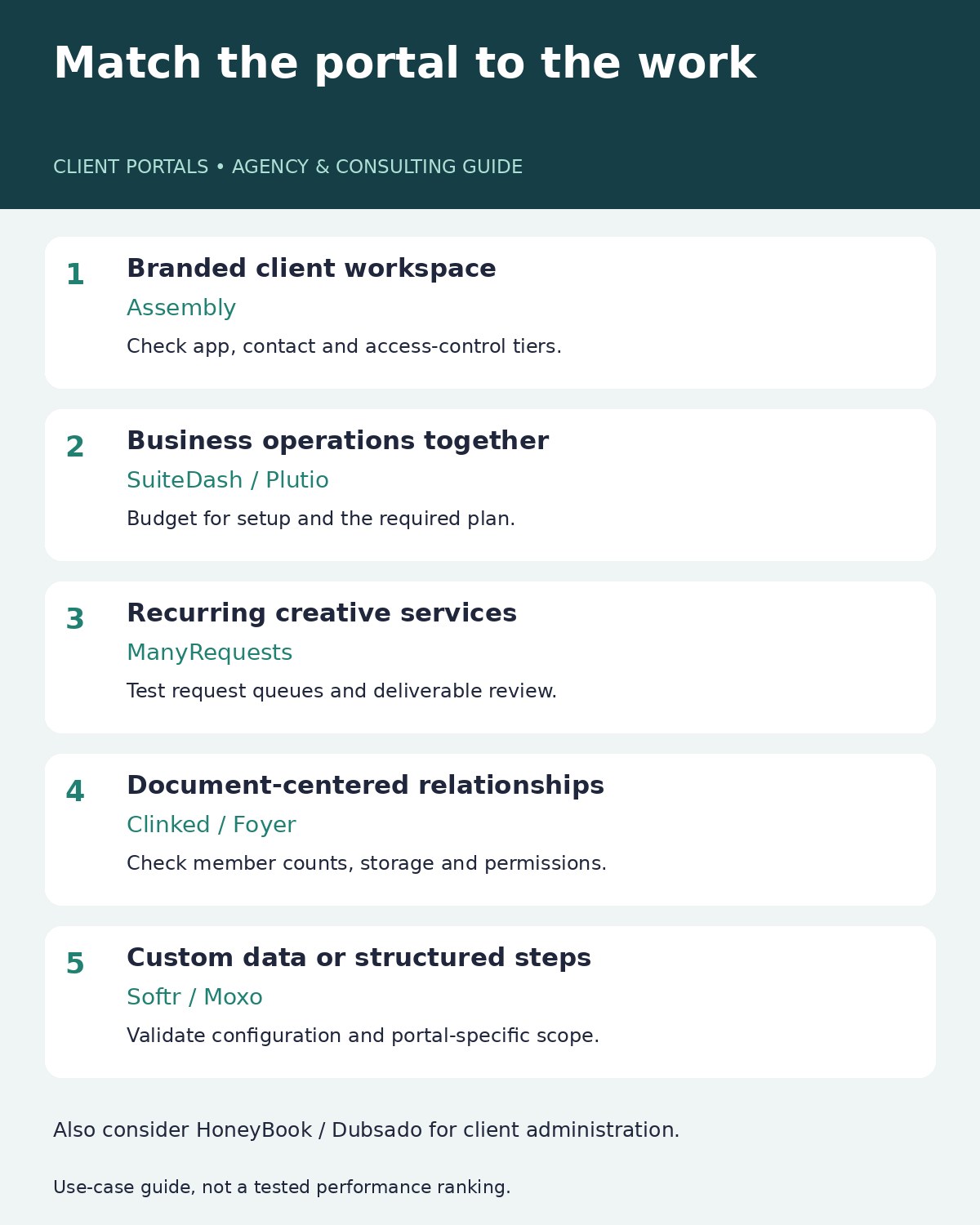
Assembly is a starting point for a branded, app-based client workspace. SuiteDash suits firms consolidating their portal and back-office tools. ManyRequests is particularly relevant to agencies selling recurring services. Clinked and Foyer deserve a look when document exchange drives the relationship, while Softr suits teams willing to configure their own portal. These are use-case recommendations, not measured performance rankings.
| Tool | Best-fit workflow | Pricing reference | Important buying condition |
|---|---|---|---|
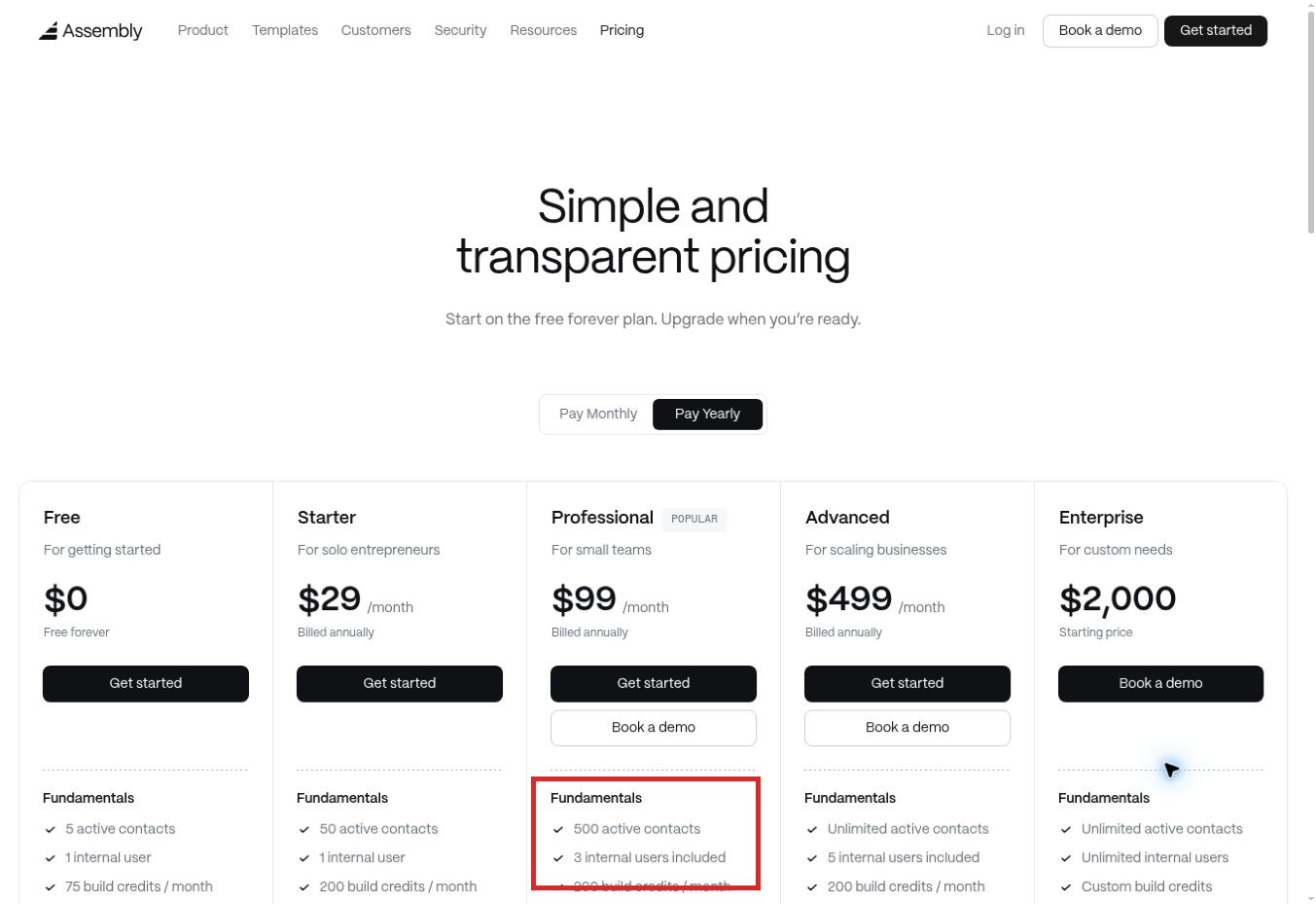
| 1. Assembly | Branded client workspace with apps | Free; Starter $29/month billed annually or $49 monthly | Custom domain and advanced access controls require higher plans |
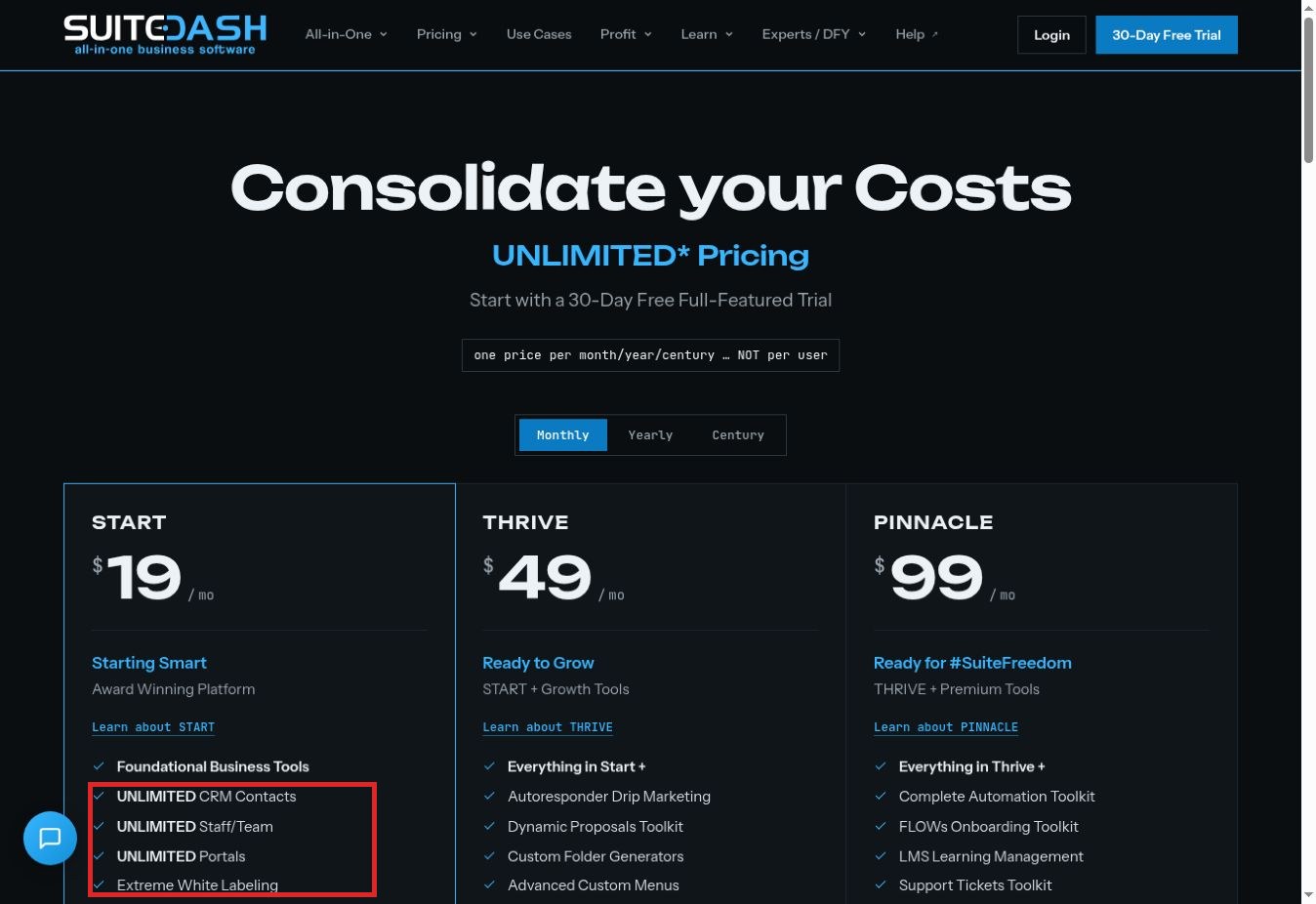
| 2. SuiteDash | Portal plus business operations | Start $19/month; Thrive $49; Pinnacle $99 | Automation and onboarding tools vary by tier |
| 3. ManyRequests | Recurring agency requests | Core $39/month or $27/month billed annually | Two seats included; branding removal is on Scale |
| 4. Clinked | Document collaboration | Start Up $11/user/month; Standard $239/month | Count members and check storage and permission tiers |
| 5. Softr | Custom portals built around your data | Free; Pro $119/month or $99/month billed annually | Budget for app users and configuration |
| 6. HoneyBook | Booking-to-payment client relationships | US Starter reference: $29/month billed annually | Confirm country eligibility and current offer |
| 7. Dubsado | Forms, contracts and client administration | Starter $35/month or $335/year | Premier adds automated workflows and scheduling |
| 8. Plutio | Project delivery and business administration | Core $19/month; Pro $49/month | Core allows nine active clients and no contributors |
| 9. Moxo | Structured multi-step client processes | Request a current portal-specific quote | Confirm portal modules, flow allowance and implementation scope |
| 10. Foyer | Focused file exchange and messaging | Standard $19/internal user/month; minimum two | Standard currently lists 50 client accounts |
Pricing checked on November 22, 2026. Figures are USD references before applicable taxes, payment processing, optional services and add-ons. Annual equivalents require annual billing. Plan pages can change; obtain a quote for your actual client and staff counts before committing.
How we selected these client portals
The shortlist focuses on software that supports a client-facing workspace for agencies, consultants and other service firms. We considered the client journey, file exchange, access controls, delivery workflow, branding and the cost of a usable configuration. General internal project trackers without a meaningful client experience were not the focus.
The order starts with broadly relevant agency and consulting options, then moves to document collaboration, configurable portals and more specialized workflows. It does not imply that the first tool is the fastest, safest or cheapest. Commercial attractiveness was not used to determine inclusion or placement.
Evidence note: this is a research-led comparison of official product, pricing and help documentation, supplemented by direct public-page checks and a ManyRequests interactive-tour walkthrough. Screenshots show those actual pages. No live invitation delivery, customer-file upload or two-account access-isolation test was completed for this draft. Recommendations about what to test below are proposed checks, not reported vendor results.
1. Assembly: Best for a branded client workspace with apps
Assembly, previously known as Copilot, brings client communication, files, signatures and billing into a portal, with apps extending the experience. It suits a consultancy that wants clients to work through a consistent front door rather than a collection of unrelated links.
The free plan allows five active contacts and one internal user. Starter increases the contact allowance to 50. Professional adds a custom domain and app visibility; Advanced lists client access permissions, an audit log and enforced MFA. Those distinctions matter when several people from one client company need different access.
Why choose it: a firm can combine familiar client tasks with a branded workspace and add functionality as its process develops. Watch out for the difference between basic client access and the more granular controls advertised on higher tiers. Also count the apps you need: the pricing FAQ lists three on Free and five on paid plans, with extra apps charged separately.
Trial priority: create two fictional client companies and check that messages, files and embedded tools remain correctly separated. Do not assume an embedded reporting tool inherits the portal’s permissions.
2. SuiteDash: Best for consolidating the portal and back office
SuiteDash combines client portals with CRM, project administration, billing and other business tools. Its attraction is breadth: a small service firm can organize several stages of the engagement in one system.
The live pricing page displayed Start at $19, Thrive at $49, and Pinnacle at $99 per month, with unlimited clients and staff across the plans. Storage and functionality differ. Thrive includes custom folder generators and client-side live chat; Pinnacle adds the automation and FLOWs onboarding toolkits.
Why choose it: the pricing model can be useful when staff and client counts grow together. The trade-off is configuration work. A broad toolkit still needs someone to decide which screens, messages and steps clients should see.
SuiteDash’s test-client documentation recommends creating a separate client contact, sending its portal invitation and opening the activation link in a separate browser context. That is a useful validation method, not a test completed here. Our live pricing capture showed a 30-day trial, while retrieved indexed material still described 14 days; check the signup offer before planning your evaluation.
3. ManyRequests: Best for recurring agency services
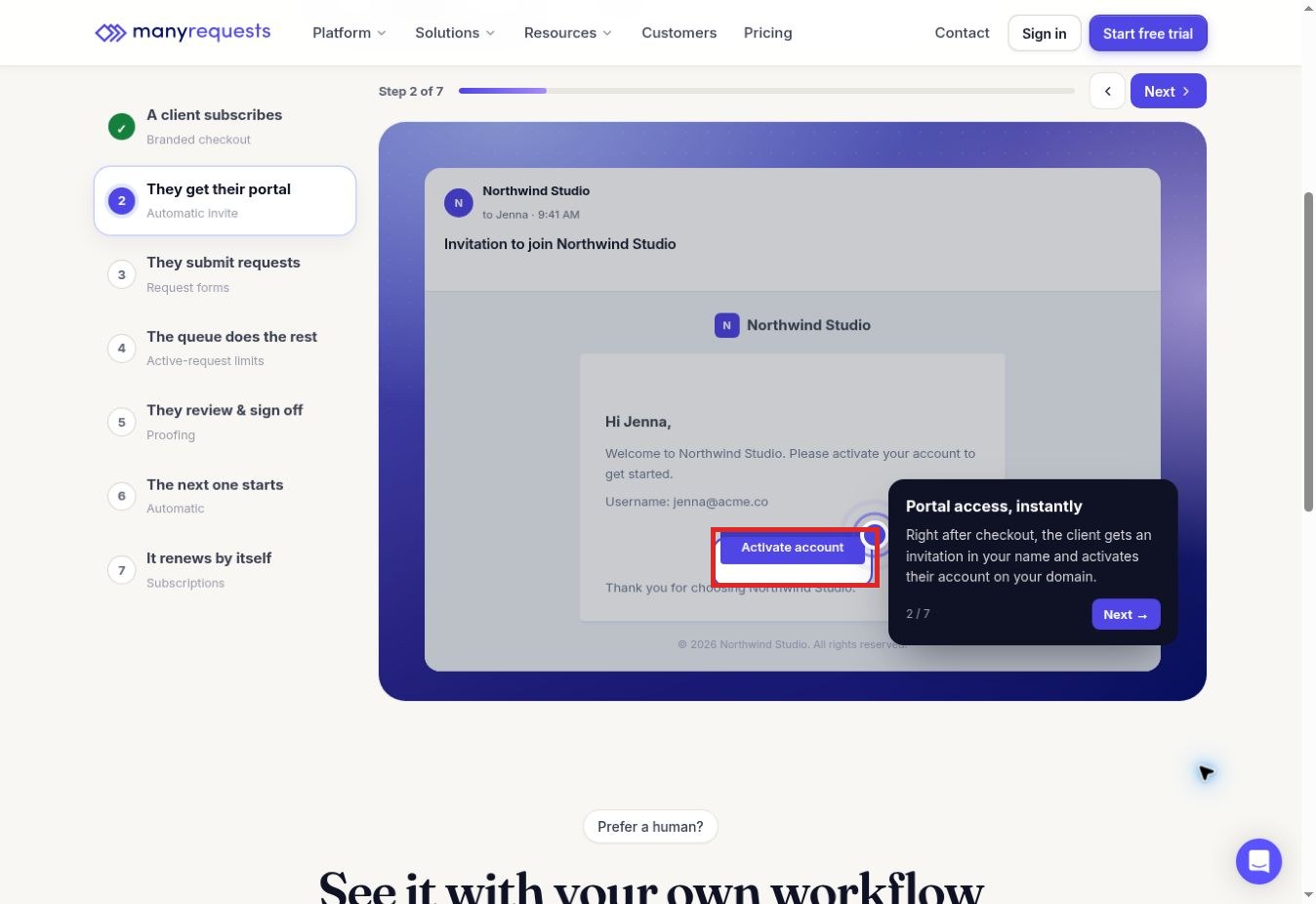
ManyRequests fits agencies that turn client work into repeatable service requests. Its public tour connects a subscription checkout, portal invitation, request queue and proofing step. This is relevant when clients need to submit briefs and review deliverables throughout a retainer.
In the walkthrough, selecting the invitation stage showed a branded activation message. The request stage displayed a client dashboard, while the proofing stage showed comments attached to a sample design. These were vendor-provided demonstration states; no real invitation, upload or approval was submitted.
The live monthly selector showed Core at $39 with two included seats and Pro at $99 with five. Annual equivalents were $27 and $69. The current comparison table placed removal of the “Powered by” branding on Scale, so a custom domain alone should not be described as complete branding removal.
Why choose it: the client journey follows the way recurring creative work is sold and delivered. Trial priority: test whether a client can find the latest deliverable, understand the queue and submit a request with enough detail to start work. Confirm which team roles can see internal comments.
4. Clinked: Best for document-centered collaboration
Clinked combines shared documents with tasks, discussions, calendars and chat. It is a relevant shortlist option when a client relationship revolves around exchanging and reviewing files rather than buying a standardized service subscription.
The pricing page lists Start Up at $11 per user, with 2 GB storage, and Standard at $239 per month with 100 members and 1 TB. Premium lists 250 members, 3 TB, enforced two-factor authentication and role-based permissions. Start Up excludes the custom URL included in Standard.
Why choose it: collaboration and document organization sit together. The buying caution is the member model. Ask exactly how external clients, internal staff and any guest access count toward the quote.
Trial priority: share one folder with two client contacts, restrict another folder to the engagement lead, and inspect what each account can actually open. Check the cost of the permission controls you require before treating the entry plan as your realistic budget.
5. Softr: Best for a portal tailored to your own data
Softr is a configurable app builder rather than a fixed service-business portal. It suits a team with a distinctive data model: perhaps clients need a tailored view of projects, records, requests and documents that a standard portal does not represent well.
Its documentation distinguishes page and block visibility from data permissions. That distinction is essential: hiding a navigation item is different from restricting which records a person can access. The current plan guide recommends Pro for branded client-facing applications with custom roles; it lists $119 monthly or $99 per month billed annually.
Why choose it: the interface can reflect your process. The trade-off is ownership of configuration and ongoing changes. App-user allowances and user groups also affect cost.
Trial priority: use two fictional companies with similar project names. Verify that each sees only its own records and allowed actions. Have someone other than the builder perform the check, because knowing where everything belongs can hide confusing navigation.
6. HoneyBook: Best for booking-to-payment relationships
HoneyBook combines client-facing administration with proposals, contracts, invoices and payments. Its portal is tied to the project, making it relevant to independent service providers who want clients to find the material associated with an engagement.
Official help documentation describes shared files, messages, invoice access and read-only meeting information. Clients can attach files, but the help page says those attachments do not notify other participants. That is a practical detail to test if your process depends on staff noticing an upload immediately.
The US pricing page lists a $29 monthly equivalent for annual Starter billing. Regional eligibility and promotional displays need checking for the business’s location; do not assume global availability.
Why choose it: the portal complements the commercial relationship. Watch out for assuming the portal replaces a detailed delivery board. Its documented preview is read-only, so previewing a client screen cannot establish that uploads or messages work end to end.
7. Dubsado: Best for forms and client administration
Dubsado suits service providers organizing client intake, proposals, contracts and invoices. Both Starter and Premier include client portals, according to the official pricing comparison.
Starter lists $35 monthly or $335 annually. Premier lists $55 monthly or $525 annually and adds scheduling, automated workflows, public proposals and Zapier integration. A firm planning automated onboarding should therefore compare Premier’s cost, not just the entry price.
Why choose it: it is a relevant fit when administrative consistency is the main problem. An event professional or consultant may value repeatable forms and payment steps more than a sophisticated request queue.
Trial priority: assemble one fictional engagement and inspect the client’s route from form to invoice. Separately confirm your requirements for arbitrary file uploads, folder organization and colleague access; portal inclusion does not prove every document-management requirement is covered.
8. Plutio: Best for combining delivery with business administration
Plutio brings projects, tasks, time tracking, proposals, invoices and a client portal into one workspace. It is relevant to a freelancer or agency wanting delivery work close to its commercial records.
The pricing page lists Core at $19 monthly for nine active clients and no additional contributors. Pro is $49 monthly with unlimited active clients and 30 included contributors. White-labeling is a separate add-on on Core and Pro, while Max includes it.
Why choose it: the same environment can support work management and client communication. The practical limit for a growing team is not simply the number of projects; active clients and contributors can determine the appropriate plan.
Trial priority: compare the staff view and client view of one project, including messages, files and financial records. Official pricing and help pages retrieved for this draft disagreed on trial duration and some allowances, so confirm those at signup rather than relying on an old trial description.
9. Moxo: Best for structured client processes
Moxo is relevant when a client engagement follows a sequence of required actions: supply documents, answer questions, acknowledge a step, obtain approval and move forward. Its portal material describes client-facing resources and workflows, while the broader product emphasizes coordination between people and automated actions.
Why choose it: a firm with complex handoffs may need to manage stalled steps more than it needs another file cabinet. The buying condition is scope. Ask for a quote that explicitly includes the portal modules, integrations and workflow capacity your team needs.
A retrieved pricing listing separated a Team workflow allowance from portal features on a higher tier, but opening the pricing URL redirected to the homepage. This guide therefore does not present that indexed entry price as a verified price for a complete portal.
Trial priority: model a missing-document exception. Identify who receives the follow-up, whether a human can correct the next action and what the client sees while the process is blocked.
10. Foyer: Best for focused file exchange and messaging
Foyer centers its offering on client file sharing, messaging and signature requests in a branded portal. It is worth considering when the immediate problem is exchanging documents clearly, without rebuilding every part of business administration.
The current homepage pricing table lists Standard at $19 per internal user per month, with a two-user minimum and 50 client accounts. That implies a $38 monthly subscription baseline before other charges. Older feature-page wording described unlimited clients, so the newer table is the more cautious planning reference.
Why choose it: a focused portal may be easier to scope when the business already has satisfactory billing and project systems. Confirm the signature integration and the plan’s exact storage and client allowances.
Trial priority: upload a fictional document, locate it as the intended client and verify that an unrelated client cannot see it. Test notification behavior and export options before moving an active client archive.
How to test client portal software for service businesses
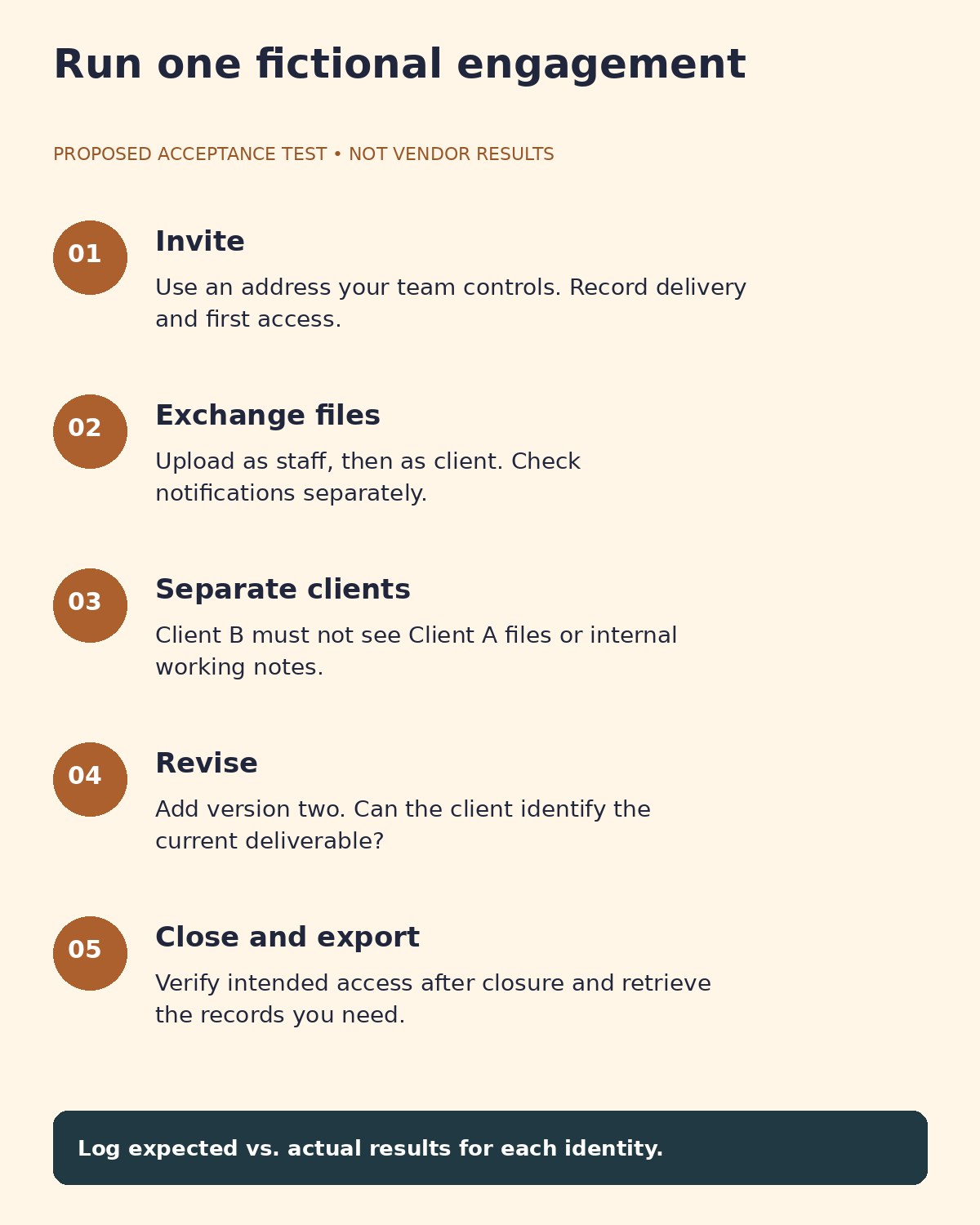
Use the same small fictional engagement in every trial. For example, a consultancy is delivering a website audit to Client A while a second account represents Client B. Prepare a brief, a draft report, a revised report and an internal working note. None should contain real customer information.
Check invitation and first access
Invite an address controlled by your testing team. Record whether the invitation arrives, what the recipient must do and whether the first screen identifies the correct engagement. Inspect expiration and recovery behavior using the vendor’s supported controls. A screenshot of an invitation template proves its appearance, not successful delivery.
Check file exchange in both directions
Upload the brief as staff and retrieve it as Client A. Then upload the fictional supporting document as the client and check what the staff member sees. Record notifications separately from successful upload: a file can arrive without generating the alert your process expects.
Check permissions with a second identity
Use separate browser profiles for staff, Client A and Client B. Attempt to open the test project through each account using normal product navigation and the test links you created. Client B should not see Client A’s files. An internal note should remain internal. Log the role, object, expected outcome and actual outcome for every check.
Check revision and closure
Add the revised report and ask the client tester to identify the current version without coaching. Close or archive the engagement and verify the intended access afterward. Use clear client project handoff fields so another employee can find the working file, owner and next action without reopening old decisions.
This protocol is a proposed acceptance test, not a security audit. A failed check can reflect configuration, a plan restriction or product behavior; record the cause before drawing a conclusion.
Compare the usable cost, not just the entry price
Build a simple quote with your actual internal users, client contacts, storage, branding requirements and required permissions. Add any signature, payment, integration or setup costs that apply. Then repeat the estimate for your expected workload six months later.
For example, Foyer’s $19 per-user reference has a two-user minimum, while ManyRequests Core includes two seats. These numbers describe different billing units. Likewise, a free portal can be useful for testing but may lack the custom domain or role controls your client experience requires.
Include ownership of the system in the decision. Someone must update templates, resolve invitation problems and remove access when a relationship ends. If the portal needs to trigger several other systems, map the workflow before comparing business process automation software. Automating an unclear handoff usually makes the confusion travel faster.
Frequently asked questions
Is a client portal the same as a CRM?
A CRM usually organizes the business’s relationship records. A client portal exposes selected information and actions to the client. Some products combine both, but the client experience and its permissions still need a separate evaluation.
Can a portal replace email?
It can centralize files and decisions, but clients may still rely on email notifications. Test the complete loop: notification, login, action and staff follow-up. Moving files into a portal is not enough if nobody knows they arrived.
What should a small agency test first?
Start with one client’s invitation, one shared deliverable and one permission boundary. If those basics are confusing, adding billing and automation will make the evaluation harder. Expand only after the client tester can complete the basic journey independently.
Does white-labeling mean every vendor reference disappears?
No. A custom domain, branded login screen, notification sender and removal of vendor badges can be separate features. Ask for the exact client-facing surfaces covered by the quoted plan.
Choose the portal that matches your service
The best client portal software for service businesses is the one that makes the next client action clear while giving your team the access controls and workflow it needs. Shortlist by delivery model, price the required configuration and run the same fictional engagement through each candidate. Choose on the evidence from that journey, rather than the length of the feature list.