
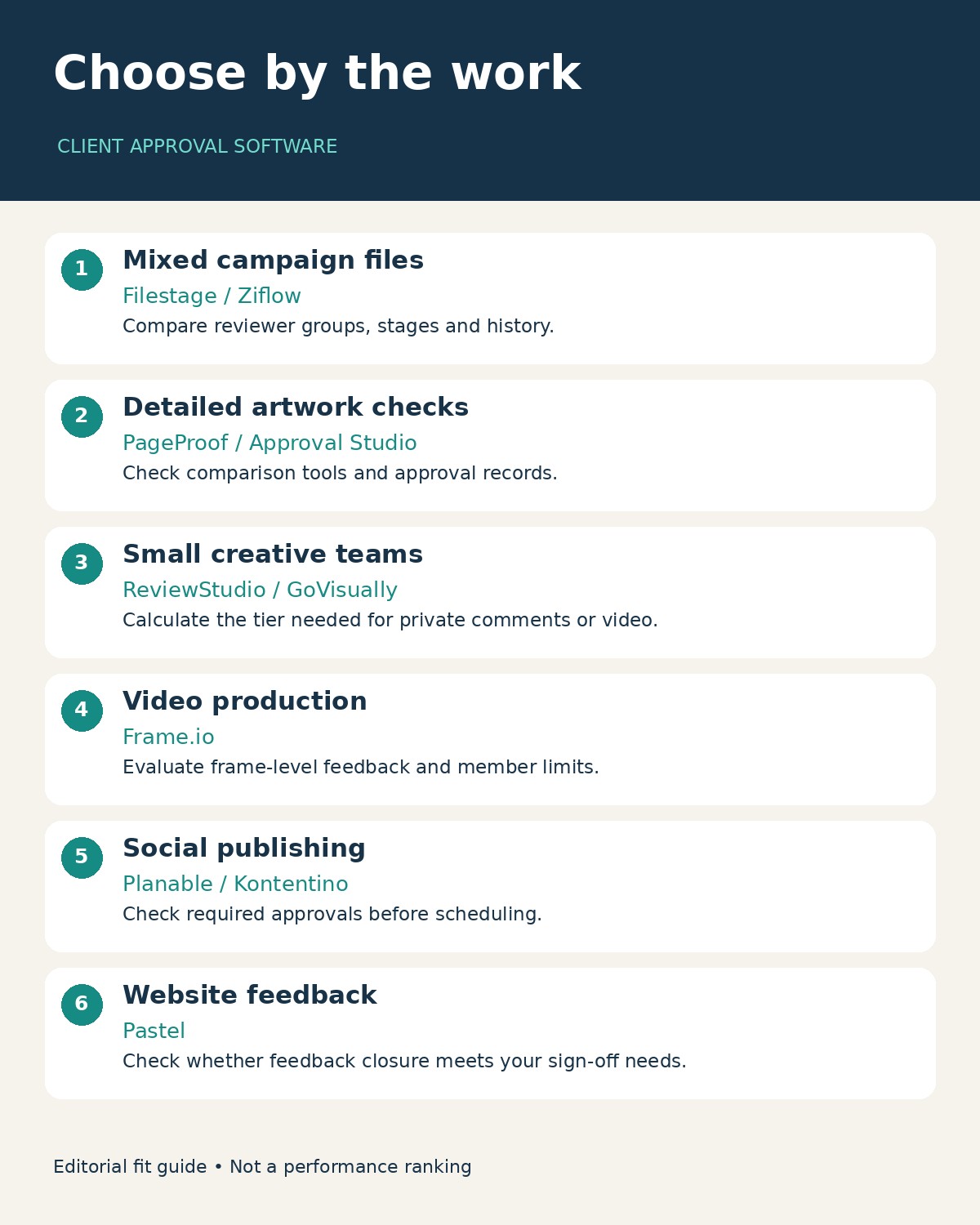
Client-approved software for marketing agencies should make one thing unmistakable: which version a client approved. A useful platform also keeps feedback attached to the work, separates internal discussion from client comments, and helps the account manager see what is still waiting. The ten options below cover mixed campaign assets, artwork, video, social publishing and website feedback, with different strengths for each job.
For an agency handling PDFs, images and video together, Filestage, Ziflow and PageProof are sensible starting points. ReviewStudio and GoVisually deserve a closer look when team size and plan restrictions dominate the decision. Frame.io fits video production; Planable and Kontentino put approvals closer to social publishing. Approval Studio emphasizes artwork comparison, while Pastel concentrates on visual website feedback.
What We Checked
Research and public-page checks were conducted on November 22, 2026. The selection considers documented review functions, revision handling, external collaboration, workflow controls and consequential plan restrictions. The numbering groups useful options; it is not a measured performance ranking, and “best” means a fit for the stated agency need.
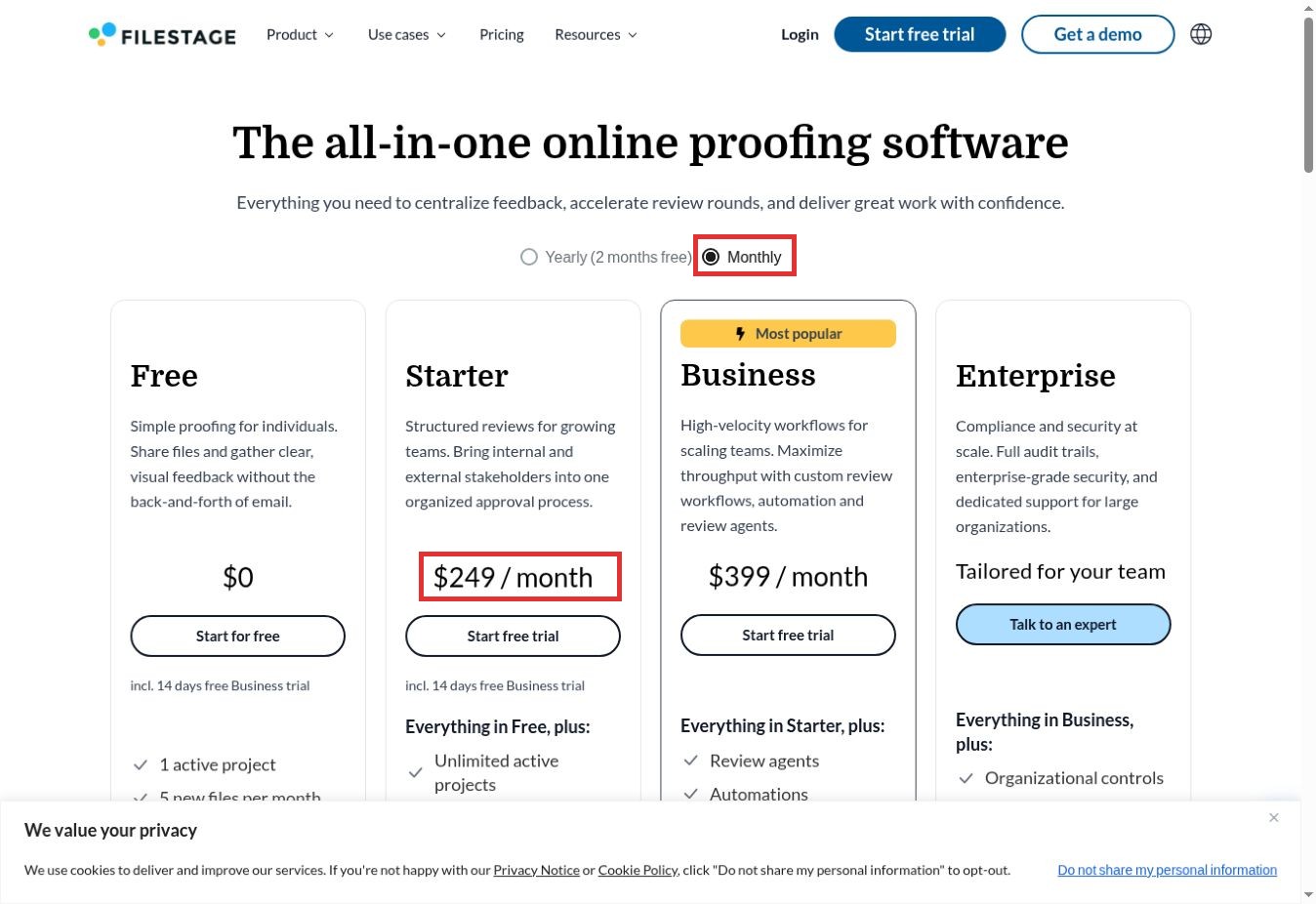
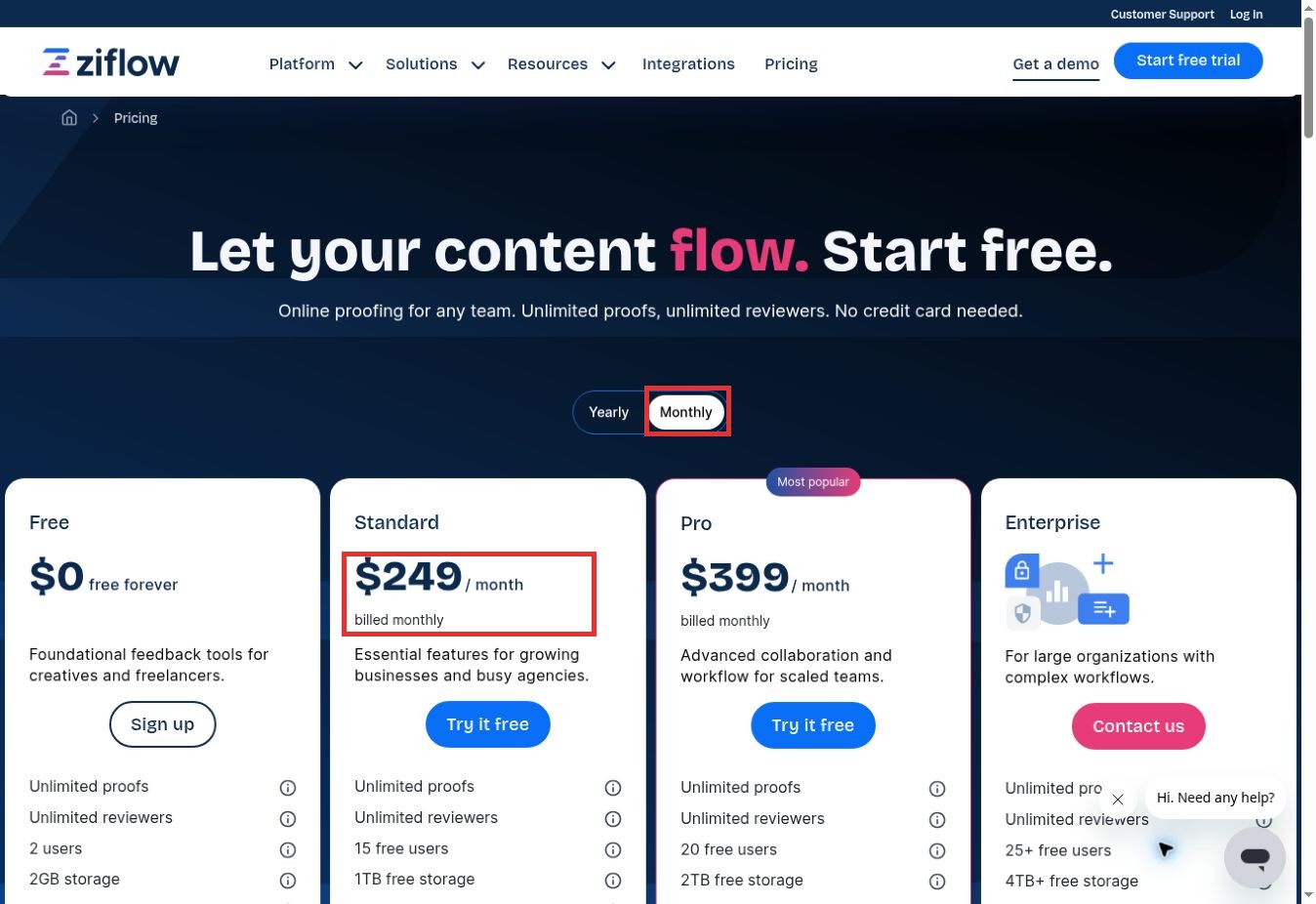
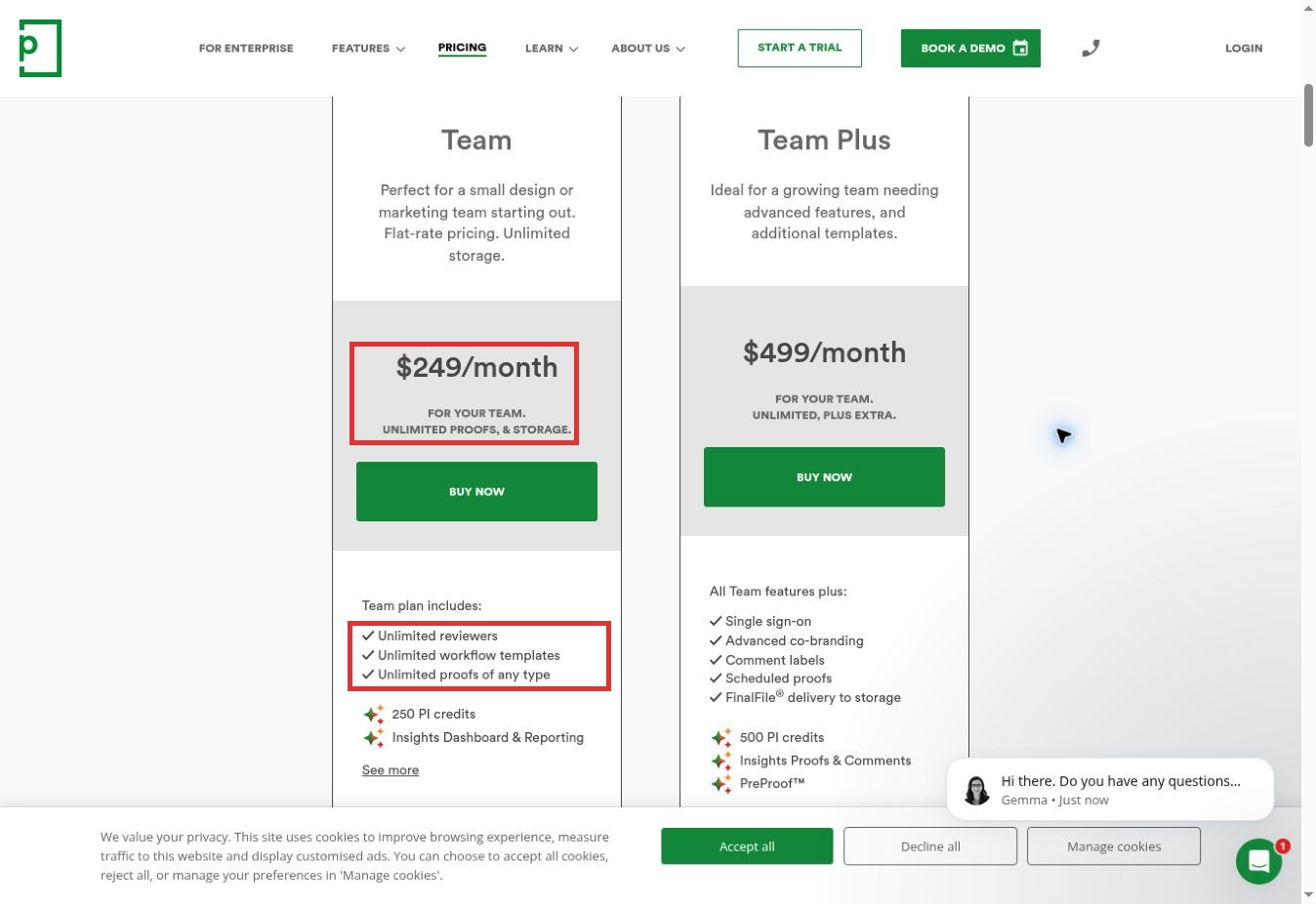
Three original browser checks examined Filestage, Ziflow and PageProof. Switching Filestage and Ziflow from yearly to monthly billing exposed higher monthly prices. PageProof’s visible team card separated its flat team fee from its included reviewer and workflow allowances. The screenshots below preserve those public-page observations. They do not demonstrate authenticated campaign review or prove that a client completed a revision loop.
An additional attempt to open Approval Studio’s public demo displayed an asset-file error, so no successful editing or approval test is claimed for it. The same-asset revision protocol near the end is a proposed evaluation method, not a completed benchmark.
Client Approval Software for Marketing Agencies: At a Glance
| Software | Agency use case | Decision-changing detail |
|---|---|---|
| Filestage | Mixed campaign deliverables | Free has one active project and five new files monthly; Starter adds comparison and private team comments. |
| Ziflow | Defined approval stages | Standard includes two workflow stages; audit-history allowances differ from proof-review history. |
| PageProof | Broad proofing with team pricing | Unlimited reviewers and workflow templates do not mean every security or export feature is included. |
| ReviewStudio | Creative teams buying by seat | Advanced adds privacy and automation but requires at least five users. |
| GoVisually | Design and PDF approval | Lite excludes video/GIF support and project archiving; Pro has a three-user minimum. |
| Approval Studio | Artwork and packaging comparison | Comparison modes are a distinctive reason to shortlist; test the actual artwork formats. |
| Frame.io | Video-centered creative production | Frame-accurate viewing and anchored comments; paid membership and storage affect cost. |
| Planable | Social content approval | Required approval is on Pro; multi-level approval is on Enterprise. |
| Kontentino | Client-facing social calendars | Starter includes client approval; Standard adds post versions and internal notes. |
| Pastel | Website feedback and revision coordination | Guest collaboration is a strong fit; formal sign-off requirements need a separate check. |
Compare the plan that supports your actual process, rather than the lowest number on the pricing page. A tool billed per workspace behaves very differently from one billed per employee or per team. Published dollar figures below are the displayed prices at the research date; taxes, additional capacity and negotiated contracts can change the invoice.
1. Filestage: For Campaigns With Several Asset Types
A mixed campaign can include a landing page, a PDF, social artwork and a short video. Filestage’s documented support for those formats makes it a candidate when the same stakeholders need to review different deliverables through one process. Reviewer groups let an agency separate internal and external review rounds instead of putting every conversation into the same thread.
The free plan is useful for a limited evaluation: it lists one active project, five new files per month, two reviewer groups and ten team members. Unlimited reviewers should not be confused with unlimited production capacity. Starter adds unlimited active projects and new files, side-by-side comparison and team-only comments.
The browser check showed Starter at $199 per month on the yearly tab and $249 on the monthly tab. That difference matters to an agency piloting the product for a short client engagement. Business adds more workflow capabilities; buying Starter solely for its lower price may be the wrong choice if three reviewer groups or review reports are essential.
2. Ziflow: For a Clearly Defined Approval Chain
Ziflow is worth examining when “client approval” actually means several decisions: creative lead, account manager, and then the client. Its pricing explicitly identifies the number of workflow stages. Standard lists two stages, and Pro lists three. This gives an agency a concrete question to answer before buying: how many separately controlled review steps does a normal campaign require?
Standard’s yearly price was $199 per month, with fifteen proof-management users included. The monthly browser view showed $249. Reviewers are unlimited, but the people creating and managing proofs are a different licensing category. A large client review group therefore should not automatically be counted as paid internal seats.
Retention deserves attention too. Standard lists unlimited review history while separately limiting audit trail history to ninety days. Those statements describe different records. If you need to reconstruct an old approval dispute, establish exactly which events remain available. The free tier’s sixty-day review history is another reason to treat it as a scoped evaluation rather than an assumed permanent archive.
3. PageProof: For Broad Proofing Under a Team Plan
PageProof takes a team-oriented approach to pricing. The monthly team card displayed $249 and listed unlimited proofs, storage, reviewers and workflow templates. For an agency with many occasional client reviewers, that is a clearer starting point than calculating a paid seat for every person who might comment.
Its comparison table documents support for static files, video, audio, website URLs, email content and design prototypes. It also lists side-by-side and smart comparison, making it relevant when a client needs to understand what changed between artwork rounds. Those capabilities are documented, not independently measured here.
The important qualification is the difference between generous usage allowances and advanced controls. Full audit/compliance export, data-residency options and digital signing sit higher in the offering. Team Plus lists additional co-branding and scheduled proofs. Select the plan around the record and access controls your client requires; “unlimited” does not remove those distinctions. Annual-price extracts differed during research, so this comparison uses the directly visible monthly Team price rather than presenting an unresolved annual amount.
4. ReviewStudio: For Teams That Want a Smaller Starting Commitment
ReviewStudio combines proofing, task and version tracking, and approval decisions. Its documented present mode and synchronized review sessions make it a candidate for agencies that sometimes resolve a difficult design round together on a call but then need the resulting decisions to remain with the work.
The pricing page lists a free Starter plan with three active reviews total, five gigabytes of storage, unlimited users and guests, versioning and comparison. Pro is listed at $15 per user monthly or $12 per user per month on yearly billing. That makes the number of active reviews and internal users meaningful parts of a small-team comparison.
Privacy and automation change the calculation. Advanced adds client/project teams, comment privacy, workflow automations and checklists, with a five-user minimum. An agency that must keep candid internal discussion away from clients should assess that tier rather than assuming the least expensive plan covers the whole process. Its documented reporting options also warrant a practical export check before adopting it as the approval record.
5. GoVisually: For Design Review With Clear Format Requirements
GoVisually brings design, PDF, and other creative feedback into a proofing environment with version management. For a small agency sending static artwork for approval, it belongs on the shortlist because the basic job is focused: collect comments on the creative and manage the next revision.
The material distinction is in the current pricing table. Lite supports one to five users and lists fifteen active projects, up to fifteen external reviewers and one approval checklist. It explicitly excludes video and GIF support, project templates and project archiving. A team that must preserve completed jobs should notice the “delete only” limitation before choosing it for ongoing client work.
Pro adds video/GIF support, project and proof archival, unlimited external reviewers and custom logo branding but requires at least three users. That is a different purchase from a single-seat static-design setup. Evaluate the total team cost for the needed tier. The separate compliance-oriented AI offering is not a reason to assume that ordinary creative approval provides a legal or regulatory sign-off.
6. Approval Studio: For Artwork Changes That Need Close Inspection
Approval Studio is a useful candidate for agencies working on packaging, labels, print collateral and other detail-heavy artwork. Its product materials emphasize annotations, external reviews and multiple comparison modes. That emphasis matters when a revision changes a small visual element that an ordinary comment thread can easily miss.
For example, an agency could use its evaluation to compare two versions of the same packaging PDF, inspect the changed region, and determine whether the client’s final decision remains attached to the intended artwork. That is a proposed use case, not a result from this review. The buyer should bring representative files rather than relying on a polished demonstration alone.
The pricing page offers Lite, Pro, Pro XL and Enterprise, with different monthly and annual options. Our public demo attempt encountered a message that some asset files were corrupted. It did not establish a general product reliability problem, but it prevented a successful hands-on comparison in this session. The recommendation therefore rests on documented functions, with the revision-loop test still outstanding.
7. Frame.io: For Video Production and Precise Creative Feedback
When the client’s feedback concerns a particular shot, sound or transition, the review surface needs to preserve that context. Frame.io’s review materials describe anchored comments, reference attachments and frame-accurate preview and scrubbing. It is a natural candidate for video-led agencies that want feedback close to the media rather than in a separate email describing a timestamp.
Its broader positioning now includes photos, design files and campaign work, but video remains the clearest reason to consider it here. A producer should evaluate how the client opens a shared review, how feedback reaches the editor and how the approved deliverable is identified at handoff.
The pricing page lists a free plan with up to two members, two projects and two gigabytes of storage. Paid plans use a per-member basis and include different storage allowances. Distinguish members from external review recipients when estimating cost. Agencies whose main requirement is a formal multi-department approval chain should compare the workflow and decision record with a dedicated proofing product before choosing primarily for its media viewer.
8. Planable: For Approval Before Social Content Goes Live
Planable suits an agency whose client approves the actual social post: copy, creative and publishing context together. Its workspaces separate brands or clients, each with its own calendar, collaborators and approval flow. This is a different decision from selecting a tool only to annotate a finished PDF.
The distinction between optional and required approval is crucial. The current pricing page lists required approval on Pro and multi-level approvals on Enterprise. If your process needs a team lead followed by a client and then another reviewer, a simple approve button is not equivalent to that ordered chain.
Planable prices by workspace with unlimited users. The company recommends a workspace per client or brand, so an agency’s client count drives the budget. Its fifty-post trial is a total allowance, not fifty free posts every month. The page also describes locking approved content and version-history limits by tier. During a trial, deliberately edit an approved sample and inspect what happens to its approval and scheduling state before trusting the workflow on a live account.
9. Kontentino: For Agencies Managing Client Social Calendars
Kontentino combines a content calendar, platform previews, collaboration and client approvals. Its usefulness here is the connection between the post the client sees and the work the agency intends to schedule. A social account manager can assess the copy and visual as a publishing unit rather than approving an isolated image with no surrounding caption.
The current Starter offering lists internal and external/client approvals, three users and ten social profiles. Standard expands the allowance and adds bulk actions, post versions, tasks, internal notes and an activity log. Those differences matter when several colleagues revise posts and the account manager needs to understand how a calendar changed.
Kontentino’s package structure should be compared with Planable’s workspace model using the same client portfolio. Count the required users and social profiles, and include any analytics or localization needs. Neither product should be selected as a substitute for detailed packaging or video proofing solely because it includes approval. Choose this category when the final decision belongs in the social publishing process.
10. Pastel: For Client Feedback on Websites and Landing Pages
Pastel is relevant when clients struggle to explain which part of a website they want changed. Its public materials describe sharing a live site or uploading images and PDFs, then collecting visual, in-context feedback. They also describe unlimited guests, no-login guest feedback and private team comments.
That workflow fits web and landing-page work: the client points to the affected area, and the agency can organize the requested revision. Features such as pausing comments and setting feedback deadlines can help define the boundary of a review round. A fourteen-day trial is advertised without a credit card.
The boundary is formal approval. Collecting and resolving comments is not automatically the same as preserving an immutable, version-specific sign-off. The public materials inspected did not establish every control needed for that stricter requirement. Pastel belongs here as a website feedback and approval-coordination option; an agency needing verified signing or a regulated audit record should require a demonstration of those exact needs. Its pricing page could not be retrieved during this check, so no current paid amount is quoted.
Run the Same Revision Loop Before Choosing
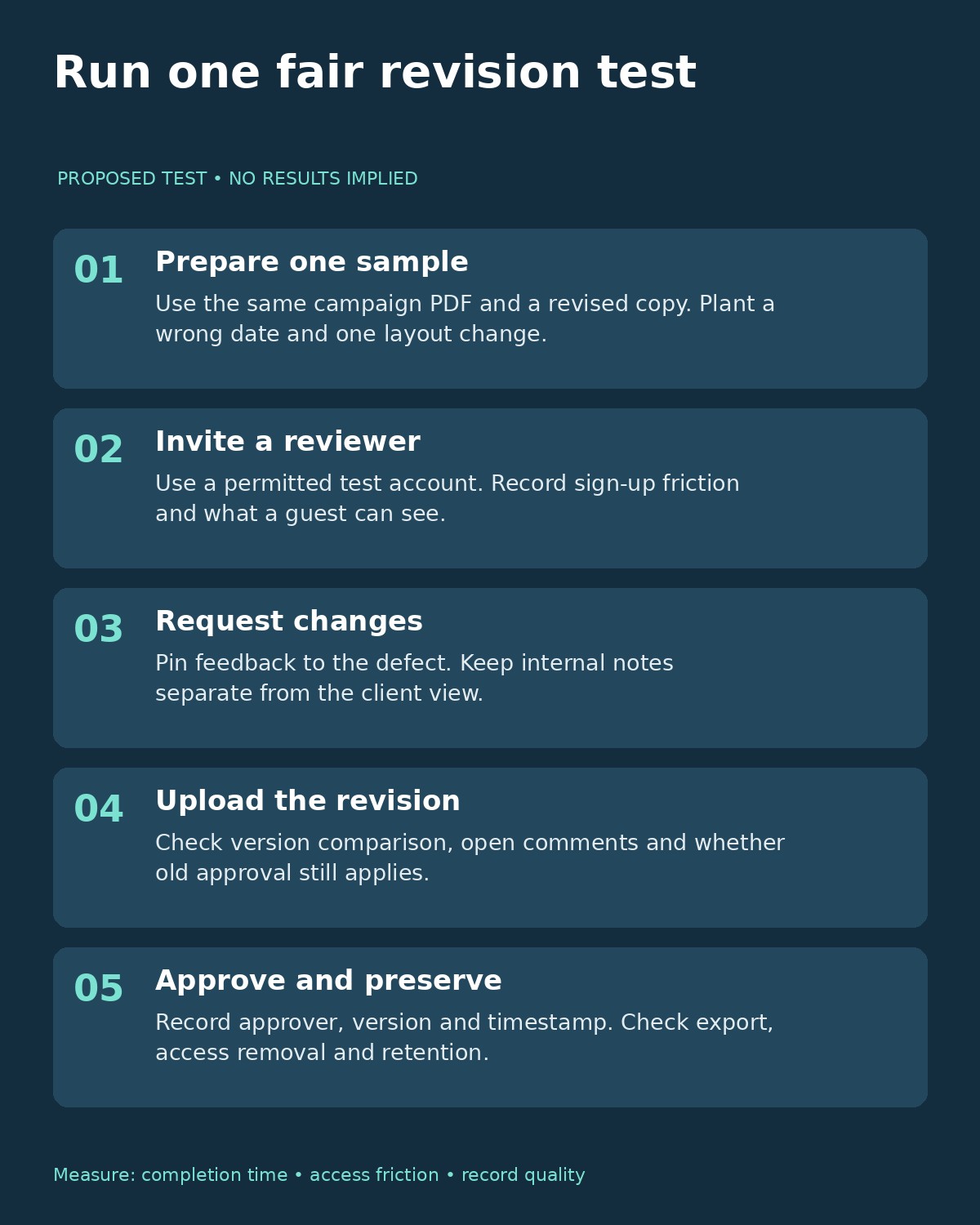
A fair trial needs a repeatable input. Prepare a fictional campaign PDF with two deliberate defects—a wrong event date and a misplaced logo—and a corrected second version. Use the same pair in each shortlisted product. Keep real customer files out of an unapproved trial account.
- Upload the first version and invite a permitted test reviewer. Record whether the reviewer can open the file without help and what identity checks appear.
- Place a comment on each defect and request changes. Check whether private internal notes remain separate from the client view.
- Upload the corrected file as the next version. Inspect comparison, unresolved comments and the treatment of the earlier decision.
- Ask the designated approver to approve the revision. Record the version, person, time and any conditions attached to the decision.
- Try the available export and access-removal controls. Confirm that you can preserve the record your agency needs after the engagement ends.
Record completion time and actual failures rather than assigning an impressionistic score. A successful upload alone does not prove an approval workflow. If you also need to connect approvals with project intake and other systems, the broader business process automation comparison can help frame that separate decision.
What Should an Agency Budget For?
Start with the number of people who manage proofs, the number of client workspaces or profiles, and the features required for your normal review. Add storage, retention, branding and integrations only where they matter. Include the effort of onboarding a client who approves work only occasionally.
As an illustrative calculation using the observed monthly prices, Filestage Starter and Ziflow Standard each start at $249 a month for their included team allowances. That does not make them equivalent: the included users, workflow stages and other limits differ. ReviewStudio Pro at $15 per user would be $75 monthly for five users, but Advanced is the relevant comparison if those users need its privacy and workflow controls. Choosing the cheapest mismatched tier produces a misleading saving.
Before rollout, agree who can approve, whether approval with conditions is acceptable, and which changes require a fresh decision. Software can preserve that process, but it cannot decide the client’s authority or your agency’s acceptance rules.
Choose the Workflow Your Clients Can Actually Finish
The most useful client approval software for marketing agencies matches the deliverable and the approval record you need. Shortlist mixed-file proofing tools for campaign production, Frame.io for video-led work, Planable or Kontentino for social calendars, and Pastel for website feedback. Then run one controlled revision loop with the real plan restrictions in place.
Choose the option that leaves a clear answer to three questions: what changed, who approved it, and which file may now be delivered. That is a more useful buying standard than a long feature list or a universal winner.