

Creating a professional and visually appealing website used to require extensive coding knowledge. However, with modern page builders, even non-coders can design and launch stunning websites without writing a single line of code.
If you’re searching for the best WordPress page builders for non-coders, this article will guide you through the top tools that make website building seamless, efficient, and highly customizable.
Whether you’re a small business owner, a blogger, or an entrepreneur looking to build a website without hiring a developer, these page builders offer drag-and-drop functionality, pre-designed templates, and intuitive design elements that make website creation effortless.
Let’s explore why non-coders need WordPress page builders and the best options available today.
Why Non-Coders Need WordPress Page Builders?
Building a website from scratch used to be a complex task, requiring knowledge of HTML, CSS, and JavaScript. However, with the advancement of WordPress page builders, non-coders can now create stunning, functional websites without any technical expertise.
These tools have revolutionized web design, making it more accessible, efficient, and cost-effective. Whether you’re a small business owner, a blogger, or an entrepreneur, choosing the right page builder can save time and effort while delivering professional results.
The Importance of Drag-and-Drop Website Design
For non-coders, traditional website development can be daunting. Writing HTML, CSS, or JavaScript requires technical expertise, which can be a barrier for beginners. This is where drag-and-drop WordPress page builders come into play. They allow users to create, customize, and manage websites visually without needing any coding knowledge.
Benefits of Using a WordPress Page Builder for Beginners
Here are some reasons why best WordPress page builders for non-coders are essential:
- No coding skills required – Easily build pages without writing code.
- Faster website creation – Get your site up and running in minutes.
- Pre-designed templates – Choose from hundreds of professional layouts.
- Cost-effective – Save money on hiring developers and designers.
- User-friendly interface – Intuitive design tools make customization simple.
- SEO-friendly – Many builders come with built-in SEO optimization features.
- Drag-and-drop flexibility – Customize your layout effortlessly.
- E-commerce ready – Many builders support WooCommerce and online selling.
Key Features to Look for in a WordPress Page Builder
Before diving into the best WordPress page builders for non-coders, it’s essential to understand the features that make a page builder effective.
Ease of Use and Drag-and-Drop Functionality
A good page builder should offer a simple interface with an intuitive drag-and-drop editor that allows users to place elements like text, images, and buttons easily.
Responsive Design and Mobile Optimization
Your website should look great on all devices. A reliable page builder ensures that designs are mobile-friendly without additional coding.
Pre-Built Templates and Customization Options
The availability of templates makes designing a website faster. Customization options should include color schemes, typography, and layout adjustments.
Integration with Plugins and SEO Tools
A robust page builder should work seamlessly with popular WordPress plugins, such as SEO tools, eCommerce plugins, and performance optimizers.
Performance and Speed Optimization
Poorly coded page builders can slow down your website. Choose one that ensures fast load times and optimized performance.
5 Best WordPress Page Builders for Non-Coders
If you’re new to website creation or simply want an easy way to design stunning pages without coding, choosing the right page builder is crucial. The best WordPress page builders for non-coders offer intuitive drag-and-drop interfaces, pre-designed templates, and seamless customization. These tools allow you to build professional websites quickly and efficiently without needing technical expertise. Below, we explore the top five WordPress page builders that make website creation a breeze.
1. Elementor – The Most Popular Page Builder

Elementor is one of the most widely used WordPress page builders, known for its powerful design features and user-friendly interface. It offers both free and premium versions, making it an excellent choice for all users, from beginners to advanced designers. Elementor allows seamless integration with third-party tools and has an extensive library of pre-designed blocks and templates.
Key Features:
- Drag-and-drop editor with real-time preview
- Large template library with ready-made designs
- WooCommerce compatibility for eCommerce websites
- Advanced animations and custom CSS support
- Responsive editing for mobile-friendly designs
- Supports third-party integrations like Zapier and Mailchimp
Pros and Cons:
| Pros | Cons |
| Beginner-friendly interface | Some advanced features require the Pro version |
| Extensive customization options | Can impact site speed |
| Free and premium versions available | Learning curve for complex designs |
| Large community and resources | More features can mean a steeper learning curve |
2. Divi – Best for Creative Designs
Divi by Elegant Themes is known for its advanced design flexibility, making it a favorite among designers. It offers a real-time visual editor with powerful customization options, allowing users to create truly unique designs. Unlike Elementor, Divi follows a membership pricing model, meaning one subscription grants access to multiple tools from Elegant Themes.
Key Features:
- Visual drag-and-drop builder with inline text editing
- Hundreds of pre-designed templates
- Built-in A/B testing for better performance
- Responsive editing for mobile-friendly designs
- Custom CSS control for advanced users
- Seamless integration with WordPress themes
Pros and Cons:
| Pros | Cons |
| High flexibility with unlimited customization | Learning curve for beginners |
| One-time payment option available | Slightly heavier than other builders |
| Advanced marketing tools built-in | Can slow down websites if not optimized |
3. Beaver Builder – Lightweight and Fast
Beaver Builder is a lightweight, performance-focused page builder ideal for speed-conscious users. It is known for its clean code and developer-friendly approach, making it a great choice for agencies and professionals who require efficiency and stability.
Key Features:
- Simple and intuitive user interface
- SEO-friendly and optimized for fast performance
- Works seamlessly with most WordPress themes
- White-label option for developers
- WooCommerce support for eCommerce integration
- Modular design for performance optimization
Pros and Cons:
| Pros | Cons |
| Great for performance and speed | Limited free version features |
| Developer-friendly | Fewer built-in templates compared to competitors |
| Stability and clean coding | Lacks built-in advanced marketing tools |
4. Brizy – Best for Simplicity and Speed
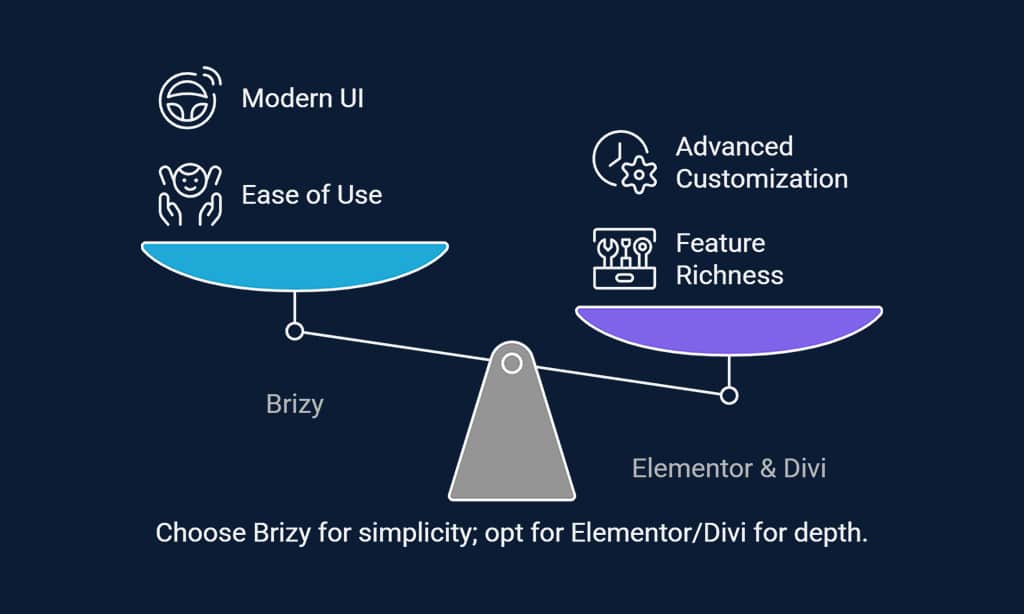
Brizy is a modern page builder that offers a clean and straightforward design experience. It is designed for users who prioritize simplicity without compromising on functionality. Unlike many complex page builders, Brizy provides a clutter-free, intuitive interface with a real-time drag-and-drop editor.
It focuses on ease of use, making it an excellent choice for beginners who want a hassle-free design process. Additionally, Brizy comes with pre-designed content blocks, cloud storage capabilities, and auto-save functionality, ensuring a smooth and efficient website-building experience.
Key Features:
- Intuitive drag-and-drop interface
- Auto-save functionality for better workflow
- Cloud-based version for remote editing
- Pre-designed content blocks for quick layouts
- SEO and performance optimization tools
Pros and Cons:
| Pros | Cons |
| Easy to use and beginner-friendly | Fewer third-party integrations |
| Modern UI and fast performance | Not as feature-rich as Elementor or Divi |
| Affordable pricing plans | Limited customization options for advanced users |
5. SeedProd – Best for Landing Pages
SeedProd is a powerful landing page builder optimized for marketing and lead generation. It allows users to quickly create high-converting landing pages without requiring extensive design skills. With its intuitive drag-and-drop editor, users can effortlessly customize pages, add forms, and integrate with popular email marketing services.
Unlike traditional page builders, SeedProd is specifically designed for lead generation, offering built-in tools such as countdown timers, opt-in forms, and social media integrations to maximize conversions. Its speed-optimized framework ensures fast-loading pages, enhancing user experience and SEO performance.
Key Features:
- Pre-designed templates for high-converting landing pages
- Drag-and-drop editor with live preview
- Built-in lead generation tools and email integrations
- WooCommerce integration for online stores
- Customizable coming soon and maintenance mode pages
Pros and Cons:
| Pros | Cons |
| Ideal for marketing campaigns and lead generation | Limited for full website building |
| Optimized for speed and performance | Some advanced features require Pro version |
Wrap Up
With the right page builder, you can create a stunning website without writing a single line of code. Whether you’re building a business website, a portfolio, or an online store, these tools provide the flexibility and ease of use required to bring your vision to life.
Each page builder has its strengths, catering to different needs such as design flexibility, performance, or marketing optimization. Explore these options, experiment with their features, and choose the one that best aligns with your website goals.
Start building your dream website today with confidence!
























