A mind map can become messy as quickly as the notes it was meant to organize. The wrong app adds a problem: private maps may sit behind a paywall, exports may be restricted, or collaborators may use an unsupported platform. The best mind mapping tools make ideas clearer without turning a brainstorm into a software project.
This guide to the best mind mapping tools compares focused apps, collaborative whiteboards, and larger productivity systems. The ranking considers usability, collaboration, exports, platform coverage, pricing, and restrictions. Prices and plans were checked in September 2026 and may vary by region, tax, currency, or billing cycle.
How We Chose These Tools
The best mind mapping tools were judged on visual thinking first. Extra features counted when they improved work, such as turning branches into tasks or letting a group edit together. Xmind ranks first for balance; the other entries serve clearer niches.
Best Mind Mapping Tools: Quick Comparison
The comparison below narrows the best mind mapping tools by practical use rather than feature count.
| Tool | Choose It For | Watch For |
| Xmind | General-purpose mapping | Team features require Premium |
| Miro | Collaborative workshops | Free-board access rules |
| MindMeister | Browser-based teamwork | Three-map free limit |
| MindNode | Apple workflows | No Windows or Android app |
| Coggle | Quick shared diagrams | Extra free diagrams are public |
| Ayoa | Maps linked to tasks | Free use is personal only |
| SimpleMind | Subscription-free ownership | Separate platform licenses |
| Freeplane | Open-source customization | Older interface and Java requirements |
What Most Lists Miss
Even the best mind mapping tools can cause trouble when privacy and portability are overlooked. “Free” may mean public diagrams, workspace-wide visibility, or weak export options. Team costs also rise when every editor needs a paid seat.
Check who can open a map, what happens after a downgrade, and whether exports remain editable elsewhere. Those questions matter more than a large template library when a map contains client work or unpublished research.
1. Xmind: Best Overall
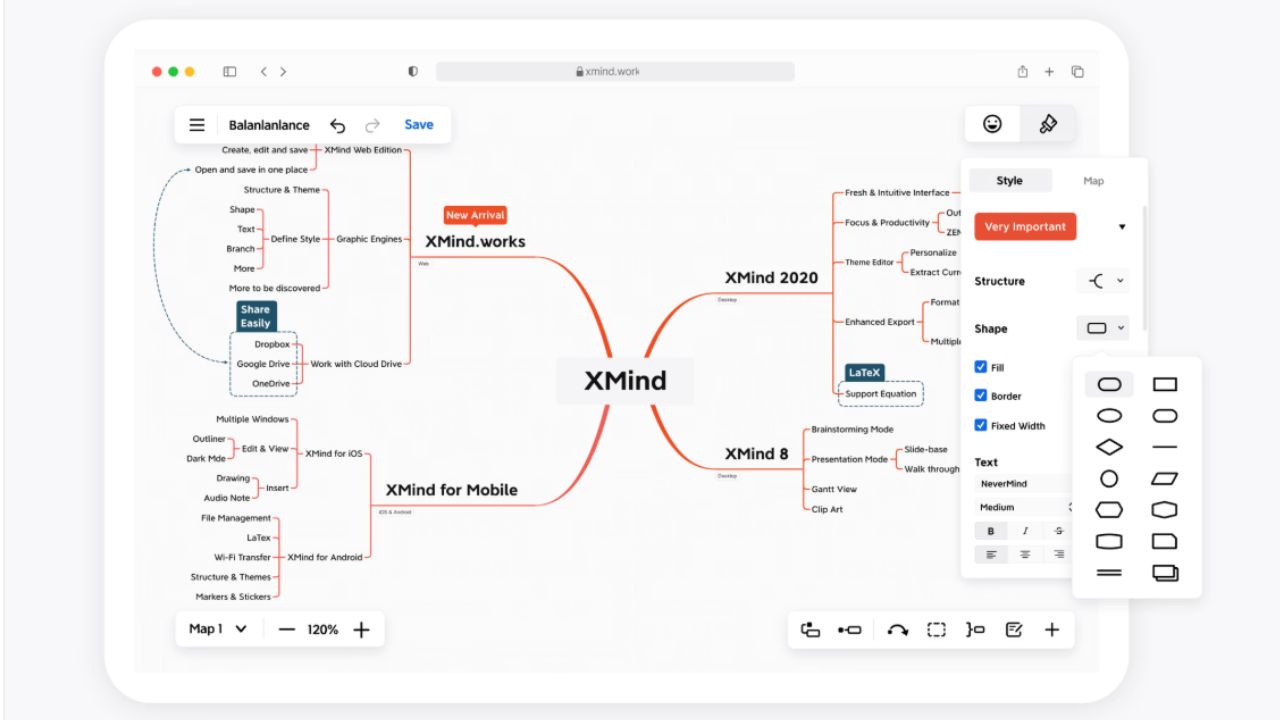
Xmind is the strongest general recommendation because it remains a dedicated mapping tool. It supports classic maps, tree structures, matrices, timelines, and Pitch presentations. Paid exports include PDF, PNG, SVG, Markdown, OPML, Word, Excel, and PowerPoint options.
The free plan permits 10 manually created online maps; that is not a cap on every local desktop map. Pro expands online access and removes export watermarks. Premium adds real-time collaboration, 30-day history, assigned tasks, editable Gantt charts, and calendar or Excel task exports.
Windows, macOS, Linux, iOS, iPadOS, and Android are supported. Among the best mind mapping tools, Xmind offers the strongest mix of focused mapping, broad compatibility, and useful exports.
2. Miro: Best for Workshops
Miro earns its place among the best mind mapping tools when a map is only one part of a meeting. A team can develop branches, surround them with research and sticky notes, vote on priorities, and present the board. Comments, mentions, and timers support live and asynchronous work.
The Free plan allows unlimited boards, but only the three most recent remain editable. Boards are accessible to all workspace members by default, with no guest or visitor roles. Starter is $8 per member monthly when billed annually and adds private boards, visitor editing, and high-resolution exports.
For one article outline, Miro is excessive. Its value appears when several people need context around the map, not merely branches.
3. MindMeister: Best in a Browser
MindMeister sits between Xmind’s focused editor and Miro’s open canvas. It runs in a browser and supports real-time editing, comments, mentions, presentations, and mobile access.
The free account includes three maps and unlimited collaborators. Personal displays at $12 per user monthly, adding unlimited maps, file exports, printing, and seven-day history. Pro displays at $18 with unlimited attachments and version history. Prices exclude VAT and may vary by billing region.
It suits classes and distributed teams. For occasional solo mapping, paying mainly to remove the map limit and gain exports is harder to justify.
4. MindNode: Best for Apple Users
MindNode is for people working entirely on Apple devices. Its free edition covers core mapping, editing, importing, and exporting on Mac, iPhone, iPad, and Vision Pro.
Plus costs $2.99 monthly or $24.99 annually and adds outlines, notes, tasks, visual tags, focus mode, Apple Watch support, and collaboration. A regular Windows or Android collaborator is enough reason to choose another app.
5. Coggle: Best for Simple Sharing
Start with privacy: Coggle’s free plan provides three private diagrams and unlimited public ones. Public diagrams should not contain client information, student records, or unpublished research.
For non-sensitive work, Coggle is refreshingly direct. It offers real-time editing, automatic branch arrangement, full change history, multiple starting points, and several export formats. The $5 monthly Awesome plan removes the private-diagram limit and adds formatting control.
It fits a quick group brainstorm. Teams needing centralized user management should consider its organization plan or a more controlled workspace.
6. Ayoa: Best for Ideas and Tasks
Ayoa makes sense when brainstorming must lead to assigned work. A campaign team can map ideas, convert branches into tasks, view deadlines on a Gantt chart, and switch to an outline without rebuilding the plan.
New accounts receive a seven-day Ultimate trial. The continuing free edition keeps up to 10 maps, but whiteboards and task boards become view-only, and AI access ends. Free use is personal; commercial work requires payment.
Project-based teams may value that combination. Someone who wants a clean notes map will be navigating far more software than necessary.
7. SimpleMind: Best Without a Subscription
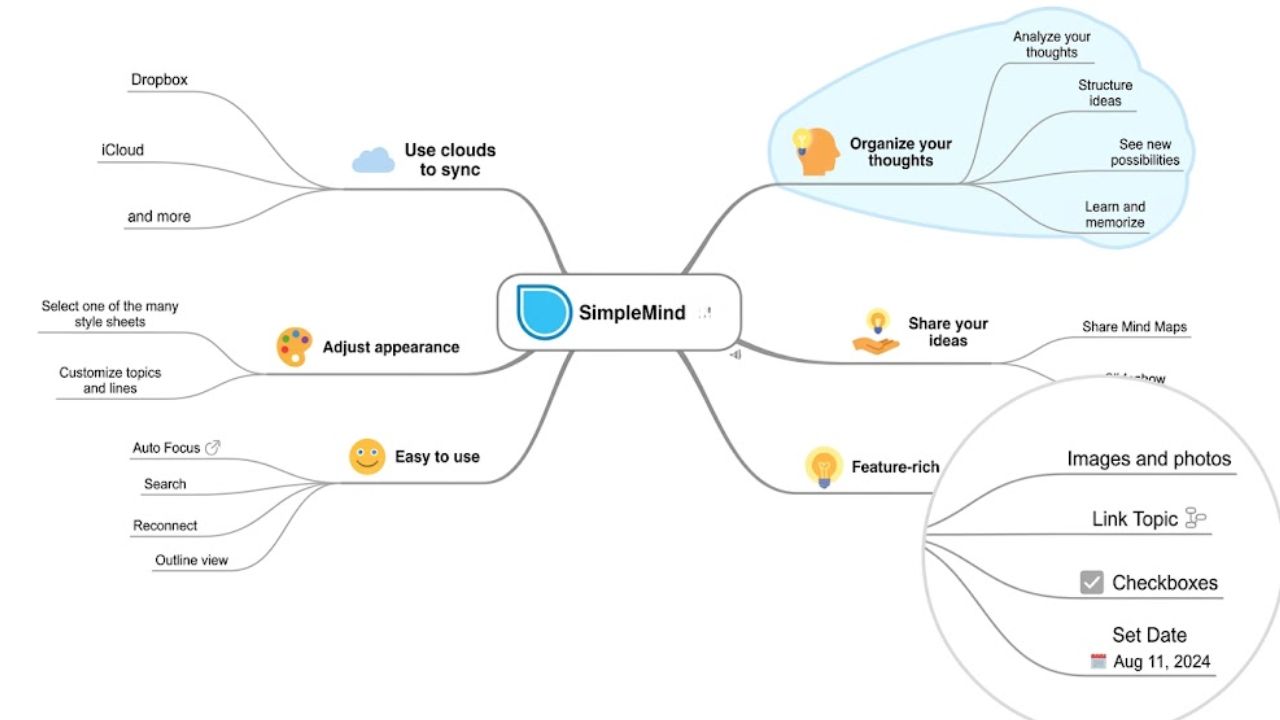
SimpleMind is the understated choice. Free editions on Mac, iPhone, iPad, and Android allow unlimited maps with basic layouts. Pro adds sharing, user-selected storage, images, notes, cross-links, checkboxes, and more layouts.
A Mac or Windows Pro license costs $29.99 before VAT, with no subscription. Each platform requires a separate purchase, so Windows and Android are not covered by one license. The developer states that both editions contain no ads or data collection. It suits private, long-term mapping. Live collaboration is not the reason to buy it.
8. Freeplane: Best Open-Source Option
Freeplane is powerful, free, and niche. Templates, conditional formatting, LaTeX, formulas, and scripting suit detailed research maps and structured knowledge systems but create a steeper learning curve than Coggle or MindNode.
It runs on Windows, macOS, and Linux. Some installers bundle Java; others require it separately. Current bundled macOS releases require macOS 14 or later.
It is a poor first choice for a new mapper. For technical users who value local files and customization more than visual polish, it may be the most durable option here.
Before You Choose
Trial the app with real work, not a sample template. Check three things:
- Export the map and reopen it.
- Confirm what an unpaid collaborator can edit.
- Read the privacy and downgrade rules.
AI branches can provide a starting structure, but a larger automatic map is not necessarily a clearer one.
Final Thoughts
The best mind mapping tools should fit the work that follows the brainstorm. Xmind is the most balanced option, while Miro earns its cost in workshops and Ayoa suits plans that must become tasks.
Before paying, build, share, and export one real map. If the trial creates questions about access, privacy, or file ownership, those problems will become harder after the project grows.
Frequently Asked Questions (FAQs)
Which of the best mind mapping tools suits students?
Coggle is easy for group work, but free diagrams beyond the three private ones are public. MindMeister offers browser collaboration with a three-map free limit. Xmind provides more structure and broader platform support.
Which export formats should matter?
PDF and image files are useful for submission, not continued editing. Markdown, OPML, text, or a widely supported native format makes migration easier. Test the export before building an archive around an app.
Can a mind map replace project-management software?
It can cover early planning and simple ownership. It becomes less suitable when a team needs workload reporting, approvals, recurring tasks, or complex dependencies. Ayoa, Miro, and Xmind Premium narrow that gap, but check the required controls before migrating work.