

A project schedule often breaks in places a task list cannot show. One approval slips, five later tasks move, and the same designer is suddenly booked on two projects. The best Gantt chart tools reveal that chain reaction before it becomes a delivery problem.
This ranking favors tools that schedule well and remain practical after setup. Dedicated schedulers come first because the chart is their main workspace. Broader platforms rank highly when they connect timelines with task ownership, reporting, or team capacity.
How We Ranked the Best Gantt Chart Tools
We considered dependencies, milestones, baselines, critical path, workload planning, collaboration, integrations, and setup effort. Free access counted only when it could support more than a brief demonstration. Features and plan placement were checked against official documentation on September 13, 2026; confirm current terms before buying.
Best Gantt Chart Tools: Quick Comparison
| Tool | Good Choice For | Check First |
| TeamGantt | Timeline-first teams | Project and manager limits |
| GanttPRO | Formal schedules | Workload tools require Business |
| ClickUp | Tasks, documents, and timelines | Free uses are cumulative |
| monday.com | Board-led workflows | Advanced features by tier |
| Smartsheet | Spreadsheet-style operations | Baselines require Business |
| Wrike | Complex team delivery | Access varies by plan |
| Microsoft Planner | Microsoft 365 organizations | Timeline needs a premium plan |
| Asana | Existing Asana teams | Critical path sits above Starter |
| Zoho Projects | Budget-aware teams | Scheduling depth changes by tier |
| OpenProject | Self-hosting and data control | Server administration |
Use the table to build a shortlist, not to choose a winner. Differences become clearer once a late task, a guest, and an overloaded employee enter the plan.
Before You Choose
Even the best Gantt chart tools can make a weak schedule look convincing. During a trial:
- Move a predecessor late and watch the downstream dates.
- Give one person overlapping tasks and look for a warning.
- Save a baseline, then compare it with the revised plan.
- Invite a guest and check viewing and editing rights.
These tests expose plan restrictions faster than importing an entire project.
1. TeamGantt
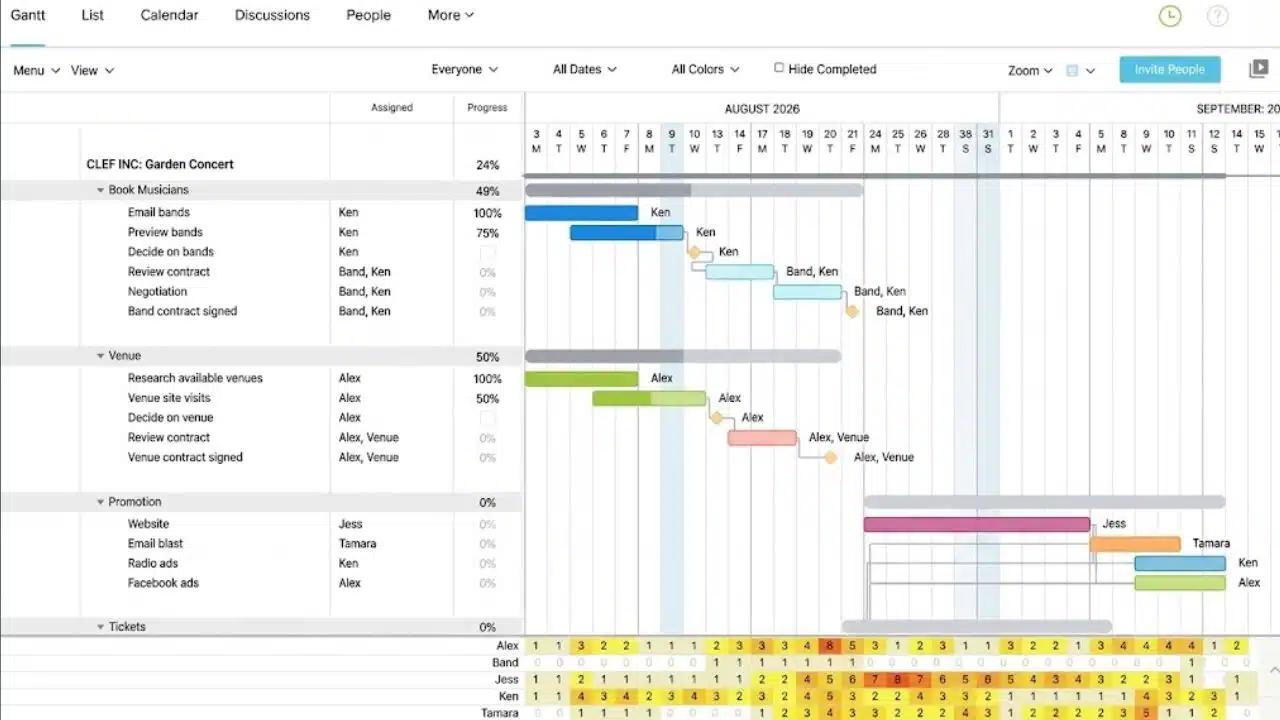
Among the best Gantt chart tools, TeamGantt is the strongest general choice for teams that want the timeline—not a dashboard—to remain central. It combines dependencies, milestones, critical path, planned-versus-actual progress, workload views, and shareable links without the density of a large enterprise suite.
The free plan is limited to one user, one project, and 40 tasks. Paid limits revolve around projects, managers, and collaborators. Agencies should therefore check how many people need management rights rather than comparing only the headline price.
2. GanttPRO
GanttPRO earns its position by staying focused on formal scheduling. Its plans list dependencies, milestones, baselines, critical path, and automatic scheduling; Business adds workloads, portfolios, time tracking, and budget planning. That mix suits agencies, consultants, and operations teams with repeatable project plans.
The 14-day trial requires no credit card, but there is no advertised permanent free plan. Occasional personal planners will find less value here.
3. ClickUp
ClickUp belongs among the best Gantt chart tools when a team wants tasks, documents, dashboards, automations, and timelines in one place. Dependencies can drive schedule changes, keeping the chart connected to daily work.
The Free Forever plan allows 60 cumulative Gantt-view uses. The allowance does not reset monthly, and Gantt views cannot be created or edited after it is exhausted. Unlimited removes that cap. Baselines begin on Business and have location-level limits. ClickUp offers considerable breadth, although a team seeking only a clean schedule may spend too long configuring it.
4. monday.com
monday.com is easier to recommend to teams already working from visual boards than to those seeking specialist scheduling software. Its Gantt materials list dependencies, milestones, baselines, critical paths, drag-and-drop scheduling, and Excel imports. Timeline and Gantt views begin on Standard.
Feature placement needs checking: the pricing comparison does not assign every advanced Gantt function as plainly as the feature page presents them. Confirm baseline and critical-path access. TeamGantt is more direct for timeline-first work; monday.com is more flexible when the chart is one view of a larger workflow.
5. Smartsheet
Smartsheet fits operations teams that think in rows, columns, forms, and reports. Pro includes Gantt view and dependencies; baselines and workload tracking appear on Business and higher tiers.
A content team, for example, can turn form submissions into rows, reports, and scheduled work. That connection matters more than visual polish. Creative teams may find the grid-first interface dry, but structured departments often benefit from its discipline.
6. Wrike
Wrike can be excessive for a freelancer managing a few deliverables. For a cross-functional team coordinating campaigns, approvals, and shared specialists, the extra machinery is easier to defend.
Interactive Gantt charts start with Team. Wrike documents four dependency types, lead and lag, conflict monitoring, critical path, float, baselines, bulk rescheduling, and controlled public sharing. Not every advanced function necessarily comes with the entry tier, so map required features to a plan before seeking budget.
7. Microsoft Planner
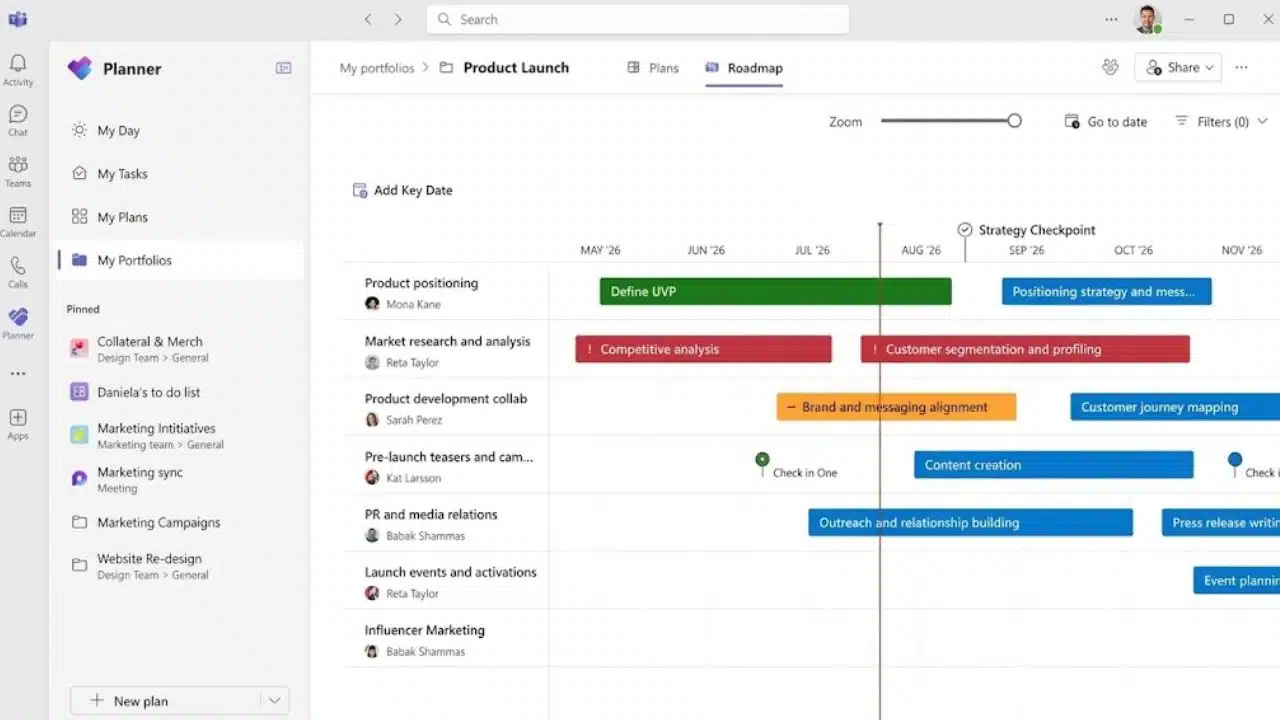
Microsoft Planner remains one of the best Gantt chart tools for organizations committed to Microsoft 365, provided they buy the correct license. The Planner bundled with Microsoft 365 includes grid, board, schedule, and charts—not the Timeline Gantt view.
Planner Plan 1 adds Timeline, milestones, People view, and finish-to-start dependencies. Planner and Project Plan 3 adds baselines, critical path, advanced dependencies with lead and lag, Assignments view, and portfolio creation. Do not mistake the familiar bundled app for the complete scheduling product.
8. Asana
Asana is a sensible extension when a team already manages work there. Starter includes Timeline and Gantt views, dependencies, milestones, forms, reporting, and workflow automation. Advanced adds portfolios, goals, and critical-path support.
The Personal plan supports up to two users but excludes Gantt. Asana links schedules well with daily accountability, though teams needing detailed lead-and-lag rules or formal resource management should compare GanttPRO or Wrike.
9. Zoho Projects
Zoho Projects is an underrated route into structured scheduling, but its plan differences matter:
- Free supports up to five users and three projects, with finish-to-start dependencies inside a project.
- Premium expands within-project dependencies to all four standard types.
- Enterprise adds cross-project dependencies, critical path, and baselines.
The free edition demonstrates the workflow, not the full scheduler. Zoho becomes more persuasive for smaller organizations already using its wider software ecosystem.
10. OpenProject
OpenProject is a niche recommendation with a clear audience. Its open-source Community edition allows unlimited on-premises users and projects. The Gantt view supports draggable dates, dependencies, multi-project planning, and automatic scheduling of follower tasks.
The license may be free; operating it is not. Community Edition requires supported Linux or Docker and someone to handle updates, backups, availability, and security. Teams that do not want that responsibility should compare the paid cloud service.
Final Thoughts
The best Gantt chart tools do more than draw horizontal bars. They show what moves when a date changes, who is affected, and where the schedule is exposed. Start with TeamGantt or GanttPRO when the timeline is the main planning surface. Choose a broader platform only if its extra task, document, or reporting features will be used consistently.
Before buying annually, rebuild one active project and introduce a deliberate delay. The resulting schedule will show whether the tool fits the team’s real working habits.
Frequently Asked Questions (FAQs)
Are free Gantt chart tools enough for a real project?
They can handle a solo schedule, short client engagement, or pilot. TeamGantt allows one project with 40 tasks, Zoho Projects allows three projects for up to five users, and ClickUp’s 60 Gantt uses are cumulative. Check dependencies, exports, guest access, and what happens after a limit is reached.
Can the best Gantt chart tools work with Agile methods?
Yes. Boards and sprints can manage daily delivery while a Gantt chart shows releases, external deadlines, and dependencies between teams. Keep routine backlog tasks off the high-level timeline, or it becomes difficult to read and maintain.
What should a team test during a free trial?
Build a small project with linked tasks, a milestone, overlapping assignments, and an external reviewer. Delay the first task, inspect workload, share or export the schedule, and test permissions. If these basic actions are confusing, a full migration will not improve matters.























