

The gaming landscape of 2026 is defined by one word: speed. Whether you are exploring the hyper-realistic streets of a modern RPG or holding a pixel-perfect angle in a competitive shooter, your monitor is the window through which you experience every frame. While 60Hz was once the gold standard, 144Hz is now the absolute baseline for a fluid gaming experience.
In this guide, we’ve analyzed the current market to bring you the 10 best high refresh rate gaming monitors of the year, ranging from budget-friendly 1080p panels to the breathtaking clarity of 4K OLEDs.
Quick Summary (Best Picks by Use Case)
Choosing the right monitor depends entirely on your “gaming persona.” Are you a professional esports hopeful or a console player looking for cinematic immersion? Here is the fast track to your perfect match:
- The Esports Pro: Alienware AW2524HF (500Hz) – Unmatched fluidity for those where every millisecond determines a win.
- The 1440p Sweet Spot: AOC Q27G3XMN (180Hz) – The perfect balance of sharp resolution and high speed without breaking the bank.
- 4K/HDMI 2.1 Console King: BenQ MOBIUZ EX321UX (144Hz) – Tailor-made for PS5 Pro and Xbox Series X with stunning Mini LED HDR.
- Ultrawide Immersion: MSI MPG 341CQPX (240Hz) – A massive QD-OLED canvas that wraps around your field of view.
- Best Budget: AOC 24G2X (144Hz) – The gold standard for affordable 1080p gaming.
- Best OLED: Asus ROG Swift PG27AQDP (480Hz) – The ultimate enthusiast display, combining OLED colors with professional speeds.
How we picked: We analyzed real-world bench tests from reputable sources like RTINGS and Tom’s Hardware, focusing on motion clarity, color accuracy, and input lag thresholds below 5ms.
Comparison Table (The “Skimmable” Core)
| Model | Size | Resolution | Refresh Rate | Panel | VRR | Ports | Best For |
| Asus PG27AQDP | 27″ | 1440p | 480Hz | OLED | G-Sync/FreeSync | DP 1.4 / HDMI 2.1 | All-around Elite |
| AOC Q27G3XMN | 27″ | 1440p | 180Hz | Mini LED | FreeSync | DP 1.4 / HDMI 2.0 | HDR Value |
| BenQ EX321UX | 32″ | 4K | 144Hz | Mini LED | FreeSync | HDMI 2.1 / DP 1.4 | Console Gaming |
| Alienware AW2524HF | 25″ | 1080p | 500Hz | Fast IPS | FreeSync | DP 1.4 / HDMI 2.1 | Competitive FPS |
| MSI MPG 341CQPX | 34″ | 1440p UW | 240Hz | QD-OLED | Adaptive-Sync | HDMI 2.1 / USB-C | Ultrawide Fans |
| AOC 24G2X | 24″ | 1080p | 144Hz | IPS | FreeSync | DP 1.2 / HDMI 1.4 | Budget Star |
| Gigabyte MO27Q28G | 27″ | 1440p | 240Hz | OLED | FreeSync | HDMI 2.1 / DP 1.4 | Mid-range OLED |
| Samsung Neo G8 | 32″ | 4K | 240Hz | VA (Curved) | G-Sync/FreeSync | HDMI 2.1 / DP 1.4 | 4K Speedsters |
| LG 45GX950A | 45″ | 5K2K | 165Hz | OLED | G-Sync/FreeSync | HDMI 2.1 / DP 1.4 | Large Format |
| KTC H27E6 | 27″ | 1440p | 320Hz | Fast IPS | FreeSync | DP 1.4 / HDMI 2.1 | High-Refresh Value |
What to Look for in a 144Hz+ Gaming Monitor (Buyer Guide)
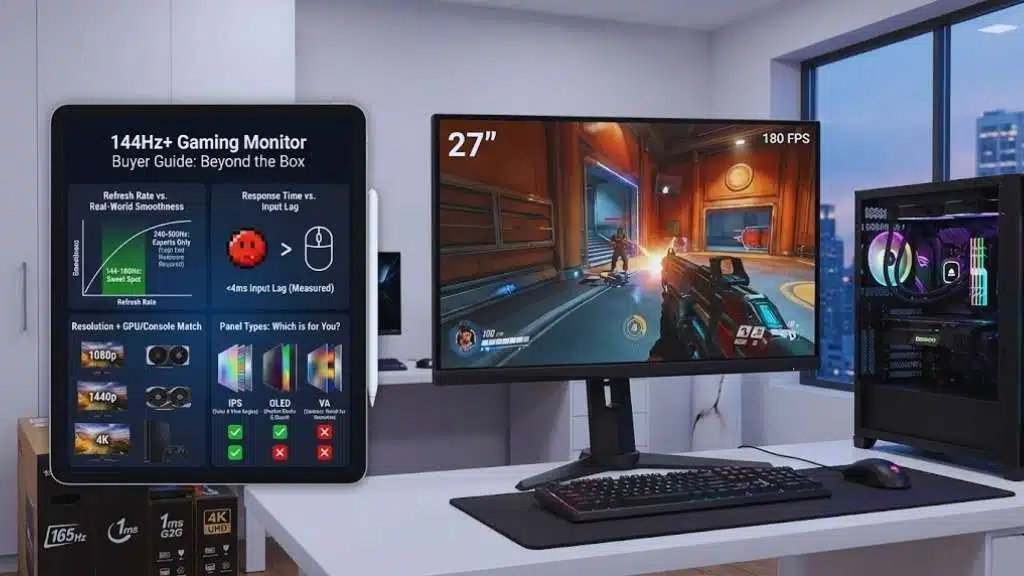
The specs on the box are often misleading. To find a monitor that actually performs, you need to look past the marketing.
Refresh Rate vs. Real-World Smoothness
While a 144Hz monitor refreshes the image 144 times per second, the benefit you see depends on your hardware.
- 144Hz to 180Hz: The “Sweet Spot.” Most modern GPUs can hit these targets in 1440p.
- 240Hz to 500Hz: Designed for “Esports.” You need a top-tier CPU and GPU (like an RTX 4080/5080) to actually feel the difference in games like Valorant or Counter-Strike 2.
Response Time vs. Input Lag
Don’t confuse these two. Response Time (G2G) is how fast a pixel changes color; low response time prevents “ghosting” (blurry trails behind moving objects). Input Lag is the delay between clicking your mouse and seeing the action on screen. In 2026, you should aim for a measured input lag of under 4ms.
Resolution + GPU/Console Match
- 1080p: Best for high-frame-rate competitive play on mid-range hardware.
- 1440p: The current standard. It offers 70% more screen real estate than 1080p and is perfectly suited for 144Hz–180Hz gaming.
- 4K: Requires a powerhouse PC or a current-gen console (PS5 Pro/Xbox Series X).
Panel Types: Which is for You?
- IPS: The king of color accuracy and viewing angles. Great for general gaming.
- OLED: The gold standard for 2026. Perfect blacks, infinite contrast, and near-instant response times.
- VA: Excellent contrast (deep blacks) but can suffer from “black smearing” in fast-moving scenes unless you buy a high-end model like the Samsung Odyssey Neo series.
10 Top-Rated 144Hz+ High Refresh Rate Gaming Monitors (Ranked List)
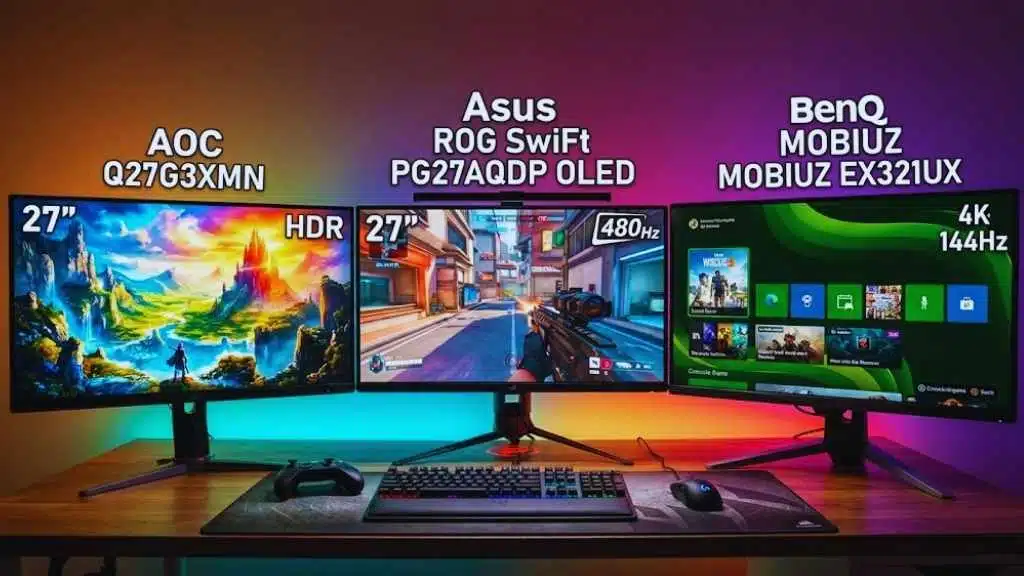
1. Asus ROG Swift PG27AQDP — Best Overall 144Hz+
This is the pinnacle of gaming displays in 2026. By combining a QHD OLED panel with a staggering 480Hz refresh rate, Asus has created a monitor that handles cinematic single-player games and pro-level shooters with equal brilliance.
- Specs: 27″, 1440p, 480Hz, OLED, G-Sync Compatible, HDMI 2.1.
- Why it’s top-rated: It features a unique anti-glare coating and the fastest response times ever measured in an OLED.
- Pros: Infinite contrast and deep blacks.
- Virtually zero motion blur.
- Excellent out-of-the-box color calibration.
- Cons: Extremely expensive.
- OLED burn-in is still a long-term (though mitigated) risk.
- Who should buy it: Enthusiasts who want the absolute best display tech available today.
2. AOC Q27G3XMN — Best 1440p “Sweet Spot” Value
You don’t need OLED prices for an incredible HDR experience. This Mini LED monitor provides local dimming zones that make bright highlights pop and shadows stay dark.
- Specs: 27″, 1440p, 180Hz, Mini LED (VA), FreeSync, HDR1000.
- Why it’s top-rated: It punches way above its price class in HDR performance, reaching 1000 nits of peak brightness.
- Pros: Incredible HDR for the price.
- High 180Hz refresh rate is perfect for most GPUs.
- Cons: Slight VA smearing in very dark scenes.
- Stand is a bit basic.
- Who should buy it: Gamers who want a premium-looking image without the $1,000 price tag.
3. BenQ MOBIUZ EX321UX — Best 4K for Console & PC
For those who want a larger screen and the sharpest resolution, this 32-inch monster is the 4K leader of 2026.
- Specs: 32″, 4K, 144Hz, IPS Mini LED, HDMI 2.1, FreeSync.
- Why it’s top-rated: Its 1,152-zone Mini LED backlight provides a “TV-like” HDR experience on a desktop.
- Pros: HDMI 2.1 supports 4K/120Hz for consoles.
- Built-in high-quality speakers (rare for monitors).
- Cons: Bulky design takes up significant desk space.
- Who should buy it: PS5 Pro/Xbox Series X owners and PC gamers with an RTX 4090 or 5090.
4. Alienware AW2524HF — Best Competitive Esports
When speed is the only thing that matters, the Alienware 500Hz monitor is the industry leader for professional play.
- Specs: 24.5″, 1080p, 500Hz, Fast IPS, FreeSync Premium.
- Why it’s top-rated: It offers the lowest total system latency of any monitor currently on the market.
- Pros: Unparalleled motion clarity.
- Compact size is preferred by pro gamers.
- Cons: 1080p resolution feels dated for non-gaming tasks.
- Who should buy it: Serious competitive players focusing on Valorant, Apex Legends, or CS2.
5. MSI MPG 341CQPX — Best Ultrawide 144Hz+
This monitor offers a massive 21:9 field of view, making your games feel more immersive by filling your peripheral vision.
- Specs: 34″, 1440p Ultrawide, 240Hz, QD-OLED, USB-C (90W PD).
- Why it’s top-rated: It uses the latest Gen 3 QD-OLED panels, which are brighter and more resistant to burn-in.
- Pros: Vibrant “pop” to colors.
- USB-C connectivity is great for laptop users.
- Cons: Ultrawide is not supported by all games (especially older titles).
- Who should buy it: Sim-racers and RPG fans who want maximum immersion.
6. AOC 24G2X — Best Budget 144Hz
Proof that you can get a great gaming experience for under $200.
- Specs: 24″, 1080p, 144Hz, IPS, FreeSync.
- Pros: Great color for a budget panel.
- Fully adjustable stand (height, tilt, pivot).
- Cons: Low brightness levels.
- Who should buy it: Students or budget-conscious gamers building their first rig.
7. Gigabyte MO27Q28G — Best Value Midrange OLED
If you want the OLED experience but can’t justify $1,200, this Gigabyte model is the smart middle ground.
- Specs: 27″, 1440p, 240Hz, OLED, FreeSync.
- Pros: Responsive and colorful.
- Often found on sale.
- Who should buy it: Mid-range PC builders looking for a “forever monitor.”
8. Samsung Odyssey Neo G8 — Best 4K Speedster
A rare 4K monitor that hits 240Hz, offering a blend of extreme resolution and extreme speed.
- Specs: 32″, 4K, 240Hz, VA (Mini LED), G-Sync Compatible.
- Pros: The highest resolution/speed combo available.
- Aggressive 1000R curve for immersion.
- Cons: The curve is polarizing; not everyone likes it.
9. LG 45GX950A — Best Large-Screen Immersive
A massive 45-inch display that blurs the line between a monitor and a TV.
- Specs: 45″, 5K2K Resolution, 165Hz, OLED, HDMI 2.1.
- Pros: Huge screen real estate.
- Great for cinematic gaming.
- Who should buy it: Gamers who want a “command center” feel.
10. KTC H27E6 — Best High-Refresh Value
KTC has disrupted the market by offering high-end specs at lower prices.
- Specs: 27″, 1440p, 320Hz, Fast IPS.
- Pros: Cheaper than competitors with similar specs.
- Excellent motion handling.
- Who should buy it: The savvy shopper looking for the best specs-per-dollar.
How We Chose These Monitors (Methodology)
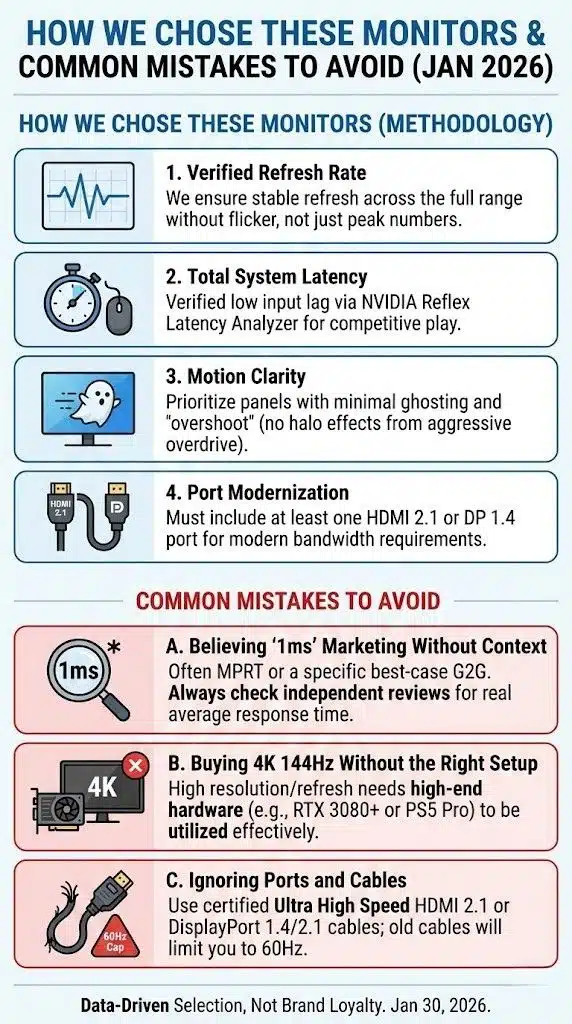
Our selection process is based on objective data rather than brand loyalty. In 2026, we prioritize the following metrics:
- Verified Refresh Rate: We only include monitors where the refresh rate is stable across the entire range without excessive flickering.
- Total System Latency: Using tools like NVIDIA Reflex Latency Analyzer, we verify that these monitors maintain an input lag low enough for competitive play.
- Motion Clarity: We look for panels with minimal ghosting or “overshoot” (the halo effect caused by aggressive overdrive).
- Port Modernization: A “top” 2026 monitor must have at least one HDMI 2.1 or DP 1.4 port to support modern bandwidth requirements.
Common Mistakes to Avoid
Believing “1ms” Marketing Without Context
Almost every monitor claims “1ms Response Time.” In reality, this is often “MPRT” or a very specific “Gray-to-Gray” measurement that only happens with settings that cause terrible image artifacts. Look for independent reviews to see the real average response time.
Buying 4K 144Hz Without the Right Setup
A 4K 144Hz monitor is a paperweight if you are running an older GPU. To truly utilize a 4K 144Hz screen, you need at least an RTX 3080 or better (or a PS5 Pro) to see those high frame rates.
Ignoring Ports and Cables
To hit 144Hz at 4K, you must use a certified Ultra High Speed HDMI 2.1 cable or a DisplayPort 1.4/2.1 cable. Using an old HDMI cable from your storage bin will likely cap you at 60Hz.
Final Thoughts
The “best” monitor isn’t the one with the highest price tag—it’s the one that matches your hardware and the games you love. If you’re a competitive shooter fan, the Alienware 500Hz or Asus 480Hz OLED will give you a genuine edge. If you prefer exploring open worlds, the AOC Q27G3XMN offers HDR visuals that will blow you away for a fraction of the cost.
Always remember to go into your Windows Display Settings and manually set your refresh rate to 144Hz (or higher) once you plug in your new screen—it’s the most common mistake gamers make!






















