
SaaS teams usually do not have a data shortage. They have a trust problem.
A founder may see one churn number in a billing dashboard, another in a spreadsheet, and a third in a board deck. A product manager may know that users are dropping during onboarding but not which step is causing the damage. Marketing may celebrate signups that never become paying accounts. Data analysts, meanwhile, may spend more time fixing broken event names than answering business questions.
That is why choosing the best analytics tools SaaS teams can use is not about finding one perfect dashboard. It is about matching the tool to the decision: product adoption, acquisition quality, customer behavior, subscription revenue, internal reporting, or company-wide data governance.
This list is ranked by practical SaaS value, not by brand awareness alone. Some tools are broad product analytics platforms. Some are better as data infrastructure. A few are only worth paying for once your team has reached a certain level of complexity.
Quick Comparison: Best Analytics Tools SaaS Teams Should Consider
| Tool | Strongest Use Case | Best Fit |
|---|---|---|
| Amplitude | Product behavior, cohorts, retention | Product-led SaaS teams |
| Mixpanel | Funnels, events, growth analysis | Startups and growth teams |
| PostHog | Product analytics plus developer tools | Engineering-led SaaS teams |
| Heap | Autocapture and journey discovery | Teams with incomplete tracking |
| Pendo | Analytics plus in-app guidance | Product adoption teams |
| Google Analytics 4 | Website and acquisition analytics | Marketing teams |
| Fullstory | Session replay and UX investigation | Product, UX, and support teams |
| Twilio Segment | Customer data routing | Teams with many tools |
| RudderStack | Warehouse-first customer data platform | Data-led SaaS companies |
| BigQuery | Scalable analytics warehouse | Google Cloud-heavy teams |
| Snowflake | Enterprise data cloud | Larger SaaS organizations |
| Metabase | Internal dashboards and BI | Startups and lean data teams |
| ChartMogul | Subscription revenue analytics | SaaS finance and revenue teams |
Before You Buy Another Analytics Tool
The software is rarely the first problem. The tracking plan is.
Before paying for a new platform, decide how your company defines users, accounts, workspaces, teams, plans, trials, activation, churn, expansion, and active usage. If those definitions are unclear, a better analytics tool will only make the confusion easier to visualize.
SaaS teams should also check how pricing scales. Some platforms bill by monthly tracked users. Some bill by events. Some bill by sessions, replays, rows, queries, compute, or storage. A tool that feels affordable during beta can become expensive once every click, page view, and background event starts flowing into it.
Start with the question you need answered. Then choose the tool.
1. Amplitude
Amplitude is one of the strongest choices for SaaS companies that treat product behavior as a growth lever.
It is built for questions like: Which actions predict retention? Which onboarding path leads to paid conversion? Are power users adopting the new feature? Does inviting a teammate in the first session improve long-term usage?
That makes Amplitude especially useful for product-led SaaS, self-serve tools, collaboration products, workflow platforms, and companies with enough users to analyze behavior patterns over time.
Amplitude’s free Starter plan is generous enough for many small teams to begin with, while paid plans add more capacity and advanced capabilities. The exact plan fit should be checked before buying because event volume and monthly tracked users matter.
The weakness is setup discipline. Amplitude will not rescue a vague event model. If your team tracks “button_clicked” everywhere without context, the dashboard may look impressive but still fail to answer serious product questions.
Amplitude deserves the top spot because it helps SaaS teams move beyond traffic and signups into behavior that affects retention. It is not the first tool every tiny startup needs, but it is one of the strongest once product usage becomes central to growth.
2. Mixpanel
Mixpanel is often the easier first product analytics tool for SaaS startups that want useful answers quickly.
It handles funnels, retention, event trends, flows, and user segmentation without forcing every question through SQL. A growth lead can check where trial users drop off. A product manager can compare behavior across plans. A founder can see whether a feature is actually being used after launch.
The practical risk is over-tracking. Mixpanel uses event-based pricing, so sending every small interaction can make both the data and the bill harder to manage. A cleaner setup might track fewer events: signup completed, workspace created, teammate invited, first project published, payment started, upgrade completed, report exported.
Mixpanel is less suited to teams that already want warehouse-first governance. But for many SaaS startups, it gives a good balance of power and usability. It is strong enough for serious analysis without feeling like an enterprise data project.
3. PostHog
PostHog is a strong choice when engineers are close to analytics work.
It combines product analytics with tools such as session replay, feature flags, experiments, surveys, data pipelines, and related product-building features. That makes it attractive for small technical teams that would rather run analytics, feature rollout, and feedback collection from one connected product.
PostHog’s usage-based pricing and monthly free allowances make it approachable, but teams should still watch usage. Session recordings, event volume, feature flag requests, and other modules can each affect cost.
The best use case is an engineering-led SaaS company that wants to move quickly: track a funnel, watch failed sessions, release a feature behind a flag, run an experiment, and collect feedback from users.
The weaker fit is a non-technical team that mostly wants polished executive reporting. PostHog can do a lot, but it rewards teams that are willing to configure and maintain their product data carefully.
4. Heap
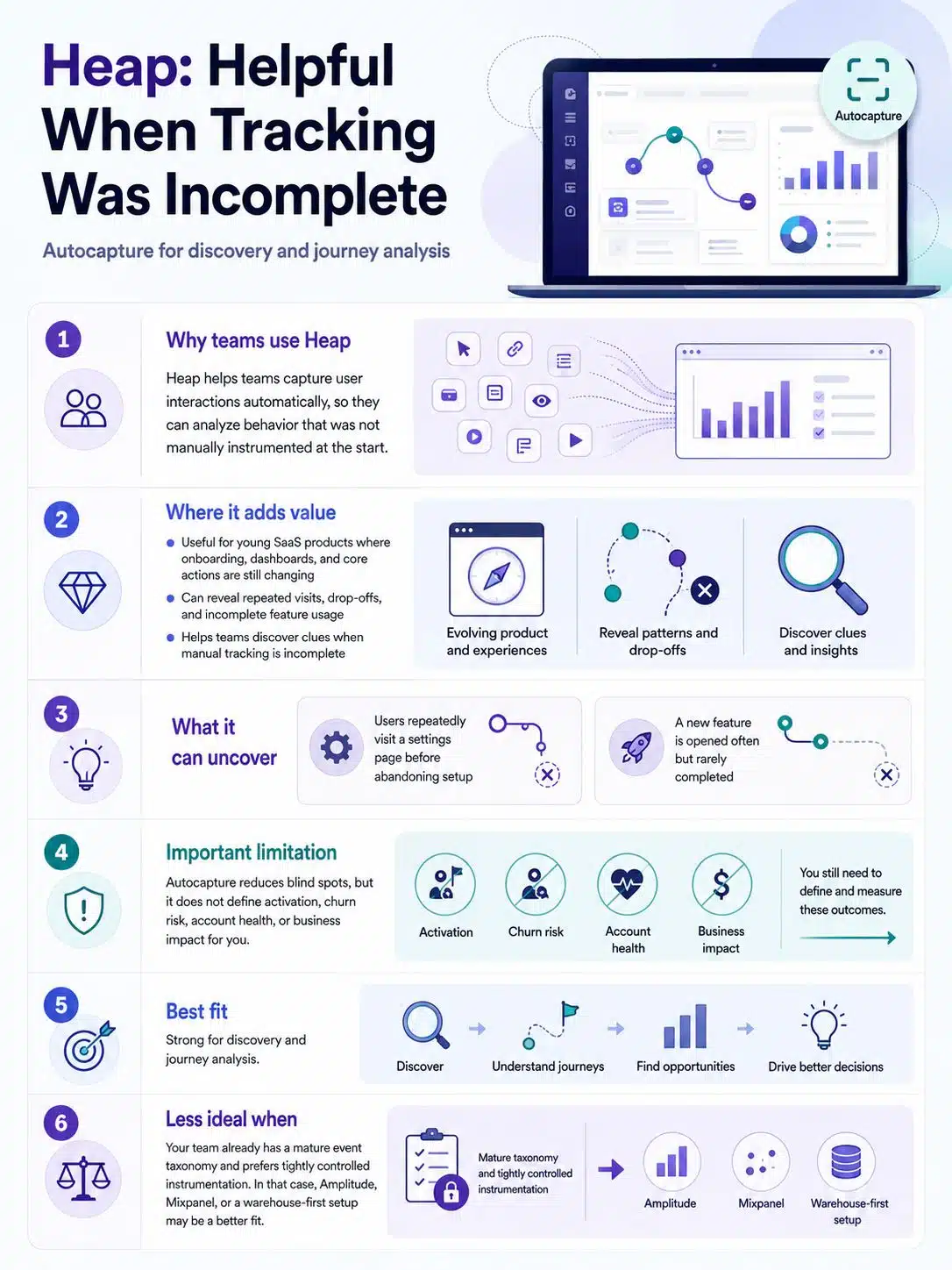
Heap is useful when the team keeps realizing it forgot to track something important.
Its autocapture approach helps capture user interactions so teams can analyze behavior that may not have been manually instrumented at the start. That is valuable in young SaaS products where the onboarding flow, dashboard, and core actions are still changing.
A team might discover that users repeatedly visit a settings page before abandoning setup. Or that a newly released feature is being opened but not completed. Those are the kinds of clues Heap can surface when manual tracking is incomplete.
That does not mean teams can avoid measurement planning. Autocapture can reduce blind spots, but it does not define activation, churn risk, account health, or business impact for you.
Heap is best for discovery and journey analysis. If your team already has a mature event taxonomy and prefers tightly controlled instrumentation, it may not rank as highly as Amplitude, Mixpanel, or a warehouse-first setup.
5. Pendo
Pendo is most useful when analytics and adoption need to work together.
A SaaS product with complex onboarding, admin settings, role-based permissions, or underused features may need more than a chart. It may need in-app guides, feedback, NPS, and product usage data in one place. Pendo fits that situation well.
Its free plan currently supports small teams with a limited monthly active user count and includes core analytics and guidance features. Larger plans use custom pricing, and buyers should check which tier includes session replay, sentiment tools, data sync, and orchestration features.
Pendo can feel heavy if all you need is funnel analytics. It becomes more valuable when product teams are responsible for helping users adopt features, not only measuring whether they did.
Use it when the problem is adoption. For pure analytics, compare it carefully against Amplitude, Mixpanel, and PostHog.
6. Google Analytics 4
Google Analytics 4 still belongs in a SaaS stack, but it should not be asked to do every job.
GA4 is useful for website traffic, campaign performance, landing pages, content, source-medium analysis, and pre-signup behavior. Marketing teams need this layer, especially when paid campaigns, SEO, and content are part of the acquisition mix.
It is weaker as the main product analytics system. SaaS teams often need account-level behavior, workspaces, roles, subscription status, plan types, lifecycle stages, and retention cohorts. GA4 can track events, but it is not designed to be the full product intelligence layer for most SaaS companies.
The BigQuery export makes GA4 more useful for technical teams because raw event data can be queried and combined with other data. That requires data skills. Without them, GA4 remains mainly a marketing analytics tool.
Use GA4 for acquisition visibility. Do not let it become the only place your SaaS team tries to understand product health.
7. Fullstory
Fullstory helps when the chart says something is wrong but not why.
A funnel can show that users abandon onboarding at step three. Fullstory can help product and support teams see the actual behavior: rage clicks, dead buttons, confusing forms, slow screens, or users repeatedly moving between two pages without completing the task.
That is valuable for products with complex interfaces: editors, dashboards, admin panels, checkout flows, customer portals, and multi-step onboarding.
The serious warning is privacy. Session replay can expose sensitive behavior if teams do not configure masking, exclusions, and consent rules carefully. This matters even more for SaaS products in finance, healthcare, HR, education, legal, or any workflow involving personal or confidential data.
Fullstory is not the main analytics system. It is the investigation layer. Use product analytics to find the weak spot, then use session replay to understand what happened on the screen.
8. Twilio Segment
Segment is customer data plumbing, not a dashboard.
It collects first-party customer data and routes it to analytics tools, marketing platforms, warehouses, and hundreds of destinations. That becomes useful when a SaaS company has too many disconnected tools collecting their own version of the customer.
Without a CDP, product events may go to one system, lifecycle emails to another, ad audiences to another, and warehouse tables somewhere else. The result is duplicated tracking, broken identity, and endless debates about which source is correct.
Segment is valuable when multiple teams need the same customer data in different places. Product may send events to Amplitude. Marketing may send audiences to campaign tools. Data teams may send everything to a warehouse.
It is not a casual purchase. Segment’s CDP plans can involve custom pricing, and the connected tools still have their own costs. Smaller SaaS companies should not adopt it just because larger companies do.
Consider Segment when data fragmentation has become an operational problem.
9. RudderStack
RudderStack is better suited to teams that want customer data infrastructure with the warehouse at the center.
It supports event collection, destinations, warehouse routing, reverse ETL, and governance workflows. Its published pricing includes a free plan with a monthly event allowance and paid plans based on event volume, which makes early cost modeling easier than with many custom-only platforms.
The practical difference from Segment is posture. RudderStack tends to appeal more to technical teams that want warehouse-first control rather than a marketing-led CDP experience.
That control comes with work. Someone has to manage schemas, transformations, destinations, warehouse syncs, and data quality. A founder looking for a simple dashboard may find it too much. A data-led SaaS team may find it exactly right.
RudderStack is a strong option once the team thinks of customer data as infrastructure, not just analytics.
10. BigQuery
BigQuery is not a SaaS analytics app. It is a managed analytics warehouse.
For teams already using Google Cloud, GA4, Firebase, Google Ads, or Looker-style reporting, BigQuery can become the central place to analyze raw events, billing exports, CRM data, marketing spend, and product tables together.
The advantage is flexibility. Analysts can join data across systems and build reporting that no single product analytics tool can provide. The cost is responsibility. Poor table design, careless queries, and unclear ownership can create waste and slow reporting.
BigQuery is best when the team has SQL skills and needs deeper analysis than dashboards allow. It is not the right first analytics purchase if nobody will maintain the data model.
11. Snowflake
Snowflake makes more sense for larger SaaS companies or teams with serious data operations.
Its value is company-wide data work: product events, billing records, CRM, support, marketing, finance, operations, and governance across departments. That is a different problem from checking a signup funnel.
Snowflake costs involve compute, storage, and data transfer considerations, so cost control is part of the work. Teams need monitoring, access controls, warehouse management, and clear ownership of reporting definitions.
A small SaaS company should usually not start here. Snowflake becomes relevant when analytics is no longer only a product or growth function but a company-wide data platform.
Powerful, yes. Lightweight, no.
12. Metabase
Metabase is one of the most practical BI tools for SaaS teams that need internal reporting without a heavy enterprise BI rollout.
It works well for founder dashboards, customer success views, sales reports, operational metrics, support queues, and simple finance snapshots. Non-technical users can explore data visually, while analysts can still write SQL.
Metabase has a free open-source option and paid plans for teams that want managed hosting or more advanced controls. That flexibility matters for startups: self-host if the team can maintain it, or pay when hosting, permissions, support, and business features matter more.
The danger is dashboard sprawl. Metabase makes reporting easy enough that every team can create its own version of the same metric. Before inviting everyone in, decide which dashboards are official.
Metabase is underrated because it is not flashy. For many SaaS teams, that is a strength.
13. ChartMogul
ChartMogul focuses on subscription analytics, and that makes it different from most tools on this list.
SaaS companies need to understand MRR, ARR, churn, contraction, expansion, reactivation, trials, add-ons, overages, billing sources, and multi-currency revenue. Product analytics may show that usage is rising, but it will not always explain whether revenue quality is improving.
ChartMogul is useful for founders, finance teams, revenue leaders, and customer success teams that need cleaner subscription reporting than a payment processor alone can provide. It is especially relevant when billing has become more complex: multiple plans, add-ons, usage-based charges, multi-currency customers, or more than one billing system.
It should not replace product analytics. Treat it as the subscription revenue layer. A SaaS company can have healthy feature usage and still suffer from weak expansion or preventable churn.
Check current pricing and plan details before buying, especially if your revenue model is still changing.
A Practical Starting Stack
Most SaaS teams should not buy all 13 tools.
A lean early-stage stack may be enough:
- GA4 for acquisition and website analytics
- Mixpanel or PostHog for product behavior
- ChartMogul for subscription metrics
- Metabase when internal reporting starts to break down
A more mature B2B SaaS company may need a broader setup:
- Amplitude for product analytics
- Segment or RudderStack for customer data routing
- BigQuery or Snowflake as the warehouse
- Metabase or another BI layer for dashboards
- Fullstory for UX investigation
- ChartMogul for subscription revenue
The useful stack is the one that answers decisions your team is actually making. Buying a warehouse before defining activation is backwards. Buying a CDP before fixing event names is expensive theater.
Common Mistakes to Avoid
- Do not use GA4 as your only product analytics tool if retention and feature adoption matter.
- Do not install Segment or RudderStack before someone owns the tracking plan.
- Do not record user sessions without a serious privacy review.
- Do not track hundreds of events before defining the few that shape product, revenue, and retention decisions.
- Do not let every department define activation, churn, or active customer differently.
FAQs on Best Analytics Tools for SaaS Teams
What is the best analytics tool for an early-stage SaaS startup?
Mixpanel and PostHog are usually the most practical starting points for product analytics. GA4 can cover acquisition, and ChartMogul becomes useful once subscription revenue needs cleaner reporting. Amplitude is excellent, but very small teams may not need its full depth immediately.
Is Google Analytics 4 enough for SaaS analytics?
GA4 is useful for website and marketing analytics, but it is usually not enough for product decisions. SaaS teams often need account-level tracking, plan segmentation, retention cohorts, workspace behavior, and billing context.
Should SaaS teams start with a data warehouse?
Only if they have the data skills and reporting complexity to justify it. A warehouse becomes valuable when product, billing, CRM, support, and marketing data need to be joined. For a very small team, product analytics and revenue analytics may create value faster.
Which is better: Segment or RudderStack?
Segment is often a better fit for teams that want a mature customer data platform with broad destination support. RudderStack is stronger for technical teams that prefer warehouse-first control and event-volume-based planning.
Final Thoughts
The best analytics tools SaaS teams can choose are the ones that clarify decisions, not the ones with the longest feature list.
Start with the business question. If the question is activation, look at Amplitude, Mixpanel, PostHog, Heap, or Pendo. If the question is acquisition, GA4 still matters. If the question is user friction, add Fullstory carefully. If customer data is scattered across too many tools, consider Segment or RudderStack. If reporting has outgrown dashboards, BigQuery, Snowflake, and Metabase enter the conversation. If revenue quality is unclear, ChartMogul deserves attention.
Good SaaS analytics is less about collecting everything and more about measuring the right things consistently. Clean definitions, careful instrumentation, and clear ownership will do more for decision-making than another dashboard nobody trusts.