
Most teams do not think seriously about local AI until someone asks a boring but uncomfortable question:
Can we safely upload this data to a cloud model?
That question changes the room.
A developer may be looking at private source code. A data analyst may have customer notes sitting in CSV files. A legal team may want help summarizing internal drafts. A support manager may want to classify tickets that include names, emails, complaints, refunds, and all the messy details real businesses collect.
Cloud AI is convenient. No argument there. But convenience gets awkward when the data should not leave your environment.
That is where local language models become interesting. If you can run LLM locally, you can keep prompts, source documents, retrieved context, and generated drafts on your own machine or private network. For privacy-focused developers, analysts, and technical leads, that can be a serious advantage.
Not a miracle. Not a replacement for every cloud model. But a practical option.
The mistake is treating local LLMs like a magic privacy button. They are not. They still depend on hardware, model size, quantization, context length, app settings, logging behavior, and basic security discipline. A private model running on a badly managed workstation can still create risk. A small model with poor retrieval can still produce confident nonsense. And a huge model forced onto weak hardware can turn a simple summary into a coffee-break event.
So the better question is not, “Can I run an LLM locally?”
You probably can.
The better question is, which local LLM workflow is actually worth running on the hardware you already have, with the level of privacy and performance your team needs?
Local AI Solves One Big Problem, Not Every Problem
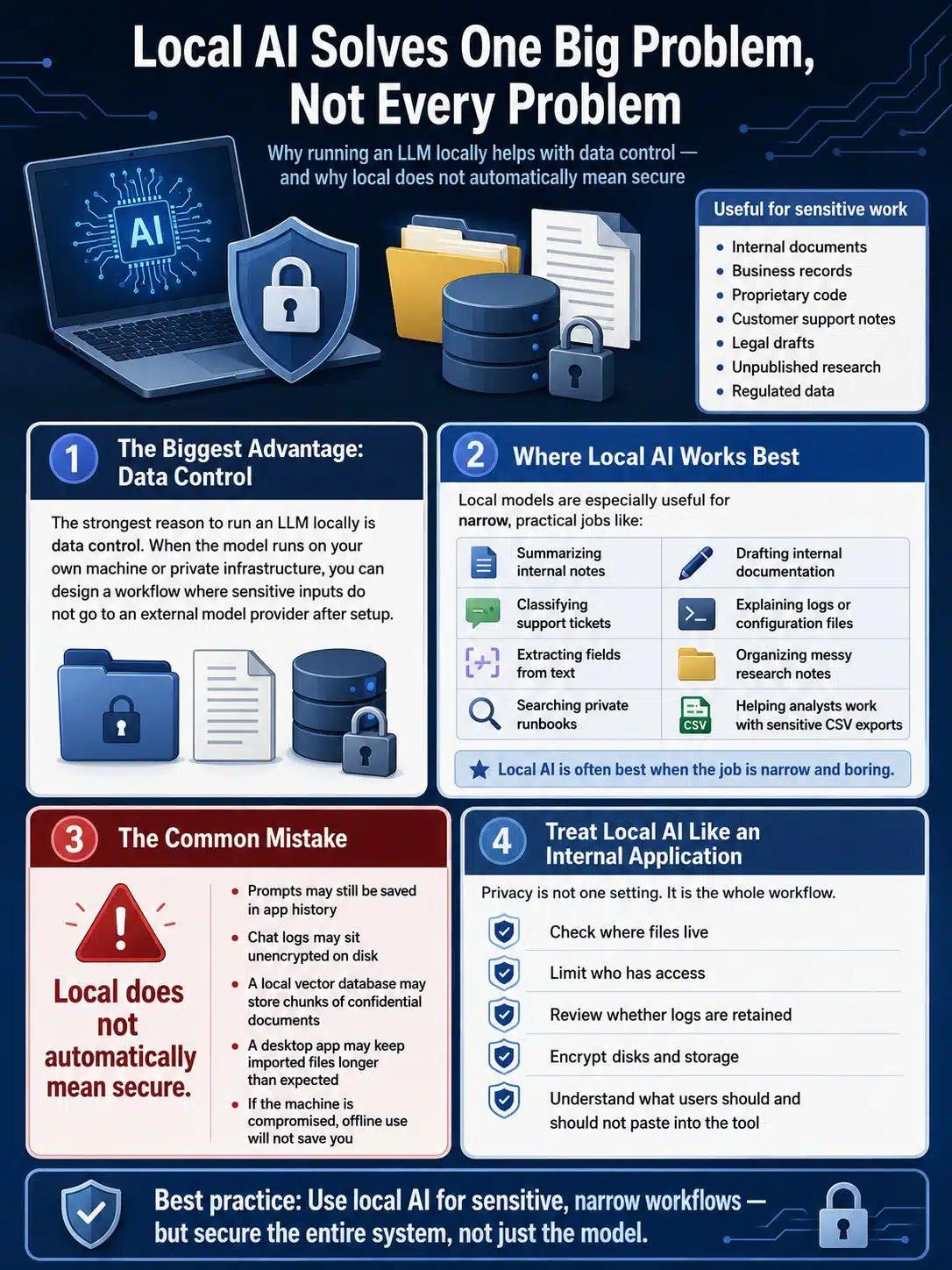
The strongest reason to run an LLM locally is data control.
When the model runs on your own machine or private infrastructure, you can design a workflow where sensitive inputs do not go to an external model provider after setup. That matters for internal documents, business records, proprietary code, customer support notes, legal drafts, unpublished research, and regulated data.
Local models are especially useful for tasks like:
- Summarizing internal notes
- Classifying support tickets
- Extracting fields from text
- Searching private runbooks
- Drafting internal documentation
- Explaining logs or configuration files
- Organizing messy research notes
- Helping analysts work with sensitive CSV exports
That list is not glamorous. Good. Local AI is often best when the job is narrow and boring.
Where people go wrong is assuming “local” automatically means “secure.” It does not.
The model may be local, but prompts might still be saved in app history. Chat logs may sit unencrypted on disk. A local vector database may store chunks of confidential documents. A desktop app may keep imported files longer than the user realizes. If the machine is compromised, the model being offline will not save you.
Treat local AI like an internal application, not like a clever toy.
That means checking where files live, who has access, whether logs are retained, whether disks are encrypted, and whether users understand what should and should not be pasted into the tool. Privacy is not one setting. It is the whole workflow.
Hardware Is Where the Hype Gets Exposed
Local LLM performance is brutally hardware-dependent.
A model that feels smooth on one machine may crawl on another. A setup that works with a short prompt may slow down badly with a longer context window. A GPU with more raw power is not always the better choice if it has less memory available for model weights and context.
For many consumer setups, VRAM is the first wall you hit.
If the model and its working memory fit comfortably on the GPU, inference can feel usable. If not, the system may spill into regular RAM or rely more heavily on the CPU. That can work, but speed often drops enough that the tool starts feeling like punishment.
This is why GPUs with larger memory pools remain attractive for local AI. NVIDIA’s RTX 3060, for example, has a 12GB variant that is still discussed in local LLM circles because that extra VRAM can matter more than its age. It is not a high-end AI workstation card. It is not magic. But for smaller and mid-sized quantized models, 12GB gives you more room than many 8GB cards.
A practical hardware reading looks something like this:
- 8GB VRAM: workable for smaller models and careful context sizes
- 12GB VRAM: a reasonable starting point for many 7B–8B quantized models
- 16GB VRAM: more comfortable for longer context and some larger models
- 24GB VRAM or more: where local inference starts to feel much less cramped
- CPU-only: fine for learning and light experiments, but not ideal for impatient users
These are planning ranges, not benchmark promises. Real performance depends on the model, quantization, context length, backend, drivers, operating system, and runner.
The simple rule: do not choose a model because it looks impressive on a download page. Choose the smallest model that performs the job well enough.
That sounds less exciting. It is also how useful tools get built.
Quantization Makes Local LLMs Practical, but It Has Trade-Offs
Quantization is one reason local LLMs are usable on ordinary machines.
Instead of storing model weights at high precision, quantized models use lower precision formats that reduce file size and memory needs. In plain English: a quantized model can fit where a full-precision model cannot. It may also run faster.
But lower precision can reduce quality.
That does not mean quantized models are bad. It means you need to test them against the actual task. A 4-bit model may be good enough for ticket labels, rough summaries, and simple extraction. A higher-precision version may behave better when wording matters, when structured output must be reliable, or when the model needs to handle subtle distinctions.
Do not treat quantization like a universal upgrade. Treat it like compression.
Sometimes the smaller file is exactly what you need. Sometimes it shaves off behavior you cared about.
For most first pilots, a 7B or 8B model in a common 4-bit or 5-bit quantization is a sensible place to begin. If output quality is weak, test a better model or higher precision before jumping straight to a much larger model.
Bigger models can help. They can also make the system slower, harder to run, and more expensive to support.
The Tools: llama.cpp, Ollama, and LM Studio
A local LLM setup does not have to start with custom infrastructure.
Three names come up again and again: llama.cpp, Ollama, and LM Studio. They overlap, but they suit different users.
llama.cpp
llama.cpp is one of the core projects behind many local LLM workflows. It focuses on efficient inference across a wide range of hardware and supports multiple build backends, including CPU and GPU paths. It is especially important in GGUF-based workflows.
Use it when you want more control, more transparency, and a stronger technical foundation.
Skip it as your first stop if your team needs a friendly interface for non-technical users. It is powerful, but it is not the easiest tool for someone who just wants to load a model and ask questions.
Ollama
Ollama is easier to use and popular with developers who want a local model running quickly behind a simple API. It is useful when you want local models to behave more like application components. Structured outputs are also useful for extraction and consistent JSON-style responses, although you still need to test reliability.
Ollama is a good choice for developers building small internal tools, local APIs, or repeatable workflows.
The caution: easy setup can hide hardware and model details. If performance is poor, you still need to understand what model is loaded, how much memory it needs, and whether GPU acceleration is working properly.
LM Studio
LM Studio is friendlier for desktop users. It is useful for analysts, writers, researchers, and technical staff who want to download models, test prompts, and run a local server without living in the terminal.
It also matters that LM Studio has been moving toward more server-like features, including parallel-request and batching improvements in recent releases. That makes it more relevant for teams experimenting beyond one-person desktop use.
The caution is the same as with any GUI tool: convenience does not remove the need for version control, model tracking, and documentation. If a workflow becomes important, record the model, version, quantization, context settings, and runtime details.
A demo that works once is not deployment.
What Most People Get Wrong About Running Local LLMs
The first mistake is comparing a small local model against the best cloud model available.
That is not a fair or useful test.
A local 8B model should not be expected to match a frontier cloud model in deep reasoning, long-context synthesis, advanced coding, or complex strategic analysis. The better question is narrower: can this local model complete this private task well enough with review?
For many tasks, yes.
The second mistake is dumping too much messy context into the prompt.
This happens constantly. Someone takes a pile of documents, pastes too much into the model, and then blames the model when the answer is vague or wrong. Local models are often more sensitive to poor context than people expect.
Before blaming the model, clean the input:
- Remove duplicate content
- Strip repeated headers and footers
- Delete irrelevant boilerplate
- Break large documents into sensible chunks
- Retrieve fewer but better passages
- Keep old policies and current policies separate
A smaller model with clean context can outperform a larger model fed badly prepared material. That is not a slogan. It is basic workflow discipline.
The third mistake is ignoring output failure.
A model that gives good-looking answers 90% of the time may still be dangerous if the remaining 10% breaks JSON, invents policy details, or misses a security warning. Track failure cases. Keep examples. Build a small test set. Review outputs before using them in customer-facing or high-impact work.
Local AI does not remove the need for judgment. It increases the need for it, because you become responsible for more of the stack.
A Practical Pilot Plan for Teams
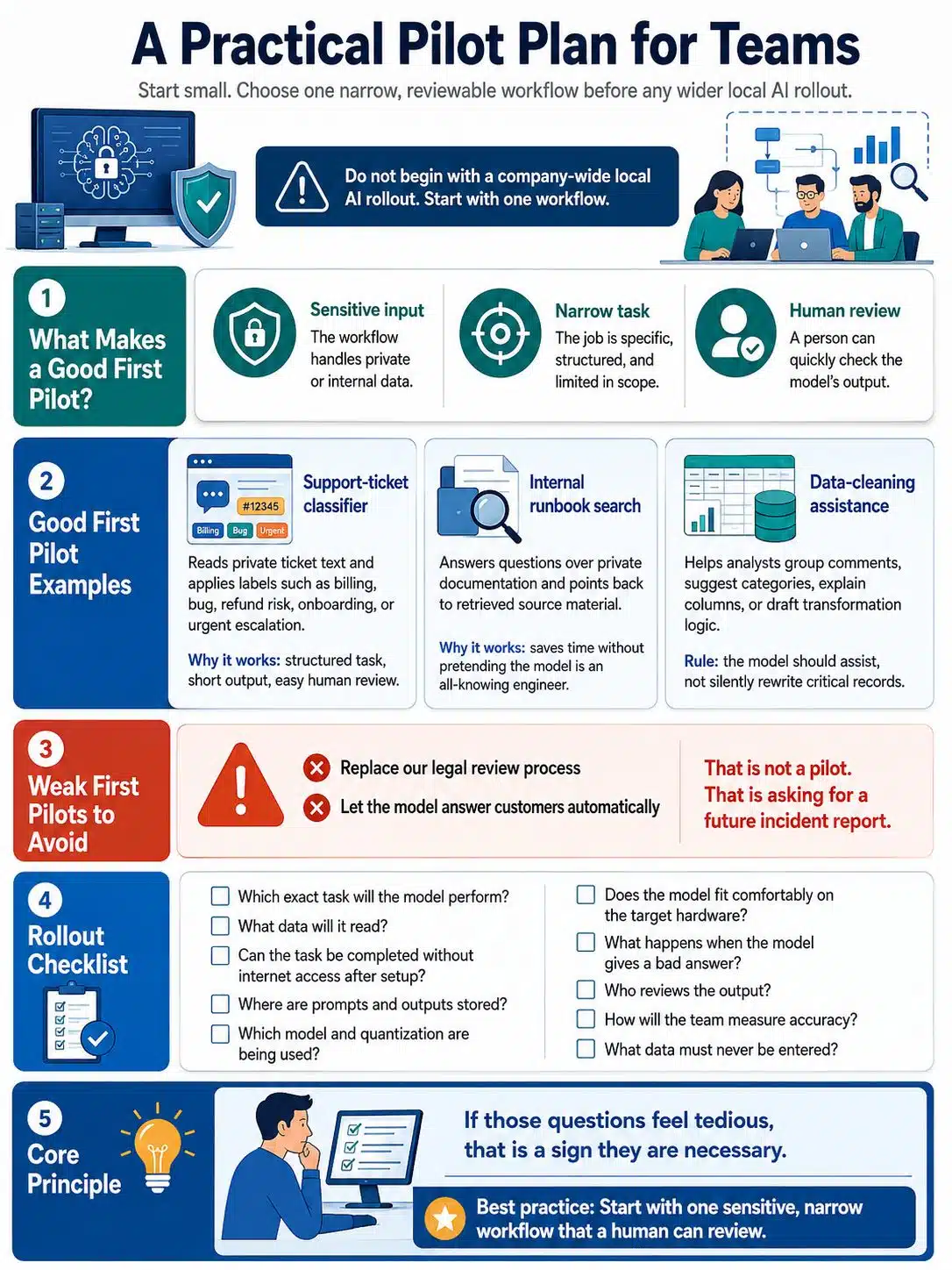
Do not begin with a company-wide local AI rollout.
Start with one workflow.
Good first pilots usually have three traits: the input is sensitive, the task is narrow, and the output can be reviewed by a human.
A support-ticket classifier is a good example. The model reads private ticket text and applies labels such as billing, bug, refund risk, onboarding, or urgent escalation. The output is short. The task is structured. A human can review mistakes.
Internal runbook search is another good candidate. The model answers questions over private documentation, but the answer should point back to retrieved source material. If the document base is clean, this can save time without pretending the model is an all-knowing engineer.
Data-cleaning assistance can also work well. Analysts can use a local model to group comments, suggest categories, explain columns, or draft transformation logic. The model should assist, not silently rewrite critical records.
A weak first pilot would be something like “replace our legal review process” or “let the model answer customers automatically.” That is not a pilot. That is asking for a future incident report.
Use a checklist before rollout:
- Which exact task will the model perform?
- What data will it read?
- Can the task be completed without internet access after setup?
- Where are prompts and outputs stored?
- Which model and quantization are being used?
- Does the model fit comfortably on the target hardware?
- What happens when the model gives a bad answer?
- Who reviews the output?
- How will the team measure accuracy?
- What data must never be entered?
If those questions feel tedious, that is a sign they are necessary.
Measuring Performance Without Fooling Yourself
Tokens per second matters, but it is not the whole story.
Measure local LLM performance on the actual job you expect people to do. A tiny prompt asking for a poem about GPUs tells you almost nothing about how the model will behave with a long support thread, a messy CSV export, or a 20-page internal policy.
Track these basics:
- Model name and version
- Quantization
- Context length
- Prompt length
- Prompt processing time
- Generation speed
- Peak VRAM use
- System RAM use
- Output format failures
- User wait time
- Power draw, if the system will run often
Separate prompt processing from generation. A model may generate quickly once it starts, but take too long to read a large context. For document-heavy work, that delay matters.
Also test boring edge cases. Very short inputs. Very long inputs. Duplicate documents. Outdated policies. Ambiguous questions. Inputs where the correct answer is “not enough information.”
That last one is important. A local model that cannot admit uncertainty is not ready for serious internal use.
Recent Developments Worth Watching
Local LLM tools are becoming less like hobby projects and more like ordinary software infrastructure.
LM Studio’s February 2026 release notes, for example, show movement toward more server-friendly local inference, including parallel requests and continuous batching support for text workloads. That matters because local AI is not just about one person chatting with a model anymore. Teams want internal services, repeatable APIs, and better throughput.
Browser-based local inference is another area to watch. Recent WebGPU research suggests that more local AI workloads may eventually run inside browsers with better memory efficiency and portability across devices.
That is promising, but it needs careful wording.
Research progress does not mean every browser can suddenly run a high-quality private assistant smoothly. Hardware still matters. Browser support still matters. Model size still matters. For now, treat browser-based LLM inference as a direction worth watching, not a finished replacement for proper local deployment.
The trend is clear, though: more AI work is moving closer to the user’s device.
Local vs Cloud Is the Wrong Argument
The local-versus-cloud debate gets silly fast.
One side treats cloud AI as reckless. The other treats local AI as underpowered hobbyism. Neither view helps teams make good decisions.
Use local models when the input is sensitive, the task is narrow, and the quality bar is achievable. Use cloud models when you need stronger reasoning, larger context, advanced multimodal capability, managed scale, or better reliability—and when the data is approved for that environment.
A sensible hybrid setup may look like this:
- Local LLM for confidential notes, private documents, code snippets, and internal search
- Local embeddings and local vector storage for sensitive retrieval
- Cloud models for approved non-sensitive tasks that need stronger reasoning
- Human review for anything involving customers, money, law, health, safety, or security
- Clear retention rules for prompts, outputs, documents, and logs
That is not a compromise. It is mature architecture.
The local model does not need to be the smartest model in the world. It needs to be good enough for the private task in front of it.
Final Advice Before You Run LLM Locally
If you want to run LLM locally, start small and measure honestly.
Pick one private workflow. Choose a model that fits your hardware. Test more than one quantization. Use real prompts, not toy examples. Check where files and logs are stored. Write down the model version and settings. Build a small evaluation set before letting anyone depend on the output.
Most teams should not begin with the biggest model they can barely load. They should begin with the smallest model that completes the job reliably.
That is the quiet truth of local AI.
The future will not be every employee running a giant model under their desk while the office power bill cries for help. The more realistic future is smaller local models handling private, narrow, useful tasks close to the data, while cloud models remain valuable for heavier work where policy allows them.
For privacy-focused teams, that is a good future.
Not flashy. Not effortless.
Useful.
And in infrastructure, useful beats impressive almost every time.