

You rarely notice a sound effect until it misses the moment. A futuristic blast has no low-end weight. A UI button click sounds too sharp. A product demo feels flat because there is no tiny tap, slide, or confirmation tone to make the interaction feel real. A podcast transition uses the same stock swoosh everyone has heard a hundred times before.
That is where AI sound effects are becoming useful.
Generative audio tools do not have the taste of a sound designer. They do not understand the emotional weight of a scene, the rhythm of an edit, or the difference between a subtle product sound and a cheap trailer hit. But they can reduce one of the most annoying parts of audio work: searching for a very specific sound that may not exist in your library.
AI sound generation helps creators build options faster. It can produce custom clicks, impacts, ambiences, transition sounds, textures, and rough soundscapes that can be edited into a project. Used with restraint, it gives editors and creators more flexibility. Used carelessly, it creates a noisy, synthetic mess that pulls attention away from the story.
From Raw Text to Real Audio
Using SFX AI tools changes how creators find audio.
Instead of guessing how someone tagged a file in a stock library years ago, you describe the sound you need. The system may generate audio from a text prompt, reference clip, or even video input. Some tools can create a simple one-shot effect. Others can build ambience, loops, or sounds that loosely match visible action.
The important thing to remember is this: a generated sound is usually raw material, not the final product.
Think of generative sound effects as a capable assistant with limited judgment. It may give you a clean glass bottle break, but it will not automatically know whether that break should feel close and dry in a small bedroom or distant and echoing inside a concrete warehouse. That decision still belongs to the editor.
AI can create the sound. Context decides whether it fits.
The Art of the Sound Prompt
The fastest way to get bad AI sound effects is to write a vague prompt.
If you type “magic sound,” the model has to guess. The result may be a messy blend of sparkles, synth noise, and random shimmer. That might work for a cartoon reveal. It probably will not work for a polished brand video or game interface.
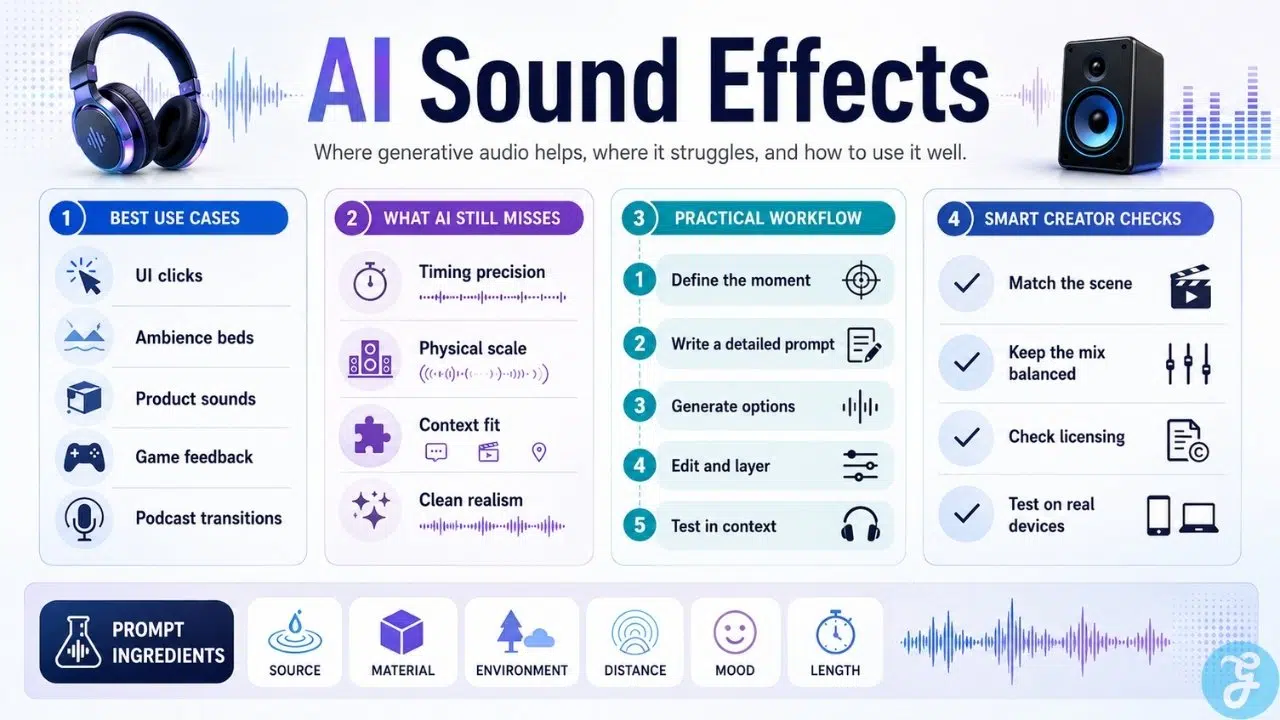
A better prompt works more like direction for a foley artist. It describes the physical source, the action, the material, the space, and what should be avoided.
Instead of:
“Footsteps.”
Use:
“Slow cautious footsteps on wet stone, close perspective, subtle tunnel echo, realistic, no music.”
Instead of:
“Button click.”
Use:
“Soft premium app confirmation click, short, clean, light glass tone, no harsh metallic sound, under one second.”
Specific prompts reduce guesswork. They also help teams build a repeatable workflow. Over time, the best prompts can become a small internal sound direction library, especially for games, apps, branded content, and recurring video formats.
Where Generative Sound Effects Work Best
Generative sound effects are most useful when the project needs quick variations, small details, or custom textures.
They work well for:
- UI clicks, taps, and confirmation sounds
- Soft transitions and whooshes
- Ambience beds and room tones
- Product interaction sounds
- Game feedback sounds
- Small foley-style textures
- Podcast stingers and segment transitions
- Background nature or environment loops
- Motion graphic accents
- Early sound design tests
This is especially helpful for small teams. A solo video editor, indie developer, course creator, or podcaster may not have a dedicated sound designer. AI sound generation gives them a faster way to test ideas before committing to final audio.
The value is not that AI always makes a perfect effect. It is that it gives you a starting point without making you search through hundreds of near-matches.
Where AI Sound Effects Still Struggle
AI sound effects can still fall short in ways that matter.
Timing is one of the biggest issues. A punch, door slam, footstep, or button tap needs to land exactly with the visual action. If the sound arrives even slightly late, the moment feels fake.
Scale is another problem. A model may generate a huge impact for a small object, or a weak sound for something that should feel heavy. It may add too much reverb, remove too much bass, or create a texture that feels disconnected from the environment.
Common failure points include:
- Poor micro-timing
- Sounds that do not match visual scale
- Metallic or compressed artifacts
- Overly dramatic effects
- Weak impact
- Repetitive textures
- Unnatural reverb
- Rough clip endings
- Sounds that feel generic
These problems are not deal-breakers, but they mean the output needs review. AI can generate sound quickly. It cannot replace listening carefully.
The Production Pipeline: Layering and Editing
Dropping a raw AI-generated clip straight into a timeline is usually a mistake.
Professional sound design often works in layers. A heavy mechanical door close may combine a low thump, a metal latch, a small rattle, and the room’s natural echo. A sci-fi interface sound may include a click, a short pulse, and a soft confirmation tone. A good impact may need both sharp attack and low-end body.
Treat AI sound effects as one ingredient, not the whole recipe.
A practical editing workflow may include:
- Trimming silence at the start or end
- Cutting the strongest part of the sound
- Adding quick fades to avoid pops
- Adjusting volume so it sits in the mix
- Reducing harsh frequencies
- Layering with other effects
- Matching timing to the visual event
- Testing the sound with dialogue and music
- Exporting in the correct format
This is where the work becomes sound design. SFX AI tools can speed up the search and generation stage, but the final quality depends on editing.
Use the Sound in Context
A sound can feel good alone and still fail inside the project.
That is why every AI sound effect should be tested where it will actually live. Put it under the voiceover. Place it against the edit. Try it with the music bed. Test it inside the game interaction or app flow.
Ask:
- Does it hit at the right moment?
- Does it match the object or action?
- Does it fit the physical space?
- Is it too loud or too busy?
- Does it fight the music or dialogue?
- Does it still work on phone speakers?
That last point matters. A deep impact may sound powerful on studio monitors and disappear on a phone. A sharp click may sound clean in headphones and irritating on laptop speakers.
Good audio survives normal listening conditions.
Licensing and Rights Still Matter
AI-generated does not automatically mean safe to use anywhere.
Before using AI sound effects in client work, apps, games, ads, podcasts, monetized videos, or commercial projects, check the tool’s license terms. Your subscription plan may affect what you can do with the output.
Check whether you can:
- Use the sound commercially
- Use it in client work
- Use it in games, apps, ads, or broadcast
- Modify and layer the output
- Redistribute it as part of a sound library
- Use it without attribution
- Keep using it if your subscription ends
For serious projects, save a basic paper trail: tool name, generation date, prompt, license terms, and downloaded file. It is not glamorous, but it protects the project later.
AI sound generation makes audio easier to create. It does not remove rights management.
The Real Value of AI Sound Effects
The real value of AI sound effects is not about filling every project with more noise.
It is about access.
A small team can create a more polished video. An indie developer can test interface sounds before hiring a sound designer. A podcaster can make a transition that feels less generic. A product team can explore a sonic identity before investing in a full audio system.
But the final decision still needs human taste.
Generate quickly. Listen carefully. Edit deliberately. Then choose the sound that serves the moment. That is how AI sound effects become useful production material instead of another layer of digital clutter.






















