
The same English word can appear on an invoice, in a battery warning, and on a payment button. A glossary that gives “charge” one Spanish equivalent across all three can spread a bad translation through an entire release. Resolving glossary conflicts before AI translation starts with deciding where each term applies and showing reviewers how to check it in context.
Start with the words customers act on: buttons, payment states, feature names, and instructions. A term that appears twice at checkout can deserve more attention than one that appears 50 times in a blog post.
1. One source word has multiple meanings
“Dispute a charge” refers to a payment. “Charge the battery” describes an action on a device. A glossary row that maps charge to cargo gives the translation system the billing sense without telling it where to stop applying it.
Split the entry by meaning. In a hypothetical English-to-Spanish project, the billing team might approve disputar un cargo for “dispute a charge” while the hardware team uses cargar la batería for “charge the battery.” If your tool can only apply a flat glossary across a batch, export separate billing and hardware glossaries or use specific source phrases. Keep the bare word out of the shared export when its use is ambiguous.
Test a sentence for each meaning and one where the glossary should stay out of the way. That last example is how you catch an entry that behaves well on an invoice but spills into the setup guide.
2. Teams use different translations for the same concept
Two Spanish translations for “subscription” may survive a spreadsheet merge because each came from a reasonable source. The help center calls it suscripción, while account settings call it membresía. Before picking one, check whether both refer to the same recurring plan. A paid subscription and a loyalty membership may need distinct terms.
If they do name the same plan, inspect the live strings customers use to complete a task. A help article that says “select Suscripción” sends readers looking for a button that may still say “Membresía.” Record the chosen term and mark the old one as deprecated for that concept. If the UI and help center ship at different times, reference the label customers will see in the live product until both releases are aligned.
3. An approved term belongs to a different locale
A Spanish term approved for Spain can turn up in a draft for Mexico if both teams export from a generic “Spanish” column. A product team might choose ordenador for Spain and computadora for Mexico, then preserve both choices in the termbase. The country labels describe the product team’s decisions, not universal rules for how people speak.
Record the source and target locale on each decision. When a tool accepts only a broad Spanish language code, keep locale selection in the workflow that supplies the glossary, and confirm that each job gets the intended export. Decide which terms can inherit from a shared glossary and which must wait for market approval. A regional policy, payment-method name, or account label is a good candidate for explicit review. Market-specific policy wording can matter as much as the translated terms in multilingual customer support.
4. A short entry overlaps a longer phrase
A billing glossary may contain both “card” and “gift card.” The short entry can make sense on a payments screen, but “gift card” is a separate product concept with its own approved translation. An editor who checks only isolated terms can miss a wrong substitution in “gift card balance.”
Review overlapping entries in actual sentences. Include the bare term, the longer phrase, and a third case where a nearby word changes the meaning. If the short entry creates unwanted matches, narrow its scope or export only the more specific phrases that need control. Compare the configured behavior when evaluating website translation and localization tools.
Case and stopwords can also affect matching. Google Cloud Translation Advanced documents case-sensitive matching by default, an option to ignore case, and glossary entries it ignores when they match its stopword rules. Check the behavior for the tool and settings you plan to use. Google Cloud Translation glossary documentation
5. A protected name looks like an ordinary word
Suppose “Pulse” is a hypothetical dashboard feature name. A product manual may also use “pulse” to describe a signal. Preserving both forms globally could leave an ordinary word untranslated. Translating both could rename the feature in the same document that tells readers how to find it.
Give the name a do-not-translate rule with explicit scope. Record the official spelling, whether the actual interface label is localized, and where the rule applies. Include a sentence-start example, where an ordinary word may also begin with a capital letter. If the glossary relies on case to distinguish the two, check that behavior with the intended settings and look at the result in the rendered interface. A heading converted to uppercase can hide distinctions that were apparent in the source file.
Treat placeholders such as {amount} as separate protected tokens. Check that the token survives exactly and that the resulting sentence still reads naturally.
6. The approved wording conflicts with grammar or UI constraints
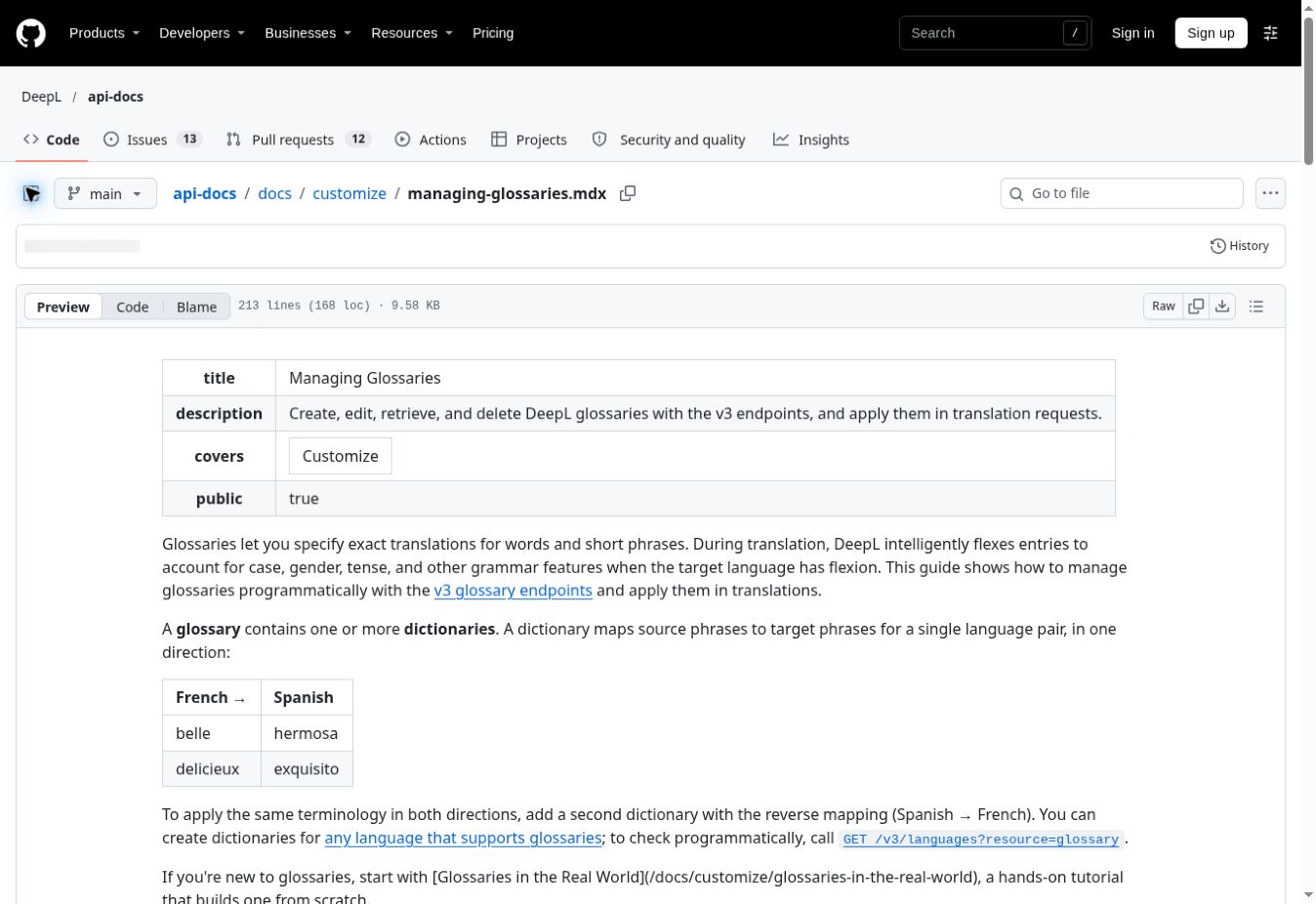
“Charge” can be a noun in a transaction history and an action on a merchant’s checkout button. In the same Spanish product, the singular noun might be cargo, the plural cargos, and the imperative-style action label might use the infinitive Cobrar. A fixed-text check that expects cargo everywhere would flag a correct plural and miss the intent of the button.
Mark which entries can inflect for grammar and which require exact spelling. DeepL’s API documentation describes grammatical inflection for glossary entries in target languages that support it. Test this behavior in full sentences and check layout separately for constrained strings. Review a plural with its article or adjective and open the actual button or a staging preview to check for truncation. DeepL glossary documentation
7. The glossary conflicts with translation memory or other instructions
An updated glossary says cargo, but a translation memory still offers cobro for a previously translated string. A style guide may prefer a third expression in a particular context. Decide how your pipeline handles those inputs before it republishes existing copy. Translation memory stores previously translated segments, so a reused sentence may carry wording from an earlier release even when the current termbase has changed.
Give the term owner a concrete conflict to resolve: the source string, the glossary entry, the existing translation, and the affected screen or document. Record what wins for that concept and where exceptions apply. Then route impacted existing translations for review alongside new strings. For a prompt-based workflow, pass the approved glossary and scoped exceptions together, then check output independently of the model that produced it.
How to check glossary conflicts before AI translation goes live
Use a small set of real source strings from the intended release and record an expected result before you run them. The examples below illustrate what a review for a hypothetical Spanish release might look like.
| Source string or field | Expected terminology | What the reviewer checks |
|---|---|---|
| Dispute a charge | disputar un cargo |
Billing sense |
| Charge the battery | cargar la batería |
Hardware sense |
| Two pending charges | dos cargos pendientes |
Plural and agreement |
| Charge, on a merchant’s checkout button | Cobrar |
Action label and available space |
Amount label usage {amount} |
Preserve {amount} |
Placeholder intact in the rendered string |
For each disputed term, keep its meaning, locale, scope, approved target, one example, an owner, and the glossary version. Store exact labels alongside their screen or string ID where available. If your translation engine accepts only pairs of terms, keep the context and approval record in the source termbase and export the pairs each job needs.
Resolve glossary conflicts before AI translation by checking the phrases customers will actually see. Release the glossary once the sample passes with the intended locale and settings, and send unresolved terms for review before running the affected batch. Use the same examples after any glossary or workflow change so an old conflict cannot silently recur.