
Digital portfolios help students show employers how they apply their skills through projects, writing, research, designs, and other work samples. A useful portfolio gives each sample context: what the task required, what the student contributed, how they approached it, and what the result actually demonstrates. That makes an application’s claims easier to examine, especially when the applicant has little paid experience.
The challenge is choosing and explaining the work. A folder full of assignments leaves the employer to figure out what matters. A carefully presented project gives them something specific to discuss in an interview.
What Digital Portfolios Add to a Student’s Application
A digital portfolio is a selected collection of work presented online or in a shareable digital document. It might include a research summary, a working prototype, an edited article, a lesson plan, or a spreadsheet with an explanation of its calculations.
The University of Alabama’s Career Center explains that students across majors can adapt portfolios to their career goals. Its suggested materials extend beyond visual design to project budgets, writing samples, and lesson plans. The choice should follow the work you want to do, rather than whichever assignment looks most attractive.
A resume gives an employer a concise account of your background. A portfolio can let them inspect a piece of that background more closely. Neither removes the need to follow the application instructions. As Marquette University’s Career Center notes, portfolios may enter the initial application process in fields such as teaching and graphic design, while other applications begin with conventional documents.
Keep the essential qualifications in your resume. Treat the portfolio as supporting evidence that a reader may choose to explore, not a place to hide information the application requires.
How Work Samples Make Skills Easier to Assess
“Strong communication skills” could describe many different abilities. A short research brief shows whether you can organize information and explain a conclusion. An accompanying revision note can show how you responded when a reader found the explanation confusing.
Different samples answer different questions. These are illustrative choices, not requirements for every student:
| Skill you want to demonstrate | Possible student work sample | Context that makes it useful |
|---|---|---|
| Data analysis | A spreadsheet or notebook using a public dataset | The question, cleaning decisions, checks, and limitations |
| Written communication | A policy brief or student publication article | Intended audience, source selection, and editing decisions |
| Design judgment | A prototype with selected earlier versions | The user problem, constraints, and reasons for revisions |
| Project coordination | A club event plan and debrief | Your responsibilities, dependencies, and response to setbacks |
| Technical problem-solving | A small application or engineering model | Setup instructions, tests, known failures, and your contribution |
| Teaching | A lesson plan and sample learning activity | Learning objective, assessment approach, and adaptations |
A finished artifact can reveal execution. Process notes help explain judgment. A plan that changed after feedback may demonstrate something a polished final page cannot: how you recognized and addressed a problem.
For teamwork, identify the boundary between the group’s achievement and your own work. “Our team built the prototype; I designed the test procedure and documented the failures” gives an interviewer a clearer starting point than claiming responsibility for the whole project.
Reflection Shows How You Learn
Harvard’s Derek Bok Center for Teaching and Learning places reflection at the center of its guidance on student portfolios. Students can explain their methods, identify strengths, and consider how they would improve the work.
For an employment portfolio, keep that reflection connected to a decision. Explain why you changed a confusing chart, rejected an unreliable source, or simplified a feature after testing it. Then identify what remains unresolved.
“I learned a lot” tells the reader little. “The first chart hid the difference between the groups, so I separated the categories and labeled the sample sizes” gives them a decision they can examine.
Turn One Assignment Into an Employer-Ready Case Study
Start with a project relevant to the role you want. You do not need a client or internship to begin. Coursework, independent projects, volunteering, and student organizations can supply material, provided you describe the setting accurately and have permission to share it.
Consider this illustrative example: a business student creates a budget workbook for a campus event. Uploading the spreadsheet alone leaves several questions unanswered. Was the event real? Did the student build the formulas? Were the costs estimates? Was the workbook ever used?
A useful project page could explain:
- The task: prepare a budget for a proposed student event under a fixed spending limit.
- The contribution: build the workbook, separate fixed and variable costs, and document assumptions.
- The decision: show alternative attendance scenarios because ticket income was uncertain.
- The check: compare formula outputs with manual calculations and inspect how changed inputs affect the totals.
- The outcome: produce a planning workbook reviewed in class; the event was not held, so no actual savings or revenue are claimed.
- The next improvement: replace estimates with supplier quotes if the event goes ahead.
This example demonstrates planning and spreadsheet reasoning without inventing a commercial result. If the project was completed with teammates, the page should also credit their work.
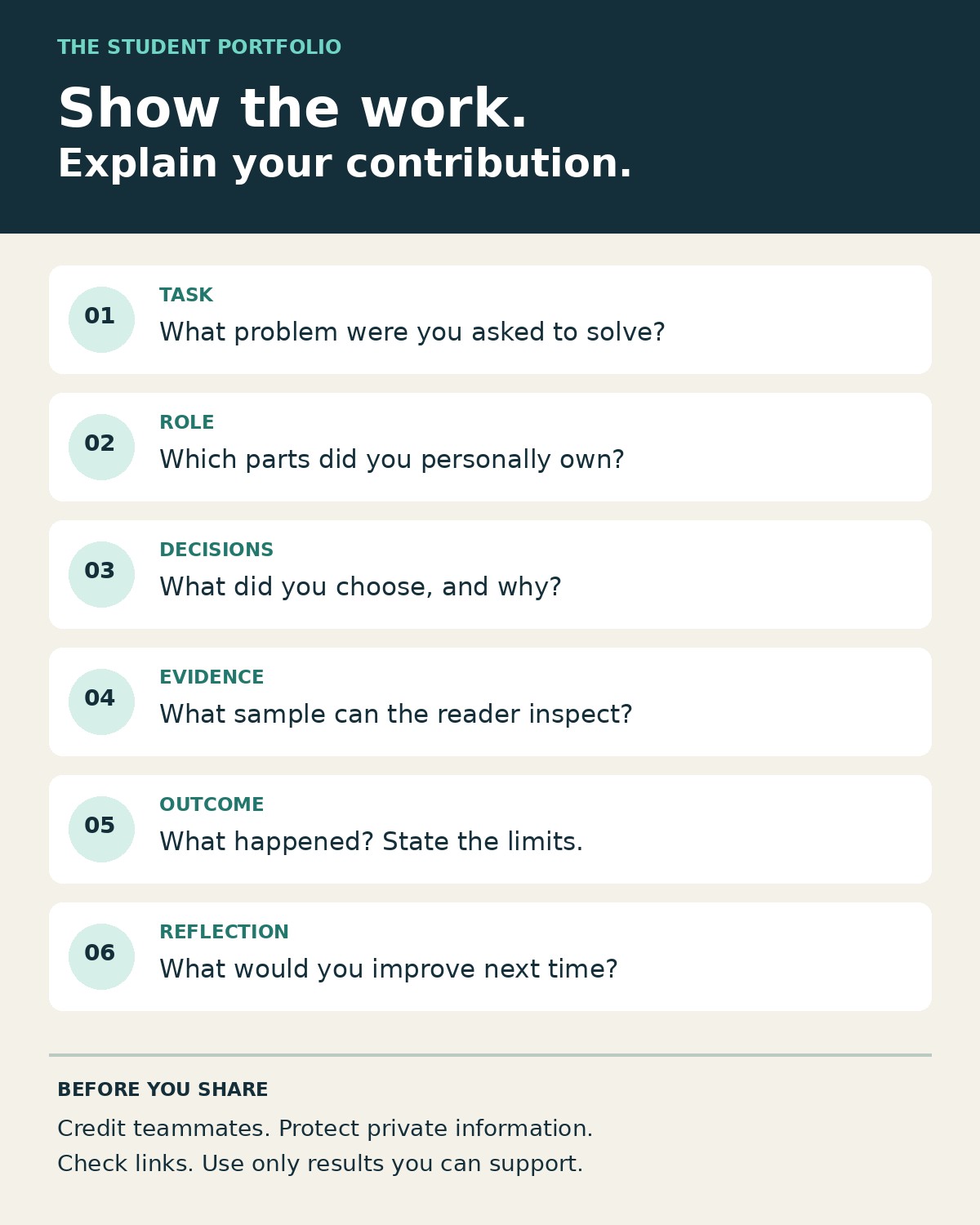
A practical project description can follow six questions: What was the task? What did I own? What did I decide? What can the reader inspect? What happened? What would I change? Use only the questions that add useful context; a short writing sample may need far less explanation than a complex engineering project.
Choose Evidence That Matches the Job
Begin with a small selection you can explain thoroughly. Three strong projects can be a manageable starting point, though the employer’s submission requirements take priority. There is no universal ideal number.
Read the job description and identify the tasks the successful applicant would perform. Then choose work that helps demonstrate those tasks. For an entry-level analyst role, a well-documented analysis may deserve the first position. For a communications internship, lead with writing or editing that suits the intended audience.
You can keep a larger private archive while presenting a smaller selection for each application. This also makes it easier to replace weaker work as your skills develop.
Certificates can support the collection, but explain how you applied the learning. If you completed a course on research methods, include a suitable research task and describe your source evaluation. Label practice projects and simulated briefs clearly. A fictional campaign should never appear to be commissioned client work.
Students pursuing remote roles can also consult Editorialge’s remote job portfolio guide for ways to present documentation and collaboration habits. Keep the student version focused on what you can actually show and explain.
Make Your Contribution Credible
Evidence needs enough context to be checked. Give projects descriptive titles and dates. Explain whether the work was individual, collaborative, academic, voluntary, or paid. Where useful, provide a safe downloadable sample, a working demonstration, or selected process records.
Use numbers only when you can substantiate them. A test result needs its conditions. A claim about improvement needs a baseline and a comparable later measure. A classroom grade reflects assessment within that course; it does not automatically establish business impact.
A useful result may be qualitative. You might have completed a functioning prototype, corrected a recurring calculation error, or revised an argument after feedback. Describe the outcome and its limits plainly.
If AI tools materially contributed, explain their role where relevant to understanding authorship and competence, and follow the applicable course or employer rules. Separate generated material from your analysis, corrections, and verification. Be ready to explain every part you present as evidence of your own ability.
Protect other people’s information. Before sharing internship work, obtain permission and check what may be disclosed. Remove personal identifiers and confidential details from approved samples. If a sample cannot be shared safely, use a permitted high-level description or choose another project. Do not assume a blurred name makes a confidential document suitable for publication.
Make the Portfolio Easy to Open and Understand
Choose a format that serves the work. A compact website can organize several projects. A PDF can suit a short collection of writing or design samples. A code repository can provide technical detail, but a plain-language project summary helps readers understand why the work matters.
A useful starting structure is a short introduction, selected projects, a resume, and a professional contact method. Avoid placing the strongest evidence behind a long biography or decorative animation.
Before submitting an application:
- Open the portfolio while signed out and check the sharing permissions.
- Test the important links and files on a phone as well as a computer.
- Use readable text, clear headings, image descriptions, and captions or transcripts for relevant audio and video.
- Provide a lightweight alternative when a large file or interactive demonstration is essential.
- Check whether access depends on a university account, and keep permitted copies of your work before graduation.
For protected work, arrange authorized access instead of making it public. A portfolio should be convenient to review without sacrificing privacy.
Use the Work to Prepare for Interviews
Building the collection is also an opportunity to practice explaining your decisions. Choose one project and talk through its purpose, your contribution, an obstacle, the result, and what you would do differently. Keep the artifact nearby so you can point to the relevant detail.
Ask a classmate or career adviser to review the page without your help. Can they identify what you did? Can they find the actual sample? Can they distinguish the result from your hopes for the project? Their confusion is useful feedback about what the page still needs.
When an application permits a portfolio link, direct the reader to relevant work. In an interview, ask whether a brief example would help answer the question. Do not assume the interviewer has already opened it or has time for a full presentation.
Digital portfolios help students make their abilities more visible when the evidence is relevant, understandable, and honest. Start with one project worth discussing. Show the work, explain your decisions, and make your contribution clear enough that an employer can ask informed questions about it.