Trying to figure out How To Choose Marketing Automation Software Without Overbuying can feel like shopping for a small tool and getting pitched a whole factory. You want Automation that helps your Marketing work harder, not Software that quietly makes your bill bigger every month.
The trap is usually not the demo. It is the extra seat, the higher contact tier, the added Analytics package, or the advanced Features your team never touches.
I’m going to keep this plain. We’ll match goals to features, check Integration, compare Pricing, and make Software selection a lot easier.
Read on.
Understand Your Business Needs
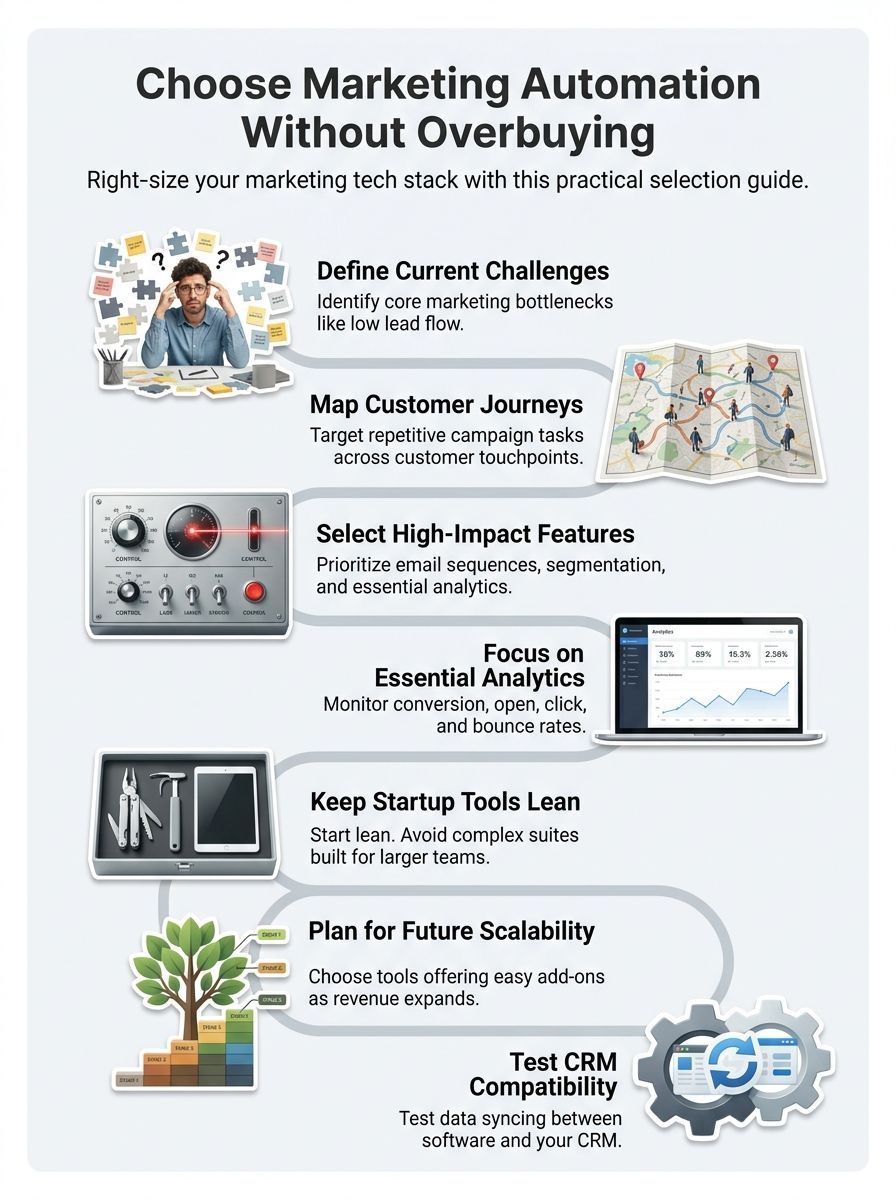
Start with the work that slows your team down today. If leads sit too long before a reply, if email follow-up happens by hand, or if you cannot tell which campaigns create revenue, those are the first problems your marketing automation software should solve.
That order matters. In Salesforce’s 2026 State of Marketing, 69% of marketers said they still struggle to respond promptly, and 84% admitted they still run generic campaigns. That tells you your first buying goal should be speed, relevance, and visibility, not the biggest workflow builder on the market.
Define your current marketing challenges
Write down the top three jobs you need the platform to handle in the next 90 days. Keep the list concrete so your Comparison stays honest.
- Lead flow: Are you getting enough new leads, and do they reach sales fast enough?
- Email marketing: Are open rates, clicks, or replies too weak to move people forward?
- Lead management: Do contacts pile up with no routing, scoring, or follow-up?
- Retention: Are existing customers going quiet because nobody owns the next touchpoint?
Once you have those answers, score each need against four filters: user experience, Integration capabilities, Analytics tracking, and Pricing model. If a feature does not support one of your top three jobs, move it to a later list instead of paying for it now.
A small five-person marketing team tested this the practical way during a four-week pilot. Before the pilot, they were spending 18 hours a week on manual lead follow-up and averaging 42 qualified leads a month. They turned on only two basic drip sequences and lead scoring, with no advanced workflows or extra add-ons. After one month, manual follow-up dropped to 6 hours a week and qualified leads rose to 61 a month. That is a good reminder to solve the biggest workflow problem first, then add more only if results demand it.
Identify the areas where automation can help
Map your customer journey from first click to sale, then mark every place where someone copies data, sends the same message again, or waits for another tool to update. Those friction points are where Automation earns its keep.
A good early rule is simple: automate repetitive tasks, not judgment calls. Small teams in marketing forums keep landing on the same lesson, the first wins usually come from lead handoff, basic nurture emails, and cleaner tracking, not giant scoring models that need constant upkeep.
- Best first automations: welcome emails, demo follow-up, form routing, and re-engagement nudges.
- Good data to track: clicks, form fills, booked calls, and sales-stage movement.
- Easy waste to avoid: AI extras, cross-channel add-ons, and deep custom reporting you cannot use yet.
Use marketing automation as a working tool for campaign management, not as a promise of some future department overhaul. If it saves time this quarter and gives you cleaner data, it is doing its job.
Evaluate Features That Align With Your Goals
Feature lists are where overbuying usually starts. The fix is to compare only the Features that move leads, improve Customer engagement, or make your team faster.
Email automation and segmentation
As of July 2026, vendor pricing pages show very different entry points once you compare what each plan actually allows. A low monthly price can still hide tight limits on contacts, seats, flow depth, or automation actions.
| Platform | Starter pricing signal | What you really get | Good fit | What to watch |
|---|---|---|---|---|
| HubSpot Marketing Hub Starter | $20 per seat monthly | 1,000 marketing contacts, send limit of 5 times your contact tier, and one simple workflow per form with up to 10 actions | Teams that want CRM-adjacent Marketing Software and simple follow-up | Advanced automation, bigger reporting needs, and higher contact volume push you up fast |
| ActiveCampaign Starter | Starts at $15 per month for under 1,000 contacts | 1 user, limited segmentation, and 5 actions per automation | Small teams focused on email marketing and basic Lead management | Complex branching and multi-user work usually mean a higher tier |
| Mailchimp | Free up to 250 contacts, Standard starts at $20 per month | Free plan has no Marketing Automation Flows, Essentials allows up to 4 flow steps, Standard allows up to 200 flows | Newsletter-first teams that want easy campaign building before deeper Automation | The free tier is very limited for true nurture sequences |
| Brevo | Starter from $9 per month, Standard from $18 per month | Starter removes the daily send cap but keeps lean reporting, Standard adds unlimited-contact marketing automation and advanced reports | Budget-conscious teams that want a clean Pricing model | You still need to check contact storage tiers and add-ons |
This is why feature Comparison beats brand shopping. If you only need a welcome series, a lead magnet follow-up, and basic segmentation, paying for enterprise orchestration makes no sense yet.
Analytics and reporting capabilities
Do not let a glossy dashboard make the choice for you. The right Analytics setup shows what changes behavior, not just what looks busy.
HubSpot’s July 2026 email analytics guidance makes a very useful point: click-through rate and conversion rate are your clearest action metrics, while open rate is getting less reliable because of Apple’s Mail Privacy Protection. So when you compare Marketing tools, look for segment-level clicks, conversions, unsubscribe trends, and campaign-to-Lead tracking before you care about pretty charts.
A simple buyer checklist works well here. Import sample contacts, build a few segments, send test campaigns, and confirm that the dashboard shows results by list, offer, and campaign path.
- Can you see click and conversion data by segment?
- Can you tie a campaign to a form fill, booking, or sale?
- Can you separate delivery issues from content issues?
- Can a non-technical teammate find those answers fast?
If you want a hands-on way to test analytics and segmentation, run a short checklist before you buy. One team used a two-day review that took about six hours total: import 1,000 sample contacts, create three segmented lists, build two automated email paths, run five test sends, and then review the dashboard metrics. The deciding factor was not how pretty the dashboard looked. It was whether the platform showed open and conversion rates for each segment inside the dashboard. Tools that hid that behind custom reporting did not make the cut.
A clear Analytics view helps you run campaigns with fewer guesses. That is how you save budget and make your Marketing strategy easier to measure.
Match Tool Complexity to Your Business Stage
Match tool complexity to your growth stage. You do not need a giant system if your team still runs on one list, one offer, and one marketer doing most of the work.
Avoid overengineering for startups
Startups usually overbuy in three places: contact tiers, workflow depth, and seats. A plan can look affordable at first and still become expensive if your list grows faster than your revenue.
- Good starter fit: one welcome sequence, one demo follow-up, and one CRM sync.
- Move up a tier: you need branching paths by behavior, product line, or lifecycle stage.
- Hold off on enterprise: only one person builds campaigns and reporting needs are still basic.
HubSpot is a good example of why this matters. Its Starter plan includes one simple workflow per form with up to 10 actions and 1,000 marketing contacts. If your team already needs bigger journeys, heavy attribution, or broad cross-channel work, you are really evaluating a higher tier, not the starter price.
A quick budget comparison shows how fast overbuying happens. In one startup model, a minimal plan cost $150 a month and included email automation for 5,000 contacts, basic analytics, and one CRM sync. The enterprise suite cost $2,400 a month for advanced workflow building, 50,000 contacts, and premium integrations. For that early-stage team, about 78 percent of the enterprise features would have gone unused. If your list size, campaign volume, and reporting needs are still simple, paying for future complexity can drain budget long before it delivers value.
Choose scalable solutions for growth
Scalability is not about buying the biggest platform now. It is about knowing which lever will raise your bill first: contacts, sends, seats, onboarding, or reporting limits.
| Business stage | What you need now | Upgrade trigger to watch |
|---|---|---|
| Early stage | Basic email marketing, form capture, lead routing, simple Analytics | Contact growth, extra users, and missing segmentation |
| Growing team | Multiple nurture paths, better reporting, stronger CRM Systems sync | Workflow limits, custom reporting, and send caps |
| Mature program | Multi-step journeys, approval workflows, attribution, deeper Scalability | Onboarding fees, admin controls, and advanced data needs |
Implementation costs belong in this stage check too. ActiveCampaign says every plan includes free onboarding and free migration, while HubSpot says Professional and Enterprise purchases are automatically charged onboarding. That difference can matter more than a flashy feature if your team needs help getting live quickly.
Pick a platform that can grow in steps. Paying for the next useful stage is smart. Paying for the stage after that usually is not.
Consider Integration With Your Existing Tech Stack
Integration problems create one of the sneakiest forms of overbuying. A tool can look affordable until your team spends weeks fixing duplicates, missing fields, and broken attribution.
Make sure it works with your CRM and other tools
Check the exact apps your team uses every day, not a vague promise that the platform “connects with everything.” HubSpot lists more than 2,000 apps, ActiveCampaign says its ecosystem includes 950+ apps, and Mailchimp offers 300+ integrations, but the real question is whether your CRM, forms, ecommerce data, and web analytics can share the fields you care about.
If Salesforce is part of your stack, look deeper than the app badge. ActiveCampaign’s official Salesforce integration supports two-way sync, opportunity syncing, and bi-directional field mapping on supported setups, which tells you much more about daily usability than a simple marketplace listing does.
- Import 10 to 20 sample leads from your form or landing page.
- Check that source, campaign, and owner fields map correctly.
- Update one record in the CRM and confirm the change syncs back.
- Create a duplicate on purpose and see how the system handles it.
- Unsubscribe one contact and confirm suppression stays in every connected tool.
A small sync test can reveal issues before they become expensive. In one three-way check between an automation tool, a CRM sandbox, and a contact form, 10 test leads were submitted. Nine reached the CRM within 90 seconds with the correct lead source tag. One created a duplicate contact because the systems handled email normalization differently. The fix was simple: enable email normalization, run a re-sync, and confirm duplicates are resolved. That kind of test tells you more than a vendor demo, especially when clean lead routing matters.
There is a legal angle here too. The FTC says commercial email opt-out requests must be honored within 10 business days, so your unsubscribe and suppression data needs to sync cleanly across your CRM and email tool. If a platform cannot prove that in testing, it is not cheaper, it is riskier.
Choose a tool only after you verify field mapping, deduplication, campaign attribution, and suppression rules. Clean Integration keeps your Lead data usable, your Sales handoff cleaner, and your budget under control.
Final Thoughts
How To Choose Marketing Automation Software Without Overbuying comes down to buying for the next useful 6 to 12 months, not the next fantasy org chart.
Pick the Features tied to Lead management, Analytics, and CRM Integration. Then compare Pricing by contacts, sends, seats, onboarding, and upgrade triggers.
Small teams usually do better with simpler Automation Tools they can set up fast and measure clearly.
That keeps costs down, supports Retention, and gives your Marketing room to grow without waste.
FAQs about How To Choose Marketing Automation Software
1. How can I avoid overbuying marketing automation software?
Start with clear goals, list the tasks you want the software to do, and set a firm budget. Try free trials, and don’t buy add-ons you will not use, like a whole toolbox when you only need a hammer.
2. What core features matter most in marketing automation software?
Pick basics that let you run email series, manage customer data, track campaigns, and analyze data. Keep it simple, those few parts do most of the heavy lifting.
3. How do I pick software that fits my business size and needs?
Match the tool to your team, and map it to your current workflows. Small teams need low-cost, easy tools, while large teams need scale, integrations, and strong reporting.
4. How do I control costs and avoid pricing traps?
Watch for per-contact fees, extra charges for seats, and costly add-ons. Run a pilot, negotiate terms, and turn off features you do not use.