


Ever feel like your day disappears into follow-up emails, social posts, and spreadsheet updates?
If you have been asking, What Is Marketing Automation And How Does It Work?, the short answer is simple: it uses software to handle repeat marketing tasks so you can spend more time on strategy, testing, and real conversations with leads.
HubSpot’s 2026 State of Marketing says 47% of marketers use automation to make their processes more efficient, and 92% use it for data analysis and reporting. That tells you this is no longer something only large teams use.
I’ll walk you through the basics, the moving parts behind workflows, and the tools that make the biggest difference first.
What Is Marketing Automation And How Does It Work?
Marketing automation uses software to run repeat marketing tasks across email, social media, forms, landing pages, and CRM follow-up.
It watches for a signal, such as a signup, click, page visit, or purchase, then carries out the next action you planned. That might be an email, a lead score update, a sales alert, or a change to a customer record.
Definition of marketing automation
Think of marketing automation as a rules engine for your marketing. You choose the audience, the trigger, the action, and the timing, and the platform keeps the process moving without manual hand-holding.
Tools like HubSpot, Mailchimp, and Salesforce Marketing Cloud Engagement all follow that model. The big difference is how deeply they connect to your customer relationship management data, reporting, and multi-channel campaigns.
| Tool type | Main job | Best use | Where it falls short on its own |
|---|---|---|---|
| Email platform | Sends newsletters, promos, and simple sequences | Welcome emails, product updates, re-engagement | Usually weaker for sales handoff, scoring, and deeper workflow logic |
| Marketing automation platform | Runs trigger-based campaigns across channels | Lead nurturing, segmentation, scoring, branching workflows | Needs good data and clear goals or it turns into noisy automation |
| CRM software | Stores contacts, deals, and activity history | Sales pipeline visibility and account context | Does not replace campaign building or audience automation by itself |
Key features of marketing automation
The best platforms all give you the same core building blocks, triggers, branches, personalization, and reporting. Once you understand those four pieces, the rest of the category makes a lot more sense.
- Triggers: A form fill, email click, purchase, or page visit can enroll a contact into a workflow the moment it happens.
- Branches: HubSpot workflows use if/then logic, so a contact who clicks can get a product tip while a contact who ignores the message gets a softer follow-up.
- Personalization: HubSpot’s personalization tokens work like smart fill-in-the-blanks, which helps you swap in a name, company, or owner without creating a brand-new email for every segment.
- Lead scoring and handoff: Salesforce scoring tools can add context to a lead before sales ever calls, which helps reps focus on people who are showing real buying intent.
- Reporting: Good automation software ties actions back to revenue, form submissions, meetings, and pipeline movement so you can tell what is helping and what is just creating activity.
How Does Marketing Automation Work?
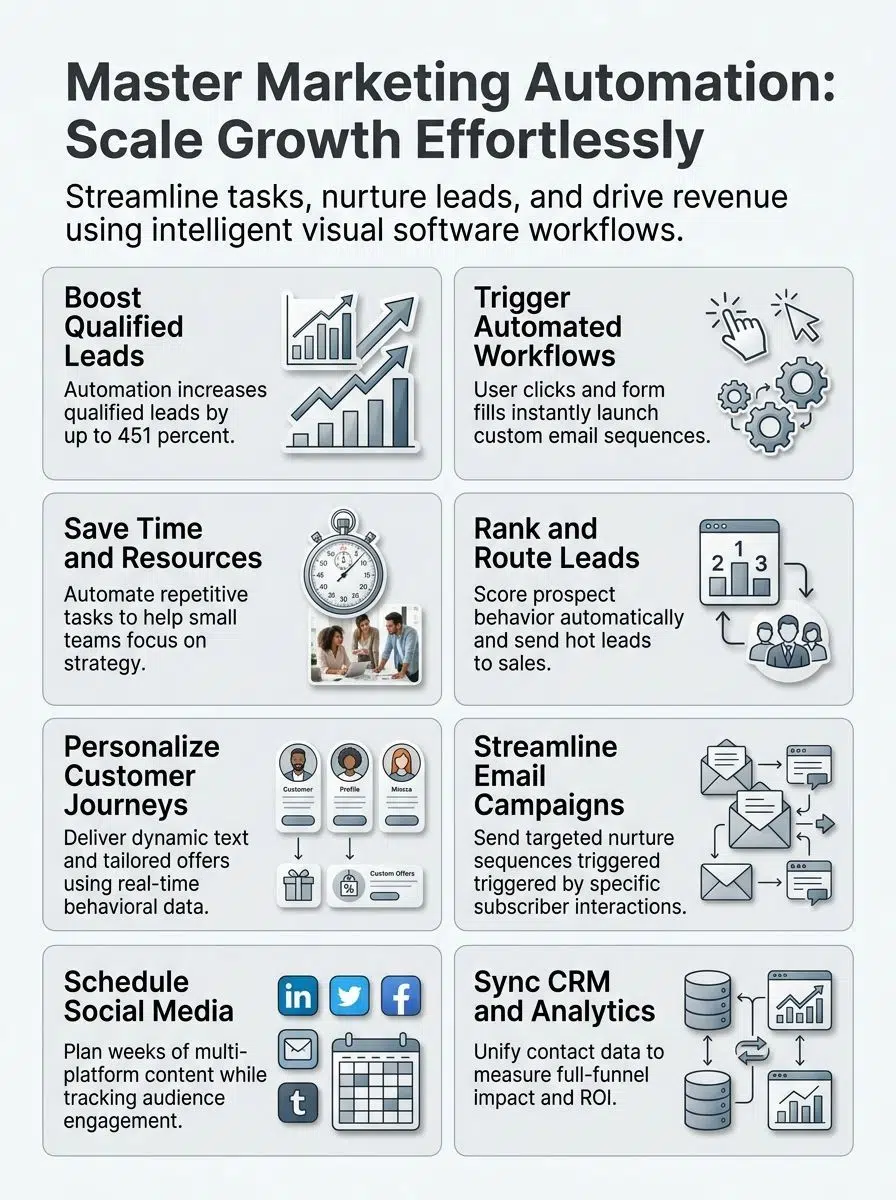
Marketing automation works by collecting behavior data, checking that behavior against rules, and then taking the next step automatically.
At a basic level, every automated campaign follows the same pattern: collect data, trigger a workflow, branch the path, update the record, and measure the result.
Data collection and analysis
Most systems pull data from your website, email platform, forms, ads, and CRM. In Google Analytics 4, a conversion starts as an event, which gives you a consistent way to measure actions like demo requests, purchases, or booked calls across channels.
That setup matters because it pushes you away from vanity metrics. In HubSpot’s 2026 research, the top KPIs marketers prioritize are lead quality and MQLs, lead-to-customer conversion, return on marketing investment, customer acquisition cost, and lead volume.
- Lead quality and MQLs: Use this to spot which channels attract the right people, not just the most people.
- Lead-to-customer conversion: This shows whether your lead nurturing is moving prospects down the funnel.
- ROMI: This helps you see whether a campaign made money after costs.
- CAC: This tells you when a workflow is too expensive for the revenue it creates.
If your dashboard cannot connect a campaign to one of those outcomes, your automation may be busy without being useful.
Triggers and workflows
Triggers and workflows are the engine room. A trigger starts the process, a branch checks what the contact did next, and the workflow sends the right action down the right path.
- A visitor fills out a form or downloads a guide.
- The platform enrolls that contact into a workflow right away.
- An email goes out, a score changes, or a rep gets notified.
- The workflow waits for a period you set, then checks for another action such as an open, click, or page view.
- The contact moves down a different path based on that behavior.
- The CRM updates so sales and marketing are looking at the same history.
A simple example looks like this: a demo request triggers a thank-you email, waits two days, checks whether the contact visited the pricing page, then assigns the lead to sales if intent is high. Salesforce assignment rules can send that lead to a user or queue automatically, which cuts down the lag between interest and follow-up.
A common workflow mistake is letting multiple automations update the same property with no clear owner. In admin communities, that is one of the fastest ways to create messy lifecycle stages, duplicate alerts, and reports nobody trusts.
The fix is simple. Give each key field, such as lifecycle stage, lead status, or owner, one clear workflow that owns it.
Benefits of Marketing Automation
Done well, marketing automation saves time, improves lead management, and makes campaigns feel more personal instead of more robotic.
The key is to automate the repeatable parts and leave the judgment calls to your team.
Enhanced efficiency and time-saving
Automation is strongest at the jobs people repeat all week, sending welcome emails, routing leads, creating internal tasks, and posting scheduled content. HubSpot’s 2026 report says 93% of marketers use automation for administrative tasks such as scheduling, note-taking, and documentation.
That is why your first workflow should be small and practical. Start with one process that already happens every week, then remove the manual steps.
- Welcome sequence: Send the promised resource right after signup while interest is still high.
- Sales alert: Notify a rep when a lead hits a score threshold or views a high-intent page.
- Internal task creation: Create follow-up tasks automatically so nothing sits in a shared inbox.
- Re-engagement flow: Wake up quiet subscribers before they drag down deliverability and list costs.
Mailchimp also reports that customers saw up to a 127% increase in click rates from automated emails compared with bulk emails. That is a strong reason to automate your highest-intent messages first instead of treating every email like a one-off campaign.
Improved lead management
Lead management improves when marketing and sales agree on what a qualified lead looks like. HubSpot’s 2026 data shows lead quality and MQLs are the top KPI for 39.4% of marketers, which says a lot about where strong teams focus.
That focus changes how you build workflows. Instead of pushing every new lead to sales, you score behavior first, then pass along the ones who have matched your ideal customer profile and shown real intent.
Salesforce scoring tools can share scores with the sales team, and assignment rules can route leads based on the conditions you set. That means the right rep gets the lead faster, with the context they need to continue the conversation.
That context matters because HubSpot’s 2025 sales research found 96% of prospects do their own research before speaking with a human sales rep. By the time sales jumps in, they should already know which page the lead viewed, what offer they downloaded, and which emails they clicked.
Personalized customer journeys
Personalization works best when you let behavior set the pace. HubSpot says 93% of marketers report that personalization improves leads or purchases, which is why behavior-based segmentation has become such a standard part of modern campaigns.
You do not need a huge database to do this well. You just need clean fields and a few meaningful signals.
- Progressive profiling: Ask for an email first, then collect industry, role, or company size later when the relationship is warmer.
- Dynamic content: Show a different message to new visitors, repeat visitors, and existing customers.
- Behavioral targeting: Trigger content from actions that show buying intent, such as a pricing page visit or abandoned cart.
- Preference control: Let subscribers choose email frequency so your nurture flow feels helpful instead of pushy.
Mailchimp’s guidance on automation triggers makes a smart point here: an uncompleted purchase is a much stronger trigger than a casual blog visit. If you have limited time, build around high-intent moments first.
Types of Marketing Automation Tools
You do not need every feature in the category. You need the tool that fits your channel mix, list size, reporting needs, and how closely marketing works with sales.
For most teams, the smartest starting point is to choose one core platform, then add adjacent tools only when the gaps are obvious.
Email marketing automation
Email is still the easiest place to start because the logic is clear and the results are easier to measure. Welcome sequences, webinar reminders, abandoned cart flows, and re-engagement campaigns all translate well into automation.
Mailchimp includes email A/B testing on Essentials plans and above, which is useful because you can test subject lines, from names, content, or send time without rebuilding the whole campaign. Use that to improve clicks and conversions, not just opens.
One practical warning: Apple Mail Privacy Protection changed how reliable open data is. So if you want cleaner decisions, judge your email automation by clicks, replies, form completions, purchases, unsubscribes, and spam complaints more than open rate alone.
Social media automation
Social automation is best for planning, scheduling, approvals, and reporting. It saves the most time when your team is posting across several channels and wants one place to manage the calendar.
HubSpot’s 2026 social data shows marketers most often use Instagram, Facebook, and TikTok. That is a good reminder to schedule where your audience already pays attention instead of trying to be active everywhere.
Tool choice matters here. Buffer is usually the easier fit for smaller teams that mainly want scheduling and light analytics, while Hootsuite suits teams that need deeper approvals, inbox management, and broader reporting.
CRM and analytics automation
CRM and analytics automation tie your campaigns to pipeline activity. This is the layer that tells you whether a campaign created meetings, opportunities, and revenue, or just produced clicks.
HubSpot’s knowledge base notes that it automatically deduplicates contacts using email addresses and companies using domain names. That sounds boring, but it protects your reporting and stops the same lead from getting two nurture paths at once.
As of July 2026, pricing makes the differences pretty clear. HubSpot lists Marketing Hub Starter from $7 per seat on special pricing and includes 1,000 marketing contacts. Mailchimp’s Free plan caps at 250 contacts, its Essentials promo starts at $13 per month for 12 months, and its Standard promo starts at $20 per month for 12 months. ActiveCampaign says pricing starts at $15 for accounts with fewer than 1,000 contacts. For social scheduling, Buffer charges from $6 per channel, while Hootsuite says paid plans start at $99 per month.
| Tool | Best for | Starting price point | Why you might choose it |
|---|---|---|---|
| HubSpot Marketing Hub | Teams that want CRM, email, workflows, and reporting in one place | From $7 per seat on Starter pricing | Strong fit when sales and marketing need one shared record |
| Mailchimp | Email-first teams and smaller lists | Free plan up to 250 contacts, Essentials promo from $13 per month | Easy entry point for newsletters, journeys, and A/B testing |
| ActiveCampaign | Teams that want deeper automation and segmentation on smaller lists | Starts at $15 for under 1,000 contacts | Good option if workflow depth matters more than an all-in-one suite |
| Buffer | Simple social scheduling | From $6 per channel | Good fit when your main pain point is posting consistently |
| Hootsuite | Broader social management and analytics | Paid plans start at $99 per month | Better for approvals, multi-account management, and deeper reporting |
If you are choosing a tool today, match the software to your first use case. Pick HubSpot or Salesforce when CRM alignment is the priority. Pick Mailchimp or ActiveCampaign when email automation is the main need. Pick Buffer or Hootsuite when social publishing is eating your week.
Final Thoughts
So, what is marketing automation and how does it work? It is software that watches for customer actions, follows rules you set, and moves the next marketing or sales step forward automatically.
When you start with clean data, one clear goal, and a simple workflow, marketing automation saves time and keeps lead nurturing moving across email, social media, CRM software, and analytics.
Start small, measure what leads to revenue, and let automation handle the repeat work while your team focuses on better campaigns.
FAQs about What Is Marketing Automation And How Does It Work?
1. What is marketing automation?
Marketing automation uses software to run repeat tasks, like sending emails and scoring leads, it acts like a backstage crew. It helps businesses analyze customer data and automate content creation, so teams can focus on strategy.
2. How does marketing automation work?
You set rules and triggers, and the system acts when customers take an action, like opening an email or asking a question. It handles customer inquiries, delivers marketing materials, and helps personalize customer interactions across channels. It also analyzes data to predict consumer behavior, so you can target the right people.
3. Can generative AI work with marketing automation?
Yes, generative AI for marketing can create content, do keyword research, and make AI generated content, images, or demo videos, developers can plug it into your workflows. Marketing generative AI speeds things up, but check for up to date information and quality before you publish.
4. Do I need human oversight when I use marketing automation?
Yes, human oversight is needed, to review AI content, check facts, and make sure outputs match your intended audience and identify SEO keywords for solid market research.























