
A startup does not need more software. It needs fewer things falling through the cracks. The real value of the Best SaaS tools for startups is not that they make a company look more professional; it is that they help a small team manage work, customers, money, people, data, and communication before chaos becomes the default operating system. To achieve this, selecting the Best SaaS Tools for Startups is essential.
A founder can easily stack up subscriptions for project management, CRM, analytics, support, HR, accounting, email, automation, design, security, and scheduling before the business has even proven its core workflow. That creates the kind of founder tool stack that looks impressive on paper and quietly drains cash every month.
The Best SaaS Tools for Startups can help simplify operations, making it easier for founders to focus on growing their businesses.
This guide is built to help startups choose essential startup software with more discipline. It covers 35 practical startup SaaS tools across the categories most early and growing teams usually need.
Understanding the Best SaaS Tools for Startups will give you insights into selecting the tools that can enhance your team’s productivity and efficiency.
Selection Criteria for the Best SaaS Tools for Startups
When evaluating the Best SaaS Tools for Startups, consider the specific needs of your startup and how each tool aligns with those needs.
A SaaS stack should reduce friction, not create another admin layer. For this list, the strongest tools were selected based on usefulness for real startup workflows, not just brand popularity.
The right combination of the Best SaaS Tools for Startups will streamline your workflow and improve collaboration among team members.
Here is the evaluation lens used to compare each option:
It’s important to research various Best SaaS Tools for Startups to find the ones that best suit your operational requirements.
| Criteria | Why It Matters for Startups |
| Startup suitability | The tool should work for small, fast-moving teams, not only mature enterprises. |
| Pricing flexibility | Free plans, trials, starter tiers, or usage-based pricing help founders manage runway. |
| Ease of setup | A startup should not spend weeks configuring software before getting value. |
| Team collaboration | The tool should help founders, operators, marketers, sales, product, and support teams work together. |
| Integrations | The software should connect with the rest of the founder tool stack. |
| Scalability | It should support growth without forcing an early and painful migration. |
| Reporting and visibility | Founders need to see what is happening before problems become expensive. |
| Automation | The tool should reduce repetitive manual work where possible. |
| Customer support and reliability | Startup teams need tools they can trust when operations get busy. |
| Practical value | The software should solve a real workflow problem, not just add features. |
Who This Startup SaaS Tools Guide Is For
This guide is for founders, SaaS teams, operators, marketers, product teams, service startups, and small businesses building a practical software stack. It is especially useful if you are trying to decide which startup SaaS tools are truly necessary now, which can wait, and which deserve a dedicated comparison before buying.
This guide aims to highlight the Best SaaS Tools for Startups to help founders make informed decisions regarding their software stack.
35 Best SaaS Tools for Startups to Build a Lean Operating Stack
The following sections will discuss the Best SaaS Tools for Startups that can be instrumental in building a lean operating stack.

The tools below are grouped by startup function, so you can think in systems instead of random subscriptions. A project management tool helps execution. A CRM helps customer relationships. Analytics tools show what users actually do. Support tools protect retention. Accounting and HR tools keep the business clean as it grows.
As we examine each tool, remember that the Best SaaS Tools for Startups are those that address specific pain points in your operational workflow.
The goal is not to buy all 35. The goal is to understand which categories matter for your stage and then choose the smallest useful stack.
To maximize efficiency, carefully select the Best SaaS Tools for Startups that align with your current business objectives.
1. ClickUp: A Best SaaS Tools for Startups Pick for Work Management
Our recommendations include the Best SaaS Tools for Startups that provide essential functionalities for early-stage companies.
ClickUp works well for startups that want tasks, docs, goals, dashboards, chat, and project visibility in one place. It is especially useful when a small team is trying to reduce tool switching across product, marketing, operations, and internal planning. ClickUp positions itself as an “everything app for work,” with Tasks, Docs, Goals, and Chat included in its broader workspace.
Best Feature/For:
- Cross-functional startup teams that need one shared workspace.
- Founders who want tasks, docs, and visibility together.
Why We Chose It:
- It can replace several lightweight tools when configured well.
- It supports multiple views for different team styles.
- It works for product, marketing, operations, and admin workflows.
Things to consider:
- It can feel overwhelming if the workspace is not simplified early.
- Very small teams may not need the full feature depth.
2. Asana
Asana is a strong choice for startups that need clean task ownership, timelines, projects, and cross-team accountability. It is easier to adopt than many heavier platforms, which makes it useful for marketing, operations, launch planning, hiring workflows, and general execution. Asana’s Personal plan is free for individuals and supports unlimited tasks and projects, with limits around seats and collaboration depth.
Best Feature/For:
- Startup teams that need clear owners, deadlines, and project progress.
- Marketing, operations, and launch-focused teams.
Why We Chose It:
- It is easy for non-technical teams to understand.
- It keeps projects visible without requiring heavy setup.
- It works well for repeatable internal workflows.
Things to consider:
The Best SaaS Tools for Startups can help streamline communication, task management, and financial tracking.
-
- Software engineering teams may need Jira or Linear instead.
Choosing the right combination from the Best SaaS Tools for Startups will enable your team to focus on what matters most.
-
- Advanced reporting and automation require paid plans.
The Best SaaS Tools for Startups are pivotal in ensuring that your team operates efficiently and effectively.
3. Trello
By leveraging the Best SaaS Tools for Startups, you can achieve a higher level of productivity and streamline your operations.
Trello is one of the simplest project tools startups can use when they need visual task movement without complex setup. Its board, list, and card structure works well for basic workflows like content planning, founder tasks, onboarding checklists, launch boards, and lightweight product roadmaps. It is best when the team needs clarity, not heavy project governance.
Investing in the right Best SaaS Tools for Startups can lead to significant time savings and improved team collaboration.
Best Feature/For:
The utility of the Best SaaS Tools for Startups cannot be overstated; they are key to driving growth and efficiency.
-
- Small teams that want a simple Kanban-style workflow.
Each section will detail how the Best SaaS Tools for Startups can specifically address various operational challenges.
-
- Solo founders managing early priorities.
Understanding the Best SaaS Tools for Startups is crucial for making strategic decisions that enhance operational efficiency.
Why We Chose It:
The Best SaaS Tools for Startups will be highlighted to guide you through the selection process.
-
- It has a low learning curve.
Strategically leveraging the Best SaaS Tools for Startups will result in more effective team dynamics and task execution.
-
- It is fast to set up for short-term projects.
This guide on the Best SaaS Tools for Startups will help you navigate the software landscape more effectively.
-
- It works well for visual thinkers.
Our exploration of the Best SaaS Tools for Startups will provide actionable insights for your operational needs.
Things to consider:
The focus on the Best SaaS Tools for Startups will equip you with the necessary knowledge to make informed decisions.
-
- It can become limited for reporting, dependencies, and multi-team planning.
As you assess the Best SaaS Tools for Startups, consider how they will fit into your organization’s workflow.
-
- Growing teams may outgrow it.
The right Best SaaS Tools for Startups will enable your team to work smarter, not harder.
4. Linear
Evaluating the Best SaaS Tools for Startups will help identify which tools align with your current needs.
Linear is built for product and engineering teams that want fast issue tracking, project cycles, roadmaps, and clean software delivery workflows. It fits technical startups that want something more focused than general project management tools. Linear’s official pricing page lists a free plan with unlimited members and two teams, while paid plans add more scale and features.
Investing in the Best SaaS Tools for Startups is an essential step towards streamlined operations and increased productivity.
Best Feature/For:
Founders should focus on selecting the Best SaaS Tools for Startups that facilitate growth and efficiency.
-
- Product-led SaaS startups and engineering teams.
The Best SaaS Tools for Startups will play a significant role in how effectively your team can execute its functions.
-
- Developer-first teams that want fast issue tracking.
Utilizing the Best SaaS Tools for Startups can dramatically improve both team productivity and project outcomes.
Why We Chose It:
In the coming sections, we will dive into the features of the Best SaaS Tools for Startups and how they can benefit your business.
-
- It is cleaner and faster than many heavy engineering tools.
To summarize, the Best SaaS Tools for Startups provide a variety of functionalities that can enhance operational efficiency.
-
- It keeps product and engineering execution focused.
Choosing wisely from the Best SaaS Tools for Startups will set a foundation for success in your entrepreneurial journey.
-
- It works well for teams that already understand agile-style delivery.
As a final note, the Best SaaS Tools for Startups will allow you to build a more agile and responsive business model.
Things to consider:
In conclusion, integrating the Best SaaS Tools for Startups into your operations can yield significant advantages.
-
- It is not ideal for broad business operations.
With the implementation of the Best SaaS Tools for Startups, you can expect enhanced teamwork and collaboration.
-
- Non-technical teams may prefer Asana, ClickUp, or monday.com.
Ultimately, the Best SaaS Tools for Startups are designed to help you navigate the complexities of running a startup.
5. HubSpot CRM
As you explore the Best SaaS Tools for Startups, you will discover the potential each offers to simplify your operations.
HubSpot CRM is often one of the best starting points for founder-led sales because it brings contacts, deals, tasks, email tracking, live chat, meeting scheduling, and sales activity into one platform. HubSpot’s free CRM page lists features such as contact, deal, and task management, email tracking, templates, scheduling, document sharing, live chat, and quotes.
The Best SaaS Tools for Startups can redefine how your team collaborates and communicates.
Best Feature/For:
When selecting from the Best SaaS Tools for Startups, ensure they align with your business strategy and goals.
-
- Founder-led sales teams and inbound startups.
Understanding how to leverage the Best SaaS Tools for Startups effectively can lead to impressive growth and efficiency.
-
- Teams planning a future internal guide on Best CRM Tools for Startups.
By focusing on the Best SaaS Tools for Startups, you can enhance your operational capabilities significantly.
Why We Chose It:
In summary, integrating the Best SaaS Tools for Startups can be transformative for your business operations.
-
- It is approachable for non-technical founders.
Choosing the right Best SaaS Tools for Startups enables you to build a strong foundation for your startup’s success.
-
- It connects sales, marketing, and support workflows.
Ultimately, the Best SaaS Tools for Startups will help streamline your operations and facilitate growth, setting you up for long-term success.
- It gives early teams a CRM foundation before revenue operations become messy.
Things to consider:
- Costs can rise when advanced automation, reporting, or paid hubs are needed.
- Startups should check plan limits before relying on free tools long term.
6. Pipedrive
Pipedrive is a sales-focused CRM built around pipeline visibility, activities, follow-ups, and deal movement. It fits B2B startups that sell through demos, calls, outreach, and structured deal stages. Pipedrive offers a 14-day free trial and positions itself around sales CRM and pipeline management.
Best Feature/For:
- Sales-led startups managing active pipelines.
- Founders and sales reps who need follow-up discipline.
Why We Chose It:
- The visual pipeline is easy to understand.
- It keeps sales activity front and center.
- It avoids some of the complexity of broader CRM suites.
Things to consider:
- It is less of an all-in-one marketing platform than HubSpot.
- Teams needing heavy lifecycle marketing may need extra tools.
7. Zoho CRM
Zoho CRM is useful for budget-conscious startups that want CRM structure without jumping into expensive enterprise software. It works well for teams already using Zoho products across finance, support, projects, or email. Zoho’s CRM pricing page states that its CRM is free for three users, which can be useful for very small teams.
Best Feature/For:
- Bootstrapped startups that need affordable CRM depth.
- Teams already using the Zoho ecosystem.
Why We Chose It:
- It gives early teams serious CRM functionality at a practical entry point.
- It can connect with other Zoho business apps.
- It supports more structure than a simple spreadsheet.
Things to consider:
- The interface can feel more complex than simpler CRMs.
- Startups should avoid over-customizing before their sales process is mature.
8. Attio
Attio is a modern CRM for startups that want flexible customer, investor, partner, and deal relationship tracking. It is especially interesting for product-led and founder-led teams that dislike rigid CRM structures. It can work as a founder CRM when a startup needs clean relationship data but does not want to inherit old-school sales software habits.
Best Feature/For:
- Modern founder-led startups.
- Product-led or relationship-heavy businesses.
Why We Chose It:
- It is flexible for non-standard startup relationships.
- It feels more modern than many traditional CRMs.
- It can support sales, investors, partnerships, and customer tracking.
Things to consider:
- Flexibility requires clear setup choices.
- Traditional sales teams may prefer Pipedrive, HubSpot, or Salesforce Starter.
9. Google Analytics

Google Analytics is still a practical starting point for website and app traffic measurement because it helps teams understand user acquisition, customer journeys, campaign performance, and marketing ROI. Google says Analytics provides free tools to understand the customer journey and improve marketing ROI.
Best Feature/For:
- Startups that need free website and marketing analytics.
- Founders tracking acquisition channels and user behavior.
Why We Chose It:
- It is widely used and free to start.
- It helps teams measure marketing and website performance.
- It connects naturally with Google Ads and other Google tools.
Things to consider:
- Setup quality matters a lot.
- Product analytics teams may need Mixpanel, Amplitude, or PostHog for deeper behavior analysis.
10. Mixpanel
Mixpanel is a product analytics platform for teams that need to understand user behavior, funnels, retention, and feature adoption. It is especially useful for SaaS products where founder guesses are not enough. Mixpanel’s pricing page lists a free forever plan capped at 1 million monthly events, with saved report and session replay limits.
Best Feature/For:
- SaaS startups that need product behavior analytics.
- Teams planning deeper internal content around Best Analytics Tools for SaaS.
Why We Chose It:
- It helps teams understand what users actually do.
- Funnels and retention analysis are useful for product decisions.
- The free event allowance can work for many early-stage products.
Things to consider:
- Event tracking requires careful planning.
- Costs can grow with event volume.
11. Amplitude
Amplitude is a strong analytics platform for product-led startups that need product analytics, session replay, experiments, feature flags, and AI-supported analysis. Its pricing page says the Starter plan is free with up to 10,000 monthly tracked users and 2 million events, plus features such as session replay, A/B tests, feature flags, AI analytics, and unlimited seats.
Best Feature/For:
- Product-led SaaS teams tracking usage, experiments, and retention.
- Teams that want analytics and experimentation closer together.
Why We Chose It:
- It supports deeper product analytics than basic website tools.
- It helps connect user behavior with product decisions.
- Its free tier can be useful for early experimentation.
Things to consider:
- It requires strong event design.
- Some advanced needs may push teams into higher plans.
12. PostHog
PostHog is a strong fit for technical startups that want product analytics, session replay, feature flags, experiments, surveys, error tracking, and data tools under one product-led platform. Its pricing page lists a monthly free tier across several products, including 1 million analytics events, 5,000 session replay recordings, and feature flag usage allowances.
Best Feature/For:
- Technical SaaS teams that want analytics, replay, flags, and experiments together.
- Developer-led startups that value transparent, usage-based pricing.
Why We Chose It:
- It combines many product growth tools in one platform.
- It is useful for teams that want product analytics close to engineering.
- The free tier can cover early-stage usage.
Things to consider:
- Non-technical teams may need help with setup.
- Usage-based pricing still needs monitoring as volume grows.
13. Zendesk
Zendesk is a mature customer support platform for teams that need ticketing, automation, AI support features, omnichannel support, knowledge base options, and reporting. It is best for startups that expect support volume to grow beyond a shared inbox. Zendesk’s pricing page lists support plans starting from a public entry tier and offers a free trial, but startups should check current plan limits before buying.
Best Feature/For:
- Scaling support teams.
- Startups building a dedicated customer support function.
Why We Chose It:
- It has strong ticketing depth.
- It supports growing customer service operations.
- It integrates with many business tools.
Things to consider:
- It may be too heavy for very early teams.
- Advanced support and AI features can increase cost.
14. Freshdesk
Freshdesk is a practical help desk option for startups that want ticket management, collaboration, knowledge base tools, automation, and support reporting without jumping straight into complex enterprise systems. Freshdesk is part of the Freshworks product family and supports cloud-based customer support workflows for teams of different sizes.
Best Feature/For:
- Early support teams graduating from shared inboxes.
- Teams comparing the Best Customer Support Tools.
Why We Chose It:
- It balances usability and support structure.
- It is easier to adopt than many heavier help desk tools.
- It can grow with support volume.
Things to consider:
- Advanced omnichannel or AI features may require higher plans.
- Teams should compare Freshdesk versions carefully before buying.
15. Intercom
Intercom is a strong option for SaaS startups that need live chat, in-app messaging, shared inbox, AI support, help center content, and customer engagement. Its pricing page positions the Essential plan for individuals, startups, and small businesses and includes Fin AI Agent, Messenger, shared inbox, ticketing, reports, and public help center.
Best Feature/For:
- Product-led SaaS startups.
- Teams that need in-app support and onboarding conversations.
Why We Chose It:
- It brings support closer to product usage.
- It can help teams answer users inside the app.
- It supports AI-assisted support workflows.
Things to consider:
- AI outcome and usage-based costs need attention.
- It may be too much for startups that only need email support.
16. Help Scout
Help Scout is a clean customer support platform for startups that want shared inboxes, live chat, knowledge base tools, saved replies, workflows, and reporting. It works well for teams that want customer support to feel personal while still being organized. Help Scout’s pricing page notes that its free plan is limited to one inbox and one Docs site, while paid plans unlock more support capacity.
Best Feature/For:
- Small teams that want human email and chat support.
- SaaS and service startups that value simple customer experience.
Why We Chose It:
- It is easier to manage than many heavy support tools.
- It keeps conversations organized without making customers feel like ticket numbers.
- It offers a strong fit for founder-led support teams.
Things to consider:
- Larger teams may need higher plans.
- It is not a full call center platform.
17. Gusto
Gusto is a payroll and HR platform for startups that need payroll, tax filing, benefits, time tracking, onboarding, and HR support. It is especially useful for US-based teams hiring employees and needing payroll compliance handled cleanly. Gusto’s pricing page lists public plan pricing and features such as payroll, tax filings, PTO policies, and advanced HR features on higher plans.
Best Feature/For:
- US startups managing payroll and basic HR.
- Founders comparing Best Hiring and HR Tools for Startups.
Why We Chose It:
- It handles payroll and HR basics in one place.
- It is approachable for small businesses.
- It helps founders avoid manual payroll chaos.
Things to consider:
- International teams may need Deel, Remote, or another global payroll platform.
- Advanced HR features may require higher plans.
18. Deel

Deel is built for global hiring, payroll, contractor management, compliance, HRIS, and workforce management across countries. It is useful for remote-first startups that hire internationally without wanting to stitch together multiple local payroll vendors. Deel says it helps companies hire, pay, and manage teams in 150+ countries.
Best Feature/For:
- Remote-first and global startups.
- Teams hiring contractors or employees across multiple countries.
Why We Chose It:
- It helps reduce global payroll and compliance complexity.
- It supports multiple worker types.
- It can centralize international workforce operations.
Things to consider:
- Pricing varies by service type and country.
- Startups should still get legal or tax advice for complex hiring decisions.
19. BambooHR
BambooHR is an HR platform for employee records, onboarding, payroll-related workflows, benefits, time, and people data. It is a strong fit when a startup has grown beyond informal HR tracking. BambooHR describes itself as a complete HR platform that brings employee, payroll, time, and benefits information together in one place.
Best Feature/For:
- Growing startups that need a real HR system.
- Teams moving beyond spreadsheets and scattered people records.
Why We Chose It:
- It centralizes employee information.
- It supports HR workflows beyond basic payroll.
- It helps startups create cleaner people operations.
Things to consider:
- Pricing is not always as transparent as lightweight tools.
- Very early teams may not need a full HRIS yet.
20. Greenhouse
Greenhouse is an applicant tracking and structured hiring platform for startups that need a serious recruiting process. It is useful for teams scaling hiring across roles, interview panels, scorecards, sourcing, and candidate experience. Greenhouse positions itself as applicant tracking software and a hiring platform with AI recruiting tools, structured hiring, sourcing, and talent management support.
Best Feature/For:
- Startups scaling hiring volume.
- Teams that need structured interviews and recruiting coordination.
Why We Chose It:
- It supports repeatable hiring workflows.
- It helps reduce messy candidate tracking.
- It is strong for teams where hiring quality matters deeply.
Things to consider:
- It may be overkill for occasional hiring.
- Pricing usually requires a sales conversation or custom quote.
21. QuickBooks Online
QuickBooks Online is a common accounting choice for startups that need invoicing, expense tracking, cash flow visibility, accountant access, and financial reporting. QuickBooks says its online accounting software helps manage cash flow, track expenses, send invoices, and more in one place.
Best Feature/For:
- Small businesses and startups needing accounting basics.
- Teams comparing Best Accounting Tools for Founders.
Why We Chose It:
- It is widely used by accountants and small businesses.
- It covers many day-to-day finance workflows.
- It helps founders move beyond spreadsheet bookkeeping.
Things to consider:
- Plan choice matters because features differ.
- Costs can increase as accounting needs become more complex.
22. Xero
Xero is cloud accounting software for small businesses that need bookkeeping, invoices, bills, bank feeds, reconciliation, reporting, and financial visibility. Xero says its plans cover accounting essentials with room to grow.
Best Feature/For:
- Startups wanting cloud accounting with room to grow.
- Teams that work closely with external accountants.
Why We Chose It:
- It supports core accounting workflows cleanly.
- It is a strong option for small business finance visibility.
- It works well when founders want better bookkeeping discipline.
Things to consider:
- Lower plans may have feature limitations.
- Regional plan availability and pricing should be checked carefully.
23. FreshBooks
FreshBooks is cloud accounting software focused on invoicing, expense tracking, time tracking, receipts, payments, estimates, and reports. It is especially useful for service startups, consultants, agencies, and founder-led businesses that need clean invoices and simple expense visibility. FreshBooks offers a 30-day free trial and positions itself around invoicing, expenses, time tracking, projects, payments, and reports.
Best Feature/For:
- Service startups and founder-led businesses.
- Teams that invoice clients and track expenses.
Why We Chose It:
- It is easier for non-accountants to use than many finance tools.
- It combines invoicing and expense workflows well.
- It supports time tracking and project-based billing use cases.
Things to consider:
- Add-ons and user costs can increase total spend.
- Product-based or complex SaaS finance teams may prefer QuickBooks, Xero, or specialized tools.
24. Stripe
Stripe is a payment infrastructure platform for startups that need to accept online payments, manage billing, handle recurring revenue, embed payments, or build marketplace-style payment flows. Stripe’s pricing page covers online and in-person payments, recurring billing, embedded payments, and more across the platform.
Best Feature/For:
- SaaS startups, ecommerce businesses, and online-first companies.
- Founders building subscription or payment workflows.
Why We Chose It:
- It is developer-friendly.
- It supports many online payment models.
- It works well for SaaS billing and digital businesses.
Things to consider:
- Payment fees, international cards, disputes, and add-ons can affect margins.
- Complex billing may require careful setup.
25. Mailchimp
Mailchimp is an email marketing platform for newsletters, campaigns, automations, audiences, forms, and marketing analytics. It is often used by startups that want a familiar email tool for early customer communication. Mailchimp’s pricing page currently says businesses with fewer than 250 contacts can try its basic free plan, while larger or more advanced needs require paid plans or trials.
Best Feature/For:
- Early email newsletters and basic marketing campaigns.
- Teams comparing Best Email Marketing Platforms.
Why We Chose It:
- It is familiar and beginner-friendly.
- It has campaign design and audience management features.
- It works well for simple marketing emails.
Things to consider:
- The free plan is more limited than older versions.
- Startups should watch contact-based pricing as lists grow.
26. Brevo
Brevo is an email marketing and customer communication platform with email campaigns, automation, transactional email, SMS, CRM-style tools, and marketing workflows. Brevo’s email marketing page promotes free starting access, AI content tools, email design, and deliverability-focused features.
Best Feature/For:
- Budget-conscious startups that send email campaigns.
- Teams that care about email volume more than contact-based pricing.
Why We Chose It:
- It can be cost-effective for certain send patterns.
- It includes email marketing and customer communication features.
- It is useful for startups that need marketing and transactional email options.
Things to consider:
- Sending limits and plan caps matter.
- Teams should calculate pricing based on actual monthly send volume.
27. Kit

Kit, formerly ConvertKit, is built for creators, newsletter operators, educators, and solo-founder businesses that need email marketing, subscriber growth, landing pages, automations, and monetization tools. Kit’s homepage describes it as a creator-first email marketing and newsletter platform for audience growth, campaigns, and selling.
Best Feature/For:
- Creator-led startups and newsletter-driven businesses.
- Founders building audience-first growth.
Why We Chose It:
- It focuses on creators and solo operators.
- It supports email list growth and automation.
- It is simpler than many enterprise marketing tools.
Things to consider:
- It may not fit larger B2B marketing teams with complex segmentation needs.
- Advanced automation and analytics needs should be checked by plan.
28. Customer.io
Customer.io is useful for startups that need lifecycle messaging, behavioral campaigns, onboarding emails, product-triggered communication, and customer journey automation. It fits SaaS products where emails should respond to what users do inside the product, not just when a marketer sends a campaign. It is often more relevant after a startup has enough user behavior data to make automation meaningful.
Best Feature/For:
- SaaS startups with product-triggered lifecycle emails.
- Teams building onboarding, activation, retention, and re-engagement flows.
Why We Chose It:
- It connects messaging with customer behavior.
- It is better for lifecycle automation than basic newsletter tools.
- It helps product and growth teams communicate with more context.
Things to consider:
- It requires clean event data.
- It may be too advanced for teams still building their first email list.
29. Slack
Slack is a team communication platform for channels, messaging, file sharing, integrations, workflow automation, AI features, and collaboration. Slack describes itself as an AI work platform for managing projects, automating workflows, and connecting teams securely.
Best Feature/For:
- Remote and hybrid startup communication.
- Teams that need fast collaboration and tool integrations.
Why We Chose It:
- It reduces internal email clutter.
- It connects with many startup SaaS tools.
- It works well for fast-moving team communication.
Things to consider:
- Slack can become noisy without channel discipline.
- Important decisions should still be documented somewhere durable.
30. Google Workspace
Google Workspace gives startups email, documents, spreadsheets, presentations, meetings, calendars, cloud storage, and admin controls. Google’s pricing page notes Business Starter, Business Standard, and Business Plus plans for up to 300 users, with Enterprise plans for larger organizations.
Best Feature/For:
- Startups needing business email and collaborative docs.
- Teams that want simple, familiar productivity software.
Why We Chose It:
- Gmail, Docs, Sheets, Calendar, and Meet are easy for most teams to adopt.
- Real-time collaboration is strong.
- It creates a basic productivity layer for the whole company.
Things to consider:
- Storage, admin, security, and meeting features differ by plan.
- Teams should standardize file organization early.
31. Notion
Notion is a workspace for docs, wikis, projects, databases, forms, calendars, and team knowledge. It works well for startups that need one place for product notes, meeting notes, internal documentation, roadmaps, SOPs, and lightweight task tracking. Notion’s pricing page lists a free plan and positions paid plans around team collaboration, AI capabilities, forms, sites, and workspace management.
Best Feature/For:
- Startup knowledge bases and internal documentation.
- Teams that want docs and lightweight projects together.
Why We Chose It:
- It keeps context close to execution.
- It can replace scattered docs and wikis.
- It is flexible enough for many early startup systems.
Things to consider:
- It can become messy without workspace rules.
- It is not always ideal for heavy engineering project management.
32. Airtable
Airtable is a flexible database and workflow platform that helps startups build lightweight internal apps, content trackers, CRM-like systems, operations databases, and structured workflows without full custom software. Airtable says its free plan is available to teams and provides key building blocks for building applications, while paid plans add more power and scale.
Best Feature/For:
- Startups that need flexible databases and no-code operations workflows.
- Teams managing structured information beyond spreadsheets.
Why We Chose It:
- It is more powerful than a spreadsheet for many operations.
- It can support lightweight internal tools.
- It works well for content, operations, sales ops, and product tracking.
Things to consider:
- Record, automation, and seat limits matter.
- Costs can rise when many editors need access.
33. Zapier
Zapier helps startups automate workflows across apps without custom code. It is useful for connecting forms, CRMs, spreadsheets, email platforms, Slack, calendars, support tools, and databases. Zapier’s pricing page lists a free forever plan with 100 tasks per month, two-step Zaps, Tables, Forms, and its automation platform.
Best Feature/For:
- Founders automating repetitive workflows.
- Teams connecting essential startup software without engineering time.
Why We Chose It:
- It is easy to start with simple automations.
- It connects a large number of apps.
- It helps reduce manual admin work.
Things to consider:
- Task-based pricing can grow with automation volume.
- Complex workflows may need careful monitoring and documentation.
34. Figma
Figma is a design and collaboration platform for product design, UI work, prototypes, design systems, brainstorming, and handoff. It is especially important for SaaS startups building web apps, mobile apps, landing pages, and product experiences. Figma’s pricing page includes a free plan with limited access to Figma products, while paid plans add more collaboration and organization features.
Best Feature/For:
- Product design, UI design, prototypes, and design collaboration.
- SaaS teams building digital products.
Why We Chose It:
- It supports real-time design collaboration.
- It helps product, design, and engineering teams work from the same source.
- It is widely adopted in modern product teams.
Things to consider:
- Free plans can work for early design, but teams often need paid collaboration features.
- Design systems require discipline, not just software.
35. 1Password
1Password helps startups manage passwords, passkeys, secrets, app access, and credential security. It becomes important as soon as a team has shared SaaS accounts, contractors, admin access, payment tools, customer data, and employee offboarding risks. 1Password describes itself as a platform for securing credentials for humans, machines, and AI agents, with password, secret, and access management features.
Best Feature/For:
- Startup security basics and shared credential management.
- Teams trying to reduce password chaos and access risk.
Why We Chose It:
- It helps prevent risky password sharing.
- It supports business credential management.
- It gives founders better control over access as teams grow.
Things to consider:
- It does not replace broader security, device management, or compliance work.
- Teams still need access policies and offboarding habits.
An Overview of the Best SaaS Tools for Startups by Category
A useful SaaS stack is not a shopping list. It is a set of tools that support the way the company operates. The more connected the stack becomes, the less time founders spend chasing updates, invoices, missing tickets, scattered notes, and lost customer context.
Overview Comparison Table
Use this snapshot to decide which categories deserve attention first. The right order depends on your startup stage, sales model, team size, and customer volume.
| Category | Tools Covered | Main Job | Best Startup Fit |
| Project management | ClickUp, Asana, Trello, Linear | Organize tasks, product work, and deadlines | Early teams, product teams, remote teams |
| CRM | HubSpot CRM, Pipedrive, Zoho CRM, Attio | Track leads, customers, deals, and relationships | Founder-led sales, B2B SaaS, growth teams |
| Analytics | Google Analytics, Mixpanel, Amplitude, PostHog | Measure traffic, behavior, funnels, retention, and product usage | SaaS, ecommerce, product-led startups |
| Customer support | Zendesk, Freshdesk, Intercom, Help Scout | Manage tickets, chat, help centers, and support workflows | SaaS, support teams, customer success teams |
| HR and hiring | Gusto, Deel, BambooHR, Greenhouse | Payroll, hiring, people data, and global workforce management | Growing and hiring startups |
| Accounting and payments | QuickBooks, Xero, FreshBooks, Stripe | Invoicing, expenses, bookkeeping, billing, and payments | Founder-led finance and SaaS revenue teams |
| Email marketing | Mailchimp, Brevo, Kit, Customer.io | Campaigns, newsletters, lifecycle messaging, and onboarding | Marketing teams, SaaS, creators |
| Collaboration and workspace | Slack, Google Workspace, Notion, Airtable | Communication, docs, data, and team knowledge | Remote teams, operators, founders |
| Automation and design | Zapier, Figma | Workflow automation and product design | Ops teams, product teams, growth teams |
| Security | 1Password | Credentials, access, passwords, and secrets | Any startup with shared tools or team access |
Our Top 3 Picks and Why
“Top three” should not mean the three best tools for every startup. It should mean the three tools that cover the widest early-stage operating pain.
- HubSpot CRM: Best early customer system for founders who need lead, deal, contact, and follow-up visibility.
- Notion: Best flexible workspace for documentation, internal knowledge, planning, and lightweight systems.
- Google Workspace: Best baseline productivity layer for professional email, files, meetings, calendars, and collaborative docs.
These three do not cover everything. They simply create a strong early operating base before a team adds deeper project management, analytics, support, HR, accounting, and automation software.
How to Choose the Right Best SaaS Tools for Startups by Yourself
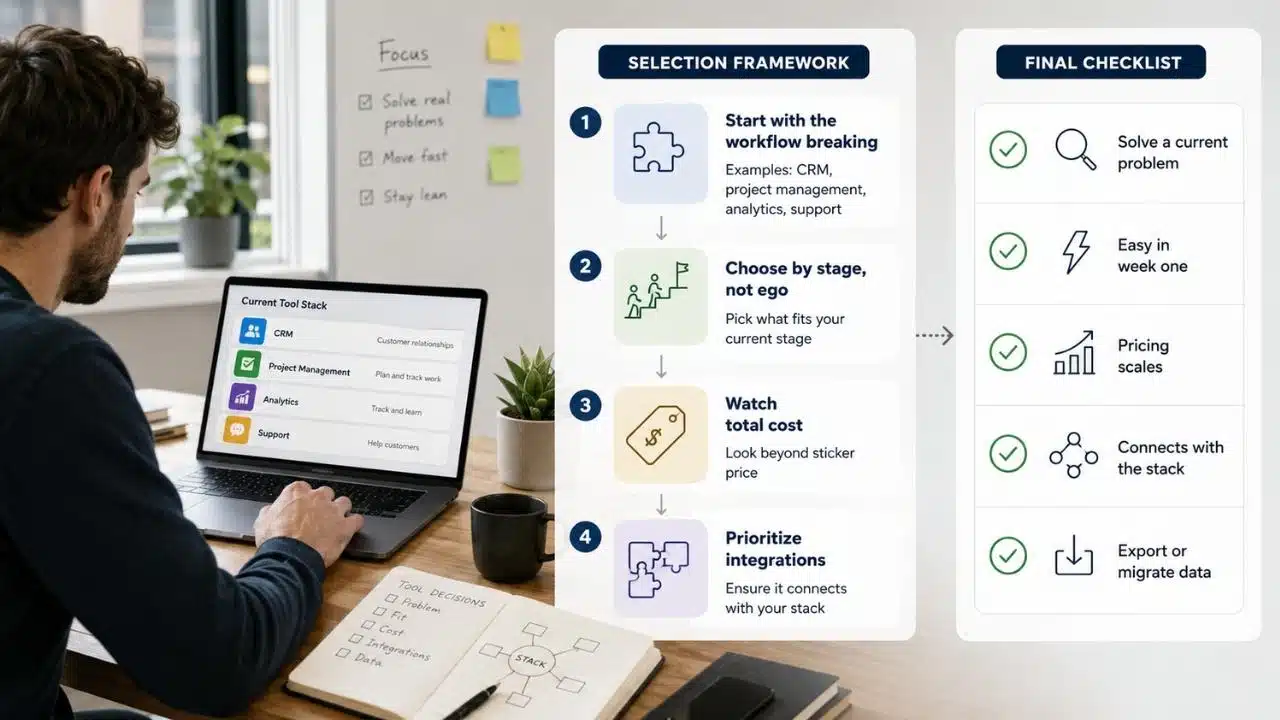
The best startup stack is not the biggest stack. It is the smallest stack that keeps the business clear, accountable, and able to move. A founder should choose tools based on workflow pressure, not because another company’s tech stack screenshot looked impressive.
The Selection Framework
- Start with the workflow that is already breaking: If customer follow-ups are slipping, choose CRM. If tasks are scattered, choose project management. If users are churning without explanation, choose analytics. If support is messy, choose help desk software.
- Choose by stage, not ego: A solo founder does not need the same stack as a 40-person SaaS company. Start simple, then upgrade when complexity is real.
- Watch total cost, not starter price: Seats, usage limits, AI credits, automation tasks, add-ons, storage, contacts, and payment fees can change the real monthly cost.
- Prioritize integrations: Your project management tool, CRM, analytics platform, support tool, email platform, accounting system, and documentation workspace should not become isolated islands.
The Final Checklist
Before choosing startup SaaS tools, use this five-point check:
- Does this tool solve a current problem, not an imagined future problem?
- Can the team learn and use it within the first week?
- Does pricing still make sense if the team or customer base doubles?
- Does it connect with the rest of the founder tool stack?
- Can you export data or migrate if the tool stops fitting the business?
Common Mistakes Startups Make When Choosing SaaS Tools
The first mistake is buying tools before defining the workflow. A startup that cannot describe its sales process does not need a complicated CRM. It needs a simple pipeline, clear ownership, and disciplined follow-up.
The second mistake is keeping overlapping tools because no one wants to clean up the stack. One team uses Notion, another uses Google Docs, another tracks work in Airtable, and the founder keeps decisions in Slack. That is not a stack. That is software sprawl with a login screen.
The third mistake is ignoring pricing after the first month. Many SaaS tools look affordable at the beginning, then become expensive when seats, contacts, events, AI usage, automations, storage, or support add-ons scale. Founders should review the stack every quarter, especially after hiring or growth milestones.
The fourth mistake is treating software as a substitute for management. A project management tool cannot fix unclear priorities. A CRM cannot fix poor positioning. Analytics cannot fix a weak product. Support software cannot fix confusing onboarding. Tools reveal operating problems faster, but they do not remove the need for judgment.
Which Startup SaaS Tools Should You Choose First?
A startup should not buy everything at once. The right stack depends on stage, sales model, team size, customer volume, and cash discipline.
| Startup Stage | First Tools to Prioritize | Why |
| Solo founder | Google Workspace, Notion, Trello, HubSpot CRM, Stripe | Covers communication, notes, tasks, early leads, and payments. |
| 2 to 5 person team | Slack, Asana or ClickUp, HubSpot CRM, Google Analytics, QuickBooks or Xero | Adds team collaboration, project clarity, customer tracking, analytics, and finance visibility. |
| Early SaaS team | Linear, Mixpanel or PostHog, Intercom or Help Scout, Customer.io, Stripe | Supports product delivery, user behavior, onboarding, support, messaging, and recurring revenue. |
| Growing startup | Gusto or Deel, BambooHR, Zendesk or Freshdesk, Airtable, Zapier | Adds people operations, structured support, internal systems, and automation. |
| Scaling B2B startup | Pipedrive or HubSpot, Greenhouse, Amplitude, 1Password, advanced accounting tools | Adds sales discipline, hiring process, product analytics, access control, and stronger finance systems. |
How These Tools Fit Into a Smarter Startup SaaS Stack
The best startup SaaS stack has a simple flow. Work gets planned in project management. Leads and customers live in CRM. Product behavior appears in analytics. Support issues go into help desk software. Financial activity lands in accounting and payment tools. Hiring and payroll stay inside HR software. Email marketing and lifecycle messages keep customers moving. Documentation gives the team memory.
The more your tools share context, the less your team has to carry in its head. That is the real point of essential startup software.
A Lean Stack Beats a Loud Stack
The uncomfortable truth is that many startups buy software to feel organized before they are actually organized. A dashboard can look clean while priorities are confused. A CRM can be full while follow-ups are weak. A support platform can collect tickets while the product keeps creating the same customer problems.
The future of the Best SaaS tools for startups will be shaped by AI agents, deeper automation, usage-based pricing, embedded analytics, and more tools trying to become the “all-in-one” startup operating layer. Some of that will help. Some of it will create new noise.
The best founders will not be the ones with the longest SaaS stack. They will be the ones who know exactly why each tool exists, what workflow it protects, what cost it creates, and when to remove it. Choose fewer tools, use them better, and let your stack grow only when the business actually needs more structure.
Frequently Asked Questions (FAQs) About Best SaaS Tools for Startups
What are the Best SaaS tools for startups?
The best options depend on your stage, but common essentials include project management, CRM, analytics, support, accounting, HR, email marketing, communication, documentation, automation, design, and security tools. A lean early stack may include Google Workspace, Notion, HubSpot CRM, Trello or Asana, Google Analytics, Stripe, and QuickBooks or Xero.
How many SaaS tools does a startup actually need?
Most early startups need fewer tools than they think. A solo founder may only need 5 to 8 core tools, while a growing startup may need 15 or more across sales, support, finance, HR, product, and marketing.
Should startups start with free SaaS tools?
Yes, free plans are useful when they solve the current workflow without blocking growth. The key is to watch limits around users, contacts, events, storage, automations, support access, and branding.
What is the biggest mistake founders make with SaaS tools?
The biggest mistake is buying tools before fixing the workflow. Software should support clear ownership, better decisions, faster execution, and cleaner customer experience. It should not hide messy operations behind a polished dashboard.
How often should startups review their SaaS stack?
Startups should review their SaaS stack every quarter or after major changes such as hiring, funding, product launch, sales growth, or customer support volume increases. This helps remove unused tools, catch rising costs, and improve integrations.