
Startup work gets messy fast. One week, five people can manage everything in Slack, spreadsheets, and memory. A month later, product tasks, customer requests, marketing deadlines, bug reports, investor updates, and hiring work start competing for attention.
That is where the Best Project Management Tools for Startups become less of a “nice-to-have” and more of an operating system for how the team actually moves. The Best Project Management Tools for Startups streamline processes and improve visibility across teams. Choosing the right tools is vital for startups to effectively manage their projects.
Hard part is not finding project software. The hard part is choosing one that fits your stage without creating more process than progress. Some tools are brilliant for product and engineering teams. Others are better for marketing, client work, founder-led operations, or scrappy early teams that simply need clarity.
The right Project Management Tools can enhance collaboration and keep everyone aligned with project goals. This guide compares 9 strong Project Management Tools based on startup usefulness, setup effort, team fit, flexibility, and long-term value, specifically focusing on the Best Project Management Tools for Startups.
The Best Project Management Tools for Startups can enhance collaboration and keep everyone aligned with project goals.
The Best Project Management Tools for Startups not only enhance collaboration but also ensure that teams can track their progress toward goals effectively.
Selection Criteria for Startup Project Management Software

A good startup PM tool should help the team move faster without burying everyone in admin work. For this list, the focus is not just on popularity. The stronger question is whether the Project Management Tools can support real startup workflows without becoming expensive, confusing, or too rigid too early.
Here are the filters used to compare these project tools startups may actually depend on:
| Criteria | Why It Matters for Startups
Using Project Management Tools effectively can differentiate between a chaotic environment and a streamlined workflow. |
| Startup suitability | The tool should work for small, fast-moving teams, not only mature enterprises. |
| Pricing flexibility | Early teams need free or affordable entry points before committing long term. |
| Ease of setup | A tool that takes weeks to configure can slow down a small team. |
| Collaboration features | Comments, assignments, due dates, files, and updates should be easy to follow. |
| Integrations | The tool should connect with the founder tool stack, including Slack, Google Workspace, GitHub, CRM, or docs tools. |
| Scalability | The tool should not break when the team grows from 3 people to 30. |
| Reporting and visibility | Founders need to know what is blocked, late, shipped, or at risk. |
| Automation | Simple automation can reduce repetitive task updates and handoffs. |
| Overall value | The tool should justify its cost through clearer execution, not just more features. |
Whom This Is For
For startup founders, SaaS operators, product managers, marketers, and small teams choosing task management, the Best Project Management Tools for Startups can realistically enhance productivity every day. It is especially useful if your team has outgrown spreadsheets but is not ready for heavy enterprise project management software.
Many teams find that using the Best Project Management Tools for Startups can differentiate between chaotic environments and streamlined workflows.
9 Best Project Management Tools for Startups to Keep Work Moving
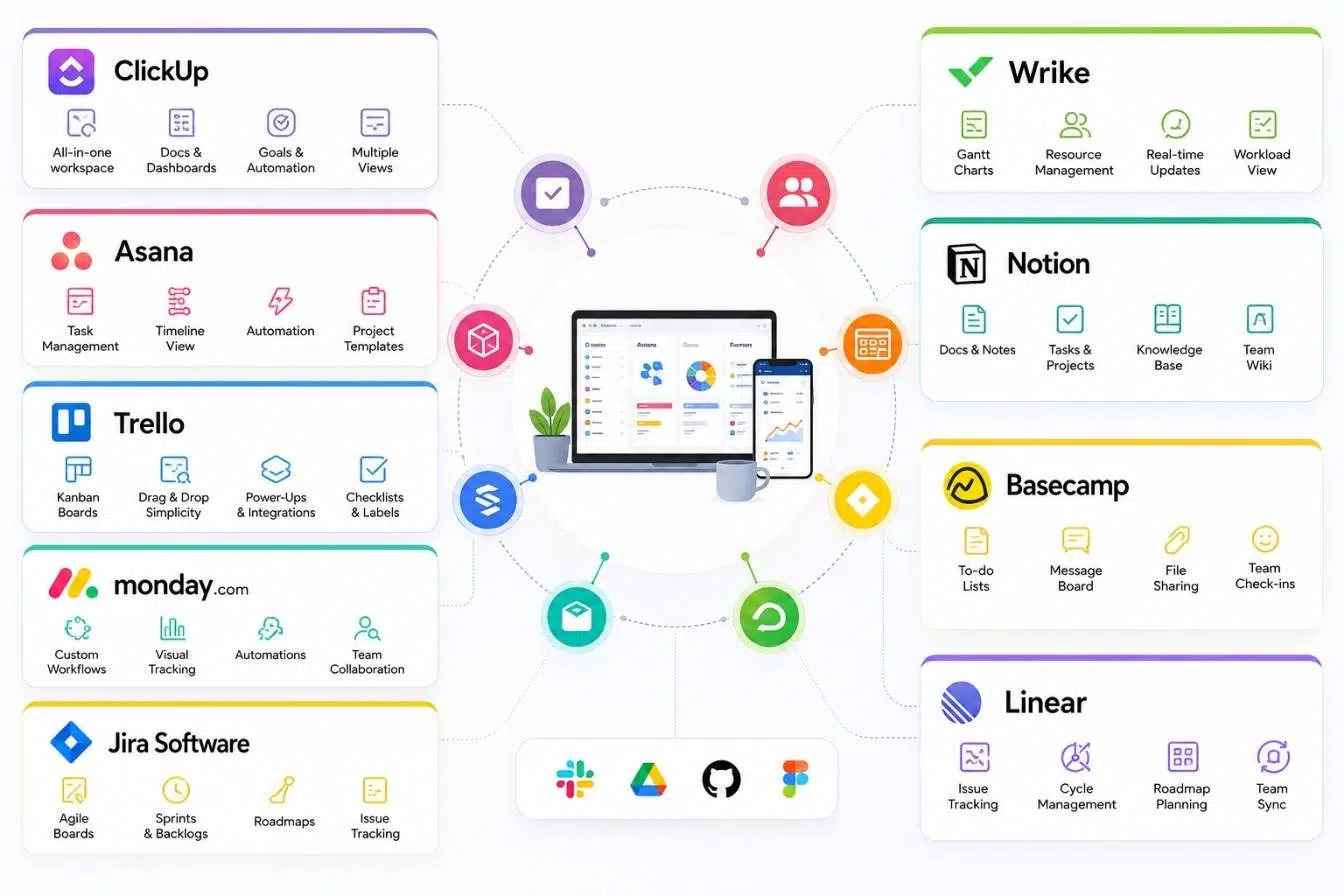
These Project Management Tools serve different needs, and understanding their strengths is key to making the right choice among the Best Project Management Tools for Startups.
Understanding the Best Project Management Tools for Startups is essential for any new venture to succeed.
Understanding the Best Project Management Tools for Startups is crucial for making the right choice for your team.
The tools below are not ranked only by feature count. A startup with two founders does not need the same Project Management Tools as a 25-person SaaS team running sprints, content calendars, customer onboarding, and roadmap planning.
Each option has a different strength, so the best choice depends on how your team works, how technical your workflow is, and how much structure you actually need.
1. ClickUp
ClickUp is one of the most flexible all-in-one startup PM tools because it combines tasks, docs, dashboards, goals, chat, and AI features in one workspace. It fits startups that want to reduce tool switching and manage product, marketing, operations, and internal work from a single place. ClickUp’s official pricing page lists a Free Forever plan, while its help documentation positions the Unlimited plan as a fit for small teams that need more capacity. That makes it useful for startups that want to begin lean and expand features later.
Best Feature/For:
- Best for startups that want one workspace for tasks, docs, dashboards, and team execution.
- Strong fit for cross-functional teams managing product, marketing, and operations together.
Key features:
- Tasks, Docs, Goals, Dashboards, Chat, automations, and multiple project views.
- Useful reporting options for tracking goals, OKRs, and team progress.
Why We Chose It:
Project Management Tools like ClickUp can help simplify processes and improve team collaboration.
- ClickUp gives startups a lot of structure without forcing them into one project methodology.
- It can replace several lightweight tools if the team commits to setting it up properly.
- It works well for founders who want visibility across departments.
- The free entry point makes it approachable before the team upgrades.
Things to consider:
Choosing the right Project Management Tools can significantly improve team alignment and project delivery.
- The feature depth can feel overwhelming for very small teams.
- Startups should create simple templates early, or the workspace can become messy.
Best startup fit:
-
- Early-stage SaaS teams, remote teams, marketing teams, and founders who want a broad work hub.
Choosing the right Best Project Management Tools for Startups can significantly improve team alignment and project delivery.
When searching for the Best Project Management Tools for Startups, it is important to assess your unique needs and the features that will benefit your team.
2. Asana
Asana is one of the leading Project Management Tools that help streamline task management effortlessly.
Asana is a strong choice for startups that need clarity across tasks, owners, projects, and timelines without creating a highly technical workflow. It works especially well for marketing, operations, growth, hiring, and cross-functional execution. Asana’s pricing page shows a free Personal plan for up to two users, with unlimited tasks and projects plus list, board, and calendar views, which makes it useful for founders or tiny teams testing their workflow before scaling.
Best Feature/For:
- Best for teams that need clean task ownership and project visibility.
- Strong fit for startup operations, marketing calendars, launches, and cross-team planning.
Key features:
When evaluating Project Management Tools, consider features that enhance team communication and task visibility.
- Tasks, projects, list view, board view, calendar view, timelines on paid plans, automation, and dashboards.
- Helpful templates for repeatable startup workflows.
Why We Chose It:
-
- Asana is easier to adopt than many heavier project management platforms.
- It balances structure and simplicity well for non-technical teams.
Each of these Project Management Tools offers unique functionalities that cater to different team needs.
- The interface makes responsibilities clear, which matters when founders are juggling multiple functions.
- It works well when a startup needs to standardize recurring projects.
Things to consider:
- The free plan is limited for team collaboration beyond very small use cases.
- Teams that need deep engineering workflows may prefer Jira or Linear.
Best startup fit:
- Marketing-led startups, operations teams, founder-led teams, and small companies managing launches.
3. Trello
Trello is one of the easiest project management tools for startups that want a visual board without a heavy learning curve. Its boards, lists, and cards make it simple to track work from idea to done, and it remains useful for content calendars, simple product roadmaps, onboarding checklists, and founder task tracking. Trello’s official pricing page lists a free plan, and Atlassian’s support documentation notes that the free plan supports up to 10 collaborators per workspace with limits on boards and automation.
Best Feature/For:
Understanding how each of these Project Management Tools functions is critical for effective team management.
- Best for lightweight Kanban-style task management.
- Great for founders and small teams that want visual simplicity.
Key features:
-
- Boards, lists, cards, checklists, labels, due dates, Power-Ups, and automation.
- Easy setup for simple workflows like content production, launch planning, and sales follow-up tasks.
For many teams, the right Project Management Tools can be the difference between success and failure.
Why We Chose It:
- Trello is approachable even for teams that dislike project management software.
- It works well when a startup needs visibility without process-heavy setup.
- Boards can be created quickly for short-term projects or recurring workflows.
- It is especially useful for non-technical teams that want drag-and-drop task movement.
Things to consider:
- It can become limited for complex reporting, dependencies, and multi-team planning.
Many startups find that using Project Management Tools effectively can help improve their execution significantly.
- Larger startups may outgrow it unless they add structure carefully.
Best startup fit:
- Solo founders, small marketing teams, early-stage service startups, and simple task workflows.
4. monday.com
monday.com is a strong visual work management platform for startups that want customizable boards, dashboards, automations, and team workflows in one place. It works well for teams that need more structure than Trello but less engineering-specific depth than Jira. monday.com’s official support page describes its Free Plan as a fit for small teams tracking essential tasks, while its pricing page shows paid plans that scale by seat and feature level.
monday.com is among the Best Project Management Tools for Startups, providing a visual platform for tracking and managing work.
Best Feature/For:
- Best for visual workflow tracking across departments.
- Strong fit for operations-heavy startups and teams that need dashboards.
Key features:
- Custom boards, dashboards, workflow automations, multiple views, integrations, forms, and templates.
Choosing a user-friendly interface in Project Management Tools can enhance team adoption and productivity.
- Useful for project tracking, campaign planning, product workflows, and internal operations.
Why We Chose It:
- monday.com gives startups a flexible way to model different workflows without coding.
- Its visual interface helps teams see ownership, deadlines, and status quickly.
- Dashboards make it useful for managers and founders who need higher-level visibility.
- It can support marketing, sales operations, product work, and internal processes.
Things to consider:
- Costs can rise as more team members need access.
Investing in the right Project Management Tools can provide long-term benefits for startups as they grow.
- Teams should avoid over-customizing boards before they have a stable workflow.
Best startup fit:
- Growing startups, operations teams, marketing teams, and founders who want visual reporting.
5. Notion
Notion is more than a task management app. It is an all-in-one workspace for docs, wikis, tasks, databases, meeting notes, lightweight project tracking, and internal knowledge. For startups, that matters because early teams often need one place to document decisions, organize product notes, plan launches, and track tasks. Notion’s official pricing page includes a Free Plan, and its product pages position Notion as a workspace for docs, projects, knowledge bases, and AI-supported work.
Notion is one of the Best Project Management Tools for Startups due to its flexibility and all-in-one workspace capabilities.
Best Feature/For:
Notion can serve as an effective set of Project Management Tools combined with documentation capabilities.
- Best for startups that want project management and documentation together.
The Best Project Management Tools for Startups provide flexibility and adaptability for evolving team needs.
- Great for founder notes, internal wikis, product specs, and lightweight task boards.
Key features:
- Docs, databases, project views, templates, wikis, calendars, tasks, and AI workspace features.
- Flexible database views for Kanban, calendars, lists, and custom trackers.
Why We Chose It:
Many startups find Notion among the best Project Management Tools due to its flexibility and ease of use.
- Notion is excellent for startups that need context around the work, not just task cards.
- It can replace separate tools for documentation, planning, and internal knowledge.
- Teams can build lightweight systems without needing a technical admin.
- It is especially useful when product specs, meeting notes, and tasks need to live together.
Things to consider:
Effective Project Management Tools like Jira can help keep engineering teams aligned and productive.
- Notion can become disorganized if the team does not create clear workspace rules.
- It is not always the best fit for complex dependencies, sprint rituals, or advanced workload management.
Best startup fit:
- Founder-led teams, content teams, product teams, small SaaS teams, and knowledge-heavy startups.
6. Jira
Choosing the Best Project Management Tools for Startups can greatly influence the success of your engineering processes.
Jira is favored among engineering teams as one of the top Project Management Tools available.
Jira is one of the strongest project management tools for software teams that run agile development, bug tracking, backlog grooming, sprint planning, and release workflows. It is not the simplest tool on this list, but it is powerful when engineering discipline matters. Atlassian’s official Jira pricing page says the Free plan supports up to 10 users with 2GB of storage and community support, while Atlassian’s agile resources explain Jira’s use for Kanban, backlogs, issues, and user stories.
Jira is one of the top Best Project Management Tools for Startups that help engineering teams manage their workflows effectively.
For engineering teams, the Best Project Management Tools for Startups help in managing workflows efficiently and improving overall project success rates.
Best Feature/For:
- Best for software startups with engineering-heavy workflows.
- Strong fit for sprint planning, bug tracking, issue management, and agile product delivery.
Key features:
Software startups often rely on robust Project Management Tools for agile workflows and issue tracking.
- Scrum boards, Kanban boards, backlogs, issue tracking, roadmaps, reports, automation, and Atlassian integrations.
- Works especially well with development workflows and technical teams.
Why We Chose It:
- Jira gives technical teams the structure needed to manage product development properly.
- It supports detailed issue types, priorities, workflows, and release tracking.
Many teams find that the right Project Management Tools can enhance their product development processes.
- It scales well as engineering teams grow.
- Its integration with the Atlassian ecosystem can help startups centralize engineering knowledge and planning.
Things to consider:
- Jira can feel too heavy for non-technical teams.
- Poor setup can create process drag instead of execution clarity.
Best startup fit:
Linear is a great choice among Project Management Tools for teams looking for speed and efficiency.
- SaaS startups, product-led startups, engineering teams, and technical founders managing software delivery.
7. Linear
Linear is built for modern product and engineering teams that value speed, clean workflows, and focused issue tracking. It is especially popular among startups that want a faster, lighter alternative to heavy agile tools while still managing cycles, projects, product work, and engineering issues. Linear’s official pricing page lists a Free plan with unlimited members and two teams, with paid plans adding more teams, unlimited issues, file uploads, admin roles, insights, and deeper integrations depending on plan level.
Linear is also considered one of the Best Project Management Tools for Startups, especially for teams focused on speed and efficiency.
Linear is recognized as one of the Best Project Management Tools for Startups, particularly for its speed and efficiency in task management.
Best Feature/For:
- Best for product and engineering startups that want fast issue tracking.
Project Management Tools like Linear prioritize speed, making it ideal for product teams.
- Strong fit for teams that dislike bloated project management systems.
Key features:
- Issues, projects, cycles, roadmaps, team workflows, integrations, insights, and AI-supported product workflows.
- Designed around speed, focus, and product execution.
Why We Chose It:
Using the right Project Management Tools allows teams to focus on what matters most in their workflows.
- Linear feels clean and fast compared with many traditional PM tools.
- It keeps engineering and product work focused without excessive configuration.
- It works well for startups that need momentum more than complex governance.
- It is especially useful for teams that already know how they want to ship software.
Things to consider:
- It is less ideal for broad business operations or non-technical teams.
- Teams that need deep cross-department workflows may prefer ClickUp, Asana, or monday.com.
Best startup fit:
Basecamp is effective for startups needing straightforward Project Management Tools for communication.
- Product-led SaaS teams, engineering teams, developer-first startups, and technical founders.
8. Basecamp
Basecamp is another practical choice among the Best Project Management Tools for Startups, especially for client-facing teams.
Basecamp is a practical choice for startups that want simple project communication, task lists, files, schedules, message boards, and client collaboration without turning work into a complicated system. It is especially useful for remote teams, agencies, consultants, and startups that manage many conversations around projects. Basecamp’s official feature page explains that every project gets a dedicated page with tools such as to-dos, message boards, chat rooms, calendars, and Kanban card tables, while its pricing page notes that clients and contractors can be added for free on its Plus package.
Best Feature/For:
- Best for simple project communication and async collaboration.
- Strong fit for client-facing startups, service businesses, agencies, and remote teams.
The simplicity of Basecamp makes it one of the preferred Project Management Tools for many client-facing teams.
Key features:
- To-dos, message boards, schedules, docs and files, chat, project pages, and client access.
- Built to keep communication and project work in one place.
Why We Chose It:
- Basecamp avoids the complexity that makes many project tools hard to maintain.
- It is strong for async updates, project discussions, and keeping files attached to the right work.
- The client and contractor access model can be useful for startups working with external collaborators.
Clients appreciate Project Management Tools like Basecamp that facilitate clear communication and collaboration.
- It encourages calmer communication instead of endless status meetings.
Things to consider:
- It is not the best option for advanced agile software development.
- Teams that need detailed dashboards, dependencies, or deep automation may find it limited.
Best startup fit:
- Remote teams, service startups, client-facing teams, agencies, and founder-led operations.
9. Zoho Projects
Zoho Projects offers a budget-friendly option among Project Management Tools for structured planning.
Zoho Projects stands out as one of the Best Project Management Tools for Startups, particularly for budget-conscious teams.
Zoho Projects is a strong budget-conscious choice for startups that want structured project management without jumping into a costly software stack. It includes task management, milestones, Gantt-style planning, timesheets, reporting, and collaboration tools, making it more robust than many lightweight apps. Zoho’s official pricing page states that Zoho Projects has a free plan for five users, and its product pages highlight project planning, Gantt charts, task scheduling, and paid editions for teams that need more capacity.
Best Feature/For:
- Best for budget-conscious startups that still need structured planning.
- Strong fit for teams already using Zoho’s wider business software ecosystem.
Key features:
For those looking for structured planning, Zoho Projects is among the Best Project Management Tools for Startups.
- Task management, milestones, Gantt charts, time tracking, project templates, reports, and collaboration.
For many startups, the affordability of Zoho Projects makes it one of the best Project Management Tools available.
- Useful for teams that need planning depth without enterprise-level complexity.
Why We Chose It:
- Zoho Projects offers a practical balance of affordability and functionality.
- It is helpful for startups that want more structure than Trello but less complexity than Jira.
- The Zoho ecosystem can be valuable if the startup also uses Zoho CRM, Zoho Books, or Zoho Desk.
- It works well for teams that need timelines, timesheets, and project reports.
Budget-conscious startups can leverage Zoho Projects as one of their essential Project Management Tools.
Things to consider:
- The interface may feel less modern than some newer startup PM tools.
- It is strongest when the team is comfortable staying inside the Zoho ecosystem.
Best startup fit:
- Bootstrapped startups, small businesses, service teams, and teams already using Zoho apps.
Project Management Tools for Startups Before You Choose
The best project tool is not always the one with the longest feature list. A startup needs a tool that matches its current operating reality. A two-founder SaaS company may need simple accountability, while a growing engineering team may need backlog discipline, sprint planning, and roadmap visibility.
Comparison of Project Management Tools for Startups
Use this comparison to quickly narrow the list before testing tools. The pricing notes are intentionally cautious because SaaS pricing and plan limits change often, so confirm current details on official pricing pages before buying.
| Tool | Best For | Main Strength | Startup Fit | Pricing Note | Ease of Use |
| ClickUp | Cross-functional startup teams
ClickUp is widely regarded as one of the Best Project Management Tools for Startups due to its extensive feature set. |
All-in-one work hub | Early-stage to growing teams | Free plan available; paid plans scale by features and users | Medium |
| Asana | Marketing, operations, launches | Clear task ownership | Small to mid-sized startup teams | Free plan available for very small use cases | Easy to medium |
| Trello
Trello is ideal for startups seeking a straightforward solution among the Best Project Management Tools for Startups. |
Simple Kanban workflows | Visual simplicity | Solo founders and small teams | Free plan available with workspace limits | Easy |
| monday.com | Visual operations and dashboards | Custom workflows | Growing teams and operators | Free plan available; paid plans scale by seats/features | Easy to medium |
| Notion | Docs plus lightweight projects | Knowledge and task management together | Founder-led and product teams | Free plan available; paid plans add team features | Medium |
| Jira
Many startups find that selecting the Best Project Management Tools for Startups is crucial for maintaining productivity. |
Software development teams | Agile engineering workflows | SaaS and technical startups | Free plan available up to a user limit | Medium to hard |
| Linear | Product and engineering teams | Fast issue tracking | Developer-first startups | Free plan available; paid plans add scale | Easy to medium |
| Basecamp | Async project communication | Simple collaboration | Remote and client-facing teams | Free account/trials available; paid options differ by package | Easy |
| Zoho Projects | Budget-conscious structured PM | Planning depth at lower cost | Bootstrapped and small teams | Free plan available for small teams | Medium |
Our Top 3 Picks and Why
Not every listicle needs a top three, but for this category it helps because the right choice depends heavily on team type. These are not universal winners. They are the most broadly useful starting points for different startup needs.
In conclusion, the Best Project Management Tools for Startups provide essential features that enhance productivity and collaboration.
- ClickUp: Best overall for startups that want tasks, docs, goals, dashboards, and team workflows in one place.
- Asana: Best for non-technical startup teams that need clean execution, ownership, and campaign or operations planning.
- Linear: Best for product and engineering startups that want a fast, focused system for building software.
How to Choose the Right Project Management Tool for Your Startup
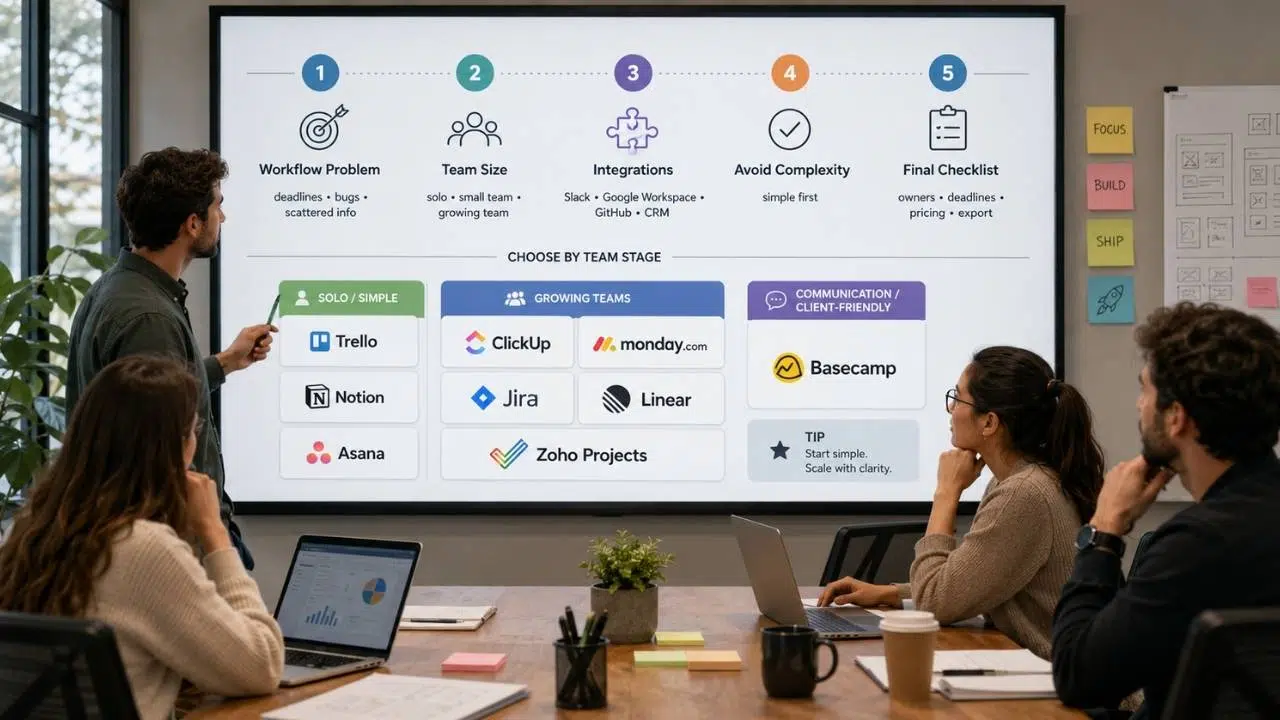
Choosing project software is really a workflow decision. The wrong tool can make a small team feel “organized” while quietly slowing everyone down. Before choosing, map how your team already works and where the confusion actually happens.
The Selection Framework
- Start with the main workflow problem: If your issue is missed deadlines, choose visibility and ownership. If your issue is product bugs, choose engineering workflow depth. If your issue is scattered information, choose docs plus project tracking.
- Match the tool to team size: Solo founders and small teams may do better with Trello, Notion, or Asana. Growing teams may need ClickUp, monday.com, Jira, Linear, or Zoho Projects.
- Check integrations before committing: Your project system should connect with Slack, Google Workspace, GitHub, CRM software, support tools, analytics, or email marketing tools where relevant.
- Avoid paying for complexity too early: A powerful tool is only useful if the team has the discipline to maintain it.
The Final Checklist
Before choosing one of these task management startups can use long term, check these five points:
- Can every team member understand the workflow in one day?
- Does the tool show owners, deadlines, priorities, and blockers clearly?
- Can it connect with the rest of your startup SaaS tools?
- Will pricing still make sense when the team doubles?
- Can you export or migrate data if the tool stops fitting your business?
Common Mistakes to Avoid When Choosing Startup PM Tools
A project management tool will not fix unclear priorities. It will only make unclear priorities more visible. That is why startups should choose carefully instead of copying another company’s software stack.
One common mistake is choosing based only on popularity. A founder may pick Jira because serious software teams use it, then realize the team only needed a simple Kanban board. Another startup may choose Trello because it feels easy, then struggle once they need reporting, dependencies, or multi-team visibility.
Another mistake is paying for features nobody uses. Automation, workload views, AI summaries, and dashboards can be useful, but only when the underlying workflow is clean. If the team still does not update tasks, assign owners, or define done, no tool will save the system.
Startups also ignore integrations too often. Your PM tool should not become another silo. If product work lives in GitHub, customer requests live in support software, and roadmap decisions live in Notion, the project tool needs to connect those pieces or at least organize them clearly.
Which Project Management Tool Should You Choose?
Different startup types need different levels of structure. Use this as a practical shortcut before testing your top two or three options.
| Startup Type | Best Match | Why |
| Solo founder | Trello or Notion | Simple setup, low friction, enough structure for early planning. |
| Small non-technical team | Asana | Clear ownership, task views, and easy team adoption. |
| SaaS engineering team | Jira or Linear | Better fit for issues, sprints, bugs, and product delivery. |
| Cross-functional startup | ClickUp | Combines tasks, docs, dashboards, goals, and multiple views. |
| Operations-heavy team | monday.com | Strong visual workflows, boards, and dashboard visibility. |
| Budget-conscious startup
Finding the right fit among the Best Project Management Tools for Startups can create significant efficiencies. |
Zoho Projects | Structured PM features with a startup-friendly entry point. |
| Client-facing startup | Basecamp
Basecamp remains a strong contender among the Best Project Management Tools for Startups, emphasizing ease of use. |
Strong async communication, files, schedules, and external collaboration. |
How This Fits Into Your Startup SaaS Stack
Project management is only one part of the broader founder tool stack. It connects with your CRM, analytics, support software, HR tools, accounting system, email marketing platform, documentation, and automation tools.
A project management app helps the team execute, but it becomes more valuable when connected with the rest of your startup SaaS tools, including CRM, customer support, product analytics, finance, and email systems.
A practical software stack should not feel like a collection of random subscriptions. It should feel like a connected operating system where tasks, customers, product decisions, marketing work, and financial visibility support each other.
The Smarter Startup Move Is Choosing Less, Then Using It Better
The uncomfortable truth is that most startup project management problems are not tool problems at first. They are priority problems, ownership problems, decision problems, or communication problems. Software can help, but it cannot replace discipline.
The future of Project Management Tools for Startups will likely include more AI summaries, automated updates, agent-assisted workflows, and deeper integrations across the startup SaaS stack. That sounds useful, but it also creates a risk: teams may confuse automation with alignment. A tool can summarize a messy workspace, but it cannot decide what matters.
Ultimately, choosing the Best Project Management Tools for Startups is crucial for long-term success and efficiency.
For most startups, the best move is simple. Choose the lightest tool that gives your team clarity today, then upgrade only when the workflow genuinely demands it. Start with ownership, deadlines, visibility, and repeatable processes. The right software should make those habits easier, not hide the lack of them.
Frequently Asked Questions (FAQs) About Project Management Tools for Startups
What are the best Project Management Tools for Startups?
The best Project Management Tools vary based on individual startup needs and workflows.
The best options depend on your startup’s workflow. ClickUp is strong for all-in-one work management, Asana is great for cross-functional teams, Trello is simple for Kanban, Jira and Linear are better for engineering teams, and Notion works well when documentation and tasks need to live together.
Should startups use free project management tools first?
Yes, many early teams should start with a free plan if it covers their real workflow. The risk is staying too long on a limited setup after the team needs better reporting, permissions, integrations, or scalability.
Is Jira too complex for startups?
Jira can be too complex for non-technical teams, but it is useful for software startups that need agile workflows, backlog management, bug tracking, and release planning. If your team does not run engineering sprints, a simpler tool may be better.
Which project management tool is best for solo founders?
For solo founders, Project Management Tools like Trello, Notion, and Asana provide ease of setup.
Trello, Notion, and Asana are usually better starting points for solo founders because they are easier to set up. ClickUp can also work if the founder wants a more complete workspace from the beginning.
How do startup PM tools fit with other SaaS tools?
Project management tools connect execution with the rest of the startup stack. They can support CRM handoffs, product analytics follow-ups, customer support tasks, hiring workflows, finance deadlines, and email marketing campaigns.