AI is not a magic money printer. Let’s get that boring but necessary truth out of the way before someone starts selling “one prompt to become rich” courses from a rented Lamborghini. But the right free AI tools can absolutely help people work faster, package better services, create more content, automate boring tasks, and take on higher-value projects.
That is why people are searching for AI Tools To Double Your Income in 2026. The real opportunity is not “use one tool and become rich by Tuesday.” The opportunity is using free AI tools to increase your output, improve your skills, build side-income assets, and offer services that used to require a bigger team. Many of these tools have free plans or free access, but most also have paid upgrades, usage limits, or premium features.
Our Selection Criteria
This list focuses on tools that can help creators, freelancers, students, marketers, coders, small business owners, and side hustlers create practical income opportunities.
Here is the selection logic used for this guide.
| Selection Factor | Why It Matters |
|---|---|
| Free Access | The tool needed a free plan, free version, or meaningful no-cost access |
| Income Usefulness | It had to help with real money-making work, not just fun experiments |
| Skill Leverage | The tool should make an existing skill faster or more valuable |
| Beginner Friendliness | A good tool should not require an engineering degree to start |
| Output Quality | The free version should still be useful enough for real work |
| Market Demand | The tool should support services people already pay for |
| Upgrade Optionality | Paid plans can help later, but beginners should be able to start free |
This is not a get-rich-quick list. It is a practical tool stack for people who want to produce more, learn faster, pitch better, and build income systems with less friction.
Whom This Is For
This guide is useful for freelancers, bloggers, content creators, students, job seekers, solopreneurs, small business owners, and anyone trying to use AI without spending money upfront.
It is especially relevant for:
- beginner freelancers building a service portfolio;
- creators making videos, posts, newsletters, or products;
- students trying to learn high-income skills faster;
- small business owners doing their own marketing;
- coders building tools or websites;
- researchers and writers who need faster workflows;
- side hustlers testing ideas before paying for software.
Now let’s look at the free tools that can actually help you build income opportunities.
7 Free AI Tools To Double Your Income In 2026 Without Burning Your Budget
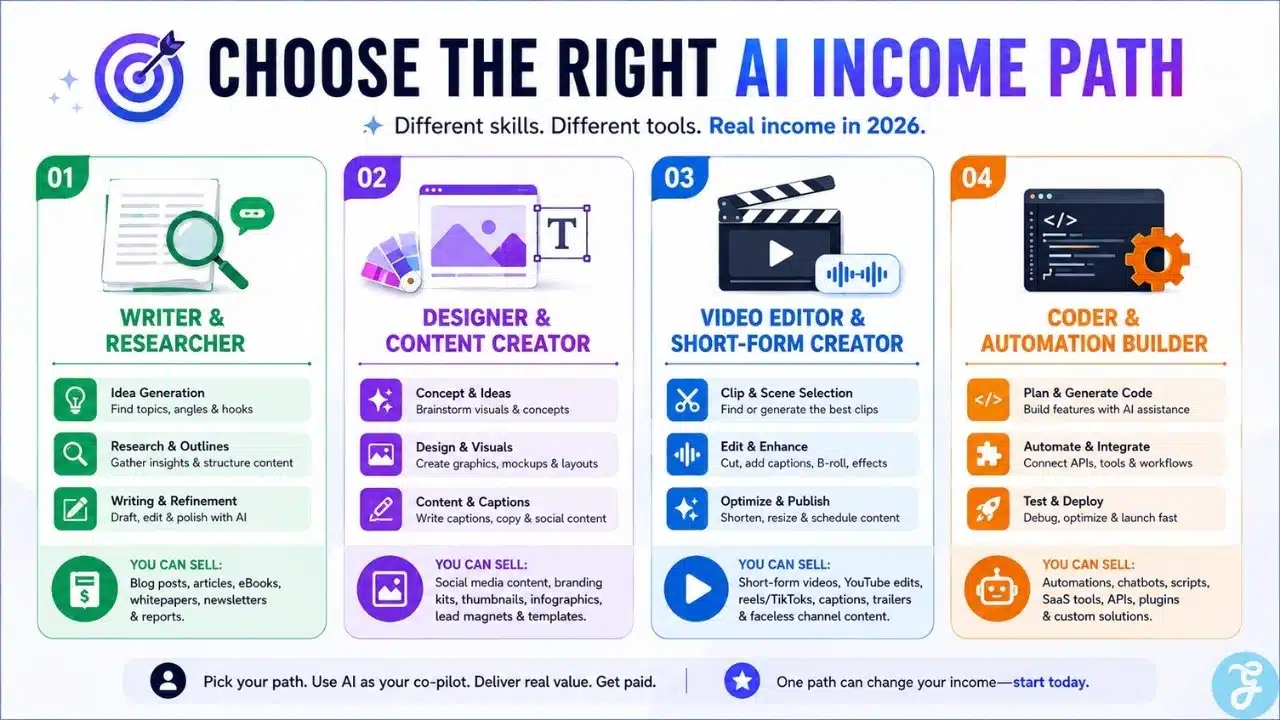
The best way to use these tools is not randomly opening all of them and feeling productive for 20 minutes. Pick one income path first, then use the right tools around it.
1. ChatGPT
ChatGPT is the most flexible tool on this list because it can support writing, brainstorming, summarizing, coding help, client emails, content planning, research preparation, offer creation, and workflow design. OpenAI lists a Free plan for ChatGPT, while paid plans add more advanced usage and higher limits.
For income growth, ChatGPT is useful because it helps turn rough ideas into usable deliverables. A freelancer can use it to draft proposals, create blog outlines, improve landing page copy, build social captions, plan newsletters, create client questionnaires, or write scripts. The money is not in “asking ChatGPT to make money.” The money is in using it to deliver useful work faster.
Best for:
- Freelance writing, marketing, planning, brainstorming, and client communication
- Beginners who want one general AI assistant for many tasks
Why We Chose It:
- Very flexible across writing, coding, research, and business tasks
- Free access makes it beginner-friendly
- Useful for packaging freelance offers and improving output speed
- Strong fit for content creators and service providers
Things to consider:
- Free usage has limits
- You still need fact-checking, editing, and human judgment before delivering client work
2. Google Gemini
Google Gemini is useful for people already working inside the Google ecosystem. It can help with brainstorming, writing, summarizing, learning, planning, and productivity tasks. Google describes Gemini as a generative AI tool that can help users save time, create personalized learning experiences, inspire ideas, and learn confidently.
For income, Gemini is helpful when you need quick ideation, document assistance, content planning, or learning support. A student can use it to understand a topic faster. A creator can use it to plan content angles. A small business owner can use it to draft campaign ideas, email copy, or customer-service responses.
Best for:
- Google users, students, creators, and small business owners
- Fast brainstorming, learning, and productivity support
Why We Chose It:
- Strong fit for users already relying on Google tools
- Useful for learning and content planning
- Helps speed up writing, summarizing, and idea generation
- Beginner-friendly for everyday AI use
Things to consider:
- Some advanced Gemini features may require paid plans or Workspace access
- Always verify factual claims before using outputs in published work
3. Perplexity
Perplexity is best for research-heavy work. Its official pages describe it as a free AI-powered answer engine that provides accurate, trusted, real-time answers, and its API documentation emphasizes real-time web-wide research and Q&A capabilities.
For income growth, Perplexity can help freelancers and creators research faster. Use it to gather source ideas, compare products, study competitors, find trend angles, prepare briefs, or understand a market before writing. This is especially useful for blog writers, SEO researchers, YouTubers, consultants, newsletter writers, and social media strategists.
Best for:
- Research, SEO briefs, competitor checks, and fact-finding
- Writers, analysts, creators, and consultants
Why We Chose It:
- Strong research-first AI tool
- Useful for finding current information quickly
- Helps reduce research time for content and client work
- Good support tool for fact-based articles and scripts
Things to consider:
- Do not copy answers blindly
- Open and verify important sources before using them professionally
4. Canva
Canva is one of the best free tools for turning ideas into visual assets. Canva describes itself as a free-to-use online graphic design tool for creating social media posts, presentations, posters, videos, logos, and more. It also offers free website and landing page tools, including free hosting for Canva-built sites.
For income, Canva is powerful because many people and businesses need visuals but cannot afford a full designer. You can create social posts, thumbnails, pitch decks, media kits, lead magnets, small business flyers, simple landing pages, and digital products. If you combine Canva with writing and strategy, you can offer useful service packages.
Best for:
- Social media graphics, thumbnails, presentations, lead magnets, and simple websites
- Freelancers and creators who need fast visual content
Why We Chose It:
- Free plan is useful for real design work
- Beginner-friendly templates reduce design friction
- Helps create sellable assets quickly
- Works well for freelancers, creators, and small businesses
Things to consider:
- Some templates, assets, and AI features may require paid access
- Generic template designs need customization to look professional
5. CapCut
CapCut is a strong free option for short-form video editing. Its site describes CapCut as an AI-powered video editor with smart templates and creative effects, while its free online video editor page highlights social media reels, promo videos, slideshows, and personal branding videos.
For income, CapCut is useful because short-form video is still one of the easiest services to sell to creators, coaches, local businesses, ecommerce brands, and personal brands. You can edit Reels, TikToks, YouTube Shorts, product promos, captions, talking-head clips, and simple ad creatives.
Best for:
- Short-form video editing, social media clips, promo videos, and creator content
- Freelancers offering video-editing packages
Why We Chose It:
- Free access makes it easy to start
- Useful for high-demand short-video services
- AI features can speed up editing and creative testing
- Works well for creators and small businesses
Things to consider:
- Some features may require paid access depending on the platform and region
- Good editing still needs pacing, storytelling, and taste
6. NotebookLM
NotebookLM is useful for turning messy information into structured knowledge. Google describes NotebookLM as an AI research tool and thinking partner that can analyze your sources, turn complexity into clarity, and transform your content. Its app listing says users can upload PDFs, websites, YouTube videos, or text into notebooks, ask questions, and listen to Audio Overviews.
For income, NotebookLM helps people create better research-backed content, course notes, client briefs, summaries, scripts, reports, and study materials. A freelancer can use it to analyze client documents. A creator can use it to turn source material into video outlines. A student can use it to learn faster and build expertise in a niche.
Best for:
- Research organization, source-based writing, study notes, and content planning
- Writers, students, educators, consultants, and researchers
Why We Chose It:
- Works from your uploaded sources
- Helps turn complex material into usable notes and outlines
- Useful for research-heavy client work
- Strong fit for knowledge-based income paths
Things to consider:
- Outputs depend on the quality of your uploaded sources
- You still need to check accuracy and context before publishing
7. Gemini Code Assist
Gemini Code Assist is one of the strongest free tools for people learning coding or building software-based income streams. Google says Gemini Code Assist for individuals is available at no cost with no credit card required, and developers receive up to 180,000 code completions per month. It can provide code completions, generation, debugging help, and natural language chat inside supported IDEs.
For income, this matters because coding remains one of the clearest paths to higher-value freelance work. You can use Code Assist to learn faster, build portfolio projects, create small business websites, automate tasks, debug scripts, or support client development work.
Best for:
- Coding, debugging, portfolio projects, automation, and developer freelancing
- Students, beginner developers, startup builders, and technical freelancers
Why We Chose It:
- Meaningful free access for individual developers
- Very high monthly completion limit
- Helps beginners learn and build faster
- Strong fit for higher-income technical skills
Things to consider:
- It will not turn a beginner into a senior developer overnight
- You must understand, test, and secure the code before using it professionally
An Overview Of 7 Free AI Tools To Double Your Income
These tools are most powerful when combined into workflows. For example, you can use Perplexity for research, ChatGPT for structuring, Canva for visuals, CapCut for video, and NotebookLM for source-based learning.
Overview Comparison
| Tool | Best Income Use | Best User Type |
|---|---|---|
| ChatGPT | Writing, offers, planning, client communication | Freelancers and creators |
| Google Gemini | Productivity, learning, ideation | Google users and students |
| Perplexity | Research and SEO briefing | Writers and consultants |
| Canva | Graphics, lead magnets, thumbnails, landing pages | Designers and marketers |
| CapCut | Short-form video editing | Creators and video freelancers |
| NotebookLM | Source-based research and content planning | Writers, students, educators |
| Gemini Code Assist | Coding, debugging, automation | Developers and technical freelancers |
Our Top 3 Picks And Why?
| Pick | Why It Stands Out |
|---|---|
| ChatGPT | Best all-around tool for service-based work |
| Canva | Best for turning ideas into sellable visual assets |
| CapCut | Best for short-form video services, which many businesses still need |
If you want a technical income path, Gemini Code Assist deserves special attention. If you want a research-heavy income path, Perplexity and NotebookLM are the stronger pair.
How To Choose The Right AI Tools By Yourself
Do not choose tools first. Choose the income path first. A video editor does not need the same AI stack as a blogger, coder, tutor, or social media manager.
The Selection Framework:
- Pick One Monetizable Skill: Writing, video editing, design, coding, research, tutoring, or marketing.
- Choose Tools Around That Skill: Do not collect tools like shiny digital toys.
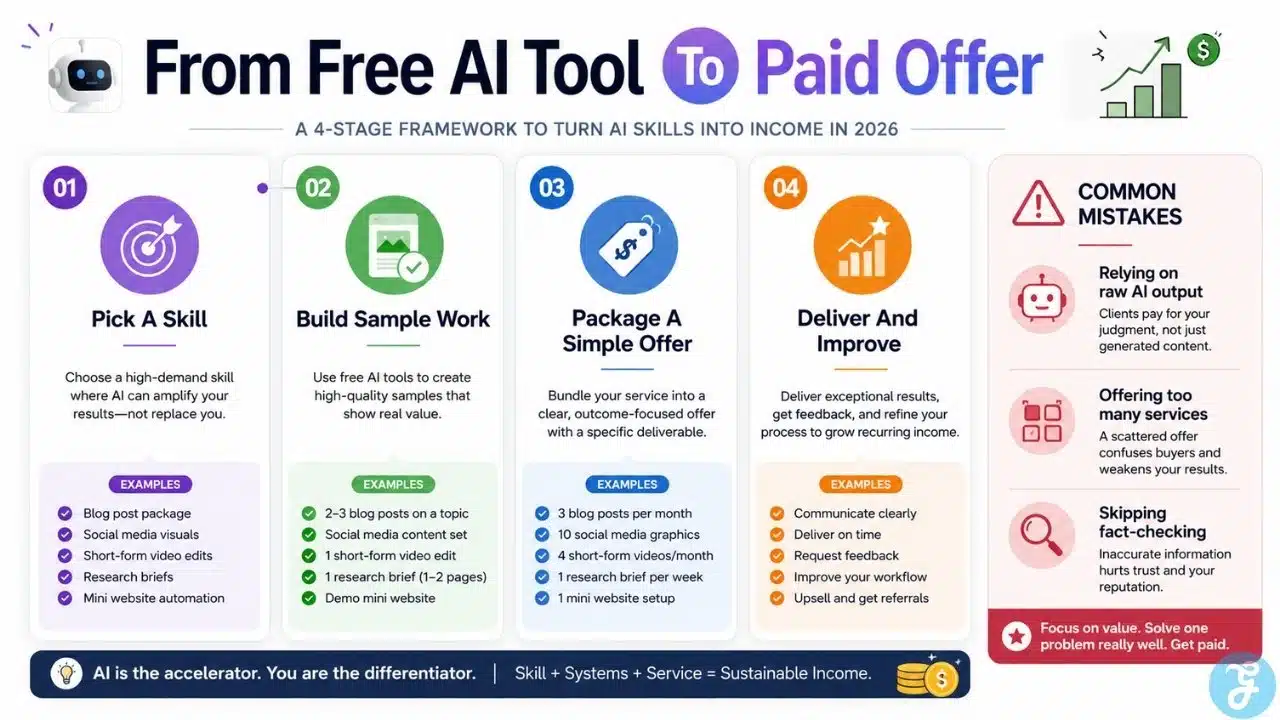
- Build A Repeatable Offer: Turn the tool workflow into a clear service people can buy.
- Measure Time Saved: If a tool does not save time or improve quality, drop it.
The Final Checklist
Before depending on any free AI tool, ask these five questions.
- Does it help me create something people already pay for?
- Can I use the free plan enough to practice or deliver work?
- Does the tool improve quality, speed, or both?
- Can I verify the output before giving it to a client?
- Can I turn the workflow into a repeatable income offer?
The Real Income Secret Is Not The Tool
The uncomfortable truth is that free AI tools are available to everyone. That means the tool itself is not the advantage anymore. The advantage is how well you combine tools with skill, taste, consistency, and market demand.
Someone using ChatGPT badly will create generic junk. Someone using Canva lazily will create template soup. Someone using CapCut without storytelling will create videos that look edited but feel empty. The people who earn more use AI to improve a real service, not to replace the need for skill completely.
That is why AI Tools To Double Your Income should be understood as leverage, not a guarantee. These tools can help you write faster, research better, design cleaner, edit videos quicker, learn coding faster, and build more professional-looking assets. But income grows when those outputs solve a real problem for a real customer.
In 2026, the best move is simple: pick one skill, choose two or three tools, build a small portfolio, offer a clear service, and improve every week. That is much more realistic than chasing the next “AI money hack” from someone whose main income is selling AI money hacks.
Frequently Asked Questions (FAQs) About AI Tools To Double Your Income
Can Free AI Tools Really Double Your Income?
They can help, but they do not guarantee it. Income grows when you use AI to offer better services, work faster, learn valuable skills, or create more sellable assets.
What Is The Best Free AI Tool For Beginners?
ChatGPT is the best starting point for most beginners because it supports writing, planning, brainstorming, coding help, and business ideas in one place.
Which AI Tool Is Best For Freelancers?
It depends on the service. Writers may use ChatGPT, Perplexity, and NotebookLM. Designers may use Canva. Video editors may use CapCut. Developers may use Gemini Code Assist.
Are Free AI Tools Enough To Start A Side Hustle?
Yes, for many beginner services. You can start with free tools for writing, design, video editing, research, and coding practice, then upgrade only when client work justifies the cost.
What Is The Biggest Mistake People Make With AI Tools?
They expect the tool to do everything. AI can speed up the work, but clients still pay for judgment, strategy, accuracy, creativity, and reliable delivery.