Gaming on a budget doesn’t mean you need to compromise on performance or quality.
With advancements in technology and a growing market for affordable components, you can now find Top Gaming Setups Under $500 that deliver smooth gameplay and a solid user experience.
In this guide, we explore the Top Gaming Setups Under $500, helping budget-conscious gamers build or buy a rig that meets their needs without breaking the bank.
Why Budget-Friendly Gaming Setups Matter in 2025
In 2025, the demand for budget-friendly gaming solutions has surged, driven by increasing accessibility to gaming as a hobby and career.
Gamers today seek affordable options that deliver value without sacrificing the ability to play popular games like Fortnite, Apex Legends, and Call of Duty: Warzone.
Budget setups cater to:
- New gamers: Individuals entering the gaming world who want to test the waters.
- Casual players: Gamers who enjoy light to moderate gaming sessions.
- Streamers on a budget: Aspiring content creators who need functional rigs without huge investments.
Affordable gaming setups allow broader participation, making gaming more inclusive and enjoyable for everyone.
By choosing one of the Top Gaming Setups Under $500, you can enjoy a high-quality gaming experience without overspending.
What to Look for in a Gaming Setup Under $500
Choosing the right gaming setup requires balancing performance, durability, and value. Here’s what to prioritize:
1. Essential Components
- Processor (CPU): Look for quad-core CPUs like AMD Ryzen 3 3100 or Intel i3 12100F for smooth multitasking and gaming.
- Graphics Card (GPU): Dedicated GPUs like NVIDIA GTX 1650 or AMD RX 550 provide a better gaming experience than integrated graphics.
- RAM: 8GB is the minimum, but 16GB is preferred for future-proofing.
- Storage: An SSD (256GB or more) ensures faster loading times, while a combo of SSD and HDD provides both speed and capacity.
2. Monitor & Accessories
A high-refresh-rate monitor (60Hz-75Hz) with a resolution of at least 1080p ensures clear visuals. Basic gaming peripherals, such as a responsive keyboard and mouse, are essential for an enjoyable experience.
3. Build Quality & Upgradability
Ensure the setup allows for future upgrades, such as additional RAM slots or GPU replacement, so your rig remains relevant for years.
These features are common in many of the Top Gaming Setups Under $500 we’ve highlighted below.
Top Gaming Setups Under $500
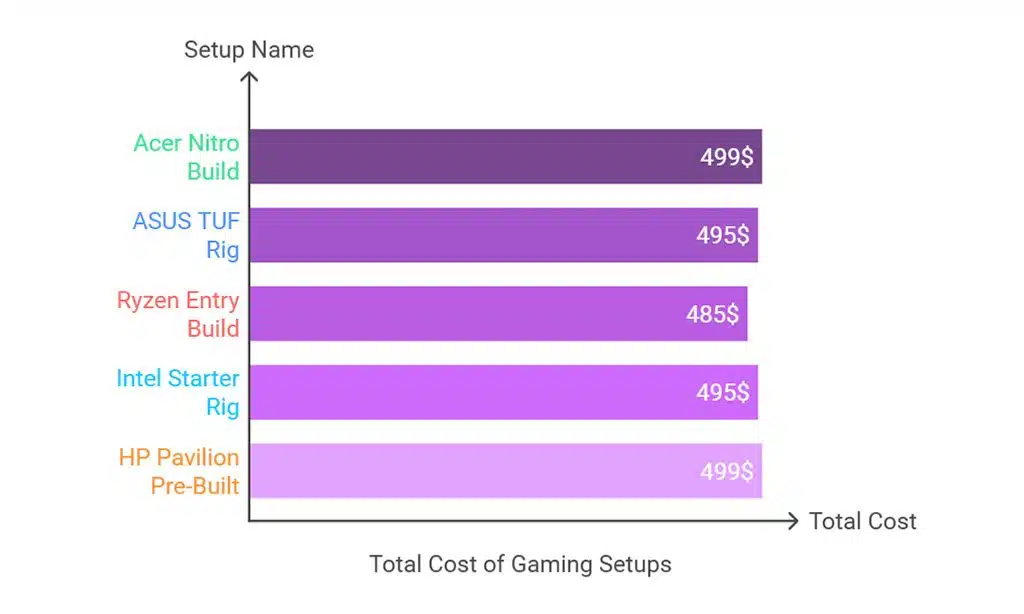
| Setup Name | Processor & GPU | Monitor Included | Accessories | Total Cost |
| Acer Nitro Build | Ryzen 3 3100 & GTX 1650 | Yes | Keyboard, Mouse | $499 |
| ASUS TUF Rig | i3 12100F & GTX 1050 Ti | Yes | Mouse | $495 |
| Ryzen Entry Build | Ryzen 3 3200G (Vega 8) | Yes | Keyboard, Mouse | $485 |
| Intel Starter Rig | i3 12100F & GTX 1650 | Yes | Mouse | $495 |
| HP Pavilion Pre-Built | Ryzen 5 5600G (Vega) | No | Keyboard, Mouse | $499 |
1. Acer Nitro Budget Build
Acer’s Nitro lineup is known for delivering reliable gaming performance at an affordable price.
This setup combines the powerful AMD Ryzen 3 3100 CPU with the NVIDIA GTX 1650 GPU, making it an excellent choice for gamers looking to enjoy AAA titles at medium settings without overspending.
Key Features:
- Processor & Graphics Card: AMD Ryzen 3 3100 with GTX 1650 GPU.
- Monitor & Accessories: 24-inch Acer Nitro monitor with a 75Hz refresh rate. Includes a basic RGB keyboard and mouse.
- Build Quality: Solid mid-tower case with efficient airflow.
Price Breakdown:
- Total: $499 (bundle deal with monitor and accessories).
Why It’s Worth Buying: This setup delivers balanced performance for modern games like Fortnite and Valorant at medium settings, and it includes a great monitor, making it one of the Top Gaming Setups Under $500 for budget gamers.
Acer Nitro Budget Build Overview
| Component | Details |
| Processor | AMD Ryzen 3 3100 |
| Graphics Card | NVIDIA GTX 1650 |
| Monitor | 24-inch Acer Nitro (75Hz) |
| Accessories | RGB Keyboard, Mouse |
| Total Price | $499 |
2. ASUS TUF Entry-Level Rig
The ASUS TUF series is synonymous with durability and performance. This entry-level rig features the Intel i3 12100F processor and NVIDIA GTX 1050 Ti, offering a solid gaming experience for those looking to play esports titles and older AAA games at low-to-medium settings.
Key Features:
- Processor & Graphics Card: Intel i3 12100F with NVIDIA GTX 1050 Ti.
- Monitor & Accessories: ASUS 23-inch monitor with 1080p resolution. Includes a wired gaming mouse.
- Build Quality: Durable ASUS TUF series components.
Price Breakdown:
- Total: $495 (accessory discounts applied).
Why It’s Worth Buying: An excellent choice for casual gamers, this setup combines reliable performance with trusted ASUS build quality. Its compact size also makes it suitable for smaller spaces.
ASUS TUF Entry-Level Rig Overview
| Component | Details |
| Processor | Intel i3 12100F |
| Graphics Card | NVIDIA GTX 1050 Ti |
| Monitor | 23-inch ASUS (1080p) |
| Accessories | Wired Mouse |
| Total Price | $495 |
3. Ryzen Entry-Level Build
For those who prioritize affordability without compromising on functionality, this Ryzen-based setup is a go-to choice.
Featuring the AMD Ryzen 3 3200G and Vega 8 integrated graphics, it’s designed for smooth esports gaming and light productivity tasks.
Key Features:
- Processor & Graphics Card: AMD Ryzen 3 3200G with integrated Vega 8 Graphics.
- Monitor & Accessories: 24-inch 1080p monitor included. Basic keyboard and mouse bundle.
- Build Quality: Compact case with efficient cooling.
Price Breakdown:
- Total: $485 (inclusive of monitor and accessories).
Why It’s Worth Buying: Perfect for beginners who play esports titles like League of Legends or CS:GO.
This setup also doubles as a productivity workstation, making it one of the most versatile options among the Top Gaming Setups Under $500.
Ryzen Entry-Level Build Overview
| Component | Details |
| Processor | AMD Ryzen 3 3200G |
| Graphics Card | Vega 8 Integrated |
| Monitor | 24-inch (1080p) |
| Accessories | Keyboard, Mouse |
| Total Price | $485 |
4. Intel Starter Rig
This Intel-based rig balances affordability with the ability to handle modern games at low-to-medium settings.
Powered by the Intel i3 12100F and NVIDIA GTX 1650, it’s a reliable setup for casual gaming and multitasking.
Key Features:
- Processor & Graphics Card: Intel i3 12100F paired with an NVIDIA GTX 1650 GPU.
- Monitor & Accessories: Includes a 21.5-inch monitor and a gaming mouse.
- Build Quality: Sleek mid-tower design.
Price Breakdown:
- Total: $495.
Why It’s Worth Buying: Ideal for casual gamers who enjoy AAA games at low-to-medium settings. The compact design makes it suitable for small spaces.
Intel Starter Rig Overview
| Component | Details |
| Processor | Intel i3 12100F |
| Graphics Card | NVIDIA GTX 1650 |
| Monitor | 21.5-inch (1080p) |
| Accessories | Gaming Mouse |
| Total Price | $495 |
5. HP Pavilion Pre-Built Gaming PC
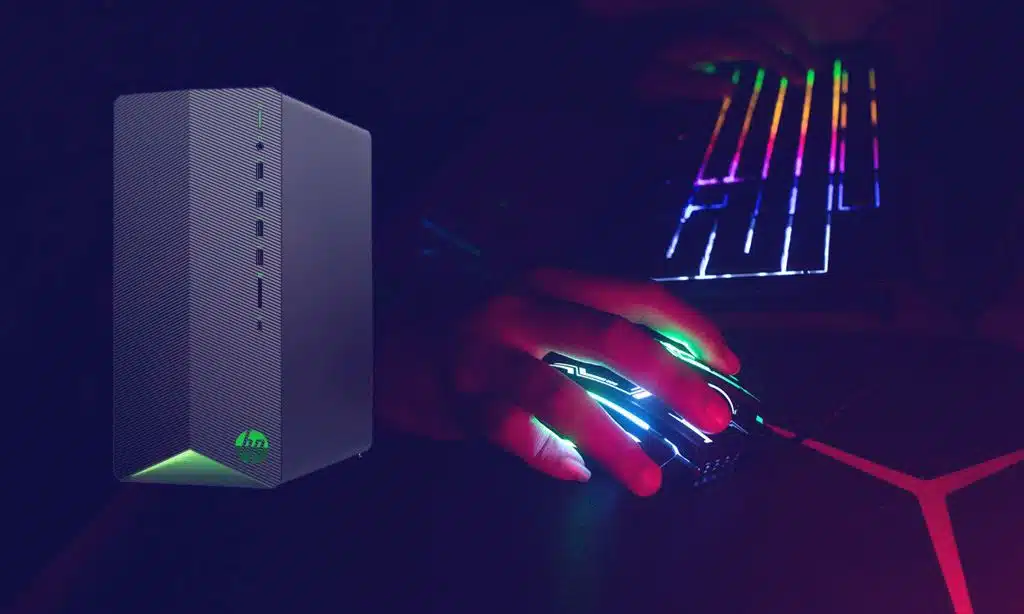
The HP Pavilion pre-built system offers a hassle-free plug-and-play experience. Equipped with the AMD Ryzen 5 5600G and Radeon Vega Graphics, this setup is perfect for gamers who prefer convenience over customization.
Key Features:
- Processor & Graphics Card: AMD Ryzen 5 5600G with Radeon Vega Graphics.
- Monitor & Accessories: No monitor, but includes a wireless keyboard and mouse.
- Build Quality: Sturdy HP Pavilion chassis with a professional look.
Price Breakdown:
- Total: $499.
Why It’s Worth Buying: This setup is great for users who want a ready-to-use solution for gaming and light productivity tasks. It’s also easily upgradable.
HP Pavilion Pre-Built Gaming PC Overview
| Component | Details |
| Processor | AMD Ryzen 5 5600G |
| Graphics Card | Radeon Vega Integrated |
| Monitor | Not Included |
| Accessories | Wireless Keyboard, Mouse |
| Total Price | $499 |
6. Custom AMD Mini Build
This compact AMD build is perfect for gamers who prioritize portability without compromising on performance. Its small form factor is ideal for tight spaces while still delivering impressive gaming capabilities.
Key Features:
- Processor & Graphics Card: AMD Ryzen 3 3100 and GTX 1050 Ti.
- Monitor & Accessories: Includes a 22-inch ultra-slim monitor and RGB keyboard.
- Build Quality: Lightweight mini-ITX case with efficient cooling.
Price Breakdown:
- Total: $490 (DIY build with discounted parts).
Why It’s Worth Buying: This setup is excellent for gamers who move frequently or have limited desk space. Despite its size, it handles modern games smoothly at medium settings.
Custom AMD Mini Build Overview
| Component | Details |
| Processor | AMD Ryzen 3 3100 |
| Graphics Card | NVIDIA GTX 1050 Ti |
| Monitor | 22-inch Ultra-Slim (1080p) |
| Accessories | RGB Keyboard, Mouse |
| Total Price | $490 |
7. Dell Inspiron Gaming Desktop
The Dell Inspiron offers a balance of reliability and affordability, making it a great option for light gaming and productivity tasks. Its integrated graphics are sufficient for older games and casual play.
Key Features:
- Processor & Graphics Card: Intel i5 10400 and Intel UHD 630 integrated graphics.
- Monitor & Accessories: No monitor included; comes with a mechanical keyboard.
- Build Quality: Sturdy Dell design with excellent thermal management.
Price Breakdown:
- Total: $450.
Why It’s Worth Buying: A trusted choice for users who want a dependable system for light gaming and everyday use, with the potential for future upgrades.
Table: Dell Inspiron Gaming Desktop Overview
| Component | Details |
| Processor | Intel i5 10400 |
| Graphics Card | Intel UHD 630 Integrated |
| Monitor | Not Included |
| Accessories | Mechanical Keyboard |
| Total Price | $450 |
8. Compact Esports Rig
This esports-focused rig is designed to handle competitive games with ease. Its compact design and powerful integrated graphics make it a favorite among esports enthusiasts on a budget.
Key Features:
- Processor & Graphics Card: AMD Ryzen 3 2200G with Vega 8 Graphics.
- Monitor & Accessories: 1080p monitor and RGB gaming keyboard included.
- Build Quality: Compact and stylish design with a durable case.
Price Breakdown:
- Total: $480 (bundle deal).
Why It’s Worth Buying: Ideal for esports players seeking a portable setup that delivers consistent performance in games like Valorant and Rocket League.
Compact Esports Rig Overview
| Component | Details |
| Processor | AMD Ryzen 3 2200G |
| Graphics Card | Vega 8 Integrated |
| Monitor | 1080p (Included) |
| Accessories | RGB Gaming Keyboard |
| Total Price | $480 |
9. NVIDIA Entry-Level Gaming Bundle
This NVIDIA-powered bundle offers great value for gamers seeking an entry-level setup with quality peripherals. Its GTX 1050 Ti ensures smooth performance for popular titles at medium settings.
Key Features:
- Processor & Graphics Card: Intel i3 10100 with GTX 1050 Ti GPU.
- Monitor & Accessories: 23-inch gaming monitor and gaming headset included.
- Build Quality: Durable case with stylish RGB lighting.
Price Breakdown:
- Total: $499 (bundle price).
Why It’s Worth Buying: A complete starter bundle with solid FPS performance and quality peripherals, ideal for new gamers.
NVIDIA Entry-Level Gaming Bundle Overview
| Component | Details |
| Processor | Intel i3 10100 |
| Graphics Card | NVIDIA GTX 1050 Ti |
| Monitor | 23-inch Gaming Monitor |
| Accessories | Gaming Headset |
| Total Price | $499 |
10. Lenovo Ideacentre Gaming PC
The Lenovo Ideacentre is a reliable pre-built option for gamers seeking simplicity and decent performance. With its AMD Ryzen 5 processor, this setup is ready for light gaming and multitasking out of the box.
Key Features:
- Processor & Graphics Card: AMD Ryzen 5 4500 with Radeon RX 550.
- Monitor & Accessories: No monitor, but includes basic peripherals.
- Build Quality: Sleek Lenovo design with compact dimensions.
Price Breakdown:
- Total: $495 (pre-built model).
Why It’s Worth Buying: A plug-and-play option for those who prefer a brand-name PC with minimal setup hassle. Great for light gaming and productivity.
Lenovo Ideacentre Gaming PC Overview
| Component | Details |
| Processor | AMD Ryzen 5 4500 |
| Graphics Card | Radeon RX 550 |
| Monitor | Not Included |
| Accessories | Basic Peripherals |
| Total Price | $495 |
Tips for Maximizing Your $500 Gaming Budget
- Build Your Own vs. Pre-Built: DIY setups can save costs but require technical knowledge.
- Shop Smart: Look for seasonal discounts or refurbished deals.
- Prioritize Components: Invest in a good CPU and GPU over aesthetics.
Takeaway
With so many great options available in 2025, finding a gaming setup under $500 that meets your needs is easier than ever.
By prioritizing key components and shopping smartly, you can enjoy an excellent gaming experience without overspending.
Explore these Top Gaming Setups Under $500 and start your budget gaming journey today!