

Microsoft Brings Xbox Interface to All Windows 11 Handhelds

xbox interface windows 11 handhelds

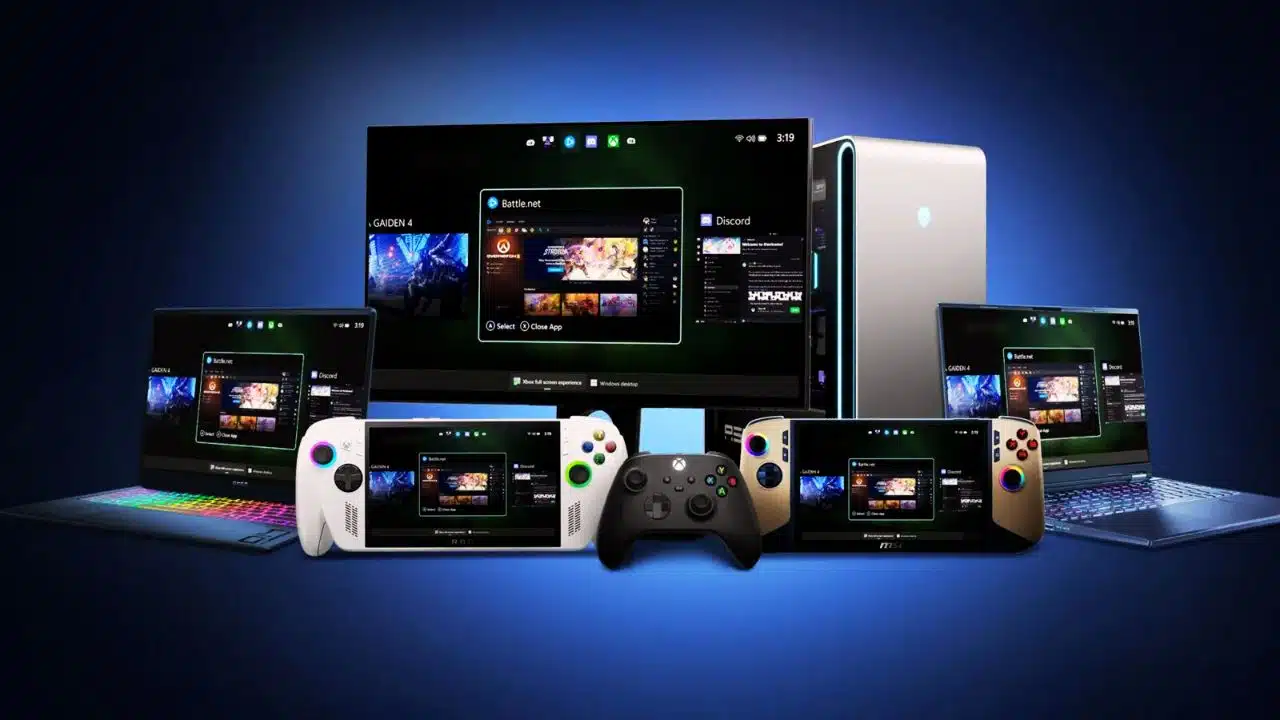
Microsoft has extended its Xbox Full Screen Experience to all Windows 11 handheld devices, moving beyond its initial exclusivity to the Asus ROG Xbox Ally. This update introduces a console-like interface optimized for handheld gaming PCs running Windows 11, delivering a streamlined, controller-friendly UI designed to enhance portable gaming.

Console-Style Interface for Handhelds

The Xbox Full Screen Experience replaces the traditional Windows desktop shell on handheld devices, providing a distraction-free, immersive gaming environment. It is designed specifically for controller navigation, allowing users to interact with the system similarly to a gaming console. This new UI acts as a central hub for games across multiple storefronts, making game management simpler and more unified. Users can access Xbox Game Pass, Xbox Play Anywhere titles, and other installed games seamlessly from this new interface.

Performance Enhancements

One key benefit of this experience is that it bypasses loading the full Windows Explorer shell, which frees up approximately 2GB of RAM for games and performance. This is particularly significant for handheld devices that often have limited memory resources, as the memory savings can translate directly into smoother gameplay and better frame rates. Additionally, this system helps reduce unnecessary background activities, contributing to overall efficiency and potentially improving battery life on portable devices.

Availability and Activation

Beginning November 21, 2025, the Full Screen Experience became available across all Windows-based handhelds, not just the Asus ROG Ally series. Users can enable this mode through the Windows 11 settings under the gaming section or toggle it directly with a shortcut (Win + F11). Once activated, devices boot directly into the Xbox Full Screen Experience, allowing a quick and seamless transition into gaming mode without encountering the usual desktop environment.

User Interaction and Features

The interface includes an Xbox guide accessible via the Xbox button on controllers, which enables quick switching between games and apps. This experience supports gamepad-optimized features, including a task switcher designed specifically for handheld gaming PCs. While mouse and keyboard support remain intact, the interface prioritizes controller inputs for ease of navigation on portable devices.

Microsoft’s move to unify the Xbox UI across all Windows 11 handhelds signals a push toward making portable PC gaming as intuitive and efficient as console gaming. This integration could reshape how gamers use Windows handhelds, promising a more focused and resource-optimized gaming experience on the go.



Subscribe to Our Newsletter

Related Articles

Top Trending

warm up cool down essentials
Warm-Up and Cool-Down Essentials: A Beginner’s Practical Guide
Best Gaming Chairs
The 8 Best Gaming Chairs Reviewed For Comfort And Support
Emotional Intelligence Leadership Skills
How To Develop Emotional Intelligence As A Leader
Engineering Toys Kids
Engineering Toys Kids Actually Use: What’s Worth Investing In
best game controllers
The 10 Best Game Controllers Compared For Every Player

Fintech & Finance

International Wire Transfer Fees
The Hidden Costs Of International Wire Transfers
Rebuild Credit Score Fast
How To Rebuild Your Credit Score Fast
kuarden
The Future of Finance With Kuarden: Your Gateway To Tokenized AI Coin
Best Neobanks for Freelancers
Top 7 Neobanks Reshaping Cross-Border Freelance Payments
HONOR 600 Pro vs HONOR 600 Lite 5G
HONOR 600 Pro vs HONOR 600 Lite 5G: Full Comparison with Expected India Pricing

Sustainability & Living

Corporate Renewable Energy Adoption
Corporate Renewable Energy Adoption: A Strong Business Case
Smart Grids and Renewable Energy
How Smart Grids Are Enabling A Renewable Energy Future
E-Waste Recycling
E-Waste Recycling: What Old Electronics Really Do to People and the Planet
Waste-to-Energy Technology
How Waste-to-Energy Technology Is Solving Two Problems At Once
A Guide to a Minimalist Lifestyle in a Busy City

GAMING

Best Gaming Chairs
The 8 Best Gaming Chairs Reviewed For Comfort And Support
best game controllers
The 10 Best Game Controllers Compared For Every Player
The Gender Gap in Gaming Progress and Challenges
The Gender Gap In Gaming: Progress And Challenges
best horror games
11 Best Horror Games That Will Haunt Your Dreams
best strategy games worth your time
The 7 Best Strategy Games Worth Your Time And Money

Business & Marketing

The Truth About Buy Now Pay Later Services
Guest Posting In 2026
Guest Posting In 2026: Is It Worth It? And How To Do It Right
New Zealand social media marketing
13 Critical Facts About How New Zealand's Small Market Forces Brands to Be Creative on Social Media
Cold Email in 2026
Cold Email In 2026: What Works, Lands In Spam, And What Converts
Entrepreneurial Spirit Promotes Social Change

Technology & AI

AI Video Copyright
AI Video Copyright: What Creators Must Know Before Publishing AI Videos
AI Terms Explained
AI Terms Explained: 5 Words That Will Make You Sound Smarter
AI Video For Social Media best practices
AI Video For Social Media: How To Create Platform-Ready Videos That People Actually Watch
CDiPhone
CDiPhone: Apple's Hardware Prowess With Data Science Intelligence
core web vitals optimization
Core Web Vitals: The Definitive Technical Guide

Fitness & Wellness

warm up cool down essentials
Warm-Up and Cool-Down Essentials: A Beginner’s Practical Guide
beginners workout routine
Beginners Workout Routine: A Simple First Month Fitness Plan That Actually Works
cardio vs strength beginners
Cardio vs Strength Beginners: What Should You Start With First?
Avtub
Avtub: The Ultimate Hub For Lifestyle, Health, Wellness, And More
resistance band routines
13 Resistance Band Routines to Build Strength at Home: Say Goodbye to Boring Workouts!


















