

Are you worried about keeping your crypto wallet safe? It’s a real concern, with hackers getting sneakier every day, targeting your digital assets on the web. You might feel like your hard-earned cryptocurrencies could slip away with just one wrong click.
Here’s a startling fact, MetaMask alone has over 21 million active users each month as of August 2024. That’s a huge target for cybercriminals looking to steal private keys or trick you with phishing attacks.
But don’t stress, we’ve got your back. In this post, we’ll walk you through “10 Simple Steps To Secure Your Web3 Wallet,” making sure your funds stay safe from threats. Stick with us to learn how to guard your crypto!
Key Takeaways
- Use trusted Web3 wallet providers like MetaMask, with 21 million monthly active users as of August 28, 2024, to keep your crypto safe.
- Store private keys offline in a hardware wallet to protect your digital assets from hackers.
- Enable two-factor authentication (2FA) for an extra layer of security on your wallet.
- Limit permissions for tokens and DApps using tools like Revoke to prevent unauthorized access.
- Regularly update your wallet and browser software from official sources to fix security risks.
Use Reputable Web3 Wallet Providers
Stick with trusted names for your Web3 wallet, folks. Picking a solid provider is like choosing a sturdy lock for your front door. You wouldn’t trust just any old key, right? Go for well-known options like MetaMask, which boasts 21 million monthly active users as of August 28, 2024.
Other reliable choices include Rabby Wallet, Coinbase, Braavos, and Argent. These names have built a reputation for keeping your digital assets safe.
Always grab your crypto wallets from official sources, no shortcuts here. Think of it as buying milk straight from the store, not some shady back alley. Check the website or app store for the real deal before downloading.
Keeping your wallet updated is just as vital for Web3 security. Updates patch holes that could let hackers sneak in. So, stay sharp and protect your private keys with a provider you can count on.
Keep Your Private Keys Offline
Hey there, let’s chat about keeping your private keys safe by storing them offline. You’ve probably heard the saying, “Not your keys, not your crypto,” and it’s a big deal.
Without those private keys, you can’t get back into your web3 wallet if your device goes missing. Worse, you can’t move to a new app or recover your digital assets. So, guarding these keys is like hiding a treasure map; you’ve got to keep it out of sight.
Think of storing your private keys offline as locking them in a safe no one can crack. Use a hardware wallet, often called a cold wallet, to keep them away from the internet. Never share these keys with anyone, no matter how nice they seem on Twitter or Telegram.
If someone gets hold of them, they’ve got full control over your crypto tokens. Now, let’s move on to setting up two-factor authentication for extra safety.
Enable Two-Factor Authentication (2FA)
Adding an extra shield to your Web3 wallet is a smart move, folks. Two-factor authentication, or 2FA, acts like a double lock on your digital assets. It means that even if someone snags your password, they can’t get in without a second key, like a code from an app or a device such as YubiKey.
Set this up fast to guard your crypto wallets from sneaky cyber threats.
Think of 2FA as a trusty sidekick for your security. Grab authenticator apps or hardware tools to make it work, and you’re golden. This step blocks phishing attacks and keeps malicious hackers at bay.
So, take a quick minute to turn it on, and sleep easy knowing your decentralized finance goodies are safer.
Create Strong and Unique Passwords
Moving from setting up two-factor authentication (2FA), let’s chat about another key step to guard your Web3 wallet. Crafting strong passwords is like building a solid lock for your digital assets.
A weak password can be a welcome mat for hackers, so make it tough to crack. Mix up letters, numbers, and symbols. Think of a crazy phrase only you’d know, like “BluePizza$42Rain.”.
Why settle for simple when you can outsmart the bad guys? Dodge common words or easy guesses tied to your life. Tools like a password manager can help whip up and store these tricky codes for your crypto wallets.
Keep those keys to your blockchain networks safe, and pair this with 2FA for an extra shield. Stick with this habit, and you’ll sleep better knowing your funds are locked tight.
Secure Your Seed Phrase Properly
After setting up a strong password, let’s move on to protecting your seed phrase, a crucial element of your Web3 wallet security. This confidential code, often a sequence of words like a BIP-39 seed phrase (imagine something unique like Cow-bungee-dispute-alabaster-golden-long-algebra-river-suit-bag-eleven-dog), is your key to accessing your digital assets.
Misplace it, and you’re in trouble. So, keep it secure, everyone.
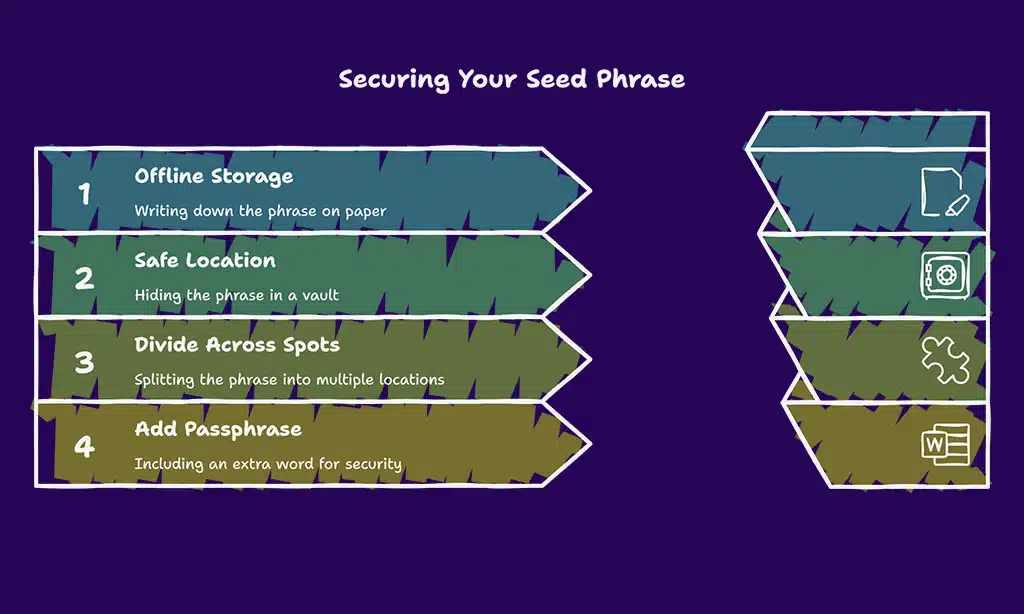
Store this recovery phrase offline, away from curious eyes on the internet. Write it on paper, hide it in a safe location like a vault, or even divide it across multiple secret spots.
For added safety, include an extra 25th-word passphrase to establish hidden accounts. Just avoid taking a picture or storing it on your computer, as hackers are always on the lookout for such vulnerabilities.
Stay vigilant, and guard this phrase like a priceless artifact, because in the sphere of crypto wallets, it genuinely is.
Beware of Phishing Attacks and Scams
Hey there, let’s chat about a sneaky trap in the Web3 world, phishing attacks. Hackers often use social engineering tricks, pretending to be support staff to steal your seed phrase or recovery QR codes.
They might send phishing emails or create fake websites that look real. Stay sharp, and always double-check URLs before clicking anything. Tools like ChainPatrol or VirusTotal can help spot threats fast.
Scammers are crafty, but you can outsmart them. Never click on unsolicited links, and keep an eye out for odd requests for your private keys. Stick to trusted sources like SEAL, ScamSniffer, or CoinDesk to stay updated on the latest scams.
If something feels off, trust your gut. Verify everything, especially when dealing with decentralized apps (dapps) or smart contracts on platforms like Uniswap or OpenSea, by testing small transactions first.
Keep your digital assets safe with these simple steps!
Regularly Update Your Wallet and Browser Software
Keeping your Web3 wallet safe starts with updates. Make sure to regularly refresh your wallet software and browser. Companies like Ledger often roll out new security patches to fix weak spots.
If you skip these, your digital assets could be at risk. Think of it as locking your door after a storm; you gotta check for cracks.
Don’t grab updates from random places, though. Always download from official sources to dodge sneaky malware. Also, keep your device’s operating system clean and patched up. A tiny glitch in your browser can let hackers slip in.
Stay sharp, and let’s move on to limiting token and DApp permissions next.
Limit Token and DApp Permissions
Moving from keeping your wallet and browser software fresh, let’s chat about a sneaky risk that often slips under the radar. Limiting token and DApp permissions is a must for protecting your digital assets in the Web3 space.
Think of it like lending your house key to a neighbor, only to realize they can enter anytime. Scary, right? Many decentralized applications, or DApps, ask for access to your crypto wallets when you interact with them.
If you’re not careful, you might give them more control than needed over your funds.
Now, here’s the kicker with browser wallets. They make connecting to decentralized apps super easy, but they’re also a weak spot if your device or browser gets hacked. So, take a moment to check what permissions you’ve handed out.
Tools like Revoke can help you spot and cancel any extra access you’ve given to DApps. Stay sharp, pals, and keep those token approvals tight. Don’t let a shady app sneak off with your hard-earned cryptocurrency.
Use a Hardware Wallet for Long-Term Storage
Hey there, let’s talk about securing your digital assets with a hardware wallet. Imagine it as an ultra-secure vault, often referred to as a cold wallet, that remains offline. This ensures malware can’t infiltrate, as there’s no internet connection to exploit.
It’s a reliable method to protect your crypto for the long term.
Now, consider this setup with brands like Ledger. Their hardware wallets display smart contract details to minimize transaction risks. Plus, they’re PIN-protected, and too many incorrect attempts can restore the device to its original state.
For added security, include a 25th-word passphrase to set up hidden accounts. What a stronghold for your cryptocurrency!
Takeaways
Wrapping up, folks, let’s keep those Web3 wallets safe as houses. You’ve got the tools, like MetaMask and cold wallets, to guard your digital assets. Don’t let hackers sneak in; stay sharp and follow these steps.
Think of your seed phrase as a secret code, hidden from prying eyes. Stick with us, and your crypto will thank you!
FAQs
1. What’s the first step to guard my Web3 wallet from nasty threats?
Hey, let’s kick things off with the basics. Secure your seed phrase, or as some call it, recovery phrase, by writing it down and stashing it offline, away from prying eyes. This secret code is your ticket to recovering your digital assets if things go south, so treat it like buried treasure.
2. Why should I bother with a hardware wallet for my crypto stash?
Listen up, pal, a hardware wallet, often dubbed a cold wallet, keeps your private keys offline, making it a fortress against phishing attacks and remote access hacks. It’s like locking your gold in a safe instead of leaving it on the kitchen counter. Plus, using this offline wallet for transaction signing adds a beefy layer of Web3 security.
3. How do I dodge phishing sites trying to swipe my crypto-wallets?
Watch out for those sneaky phishing sites; they’re like wolves in sheep’s clothing. Always double-check URLs before entering details, and never click shady links that scream scam detection alert. Stick to trusted browsers and keep your wits about you to protect your decentralized applications, or dapps.
4. Can two-factor authentication really save my Web3 wallet security?
You bet it can. Adding two-factor authentication, or 2FA, with authenticators is like putting a deadbolt on your front door; it makes breaking in a real pain for hackers targeting your crypto wallets.
5. What’s the deal with token approvals in decentralized finance?
Alright, let’s chat about token approvals in DeFi. Be stingy with permissions on decentralized apps, or dapps, because giving too much access is like handing over the keys to your house. Check every smart contract before signing off to keep your digital assets safe from social engineering tricks.
6. How do I prep for the worst with my cryptocurrency’s safety?
Hey, stuff happens, so let’s plan ahead with a disaster recovery plan for your Web3 wallet. Store backups of seed phrases and private keys in secure spots, maybe even split across locations, to outsmart side-channel attacks. Think of it as having a spare tire for your Cardano or other blockchain investments; you’ll thank yourself later if a vulnerability pops up.





















