
Running out of storage on your VPS can be a real headache. Slow performance, limited space, and high costs can make managing your server frustrating. Many users face these problems but don’t know how to fix them.
A Virtual Private Server (VPS) gives you control over hosting websites or apps. But keeping it efficient needs planning. Simple tricks like compressing files and cleaning up old data help save space and boost speed.
This blog will show you easy ways to max out your VPS’s storage efficiency. Keep reading for tips to improve performance without breaking the bank!
Key Takeaways
- Use SSDs for faster performance; read speeds can reach 1.8 GB/s, while write speeds hit 682 MB/s.
- Compress files like CSS and images to save space and lower bandwidth use. Switch to WebP or AVIF formats for better results.
- Clean up old backups, logs, and unused data often to free storage and improve speed.
- Enable caching with tools like Varnish or Memcached to make data access faster and reduce server load.
- Regularly monitor disk usage using tools like htop or Grafana to find problems early and avoid full storage crashes.
Optimize Disk I/O Performance
Use SSD storage for faster speeds. It improves data retrieval and handles high workloads better than hard drives. For example, read speeds can hit 1.8 GB/s using the DD command, while write speeds reach 682 MB/s.
Organize your databases to minimize disk stress. Tools like MySQL optimization reduce unnecessary queries, improving VPS (virtual private server) performance. Limit CPU usage by balancing tasks across cores for smoother operation and less lag in web servers.
Enable Caching for Faster Data Access
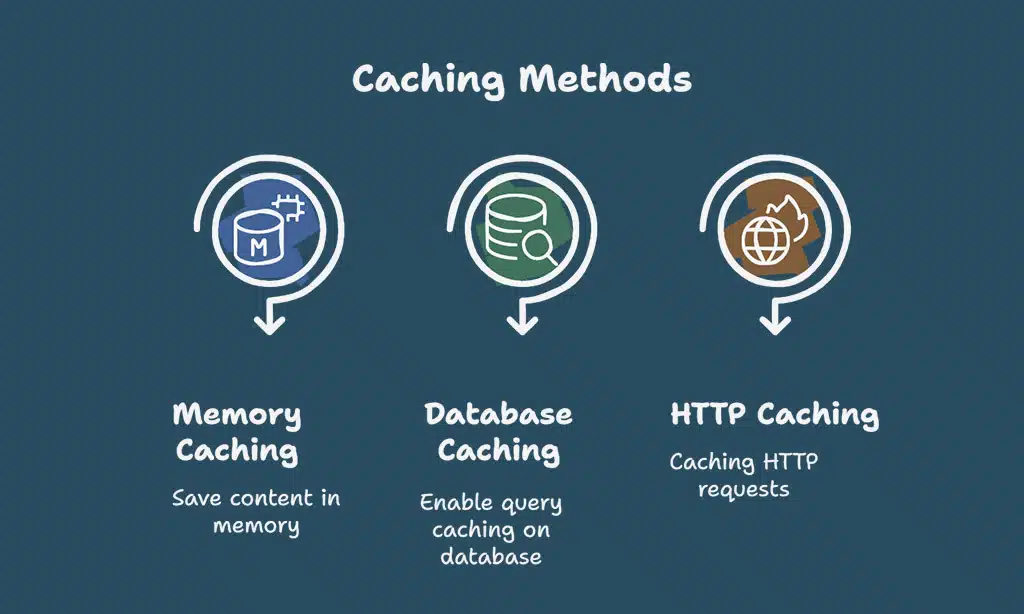
Speed up data access with smart caching. Tools like Varnish, Memcached, or Squid can save frequently used content in memory. This reduces the need to fetch data from slower storage repeatedly.
Allocate about 70% of your RAM to `innodb_buffer_pool_size` for better database performance.
Enable query caching on your database systems to handle repetitive requests faster. Caching HTTP requests also cuts server load and accelerates website response times. Use solid-state drives (SSD) and modern caching strategies for improved results.
These methods boost VPS hosting speed and improve user experience significantly!
Compress Data to Save Space and Bandwidth
Compressing files makes them smaller. This frees up disk space and speeds up data transfers. Use Gzip compression on your web server to shrink CSS, JavaScript, and HTML files. Minify these files by removing unneeded spaces or comments.
Switch image formats to WebP or AVIF for even more savings.
Cut back HTTP requests by combining scripts or stylesheets. Fewer requests mean faster loading times and less bandwidth use. These steps boost VPS performance while keeping costs low.
Monitor and Analyze Storage Usage
Keeping track of storage is vital for VPS optimization. It helps find problems and improve server performance.
- Check your CPU usage regularly with tools like htop or Netdata. High CPU usage often means trouble.
- Use Prometheus and Grafana to analyze trends in storage. They show helpful graphs and patterns over time.
- Test network speed using Speedtest.net, Iperf, or Fast.com. For example, download speeds of 315 Mbps ensure smooth operations.
- Look for large files eating up space. Delete unnecessary logs or backups stored for too long.
- Monitor database sizes using MySQL tools. Big databases affect VPS performance.
- Set alerts for low storage limits with command-line tools. This prevents sudden crashes from full disks.
- Track SSD health since they handle faster reads/writes than HDDs but can wear out.
Implement File System Optimization

File system optimization improves VPS performance. It helps you manage storage better and speeds up your server.
- Use solid-state drives (SSD). They are faster than traditional hard drives. SSDs improve read and write speeds.
- Choose the right file system, like ext4 or XFS. These are great for Linux OS. They handle storage efficiently.
- Enable disc caching for better data access. This reduces input/output (I/O) load on the drive.
- Turn on innodb_file_per_table in MySQL. This splits database tables into separate files, saving space.
- Update your operating system regularly. This ensures new patches fix bugs and improve file handling.
- Check for fragmented files often. Defragmenting helps increase data access speed.
- Remove unused or duplicate files frequently. Clean systems use less memory and CPU cores.
- Use security audits to check for vulnerabilities in your file system setup.
- Optimize worker_processes in web server configuration files, such as Nginx or Apache, to boost server efficiency with heavy traffic users.
- Monitor disk usage using tools like apt-get or yum. They show where space is wasted so you can act fast.
Regularly Clean Up Unnecessary Files
Old files and unused data take up space. Cleaning them boosts your VPS performance.
- Clear temporary files often. Use the command rm tmpfile to remove one quickly.
- Delete outdated backups stored on your server. They eat up gigabytes needlessly.
- Check for unused databases or tables in MySQL. Drop them if not required to improve database efficiency.
- Remove old logs that no longer serve a purpose, like access or error logs from months ago.
- Clear cache files regularly for better disk I/O performance and faster processes.
- Uninstall unnecessary software packages using the package manager to free memory and storage.
- Check directories for duplicate files or unused scripts, then delete them immediately.
Leverage Backup and Redundancy Strategies
Set up automatic backups on your virtual private server (VPS). This protects your data from loss during crashes or cyberattacks. Use tools like cloud technology for off-site storage.
Keep copies of important files in different locations to improve data integrity.
Add redundancy by using Content Delivery Networks (CDNs) like Cloudflare or Fastly. They distribute traffic and reduce downtime risks. Combine firewalls with Intrusion Detection Systems (IDS) to fight threats, including denial-of-service attacks.
Always test recovery plans to avoid surprises later.
Takeaways
Boosting VPS storage is easier than it seems. Use tools like compression and caching to save space and speed up access. Clean up unused files often, and watch your resource use closely.
A well-tuned VPS means faster sites, happier users, and less stress for you! Stick to these tips, and your server will run smooth as butter.
FAQs
1. What is a Virtual Private Server (VPS), and how does it help with storage efficiency?
A VPS, or Virtual Private Server, is a hosting service that splits one physical server into smaller virtual servers. It improves storage efficiency by offering dedicated resources like SSD storage and better memory allocation for your website.
2. How can I optimize my VPS performance to save space?
You can use caching mechanisms like disk caching or browser caching, compress files with Gzip compression, and minify CSS and JavaScript code to reduce file sizes.
3. Why should I use a Content Delivery Network (CDN) with my VPS?
A CDN stores cached copies of your site on multiple servers worldwide. This reduces the load on your VPS hosting while speeding up website performance for users in different locations.
4. How do security updates improve VPS optimization?
Regular security updates protect against malware scanning issues, DDOS attacks, eavesdropping threats, and other cyber risks that may slow down your network performance or waste server resources.
5. What role does database optimization play in maximizing storage efficiency?
Optimizing databases by managing MySQL performance, reducing database queries, and using replication ensures faster processing times while freeing up CPU usage and memory allocation.
6. Can scaling help improve storage management on a VPS?
Yes! Scaling lets you adjust processor power or add more SSD resources as needed without overloading existing CPU cores or slowing upload speeds like megabytes per second during high traffic periods.