

The traditional approach to teaching computer science—staring at a blinking cursor on a black screen—is notoriously ineffective for holding the attention of modern students. For educational institutions and parents seeking to foster genuine computational thinking, finding the right Code Learning Games is essential.
By stepping away from massive tech monopolies and partnering with independent American developers, educators gain access to highly specialized, narrative-driven platforms. These SMEs build tools that disguise complex syntax, loops, and algorithms within immersive RPGs, interactive puzzles, and creative sandbox environments.
Establishing a reliable digital foundation requires a strict evaluation process to ensure these engaging platforms also deliver rigorous, standards-aligned computer science education.
Our Selection Methodology
Identifying the most effective interactive coding architecture required strict filtering to separate genuine computer science curricula from generic digital toys. We focused entirely on independent American studios that balance high engagement with authentic programming languages.
-
Geographic Baseline. Operated and headquartered strictly within the United States as independent entities.
-
Independence. Verified as independent SMEs to guarantee agile customer support, educational focus, and transparent student data policies.
-
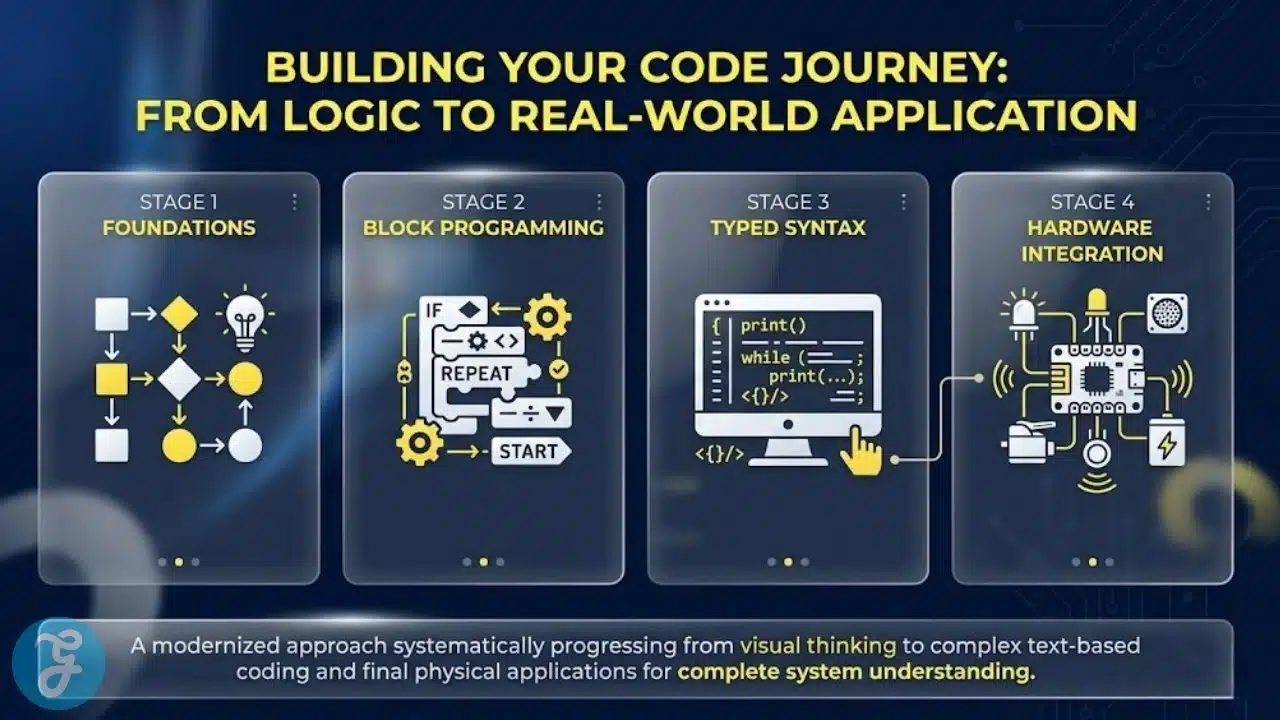
Pedagogical Rigor. Proven transition from visual block-based logic to typed, real-world languages like Python and JavaScript.
-
Data Security. Complete adherence to FERPA and COPPA regulations, ensuring student gameplay data and project codes remain strictly private.
Understanding these core requirements helps identify exactly which organizations are equipped to handle the rigorous demands of modern computer science classrooms.
Whom This is for
This guide serves district STEM coordinators, instructional technologists, and classroom teachers seeking to deploy scalable, engaging computer science curricula. It is also an essential resource for parents and independent coding academies looking for scientifically proven platforms to teach programming logic safely.
With the audience defined, we can examine the specific developers leading the industry.
Here the Top 15 SMEs for Code Learning Games
The following independent studios and specialized organizations are actively reshaping how academic institutions teach computational thinking. Here is our curated breakdown of the standout developers driving gamified computer science today.
Starting with platforms that seamlessly bridge the gap between gaming and actual typed code allows for an immediate classroom impact.
1. CodeCombat
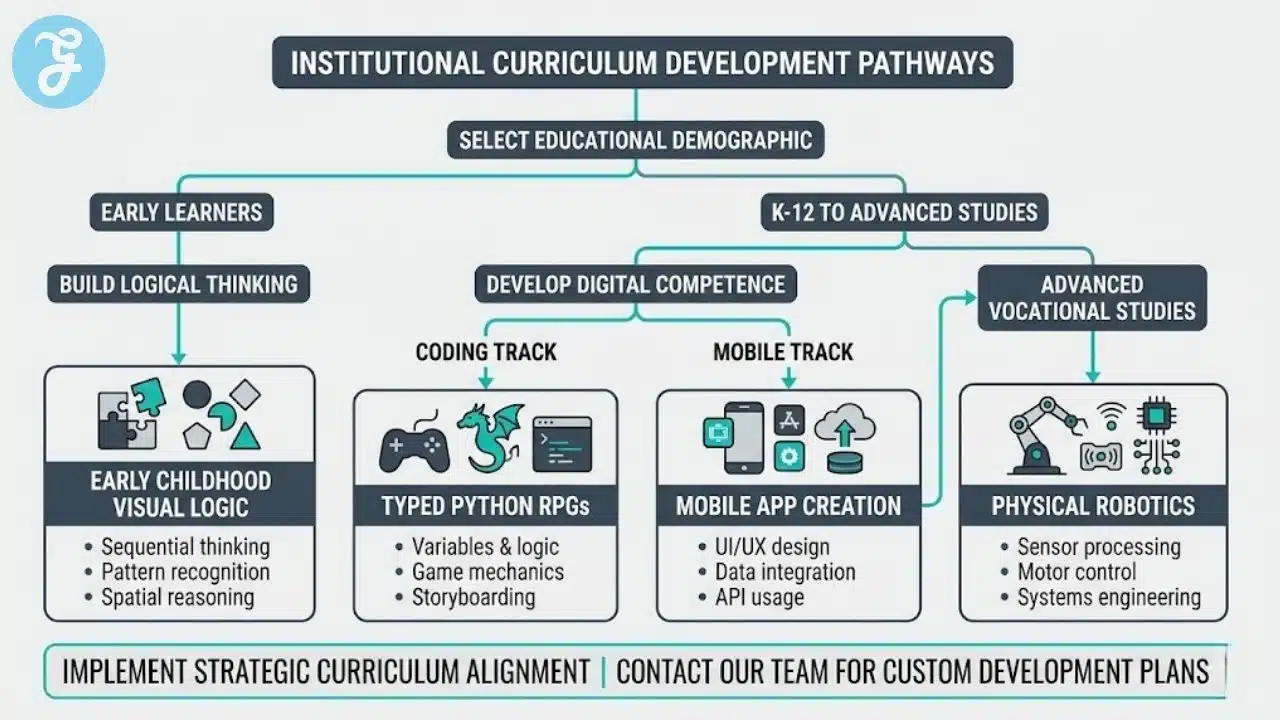
Operating out of San Francisco, California, CodeCombat is a pioneer in typed-code gaming. Instead of using visual blocks, the platform immerses students in a fantasy role-playing game where they must write actual Python, JavaScript, or C++ syntax to command their hero. Students defeat ogres and navigate dungeons by typing loops, variables, and conditional statements in real-time.
Best for:
-
Middle and high school students who need to transition from block-based concepts to actual typed programming languages.
Why We Chose It:
-
It forces students to learn proper syntax and formatting immediately, completely bypassing the “training wheels” of block coding.
-
The game provides a highly sophisticated, proprietary error-checking engine that gives students immediate, human-readable feedback when their code fails.
Things to consider:
-
Because it requires actual typing and syntax memorization, it can be frustrating for young students lacking keyboarding skills.
The 2026 Edge:
-
Advanced AI “pair-programming” avatars that guide students through complex algorithmic puzzles without giving away the direct answer.
Teaching logic before literacy requires highly visual, word-free programming interfaces.
2. Kodable
Headquartered in San Francisco, California, Kodable is designed specifically for early childhood education. The platform uses a completely word-free, visual interface where students drag and drop arrows and symbols to guide “Fuzz” characters through mazes. It teaches complex concepts like sequencing, loops, and object-oriented programming to students who haven’t even learned to read yet.
Best for:
-
Pre-K through elementary educators needing a highly accessible, foundational computer science curriculum.
Why We Chose It:
-
It masterfully abstracts complex programming logic into intuitive, directional game mechanics.
-
The platform provides teachers with incredibly detailed lesson plans that connect the digital gameplay to physical, off-screen classroom activities.
Things to consider:
-
The extreme simplification means students will eventually outgrow the platform and require a more robust coding environment.
The 2026 Edge:
-
Integrated creative studios where young students can design and code the behavior of their own custom 3D Fuzz characters.
Transitioning from consuming apps to creating them requires platforms that gamify app development.
3. Bitsbox
Located in Boulder, Colorado, Bitsbox gamifies the creation of mobile applications. The platform provides students with short, typed coding commands in JavaScript. By typing these commands into the Bitsbox web editor, kids instantly build working games, greeting cards, and interactive physics simulations that they can immediately push to a real smartphone or tablet.
Best for:
-
Upper elementary and middle school students who are highly motivated by creating sharable, playable digital products.
Why We Chose It:
-
The instant gratification of writing a line of code and seeing a mobile app react on a physical device is incredibly motivating.
-
It utilizes a simplified version of JavaScript that maintains industry-standard logic while removing overly complex syntax barriers.
Things to consider:
-
The platform relies heavily on kids copying provided code snippets before modifying them, requiring strong reading comprehension.
The 2026 Edge:
-
Enhanced multiplayer app development, allowing two students to code different components of the same mobile game simultaneously over a secure network.
Creative, open-ended sandboxes appeal to visual learners who want to design their own interactive worlds.
4. Hopscotch
Based in New York City, Hopscotch is a heavily gamified, block-based coding platform explicitly designed for mobile touchscreens (specifically iPads). Students use a highly visual drag-and-drop interface to build their own games, animations, and interactive art. The platform features a moderated, kid-friendly community where students can publish their games and play creations coded by their peers.
Best for:
-
1:1 iPad classrooms and students who thrive in creative, open-ended design environments.
Why We Chose It:
-
The touch-first interface completely eliminates the friction of a mouse and keyboard, making coding feel as natural as drawing.
-
The social community aspect drives massive engagement, as students naturally want to reverse-engineer and modify the impressive games built by their friends.
Things to consider:
-
The platform is heavily optimized for Apple’s iOS ecosystem, limiting its utility in Chromebook-dominated school districts.
The 2026 Edge:
-
Advanced physics block updates that allow students to easily code complex gravity, friction, and collision mechanics into their games.
Engaging teenagers requires platforms that connect coding directly to social media and digital media creation.
5. Vidcode
Operating out of New York City, Vidcode was built specifically to engage teenagers, particularly young women, in computer science. The platform gamifies the process of video editing and filter creation using JavaScript. Students upload their own videos or photos and write actual code to create snapchat-style filters, interactive memes, and virtual reality scenes.
Best for:
-
Middle and high school students who are interested in digital media, photography, and social content creation.
Why We Chose It:
-
It contextualizes computer science within the realm of modern youth culture, making programming instantly relevant to teenagers.
-
The platform bridges the gap between visual creativity and hard technical skills, proving that coding is an art form.
Things to consider:
-
The focus is heavily on visual outputs and media manipulation, rather than traditional back-end database programming.
The 2026 Edge:
-
Integrated audio-coding modules that allow students to program custom sound waves and digital music synthesizers using JavaScript.
Modding popular commercial video games is the ultimate entry point for hardcore gamers.
6. CodaKid
Headquartered in Scottsdale, Arizona, CodaKid leverages the massive popularity of commercial games like Minecraft and Roblox. Instead of a standalone educational game, the platform provides gamified, video-guided courses that teach kids how to write real Java and Lua code to modify their favorite existing games, adding custom swords, enemies, and game modes.
Best for:
-
Highly motivated young gamers who already spend hours playing Minecraft or Roblox and want to learn how they work under the hood.
Why We Chose It:
-
It teaches students how to use professional, industry-standard IDEs (Integrated Development Environments) like Eclipse.
-
The motivation factor is unparalleled; students will happily write complex Java code if it means they get a flaming sword in Minecraft.
Things to consider:
-
Setting up the professional development environments on a home computer requires a basic level of technical proficiency from parents or teachers.
The 2026 Edge:
-
Automated AI debugging assistants that help students identify complex syntax errors in their Java code without giving away the direct fix.
Combining physical activity with digital programming solves the issue of sedentary screen time.
7. Unruly Studios
Located in Boston, Massachusetts, Unruly Studios created “Unruly Splats,” which are programmable floor buttons that light up and make sounds. Students use a tablet-based visual coding app to program the behavior of the Splats, creating gamified recess activities like physical whack-a-mole, relay races, and interactive dance floors.
Best for:
-
Physical education teachers, makerspaces, and elementary educators wanting to combine active, physical play with STEM concepts.
Why We Chose It:
-
It fundamentally changes what a “coding environment” looks like, pulling students out of their chairs and into active collaboration.
-
The physical constraints of the Splats force students to think deeply about event-driven programming (e.g., “If Splat 1 is stomped, do X”).
Things to consider:
-
The system requires the purchase of physical hardware alongside the software platform.
The 2026 Edge:
-
Cloud-connected global leaderboards where a classroom in Boston can program a physical relay race and challenge the times of a classroom in Chicago.
Robotics platforms provide immediate, tangible feedback for complex algorithmic planning.
8. Wonder Workshop
Based in San Mateo, California, Wonder Workshop is the creator of the Dash and Cue coding robots. The accompanying digital apps are highly gamified, offering narrative-driven puzzles where students must arrange block-based code to help the physical robot navigate mazes, throw projectiles, and complete rescue missions in the real world.
Best for:
-
Elementary and middle school classrooms looking for highly durable robotics paired with rigorous, puzzle-based coding software.
Why We Chose It:
-
The apps feature a brilliant “virtual robot” mode, allowing students to test and debug their code digitally before executing it on the physical hardware.
-
The progression system is masterfully paced, slowly introducing variables and sensor logic as the puzzles become more complex.
Things to consider:
-
Managing the charging, storage, and firmware updates of a physical robot fleet requires dedicated classroom logistics.
The 2026 Edge:
-
Enhanced spatial awareness algorithms in the app that allow students to code complex swarm behaviors for multiple robots simultaneously.
Spatial reasoning and 3D modeling are essential skills for the next generation of software engineers.
9. Blocksmith
Operating out of Boise, Idaho, Blocksmith provides a 3D game design and coding platform explicitly built for education. Students use a gamified interface to drag and drop 3D assets into a world, and then use visual logic blocks to program interactions. It serves as an incredibly safe, moderated stepping stone before students tackle complex professional engines like Unity or Unreal.
Best for:
-
Middle and high school STEM labs focusing on 3D game design, virtual reality, and spatial programming.
Why We Chose It:
-
It allows students to build fully functional 3D games and VR experiences without needing to master complex C# syntax immediately.
-
The platform provides a massive library of safe, pre-made 3D assets, eliminating the need for students to build models from scratch.
Things to consider:
-
Running a 3D game engine requires modern computers or high-end Chromebooks to ensure smooth rendering.
The 2026 Edge:
-
Automated WebXR exporting, allowing students to instantly push their coded 3D games to a web browser for peers to play on VR headsets.
Hardware-focused coding requires platforms that seamlessly blend circuitry with software logic.
10. Firia Labs
Headquartered in Madison, Alabama, Firia Labs produces the CodeBot and JumpStart Python platforms. They provide a gamified, browser-based coding environment where students write Python code to control custom hardware boards. The platform uses a mission-based narrative, tasking students with writing code to activate specific sensors, lights, and motors on the board.
Best for:
-
High school computer science programs that want to move beyond screen-only coding and integrate hardware engineering.
Why We Chose It:
-
The browser-based IDE requires absolutely no software installation, making it incredibly easy to deploy across a district network.
-
It teaches actual, industry-standard Python within the context of physical computing and IoT (Internet of Things) architecture.
Things to consider:
-
The strict focus on Python and hardware engineering is geared toward older, more focused STEM students.
The 2026 Edge:
-
Integrated hardware-in-the-loop simulation, allowing students to virtually test their Python scripts on a 3D model of the board before deploying to the physical device.
High-quality narrative games can disguise complex computer science curricula entirely.
11. Endless Studios
Located in San Francisco, California, Endless Studios operates Terminal Two, a platform that builds premium, standalone video games designed specifically to teach coding. Instead of feeling like educational software, titles like “Frog Fractions” or “Aqueducts” play like top-tier indie games, where students must manipulate variables and logic gates to beat the levels.
Best for:
-
Students who are highly resistant to traditional educational software and need genuine, high-quality video game experiences.
Why We Chose It:
-
The production value of the games rivals commercial indie titles, ensuring deep immersion and high replayability.
-
It abstracts computational thinking so flawlessly that students often do not realize they are learning advanced logic algorithms until after the game is over.
Things to consider:
-
Because the games are standalone experiences, transitioning the knowledge directly to a blank code editor requires structured teacher facilitation.
The 2026 Edge:
-
New multiplayer puzzle titles where students must securely share snippets of code with teammates to solve massive, server-wide logic gates.
Spherical robotics provide unique challenges regarding physics, momentum, and navigation algorithms.
12. Sphero
Based in Boulder, Colorado, Sphero produces programmable robotic balls paired with the highly gamified Sphero Edu app. The app allows for draw-to-drive, block-based coding, and full JavaScript programming. Students must write code to navigate the physical robot through obstacle courses, calculating speed, heading, and delay based on real-world physics.
Best for:
-
K-12 educators looking for an incredibly durable, highly versatile platform that scales from kindergarten drawing to high school JavaScript.
Why We Chose It:
-
The raw durability of the robots allows them to be used in gymnasiums, hallways, and outdoor environments.
-
The app captures real-time telemetry data from the robot (velocity, location, acceleration), allowing students to graph and analyze their code’s physical performance.
Things to consider:
-
Spherical movement involves complex physics (like drift and momentum), meaning the robot won’t always execute a 90-degree turn perfectly without advanced coding adjustments.
The 2026 Edge:
-
Enhanced optical recognition modules that allow the robots to read and react to specific physical color codes placed on the floor during a coded run.
Understanding the physical architecture of a computer makes the software code much more intuitive.
13. Piper
Operating out of San Francisco, California, Piper produces a physical computer kit that students build themselves using a Raspberry Pi. Once assembled, they play a custom, heavily gamified version of Minecraft (PiperCraft). To progress in the game, students must physically wire breadboards and write Python code to activate switches, lights, and buzzers that interact directly with the Minecraft world.
Best for:
-
Makerspaces and STEM programs focusing on the intersection of physical electronics, hardware assembly, and Python programming.
Why We Chose It:
-
It completely demystifies the “black box” of a computer by forcing students to build the hardware before they write the software.
-
Bridging physical breadboard wiring directly into a digital Minecraft environment is a brilliantly motivating pedagogical tool.
Things to consider:
-
The platform is hardware-intensive, requiring careful inventory management of small electronic components.
The 2026 Edge:
-
New advanced sensor kits that allow students to code environmental variables (temperature, humidity) directly into their custom game levels.
Art and robotics merge beautifully when platforms prioritize creative expression over strict navigation.
14. BirdBrain Technologies
Headquartered in Pittsburgh, Pennsylvania, BirdBrain Technologies is the creator of the Finch Robot and the Hummingbird Robotics Kit. Their programming environments are highly gamified and accessible, focusing heavily on allowing students to code artistic, creative projects. Students write block-based or Python code to control custom cardboard creations brought to life by the Hummingbird board.
Best for:
-
STEAM (Science, Technology, Engineering, Arts, Math) classrooms focusing on creative robotics and artistic expression.
Why We Chose It:
-
It actively recruits students who might not consider themselves “coders” by framing programming as a tool for creating art and kinetic sculptures.
-
The platform integrates flawlessly with standard crafting materials, keeping project costs incredibly low.
Things to consider:
-
The focus is on creative construction rather than the hyper-competitive, high-speed coding challenges found in pure gaming platforms.
The 2026 Edge:
-
Advanced Bluetooth broadcasting tools that allow students to code their independent robotic sculptures to “dance” in synchronized algorithmic patterns.
Absolute beginners need interfaces that remove the concept of reading entirely.
15. CodeSpark
Based in Pasadena, California, CodeSpark (formerly CodeSpark Academy) provides a wildly popular, gamified app designed for pre-readers. The platform uses intuitive, visual blocks featuring the “Foos” characters. Students solve puzzles and build their own side-scrolling platformer games entirely through visual logic, learning concepts like conditional statements without reading a single word.
Best for:
-
Kindergarten and early elementary students taking their absolute first steps into computational thinking.
Why We Chose It:
-
The word-free interface ensures that reading level is never a barrier to learning advanced computer science logic.
-
The “Game Maker” mode allows young children to design their own Mario-style levels, reinforcing logic through creative game design.
Things to consider:
-
The interface is incredibly specific to young children and will not appeal to students beyond the third grade.
The 2026 Edge:
-
Automated difficulty scaling that tracks how quickly a child solves a puzzle and subtly adjusts the complexity of the next level’s algorithmic challenge.
Reviewing these varied digital environments side-by-side helps administrators clarify their institutional priorities.
An Overview Of Code Learning Games
Examining these distinct providers collectively provides a clear perspective on the digital infrastructure available to modern educators. The following data points highlight the primary functional differences between these independent providers.
Overview Comparison Table
Comparing these specific metrics highlights the structural differences between screen-only platforms and hardware-integrated systems.
| SME Developer | Headquarter Location | Core Focus Area | Primary Function |
| CodeCombat | San Francisco, CA | Typed-Code Gaming | Python/JS RPG Adventure |
| Kodable | San Francisco, CA | Early Childhood CS | Visual Maze Programming |
| Bitsbox | Boulder, CO | Mobile App Creation | JavaScript Project Coding |
| Hopscotch | New York, NY | iOS Game Design | Block-Based Touch Coding |
| Vidcode | New York, NY | Teen Digital Media | JS Creative Filtering |
| CodaKid | Scottsdale, AZ | Modding Commercial Games | Java/Lua Game Integration |
| Unruly Studios | Boston, MA | Active Physical Play | Programmable Floor Buttons |
| Wonder Workshop | San Mateo, CA | Gamified Robotics | Block Coding App + Dash |
| Blocksmith | Boise, ID | 3D Game Design | Spatial/VR Programming |
| Firia Labs | Madison, AL | Hardware Engineering | Python IoT Coding |
| Endless Studios | San Francisco, CA | Indie-Style Games | Narrative Computational Logic |
| Sphero | Boulder, CO | Versatile Robotics | Scalable App-Enabled Play |
| Piper | San Francisco, CA | Hardware Assembly | Python + Physical Minecraft |
| BirdBrain Tech | Pittsburgh, PA | STEAM & Arts | Creative Robotic Sculpting |
| CodeSpark | Pasadena, CA | Word-Free Coding | Visual Pre-Reader Puzzles |
Evaluating these diverse administrative tools naturally leads to our primary recommendations for specific institutional use cases.
Our Top 3 Picks and Why
Narrowing down the field highlights three developers making exceptional contributions to computer science education. CodeCombat completely revolutionizes the transition to typed code, proving that writing actual Python syntax can be as engaging as playing a top-tier fantasy RPG. Bitsbox provides unmatched motivation by allowing students to write real JavaScript and instantly play their creations on a smartphone. Finally, Unruly Studios completely redefines the coding environment, pulling kids away from their monitors and using code to facilitate highly physical, collaborative recess games.
Selecting the right digital infrastructure requires balancing the technical capabilities of the software with the actual needs of the teaching staff.
How to Choose the Right Coding Learning Games by Yourself
Implementing a new computer science environment successfully means finding a platform that aligns with your specific pedagogical philosophy and campus technology constraints.
-
Assess the Hardware Environment. Determine if your school relies on iPads (which favor touch-based block coding) or Chromebooks/PCs (which can handle typed IDEs).
-
Define the End Goal. Decide if you are trying to teach specific syntax (Python, Java) or if you are focused on teaching general computational thinking and logic structures.
-
Evaluate the “Floor and Ceiling.” Ensure the platform is easy enough for absolute beginners to start immediately, but complex enough that advanced students won’t master it in a week.
-
Consider Hardware Logistics. If choosing a robotics or physical computing platform, factor in the time and space required for charging, storage, and firmware management.
Applying this framework directly to your specific campus needs allows you to match the right developer to your computer science department.
The Final Checklist
Running through this quick verification process guarantees you are adopting a secure, scalable platform.
-
Verify the developer complies entirely with federal regulations regarding student privacy, specifically COPPA for users under thirteen.
-
Ensure the platform allows teachers to view student code in real-time to assist with debugging during live classes.
-
Test the platform’s offline capabilities; some robotics apps require a constant internet connection, which can be problematic in schools with poor Wi-Fi.
-
Confirm the developer provides dedicated professional development to help non-technical teachers understand the core computer science concepts.
-
Check that the software includes built-in accessibility features, such as high-contrast modes or screen reader compatibility.
Implementing these systems successfully requires a deep understanding of what computer science actually represents.
Beyond the Screen: Cultivating Computational Thinking
The rapid expansion of STEM initiatives has created a false belief that simply putting a student in front of a Coding Learning Games platform will automatically turn them into a software engineer. The uncomfortable truth is that treating coding as just another isolated digital worksheet fundamentally misses the point of computer science. As schools rush to implement flashy gamified curricula, they often prioritize the completion of digital levels over the actual development of problem-solving skills. The future of educational technology does not rely on building more addictive coding puzzles. It relies on educators utilizing these specialized digital sandboxes to teach resilience, logical sequencing, and the ability to break massive, complex problems into small, manageable steps.
True computational thinking happens when institutions stop viewing coding as a rote technical skill to be memorized, and start recognizing it as a creative language that empowers students to reshape the digital world around them.
To further clarify the implementation of these digital systems, addressing common technical concerns is essential.
Frequently Asked Questions (FAQs) About Coding Learning Games
Do these games teach real programming languages, or just “fake” visual blocks?
High-quality platforms act as a bridge. While early-childhood platforms use visual blocks to teach foundational logic (like loops and conditions) without the frustration of syntax errors, intermediate platforms like CodeCombat and Bitsbox transition students directly into typing real, industry-standard languages like Python, JavaScript, and Java.
Can a teacher with no coding experience use these platforms effectively?
Yes. Independent educational developers specifically design their platforms to be teacher-facing. They include robust dashboards, automated grading for code execution, and comprehensive lesson plans that guide non-technical educators through the computer science concepts step-by-step.
What is the difference between coding a robot and coding a video game?
Coding a video game happens entirely within a controlled digital environment. Coding a physical robot introduces real-world variables like battery drain, floor friction, and sensor inaccuracy. Robotics forces students to write more robust, adaptable code that can handle unpredictable physical constraints.
Are these coding platforms accessible for students on Chromebooks?
Most modern coding platforms are entirely browser-based, meaning they run flawlessly on standard school-issued Chromebooks. However, iOS-specific apps (like Hopscotch) or heavy 3D rendering engines may require specific tablets or more powerful desktop computers.
How do these platforms prevent students from just copying each other’s code?
Advanced platforms utilize algorithmic tracking that identifies when a massive block of code is pasted instantly rather than typed. Furthermore, open-ended, project-based coding games naturally prevent cheating, because every student is designing a unique solution to a creative problem rather than searching for a single correct answer.





















