
As businesses grow, the need for scalable and reliable hosting solutions becomes critical. One of the most effective tools for meeting this need is VPS hosting. Virtual Private Servers offer the perfect balance of performance, control, and affordability, making them ideal for businesses looking to expand their online presence.
In this guide, we’ll explore 10 tips to scale your business using VPS hosting, helping you optimize resources, enhance performance, and drive growth.
Scaling efficiently is essential for modern businesses. By following these tips to scale your business using VPS hosting, you can ensure smooth growth and a seamless customer experience.
Understanding VPS Hosting and Its Role in Scaling
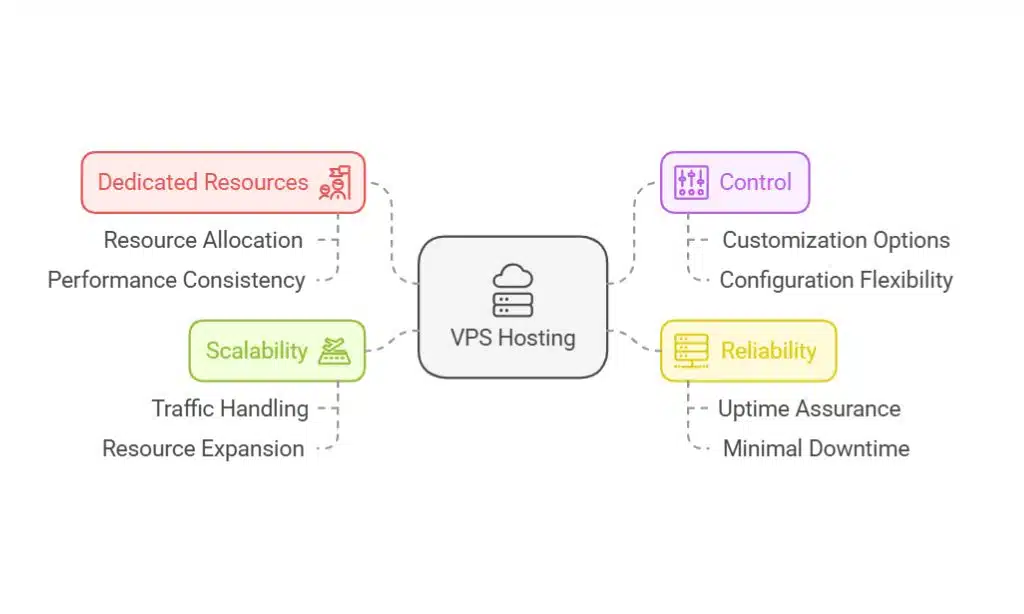
A Virtual Private Server (VPS) is a hosting solution that bridges the gap between shared and dedicated hosting. It provides businesses with dedicated resources on a shared server, offering greater control, reliability, and scalability compared to shared hosting. VPS hosting ensures that businesses have the flexibility to customize their server environment to meet specific needs.
Benefits of VPS Hosting
- Cost-efficiency: Affordable compared to dedicated hosting.
- Enhanced control: Full root access for custom configurations.
- Scalability: Resources can be adjusted as your business grows.
- Reliability: Guaranteed resources and better performance.
Why VPS Hosting Is Perfect for Scaling Businesses
Scalability is at the core of VPS hosting. With VPS, businesses can easily allocate additional resources, such as CPU, RAM, and storage, to accommodate growing demands. This flexibility ensures smooth operations even during traffic spikes.
Examples of Businesses That Scaled Using VPS Hosting
- E-commerce stores experiencing seasonal surges: VPS ensures seamless performance during high-traffic periods like Black Friday or holiday sales.
- Startups transitioning from MVP to full-scale platforms: Gain resources without upfront infrastructure costs.
- Agencies managing multiple client websites: Efficiently handle diverse client requirements on a single server.
10 Tips for Scaling Your Business Using VPS Hosting
Tip 1: Choose the Right VPS Plan
Factors to Consider When Selecting a Plan
To effectively scale your business with VPS hosting, selecting the right plan is crucial.
Here are some key considerations:
- Resource Requirements: Assess your current and future needs for RAM, CPU, and storage.
- Scalability Options: Ensure the provider allows for easy resource upgrades.
- Budget: Balance affordability with the features offered.
Pro Tip: Start with a mid-tier plan that provides room for growth without overcommitting resources initially. This approach aligns with the best tips to scale your business using VPS hosting.
Comparison of VPS Plans
| Plan Type | RAM | CPU Cores | Storage | Scalability Options |
| Basic Plan | 2 GB | 1 Core | 50 GB SSD | Limited |
| Mid-Tier Plan | 4 GB | 2 Cores | 100 GB SSD | Moderate |
| High-End Plan | 8 GB+ | 4+ Cores | 200 GB+ SSD | Extensive |
Real-Life Example: A fashion e-commerce brand chose a mid-tier VPS plan and scaled to a high-end plan during the holiday season, avoiding downtime and ensuring smooth operations.
Tip 2: Optimize Server Configurations
Best Practices for Server Optimization
Optimizing your server ensures better performance and user experience.
Here are some tips:
- Implement caching: Use tools like Varnish or Memcached to reduce server load and speed up content delivery.
- Use Content Delivery Networks (CDNs): Distribute content across multiple geographic locations for faster access.
- Regularly update server software: Address security vulnerabilities and enhance performance with timely updates.
Implementing these tips to scale your business using VPS hosting guarantees enhanced performance and user satisfaction.
Key Tools for Server Optimization
| Tool | Purpose | Recommended Options |
| Caching | Speeds up content delivery | Varnish, Memcached |
| CDN | Distributes content geographically | Cloudflare, Akamai |
| Server Updates | Improves security and performance | Automatic or manual updates |
Example: An e-commerce store implemented caching and CDNs, reducing page load times by 40% and improving conversion rates.
Tip 3: Prioritize Security Measures
Security Features to Look For
As your business scales, security becomes a top priority.
Protect your VPS environment by:
- Installing firewalls and enabling SSL certificates.
- Implementing DDoS protection to prevent attacks.
- Conducting regular backups to secure data.
Strengthening your server’s security is one of the most important tips to scale your business using VPS hosting without interruptions.
Checklist for VPS Security:
Security Tools and Features
| Security Tool | Purpose | Example Providers |
| Firewall | Blocks unauthorized access | CSF, UFW |
| DDoS Protection | Prevents large-scale attacks | Cloudflare, Akamai |
| SSL Certificate | Encrypts data transmission | Let’s Encrypt, DigiCert |
Case Study: A SaaS platform mitigated a major DDoS attack by deploying advanced firewall and protection measures, maintaining uptime during peak usage.
Tip 4: Monitor Performance Metrics
Key Metrics to Track
Monitoring performance ensures your VPS is running optimally.
Focus on these metrics:
- Uptime: Aim for 99.9% or higher.
- Latency: Ensure fast response times.
- Load Times: Faster load times improve user experience and SEO.
Recommended Tools:
- Google PageSpeed Insights
- Pingdom
- New Relic
Consistently tracking these metrics aligns with essential tips to scale your business using VPS hosting.
Case Study: A SaaS company tracked uptime and latency, identifying bottlenecks that were resolved to improve uptime from 98% to 99.95%.
Monitoring Metrics and Tools
| Metric | Importance | Recommended Tools |
| Uptime | Ensures availability | Pingdom, Uptime Robot |
| Latency | Improves response times | Google Cloud Monitoring |
| Load Times | Enhances user experience | GTmetrix, PageSpeed Insights |
Tip 5: Leverage Scalability Features

Dynamic Resource Allocation
One of the primary advantages of VPS hosting is the ability to dynamically scale resources.
Work with a provider that offers:
- Instant resource upgrades.
- Flexible payment options (pay-as-you-go models).
Scaling your resources effectively is one of the smartest tips to scale your business using VPS hosting.
Scalability Options
| Resource | Basic Plan | Scalable Plan | Benefit |
| RAM | 2 GB | Up to 32 GB | Handles traffic spikes |
| CPU Cores | 1 Core | Up to 8 Cores | Improves processing |
| Storage | 50 GB SSD | Up to 1 TB SSD | Supports large files |
Case Study: A news website successfully handled a 500% traffic surge during a breaking news event by leveraging scalable VPS resources.
Tip 6: Optimize Website Speed and Responsiveness
Techniques to Enhance Speed
- Compress images: Use tools like TinyPNG to reduce file sizes.
- Minify code: Remove unnecessary code from CSS, JavaScript, and HTML.
- Select a server location: Reduce latency by choosing a data center near your audience.
Enhancing speed is a key component of effective tips to scale your business using VPS hosting, improving user experience and conversion rates.
Practical Insight: An online retailer saw a 20% increase in sales after optimizing website speed with image compression and code minification.
Speed Optimization Tools
| Task | Tool | Benefit |
| Image Compression | TinyPNG, ImageOptim | Reduces file sizes |
| Code Minification | UglifyJS, CSSNano | Speeds up rendering |
| Latency Reduction | AWS Regions, Cloudflare | Enhances proximity |
Tip 7: Use VPS for Resource-Intensive Applications
Examples of Applications
VPS hosting is ideal for:
- E-commerce Platforms: Manage high traffic and transactions.
- Databases: Support large-scale data processing.
- SaaS Applications: Provide reliable and scalable services to clients.
Scaling resource-heavy applications with VPS is one of the top tips to scale your business using VPS hosting.
Case Study: A financial analytics firm used VPS to handle complex data modeling, reducing processing time by 30%.
Resource Demands of Applications
| Application Type | Typical RAM Needs | CPU Cores Needed | Storage Requirements |
| E-commerce | 4 GB+ | 2+ Cores | 100 GB+ SSD |
| Databases | 8 GB+ | 4+ Cores | 200 GB+ SSD |
| SaaS | 8 GB+ | 4+ Cores | 500 GB+ SSD |
Tip 8: Integrate VPS with Cloud Solutions
Benefits of Hybrid Solutions
Combining VPS hosting with cloud solutions offers:
- Enhanced flexibility: Scale across multiple platforms.
- Redundancy: Minimize downtime with failover options.
Hybrid solutions align perfectly with advanced tips to scale your business using VPS hosting.
VPS vs. Hybrid Hosting
| Feature | VPS Only | VPS + Cloud Hybrid |
| Flexibility | Moderate | High |
| Redundancy | Basic | Advanced |
| Cost | Lower | Moderate |
Real-Life Application: An international e-learning platform integrated VPS and cloud hosting, achieving near-zero downtime during peak global usage.
Tip 9: Ensure Regular Backups
Backup Strategies
Backing up your data is critical for business continuity. Implement:
- Automated backups: Schedule daily or weekly backups.
- Offsite storage: Store backups in secure, remote locations.
Including backups in your routine is a non-negotiable part of tips to scale your business using VPS hosting.
Practical Example: A digital agency avoided data loss during a cyberattack by restoring from offsite backups within hours.
Backup Methods Comparison
| Backup Type | Frequency | Benefits |
| Automated Backups | Daily or Weekly | Reduces manual effort |
| Offsite Backups | Weekly or Monthly | Adds an extra layer of security |
| Real-Time Backups | Continuous | Minimizes data loss risks |
Tip 10: Seek Expert Support When Needed
Managed VPS Hosting Services
If server management feels overwhelming, consider managed VPS hosting. Benefits include:
- Expert support for technical issues.
- Proactive monitoring and updates.
- Peace of mind to focus on business growth.
Managed services are highly recommended in advanced tips to scale your business using VPS hosting for peace of mind and efficiency.
Case Study: A startup reduced downtime by 80% after switching to managed VPS hosting, allowing the team to focus on product development.
Managed vs. Unmanaged VPS
| Feature | Managed VPS | Unmanaged VPS |
| Technical Support | 24/7 Availability | Limited or None |
| Updates | Automatic | Manual |
| Cost | Higher | Lower |
Interactive Tools and Resources
Tools to Optimize VPS Hosting
| Provider | Starting Price | Key Features | Scalability Options |
| HostGator | $19.95/month | Full root access, SSD storage | Dynamic scaling |
| Bluehost | $18.99/month | Free SSL, 24/7 support | Flexible upgrades |
| DigitalOcean | $5.00/month | Developer-friendly, scalable apps | API-driven resources |
Takeaways
Scaling your business requires a reliable and flexible hosting solution, and VPS hosting delivers on all fronts. By implementing these 10 tips to scale your business using VPS hosting, you can enhance performance, manage resources efficiently, and ensure your business is prepared for future growth.
Take the next step by assessing your current hosting needs and exploring VPS options that align with your goals. Start scaling with confidence today!