
Are you trying to figure out what timewarp taskus actually means in real work? That confusion makes sense. On the public side, TaskUs talks much more about the systems behind the name, like TaskGPT, AssistAI, PromptAI, CallAI, TaskVerse, and agentic AI services, than about a simple standalone task app.
The useful question is this: how does that mix of tools help a workforce move faster without making support feel robotic?
In this guide, I’ll walk you through the key features, the real benefits for customer support and business process outsourcing teams, and how the digital workforce works alongside human agents.
Key Features of TimeWarp TaskUs
If you strip away the vague buzzwords, the features of the TimeWarp TaskUs line up with the capabilities TaskUs publicly documents: AI assistance, real-time dashboards, smart routing, scalable staffing, and compliance-ready operations.
That matters because readers usually are not looking for another to-do list tool. They want to know whether timewarp by taskus can actually transform productivity, customer support, and workforce performance.
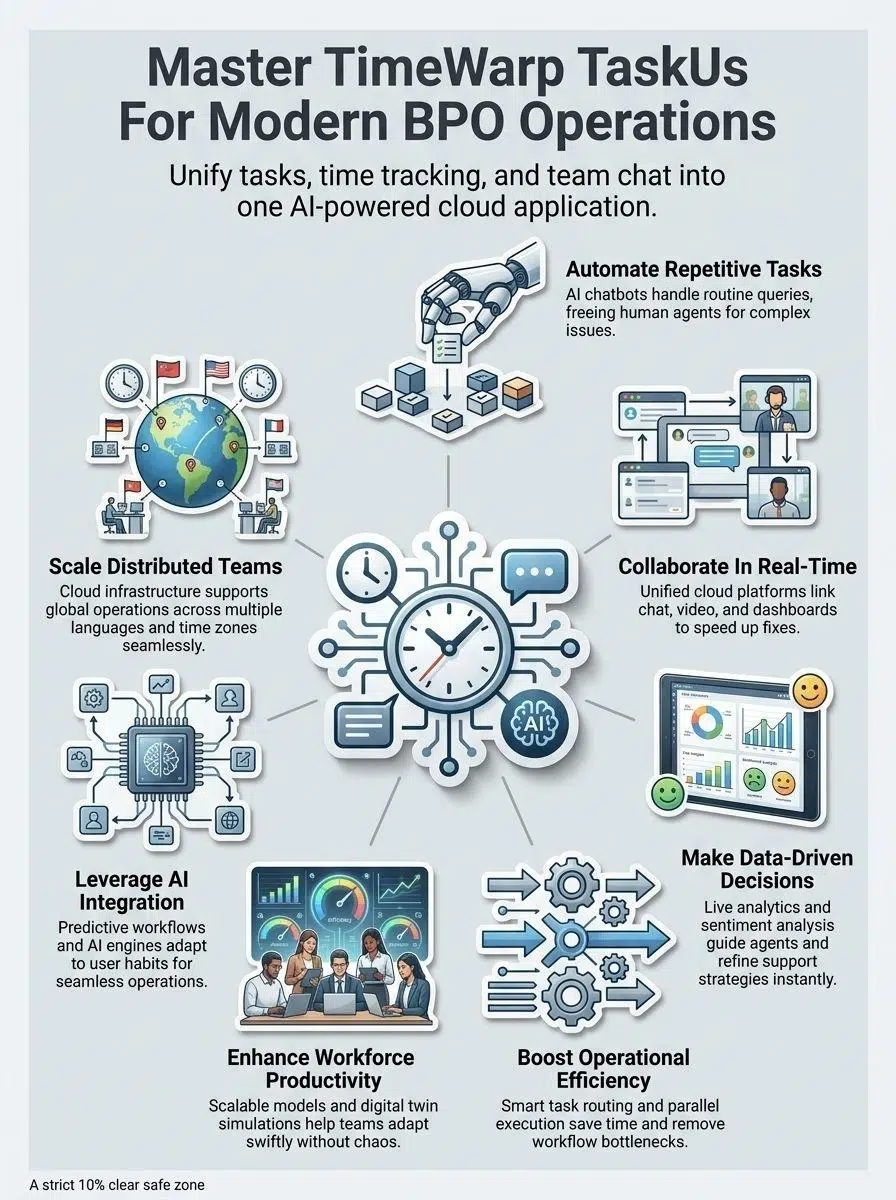
Automation of repetitive tasks
A big part of the value comes from automation that handles repeatable work before it reaches a human queue. On TaskUs’s current technology pages, the company highlights AssistAI for knowledge lookups, PromptAI for real-time reply suggestions, CallAI for live voice analysis, and AuthorAI for writing cleanup and clarity.
Each tool solves a different bottleneck. AssistAI cuts the time agents spend searching help articles, PromptAI speeds written replies, CallAI reduces note-taking during calls, and AuthorAI helps teams keep answers cleaner and more consistent.
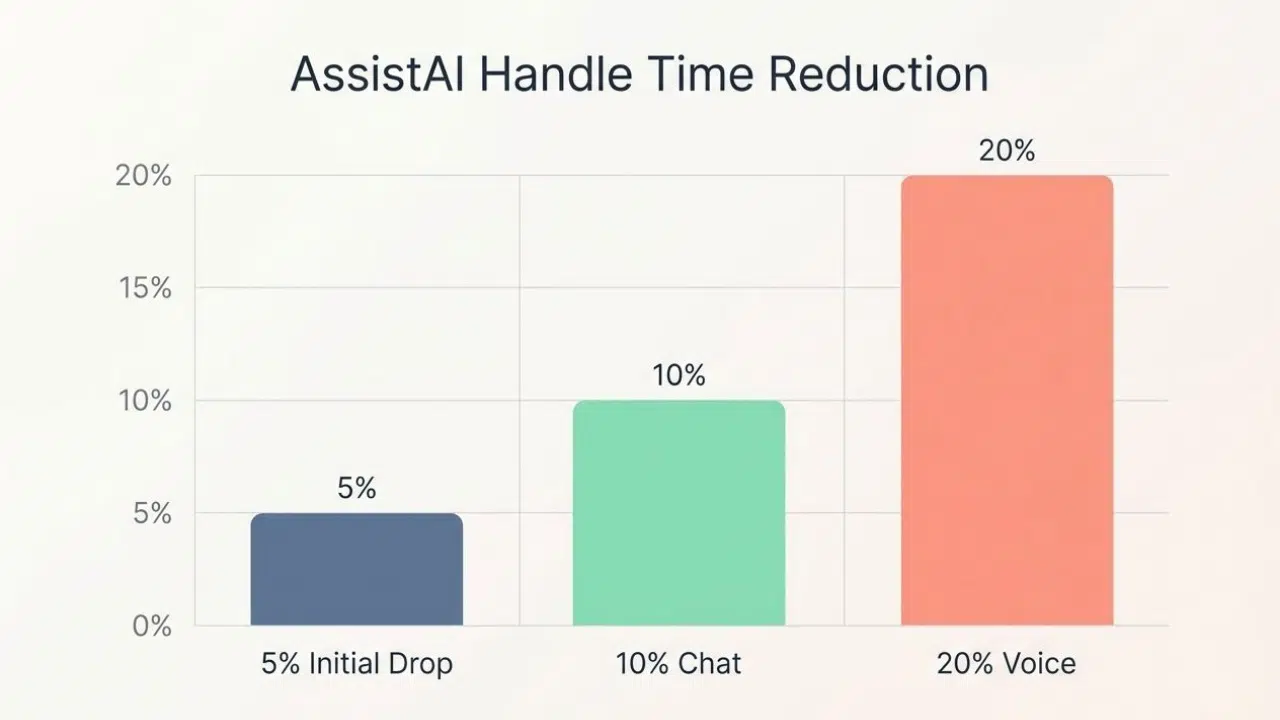
In a published MoneyLion case study, TaskUs said AssistAI reduced average handle time by 5% in the first 30 days, then reached 10% for chat and 20% for voice, while processing more than 100,000 queries for 300 teammates. That is the kind of evidence that turns automation from a theory into a workforce planning decision.
| Tool | What it does | Why it matters |
|---|---|---|
| AssistAI | Pulls answers from a company knowledge base | Helps agents solve harder questions without hunting through documents |
| PromptAI | Suggests real-time chat responses | Speeds replies and helps keep tone on brand |
| CallAI | Analyzes live voice interactions | Lets agents focus on the customer instead of manual notes |
| AuthorAI | Improves grammar, spelling, and clarity | Raises response quality with less editing time |
Real-time collaboration tools
Time warp taskus also points to a collaboration model where people, dashboards, and staffing tools stay connected in the same operating flow. That is much more useful than juggling separate chat apps, schedule tools, and ticket screens.
TaskUs has publicly showcased a workforce management concept that combined NICE IEX with TaskVerse, giving employees more schedule self-service while keeping staffing aligned to demand. For distributed teams across time zones, that kind of setup cuts the usual back-and-forth over shift swaps, queue coverage, and last-minute demand spikes.
- Live status visibility helps managers spot overloaded queues before service levels slip.
- Shared task context reduces repeated explanations during handoffs.
- Self-service scheduling gives support employees more control without losing workforce management discipline.
- Elastic staffing options make it easier to cover launches, seasonal peaks, and after-hours work.
Data-driven decision-making support
TaskUs describes its technology stack as using machine learning, real-time monitoring dashboards, and predictive analytics to make teams more proactive. In plain English, that means the system is supposed to do more than show charts; it should help leaders decide what to fix next.
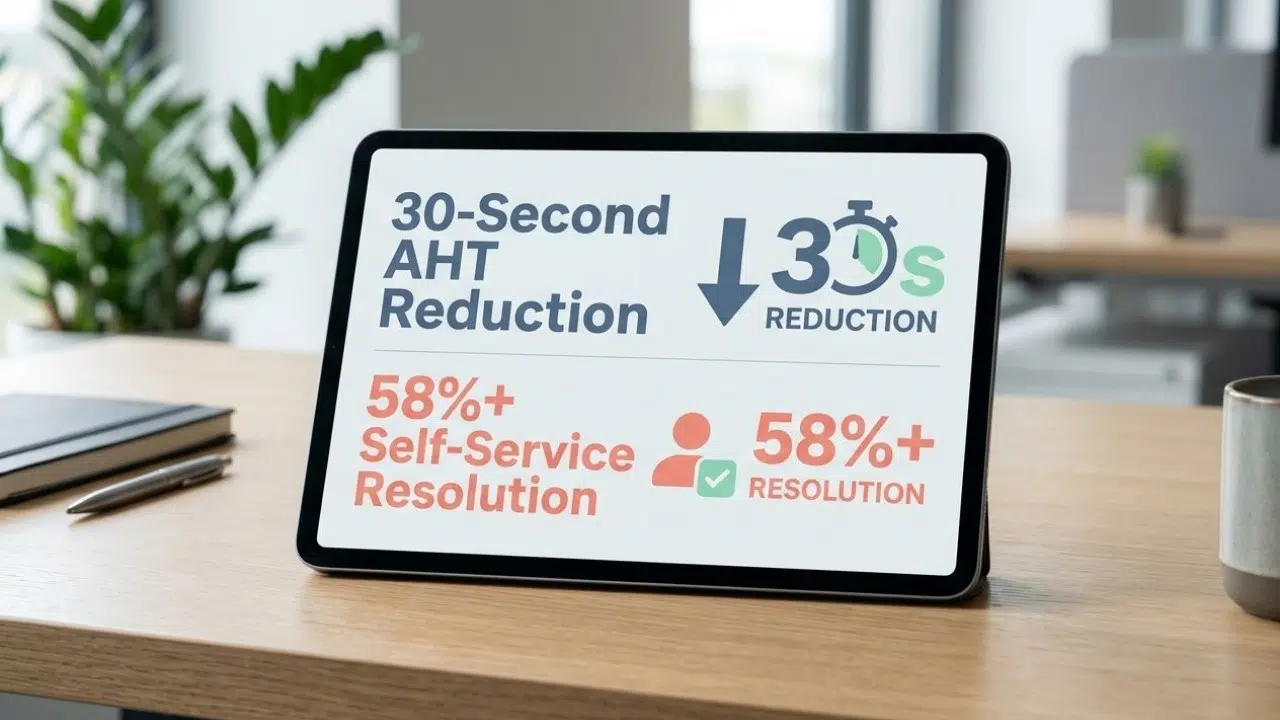
That is where named proof points matter. TaskUs says PromptAI cut average handle time by 30 seconds for a sporting goods retailer, and its Zendesk integration added AI responses with a confidence score, so frontline staff can judge whether to use, edit, or discard the suggestion.
The strongest data-driven workflow is not the one with the most dashboards. It is the one that shortens handle time, improves handoffs, and gives agents a clearer next step.
Benefits of TimeWarp TaskUs
The benefits of TimeWarp TaskUs show up when automation, analytics, and workforce management actually change daily operations. If they do not lower queue pressure, improve service quality, or make scaling easier, then the tech is just extra noise.
Improved operational efficiency
The clearest efficiency gains come from reducing repeat work and moving customers to the right answer faster. A 2024 TaskUs update on its Mavenoid partnership said AI-guided product support could reach self-service resolution rates of 58% and up, with live agent transfer happening within seconds when escalation is needed.
That kind of hybrid workflow is powerful for businesses that handle product troubleshooting, setup questions, and order-related support. It lets automation absorb the predictable steps while people take over where context, judgment, or empathy matters more.
| Operational example | Measured result | What it means for a BPO workforce |
|---|---|---|
| AssistAI at MoneyLion | 5% early AHT drop, later 10% in chat and 20% in voice | Less time per contact without asking agents to rush |
| PromptAI in retail | 30-second AHT reduction | Small savings per interaction add up fast at scale |
| Mavenoid partnership | 58%+ self-service resolution | Fewer low-value contacts reach live support teams |
For US businesses, this matters even more in regulated support. TaskUs’s public site lists badges for PCI-DSS Level 1, HIPAA, ISO, NIST, and HITRUST, which gives buyers a practical way to judge whether the platform can support payments, healthcare workflows, and audit-heavy operations.
Enhanced workforce productivity
Productivity rises when agents stop doing work that software can handle better. Searching documents, retyping policy answers, cleaning up grammar, and repeating the same first-step troubleshooting all eat up time that skilled staff could use on exceptions and escalations.
TaskUs’s AI tools are built around that exact tradeoff. AssistAI pulls answers from a company’s own documents, PromptAI drafts faster responses, and CallAI helps voice teams stay present in the conversation instead of splitting attention between the customer and a notes field.
- Faster ramp-up because newer agents get guided answers sooner.
- Better consistency because brand voice and policy answers stay closer to the source.
- Less context switching because teams spend less time bouncing between tabs and systems.
- Higher-value work because experienced staff can focus on fraud, edge cases, and customer retention.
There is one practical warning here. If your knowledge base is outdated, messy, or full of duplicate rules, AI will repeat that confusion faster, so one of the smartest first moves is to clean policies, macros, and escalation paths before rollout.
Workforce Integration in TimeWarp TaskUs
This is where TimeWarp TaskUs improves or fails. The real test is not whether the technology looks modern; it is whether your workforce can use it without losing speed, trust, or accountability.
Leveraging AI for seamless operations
In a February 2025 company update, TaskUs launched an Agentic AI Consulting practice to help businesses apply AI to customer support and business processes. A few months later, it announced partnerships with Decagon and Regal and said the right agentic AI workflows could reduce customer support costs by 25% to 50% while improving quality.
That sounds exciting, but the helpful part is the operating model behind it: automate simple, repetitive functions first, then hand off to people for judgment-heavy work. TaskUs has also been clear that some areas are poor fits for full automation, especially trust and safety, financial crime and compliance, and complex customer experience cases.
- Best fit for automation: basic account updates, repeat policy questions, guided troubleshooting, and first-pass intake.
- Best fit for humans: sensitive escalations, regulated decisions, risk reviews, and nuanced customer conversations.
- Best fit for hybrid work: returns, refunds, voice support, and multi-step cases that need AI speed plus human oversight.
Supporting scalability for distributed teams
Scalability is one of the strongest arguments behind timewarp taskus supports as a workforce model. In its November 2025 quarterly update, TaskUs said it ended the third quarter with 63,800 teammates across 30 locations in 13 countries, and its public site says it supports 30+ languages.
For US readers, there is also a local angle. TaskUs’s USA page lists 2 delivery centers and about 2,200 teammates as of December 2024, which gives businesses a domestic base while still tapping a broader global workforce.
The scaling story gets even bigger with TaskVerse. On its current public page, TaskUs lists 1.1M+ taskers, coverage across 100+ countries, and support for 150 languages, which is useful when you need overflow coverage, specialized skills, or faster expansion without rebuilding your whole org chart.
| Workforce layer | Best use | Business value |
|---|---|---|
| Core TaskUs teammates | Daily operations, regulated workflows, quality-sensitive support | Stability, training, stronger accountability |
| TaskVerse talent pool | Surge work, specialized tasks, multilingual coverage | Faster scaling and more flexible staffing |
Final Words
TimeWarp TaskUs makes the most sense when you see it as a workforce system, not just a task tracker. It brings together automation, dashboards, customer support tools, and human oversight so teams can move faster without losing control.
For businesses adopting TimeWarp TaskUs, the real win is measurable: better productivity, smarter workforce management, and a stronger customer experience. The companies that get the most from it are the ones that use AI for repeatable work, keep people on the hard cases, and track performance with clear data.