

Learning how to do keyword research for a local business starts with connecting specific services to high-intent local customers in your service area. Unlike general SEO, local keyword discovery focuses on intent over sheer volume—combining core offerings with geo-modifiers, “near me” queries, and localized buyer intent.
To conduct local keyword research effectively, group terms into core services, map them to explicit location pages, and align your target phrases with Google Business Profile categories. Prioritizing commercial intent, geographic relevance, and Map Pack competition over raw search numbers ensures your strategy targets queries that generate local calls, leads, and foot traffic rather than empty web visits.
1. Start With Services, Not Keywords
Do not begin by typing a broad industry term into a keyword tool. First, make a plain list of what the business sells.
A plumbing company might have:
- drain cleaning;
- leak repair;
- sewer repair;
- water heater installation;
- emergency plumbing;
- bathroom plumbing.
A dental practice may care about implants, emergency appointments, Invisalign, root canals, hygiene visits, and other specific services.
Then add business context. Which services make up a meaningful part of revenue? Which are available only from one location? Which are residential only? Which can be booked urgently? Which services does the business technically offer but rarely wants to promote?
That information matters because keyword tools cannot understand business priorities. Terminology also changes between markets. A British heating company may build much of its research around “boiler repair.” A North American company could see more relevant demand around furnaces or water heaters.
Do not force terminology from one country onto another because a global database reports a larger number. Start with the business. Let keyword tools expand the list later.
2. Expand the List With Service, Intent, and Geography
Once the service list is clear, begin adding the ways customers may search for those services. Many useful local searches contain some combination of:
Service + need + location
For example:
- emergency dentist Bristol;
- dental implants Bristol;
- roofer Toronto;
- leaking roof repair;
- divorce solicitor Manchester;
- plumber near me;
- 24 hour plumber Chicago.
The location does not always appear in the query.
Someone searching “dentist,” “roof repair,” or “coffee shop” may still receive highly local results because Google considers the searcher’s location. Its local ranking documentation continues to describe relevance, distance, and prominence as important factors in local results.
Build variations around places the business genuinely serves:
- cities;
- towns;
- suburbs;
- boroughs;
- neighborhoods;
- counties or regional areas where people actually search that way.
Avoid turning this into a combinatorial exercise. If a contractor serves 60 suburbs, that does not mean the research needs 60 versions of every service or that the website needs 60 pages. At this stage, location terms are possibilities. Publishing decisions come later.
3. Mine Search Console Before Looking for Completely New Keywords
An established website already has useful keyword information sitting inside Google Search Console. The Performance report can show the queries for which pages appeared, along with clicks, impressions, click-through rate, average position, page, country, device, and other dimensions.
Start with what Google already associates with the website.
Look for:
- important services receiving impressions but few clicks;
- valuable terms sitting just outside stronger visibility;
- unexpected location phrases;
- pages ranking for services they barely explain;
- groups of similar searches pointing to one existing page.
This can uncover faster opportunities than starting from zero.
A page already appearing for “commercial boiler repair Manchester,” for example, may only need better service detail, stronger internal links, or a clearer title. Creating an entirely new page for a higher-volume term may accomplish less.
Search Console does have limits. It does not expose every query, and some low-volume data is withheld or omitted for privacy and reporting reasons. Treat it as evidence of existing visibility, not a complete record of everything people search.
4. Check Google Business Profile Search Terms
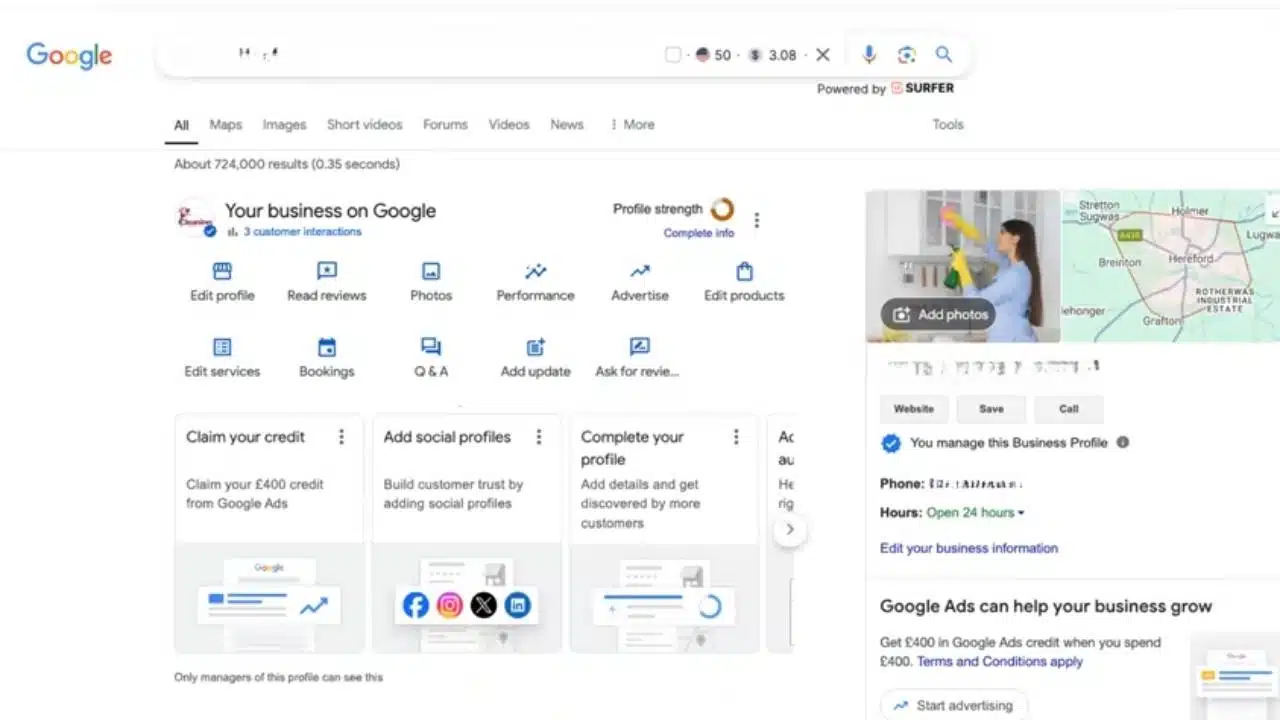
A verified Google Business Profile provides another useful source of local search language. Its Performance section can show search terms used when the profile appeared in Google Search or Maps. Google updates this search-term information around the beginning of each month, although reporting can take several days to settle. The value here is not simply another keyword list.
Look for language customers use differently from the website:
- alternative service names;
- branded versus non-branded searches;
- unexpected product or treatment terms;
- recurring local phrases;
- searches that reveal operating-hour or urgency intent.
Suppose a dental practice repeatedly appears for “dentist open Saturday.”
If the practice genuinely opens on Saturday, that may deserve clearer treatment on the website and profile. If it does not, adding the phrase to a service page merely because it appears in the report would be misleading. Business Profile search terms are clues about discovery. They are not instructions to optimize for every phrase shown.
5. How to Do Keyword Research With Google Keyword Planner
Google Keyword Planner is designed for advertising, but it remains useful for local SEO research. It can suggest related keywords, provide historical search estimates, organize ideas, and narrow data geographically.
There is some setup friction. Google currently requires users to complete Google Ads account setup, including billing information, before accessing basic Keyword Planner functionality. Once inside, avoid researching the entire business with one broad phrase.
A family law practice would get cleaner data by investigating separate groups such as:
- divorce solicitor;
- child custody solicitor;
- family solicitor;
- prenuptial agreement solicitor.
Then set the relevant geography.
National UK search demand does not tell a Bristol practice much about its local opportunity. The same applies to a dentist in Vancouver or an HVAC company in Phoenix.
Use the closest sensible market rather than defaulting to national numbers. The search-volume figures themselves should be treated as estimates, not precise forecasts. Low-volume local terms can also be missing or difficult to model.
That matters because local SEO often contains commercially useful searches with modest volume. A specialist service generating a few qualified enquiries can matter more than a broad phrase attracting hundreds of people who never become customers.
6. Search the SERP Before Deciding What a Keyword Means
Keyword tools can suggest intent. The search results show how Google is currently interpreting it. Check representative searches manually.
Look at what dominates the results:
- local map listings;
- individual businesses;
- service pages;
- directories;
- informational articles;
- ecommerce pages;
- national brands;
- government or professional resources.
Compare:
emergency roofer Leeds
with:
how long does a roof last
Both involve roofing. They should not lead to the same page. The first suggests an urgent local service need. The second is primarily informational.
SERP inspection can also expose attractive-looking keywords that do not fit the business at all. If a phrase is dominated by ecommerce products or national informational sites, a local service page may struggle because it is solving a different problem from the one Google currently sees.
This step is easy to skip because it does not produce a neat score. It is also one of the most useful parts of the process.
7. Separate Service Intent From Research Intent
After reviewing the search results, split the list by purpose.
For a roofing company, commercial searches might include:
- roof repair near me;
- emergency roof repair;
- flat roof contractor Leeds;
- roof replacement Leeds.
Research searches could include:
- how long should a roof last;
- signs of roof damage;
- can you repair a roof in winter;
- what causes a roof leak.
Both groups can contribute to local visibility, but they usually belong in different parts of the site. Service and location pages should handle searches where someone is evaluating or trying to contact a provider.
Informational searches may justify guides or supporting content when the company can answer the question properly and the topic has a reasonable connection to its services.
Do not force one landing page to satisfy every keyword that contains the same service name. Use the language people search in titles, headings, and body copy where it fits naturally, but write the page around the underlying need rather than repeating an exact phrase.
8. Handle “Near Me” and Location Modifiers Without Keyword Stuffing
“Near me” is useful to research because it signals local intent. It does not need to appear literally everywhere.
A heading such as:
Emergency Plumbing in Dallas
is clearer than:
Best Emergency Plumber Near Me in Dallas
Google already uses location information when producing local results. Stuffing “near me” into titles or copy does not create genuine proximity.
The same principle applies to Google Business Profile names. The profile should use the business name customers recognize in the real world. Location, service area, address, and category information belong in their dedicated fields rather than being appended to the name for SEO.
Research phrases such as:
- near me;
- open now;
- 24 hour;
- emergency;
- same day.
They can reveal useful customer intent.
Only make claims such as “24 hour” or “same day” when the business genuinely provides them. Keyword research should describe reality, not create a more marketable version of it.
9. Map Keyword Groups to Pages
This is where a keyword list becomes a site plan.
Suppose a dental practice finds:
- dental implants Birmingham;
- tooth implants Birmingham;
- implant dentist Birmingham;
- dental implant clinic Birmingham.
Those phrases are close enough in intent that one strong implant page may cover them naturally.
Now compare:
- emergency dentist Birmingham;
- root canal Birmingham;
- Invisalign Birmingham.
Those represent distinct services and may justify separate pages if the practice actually provides them. Location pages require the same judgment.
A company with staffed offices in Manchester, Birmingham, and Leeds may have legitimate reasons for individual pages because each location can contain different addresses, opening hours, directions, staff information, and local service details.
A service-area business publishing dozens of near-identical town pages has a weaker case. Google’s spam policies specifically warn about doorway abuse, including city or regional pages created mainly to capture similar searches and funnel visitors toward the same destination.
The right output from keyword research is therefore not:
one keyword = one page
It is:
one distinct intent = one useful destination where appropriate
Prioritize Keywords With Business Value, Not Just Volume
Once the terms are grouped, decide what deserves attention first.
Useful criteria include:
- Business relevance: Does the company genuinely provide this service?
- Intent: Is the searcher researching, comparing, booking, buying, calling, or looking for directions?
- Local demand: Is there evidence from Keyword Planner, Search Console, Business Profile data, or another credible source?
- SERP fit: Does Google show results similar to what the business could realistically publish?
- Existing visibility: Is the website already close to useful rankings?
- Commercial value: What would a customer for this service be worth?
- Page fit: Does an existing page already satisfy the intent?
This is why search volume should never become the only sorting column. Ten searches for a specialist commercial installation may be far more valuable to a contractor than hundreds of broad searches for “home improvement.” Volume estimates attention. It does not estimate revenue.
Use Google Trends for Language and Seasonality, Not Exact Volume
Google Trends is useful when terminology differs between regions or demand changes through the year. It can compare phrases by country or region and show how relative interest changes over time.
That makes it helpful for deciding whether two phrases behave differently across the US, UK, or Canada, or whether a seasonal service becomes more important during certain months.
Do not treat the numbers as literal search volume. Trends normalizes its data. A high score in one region means the term represents a relatively larger share of searches there, not necessarily that the region produces the highest number of searches.
Use Trends to compare patterns. Use Search Console, Keyword Planner, Business Profile data, and real business performance to decide whether the opportunity is commercially meaningful.
Common Local Keyword Research Mistakes
A few shortcuts repeatedly weaken otherwise decent research.
- Sorting everything by volume: Large numbers can hide weak buying intent.
- Creating one page for every phrase: Close variations often represent the same need.
- Targeting places the business barely serves: A keyword opportunity does not create a legitimate local presence.
- Copying competitors’ keywords without context: Their locations, services, authority, or business model may be completely different.
- Treating keyword difficulty as a Google metric: Third-party SEO tools can be useful for comparison, but their difficulty scores are proprietary estimates. They do not have access to Google’s internal ranking systems.
- Ignoring current visibility: A useful search already producing impressions may deserve work before a brand-new target.
- Stuffing Google Business Profile names: Keep the real-world business name intact and use the appropriate profile fields for location and service information.
Final Thoughts
How to do keyword research for a local business is mostly about deciding what deserves a page, what deserves improvement, and what is not worth pursuing. Start with real services and real locations. Use Search Console and Business Profile data to see how the business is already being found. Bring in Keyword Planner for broader demand, inspect the actual SERPs for intent, and use Trends when regional language or seasonality needs clarification.
Then make the important editorial decision: group related searches instead of turning every keyword variation into another URL. A useful keyword sheet should not end with a column of search volumes. For every meaningful term, it should tell the business what comes next: improve an existing page, create a genuinely useful new one, strengthen local information, publish supporting content, or leave the keyword alone. That is when keyword research stops being a spreadsheet exercise and becomes a local SEO strategy.























